
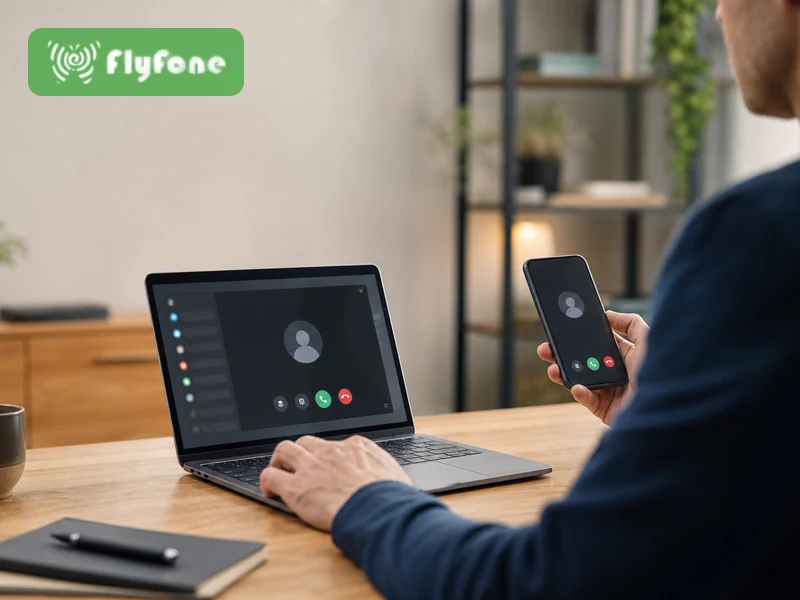
Softphone software turns your device into a business phone over the internet. In this guide, I’ll show you what softphone software is, how a VoIP softphone app works, the benefits for remote work and business telephony, which features matter most, and how you can compare top providers without overpaying.
Key Takeaways
- Softphone software is a phone app for business calling that lets you make and receive calls on a computer, tablet, or smartphone.
- VoIP is the calling technology behind the app while the softphone is the interface you use every day.
- A desk phone is physical hardware but a softphone is software, which makes setup faster and more flexible.
- Softphones help reduce costs by cutting desk phone purchases, installation work, and ongoing hardware maintenance.
- They are ideal for remote work because your team can use the same business number across desktop and mobile devices.
- The best softphone tools improve productivity with features like call transfer, voicemail, SMS, click-to-dial, and CRM integration.
- Not every buyer needs advanced features like predictive dialing, deep analytics, or contact center routing.
- The right provider depends on your use case such as small business calling, remote team collaboration, sales outreach, or support operations.
- Integration quality matters as much as features because poor workflow fit can slow your team down.
- Before you buy, test real call quality on your actual devices, headsets, and network.
What Is Softphone Software?
Simple definition of softphone software
Softphone software is a software-based phone that lets you make and receive calls over the internet instead of through a traditional phone line.
Most softphones work using VoIP (Voice over Internet Protocol, a way to carry voice calls online). Instead of using a physical handset on your desk, you open an app on your laptop, desktop, tablet, or smartphone and place calls from there.
A softphone usually includes the same basics you expect from a phone, such as a digital dial pad, contacts, voicemail, call history, hold, transfer, and caller ID. Many tools also add SMS, team messaging, video calls, and integrations with business apps.
The main difference from a desk phone is simple. A desk phone is hardware. A softphone is software. That gives you more flexibility, especially if you work remotely or want to avoid buying extra equipment.
Common functions often include:
- Dialing and receiving calls
- Accessing contacts and call history
- Checking voicemail
- Sending SMS or internal messages
- Joining video meetings in some platforms
A simple example: a consultant can use a softphone app on their phone and laptop to handle business calls from one company number without sharing a personal number.
What softphone software is used for
Softphone software is commonly used for:
- Internal team calls across office and remote staff.
- Customer calls for sales, support, and account management.
- Giving freelancers or consultants a dedicated business number.
- Handling follow-up calls directly from a CRM or help desk tool.
- Supporting remote work without shipping desk phones to every employee.
- Keeping business communication inside one virtual phone system.
The big benefit is simple: you get business calling without needing a traditional office phone on every desk.
Where softphone software fits in modern business communication
Softphones are usually one part of a larger business communication setup. They often sit inside a broader cloud calling or collaboration platform.
You will often see softphone software used as part of:
- A VoIP phone system
- A virtual phone system
- A UC (Unified Communications, tools that combine calling, messaging, and meetings)
- A UCaaS platform (cloud-based unified communications service)
- A cloud contact center for support or sales teams
In practice, the softphone is the front-end app your team uses. The wider platform handles phone numbers, call routing, messaging, admin settings, and integrations.
How Does Softphone Software Work?
Softphone software uses VoIP to place calls
A softphone works by using VoIP to send your voice over the internet.
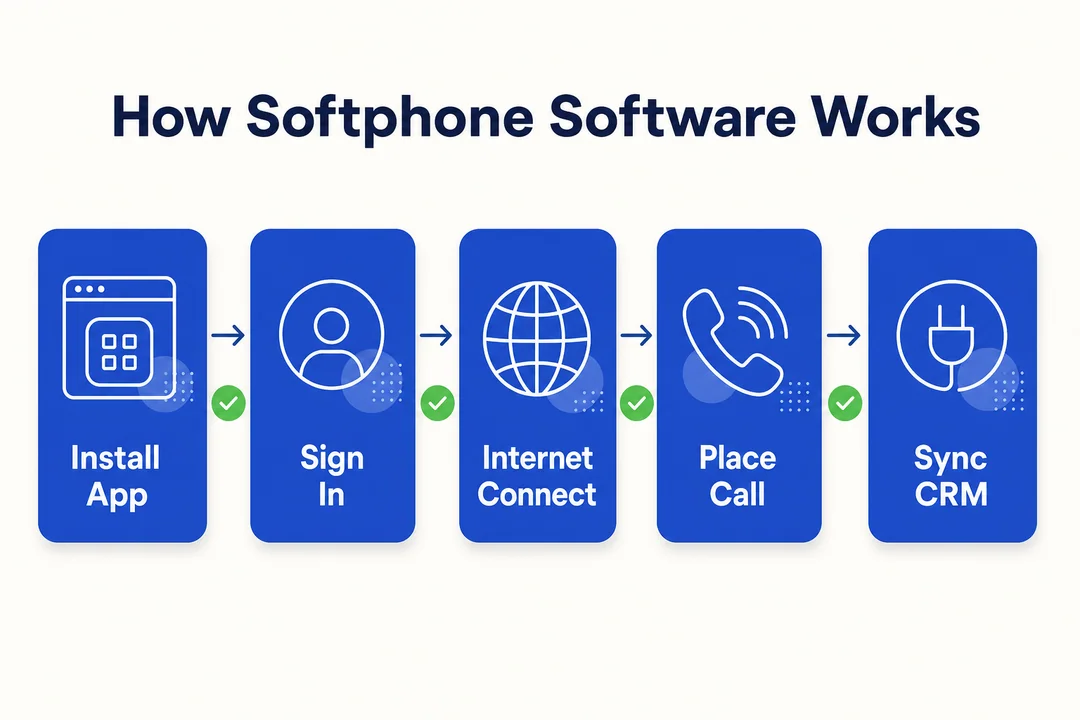
Here is the simple version of what happens:
- You speak into your device microphone or headset.
- The softphone app converts your voice into digital data.
- That data travels over the internet to your provider or phone system.
- The other person hears your voice almost instantly on their end.
The app is what you see and tap. VoIP is what carries the call. That distinction matters when comparing products. A softphone is not the same thing as VoIP. It is one way to use VoIP.
Many systems also use SIP (Session Initiation Protocol, a standard for starting and managing internet calls). You do not need to manage SIP yourself in most business tools, but it often sits behind the scenes.
This is why softphones can do more than old phone lines. Once calling happens through software, providers can add features like call recording, click-to-dial, voicemail-to-email, messaging, and CRM integration without extra hardware.
Devices and interfaces used by a softphone app
Softphone apps usually support:
- Windows desktops and laptops
- macOS desktops and laptops
- iPhone and iPad on iOS
- Android phones and tablets
- Browser-based softphones that run in Chrome or other web browsers
You can usually talk through:
- Your built-in mic and speakers
- A USB headset
- A Bluetooth headset
This cross-device setup is one of the main reasons softphones fit remote and hybrid teams so well.
What users need to start using softphone software
To start using softphone software, you usually need:
- A stable internet connection
- A compatible computer or smartphone
- An account with a softphone or VoIP provider
- A business number or access to a PBX (Private Branch Exchange, a business phone system)
- An optional headset for better audio quality
For business rollout, I recommend a few quick checks first:
- Test Wi-Fi stability in the places where people will take calls.
- Use decent headsets for customer-facing roles.
- Confirm your network or firewall does not block the provider if your IT setup is strict.
- Test the desktop and mobile apps before onboarding the full team.
What happens during a typical softphone call
A normal softphone call usually looks like this:
- Sign in to the app on your desktop, browser, or mobile device.
- Open the digital dial pad or choose a contact.
- Start the call or answer an incoming call.
- Use controls like mute, hold, transfer, record, or forward during the conversation.
- If your provider uses a cloud system or PBX, the call is routed through that service.
- After the call, the system may log the call, save a recording, or update voicemail and call history.
For most users, it feels very close to using a normal phone, just with more tools on screen.
Softphone vs VoIP vs Desk Phone
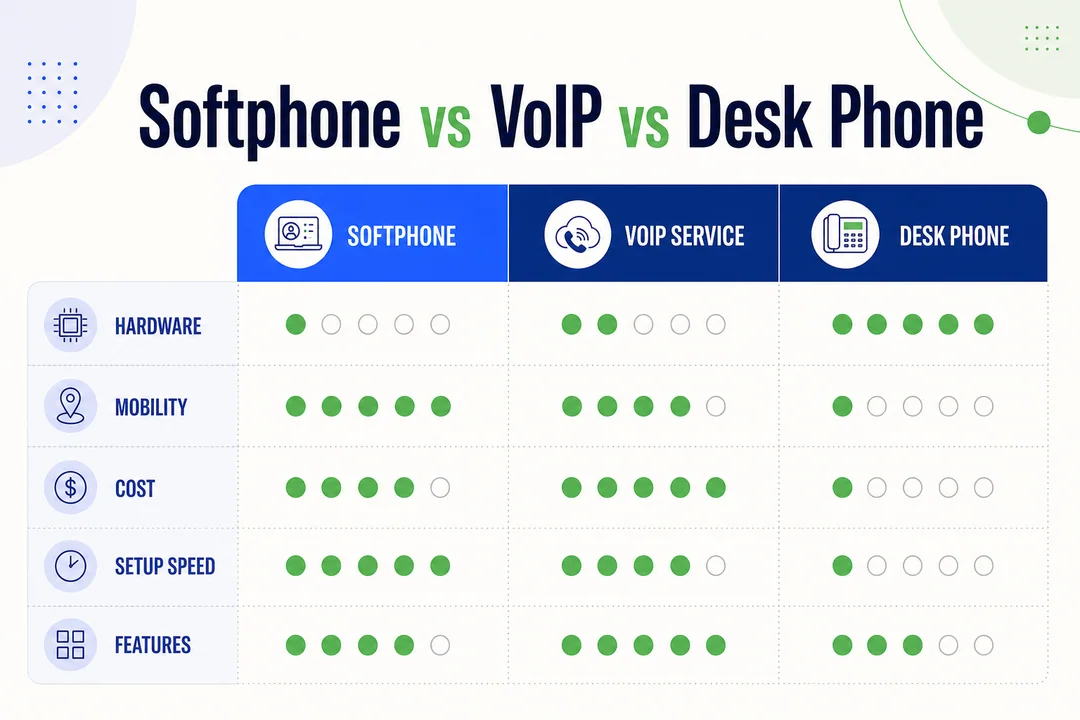
Softphone vs VoIP
This is the distinction many buyers confuse first.
A softphone is the app or software interface you use to place and manage calls. VoIP is the technology that delivers those calls over the internet.
Think of it this way:
- Softphone: the software-based phone
- VoIP: the internet calling method behind it
A business can use VoIP in more than one way. For example:
- Through a softphone app on a laptop
- Through a VoIP-enabled desk phone
- Through a larger PBX or cloud phone system
So when someone says they need VoIP, they may actually mean they need a softphone provider, a business phone system, or both.
Softphone vs desk phone
A softphone gives you flexibility. A desk phone gives you a fixed physical device.
Softphones are usually easier to deploy. Your team downloads an app, signs in, and starts calling. That works well for remote teams, growing companies, and businesses that want to avoid hardware overhead.
Desk phones still make sense in some cases. Front desks, reception areas, warehouses, shared stations, and some office roles may still prefer a dedicated handset that always stays in place.
Here is the practical tradeoff:
- Softphones are better for mobility, fast setup, and lower hardware costs.
- Desk phones are better for fixed locations and users who want a traditional calling experience.
Many companies use both. For example, reception may use desk phones while managers, sales reps, and remote staff use softphones on laptops and mobile devices.
Softphone software vs hardphone comparison at a glance
| Factor | Softphone Software | Hardphone |
|---|---|---|
| Mobility | High | Low |
| Upfront cost | Lower | Higher |
| Maintenance | Lighter | More hardware upkeep |
| Deployment speed | Fast | Slower |
| Scalability | Easy to add users | More hardware to purchase |
| Best for | Remote teams, SMBs, mobile staff | Reception, fixed desks, shared stations |
Many businesses use a mixed setup to balance flexibility with fixed-location needs.
Key Benefits of Softphone Software
Lower hardware and telecom costs
One of the biggest reasons businesses switch to softphone software is cost.
You do not need to buy a physical desk phone for every employee. That cuts upfront hardware spending. You also reduce installation work, replacement costs, and the time spent managing devices across locations.
This matters most for startups and small businesses. If you are building a team, every avoided hardware purchase helps preserve budget.
A realistic example: if you onboard 20 remote employees, a softphone setup lets them use existing laptops and phones. You avoid buying, shipping, installing, and supporting 20 desk phones. That saves money and removes rollout friction.
You still need a provider subscription, but the cost structure is usually simpler and easier to scale.
Better mobility for remote and hybrid teams
Softphones fit how people work now.
Your team can take calls from a laptop at home, answer the same business number on a mobile phone while traveling, and stay reachable without being tied to one desk.
That is a major advantage for remote and hybrid work. It also helps managers keep communication consistent across different locations.
Practical benefits include:
- Taking business calls from home without exposing a personal number
- Switching between desktop and mobile during the day
- Staying available while moving between office, home, and travel
- Keeping one communication platform for the whole team
Some providers also offer call flipping, which lets users move a live call from one device to another. That is useful if someone starts on a desktop and needs to leave the office mid-call.
Easier scaling for growing teams
Softphone software is easier to scale than hardware-heavy phone setups.
If your team grows, you usually just add users, assign numbers, and update permissions in the admin panel. There is no need to wait for new desk phones to arrive and be configured.
This is especially useful for:
- New branch offices
- Seasonal hiring
- Distributed teams
- Fast-growing startups
- Contractor onboarding
Because many softphone tools are cloud-based, adding or removing seats is usually straightforward. That makes growth less painful and keeps communication systems aligned with the business.
Improved productivity with built-in tools
Softphones often do more than basic calling. That is where much of the day-to-day value comes from.
Instead of switching between multiple apps, your team can handle calls, messages, voicemail, and customer records from one place. That saves time and reduces missed follow-ups.
Common productivity gains include:
- Call transfer and forwarding help route conversations quickly.
- Voicemail and visual voicemail make messages easier to review.
- SMS and messaging keep quick communication inside the same platform.
- Click-to-dial saves time for sales teams working from browser pages or CRM records.
- Call recording helps with training, quality review, and accountability.
- CRM sync can automatically log calls and contact activity.
- Video and team chat reduce the need for separate tools in some workflows.
For sales teams, a softphone with CRM integration can turn a contact list into a working call queue. For support teams, it can keep call history, recordings, and notes connected to the customer record.
Better separation between personal and work communication
Softphone software helps keep business and personal communication separate.
That matters for freelancers, consultants, and employees using their own phones. Instead of giving out a personal number, you use a business number through the app.
This gives you:
- A more professional caller identity
- Better privacy
- One business number across multiple devices
- Cleaner boundaries between work and personal life
For solo professionals, this is often one of the simplest and most useful benefits.
Must-Have Features in Softphone Software
Essential calling features
Every softphone should cover the basics well before you pay for advanced extras.
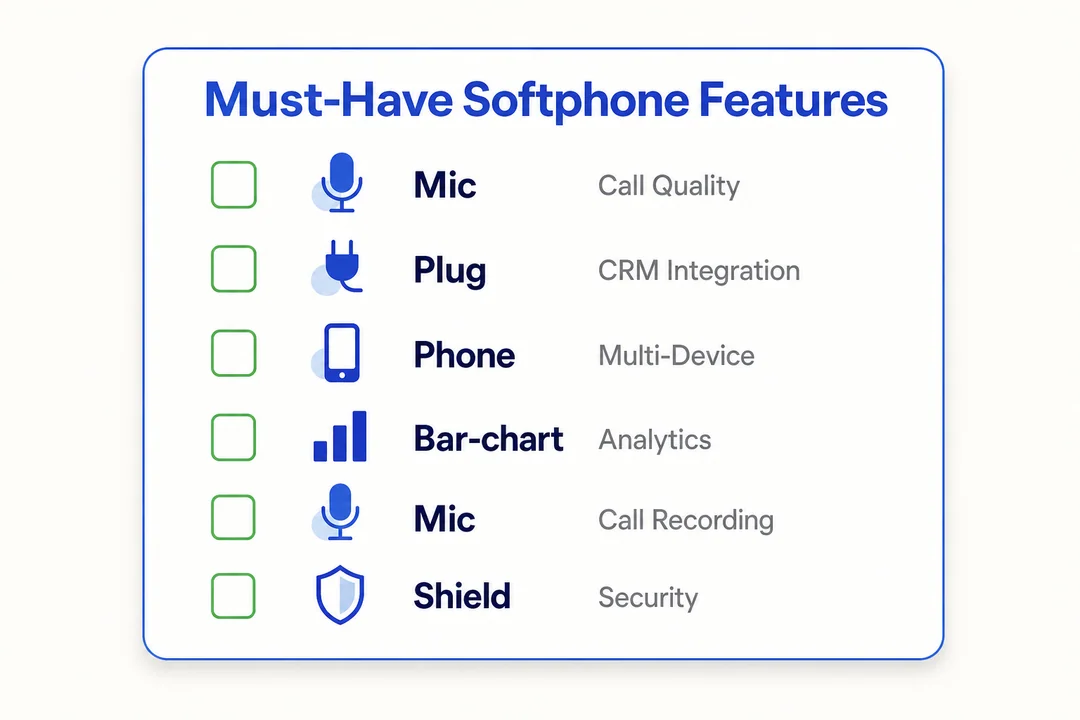
Check for these core calling features:
- Hold: Lets you pause a call without hanging up.
- Transfer: Sends the caller to another person or department.
- Call forwarding: Redirects calls to another number or device.
- Voicemail: Captures missed calls and messages.
- Caller ID: Shows who is calling and what number is displayed outbound.
- Call waiting: Alerts users to a second incoming call.
- Call park: Temporarily places a call in a shared holding slot if your workflow needs it.
My advice: test these basics first. A fancy platform is not useful if the everyday calling experience feels clunky.
Collaboration and communication features
These features matter most for remote teams and businesses that want fewer communication tools.
Useful collaboration features include:
- Team messaging: Good for quick internal communication.
- Video calling: Helpful if your team already works face to face online.
- Shared contacts: Makes company-wide directories easier to use.
- Presence status: Shows whether coworkers are available, busy, or away.
- SMS: Useful for customer updates, reminders, and fast follow-ups.
Not every business needs all of these. A solo consultant may only need calling and voicemail. A distributed team may benefit a lot from messaging, presence, and shared contacts.
Business and admin features
This is where business buyers should be selective. Some features are essential. Others only matter for larger or higher-volume teams.
Core business features
- Call recording: Useful for training, compliance, and quality review.
- Visual voicemail: Makes voicemail easier to scan and manage.
- Call routing: Sends calls to the right user or group.
- IVR (Interactive Voice Response, the menu callers hear when pressing options): Helpful for directing incoming calls.
- Analytics and reporting: Shows call activity, missed calls, and basic usage trends.
- Admin controls: Manage users, permissions, numbers, and settings.
Advanced or high-volume features
- Granular call analytics: Better for managers who need deeper performance reporting.
- Predictive dialing: More relevant for high-volume outbound teams.
- Queue management: Important for service teams and contact centers.
- Advanced routing logic: Useful for larger support operations.
Small businesses often overpay here. Buy for your actual workflow, not for a future use case you may never need.
Integration features
Integrations often matter more than an extra feature list.
A softphone that works cleanly with your existing tools saves time every day. A tool with dozens of features but weak workflow fit often creates friction.
Important integrations to review include:
- CRM integration: For systems like Salesforce or HubSpot
- Help desk integration: For tools like Zendesk
- Email and calendar: Helpful for scheduling and follow-up
- PBX or SIP support: Important if you already use phone infrastructure
- APIs: Useful for custom workflows or more advanced business environments
Practical examples:
- A sales rep clicks a number inside Salesforce and the call is logged automatically.
- A support agent answers a customer call and sees the related Zendesk ticket.
- An operations team keeps calling connected to an existing PBX or SIP setup.
If integration quality is poor, the softphone can become another isolated app your team avoids.
Device and platform compatibility
Before choosing a provider, confirm support for:
- Windows
- macOS
- iOS
- Android
- Browser access, if your team prefers web apps
Also check the real user experience. Some vendors technically support every platform, but their desktop app may be much stronger than their mobile app, or vice versa.
Who Should Use Softphone Software?
Small businesses
A softphone for small business usually makes sense because it lowers upfront costs and keeps setup simple.
Instead of buying hardware and dealing with office-bound phone systems, small teams can start with laptops, mobile phones, and a cloud-based business number. That is faster, cheaper, and easier to manage.
A practical example: a five-person service business can set up calling, voicemail, call routing, and SMS without installing desk phones or paying for complex telecom work.
For SMBs, the appeal is clear:
- Lower starting costs
- Fast deployment
- Flexible growth as the team expands
Remote and hybrid employees
Remote and hybrid staff are one of the strongest fits for softphones.
They need access to the same business number and calling tools no matter where they are. A softphone solves that by putting business communication on the devices they already use.
This is better than tying work calls to one office desk or one physical handset. It also helps teams stay consistent when people split time between home and office.
For companies building hybrid work models, softphones are often the most practical default.
Sales and customer support teams
Softphones are especially useful for teams that live on the phone.
Sales teams
Sales reps benefit from click-to-dial, CRM integration, call logging, notes, and mobile access. That speeds up outreach and makes follow-up cleaner. If the system also supports SMS and recordings, it becomes easier to manage prospect communication in one place.
Support teams
Support teams benefit from call history, routing, recordings, voicemail handling, and shared visibility into customer interactions. If the softphone connects to a help desk tool, agents can work from one screen instead of jumping between systems.
The better the integration and workflow design, the bigger the payoff for both teams.
Freelancers, consultants, and solo professionals
Solo professionals often use softphones to get a business number without building a full office setup.
This works well if you want to look professional, keep your personal number private, and take calls from both your phone and laptop. For many consultants, that is enough reason to choose a simple softphone plan over a traditional business line.
Contact centers and service teams
Some softphone platforms are built for contact center use, but not all of them.
For service teams with higher call volume, useful features may include:
- Call routing
- Queue management
- Recording
- Analytics
- Predictive dialing for outbound workflows
That said, this level of tooling is often too much for a basic small business setup. Choose it only if your operation actually needs it.
When Softphone Software Makes the Most Sense
Replacing expensive desk phones
Softphones make sense when you want to replace aging desk phones without paying for a full hardware refresh. If your current setup is expensive to maintain or hard to expand, moving to software-based calling can cut cost and simplify management.
Supporting remote employees without extra hardware
If you need to support remote employees, contractors, or seasonal staff quickly, softphones are a strong fit. You can roll out calling through an app instead of shipping phones, configuring desks, and managing physical inventory.
Adding business calling to laptops and mobile phones
Softphones are useful when your team already works on laptops and mobile phones. They add business calling to devices people use every day, whether you follow a BYOD (bring your own device) model or issue company hardware.
Centralizing communication in one platform
If your business wants voice, SMS, team messaging, and sometimes video in one place, softphone software can help centralize communication. That reduces tool sprawl and gives users one clearer workflow.
How to Choose the Best Softphone Software
Start with your main use case
The right softphone starts with the problem you need to solve.
Use cases usually fall into a few clear paths:
- Small business phone system: You need affordable business calling, voicemail, and simple routing.
- Remote team setup: You need mobile and desktop access with easy rollout.
- Sales outreach: You need click-to-dial, CRM integration, and call logging.
- Support or contact center operations: You need routing, queues, reporting, and recordings.
This is the fastest way to answer questions like What is the best softphone software for small business? or How to set up softphone for remote employees?
Avoid overbuying. Many teams only need strong basics, mobile support, and one or two key integrations.
Check compatibility and deployment options
Before shortlisting tools, verify:
- OS support for Windows, macOS, iOS, and Android
- Whether the provider offers desktop, mobile, and browser access
- Whether the system is cloud-based
- Whether it works with your current PBX or SIP setup if needed
- Whether the admin setup is simple enough for your team
Do not rely only on feature pages. Test the app on the actual devices your team uses. A platform can look great on paper and still feel weak on macOS, mobile, or browser.
Prioritize the features you will actually use
A good way to choose is to group features into three levels.
Essential
- Calling
- Voicemail
- Transfer
- Forwarding
- Caller ID
- Mobile and desktop support
Useful
- SMS
- Team messaging
- Video
- Shared contacts
- Basic reporting
- CRM integration
Optional
- Predictive dialing
- Deep analytics
- Advanced routing
- Contact center workflows
- Custom API-heavy setups
This keeps you focused and helps avoid feature-heavy plans that inflate cost without adding real value.
Review integrations with existing tools
If the softphone does not fit your workflow, your team will feel it every day.
Check whether it integrates with:
- CRM systems
- Help desk tools
- Email and calendar tools
- Existing phone systems
- PBX or SIP environments
Examples:
- A sales team may need quick calling and automatic call logs inside the CRM.
- A support team may need customer calls tied directly to tickets and history.
In many cases, integration quality matters more than having one extra feature.
Compare pricing, scalability, and support
Do not compare plans on monthly price alone.
Look at:
- Per-user pricing
- Feature tier limits
- Onboarding or setup fees
- Contract length
- Renewal pricing
- Number availability
- Add-on costs
- Scalability as you grow
- Support hours and support channels
The cheapest plan can become expensive if it lacks essentials and forces upgrades later. I also recommend checking whether the provider has responsive support during rollout. That often matters more than buyers expect.
Consider call quality and security
Call quality depends on both the provider and your environment.
A strong provider helps, but your own network, Wi-Fi stability, and headset quality also affect results. That is why trials matter.
Check for:
- Stable internet performance
- Good headset quality
- Provider uptime and reliability
- Encryption for calls and data
- Admin access controls
- Mobile and desktop consistency
If possible, run tests on your real company network before committing. This is the best way to catch hidden issues early.
Best Softphone Software Options to Consider
What to look for in a provider before comparing options
Before looking at vendors, use the same evaluation checklist for each one:
- Ease of use
- Device support
- Core calling features
- Mobile and desktop quality
- Integration options
- Pricing transparency
- Security controls
- Support quality
- Fit for your business size and workflow
This prevents you from choosing based on branding alone.
Top softphone software options for business users
Best depends on team size, workflow, and budget. These are the main options worth considering for business users.
1. RingCentral
- Best for: Businesses that want an all-in-one communications platform
- Key strengths: Strong calling, messaging, video, broad integrations, mature admin controls, reliable business focus
- Limitations: Can feel expensive for smaller teams, and some plans add features many small buyers will not use
- Pricing positioning: Mid to premium
- Best fit / Skip if: Best for SMBs and mid-sized teams that want one platform for calling and collaboration. Skip if you only need a simple business number and basic call handling.
RingCentral is a strong choice if you want a unified setup rather than a standalone softphone. It suits companies that need room to grow and want a familiar business communications brand. The tradeoff is cost and complexity for smaller buyers.
2. 8×8
- Best for: Businesses with international communication needs
- Key strengths: Strong business telephony, global focus, good feature depth, suitable for distributed teams
- Limitations: Setup and plan selection can feel less simple for very small teams
- Pricing positioning: Mid-range to premium depending on needs
- Best fit / Skip if: Best for organizations with cross-border teams or international calling needs. Skip if you want the simplest setup possible.
8×8 stands out when international reach matters. It is often considered by companies that need business calling, collaboration, and global coverage in one service. For basic local SMB needs, it may be more than necessary.
3. Nextiva
- Best for: Businesses that want a service-oriented business communications platform
- Key strengths: Good reputation for business support, solid core calling features, useful admin tools, broad SMB appeal
- Limitations: Interface preferences vary, and some users may find plan packaging less straightforward than simpler rivals
- Pricing positioning: Mid-range
- Best fit / Skip if: Best for SMBs that want dependable business communications with support. Skip if you need a lightweight low-cost option only.
Nextiva is often shortlisted by businesses that care about reliability and customer support. It is not the flashiest option, but it tends to fit practical business use cases well.
4. Zoom Phone
- Best for: Teams already centered on Zoom
- Key strengths: Natural fit with Zoom Meetings, familiar interface, clean deployment for existing Zoom users
- Limitations: Less compelling if your business is not already deep in Zoom
- Pricing positioning: Mid-range
- Best fit / Skip if: Best for teams that already use Zoom daily and want to add business calling. Skip if you want broader business phone depth without a Zoom-first workflow.
Zoom Phone is most attractive when your team already lives in Zoom. In that case, adding calling can feel simple and efficient. If not, other providers may offer stronger phone-first workflows.
5. Dialpad
- Best for: Mobile-first teams and businesses that want a modern softphone experience
- Key strengths: Clean interface, strong mobile usability, business messaging, modern workflow design
- Limitations: Some advanced features or integrations may require higher tiers, and preferences on AI-heavy positioning vary
- Pricing positioning: Mid-range
- Best fit / Skip if: Best for startups, remote teams, and businesses that want a modern app experience. Skip if you prefer a more traditional phone-system feel.
Dialpad often appeals to buyers who want a fresh, app-driven experience. It is especially easy to like if your team is mobile, distributed, and comfortable with software-first workflows.
6. Grasshopper
- Best for: Solo professionals and micro-businesses
- Key strengths: Simple setup, business number support, easy to understand, low barrier to entry
- Limitations: Less depth than broader UC or contact-center-oriented platforms
- Pricing positioning: Budget to lower mid-range
- Best fit / Skip if: Best for freelancers, consultants, and tiny teams. Skip if you need deeper integrations, collaboration, or advanced admin features.
Grasshopper is not trying to be everything. That is why it works well for solo users who mainly want a professional business number, call handling, and simplicity.
7. Ooma Office
- Best for: Straightforward SMB calling
- Key strengths: Easy business calling features, approachable setup, practical for smaller offices
- Limitations: May not match the broader software ecosystem of larger UC platforms
- Pricing positioning: Budget to mid-range
- Best fit / Skip if: Best for small businesses that want practical calling features without overcomplication. Skip if you need more advanced integrations or enterprise breadth.
Ooma Office is often a sensible option for smaller businesses that want strong basics and reasonable pricing. It is more practical than ambitious, which is a positive for many SMB buyers.
8. Ringover
- Best for: Sales and support teams that want cloud calling with workflow tools
- Key strengths: Sales/support focus, CRM integration, cloud-based calling, helpful features for business communication
- Limitations: May be more feature-rich than needed for simple solo or micro-business use
- Pricing positioning: Mid-range
- Best fit / Skip if: Best for customer-facing teams that need better workflow support. Skip if your needs are limited to basic calls and voicemail.
Ringover tends to make more sense when calling is part of a structured business process. If your sales reps or support agents need integration and team visibility, it becomes more attractive.
9. Zoiper
- Best for: Technical users or SIP-based environments
- Key strengths: Configurable SIP softphone, flexible for users who want control, works in setups that rely on SIP credentials
- Limitations: Less beginner-friendly, not ideal for buyers who want an all-in-one polished business platform
- Pricing positioning: Lower cost to mid-range depending on setup
- Best fit / Skip if: Best for technical users or businesses with existing SIP/PBX needs. Skip if you want a guided, mainstream business phone experience.
Zoiper is often chosen by people who know exactly what they need from a SIP softphone. It is not the easiest path for non-technical buyers, but it can be very useful in the right setup.
10. Five9
- Best for: Contact centers and larger service operations
- Key strengths: Contact-center focus, routing, analytics, agent workflows, CRM connectivity, cloud operations depth
- Limitations: Too much platform for most small businesses looking for simple calling
- Pricing positioning: Premium
- Best fit / Skip if: Best for serious support or call center environments. Skip if you only need a basic small business softphone.
Five9 is not a casual SMB phone app. It is built for contact center use cases. That makes it powerful for service-heavy teams and overkill for basic business calling.
Comparison table: top tools at a glance
| Provider | Best for | Core features | Mobile/Desktop Support | Integrations | Starting price range | Main drawback |
|---|---|---|---|---|---|---|
| RingCentral | All-in-one business communications | Calling, messaging, video, admin tools | Strong | Broad | Mid to premium | Can be expensive for small teams |
| 8×8 | International business calling | Calling, collaboration, global support | Strong | Good | Mid to premium | Less simple for very small teams |
| Nextiva | Service-focused SMBs | Calling, routing, admin features | Strong | Good | Mid-range | Plan structure may feel less simple |
| Zoom Phone | Zoom-centric teams | Calling, routing, Zoom integration | Strong | Good | Mid-range | Best only if you already use Zoom |
| Dialpad | Modern mobile-first teams | Calling, messaging, app-first workflows | Strong | Good | Mid-range | Advanced features may cost more |
| Grasshopper | Solo users and micro-businesses | Business number, call handling, voicemail | Good | Limited to moderate | Budget to lower mid-range | Less feature depth |
| Ooma Office | Straightforward SMB use | Calling, voicemail, routing | Good | Moderate | Budget to mid-range | Less broad ecosystem |
| Ringover | Sales and support teams | Calling, CRM features, team tools | Strong | Good | Mid-range | More than basic users may need |
| Zoiper | SIP/PBX users | SIP softphone calling | Varies by setup | SIP-focused | Lower to mid-range | Less beginner-friendly |
| Five9 | Contact centers | Routing, analytics, agent tools | Strong | Strong | Premium | Overkill for basic SMB use |
Use this table to narrow your list, then validate pricing tiers and feature access on the provider site.
How to shortlist the right softphone for your needs
Use your buyer profile to narrow the list fast:
- Small business: Start with Nextiva, Ooma Office, or RingCentral.
- Remote team: Look at Dialpad, RingCentral, or Zoom Phone.
- Sales or support team: Shortlist Ringover, Dialpad, or RingCentral.
- Contact center: Focus on Five9 or other contact-center-first tools.
- Budget buyer: Review Grasshopper, Ooma Office, or Zoiper depending on your setup.
- SIP/PBX environment: Look closely at Zoiper and compatibility-focused tools.
Then follow this 3-step process:
- Narrow to 2 or 3 providers based on your use case.
- Test them on your real devices, headsets, and network.
- Compare call quality, app usability, integrations, and admin setup before buying.
Common Mistakes to Avoid When Choosing Softphone Software
Choosing based on price alone
Cheap plans often look good until you notice missing essentials like call routing, mobile support, or integrations. A low-cost plan can create more friction and force an upgrade later, which raises the real cost.
Ignoring integration needs
If the softphone does not connect well with your CRM, help desk, or calendar tools, productivity drops fast. Teams lose time switching screens, logging calls manually, and searching for customer context.
Overpaying for advanced features you will not use
Many small businesses do not need enterprise-grade bundles, deep analytics, or advanced contact center tools. Paying for features your team never touches is wasted spend.
Not checking device support and user experience
A provider may say it supports every major platform, but the actual app quality can vary a lot. Always test the desktop, mobile, and browser experience your team will use most.
Overlooking support, uptime, and security
Poor support and weak reliability become expensive when calling is business-critical. Review uptime expectations, security standards, and admin controls before you commit, not after rollout problems start.
Frequently Asked Questions
What is softphone software?
Softphone software is a software-based phone app that lets you make and receive calls over the internet using a computer, tablet, or smartphone. Most softphones use VoIP to handle those calls.
Is softphone software the same as VoIP?
No. A softphone is the app you use. VoIP is the technology that carries voice calls over the internet. A softphone is one way to use VoIP.
Do I need special hardware to use a softphone?
Usually no. You can use a computer or smartphone with an internet connection. A headset is optional but strongly recommended for better call quality.
Can I use softphone software on both desktop and mobile?
Yes. Most providers support desktop and mobile apps across Windows, macOS, iOS, and Android. Some also offer browser access and synced calling across devices.
Is softphone software good for small business?
Yes. Softphone software is often a strong fit for small businesses because it lowers hardware costs, supports remote work, and makes business calling easier to deploy and scale.
Conclusion
Final takeaway
Softphone software gives you business calling through software instead of desk phone hardware. For many businesses, that means lower costs, better mobility, easier scaling, and cleaner workflows through tools like CRM integration and shared communication features.
The best option depends on how you work. A solo consultant needs something very different from a support team or contact center.
Shortlist 2 to 3 providers based on your use case, run a free trial, and test call quality, integrations, and admin usability before you commit.
More in Operations & CX Optimization
View all →
Customer Experience Transformation: Framework and Steps
A telecom customer calls support about a billing error. They explain the problem to the IVR system. Then to the first agent. Then get transferred and explain again. Then escalated—and explain a third time. Forty minutes later, they're exhausted and the problem still isn't solved. This is what broken customer experience looks like. And it's costing you customers. Customer experience…


Web Caller Meaning: JavaScript caller, Calling Tools or Portals
“Web caller” is one of those phrases where the search results and the searcher are frequently talking about different things. Three unrelated audiences use it: developers hitting an error on the legacy JavaScript caller property, buyers evaluating browser-based calling software, and people trying to reach a specific portal or training page whose exact name they cannot recall. That fragmentation is…

Customer Experience Strategy: How to Build One That Works
Customer experience is getting worse, not better. Forrester's 2025 Global CX Index found that 21% of brands declined in CX quality while only 6% improved — and in the US, 25% declined against 7% that improved, the second consecutive year of that pattern. Most of those brands were not neglecting customer experience. They were working on it without a strategy…



 English
  Russian
  Chinese