

If you’re evaluating the 8×8 dialer, this guide helps you quickly see whether it fits your outbound calling goals, team workflows, and compliance needs. You’ll get a clear view of dialing modes, integrations, reporting, and the practical trade-offs that matter before you request a demo or compare vendors.
Key Takeaways
- The 8×8 dialer is a cloud-based outbound calling tool built for teams that want automated outreach inside a broader communications platform.
- Buyers should focus first on dialing mode fit because predictive, progressive, and preview workflows support very different campaign goals.
- Predictive dialing is best for scale, while progressive dialing is often the safest starting point for balanced control and easier rollout.
- Preview dialing is the better fit when agents need account context before each call, especially in sensitive follow-up workflows.
- CRM integration matters because it gives agents customer history, reduces manual updates, and improves follow-up accuracy.
- Real-time call analytics help managers adjust pacing, improve list quality, and monitor campaign outcomes without waiting for end-of-day reports.
- TCPA, DNC, and TPS safeguards should be verified before launch, but software alone does not guarantee compliance.
- The 8×8 contact center dialer is often the strongest fit for teams already considering 8×8 Contact Center, 8×8 Work, or a connected CCaaS setup.
What Is the 8×8 Dialer?
The 8×8 dialer is a cloud-based outbound calling capability designed for contact center teams that need to call more efficiently. It helps automate outbound campaigns, reduce manual dialing, and keep agents focused on live conversations instead of repetitive call handling tasks.
In plain terms, this is more than a basic dial pad. It is part of a broader 8×8 environment that can support contact center operations, unified communications, and customer experience workflows from one platform. That matters for buyers who want outbound calling to connect cleanly with reporting, routing, and customer data.
For most teams, the value is simple: faster outreach, better workflow continuity, and easier management inside a connected system. Depending on plan and configuration, buyers should verify which capabilities are native, configurable, or added separately.
| Attribute | What it means |
|---|---|
| Deployment | Cloud-based, so teams can manage outbound calling without on-premise telephony hardware |
| Primary function | Automated outbound calling for campaigns, follow-ups, and proactive customer contact |
| Target users | Contact center agents, sales teams, service teams, and managers |
| Reporting | Real-time analytics for campaign visibility, agent activity, and outcomes |
The 8×8 dialer is usually a better fit for teams that want a connected platform, not a disconnected standalone dialer added on top of other tools.
Where the 8×8 Dialer Fits in the 8×8 Platform
The dialer sits within the broader 8×8 communications ecosystem, especially where outbound calling needs to work alongside contact center and business telephony workflows.
- It aligns closely with 8×8 Contact Center for outbound campaign execution.
- It can support broader Unified Communications needs through the 8×8 environment.
- It fits organizations using 8×8 Work and related business telephony systems.
- It supports buyers looking for seamless integration across 8×8 Work and Contact Center suites.
- It makes the most sense when outbound calling is part of a wider Customer Experience platform strategy.
8×8 Dialer vs a Generic Auto Dialer
A generic auto dialer can automate calls, but it may sit outside the rest of your workflow. The 8×8 auto dialer is more appealing when you want outbound calling tied to the same platform used for contact center operations, reporting, and communications.
- Native platform fit usually means less integration friction.
- Unified reporting is often easier than stitching together separate tools.
- Workflow continuity is stronger when agent activity stays in one environment.
- Fewer vendors can mean simpler support and admin overhead.
- Some generic dialers may look cheaper upfront, but they can create data gaps and extra process work later.
How the 8×8 Dialer Helps Outbound Teams
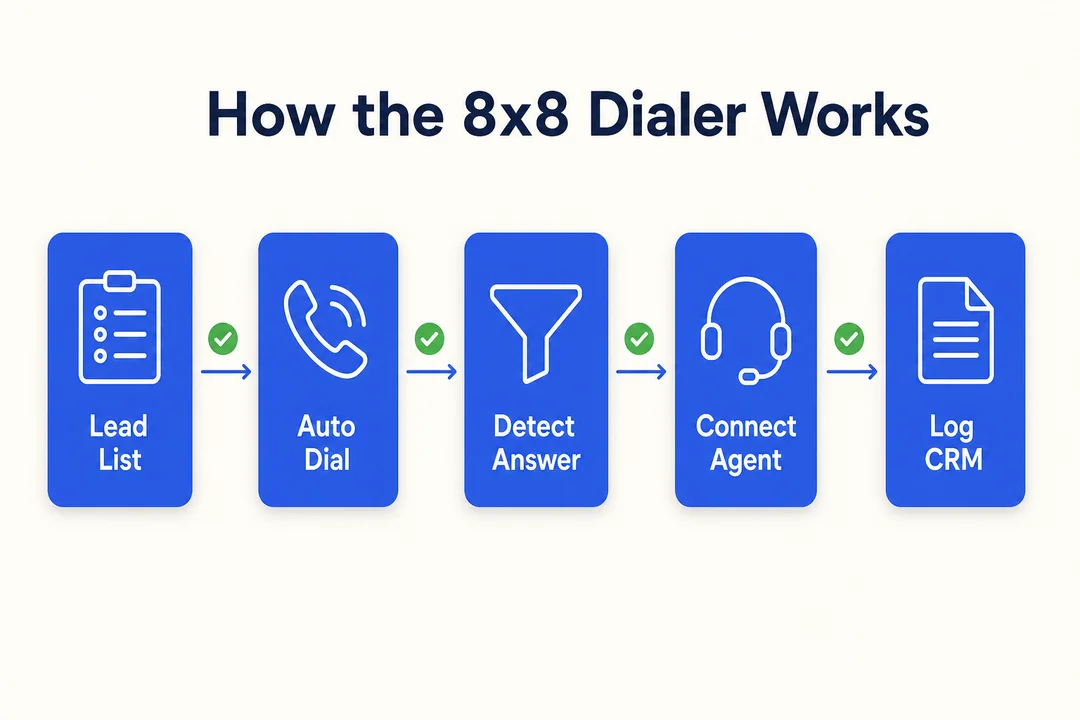
The business value of the 8×8 dialer is not just automation. It is about helping teams spend less time on manual tasks and more time on useful customer conversations. For buyers, the main outcomes are usually lower idle time, better campaign throughput, and stronger agent productivity.
The 8×8 dialer can automate outbound call campaigns, reduce manual dialing time, and improve customer interaction quality when the workflow is set up correctly. Results still depend on list quality, campaign design, and choosing the right dialing mode.
Reduce Manual Dialing and Idle Time
Automated number sequencing means agents do not need to manually look up records and dial every number one by one. That removes repetitive work and helps teams keep a steadier call flow throughout the day.
For an SDR team calling warm leads, this can mean more conversations per hour. For a service team making reminder calls, it means less time switching between records and phone actions.
Benefits include:
- Agents spend less time clicking through call lists.
- Idle time drops because the next call can be prepared automatically.
- More agent time goes into live conversations instead of setup work.
- Contact center operations become smoother and easier to manage.
Improve Outbound Engagement and Campaign Throughput
Faster list handling helps teams move through more contacts in a structured way. That is useful for lead outreach, appointment reminders, renewals follow-up, and customer notifications.
Campaign throughput is not only about speed. It is about reaching more contacts with fewer workflow breaks and more consistent execution. That can support sales acceleration strategies without forcing agents into a chaotic pace.
Common use cases include:
- Lead outreach for inbound follow-up or outbound prospecting
- Appointment reminders for service or healthcare scheduling
- Renewal follow-up for contract or subscription teams
- Proactive customer notifications for account updates
Support Better Agent Productivity
Agent productivity improves when the system helps reduce pauses between calls and makes outcomes easier to log. Features like persistent connection mode, real-time connection management, and faster call disposition handling can help agents stay focused.
A practical example: a renewals team can finish one conversation, log the outcome, and move to the next record quickly without rebuilding context each time.
What affects results:
- List quality affects connection rates.
- Campaign pacing affects agent workload and customer experience.
- The wrong dialing mode can reduce both productivity and call quality.
- Agents still need clear scripts, training, and disposition rules.
8×8 Dialing Modes Explained
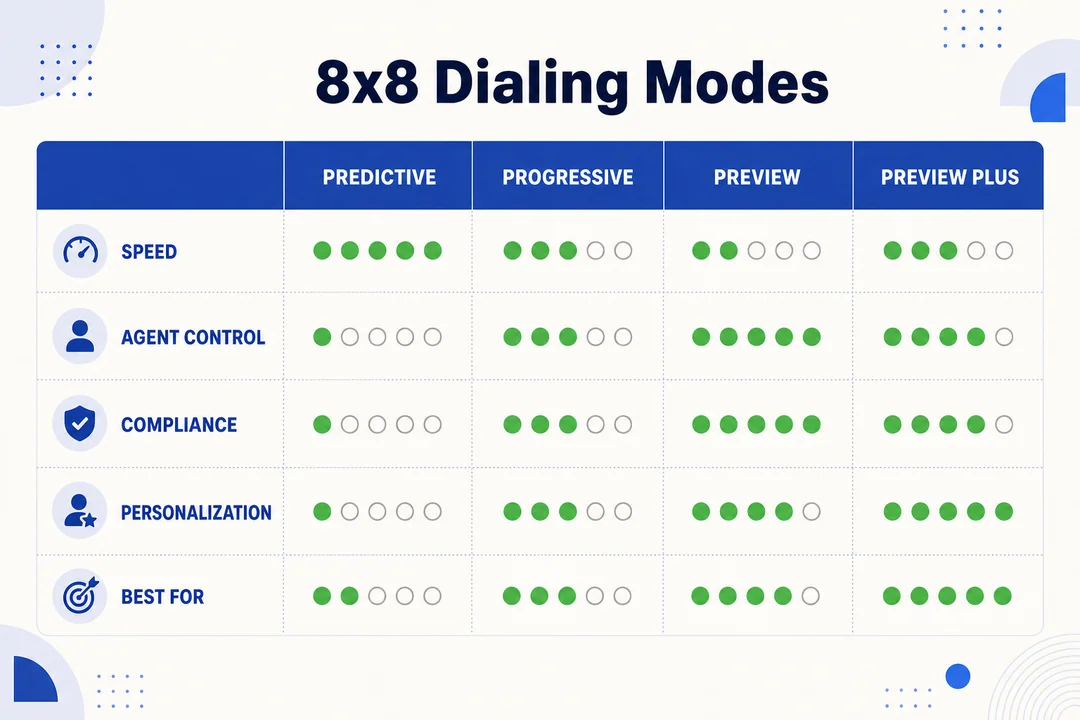
Dialing mode is often the most important buying decision because it directly affects speed, personalization, agent readiness, and compliance exposure. No single mode is best for every team.
The practical choice comes down to one question: do you need maximum volume, balanced control, or context-first calling?
Predictive Dialer
A predictive dialer places calls ahead of agent availability using pacing logic. The goal is to maximize agent availability by reducing wait time between live connections.
This mode is usually best for:
- High-volume prospecting
- Large outbound teams
- Campaigns where speed matters most
- Broad lead coverage workflows
Key benefit:
- It can help keep agents in near-continuous conversation flow.
Caution:
- It is not ideal for highly personalized outreach.
- It may require closer compliance review and pacing oversight.
- Buyers should validate abandonment risk and campaign controls.
Example: a large sales team working aged lead lists may use predictive dialing to increase daily coverage when call context is limited and speed matters more than deep personalization.
Progressive Dialer
A progressive dialer waits until an agent is available before placing the next call. That makes it a strong middle ground between efficiency and control.
It is often a safe starting point because it offers:
- More predictable pacing
- Easier operational management
- Lower risk of over-aggressive dialing
- Better control for growing teams
Common fits include:
- Inside sales
- Customer follow-ups
- Mid-sized contact centers
- Teams adopting outbound automation for the first time
For many buyers, progressive dialing is the most practical first mode to test because it improves efficiency without making the workflow feel too automated.
Preview Dialer
A preview dialer lets agents review account details before the call starts. That gives them time to read notes, understand history, and prepare for a more relevant conversation.
This mode is strongest when outreach is context-heavy or sensitive.
Best-fit use cases:
- Renewals
- Collections
- Account management
- Service recovery follow-up
The trade-off is simple: preview dialing gives you better personalization and call quality, but usually less speed than predictive or progressive workflows.
Which Dialing Mode Is Best for Your Team?
| Factor | Predictive | Progressive | Preview |
|---|---|---|---|
| Campaign volume | Best for high volume | Good for medium to high volume | Best for lower volume |
| Personalization needs | Low to medium | Medium | High |
| Compliance sensitivity | Higher review needed | Balanced | Strong fit for sensitive outreach |
| Agent readiness | Less prep time | Moderate prep time | Most prep time |
| CRM context required | Limited | Helpful | Often essential |
If your main goal is scale, start with predictive. If you want balanced control, choose progressive. If your agents need account context before every call, preview is the better fit.
If you are unsure, start with progressive dialing and adjust after live testing with your actual campaign type.
Key 8×8 Dialer Features Buyers Should Look For
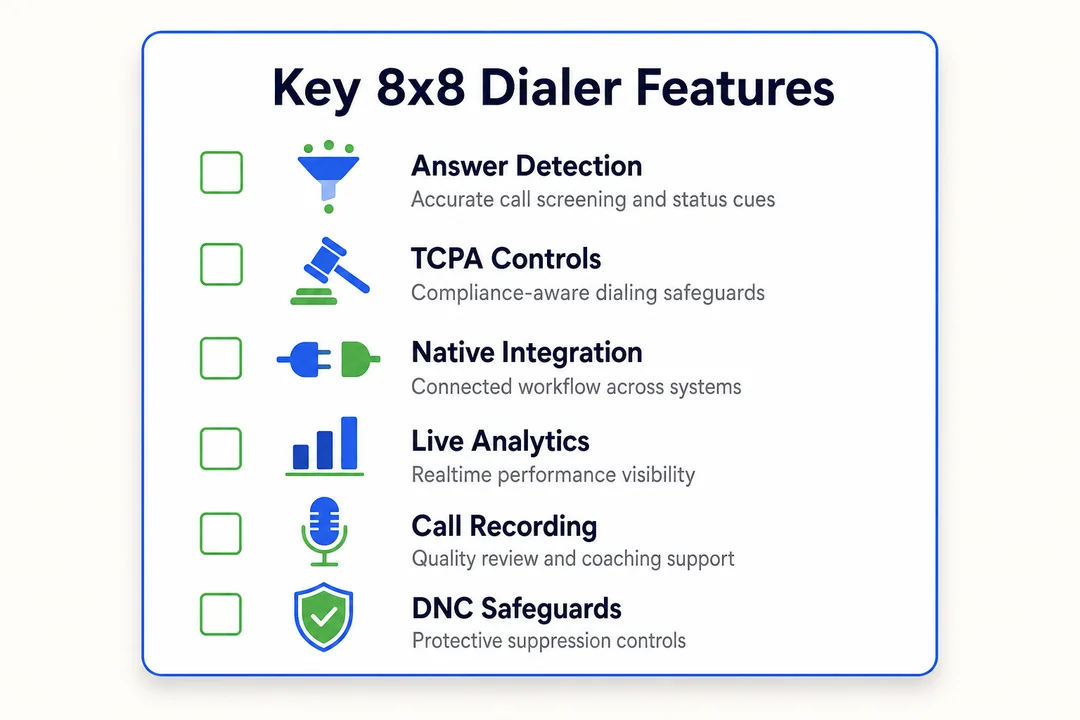
The best way to evaluate the 8×8 automated dialing solution is to treat features like a buyer checklist, not a spec sheet. Focus on the capabilities that affect rollout success, manager visibility, and day-to-day agent performance.
Buyers should also confirm which features are native, configurable, or add-on based on plan and deployment.
Automated Outbound Calling
Automated outbound calling reduces the manual work of dialing and helps teams move through campaigns faster. It supports more consistent outreach and makes proactive customer contact easier to manage.
Key value points:
- Less manual effort for agents
- Faster outreach across call lists
- Better campaign consistency
- Stronger support for proactive follow-up workflows
For most teams, this feature matters because it turns calling into a repeatable process instead of a manual task chain.
Contact List and Campaign Management
Good outbound performance starts with organized contact lists. Buyers should look at how the system handles importing, segmentation, duplicate control, invalid numbers, and campaign outcomes.
Call disposition matters here because it helps teams track what happened on each call and what should happen next.
Buyer checks:
- How often are lists refreshed?
- How are duplicates handled?
- How are invalid numbers flagged?
- Can teams segment by campaign type, geography, or customer status?
- How are dispositions reported back to managers or other systems?
Example: a renewals team might segment one campaign for customers expiring in 30 days and another for overdue accounts, each with different scripts and follow-up rules.
Answering Machine Detection and Connection Handling
Answering Machine Detection (AMD) is a feature that tries to identify whether a call reached a live person or voicemail. That matters because it can reduce wasted live-agent time and improve talk-time efficiency.
Benefits include:
- Fewer wasted agent moments on voicemail outcomes
- Better use of live conversation time
- More usable campaign throughput
- Cleaner connection handling at scale
Caution:
- Buyers should validate AMD performance in real workflows.
- Detection accuracy can affect both efficiency and customer experience.
- Platform safeguards help, but they do not replace smart campaign testing.
Real-Time Analytics and Reporting
Real-time reporting helps managers see how campaigns are performing while calls are still happening. That allows faster adjustments instead of waiting until the end of the day.
Useful metrics to review include:
- Connection rates
- Call outcomes and dispositions
- Agent activity levels
- Campaign throughput
- Answer rates by list or segment
This visibility helps managers improve list quality, adjust pacing, coach agents, and optimize outbound performance. It also supports workforce planning, even if that is not the primary reason you buy a dialer.
Agent Productivity Tools
Small workflow improvements can create meaningful gains across a full team. Agent productivity tools matter because they reduce friction between one call and the next.
Look for benefits such as:
- Reduced wait time between calls
- Cleaner transitions between records
- Faster outcome logging
- More consistent customer interaction handling
These are not flashy features, but they often shape daily adoption more than advanced automation does.
Compliance Features
Compliance tools can reduce risk, but they do not replace internal legal review or process controls. Buyers should treat them as safeguards, not guarantees.
Buyer checks:
- Confirm support for TCPA (US calling consent rules), DNC (Do Not Call lists), and TPS (UK Telephone Preference Service).
- Ask how suppression handling works.
- Verify campaign rules by geography.
- Confirm who owns internal approval before launch.
- Check whether compliance settings are native or require setup work.
8×8 Dialer Integrations and Platform Fit
Integrations shape adoption as much as dialing speed does. A dialer that cannot connect well to your existing workflow often creates extra admin work, weak reporting, and poor agent experience.
The best platform fit comes from how well the dialer connects to CRM records, contact center processes, internal communication tools, and your broader cloud communications setup.
CRM Integration for Customer Context
CRM integration matters because agents need context before and after the call. Integrating 8×8 dialer with CRM software can help agents see contact history, avoid re-keying, and log follow-up actions more accurately.
This is especially useful for sales outreach, account follow-up, and service callbacks where conversation quality depends on prior context.
Key benefits:
- Agents can see customer history in one workflow.
- Manual data entry is reduced.
- Follow-up tasks become more accurate.
- Personalization improves because record visibility is stronger.
For most buyers, CRM integration is not optional. It is a core part of making outbound calling efficient and accountable.
Contact Center Workflow Integration
Outbound calling works better when it fits into the broader contact center environment. Native contact center workflow integration helps maintain routing consistency, interaction management, and daily operational continuity.
This matters when outbound teams share resources, reporting, or processes with inbound teams.
Benefits of stronger fit include:
- Better alignment with ACD (Automatic Call Distribution, which routes interactions to the right agents)
- More consistent interaction handling
- Easier management inside a CCaaS platform
- Less fragmentation across tools
For many teams, native fit matters more than isolated dialer features because the real cost of a poor workflow shows up later in reporting gaps and admin overhead.
Microsoft Teams and the Broader Communication Stack
Organizations already using Microsoft Teams may care less about technical architecture and more about daily coordination. Compatibility with the broader communication stack can support easier adoption and better internal handoffs.
- Teams users may benefit from better alignment with existing communication habits.
- Internal coordination is easier when voice workflows do not feel separate.
- Buyers standardized on Teams should ask how the dialer fits into their current environment.
API and Extensibility Considerations
API flexibility matters when your team needs custom workflows, CRM-triggered outreach, or automatic status syncing. This is especially relevant for buyers asking how to set up 8×8 auto dialer for contact center workflows beyond basic calling.
Simple example flow:
- CRM event triggers an outbound workflow.
- The dialer starts a call task.
- Call disposition updates back into the CRM.
CRM status change -> outbound workflow triggered
Call attempt completed -> disposition logged
Disposition update -> CRM record synced
Buyers should ask whether the required workflow is native, configurable, or dependent on API or no-code extensibility.
Compliance and Calling Safeguards to Evaluate
Compliance review should happen before launch, not after the first campaign goes live. In outbound calling, performance and compliance are tightly linked because poor controls can hurt answer rates, reputation, and customer trust.
This is where buyers should slow down, verify assumptions, and involve internal stakeholders early.
TCPA, DNC, and TPS Support
TCPA stands for the Telephone Consumer Protection Act, a US law that affects consent and calling practices. DNC refers to Do Not Call rules that restrict outreach to people who should not be contacted. TPS is the UK Telephone Preference Service, which serves a similar opt-out purpose.
These matter because outbound calling is not only an operations issue. It is also a risk-control issue.
| Rule | Geography | Why it matters |
|---|---|---|
| TCPA | US | Affects consent, outreach methods, and campaign risk |
| DNC | US and broader business practice | Helps prevent calls to restricted contacts |
| TPS | UK | Supports suppression against UK opt-out registrations |
Practical buyer steps:
- Verify suppression handling.
- Confirm how consent logic is managed.
- Review internal approval processes.
- Do not assume software alone guarantees lawful outreach.
Buyers can evaluate whether 8×8 supports unified compliance management across US/UK regulatory standards, but they should still confirm campaign-specific requirements with legal or compliance teams.
Carrier-Level Call Blocking and Risk Reduction
Integrated carrier-level call blocking refers to controls designed to reduce the risk of outbound calls being treated as suspicious by carriers. At a high level, this matters because blocked or flagged calls can hurt answer rates and overall campaign effectiveness.
Why buyers should care:
- Better number reputation can support stronger deliverability.
- Fewer blocked calls can improve answer opportunities.
- Brand trust is easier to protect when outreach looks legitimate.
Important cautions:
- Poor list hygiene can still damage outcomes.
- Aggressive pacing can still create risk.
- Platform safeguards do not fix weak outreach practices.
Questions to Ask Before Launching Campaigns
- Which geographies will this campaign target?
- How is consent tracked and reviewed before calling starts?
- What is the process for DNC and TPS suppression?
- How are voicemail, no-answer, and callback outcomes handled?
- Who owns internal compliance approval?
- Do regulated teams need legal review before launch?
For financial services, healthcare, or other regulated industries, involve legal and compliance stakeholders early.
Who Should Use the 8×8 Dialer?
The 8×8 dialer is not for every outbound team in the same way. The best fit depends on your campaign type, need for context, and how much value you place on a connected platform.
Sales and Business Development Teams
Sales and business development teams often need speed, coverage, and reliable follow-up. The dialer can fit well when the goal is high-volume prospecting or lead follow-up inside a more structured outbound workflow.
Best fit signals:
- Predictive dialing for high-volume prospecting
- Progressive dialing for more controlled lead follow-up
- Sales acceleration goals tied to agent efficiency
- Teams that need stronger list coverage without full manual dialing
Customer Service and Follow-Up Teams
Service teams often care more about consistency than raw volume. Progressive and preview workflows are common fits for appointment reminders, service follow-ups, and proactive customer updates.
Examples include:
- Appointment reminders
- Service callbacks
- Post-case follow-up
- Proactive account notifications
Collections, Renewals, and Retention Teams
These teams usually need more context before each call. Preview or progressive dialing is often a better fit because conversations can be sensitive, repeatable, and compliance-aware.
Strong fit indicators:
- Agents need account notes before calling.
- Call quality matters more than maximum speed.
- Teams need consistency across repeat follow-ups.
- Compliance-sensitive conversations require tighter control.
SMB and Mid-Market Contact Centers
SMB and mid-market contact centers often value a single-vendor stack because it reduces tool sprawl and admin complexity.
- Good fit for buyers who want cloud telephony architecture.
- Useful when one provider across telephony, contact center, and UC is a priority.
- Often appealing to teams that want fewer disconnected systems.
8×8 Dialer vs Other Dialer Options
This comparison is less about brand loyalty and more about operational fit. Buyers should compare categories based on workflow alignment, reporting needs, integration depth, and admin overhead.
8×8 Dialer vs Generic Auto Dialers
| 8×8 Dialer | Generic Auto Dialers |
|---|---|
| Better fit for teams already using the 8×8 ecosystem | May suit teams with simpler outbound needs |
| Stronger potential for unified reporting | Reporting may be split across tools |
| Better workflow continuity inside contact center operations | Can create handoff and data gaps |
| Often easier for connected CCaaS environments | May look cheaper upfront |
| Good for buyers wanting fewer vendors | Can work well if integration depth is not critical |
Standalone tools still have a place, especially for basic outbound use cases. But for teams already in an existing 8×8 environment, native workflow fit is often the more efficient long-term choice.
8×8 Dialer vs Power Dialer
A power dialer usually follows a simpler one-after-another calling pace. A broader dialer platform may offer more mode flexibility, deeper reporting, and stronger support for integrations and compliance workflows.
Quick comparison:
- Power dialer: simpler pacing, more direct agent control
- Broader dialer platform: more automation depth and workflow options
- Power dialer: useful for straightforward sales sequences
- 8×8 dialer: more appealing when CRM context and contact center integration matter
When comparing 8×8 dialer vs power dialer for outbound calls, do not choose based on speed alone if compliance and context are important.
When a Native 8×8 Dialer Is the Better Fit
Choose a native 8×8 dialer approach when these signals apply:
- You already use 8×8 tools today.
- You need CRM, ACD, or API alignment.
- Centralized reporting is important for managers.
- You want fewer vendors and less workflow fragmentation.
- You are building a connected CCaaS + UC + CX environment.
How to Evaluate If 8×8 Dialer Is Right for Your Team
A strong evaluation framework helps buyers avoid choosing a dialer based on one feature alone. Use this section as a practical checklist to align operations, IT, and management before a purchase decision.
Define Your Outbound Use Case
Start with the actual business goal.
- Sales prospecting
- Lead follow-up campaigns
- Support outreach
- Regulated outreach
- Renewals or retention follow-up
Your use case should drive the dialing mode, integration needs, reporting requirements, and compliance safeguards. If you are not sure where to begin, start by defining what a successful outbound call looks like for your team.
Match the Right Dialing Mode to Your Workflow
Use simple selection logic:
- Predictive = best for scale
- Progressive = best for balanced control
- Preview = best for context-first outreach
Do not over-automate workflows where agents need account context before speaking.
Confirm Integration Requirements
Buyer checklist:
- Do you need CRM integration?
- Does Microsoft Teams matter to your internal workflow?
- Do you need API-based custom workflows?
- Will this fit your current cloud communications stack?
- Is the integration native, add-on, or custom?
This step often decides whether rollout will be smooth or painful.
Review Reporting and Management Needs
Managers should verify:
- Real-time analytics access
- Campaign visibility
- Agent performance tracking
- Admin controls for pacing and outcomes
These controls matter because optimization depends on visibility and accountability.
Check Compliance and Deployment Readiness
- Review TCPA, DNC, and TPS requirements.
- Confirm internal compliance approval owners.
- Validate cloud deployment expectations.
- Clarify who owns data quality and process rules.
- Request a demo based on your real campaign type.
Pros, Cons, and Best-Fit Use Cases for 8×8 Dialer
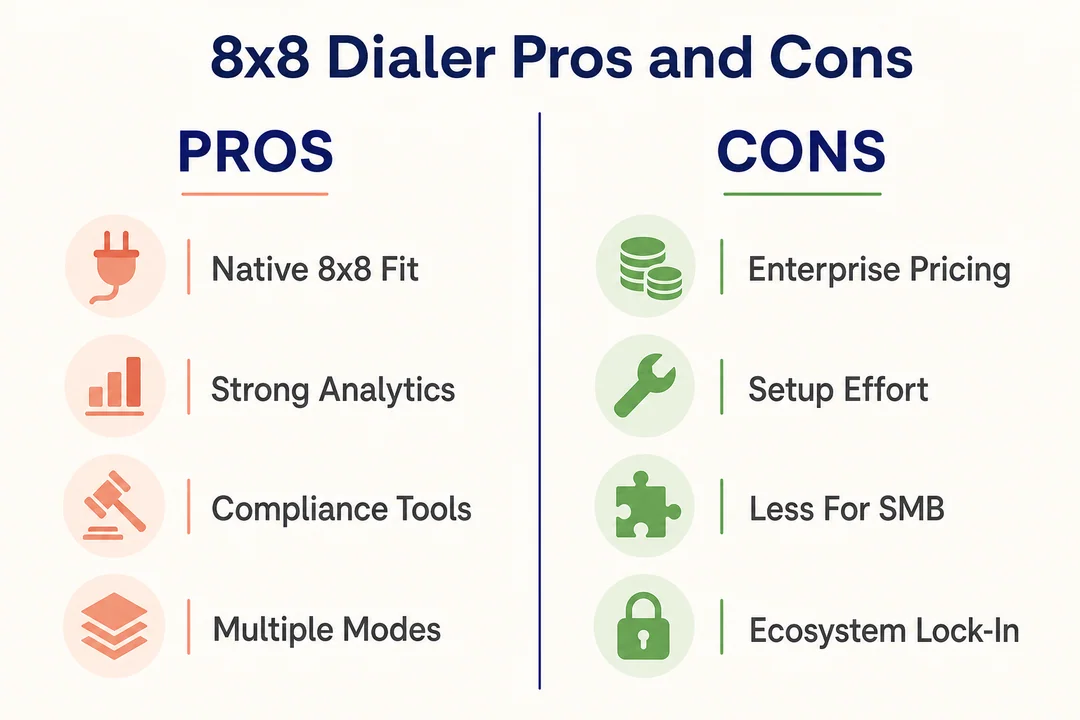
From a buyer’s perspective, the 8×8 dialer stands out most when platform fit matters as much as calling speed. The upside is stronger workflow alignment. The trade-off is that teams still need to verify setup, integrations, and operating model.
Pros of 8×8 Dialer
- It supports multiple outbound dialing modes for different campaign styles.
- It can fit cleanly into 8×8 Contact Center workflows.
- CRM integration can improve customer context and follow-up accuracy.
- Real-time call analytics help managers optimize performance faster.
- Compliance-oriented safeguards support more controlled outbound operations.
- It is attractive for teams that want one connected communications environment.
Cons or Limits to Check Before Buying
- The strongest fit often depends on whether you already use 8×8.
- Some teams may need custom integration review.
- Predictive workflows require tighter pacing and compliance oversight.
- Setup complexity can vary based on process maturity.
- Buyers should confirm feature availability by plan and configuration.
Best Fit for These Teams
- Current 8×8 customers
- SMB and mid-market contact centers
- Sales teams with structured outbound campaigns
- Retention and renewals teams needing context-aware outreach
- Service teams seeking connected CCaaS + UC + CX workflows
Frequently Asked Questions
What is the 8×8 dialer used for?
The 8×8 dialer is used for automated outbound calling, proactive outreach, and campaign management. It helps teams reduce manual dialing, improve agent productivity, and run outbound workflows more efficiently inside a cloud-based contact center environment.
Is 8×8 dialer the same as an auto dialer?
Not exactly. An auto dialer refers to automated dialing capability, while the broader 8×8 contact center dialer may include multiple dialing modes, reporting tools, integrations, and compliance-related safeguards. Buyers should evaluate the full workflow, not just the dialing function.
Does 8×8 support predictive, progressive, and preview dialing?
Buyers should verify current feature availability based on the latest product documentation, plan, and configuration. In general, evaluation should focus on which mode best fits your campaign goals, agent workflow, and compliance needs.
Can the 8×8 dialer integrate with CRM systems?
CRM integration is an important part of outbound calling because it gives agents customer context, reduces manual updates, and improves workflow efficiency. Buyers should confirm which CRM connections are native and which may require additional setup.
Does 8×8 dialer support compliance for outbound campaigns?
It may support outbound compliance workflows related to TCPA, DNC, and TPS, depending on plan and configuration. Still, internal compliance processes, consent review, and legal oversight remain essential because software alone does not guarantee compliant outreach.
How is 8×8 dialer different from a power dialer?
A power dialer usually focuses on simpler sequential calling. The 8×8 dialer may offer broader mode options, stronger workflow integration, better reporting visibility, and more support for CRM context. The right choice depends on whether you need simple speed or a more connected outbound platform.
Is 8×8 dialer suitable for small and mid-sized contact centers?
Yes, it can be a strong fit for small and mid-sized contact centers that want cloud-based outbound calling without managing many separate tools. It is especially appealing when the team values integrated telephony, contact center workflows, and unified reporting.
When should a team request an 8×8 dialer demo?
Request a demo after you define your outbound use case, preferred dialing mode, CRM and integration needs, reporting expectations, and compliance questions. The best demo is one built around your real campaign type, not a generic product walkthrough.
Conclusion: Is 8×8 Dialer the Right Outbound Calling Fit?
The 8×8 dialer is a strong option for teams that want outbound calling inside a broader platform, not as a disconnected add-on. The real decision comes down to five factors: the right dialing mode, the integrations you need, the reporting visibility managers expect, your compliance readiness, and how much value you place on native platform fit.
If your team is comparing predictive, progressive, or preview workflows, start by mapping those choices to your real outbound use cases. Then confirm CRM integration, reporting needs, and calling safeguards before launch.
Shortlist your use case, request a tailored demo, and compare 8×8 against your current workflow needs. That is the fastest way to decide whether the 8×8 dialer is the right outbound calling setup for your team.
More in Operations & CX Optimization
View all →
Customer Experience Transformation: Framework and Steps
A telecom customer calls support about a billing error. They explain the problem to the IVR system. Then to the first agent. Then get transferred and explain again. Then escalated—and explain a third time. Forty minutes later, they're exhausted and the problem still isn't solved. This is what broken customer experience looks like. And it's costing you customers. Customer experience…


Web Caller Meaning: JavaScript caller, Calling Tools or Portals
“Web caller” is one of those phrases where the search results and the searcher are frequently talking about different things. Three unrelated audiences use it: developers hitting an error on the legacy JavaScript caller property, buyers evaluating browser-based calling software, and people trying to reach a specific portal or training page whose exact name they cannot recall. That fragmentation is…

Customer Experience Strategy: How to Build One That Works
Customer experience is getting worse, not better. Forrester's 2025 Global CX Index found that 21% of brands declined in CX quality while only 6% improved — and in the US, 25% declined against 7% that improved, the second consecutive year of that pattern. Most of those brands were not neglecting customer experience. They were working on it without a strategy…



 English
  Russian
  Chinese