

“Web caller” is one of those phrases where the search results and the searcher are frequently talking about different things. Three unrelated audiences use it: developers hitting an error on the legacy JavaScript caller property, buyers evaluating browser-based calling software, and people trying to reach a specific portal or training page whose exact name they cannot recall.
That fragmentation is why a plain search returns a mixture of free calling utilities, developer references, and government training modules with no obvious connection between them. Nothing is broken — the query simply carries no signal about which of the three you meant.
This guide sorts the three apart, then goes deep on each. The JavaScript section is the longest because it is the one with a concrete failure mode attached: code that worked yesterday throws a TypeError today, usually after a file became a module. Behaviour there is defined by the ECMAScript specification rather than left to browsers, so the fix is deterministic once you know what is happening.
Key Takeaways
- Web caller usually refers to Function.prototype.caller, a web-based calling service, or a branded portal page.
- If you are troubleshooting JavaScript, go straight to Function.prototype.caller and Strict mode behavior.
- If you are comparing business tools, you likely mean a web-based calling service or browser calling software.
- If you are trying to reach a specific page, use a branded search for the exact cloud-based service portal, hotline, login, or training page.
- Function.prototype.caller is a deprecated API and often restricted or broken in Strict mode.
What Does Web Caller Mean?
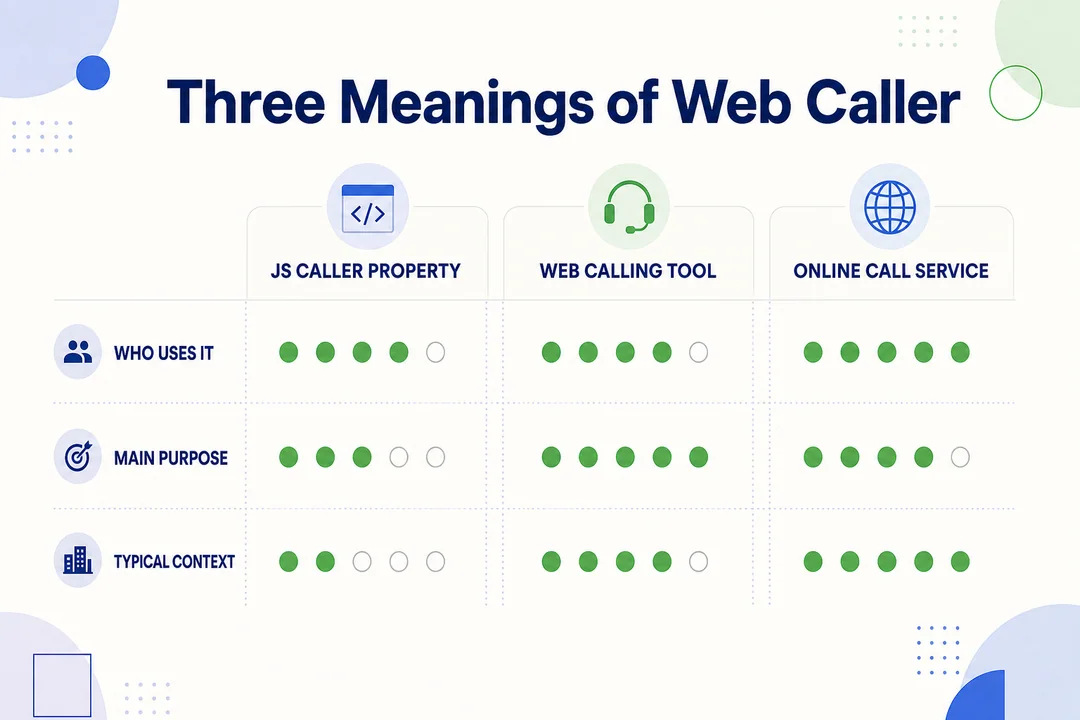
The 3 Most Common Meanings of Web Caller
Web caller usually refers to one of three things. The confusion happens because the same phrase appears in coding, software, and institutional search results.
-
JavaScript caller property
In web development, people may mean Function.prototype.caller, a legacy JavaScript property that tries to show which function called another. This usually comes up when debugging old code or dealing with strict mode errors. -
Web-based calling service
In business software, web caller can mean a browser-based calling tool used for sales, support, outreach, or contact center work. These tools run in a web app instead of a desktop phone system. -
Branded portal or online call page
Some searches are really attempts to reach a specific service page, hotline, training module, reporting portal, or application page. In that case, web caller is not a technical term at all. It is a vague shortcut for a destination page.
| Meaning | Best for | Example query |
|---|---|---|
| JavaScript caller property | Developers debugging legacy code | Function.prototype.caller strict mode |
| Web-based calling service | Teams comparing communication tools | browser calling software pricing |
| Portal or service page | Users trying to reach a known destination | CDC You Call the Shots training |
This matters because many users click the wrong result before they identify their context.
Why Search Results for Web Caller Are Mixed
The term crosses several unrelated industries, so results are fragmented in a specific and predictable way. A search engine ranking a query with no disambiguating signal falls back on aggregate popularity, which means the highest-traffic interpretation wins the first page regardless of which one you meant. For this phrase that is the browser-calling utilities, so a developer searching from a code editor lands in a set of free calling services, and a person hunting a training portal lands in the same place.
The four clusters competing for the term:
- Coding and debugging results related to client-side scripting.
- Communication software results for browser dialers and contact tools.
- Public service reporting portals and hotline pages.
- Training and education pages, including vaccine training modules.
A broad query creates noise. The less context you provide, the more irrelevant results you get.
A Quick Intent-Matching Guide
Use this quick check before you click anything.
-
You are in the JavaScript path if you searched for terms like
how to check function caller in JavaScript,Fixing TypeError in JS caller property,strict mode, orcall stack.
You likely need help with a legacy function caller property, not a service page. -
You are in the software path if you searched for
browser calling software,pricing,setup,routing,CRM integrations, orcall center features.
You are likely looking for a web-based calling service for a team workflow. -
You are in the portal path if you searched for
login,reporting portal,training,certificate,hotline,city,county, or an agency name.
You are probably trying to reach a specific destination page, not learn a concept.
Example queries:
Function.prototype.caller null strict modeweb caller platform for support teamweb caller service for local government reportingCDC You Call the Shots certificate login
Identify your context before clicking results.
If You Mean the JavaScript caller Property
This is the branch with an actual error attached, so it is the one most people arrive at under time pressure. The short version: Function.prototype.caller is both non-standard and deprecated — MDN carries both banners — and in strict mode, accessing it throws a TypeError with no replacement API.
Two things follow from that, and they matter in different situations. If you are debugging existing code, the property is almost certainly not going to start working again; the fix is to remove the dependency rather than to find a compatible environment. If you are writing new code, treat any suggestion to use caller as out of date, including suggestions from older answers on forums that predate the specification change.
The sections below cover what the property was meant to do, why it was removed, exactly what happens under strict mode, why browsers restrict this class of behaviour, and what to use instead. If you only need the last part, skip to the alternatives.
What Function.prototype.caller Is in Plain English
Function.prototype.caller is a JavaScript property that attempts to reveal which function called the current function. It relates to the call stack (the order of function calls during execution) and execution context (the environment where code runs).
In simple terms, it tries to answer: which function invoked this one?
function a() {
  b();
}

function b() {
  console.log(b.caller);
}
This is a legacy debugging pattern. It is not a modern best practice.
Why JavaScript caller Is Deprecated and Non-Standard
Function.prototype.caller is both deprecated and non-standard. That means you should not rely on it in new code, and you should treat it as legacy debt if you find it in old projects.
The reasons are practical:
-
Browser behavior is inconsistent.
Chrome, Firefox, and Safari have not handled it in exactly the same way. That makes debugging and maintenance harder. -
It creates security concerns.
It can expose parts of the call chain that modern JavaScript tries to protect. -
It limits engine optimization.
JavaScript engines need freedom to optimize code. Features that expose internal call behavior can block those improvements. -
It does not fit modern standards.
Current ECMAScript guidance favors explicit program flow over hidden runtime inspection.
| Problem | Why it matters |
|---|---|
| Inconsistent browser behavior | Code may work in one browser and fail in another |
| Security exposure | Runtime internals become easier to inspect |
| Optimization limits | Engines cannot optimize as aggressively |
| Poor standards alignment | New code becomes harder to maintain |
In real projects, this usually shows up in old utility functions, copied snippets, or outdated debugging logic. If your team still uses it, do not extend that pattern. Replace it gradually.
Practical advice:
- Do not use Function.prototype.caller in new projects.
- If it appears in old code, mark it for refactoring.
- Expect breakage in modern environments.
- Move to stack traces, structured logs, and explicit data flow instead.
What Happens in Strict Mode
In strict mode, accessing caller throws a TypeError. This is worth stating precisely, because a lot of material online describes the behaviour as “may return null” — that is legacy sloppy-mode behaviour in some engines, not what strict mode does. MDN states it directly: in strict mode, accessing caller of a function throws an error, and the API is removed with no replacement.
The same applies beyond the "use strict" directive. For strict, arrow, async, and generator functions, accessing the caller property throws a TypeError. Since ES modules are strict by default, any code inside a module falls into this category whether or not anyone wrote the directive.
The mechanism is defined at the specification level rather than left to browsers. ECMAScript requires Function.prototype to carry an initial caller accessor that unconditionally throws a TypeError on any get or set — informally known as a poison pill accessor — and implementations are not permitted to change that semantic for anything except non-strict plain functions. That is why this is not a browser quirk you can work around with a polyfill or a flag: the throw is the specified behaviour, and only legacy sloppy-mode functions are exempt.
The underlying reason is stack walking. Letting a function inspect its caller at runtime lets untrusted code read the call chain of code that invoked it, which leaks information across security boundaries. Removing the capability was a deliberate language decision, not an oversight.
A common scenario looks like this:
- Old script works in a loose mode setup.
- Someone adds
"use strict". - A legacy function tries to inspect
.caller. - The code breaks or returns unexpected values.
Minimal example:
"use strict";

function outer() {
  inner();
}

function inner() {
  console.log(inner.caller);
}

outer();
Under "use strict" this throws a TypeError. Remove the directive and run the same code as a non-strict plain function and it will report outer instead — which is exactly why the bug appears the moment a file is converted to a module or a build step adds strict mode.
Troubleshooting steps:
-
Find where
calleris used.
Search the codebase for.callerand related legacy patterns. -
Confirm whether strict mode is active.
Check for"use strict"or module-based code, since JavaScript modules are strict by default. -
Replace the pattern.
Use logs, stack traces, or explicit argument passing instead of runtime caller inspection.
If your script only broke after enabling strict mode, legacy caller usage is one of the first things to check.
Four reasons sit behind the restriction, and they explain why no browser is going to reverse it:
- Security: It can expose execution details that should stay protected.
- Privacy: Internal function relationships should not always be inspectable.
- Sandboxing: Browsers isolate code for safer execution.
- Optimization: Engines work better when code cannot depend on hidden runtime structure.
Some advanced documentation refers to poison pill accessor behavior (a getter/setter designed to block unsafe access). For most readers, the practical point is enough: modern browsers intentionally limit this feature.
Six situations account for almost every search that lands here from a code editor:
- You are maintaining legacy code and found
.caller. - You are debugging a function invocation chain.
- Your code broke after adding strict mode.
- You are comparing
callerwith a stack trace. - You copied an old snippet and want to know why it no longer works.
- You are tracing old client-side scripting behavior in a browser app.
In most of these cases, modern alternatives are better.
Better Alternatives to caller in Modern JavaScript
Use tools and patterns that are explicit, supported, and easier to maintain.
-
DevTools
Browser DevTools show breakpoints, call stacks, variable values, and execution flow.
Use this when you need to inspect behavior interactively.
It is safer thancallerbecause it does not depend on a deprecated runtime property. -
Stack traces
A stack trace is a list of function calls that led to an error or trace point.
Use it when you need a broader view of execution, especially during debugging.
It gives more context than a single caller reference.function handleClick() { console.trace("Click flow"); } -
Error().stack
In many environments,Error().stackgives a readable trace.
Use it when logging diagnostics in development or controlled troubleshooting.function logFlow() { console.log(new Error().stack); } -
Structured logging
Log function names, input values, state changes, and event IDs directly.
Use this when debugging UI flows, async behavior, or support issues in production-like systems.
It is more reliable because you define what gets recorded. -
Explicit parameters and state flow
Pass the information you need through arguments, return values, or shared state models.
Use this when refactoring legacy code.
This is better design because the code explains itself.
Real-world scenario: a button click triggers three nested functions in a UI. Old code uses caller to guess where the event came from. Better code logs the action source, passes the event context forward, and uses DevTools or console.trace() during debugging.
The rule is simple: hidden runtime inspection is weaker than explicit program design.
Web Caller vs Stack Trace: What Is the Difference?
| Factor | Function.prototype.caller | Stack trace |
|---|---|---|
| Scope | Usually shows only one caller relationship | Shows a broader chain of execution |
| Reliability | Inconsistent and restricted | More useful in real debugging |
| Standards support | Deprecated and non-standard | Common debugging approach |
| Strict mode behavior | Throws TypeError — specified, not a browser quirk |
Still useful through supported tools |
| Best use case | Legacy investigation only | Modern debugging and troubleshooting |
caller is narrow and legacy. A stack trace is broader and more practical for real debugging. For beginners, start with stack traces and DevTools, not caller.
If You Mean a Web-Based Calling Tool
This is the largest group by search volume, and it splits into two very different needs that get lumped together.
Some people want to place a single call right now from a browser, usually to avoid using their own number or because they are on a machine without a phone app. That need is served by free browser-calling utilities, and the practical constraints are the same across all of them: limited free minutes, no inbound number, patchy delivery to some destinations, and no record of the conversation.
Others are evaluating software for a team — sales, support, or a contact centre — where calling from the browser is one feature inside a system that also has to handle routing, recording, CRM integration, reporting, and user administration. Those are procurement decisions, not a five-minute task, and the free utilities are not competing in that category at all.
Work out which you are before comparing anything. The sections below describe what browser-based calling does technically, the categories of tool that exist, the features teams usually end up needing, and how to tell whether this is even the right interpretation of your search.
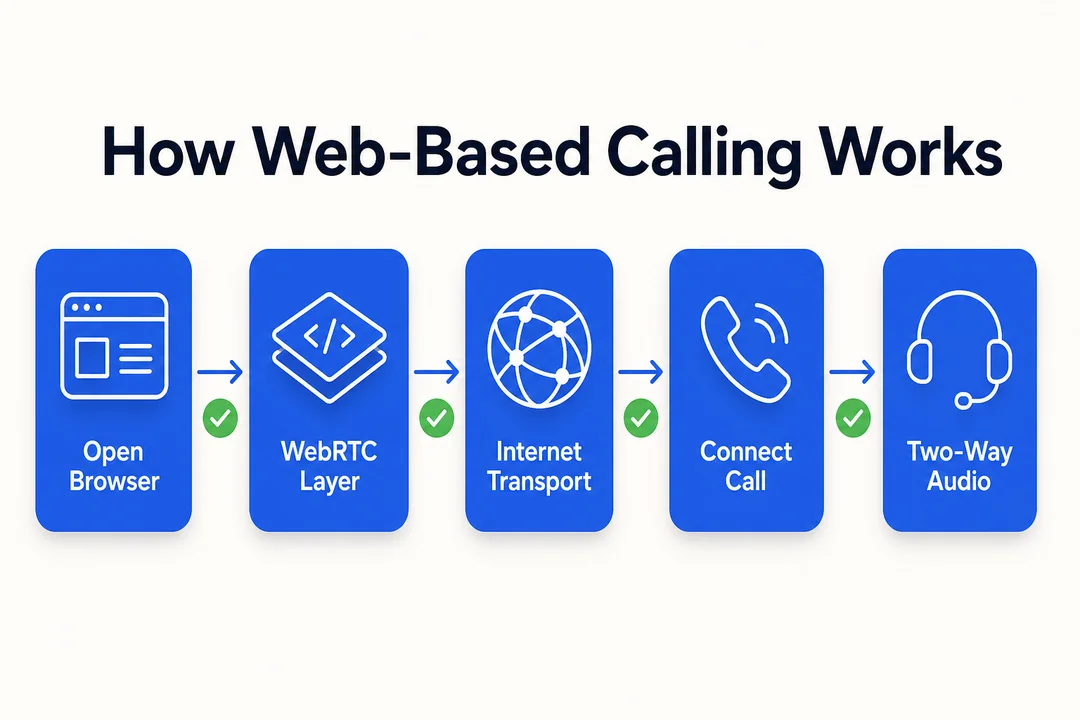
What a Web-Based Calling Service Usually Does
A web-based calling service lets users place or manage calls from a browser. It is commonly used in sales, support, outreach, and contact center workflows. This meaning has nothing to do with the JavaScript property above.
Typical capabilities include:
- Browser-based calling without a separate desktop phone app.
- Contact handling through an interactive communication interface.
- Team workflows such as routing, queueing, and transfer.
- Activity tracking and reporting.
- Access from different locations and devices.
Five categories cover the market, and they differ more in workflow assumptions than in call quality:
-
Sales dialers
Built for outbound calling, lead follow-up, and rep productivity. -
Support platforms
Used by customer service teams to manage inbound calls and case handling. -
Contact center software
Designed for queues, agent management, routing, and reporting. -
VoIP browser tools
Voice over Internet Protocol, meaning calls over internet connections rather than traditional phone lines. -
Outreach or notification systems
Used for reminders, alerts, and high-volume communication.
Some teams prefer cloud simplicity. Others need deeper on-premise customization. Fit matters more than category labels.
Features Users Usually Expect From a Web Caller Platform
When buyers say web caller, they usually want a platform that fits daily operations, not just a dial pad.
Key features to evaluate:
-
Browser access
Users should be able to work without heavy installs. This matters for speed, remote onboarding, and device flexibility. -
Call routing
Calls should reach the right person or queue. This matters for response time and customer experience. -
Call recording
Useful for quality review, compliance checks, and training. -
CRM integrations
Customer relationship management tools should connect cleanly so teams can see contact history and update records without switching tabs. -
Analytics and reporting dashboards
Managers need visibility into volume, response times, missed calls, and team performance. -
User permissions
Different roles need different access. This matters for control, security, and cleaner workflows. -
Multi-device support
Teams often work across laptops, headsets, and mobile fallbacks. -
Reliability and uptime
If the platform is unstable, every feature loses value.
Buying advice:
- Prioritize workflow fit over long feature lists.
- Check integration quality before buying.
- Ask about support response time and onboarding.
- Test browser compatibility with your real setup.
Mini buyer checklist:
- Does it support your call flow?
- Does it integrate with your current systems?
- Is setup simple for your team?
- Are reporting dashboards actually useful?
- Is reliability proven?
Who Typically Uses Web-Based Calling Software
- Sales teams use it for outbound calls, lead management, and follow-up.
- Support teams use it for inbound service, routing, and issue resolution.
- Public service teams may use it for hotline access and service accessibility.
- Distributed teams rely on browser access for remote work.
- Local agencies may use it for service lines, intake, and public communication.
The quickest way to confirm this is the right branch is to look at the words alongside your search. You probably mean software if it includes terms like:
browser calling softwarepricingsetup helpcall routingCRM integrationscall center featuresweb-based calling service
You probably do not mean software if your search includes:
strict modeFunction.prototype.callerTypeErrorCDC trainingcertificate login
A simple test works well: if you care about features, cost, setup, or integrations, you are in the software path. Your next step is to compare tools based on your use case, not the generic term web caller.
If You Mean a Specific Online Call Service or Portal
The third group is not searching for information at all. They have a destination in mind — a hotline, a reporting form, a training module, an application page — and are using “web caller” as an approximation of a name they half-remember or never knew precisely.
This is the hardest of the three to satisfy with a general search, because the query contains no identifying signal. A search engine has nothing to match against except the generic phrase, so it returns the most popular pages carrying it, none of which is the page you want. The fix is not a better search engine; it is adding the organisation and the action to the query.
The sections below cover why these searches behave that way, the kinds of pages people are usually looking for, and a faster method for finding them — including how to check you have landed on the official domain rather than a lookalike, which matters more than usual when the destination handles reports, applications, or personal data.
The destinations people are actually trying to reach cluster into four kinds:
- A hotline page
- A reporting page
- An application portal
- A training module
This is navigational intent, meaning the goal is to reach a specific site or page fast.
These are the page types people are usually trying to reach:
- A city hotline or local government service page.
- A school or university call-related service page.
- A health training resource such as CDC education content.
- An agency reporting or application tool.
- Public service reporting portals tied to a city, county, or department.
For example, users may search for You Call the Shots, which is a CDC immunization training program page, not a JavaScript topic or calling platform.
How to Find the Correct Portal Faster
Generic searches are weak for portal discovery. Branded searches work better.
Use this process:
-
Add the organization name
Search the agency, school, city, county, or program name first.
Example:CDC You Call the Shots -
Add the action word
Include words likelogin,report,training,certificate,application, orhotline.
Example:CDC You Call the Shots certificate -
Add location or department if needed
This helps when many organizations use similar names.
Example:Durham city one call reporting -
Check the domain before clicking
Look for trusted domains such as.gov,.edu, or official organization domains.
Example query upgrades:
Too broad: web caller
Better: county hotline web caller login
Better: CDC You Call the Shots training certificate
Better: city service reporting portal official
| Do this | Avoid this |
|---|---|
| Add organization and action | Search only web caller |
| Check official domain | Click unknown lookalike pages |
| Add location or department | Assume the first result is correct |
Branded search usually outperforms a generic query. It also lowers the chance of landing on fake, outdated, or unrelated pages.
Signs You Need a Brand-Specific Search Instead of a General Web Caller Query
- You already know the organization name.
- You need access to records, certificates, or service status.
- You are trying to log in, report, apply, or complete training.
- You need a specific page, not a concept definition.
- Broad results keep showing unrelated coding or software pages.
Broad searches create noise. Brand-specific terms cut through it.
How to Choose the Right Next Step
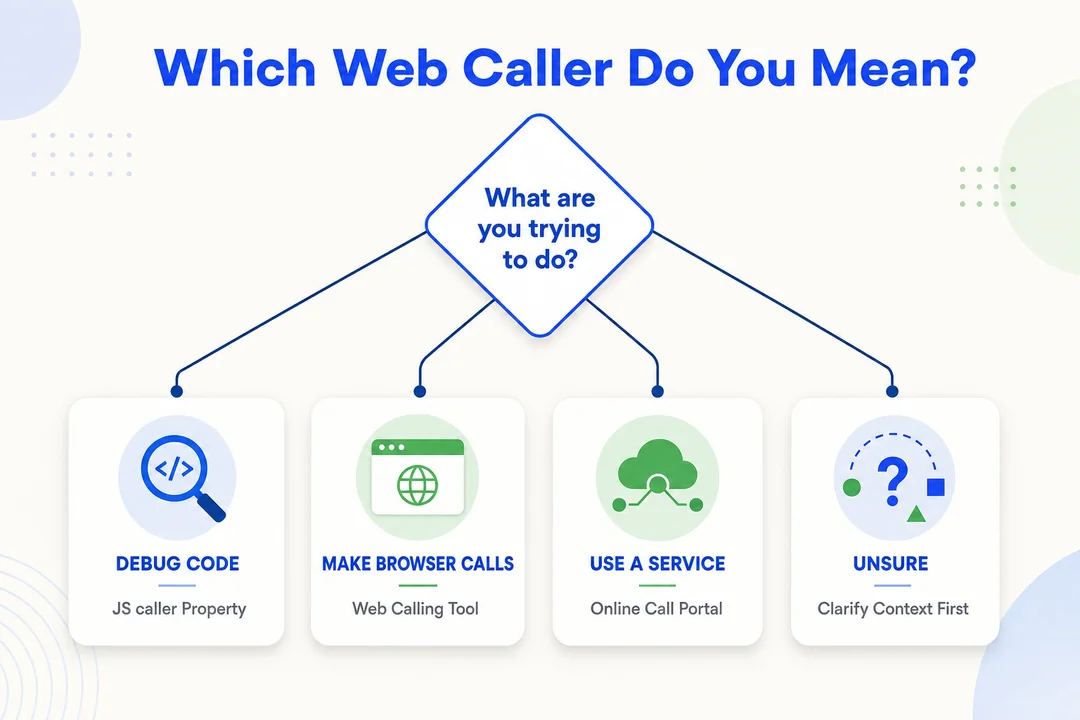
The right next step depends entirely on which of the three groups you fall into, and the table below is the fastest way to settle it. Pick the row that matches what you were doing when the question came up, not the one that sounds most relevant.
| If you are… | Do this first | What to avoid |
|---|---|---|
| A developer hitting an error | Treat Function.prototype.caller as legacy. Search the codebase for .caller, confirm whether strict mode or a module boundary is involved, and replace the pattern with explicit arguments, structured logging, or a stack trace. |
Looking for an environment or flag where it still works. Strict-mode behaviour is specified, not a browser quirk, so there is no configuration that restores it. |
| Evaluating calling software | Define the use case first — sales outreach, inbound support, or contact centre — then compare on call routing, CRM integration, reporting, and browser support. Test reliability and onboarding on a real workflow before reading feature lists. | Comparing free browser-calling utilities against team software. They serve different needs and the comparison produces a misleading price expectation. |
| Trying to reach a portal | Search the organisation name first, then add the exact action: login, certificate, training, report, or apply. Confirm the domain is official — .gov, .edu, or the agency’s own site — before entering anything. |
Searching the generic phrase and scrolling. Without an identifying term the result set cannot contain your page except by coincidence. |
Summarised by search intent:
- Informational: Start with the meaning section to identify which kind of web caller you actually mean.
- Problem-solving: Go to the JavaScript section if you need help with strict mode, debugging, or legacy caller behavior.
- Navigational: Use a brand-specific search if you are trying to reach a portal, hotline, or service page.
- Educational: Search the exact program name if you want a training resource such as a public health module.
Common Mistakes When Interpreting Web Caller
Three errors account for most of the wasted time on this term, and each one sends the searcher down a path that cannot produce what they wanted.
The first is assuming a technical meaning when the context is not technical. Developer material dominates written discussion of the phrase, so a non-technical searcher can spend several clicks inside JavaScript documentation before realising none of it applies. The check is simple: if you were not looking at code when the question arose, the JavaScript meaning is almost certainly not yours.
The second is expecting caller to be a debugging tool. It returns at most one relationship, it is deprecated and non-standard, and in strict mode it throws rather than returning anything. Treating it as a diagnostic mechanism produces a fragile workaround for a problem that stack traces and DevTools already solve properly.
The third is using a broad query for a specific destination, which is the navigational case above. Every additional identifying word — the organisation, the programme, the action — narrows the result set faster than any search operator will.
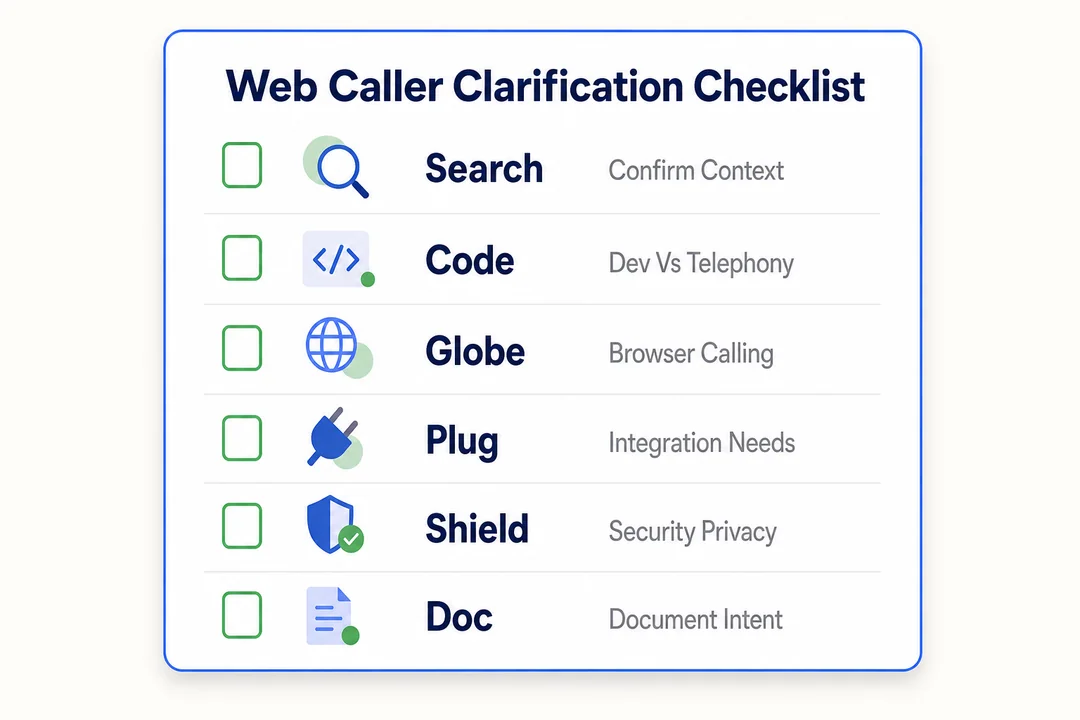
The third mistake is the one worth a worked example, because the fix is mechanical. Add the brand, agency, programme, location, and action word rather than searching the bare phrase:
- Broad:
web caller - Better:
county reporting portal login - Better:
CDC You Call the Shots training
Frequently Asked Questions
The questions below cover all three meanings. The JavaScript answers are the ones most likely to be needed urgently, since that branch is the only one with a runtime error attached — behaviour there is fixed by the ECMAScript specification rather than by any browser setting, so the answers hold regardless of environment.
What does web caller mean?
Web caller has three unrelated meanings, and which one applies depends entirely on what you were doing when the question came up. In web development it refers to Function.prototype.caller, a legacy JavaScript property. In business software it means a browser-based calling service used by sales, support, or contact centre teams. And in a large share of searches it is a stand-in for a specific portal — a hotline, reporting form, application page, or training module — whose exact name the searcher does not remember.
Is web caller a JavaScript term?
Only sometimes, and less often than the written material suggests. Developer documentation dominates discussion of the phrase, which makes the JavaScript meaning look like the primary one, but most searches are non-technical and point at communication software or an institutional portal. The reliable test is context rather than the phrase itself: if you were not looking at code when the question arose, the JavaScript meaning is almost certainly not yours, and reading further into it will cost you time without answering anything.
What is Function.prototype.caller?
Function.prototype.caller is a legacy JavaScript property that attempts to reveal which function invoked the current one, by inspecting the call stack at runtime. It predates modern JavaScript and was never standardised. MDN marks it both non-standard and deprecated. It should not appear in new code, and where it appears in existing code it is usually a maintenance liability waiting for the file to become a module.
Is JavaScript caller deprecated?
Yes, and it is non-standard as well — two separate problems that are often conflated. Deprecated means it is no longer recommended and may be removed; non-standard means it was never part of the specification in the first place, so behaviour was always implementation-defined. The practical consequence is that support and semantics differ across engines and across function types, which makes any code depending on it fragile in ways that are difficult to test for.
Why does caller fail in strict mode?
In strict mode, accessing caller throws a TypeError. Descriptions saying it “may return null” describe legacy sloppy-mode behaviour, not strict mode. The mechanism is specified rather than left to browsers: ECMAScript requires a poison pill accessor on Function.prototype.caller that throws unconditionally on get or set, and implementations may not vary that except for non-strict plain functions. The same throw applies to arrow, async, and generator functions, and to anything inside an ES module, since modules are strict by default.
What is the difference between caller and a stack trace?
caller attempts to expose a single relationship — which function invoked this one — and does so unreliably. A stack trace captures the full sequence of calls that led to the current point, is available through supported tooling rather than a deprecated language feature, and continues to work under strict mode. For anything resembling real debugging, a stack trace supplies more information with none of the compatibility risk, which is why the removal of caller left no functional gap.
Can web caller also mean a browser-based calling service?
Yes, and by search volume this is the largest of the three groups. It covers two quite different needs, though. Some people want to place one call immediately from a browser, which free calling utilities handle with the usual limits on minutes, inbound numbers, and destination coverage. Others are evaluating software for a team, where calling from the browser is one feature alongside routing, recording, CRM integration, and reporting. Free utilities and team platforms are not substitutes for each other.
Why are Google results for web caller so mixed?
Because the query carries no signal about which meaning you intended. When a phrase is genuinely ambiguous, ranking falls back on aggregate popularity, so the highest-traffic interpretation takes the first page regardless of individual intent. For this term that is the browser-calling utilities, which is why a developer searching from a code editor and someone hunting a government training module both land in the same set of free calling services. Adding one identifying word usually resolves it.
How do I find a specific web caller portal or service page?
Search the organisation name first, then add the exact action — login, training, certificate, reporting, application, or hotline. That combination narrows the result set faster than any search operator. Before entering anything, confirm the domain is the official one: a .gov or .edu address, or the agency’s own site. This matters more than usual for portals handling reports, applications, or personal data, where lookalike domains are common.
What should developers use instead of caller?
Pass what you need explicitly rather than discovering it at runtime — an argument identifying the caller is clearer and testable. For diagnosis, use stack traces and browser DevTools, which show the whole chain rather than one link. For production, structured error logging with contextual fields replaces the ad hoc inspection that caller was used for. If you are removing it from legacy code, search for .caller, check whether strict mode or a module boundary is involved, then replace the pattern rather than trying to restore the old behaviour.
Web caller usually has three meanings: a legacy JavaScript property, a browser calling platform, or a specific portal page. Identify your context first, then follow the matching path above to get to the right answer faster.
More in Operations & CX Optimization
View all →
Customer Experience Transformation: Framework and Steps
A telecom customer calls support about a billing error. They explain the problem to the IVR system. Then to the first agent. Then get transferred and explain again. Then escalated—and explain a third time. Forty minutes later, they're exhausted and the problem still isn't solved. This is what broken customer experience looks like. And it's costing you customers. Customer experience…


Customer Experience Strategy: How to Build One That Works
Customer experience is getting worse, not better. Forrester's 2025 Global CX Index found that 21% of brands declined in CX quality while only 6% improved — and in the US, 25% declined against 7% that improved, the second consecutive year of that pattern. Most of those brands were not neglecting customer experience. They were working on it without a strategy…

Predictive Dialer vs Auto Dialer: Key Differences and How to Choose
If you need faster outbound calling but are not sure which dialer fits, this guide gives you a clear answer fast. You and I will compare predictive dialer vs auto dialer in plain English, including how each one works, where each fits best, the trade-offs around call volume, personalization, and TCPA compliance, plus a simple framework to help you choose…



 English
  Russian
  Chinese