

VoIP CRM connects your business phone system with your customer records. That means your team can place calls, see customer details, log activity automatically, and follow up faster without bouncing between tools. For SMB owners, sales managers, support leads, and CRM admins, this setup helps cut manual work, improve sales productivity, and create a better customer experience with real-time customer data at the moment a call happens.
Key Takeaways
- VoIP CRM links internet-based calling with your CRM so calls and customer records stay connected in one workflow.
- Automatic call logging saves time, reduces manual updates, and creates a cleaner history of customer interactions.
- Click-to-call helps teams call faster from the CRM and reduces dialing mistakes.
- Real-time customer data gives sales and support teams useful context during inbound calls.
- Small businesses should prioritize compatibility, ease of setup, reliable sync, and core features before advanced extras.
- Common problems like duplicate records and weak sync rules can usually be avoided with better field mapping and simpler workflows.
- The best solution is the one that fits your daily process, not the one with the longest feature list.
What Is VoIP CRM?
VoIP CRM is the combination of a VoIP phone system and a CRM platform in one connected workflow. VoIP lets your business make and receive calls over the internet. CRM stores customer records, deal activity, notes, and task history. When the two work together, call activity becomes part of the customer record automatically.
This matters because most teams do not struggle with making calls. They struggle with what happens around the call. Notes get missed. Follow-ups slip. Reps switch tabs. Support agents ask customers to repeat information. A good phone CRM integration fixes that by making your phone system part of the same workspace where your team already manages leads, accounts, and tickets.
VoIP CRM in simple terms
In simple terms, VoIP CRM means your phone system and CRM talk to each other.
A rep gets an incoming call. The CRM finds the contact. The customer record opens. The rep sees past calls, notes, open deals, or support issues. When the call ends, the system logs the activity automatically.
That is the core value. One call. One record. One shared history.
- VoIP handles the call through the internet.
- CRM holds the customer data and activity history.
- The integration ties the conversation to the right record with automatic call logging and real-time customer data.
Phone CRM integration vs. standalone phone systems
A standalone phone system can still work for a very small team. But once call volume grows, separate tools create more admin work and weaker visibility.
| Workflow area | Integrated VoIP CRM | Standalone phone + separate CRM |
|---|---|---|
| Call logging | Automatic or near real-time | Manual entry is often required |
| Customer context | Visible during the call | Users must search manually |
| Tab switching | Minimal | Frequent |
| Follow-up tasks | Can be triggered automatically | Usually manual |
| Reporting | More complete and accurate | Often fragmented |
| Data consistency | Better with sync rules | Higher risk of missing notes |
The practical takeaway is simple. If your team depends on calls to sell, support, or retain customers, integrated cloud telephony usually creates better workflow discipline than separate tools.
Common examples: Salesforce, HubSpot, Zendesk, Pipedrive, and Zoho CRM
These are common CRM platforms used with VoIP tools:
- Salesforce: Often used by larger teams with more complex processes and deeper automation needs.
- HubSpot: Popular with growing businesses that want simple setup and easy adoption.
- Zendesk: A strong fit for support-first teams that care about tickets and service context.
- Pipedrive: Good for smaller sales teams that want a simple pipeline view.
- Zoho CRM: Flexible for SMBs that want broad features at a value-oriented price point.
How VoIP CRM Integration Works
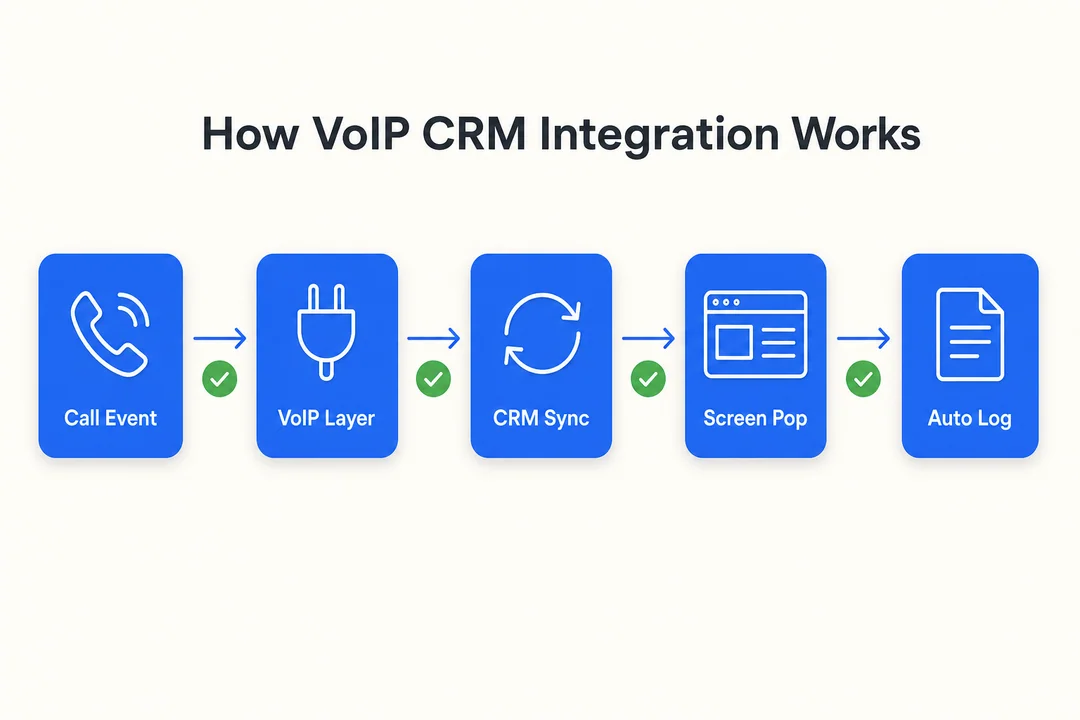
At a high level, a VoIP CRM integration connects two systems so they can exchange data automatically. The connection usually runs through APIs (software connectors that let applications share data). When a call starts, ends, or gets missed, the phone system sends that event to the CRM. The CRM then updates the right contact, account, deal, or ticket record.
The exact behavior depends on the provider and CRM. Some integrations are native. Some use third-party connectors. Some log only call basics. Others also sync recordings, transcripts, notes, and task triggers.
A typical process looks like this:
- A call comes in or a rep clicks a number inside the CRM.
- The VoIP system identifies the phone event.
- The integration matches the number to an existing CRM contact or creates a new activity.
- The CRM displays caller context or opens the related record.
- After the call, the system logs call details such as time, duration, direction, and agent.
- Optional workflows create tasks, attach notes, or save recording links.
API connectivity and data synchronization
APIs are the connectors behind most VoIP CRM setups. They allow the phone platform and CRM to share updates without manual copying.
In practice, data synchronization often covers events like:
- Call started
- Call answered
- Missed call
- Call ended
- Notes added after the call
Some sync actions happen instantly. Others happen within a short delay. That is normal. Native integrations are often easier to maintain because the vendor already supports the connection. Custom API setups can offer more flexibility, but they usually require more admin time and testing.
What gets shared between VoIP and CRM systems
Not every integration shares the same fields, but most sync a common set of call and contact data.
Typical shared data includes:
- Phone number
- Contact name
- Company or account
- Call direction, inbound or outbound
- Timestamps
- Call duration
- Assigned rep or agent
- Notes
- Call recording link
- Transcript link
- Lead or deal association
Field mapping matters here. Field mapping means deciding which data goes where. If phone number formats or record rules are inconsistent, logs may attach to the wrong contact or create duplicates.
| Data type | Why it matters |
|---|---|
| Phone number | Used for matching calls to CRM records |
| Call duration | Supports reporting and coaching |
| Notes | Preserves context for the next interaction |
| Deal association | Connects calls to revenue activity |
| Agent info | Helps with ownership and accountability |
How call data appears inside the CRM
Once the integration is active, phone activity usually shows up in places your team already uses.
Common locations include:
- Contact timeline
- Account or company record
- Deal or opportunity record
- Activity feed
- Follow-up task list
Common automatic actions include:
- Logging the call
- Saving the timestamp and duration
- Attaching notes
- Creating a callback task
- Storing a recording or transcript link
Example: a rep reviews a lead before calling back. Instead of asking what happened last time, the rep opens the CRM record and sees the missed call from yesterday, the note about pricing questions, and a reminder to follow up today.
Real-time customer data during incoming calls
This is where screen pops become valuable. A screen pop is an incoming call window that shows customer context before or during the call.
It may display:
- Caller name
- Company
- Recent calls
- Open support tickets
- Deal stage
- Assigned owner
- Pending tasks
This improves first-response quality. The rep or agent starts with context instead of guessing. Customers do not need to repeat basic information.
One limitation matters: this works best when contact matching is clean. If caller ID is missing or the number is stored in different formats, the pop-up may not find the right record.
Key Benefits of VoIP CRM Integration
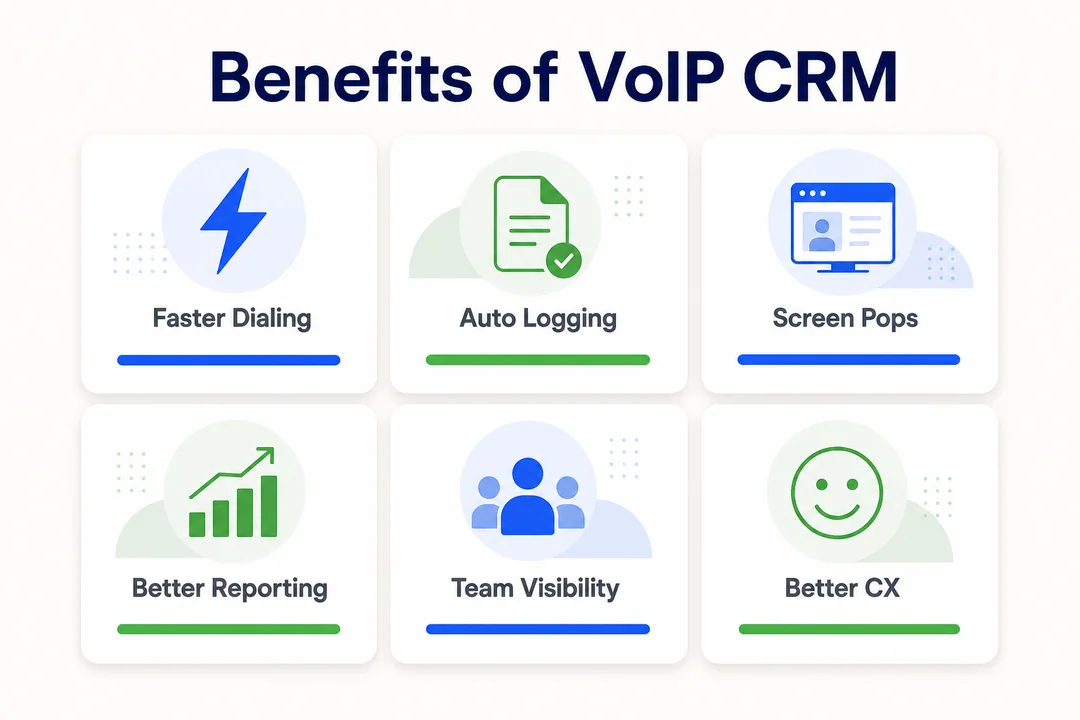
The best reason to use VoIP CRM is not the technology itself. It is the business outcome. A connected system helps teams move faster, keep better records, and make each conversation more useful.
Automatic call logging and fewer manual tasks
Manual call updates waste time, especially for teams that make or receive calls all day. Reps often forget to log short calls, missed calls, or follow-up notes. That weakens reporting and creates gaps in customer history.
Automatic call logging reduces that admin burden.
For example, an SDR making 40 calls a day should not spend extra time updating every record by hand. The integration can log the call, save duration, and attach the activity to the lead automatically.
Benefits include:
- Less manual data entry after each call
- More complete CRM activity history
- Fewer missed records and cleaner updates
Better sales productivity and faster follow-up
When calling, logging, and follow-up happen in one place, reps lose less time between actions. That matters in active pipelines where speed often affects conversion.
A simple workflow looks like this:
- A rep clicks a number inside the CRM.
- The call ends and the activity logs automatically.
- A callback task is created if the lead did not answer.
- The rep moves to the next call without extra admin work.
This supports sales pipeline management by keeping next steps visible and reducing forgotten leads.
Improved customer experience through context-aware calls
Customers notice when your team already knows who they are and why they are calling. That context reduces friction and builds trust.
Example: a returning customer calls support about an open billing issue. The agent sees the account, previous call note, and current case status before answering. The customer does not need to start from zero.
That leads to:
- Faster issue handling
- Less repetition
- More personalized conversations
More accurate call center analytics and reporting
Call reporting is only useful when the data is complete. If some calls live in the phone tool and others are manually entered in the CRM, reports become unreliable.
Integrated systems improve metrics like:
- Call volume
- Missed call rate
- Answer rate
- Response time
- Talk time
- Follow-up completion
- Conversion by call activity
Cleaner reporting helps managers coach better, spot bottlenecks, and make smarter staffing decisions.
Stronger lead management workflows
Calls are often the first real signal of buying intent. A good integration makes sure that signal does not get lost.
Example workflow:
- An inbound lead call creates or updates the contact record.
- The lead is assigned to the right owner.
- A note or outcome is saved after the call.
- A follow-up reminder is triggered automatically.
This makes lead management workflows more consistent and easier to track.
Reduced data entry errors and missed interactions
When phone activity and CRM records live in different places, teams create gaps without meaning to. Notes get typed twice. Contact details go out of date. Calls never make it into the account history.
A synced setup gives you a stronger single source of truth.
Common issues it helps reduce:
- Duplicate notes
- Missed follow-ups
- Outdated contact info
- Incomplete call history
- Confusion across sales and support teams
Main Features of a Good VoIP CRM System
Not every business needs advanced features. But a solid VoIP CRM setup should cover the daily basics well. Start with workflow value, not feature volume.
Click-to-call from the CRM
Click-to-call lets users place calls by clicking a phone number inside the CRM. The call then starts through the browser, desktop app, or embedded dialer.
This helps because it removes extra steps and speeds up outbound work.
Quick benefits:
- Faster calling from contact and deal records
- Fewer dialing errors
- Easier rep adoption for daily use
Call recording and call history
Call recording supports coaching, quality assurance, and dispute review. Searchable call history is just as useful because teams often need to find when a customer called, who handled it, and what happened next.
This is especially helpful for:
- Sales review and training
- Support quality checks
- Escalation review
- Compliance checks
Recording laws vary by state and country. Make sure your process includes proper disclosure where required.
Contact sync and single source of truth
Contact sync keeps records aligned between the phone system and CRM. Some systems offer one-way sync. Others offer two-way sync.
This matters because synced contacts improve:
- Caller ID matching
- Record accuracy
- Ownership visibility
- Reporting consistency
Good systems also let admins control conflict rules, such as which platform wins if two records do not match.
Context-aware incoming call pop-ups
Incoming call pop-ups show the caller’s context right when the phone rings. That can include account details, recent conversations, tickets, or deal status.
This is especially useful for:
- Support teams handling repeat callers
- Account managers managing renewals
- Sales reps responding to warm leads
The result is less searching, faster answers, and more informed conversations.
Workflow automation and task triggers
Automation helps turn call activity into the next action without relying on memory alone.
Common post-call automations include:
- Create a follow-up task
- Assign the record to the right rep
- Update lead stage
- Send an internal alert
- Route the call or record to the right queue
Start simple. A few reliable automations usually create more value than a large workflow that no one trusts.
SMS and follow-up automation
SMS can be a useful add-on when your team needs quick follow-up after a call.
Common examples:
- Appointment reminders
- Missed-call text responses
- Confirmation messages
- Simple post-call outreach
Some tools also support cross-platform SMS triggers from CRM workflows. Useful, but not essential for every team.
Common Use Cases for Sales and Support Teams
The value of VoIP CRM shows up in daily work. These are the most common use cases teams care about.
Sales pipeline management
Sales teams use VoIP CRM to keep call activity tied to deals. When calls, notes, and tasks stay linked to the pipeline, it becomes easier to see what is moving and what is stalled.
Example: a rep calls a prospect, logs the outcome automatically, and sets a next-step task on the deal record. The manager can then review call activity without asking for a manual update.
Customer support automation
Support teams benefit from caller recognition, ticket visibility, and call routing tied to customer records.
Useful outcomes include:
- Faster recognition of repeat callers
- Better context from ticket history
- Smarter routing to the right agent
Example: a customer calls back about an unresolved issue. The agent sees recent ticket history before answering and continues the conversation without repeating intake questions.
Lead management workflows
VoIP CRM helps structure both inbound and outbound lead handling.
A simple lead flow looks like this:
- A lead calls in or receives an outbound call.
- The system matches or creates the lead record.
- The rep logs notes and qualification details.
- A follow-up task or ownership rule is triggered.
- The lead moves to the next stage.
That structure improves response speed and lead accountability.
Internal team collaboration
Shared call history helps teams work from the same record.
Benefits include:
- Sales can see support conversations
- Support can review account notes before responding
- Account managers can track recent outreach
This reduces handoff confusion and improves continuity.
Small business phone operations
Small teams often feel the biggest impact because fewer people carry more responsibility. When one person handles sales, support, and follow-up, separate tools create more friction.
An integrated setup helps by:
- Reducing admin work
- Keeping customer history in one place
- Making follow-up more consistent
For small business phone operations, simplicity usually beats complexity.
What to Look for in a VoIP CRM Integration
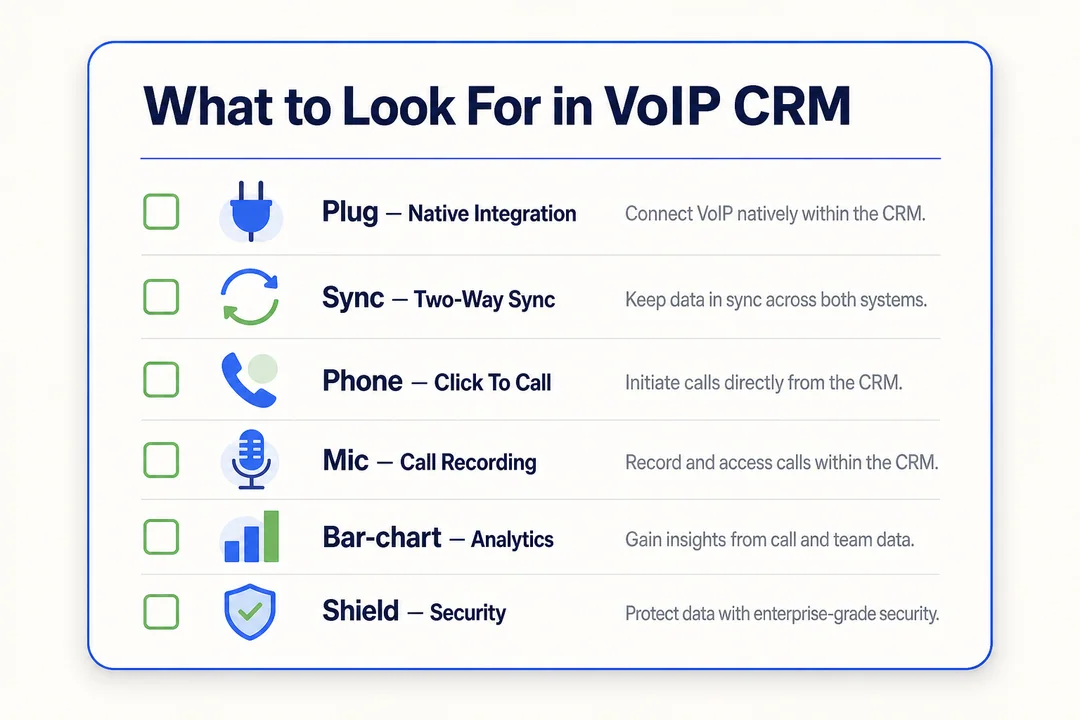
When comparing options, focus on workflow fit. A good integration should save time every day, not create a new admin layer.
Native integration vs. third-party integration
A native integration is built and supported directly by the VoIP provider, the CRM provider, or both. A third-party integration uses middleware (software that connects tools) to bridge the two systems.
| Type | Strengths | Tradeoffs |
|---|---|---|
| Native integration | Easier setup, fewer moving parts, stronger vendor support | May support fewer custom workflows |
| Third-party integration | More flexibility, broader automation possibilities | More configuration, more maintenance risk |
For most SMBs and non-technical buyers, native is usually the safer starting point. Use third-party options when you need specific workflows the native app does not support.
Ease of setup and daily usability
Even a powerful system fails if users avoid it. Daily usability matters as much as feature depth.
Check these basics:
- How many clicks does it take to place a call?
- Can users review logs quickly?
- Do notes save easily?
- Does the mobile or browser experience feel stable?
- Can non-technical users learn it fast?
If the answer is no, adoption will suffer.
CRM compatibility and marketplace support
Always verify official support before buying. A vendor may say it integrates with your CRM, but the real question is how well.
Places to check:
- Salesforce AppExchange
- HubSpot App Marketplace
- Zendesk Marketplace
Also confirm plan limits. Some integrations only work on higher pricing tiers or exclude certain features like recording sync or workflow triggers.
Call logging, transcription, and recording options
These features are related, but not the same.
| Feature | What it does | Best for |
|---|---|---|
| Basic call logging | Saves call time, duration, direction, and contact link | Core visibility |
| Call recording | Stores the audio of the conversation | Review and coaching |
| AI-driven transcription | Converts speech to text | Search and fast review |
| AI-powered summarization | Creates a short recap of the call | Speeding up follow-up |
Advanced AI can help, but it is not required for every team. Many businesses get strong value from reliable logging and searchable history alone.
Reporting, scalability, and automation support
Your needs will change as the team grows. Make sure the system can support that without forcing a full replacement too early.
Look for:
- User and line scalability
- Queue and routing support
- Dashboards that go beyond basic call counts
- Workflow flexibility for follow-up and assignment
- Multi-team reporting if sales and support both use the system
Future-proofing matters, but avoid paying upfront for features you will not use soon.
Security and data sync reliability
Trust depends on data quality and access control. If the sync is unreliable, the CRM record stops being useful.
Check for:
- Role-based permissions
- Data protection standards and encryption where applicable
- Audit visibility for changes
- Sync frequency
- Error handling or failed sync alerts
If possible, ask how the vendor handles mismatched records and retry logic for failed updates.
Best CRM Platforms Commonly Used with VoIP
A CRM is not better just because it is popular. The right fit depends on your process, team size, and how much complexity you want to manage.
| CRM | Ease of use | Automation depth | Sales vs support orientation | Scalability | Ideal fit |
|---|---|---|---|---|---|
| Salesforce | Moderate to advanced | High | Sales-heavy, flexible for both | High | Larger or process-heavy teams |
| HubSpot | High | Moderate to high | Balanced | High | Growing SMBs |
| Zendesk | Moderate | Moderate | Support-first | High | Service-driven teams |
| Pipedrive | High | Moderate | Sales-first | Moderate | Small sales teams |
| Zoho CRM | Moderate | Moderate to high | Balanced | Moderate to high | Value-focused SMBs |
Salesforce
Salesforce is a strong fit for larger teams that need deep customization, detailed workflows, and enterprise-level sales automation. It is powerful, but setup and admin work can be heavier than simpler platforms. If your process is complex, the extra control can be worth it.
HubSpot
HubSpot is known for usability and quick adoption. It works well for growing teams that want clear activity visibility, solid sales workflows, and a smoother learning curve. Many SMBs prefer it because it is easier to operate day to day.
Zendesk
Zendesk is a natural fit for support-centric teams. Its strength is customer service context, ticket visibility, and smoother support workflows. If your phone activity needs to connect closely with service operations, it is a practical choice.
Pipedrive
Pipedrive keeps things simple. It is designed around pipeline visibility and easy sales execution. Smaller sales teams often choose it because it gives structure without too much complexity.
Zoho CRM
Zoho CRM offers broad functionality and good flexibility for SMBs. It is often chosen by teams that want strong configurability and value. It can do a lot, but setup quality matters if you want the system to stay easy to use.
VoIP CRM for Small Business
Small businesses do not need a large call center to benefit from VoIP CRM integration for small business. In many cases, smaller teams gain more because each person handles multiple tasks.
Why small teams benefit from integration
Small teams often lose time to manual work because one person may handle sales calls, support follow-up, and basic CRM updates all in one day.
A connected setup helps by:
- Keeping calls and customer info in one place
- Reducing admin work after each conversation
- Making follow-up less dependent on memory
For a lean team, even small time savings add up quickly.
Simple setup priorities for SMBs
SMBs should keep setup practical.
- Choose a VoIP tool with a native CRM integration.
- Confirm the core features work on your pricing plan.
- Keep the workflow simple at launch.
- Train users on one calling and follow-up process.
- Add more automation only after the basics work well.
Over-customizing early usually creates more confusion than value.
Features that matter most for lean sales and support teams
Start with the essentials:
- Automatic call logging
- Click-to-call
- Contact sync
- Call notes
- Simple reporting
These usually matter more than advanced AI features in the first phase. If your core workflow is fast and reliable, you can always expand later.
Common Challenges and How to Avoid Them
Most VoIP CRM problems are not caused by the idea of integration. They come from poor setup choices, weak data rules, or too much complexity too early.
Disconnected data between tools
Problem: calls live in one system while notes and customer history live in another. That creates fragmented records and weaker follow-up.
Fixes:
- Choose an integration with reliable sync
- Decide which tool is the source of truth
- Review sync settings regularly
- Check whether call records attach to the correct CRM objects
If your team cannot trust where data lives, they will stop using the system properly.
Duplicate records and sync issues
Duplicate records are common when phone numbers are stored in different formats or when users import data manually without clear rules.
Common causes:
- Inconsistent phone number formatting
- Weak contact matching rules
- Multiple imports from different sources
- No ownership rules for new records
Prevention checklist:
- Normalize phone numbers into one standard format
- Define contact ownership rules
- Use duplicate detection where available
- Test matching logic before rollout
Small cleanup work upfront prevents much bigger reporting problems later.
Too much complexity for non-technical users
Adoption drops when users face cluttered screens, too many fields, or confusing workflows.
Keep it simple:
- Use minimal required fields
- Start with one standard call workflow
- Train the team in short, task-based sessions
A system people actually use is better than a system that looks powerful on paper.
Choosing features you do not need
Buying based on feature count is a common mistake. Many teams pay for advanced tools they never use well.
Start with:
- Reliable call logging
- Easy calling from the CRM
- Basic contact sync
- Simple follow-up automation
Add later if needed:
- AI summaries
- Deeper analytics
- Omnichannel routing
- More complex automation layers
A phased rollout usually creates better adoption and lower risk.
Why VoIP CRM Matters for Business Communication Systems
VoIP CRM matters because it connects communication with customer context. In modern business communication systems, calls should not sit apart from sales, support, or account data.
It supports a broader stack that may include:
- Unified Communications (UC), where calling, messaging, and collaboration tools work together
- Customer Experience Management (CXM), where teams use shared context to improve service quality
- Sales and support infrastructure, where activity history drives follow-up and accountability
The strategic value is simple. When communication data and customer data stay connected, the business can respond faster, work with less friction, and make better decisions from real interaction history.
How to Set Up VoIP CRM Integration
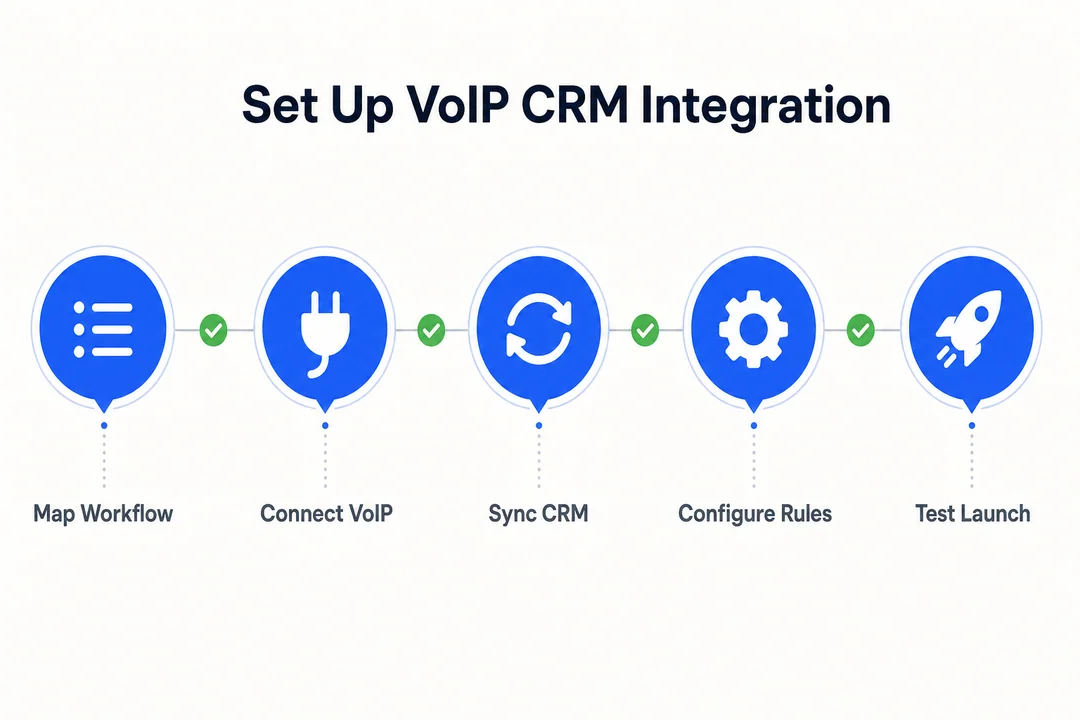
Setting up a VoIP CRM integration is usually straightforward if you keep the first rollout simple.
Choose compatible tools
Start by checking whether your VoIP provider supports your CRM directly. Also confirm which pricing plans include the integration and whether features like recording sync, click-to-call, or workflow triggers are available.
Connect accounts through a native app or API
Use the native app or marketplace listing first if possible. It is usually easier to set up and support. Use a custom API connection only if you have a specific workflow the standard integration cannot handle.
Map contacts, call logs, and notes
Field mapping means deciding how contact details, phone numbers, notes, and call logs line up between systems. Make sure number formatting is consistent so records match correctly.
Test data synchronization and call logging
Before full rollout, test the core scenarios:
- Inbound calls
- Outbound calls
- Missed calls
- Call notes
- Recording links
- Record matching inside the CRM
Check that each event lands on the correct contact or deal record.
Train the team on click-to-call and follow-up workflows
Setup alone is not enough. Users need a clear process for when to call, where to save notes, and how follow-up should work.
Keep training simple:
- Show how to use click-to-call
- Explain what gets logged automatically
- Set expectations for notes and follow-up tasks
- Review a few real call scenarios with the team
Frequently Asked Questions
What is VoIP CRM integration?
VoIP CRM integration links an internet-based phone system with your CRM so call activity and customer data stay connected. It can sync call logs, contact matching, notes, and follow-up actions into one shared workflow.
How does VoIP CRM help sales teams?
It helps sales teams call faster, log activity automatically, and follow up with better discipline. Reps spend less time switching tools and more time moving leads through the pipeline with complete call history visible in the CRM.
Can VoIP CRM automatically log calls?
Yes. Many integrations can automatically log inbound and outbound calls, including timestamps, call duration, direction, and sometimes notes, recordings, or transcript links. Exact logging depth depends on the provider and CRM connection.
What is click-to-call in CRM software?
Click-to-call lets users place a call by clicking a phone number inside the CRM. It speeds up outbound calling, reduces manual dialing, and helps reps work from the same place where they manage contacts and deals.
Is VoIP CRM useful for small businesses?
Yes. Small businesses often benefit a lot because they have less time for manual admin. VoIP CRM helps small teams keep customer records organized, improve follow-up, and run a simpler calling workflow with fewer tools.
Conclusion
VoIP CRM connects calling with customer data so teams can work faster and smarter. It reduces manual admin, improves follow-up, gives reps better context during calls, and makes reporting more useful. The best setup is usually not the most complex one. It is the one that fits your workflow, syncs reliably, and covers the core features your team will actually use.
If you are evaluating options, start with compatibility, ease of use, and reliable automatic call logging. Then shortlist tools that match your CRM, test them with a small team, and expand only after the workflow proves itself.
More in Operations & CX Optimization
View all →
Customer Experience Transformation: Framework and Steps
A telecom customer calls support about a billing error. They explain the problem to the IVR system. Then to the first agent. Then get transferred and explain again. Then escalated—and explain a third time. Forty minutes later, they're exhausted and the problem still isn't solved. This is what broken customer experience looks like. And it's costing you customers. Customer experience…


Web Caller Meaning: JavaScript caller, Calling Tools or Portals
“Web caller” is one of those phrases where the search results and the searcher are frequently talking about different things. Three unrelated audiences use it: developers hitting an error on the legacy JavaScript caller property, buyers evaluating browser-based calling software, and people trying to reach a specific portal or training page whose exact name they cannot recall. That fragmentation is…

Customer Experience Strategy: How to Build One That Works
Customer experience is getting worse, not better. Forrester's 2025 Global CX Index found that 21% of brands declined in CX quality while only 6% improved — and in the US, 25% declined against 7% that improved, the second consecutive year of that pattern. Most of those brands were not neglecting customer experience. They were working on it without a strategy…



 English
  Russian
  Chinese