

An assisted dialer helps sales teams, SDR managers, RevOps teams, and call center leaders increase live conversations without forcing reps to waste hours on manual dialing. This guide explains what assisted dialing is, how it works, why teams use it, how it compares with other dialers, and when it is the right fit for your outbound calling workflow.
Key Takeaways
- An assisted dialer is outbound calling software that helps reps reach live people faster while keeping a human involved in the calling process.
- Most teams use assisted dialer and agent-assisted dialer to mean the same thing, though exact workflows can vary by vendor.
- The basic workflow is simple: calls start through a human-led process, non-live outcomes are filtered out, and live answered calls are routed to a rep.
- The biggest benefit is more time in real conversations and less time spent dialing, waiting through rings, and handling voicemails.
- Assisted dialing often sits between manual calling and heavier automation like power dialers and predictive dialers.
- It can improve rep workflow, reduce repetitive busywork, and lower the risk of dead air compared with more aggressive dialing systems.
- Results still depend on lead quality, timing, talk tracks, routing setup, and rep readiness.
- CRM integration matters because reps need account context, notes, and follow-up history at the moment the call is connected.
- Compliance and call screening still matter, so teams should review vendor workflows, calling practices, and legal requirements carefully.
What Is an Assisted Dialer?
Assisted dialer definition in plain English
An assisted dialer is a type of sales dialer software that helps reps place outbound calls more efficiently without removing the human from the process. It is designed to reduce wasted time on dialing, ringing, voicemail, and failed call attempts so reps can spend more time talking to real people.
It is not the same as fully manual dialing, where the rep handles every step alone. It is also not the same as fully autonomous dialing, where automation drives most of the process. Instead, it works as a middle layer between human control and automation.
In practice, sales teams, telemarketing teams, and outbound call centers use assisted dialing to improve call flow. Instead of dialing every number manually and waiting through rings, the rep gets connected faster when a live person answers.
- What it is: a human-guided outbound calling workflow with automation support.
- What it is not: a fully manual process or a fully robotic calling system.
Assisted dialer vs agent-assisted dialer: are they the same?
Usually, yes. Most vendors and buyers use assisted dialer and agent-assisted dialer interchangeably. In day-to-day buying conversations, they often refer to the same category of outbound calling software.
The small difference is usually in emphasis. Some providers use agent-assisted dialer to highlight stronger human involvement in starting calls, screening outcomes, or handling live call handoffs. That does not always mean it is a separate product category. In many cases, it is just branding or a slightly different workflow design.
When comparing tools, focus less on the label and more on how the workflow actually works.
Usually the same
- A human stays involved in the process.
- The system helps remove non-live call outcomes.
- Live answers are passed to the rep more efficiently.
May vary by vendor
- Who starts the call.
- How voicemail or busy lines are filtered.
- How quickly live calls are handed to available reps.
The main goal of assisted dialing in sales and outbound calling
The main goal of assisted dialing is simple: reduce time wasted on manual dialing and increase time spent in live conversations. It helps teams avoid low-value tasks like waiting through rings, handling busy tones, and retrying bad numbers.
For most teams, that leads to three clear outcomes:
- More live conversations per rep.
- Better productivity and more consistent workflow.
- Stronger morale because reps spend less time on repetitive dead-end activity.
How Does an Assisted Dialer Work?
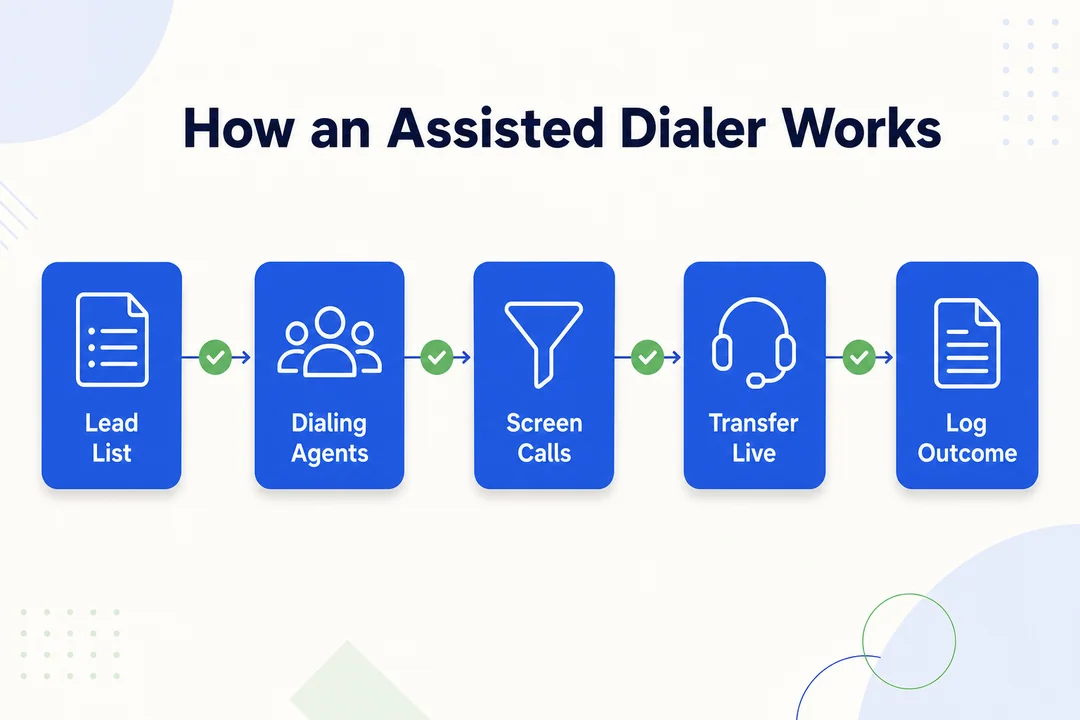
Step 1: A human agent or system starts outbound calls
Assisted dialing usually starts with a human action or a defined workflow, not a fully autonomous robocall-style process. In simple terms, human-initiated dialing means a person starts the call sequence, batch, or task rather than the system calling people on its own without that trigger.
In practice, a rep might click to start a calling queue, launch a batch from a list, or work through assigned contacts inside a sales tool. Some platforms make this feel highly automated, but the starting action still matters.
The exact setup depends on the software. One tool may require each rep to start their own queue. Another may let a team follow a managed workflow with routing logic in place.
What matters is this: do not assume every dialer that claims automation works the same way. The details of call initiation, routing, and rep involvement can change the real experience a lot.
Step 2: No answers, voicemails, and busy lines are filtered out
This is where the efficiency gain starts to show. Automated call filtering helps remove low-value outcomes before they eat up too much rep time. Instead of making reps sit through every ring or voicemail pickup, the system helps identify what happened on the call.
Common outcomes that may be filtered include:
- Voicemail
- Busy tone
- No answer
- Disconnected line
- Invalid number
This does not mean every bad outcome disappears. Poor contact data still hurts performance. If the list is full of old numbers, wrong contacts, or low-intent leads, even a good assisted dialer cannot fix the root problem.
Still, filtering removes a large share of repetitive delay. That means more time for real talk time and less time wasted on call outcomes that rarely move pipeline forward.
Step 3: Live answered calls are routed to the sales rep
When a real person answers, the system routes or transfers that call to an available rep. This handoff has to happen fast. If there is too much delay, the first impression suffers and the prospect may hang up.
A good assisted dialer aims to make that transition feel smooth. The goal is simple: the person answers, the call reaches the rep quickly, and the conversation starts naturally.
That usually looks like this:
- Live answer detected: the system identifies that a real person is on the line.
- Routed to rep: the call is sent to the assigned or available rep.
- Rep begins conversation: the rep opens with context and moves into the conversation.
Speed matters here because lag creates awkwardness. Even strong software still needs strong routing rules. If rep assignment is messy or availability logic is weak, the handoff quality drops fast.
Step 4: The rep joins with context from CRM or call notes
The best assisted dialer tools do more than connect calls. They also show useful context at the exact moment the rep picks up.
That context often includes:
- CRM record (customer relationship management record)
- Previous touchpoints
- Account notes
- Prior call outcomes
- Next-step reminders
This matters because the rep can start with relevance. Instead of asking basic questions the team already knows, they can open with a clearer, more natural message and move faster into qualification or next steps.
What human-assisted dialing looks like in a real workflow
A typical human-assisted dialing workflow is straightforward:
- New leads enter a calling queue or sequence inside a sales engagement platform.
- The rep starts the assigned call task or batch.
- The system works through the list and filters out non-live outcomes like voicemail, no answer, or disconnected numbers.
- When a live person answers, the system routes the call to the rep.
- The rep joins with contact context from the CRM, speaks with the prospect, and qualifies interest.
- After the call, the rep logs notes, updates the disposition (call outcome), and sets a follow-up task.
This setup works well when the workflow is tight. It breaks down when routing is slow, list ownership is unclear, or notes are poor. In real teams, awkward handoffs usually come from process gaps, not from the concept of assisted dialing itself.
Assisted Dialer Example in a Real Sales Workflow
Example: SDR team handling high lead volume
Picture an SDR team working through a large outbound list after a webinar, trade show, or inbound demo request surge. Each rep needs to move fast, but fully manual dialing turns that work into a grind. Too much time gets lost between conversations.
This is where an assisted dialer helps. Instead of each SDR dialing every number, waiting through rings, hitting voicemail, logging outcomes, and moving manually to the next lead, the workflow removes much of that dead time.
It is especially useful when teams are dealing with:
- Large daily call lists
- Follow-up after inbound interest
- Territory-based prospecting
- Event lead outreach
- Repeatable qualification workflows
For high-volume SDR teams, the win is not magic. It is simple operational efficiency. Reps spend less time on failed call attempts and more time talking to leads who actually answered.
What the rep experiences before, during, and after the handoff
Before the handoff
- The rep gets a list assignment or queue.
- The system shows contact context and task readiness.
- The rep starts the call workflow and stays ready for a live connect.
During the handoff
- A live answer is routed in.
- The rep sees the contact record and opens quickly.
- The rep asks qualification questions and moves the conversation forward.
After the handoff
- The rep logs notes.
- The rep selects a disposition.
- The rep schedules next steps, follow-up tasks, or a meeting.
This is why the rep experience matters. If the handoff is smooth, the workflow feels efficient. If it is clunky, the rep feels rushed and the prospect feels the delay.
Why this hybrid dialing system reduces wasted time
A hybrid dialing system removes the repetitive parts of calling without removing the rep from the conversation. That is the core value.
In manual calling, time gets lost in small pieces all day:
- Dialing numbers
- Waiting through rings
- Reaching voicemail
- Handling bad numbers
- Switching between tabs
- Logging repetitive outcomes
Assisted dialing strips out much of that friction. The result is:
- More conversation time
- Less idle time
- More consistent daily activity
That said, the gains are strongest when lead quality, talk tracks, and coaching are already decent. A better dialer improves workflow. It does not rescue a broken outreach strategy.
Key Benefits of Using an Assisted Dialer
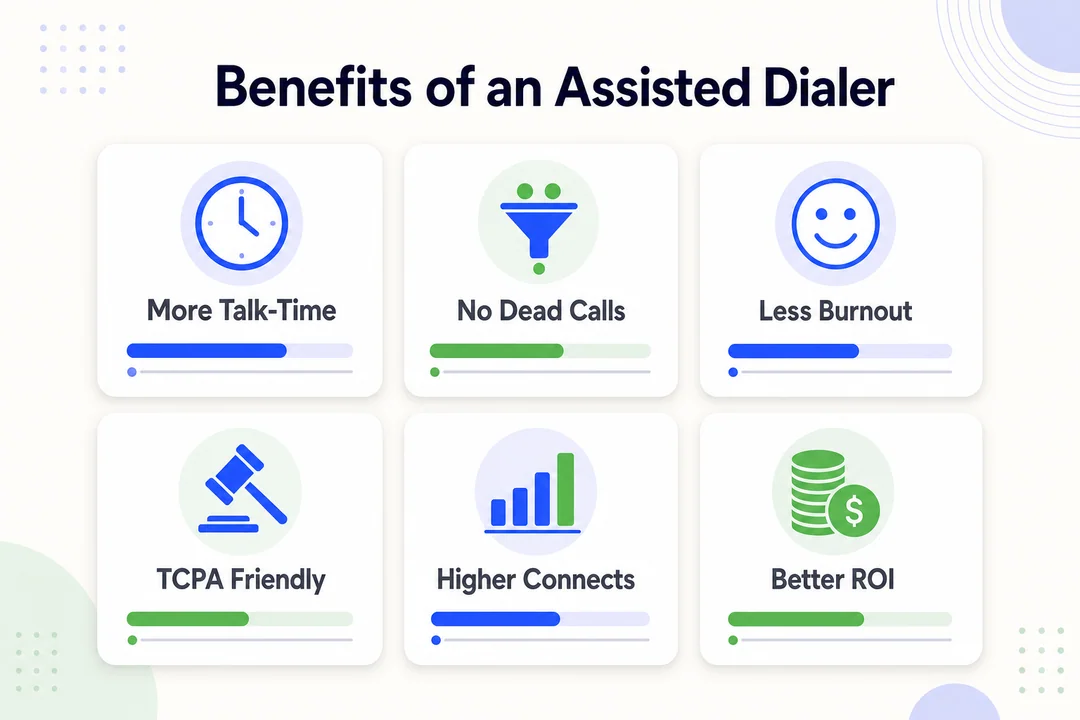
More live conversations per hour
The biggest benefit of an assisted dialer is simple: reps spend more of the hour talking to real people. They spend less time dialing, waiting, and handling failed attempts.
That usually improves efficiency, but it is not a guarantee of better sales outcomes by itself. Results still depend on lead quality, call timing, and how trusted the calling number appears.
Still, for most outbound teams, more live conversations create more chances to qualify, book meetings, and move pipeline.
Better sales rep productivity and less manual busywork
Assisted dialing cuts down repetitive manual steps such as:
- Dialing every number by hand
- Listening through no answers
- Retrying bad numbers
- Jumping between tools and tabs
- Logging repetitive call outcomes manually
The benefit is not just speed. It is simpler workflow. Reps can stay focused on talking, qualifying, and moving leads forward.
Managers benefit too. A cleaner process usually leads to more consistent rep activity and better visibility into what is really happening on the floor.
Reduced sales rep burnout from repetitive dialing
Repetitive low-value work drains energy. That is one reason outbound teams burn out.
Common burnout triggers include:
- Long call blocks with few live answers
- Constant voicemail and no-answer outcomes
- Too much repetitive admin work
Assisted dialing can reduce that friction. Reps get more real conversations and less dead-end activity. That can improve morale, support more consistent performance, and make calling blocks feel less punishing.
It is not a cure-all, but it often removes one of the biggest daily frustrations in outbound work.
Better lead connection quality and faster lead-to-rep connection time
Lead connection quality means the call feels smooth, timely, and relevant when the rep joins. A faster handoff usually helps that first impression.
When routing is configured well, assisted dialing can reduce the gap between answer and rep connection. That lowers awkward silence and gives the rep a better chance to start naturally.
Human involvement matters here too. It helps preserve a more natural conversation flow than heavier automation can sometimes create.
One caution: poor routing can erase this benefit fast. If there is lag or the rep lacks context, the conversation starts on the wrong foot.
More consistent outbound call center workflow
Assisted dialers can make daily workflow more consistent across teams.
Operational benefits include:
- More standardized call handling
- Better supervisor visibility
- Cleaner activity tracking
- Easier coaching across reps
For managers, that consistency often matters as much as raw call volume.
Lower risk of dead air compared with predictive dialers
Dead air is the awkward silence that happens when someone answers but no rep is ready yet.
Predictive dialers can create more of this risk because they push automation harder and often place calls before an agent is fully available. Assisted dialing is usually more controlled because the human stays more involved in the flow.
That does not mean there is no risk. It means the risk is often lower when the system is set up well.
Potential Drawbacks and Limitations
Higher cost than basic manual dialing
Assisted dialing usually costs more than basic manual calling. The cost can include:
- Software subscription fees
- Setup and implementation
- Admin configuration
- Workflow training
- Ongoing management overhead
That does not make it overpriced. It just means the value depends on team size, call volume, and workflow complexity. For a very small team, the extra layer may not pay off yet. For a larger outbound motion, it often does.
Not every team needs an agent-powered outbound calling setup
Some teams simply do not need an agent-powered outbound calling model.
Best fit
- High-volume outbound teams
- SDR and BDR teams
- Appointment-setting teams
- Call centers with repetitive dialing volume
Not ideal
- Low-volume founder-led sales
- Relationship-heavy enterprise selling
- Account managers making fewer, deeper calls
The value of assisted dialing rises as call volume and repetitive outreach rise. If the team makes only a small number of highly personalized calls, manual workflow may still be enough.
Poor handoffs can create awkward customer experiences
The biggest operational risk is a weak handoff.
Common problems include:
- Slight delay after answer
- Rep sounding unprepared
- Repeated questions the prospect already answered
- Abrupt or robotic openers
When routing is weak, automation adds friction instead of removing it.
Practical fixes:
- Tighten routing rules
- Improve screen-pop contact context
- Train reps on fast, natural openers
In real use, handoff quality often matters more than flashy feature lists.
Results still depend on lead quality, scripts, and process setup
An assisted dialer improves workflow. It does not fix bad targeting.
Performance still depends on:
- Lead quality
- Segmentation
- Messaging
- Call timing
- Rep coaching
If those basics are weak, the software will not create strong outcomes on its own.
Assisted Dialer vs Other Dialer Types
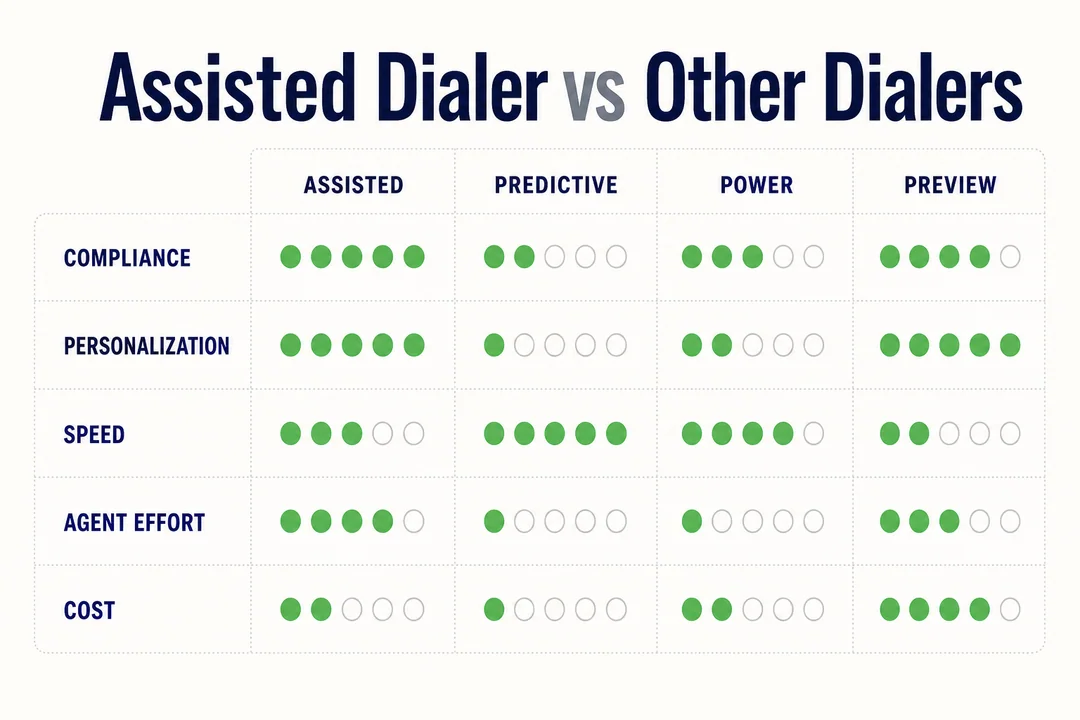
Assisted dialer vs manual dialer
A manual dialer gives the rep full control. The rep chooses each contact, dials each number, and handles every outcome directly. That works well for low-volume or high-personalization sales.
An assisted dialer keeps human control but removes much of the repetitive work. It helps reps move faster through call lists and spend more time in live conversations.
Manual dialing is not obsolete. It is still a good fit for smaller teams or more consultative outreach. Assisted dialing becomes more useful when rep time is getting consumed by repetitive volume.
Assisted dialer vs power dialer
A power dialer usually automates sequential dialing more aggressively. It calls through a list in order, often one contact after another, with less friction between attempts.
An assisted dialer still emphasizes a stronger handoff model and more active human involvement in the workflow. That can make it feel more controlled, especially for teams that care about rep readiness and handoff quality.
A power dialer may be better for teams that want straightforward speed with simpler flow. An assisted dialer may be better for teams that want efficiency but also want tighter control over live-call connection quality.
Assisted dialer vs predictive dialer
A predictive dialer uses heavier automation to place calls based on estimated agent availability. Its goal is to maximize agent utilization at scale. That can work in specialized high-volume environments, but it often brings more complexity.
Compared with a predictive dialer, an assisted dialer usually offers:
- More human control
- Lower dead air risk
- Simpler rep workflow
- A more measured automation level
Predictive dialers can also face more scrutiny around spam labeling and compliance discussions, especially when teams do not fully understand how calls are being initiated and routed. That does not mean predictive dialing is always wrong. It means it is a different operating model.
For teams that want a practical middle ground, assisted dialing is often easier to manage and easier for reps to work with day to day.
Which option offers the best balance of efficiency and human control?
For most business teams, the answer depends on volume and workflow.
- Manual dialing: best for lower volume and high personalization.
- Assisted dialing: best for moderate to high volume when teams want efficiency without giving up human control.
- Predictive dialing: best for aggressive scale in specialized environments that can support the process complexity.
- Power dialing: best for teams that want more speed than manual dialing with simpler automation than predictive.
If your team wants a middle-ground option, assisted dialing is usually the best balance.
| Dialer Type | How It Starts Calls | Automation Level | Human Control | Dead Air Risk | Best For | Main Tradeoff |
|---|---|---|---|---|---|---|
| Manual | Rep dials each call | Low | High | Very low | Low-volume, personalized outreach | Slow and labor-heavy |
| Assisted | Human-led workflow with filtering and handoff | Medium | High | Lower | Teams wanting efficiency plus control | More setup than manual |
| Power | Sequential automated dialing | Medium-high | Medium | Moderate | Faster list processing | Less control than assisted |
| Predictive | System places calls based on availability logic | High | Lower | Higher | Large-scale call environments | More complexity and dead air risk |
Who Should Use an Assisted Dialer?
Outbound sales teams and SDR/BDR teams
Outbound sales teams benefit the most because they live in repetitive prospecting workflows. SDRs and BDRs often work large lists, repeat similar outreach motions, and need more live conversations to hit targets.
Assisted dialing helps them spend less time on the mechanics of calling and more time qualifying interest, booking meetings, and moving leads forward.
Appointment-setting teams and telemarketing teams
Appointment-setting and telemarketing teams usually run structured scripts and high-frequency calling blocks. That makes them a strong fit for assisted dialing.
The workflow is repeatable. The call goals are clear. Efficiency matters. When those teams can reduce wasted dialing time, they often improve both output and consistency.
Call centers managing high lead volume
Call centers handling high lead volume often need more than speed. They need consistency, routing logic, and manager visibility.
Assisted dialing can help by supporting:
- Smoother call flow
- Better rep utilization
- More standardized process
- Easier supervision and coaching
For high-volume teams, workflow control matters almost as much as raw throughput.
Teams that want more efficiency without fully robotic calling
This is the broadest best-fit group. If your team wants more efficiency but does not want calls to feel fully robotic, assisted dialing is a strong option.
It blends automation with human control. It often reduces dead air risk compared with heavier automation. And it gives reps more influence over the conversation stage, where call quality matters most.
Signs Your Team May Need an Assisted Dialer
Reps spend too much time dialing and leaving voicemails
This is one of the clearest warning signs. If reps spend large parts of the day dialing numbers, waiting through rings, and leaving voicemail after voicemail, the workflow is wasting skilled selling time.
That usually means the team has enough calling volume to justify a more efficient model.
Connect rates are low and talk time is inconsistent
Poor connect efficiency often looks like this:
- Lots of call attempts but few real conversations
- Uneven talk time from rep to rep
- Long call blocks with little pipeline movement
Assisted dialing can help reduce workflow waste around those patterns. It will not solve every answer-rate issue, but it can improve how efficiently reps move from attempt to live connect.
Reps show signs of burnout or low morale
Practical warning signs include:
- Low energy during call blocks
- Inconsistent follow-up
- Avoidance of calling tasks
- Declining output
When repetitive work dominates the day, morale usually drops. Assisted dialing can remove some of that friction and help restore a better rhythm.
Your pipeline needs better sales workflow efficiency
If follow-up is slow, lead response is uneven, or call tasks pile up, the problem may be workflow efficiency rather than rep effort alone.
In those cases, assisted dialing can help the team move through more outreach with less drag.
Assisted Dialer and Compliance Basics
Why TCPA compliance comes up in assisted dialing
TCPA (Telephone Consumer Protection Act) is a US law that affects certain outbound calling and messaging practices. That is why dialing technology decisions often raise compliance questions.
When teams evaluate assisted dialing, they often want to understand how the calling workflow works and whether human involvement changes the compliance picture. It is an important topic, but it should be handled carefully.
This is educational, not legal advice.
How human-initiated dialing may differ from ATDS-style workflows
ATDS stands for Automated Telephone Dialing System. In simple terms, it is a legal concept that often comes up when people discuss automated outreach.
Human-initiated dialing is often discussed differently from more automated ATDS-style workflows, but legal interpretation can vary. That is the key point. Do not assume a tool is compliant just because a vendor says the process is human-led.
What matters is the real workflow, the jurisdiction, the consent model, and how the tool is configured.
Why compliance should be reviewed with your legal and operations teams
- Review consent requirements.
- Review local and federal calling laws.
- Review recording rules.
- Review time-of-day restrictions.
- Review vendor settings and workflow configuration.
Assisted Dialers and Modern Call Screening
How call screening and spam labeling affect outbound calling
Many mobile users now see spam warnings, unknown caller labels, or built-in call screening tools. That makes outbound calling harder than it used to be.
Even a good sales team can see lower answer rates if caller reputation is poor or numbers are flagged. This is now a normal part of the outbound environment, not a rare edge case.
Why human-in-the-loop calling may support better connection quality
A human-in-the-loop workflow means a person remains actively involved in the calling process rather than leaving every step to automation.
That may support better connection quality because timing, handoffs, and call flow can feel more natural. It does not guarantee better deliverability or answer rates. But for many teams, it creates a more controlled outreach experience.
What to know about iOS 26 Call Screening without overcomplicating it
Modern mobile call screening, including iOS 26 Call Screening, makes it harder for outbound calls to get answered when the number looks unfamiliar or untrusted.
The practical takeaway is simple. Focus on sound outbound basics:
- Use clean contact lists
- Maintain proper caller identity
- Follow good calling hygiene
- Call at better times
- Avoid overreaching with aggressive automation
The goal is not to look for shortcuts. It is to run a cleaner, more credible calling program.
Features to Look for in Assisted Dialer Software
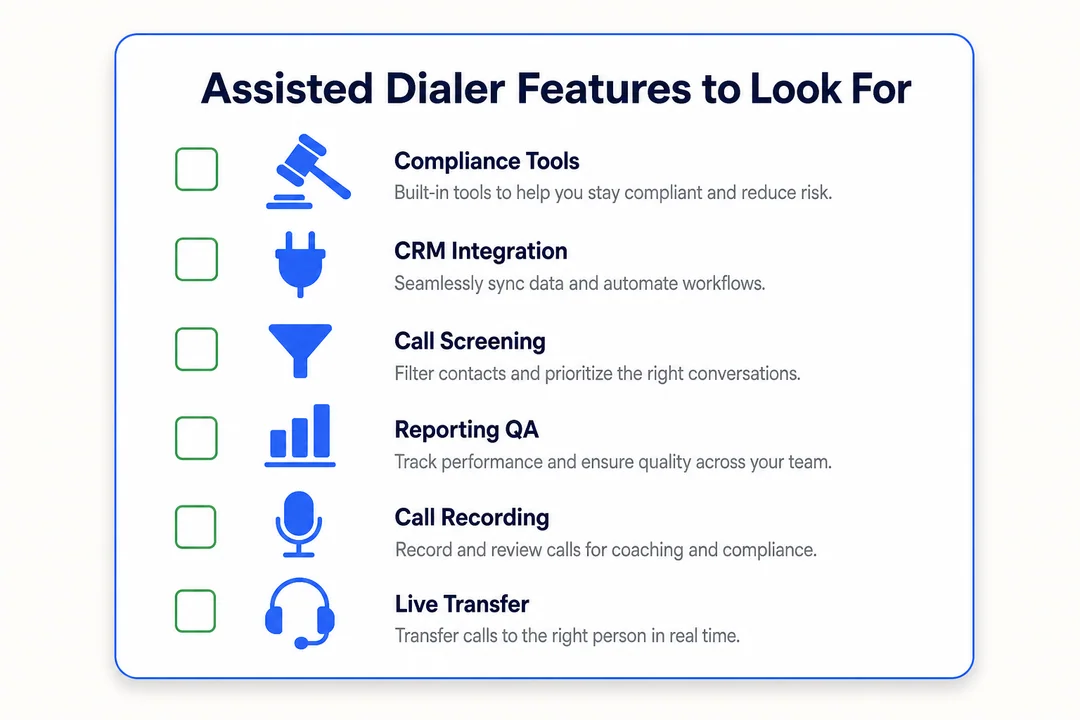
CRM integration and real-time contact context
CRM integration should be near the top of your buying list. When a live call is connected, the rep should not need to search multiple tools for basic context.
Strong CRM sync helps with:
- Screen pops during live calls
- Contact and account history
- Previous notes
- Prior outreach activity
- Next-step reminders
This improves handoff quality, reduces duplicate work, and helps reps sound prepared from the first second of the conversation.
Automated call filtering and routing
Filtering and routing are core features of assisted dialer software. Without them, it is not really delivering the main value.
Look for capabilities like:
- Live-answer detection
- Routing rules
- Rep assignment logic
- Queue handling
- Fast live-call transfer
These functions directly affect call flow efficiency and rep readiness. If routing is weak, the software will feel clumsy no matter how polished the dashboard looks.
Reporting on call center productivity metrics
Useful reporting should include:
- Connect rate
- Talk time
- Call attempts
- Disposition rate
- Rep activity
Managers use this data to improve coaching, staffing, and daily workflow decisions.
Call notes, lead qualification workflow, and supervisor visibility
Call notes and dispositions help maintain follow-up quality. Supervisor visibility helps teams stay consistent.
Look for support for:
- Call notes
- Dispositioning
- Qualification workflow steps
- Rep monitoring
- Coaching visibility
These features help teams run assisted dialing as a process, not just a calling tool.
Nice-to-have features vs must-haves for most teams
Do not overbuy. Most teams need the basics done well before they need advanced extras.
| Must-have | Nice-to-have |
|---|---|
| Reliable routing | Advanced analytics depth |
| Automated filtering | Adaptive talk-track tools |
| Strong CRM sync | Granular admin controls |
| Clean usability | Highly customized workflow logic |
| Fast rep handoff | Expanded supervisor automation |
The best buying advice is simple: pay for features your reps will actually use. A simpler tool with strong adoption often beats a feature-heavy tool that the team avoids.
{
  "dialing_mode": "assisted",
  "call_start": "human_initiated",
  "filtering": ["busy", "voicemail", "no_answer"],
  "route_live_calls_to": "available_rep",
  "crm_sync": true,
  "call_notes": true
}
How to Choose the Right Assisted Dialer for Your Team
Match the tool to your sales process and team size
The right tool depends on team size, call volume, lead flow, and handoff style. A three-rep founder-led team has very different needs from a 50-seat outbound team.
Use fit, not hype, as the decision rule.
- Small team with low call volume: manual or lightweight tooling may be enough.
- Mid-size outbound team: assisted dialing often makes sense.
- Larger volume environment: evaluate assisted, power, and predictive options based on workflow needs.
Check integration with CRM and sales engagement platform
The dialer should fit your current stack. If it does not integrate cleanly with your CRM and sales engagement platform, reps will end up copying notes, updating records manually, and working across fragmented workflows.
Check for:
- Contact sync
- Activity sync
- Notes sync
- Task sync
- Duplicate record protection
Integration quality affects adoption, reporting, and data trust.
Review reporting, ease of use, and onboarding needs
Rep adoption often matters more than feature depth. If the tool is hard to use, the workflow breaks.
During evaluation, look at:
- Admin setup difficulty
- Rep learning curve
- Manager visibility
- Daily usability
- Onboarding and support quality
Ask vendors to show real workflows in demos, not just feature slides. You want to see how a rep starts calls, receives handoffs, logs notes, and moves to next steps.
Compare assisted dialing with other outbound calling software before buying
Before buying, compare assisted dialing with manual, power, and predictive options using your real workflow.
Evaluate:
- Who starts the calls
- How much rep idle time remains
- Dead air risk
- CRM fit
- Reporting quality
- Compliance review needs
Do not rely on vague claims about being smarter or faster. Focus on how the tool changes the actual rep experience and manager workflow.
Final Takeaway
What an assisted dialer is in one sentence
An assisted dialer, often called an agent-assisted dialer, is outbound calling software that keeps a human involved while using automation to filter non-live calls and connect reps to live answers faster.
When it makes the most sense for sales and call teams
Assisted dialing makes the most sense when your team has moderate to high call volume, repetitive outbound workflows, and a clear need for more live conversations without losing human control.
It is especially useful for SDR teams, appointment setters, telemarketing teams, and outbound call centers.
Why it sits between manual calling and fully automated dialing
Assisted dialing sits in the middle for a reason. It gives teams more efficiency than manual calling, but more control than heavier automated dialing.
That balance is why many teams see it as the most practical choice. If your reps are wasting too much time on dialing mechanics, assisted dialing is worth serious consideration. Review your workflow, compare vendor models carefully, and choose a setup your reps will actually use.
Frequently Asked Questions
What is an assisted dialer?
An assisted dialer is outbound calling software that helps reps reach live people faster by reducing time spent on manual dialing, voicemail, and other non-live outcomes. It keeps a human involved in the process rather than fully automating every call.
Is an assisted dialer the same as an agent-assisted dialer?
Usually, yes. Most vendors and buyers use assisted dialer and agent-assisted dialer to mean the same thing, though the exact call initiation and handoff workflow may vary by provider.
How does an assisted dialer work?
- A rep or human-led workflow starts the calls.
- The system filters non-live outcomes like voicemail or no answer.
- A live answered call is routed to a rep.
- The rep joins with CRM context and continues the conversation.
What is the difference between an assisted dialer and a predictive dialer?
An assisted dialer uses more human control and usually has lower dead air risk. A predictive dialer uses heavier automation to place calls at scale, which can improve volume but may create more complexity and a higher chance of awkward call timing.
What are the main benefits of assisted dialing?
The main benefits are better productivity, more live talk time, less repetitive busywork, lower rep burnout, and smoother lead connection quality. It helps reps focus more on conversations and less on dialing mechanics.
Who should use assisted dialer software?
Assisted dialer software is a strong fit for SDRs, BDRs, appointment setters, telemarketing teams, and outbound call centers. It works best for teams with moderate to high call volume and repeatable outreach workflows.
Can an assisted dialer integrate with a CRM?
Yes, usually. Many assisted dialers connect with a CRM so reps can see contact history, account context, notes, and follow-up tasks during or right after a call.
Does assisted dialing help with compliance and call screening?
It may support better calling practices through more human-controlled workflows, but it does not replace legal review, consent management, or good list hygiene. Teams should still review TCPA considerations, vendor settings, and modern call screening risks carefully.
More in Operations & CX Optimization
View all →
Customer Experience Transformation: Framework and Steps
A telecom customer calls support about a billing error. They explain the problem to the IVR system. Then to the first agent. Then get transferred and explain again. Then escalated—and explain a third time. Forty minutes later, they're exhausted and the problem still isn't solved. This is what broken customer experience looks like. And it's costing you customers. Customer experience…


Web Caller Meaning: JavaScript caller, Calling Tools or Portals
“Web caller” is one of those phrases where the search results and the searcher are frequently talking about different things. Three unrelated audiences use it: developers hitting an error on the legacy JavaScript caller property, buyers evaluating browser-based calling software, and people trying to reach a specific portal or training page whose exact name they cannot recall. That fragmentation is…

Customer Experience Strategy: How to Build One That Works
Customer experience is getting worse, not better. Forrester's 2025 Global CX Index found that 21% of brands declined in CX quality while only 6% improved — and in the US, 25% declined against 7% that improved, the second consecutive year of that pattern. Most of those brands were not neglecting customer experience. They were working on it without a strategy…



 English
  Russian
  Chinese