

Dialer Salesforce: встроенные звонки по сравнению с интеграциями сторонних решений и облачным колл-центром
Термин дилер Salesforce звучит просто, но на практике в реальных оценках это часто охватывает совершенно разные продукты. Некоторые покупатели подразумевают встроенный звонок Salesforce. Другие — сторонний автодозвонщик, созданный через Интеграция телефонии SalesforceА некоторые действительно ищут более универсальную телефонную платформу, интегрированную с Salesforce, для отделов продаж, поддержки или смешанных операций.
Это различие имеет значение, поскольку каждый из вариантов решает свою задачу в рамках рабочего процесса. В этом руководстве подробно рассматриваются основные категории, ключевые функции и критерии выбора с учётом численности команды, объёма звонков, потребностей в отчётах и административной нагрузки. Цель — не навязать единственно верное решение, а помочь вам быстро определить наиболее подходящий вариант.
Что обычно подразумевается под термином «Salesforce Dialer»
Дозвонщик Salesforce обычно относится к одна из трёх категорий: встроенная функция звонков Salesforce, сторонний наборщик, подключённый через Интеграция Salesforce CTI или экосистему, или более широкую платформу для совершения звонков, интегрированную с Salesforce. Покупатели часто используют один и тот же термин для всех трёх решений, хотя они поддерживают совершенно разный уровень сложности рабочих процессов.
Когда команды начинают исследовать дилер Salesforce, они обычно пытаются решить одну из нескольких практических задач: совершать звонки из CRM, улучшать CRM «нажми, чтобы позвонить», автоматизировать исходящие действия или интегрировать Salesforce с более функциональной системой телефонных звонков. Именно поэтому этот термин так часто теряет чёткость.
Встроенная функция звонков Salesforce или встроенные варианты набора номера
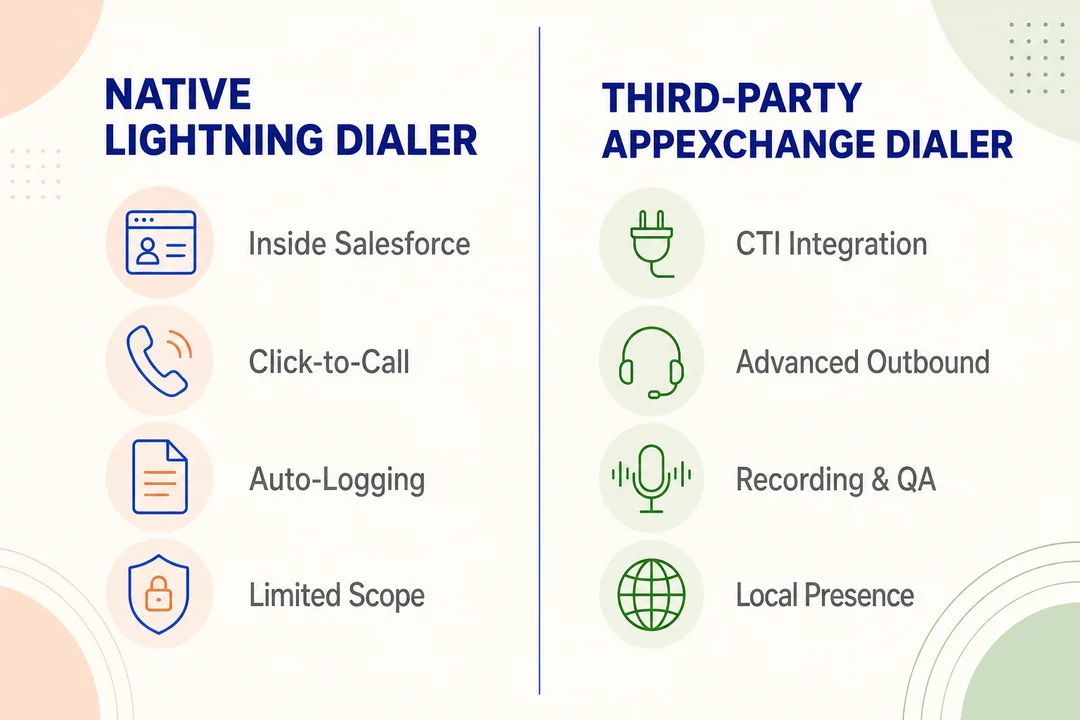
Для многих команд Встроенный наборный автомат Salesforce является самым простым стартовым вариантом. Обычно он хорошо подходит, когда CRM является центром рабочего процесса представителя, а потребности в совершении звонков просты.
- Лучше всего подходит для команд, которым в первую очередь нужно CRM «нажми, чтобы позвонить» из записей потенциальных клиентов, контактов или учётных записей
- Поддерживает базовый сбор данных о звонках без необходимости добавления крупного телекоммуникационного стека
- Снижает фрагментацию инструментов для небольших команд, которые ценят простоту больше, чем глубокие возможности работы с вызовами
- Часто хорошо работает, когда менеджеры больше заботятся о видимости активности в CRM, чем о продвинутой маршрутизации или управлении кампаниями.
Третьесторонние телефонные приложения из AppExchange
Эта категория расширяет возможности дилер Salesforce можно делать, пока Salesforce остаётся системой записи. Большинство вариантов доступны через AppExchange Salesforce и полагаться на Интеграция Salesforce CTI Интеграция компьютерной и телефонной систем (CTI) — это уровень, который позволяет телефонным инструментам работать внутри Salesforce или параллельно с ним.
- Практичное решение, когда встроенные звонки кажутся слишком ограниченными, а полноценное ПО для контакт-центра — излишне громоздким
- Обычно предлагает более высокую Интеграция телефонии Salesforce для обработки звонков, автоматизации рабочих процессов и повышения производительности операторов
- Часто добавляет улучшенные возможности исходящих звонков, запись разговоров, локальное присутствие и расширенное управление вызовами
- Позволяет командам оставаться внутри Salesforce, расширяя функциональность телефонии за пределы базовых возможностей звонков из CRM
Распространённые сторонние телефонные АТС в этой категории включают JustCall, Kixie, Aircall, CloudTalk, Revenue.io (ранее RingDNA) PhoneBurnerи наборы инструментов для исходящего взаимодействия, такие как Salesloft и Информационно-просветительская работа которые добавляют на вершину цепочек звонков дополнительный уровень вызовов. Каждый из них занимает свою позицию в отношении автоматизации исходящих звонков, обучения сотрудников с помощью ИИ, локального присутствия или простоты ценообразования, поэтому правильный выбор зависит от рабочего процесса, а не от одного «лучшего» решения.
Облачные платформы колл-центров, интегрированные с Salesforce
Некоторые команды ищут дилер Salesforce на самом деле нужна операционная платформа, а не просто автодозвон. Именно здесь облачный колл-центр категория вступает в игру.
- Лучше подходит для входящих и исходящих рабочих процессов, требующих маршрутизации, очередей, мониторинга и контроля
- Поддерживает команды с высоким объемом звонков, где телефонные звонки — это не просто действие оператора, а управляемая операция.
- Часто включает более широкий Инфраструктура облачных коммуникаций например, логика резервного варианта, отчётность и управление несколькими рабочими процессами
- Имеет смысл, когда командам продаж, поддержки или аутсорсинговым командам требуется больше возможностей, чем базальный звонок на уровне записей
Устоявшиеся платформы в этой категории включают Talkdesk, Пять9, NICE CXone, Genesys Cloud, и Flyfone, созданный для управления операциями колл-центра, а не для индивидуальных звонков операторов, с более глубокой маршрутизацией, возможностями контроля со стороны руководителя и расширенной отчётностью по сравнению с автономным автоответчиком.
Правильная категория зависит в меньшей степени от названия и в большей — от сложности вашего рабочего процесса. Ни один из вариантов не подходит для всех команд.
## Основные функции, которые покупатели ожидают от дилера Salesforce
Большинству покупателей не нужны все доступные функции. Более разумный подход — разделить базовые потребности и потребности, связанные с масштабированием. Небольшая команда может нуждаться только в нажмите, чтобы позвонить и надежный регистрация звонковБолее активной команде исходящих звонков может потребоваться автоматизация исходящих звонков и улучшенная обработка лидов. Более крупным операциям могут потребоваться функции контроля качества, информационные панели и средства управления, выходящие за рамки базового автодозвона.
Большинство покупателей ожидают, что дилер Salesforce будет включать…
- Нажмите, чтобы позвонить из записей CRM
- Надежный регистрация звонков и синхронизация активности
- Заметки, статусы и обновления записей
- Необязательная автоматизация исходящих звонков для ускорения рабочих процессов
- Видимость менеджера по мере роста команды
Базовые функции, которых ожидают большинство команд
Это функции, которые обычно имеют первостепенное значение.
- Нажмите, чтобы позвонить внутри Salesforce, чтобы представители могли совершать звонки, не переключая вкладки
- Автоматическая регистрация активности звонков сократить объем ручных обновлений и повысить качество данных в CRM
- Синхронизация контактов, потенциальных клиентов и учетных записей, чтобы результаты звонков связывались с соответствующими записями
- Примечания и результаты обработки для обеспечения точности последующих действий
- Базовая видимость активности агентов через простые панели мониторинга или отчёты
Если инструмент хорошо справляется с этими задачами, его функциональности, вероятно, уже будет достаточно для многих команд, ориентированных на CRM.
Расширенные функции для более активных команд исходящих звонков
Это тот момент, когда простой дилер Salesforce начинает превращаться в инструмент повышения производительности, а не просто в кнопку для звонков.
- Автоматический набор номера, автодозвон, или прогрессивный набор номеров для ускорения процессов взаимодействия
- Запись звонков для обучения, проверки и урегулирования споров
- Функции локального присутствия для повышения показателя ответов в некоторых сценариях исходящих звонков
- Поддержка очереди или облегчённая маршрутизация для команд с более структурированными процессами обработки звонков
- Расстановка приоритетов таким образом, представители сначала тратят время на записи более высокой ценности
- Автоматизация исходящих звонков сократить повторяющиеся ручные действия при наборе номера
Эти функции необходимы не каждой команде. Они становятся полезными при росте объема исходящих звонков и когда менеджерам требуется больший контроль.
Функции, которые важны при масштабировании операций
В масштабе покупатели, как правило, меньше заботятся о кнопке набора и больше — о видимости, контроле и управлении процессами.
- Резюме на основе ИИ или сигналы тональности для ускорения проверки менеджером
- Оценка качества работы и Искусственный интеллект для обеспечения качества звонков
- Автоматический анализ звонков для сокращения ручной выборки
- Интерактивные панели мониторинга для отслеживания активности команды, результатов и узких мест
- Контроль за соблюдением требований для скриптов, раскрытия информации и рабочих процессов, чувствительных к политике
- API- или вебхук-триггеры, поддерживающие более широкий функционал Автоматизация рабочего процесса продаж
Функции ИИ полезны только в том случае, если менеджеры действительно используют полученные аналитические данные для обучения операторов, корректировки рекламных кампаний или повышения уровня соблюдения нормативных требований. Более длинный список функций не означает автоматически лучшую применимость в операционной деятельности.
## Встроенный телефонный набор Salesforce по сравнению с интеграциями сторонних телефонных наборов
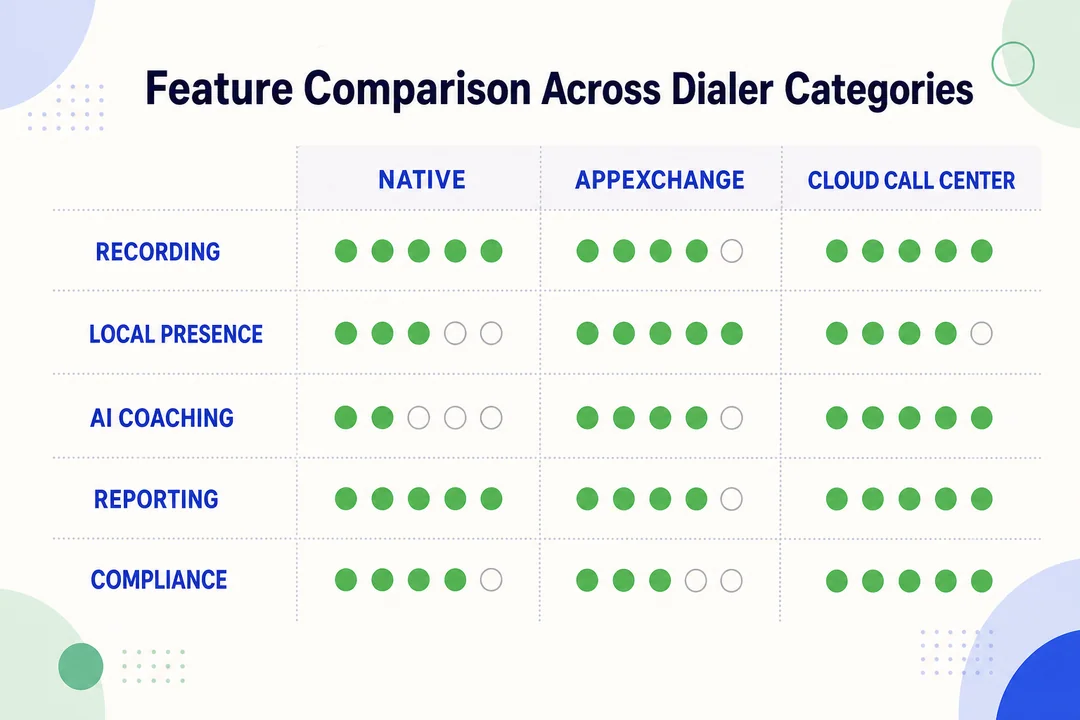
Основной вопрос при покупке обычно заключается не в том, имеет ли инструмент кнопку набора. Вопрос в том, нуждается ли команда в простом вызове прямо из CRM или ей требуется более гибкий уровень телефонии. В большинстве случаев Dialer Salesforce против интеграции сторонней телефонии оценок, правильный ответ зависит от сложности рабочего процесса, степени видимости для менеджера и того, насколько много телефонной логики находится вне CRM.
| Критерии | Встроенная интеграция Salesforce с функцией звонков | Интеграция стороннего наборного устройства |
|---|---|---|
| Простота настройки | Обычно проще | Зависит от поставщика и рабочего процесса |
| Интеграция с CRM | Сильный Интерфейс вызовов внутри платформы | Часто высокая, но зависит от дизайна интеграции |
| Исходящая автоматизация | Обычно более ограниченные | Часто более широкие и гибко настраиваемые |
| Входящая маршрутизация | Ограниченный или базовый в зависимости от настройки | Обычно сильнее |
| Глубина отчетности | Подходит для работы с CRM | Часто углубленно — для телефонии и операций |
| ИИ-тестирование качества / аналитика диалогов | Возможно, ограничено | Чаще доступно в расширенных инструментах |
| Модель затрат | Зависит от структуры лицензирования | Зависит от поставщика: модель оплаты либо по использованию, либо за рабочее место |
| Масштабируемость | Подходит для небольших команд | Обычно лучше подходит для рабочих процессов с высоким объемом |
| Гибкость администратора | Снижение сложности | Часто выше гибкость, но больше вариантов настройки |
| Наиболее подходит для | Телефонные звонки с приоритетом CRM | Команды, которым необходима автоматизация, маршрутизация или управление операциями с вызовами |
Когда встроенная функция звонков Salesforce обычно достаточна
Сайт Встроенный наборный автомат Salesforce часто является разумным выбором, когда команда хочет чистый рабочий процесс, ориентированный на CRM, и не нуждается в расширенных функциях телефонии.
- Небольшие отделы продаж со стандартными сценариями совершения звонков
- Команды, которые отдают предпочтение простоте и меньшим административным издержкам
- Рабочие процессы, в которых важнее фиксация базовой активности, чем логика маршрутизации
- Среды с ограниченной потребностью в управлении кампаниями, контроле записи звонков или тщательном надзоре со стороны руководителей
Для этих команд встроенная функциональность может обеспечить достаточную ценность без необходимости внедрения еще одной системы для управления.
Когда сторонние АТС имеют больше смысла
A Интеграция со сторонней телефонией обычно становится более привлекательным, когда звонки — это структурированная операционная функция, а не просто задача отдельного представителя.
- SDR или внештатные команды, деятельность которых направлена на проведение кампаний
- Службы поддержки, которым требуются очереди, переводы звонков или более умная маршрутизация
- Команды, которым требуются более мощные функции отчетности, записи или контроля со стороны руководителей
- BPO или распределенные команды, которым требуется более надежное решение Инфраструктура VoIP
- Организации, оценивающие инструменты через AppExchange Salesforce сохранить Бесшовная интеграция с CRM при расширении возможностей телефонии
Автоматический наборщик с надежной синхронизацией с CRM, но слабой маршрутизацией, всё равно может не подойти командам с высоким объёмом звонков.
На практике в плане простоты обычно побеждают встроенные инструменты. Сторонние инструменты, как правило, выигрывают, когда важнее автоматизация, маршрутизация и производительность телефонии. Правильное решение зависит не от того, какой тип инструментов звучит убедительнее. Решающим фактором является то, какой тип инструментов лучше поддерживает реальный рабочий процесс вашей команды.
## Как выбрать подходящий Salesforce-дозвонщик для вашей команды
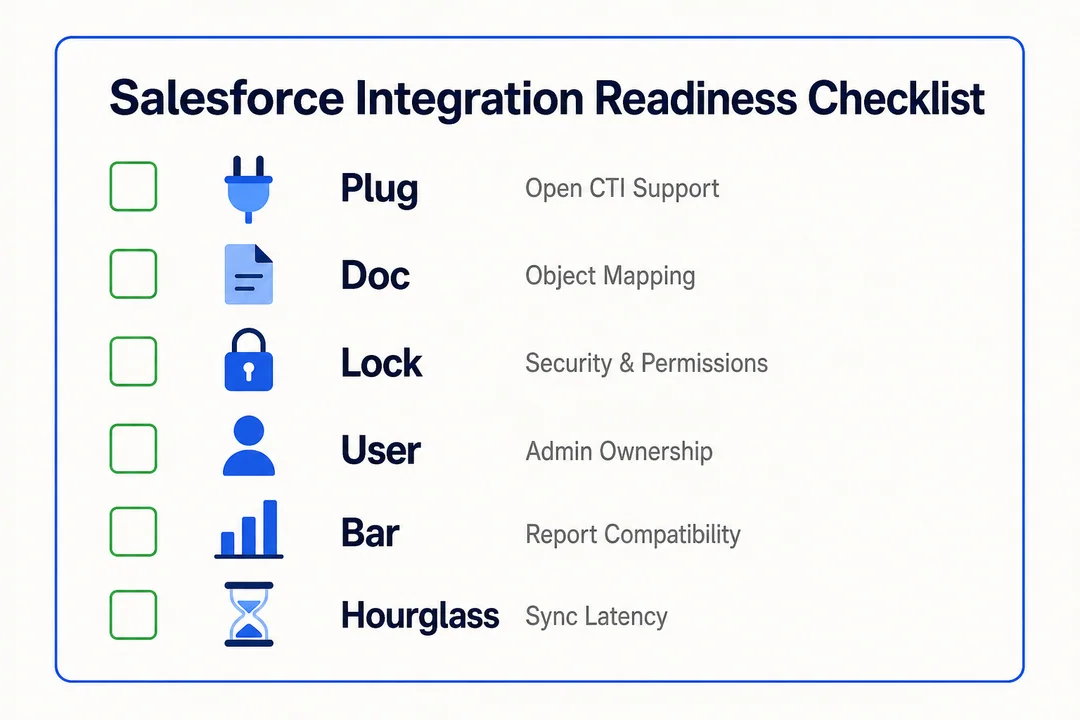
Длинный перечень функций редко бывает полезен сам по себе. Покупателям нужна краткая структура, которая связывает инструмент с реальными требованиями к рабочим процессам, рисками внедрения и ожидаемой бизнес-ценностью.
Используйте эту пятиступенчатую методику для отбора Salesforce-автодозвонщика…
- Тип команды и сценарий использования
- Объём звонков и сложность рабочих процессов
- Качество интеграции и синхронизация с Salesforce
- Отчетность, контроль качества и прозрачность процесса коучинга
- Структура затрат и время достижения ценности
1) Тип команды и сценарий использования
Начните с эксплуатационная пригодность, а не узнаваемость бренда.
Команда по поиску потенциальных клиентов, группа по управлению аккаунтами, служба поддержки, BPO и команда, совмещающая входящие и исходящие звонки, не нуждаются в одном и том же инструменте. Некоторые ставят во главу угла скорость работы операторов, другие — маршрутизацию, контроль или привлечение клиентов качество во всех каналах. Правильный выбор должен отражать то, как команда использует звонки в повседневной работе.
2) Объём звонков и сложность рабочих процессов
Именно здесь решение по категории зачастую становится очевидным.
Если звонки в основном совершаются вручную и инициируются пользователем, встроенный или более легкий наборный интерфейс может оказаться достаточным. Если команда запускает кампании, обрабатывает очереди или нуждается в более высокой пропускной способности, то Лучший дилер Salesforce для продаж в большом объеме часто не является простым инструментом, ориентированным в первую очередь на CRM. Именно здесь Облачные исходящие звонки для Salesforce или более сложные интеграции начинают приобретать практический смысл.
3) Качество интеграции и синхронизация с Salesforce
Не рассматривайте интеграцию как простую галочку.
Сильный Интеграция с Salesforce должен поддерживать всплывающие окна на экране, точные регистрация звонков, сопоставление результатов звонков и надежная синхронизация между событиями звонков и записями. Слабая синхронизация приводит к пробелам в отчетах, низкому качеству данных и снижению доверия менеджеров к системе.
4) Отчетность, контроль качества и прозрачность процесса коучинга
Многие покупатели чрезмерно сосредоточены на функциях для агентов и недостаточно — на видимости для менеджеров.
Базовые отчёты об активности операторов могут быть достаточны для небольших команд. Более крупным командам зачастую требуются интерактивные панели мониторинга, процессы контроля качества, а также возможность отслеживать процессы коучинга и обучения. контроль соблюдения требований. Эти возможности напрямую влияют на производительность отдела продаж потому что менеджеры могут быстрее выявлять проблемы и проводить коучинг, основываясь на реальных шаблонах.
5) Структура затрат и время выхода на отдачу
Более низкая стартовая цена не всегда означает более низкую стоимость эксплуатации.
Сравните модели оплаты по количеству пользователей и по фактическому использованию, а также оцените трудозатраты на настройку, время обучения и текущие административные задачи. Инструмент, который быстрее внедряется, зачастую приносит больше пользы. операционная эффективность и короче время до получения ценности чем более функциональный вариант, которым команда почти не пользуется.
Правильный короткий список — это не тот, в котором больше всего функций, а тот, который ваша команда сможет внедрить с минимальными трудностями и который обеспечит наиболее очевидные операционные преимущества.
## Когда облачный колл-центр, интегрированный с Salesforce, является более предпочтительным вариантом
Автоматический набор номера в первую очередь является инструментом повышения производительности операторов. облачный колл-центр это более широкий операционный уровень. Разница становится важной, когда командам требуются маршрутизация, контроль, обеспечение качества, аналитика или несколько рабочих процессов в отделах продаж и поддержки. В этот момент разговор смещается от простого набора номера к инфраструктура облачных коммуникаций.
Эта категория не нужна каждой команде. Однако по мере роста сложности рабочих процессов она зачастую становится более практичным вариантом.
Распространённые признаки того, что команде уже недостаточно базового набора номера
- Команде необходимы IVR, очереди или более структурированная обработка входящих звонков
- Процессы продаж и поддержки теперь работают параллельно
- Глобальная маршрутизация вызовов или логика резервного варианта важна для обеспечения надежности
- Менеджерам необходимы функции живого мониторинга, просмотра записей или более строгого контроля качества
- Операции с высоким объёмом требуют более быстрого развертывания без масштабного внедрения на уровне предприятия
- Простые инструменты набора номера больше не обеспечивают необходимую видимость и контроль.
Где FlyFone органично вписывается
Для команд, которые уже вышли за рамки базового набора номеров, но по-прежнему хотят использовать рабочий процесс, совместимый с Salesforce, подходят такие платформы, как Flyfone подходит облачный колл-центр категория, объединяющая входящие и исходящие операции, гибкую маршрутизацию и быструю настройку, а также Интеграция с Salesforce.
Это становится особенно актуальным для команд, которые хотят:
- Масштабируемость входящих и исходящих звонков без масштабных инфраструктурных проектов
- Контроль качества на основе искусственного интеллекта и видимость для менеджеров
- Прозрачный модели связи по принципу «оплата за фактическое использование»
- Более быстрая настройка для распределённых команд или растущих операций
- Улучшенная поддержка глобальных рабочих процессов и гибкость маршрутизации
Это не означает, что облачный колл-центр подойдёт каждому покупателю. Это просто означает, что как только маршрутизация, мониторинг и управление несколькими рабочими процессами становятся ключевыми задачами, более широкая платформа может оказаться более подходящим решением, чем базовый автотелефон.
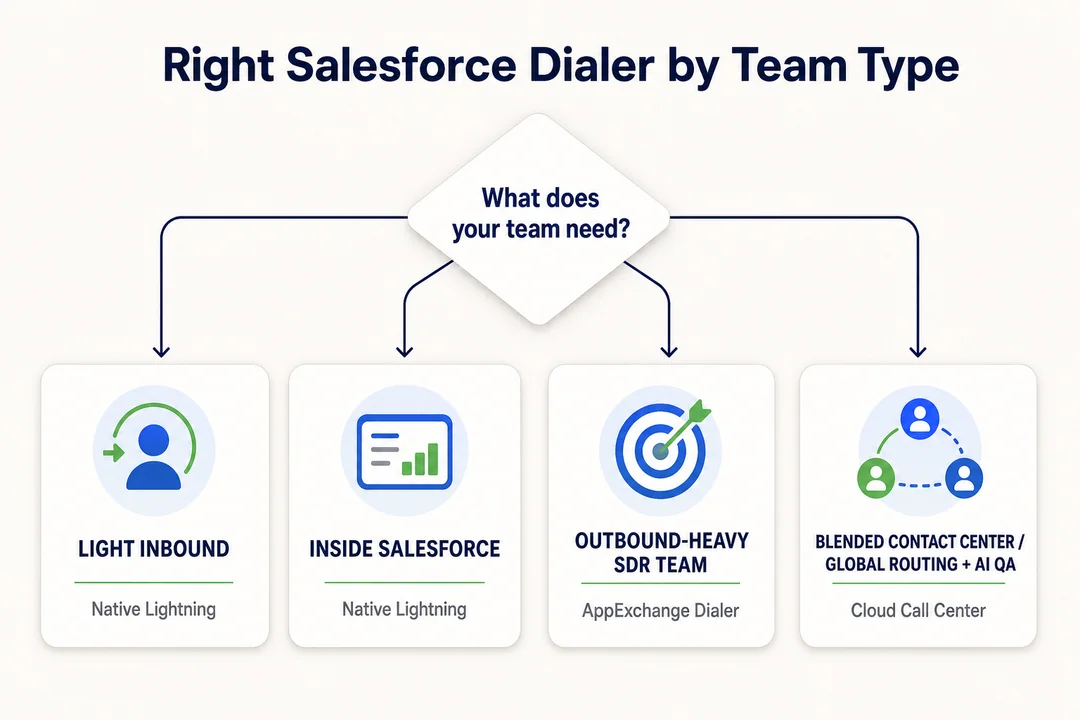
Практический вердикт по покупке в зависимости от типа команды
Для тех, кто просматривает текст бегло, самый быстрый способ оценить Интеграция телефонии Salesforce соответствует категории модели команды. Лучший выбор зависит от эксплуатационная пригодность, а не на том, какой инструмент выглядит наиболее продвинутым на демонстрации.
| Тип команды | Наилучший вариант | Почему |
|---|---|---|
| Небольшая команда продаж с акцентом на CRM | Встроенная интеграция Salesforce для совершения звонков | Простой рабочий процесс, меньшая нагрузка на администратора, надежно для базовых задач производительность отдела продаж |
| Средняя по размеру команда SDR, работающая с исходящими звонками | Интеграция со сторонними системами автодозвона | Лучшая автоматизация, надёжнее исходящая кампания эффективностьбольше контроля |
| Поддержка, BPO или глобальная команда | Интеграция облачного колл-центра | Улучшенная маршрутизация, контроль и глобальная маршрутизация вызовов нуждается |
| Смешанная команда продаж и поддержки | Зависит от сложности рабочего процесса | Выберите, исходя из требований к маршрутизации, отчётности и видимости для менеджеров |
Простое правило работает здесь хорошо:
- Небольшие команды, ориентированные в первую очередь на CRM: нативного решения зачастую достаточно
- Внешние команды, которым требуется автоматизация: сторонние телефонные автоматические наборщики зачастую лучше подходят
- Поддержка, BPO или глобальные операции: возможности облачного колл-центра, как правило, более целесообразны
- Смешанные команды: выбирайте на основе сложности рабочего процесса, глубины отчетности и потребностей в маршрутизации
Такой подход позволяет принимать решения, основываясь на реальных операциях, а не на избытке функций.
Заключение
A дилер Salesforce не является одним конкретным типом продукта. В большинстве покупательских цепочек этот термин относится к встроенной функции звонков Salesforce, интеграции стороннего автодозвона или более широкому облачный колл-центр подключено к Salesforce. Встроенный функционал зачастую достаточен для простых сценариев работы с CRM в первую очередь. Сторонние автоматические телефонные системы обычно подходят командам, которым требуется больше автоматизации, улучшенная отчётность или более строгий контроль исходящих звонков. Облачные платформы контакт-центров становятся предпочтительным решением, когда маршрутизация, контроль качества, аналитика и работа с несколькими рабочими процессами выходят на первый план.
Самый практичный следующий шаг — проанализировать ваш текущий рабочий процесс перед сравнением поставщиков. Обратите внимание на тип команды, объём звонков, потребности в маршрутизации, качество синхронизации и уровень видимости для менеджеров. Если ваша команда не уверена, достаточно ли встроенной функциональности, или уже выросла за рамки базового набора номера, Забронировать персонализированную демонстрацию с командой FlyFone, чтобы определить наиболее подходящую категорию до перехода на более масштабный телефонный стек.
Часто задаваемые вопросы
Что такое Salesforce-автотелефонный наборатор?
«Дилер Salesforce» — это обобщающий термин для инструментов совершения звонков, работающих внутри CRM-системы Salesforce. В зависимости от потребностей команды под этим термином может подразумеваться встроенная функция совершения звонков от Salesforce, стороннее приложение из AppExchange или полнофункциональная облачная платформа контакт-центра, интегрированная с Salesforce.
В чём разница между родным Salesforce-дозвонщиком и сторонним приложением?
Встроенный наборный интерфейс обеспечивает базовые функции, например, вызов по щелчку мыши, и хорошо подходит для небольших команд. Сторонние приложения добавляют более продвинутые возможности, такие как интеллектуальная маршрутизация, расширенная аналитика и автоматизация процессов — всё это обычно требуется отделам продаж с высоким объёмом звонков.
Следует ли использовать встроенный телефонный набор Salesforce?
Да, если вашей команде требуются только базовые функции, такие как звонок по нажатию и ручной ввод заметок. Если же вам также нужны маршрутизация, отчеты в реальном времени или управление кампаниями в масштабе, стороннее решение, как правило, подойдет лучше.
Как выбрать подходящий автоматический дозвонщик для вашей команды продаж?
Оцените варианты по пяти факторам:
- Сложность рабочего процесса
- Ежедневный объем звонков
- Требования к отчетности и аналитике.
- Качество и стабильность интеграции CRM
- Общая стоимость владения (TCO)
Когда бизнесу следует перейти от базового автодозвонщика к облачному колл-центру?
Обновитесь, когда потребности вашей команды превысят возможности автономного наборного устройства, например при необходимости глобальной маршрутизации звонков, мониторинга качества звонков на основе ИИ, живого контроля звонков или управления несколькими параллельными рабочими процессами, которые стандартное наборное устройство не в состоянии координировать.
Может ли решение-автодозвонщик интегрироваться с другими платформами?
Да. Облачные платформы колл-центров с интеграцией Salesforce (например, FlyFone) обычно предоставляют открытые API и вебхуки, что позволяет синхронизировать данные звонков с CRM, системами управления заявками и другими корпоративными приложениями.
Подробнее Оптимизация операций и CX
Смотреть все →
Трансформация клиентского опыта: концептуальная основа и этапы
Клиент телекоммуникационной компании звонит в службу поддержки по поводу ошибки при выставлении счета. Он объясняет проблему системе IVR. Затем первому агенту. Затем их переводят и снова объясняют. Затем их перевели и объяснили в третий раз. Через сорок минут они выдохлись, а проблема так и не была решена. Вот как выглядит некачественное обслуживание клиентов. И это стоит вам клиентов. Клиентский опыт...


Значение термина «Web Caller»: вызывающая сторона в JavaScript, инструменты или порталы для совершения вызовов
“Web caller” — это одно из тех выражений, при поиске которых результаты и запрос часто не совпадают. Им пользуются три не связанные между собой группы пользователей: разработчики, сталкивающиеся с ошибкой, связанной с устаревшим свойством caller в JavaScript; покупатели, оценивающие программное обеспечение для звонков через браузер; а также люди, пытающиеся перейти на конкретный портал или страницу с учебными материалами, точное название которых они не могут вспомнить. Такая фрагментация….

Стратегия клиентского опыта: как разработать эффективную стратегию
Качество обслуживания клиентов ухудшается, а не улучшается. Согласно данным «Глобального индекса клиентского опыта» (Global CX Index) компании Forrester за 2025 год, качество клиентского опыта у 21% брендов ухудшилось, тогда как улучшилось лишь у 6% — при этом в США показатели ухудшились у 25% брендов, а улучшились — у 7%, и такая тенденция наблюдается уже второй год подряд. Большинство этих брендов не пренебрегали качеством обслуживания клиентов. Они работали над этим, но без четкой стратегии...



 English
  Russian
  Chinese