
Customer privacy compliance protects your business from regulatory fines, legal disputes, and the kind of trust erosion that turns customers into former customers. In 2025, privacy violations aren’t just bad PR—they’re expensive. TCPA violations can cost $500 to $1,500 per incident, while CPRA non-compliance triggers penalties up to $7,500 per violation.
For small to mid-sized U.S. businesses, the challenge isn’t understanding that privacy matters—it’s knowing where to start without hiring a legal team or spending months on implementation. Most privacy advice either assumes you have compliance experts on staff or gives you surface-level tips that don’t actually work when a customer requests their data or a regulator asks questions.
This guide takes a different approach. You’ll get a practical, executable customer privacy compliance checklist designed for teams without legal departments. The goal isn’t perfection—it’s building a defensible baseline you can implement this quarter and improve over time. Focus on collecting less data, being transparent about what you do collect, and giving customers real control over their information.
What Is Customer Privacy Compliance
Customer privacy compliance means handling customer data—names, emails, purchase history, payment information—in ways that are legal, transparent, and respectful of customer rights. It covers every stage of the data lifecycle: how you collect it, what you use it for, who you share it with, how long you keep it, and how you delete it when customers ask or when you no longer need it.
Think of it as the operational backbone of customer trust. When customers give you their information, they’re making a choice to trust you with something valuable. Privacy compliance is how you honor that trust in practice, not just in your privacy policy.
Why this matters for your business:
It protects revenue: Privacy violations don’t just trigger fines—they destroy customer relationships. Sixty-seven percent of consumers will stop doing business with a company after a data misuse incident (IBM, 2024). For businesses where customer lifetime value exceeds $1,000, a single breach can cost hundreds of thousands in lost revenue.
It reduces legal exposure: Privacy regulations have teeth. CPRA allows penalties up to $7,500 per violation. For a business with 10,000 customers, even a 5% violation rate means potential exposure of $3.75 million. Regulators are actively enforcing—California’s Privacy Protection Agency issued over $20 million in settlements in 2024 alone.
It enables growth: Want to expand to California, the EU, or Brazil? Each market has its own privacy requirements. Building compliant data practices now means you can enter new markets without scrambling to retrofit your entire operation.
Who This Customer Privacy Compliance Checklist Is For
This checklist is designed for:
- Small and mid-sized U.S. businesses.
- Marketing, product, operations, and CX teams.
- Founders and managers without in-house legal counsel.
- Companies collecting customer data through websites, apps, or sales tools.
No legal background required. Practical execution only.
Customer Privacy Compliance Checklist (How to Use It)
This checklist aligns with major U.S. state privacy laws, including CPRA, and follows GDPR-style best practices where helpful. It is a baseline framework, not legal advice.
How to use it:
- Work through each section in order.
- Document what you do, even if it is simple.
- Fix high-risk gaps first.
- Review and update regularly.
Identify and Document Customer Data You Collect
Most businesses can’t tell you exactly what customer data they collect, where it lives, or why they’re keeping it. This isn’t negligence—it’s the natural result of growth. You add a new analytics tool, integrate a support platform, sync data to your CRM, and suddenly customer information exists in twelve places across five vendors. Each tool has its own retention settings. Nobody planned it this way.
This is why data inventory comes first. You cannot protect data you don’t know exists, honor deletion requests for data you can’t find, or explain your practices when data lives in systems you’ve forgotten about. When regulators or customers ask what data you hold, “I’m not sure” is the wrong answer—and an expensive one.
What you’re documenting:
Personal data covers information that identifies or describes a person: names, email addresses, phone numbers, IP addresses, purchase history, account preferences, support tickets, and behavioral analytics.
Sensitive data requires extra care and includes precise geolocation, health information, financial account numbers, biometric data, and Social Security numbers. Many privacy laws impose stricter rules and higher penalties for mishandling sensitive data.
The goal isn’t creating a 50-page spreadsheet—it’s building a clear map of where customer data flows through your business and why you’re collecting it in the first place.
How to build your data inventory (without drowning in detail):
Step 1: Map your data sources
Start with the obvious: website forms, cookies, CRM, email marketing tools, support ticket systems, payment processors. Then check the less obvious: backup systems, archived data, vendor databases, marketing pixels, and analytics platforms you set up two years ago and forgot about.
Walk through your customer journey from first website visit to purchase to support. At each step, ask: “What data gets collected here?” You’ll be surprised how much you find.
Step 2: Document what data each source collects
For each system, record the specific data points: not just “contact information” but “first name, last name, email, phone, company name, job title.” Specificity matters when customers request their data or when you need to delete it.
Step 3: Define why you’re collecting it
This is where most businesses get stuck. Don’t just write “marketing purposes”—that’s too vague. Be specific: “to send monthly product update emails” or “to calculate customer lifetime value for retention campaigns.” If you can’t articulate a clear purpose, you probably don’t need that data.
Step 4: Set retention timelines
How long do you actually need each data type? Marketing leads you haven’t contacted in 24 months aren’t leads anymore—they’re liability. Support tickets older than 18 months rarely get referenced. Define retention periods based on actual business need, not “forever because storage is cheap.”
Step 5: Flag sensitive and high-risk data
Payment information, precise location data, health details, and Social Security numbers require special handling. These typically trigger stricter legal requirements and higher penalties if mishandled. Know where this data lives so you can prioritize security controls.
What to do with what you find:
If you discover data you don’t need, delete it. If you find data in systems you can’t access anymore (old vendor accounts, deprecated tools), that’s a security gap—migrate or delete immediately. If multiple systems hold the same customer data with different retention policies, standardize them.
Document everything in a simple spreadsheet or data mapping tool. The format doesn’t matter—clarity does.
Example data inventory:
| Data type | Source | Назначение | Удержание |
|---|---|---|---|
| Email address | Newsletter form | Marketing updates | Until unsubscribe |
| IP address | Website analytics | Security, analytics | 12 months |
| Payment info | Payment processor | Transaction processing | Not stored internally |
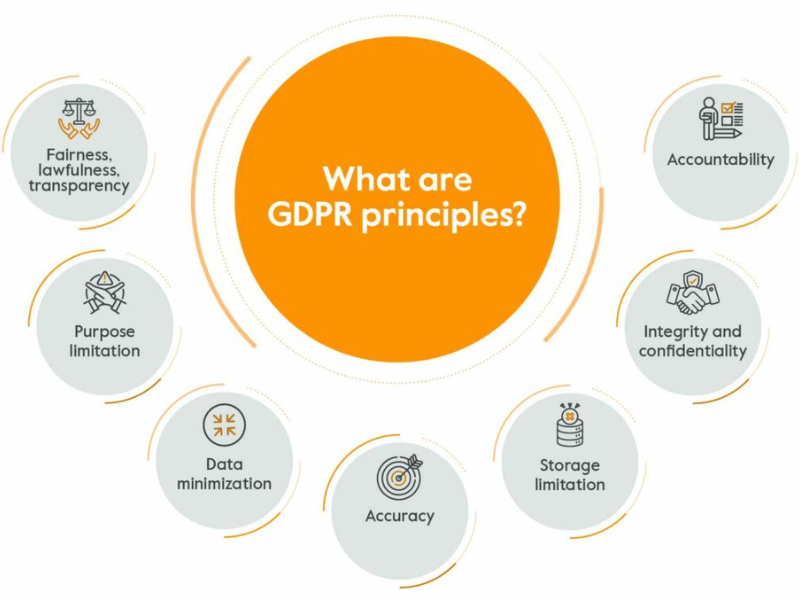
Only collect data you truly need. This is data minimization in practice.
Common mistake: collecting data “just in case” and never deleting it.
Collect Customer Consent the Right Way
Consent isn’t just legal checkbox—it’s your first conversation with customers about data trust. The problem is most consent mechanisms either deceive customers with dark patterns or overwhelm them with legal language nobody reads. Effective consent strikes a balance: clear enough that customers understand what they’re agreeing to, simple enough that they don’t abandon your site out of frustration.
Understanding opt-in vs opt-out:
Opt-in consent means customers must actively agree before you collect or use their data. This is the default under GDPR and is considered the higher standard of consent. Example: An unchecked box labeled “Yes, I want to receive marketing emails” that customers must check themselves.
Opt-out consent means data may be collected or used by default, but customers can decline. This is more common under CPRA and U.S. state laws. Example: A pre-checked box stating “We’ll send you product updates; uncheck if you’d prefer not to receive them.”
When you need opt-in:
- Marketing emails and SMS (CAN-SPAM requires ability to opt out; some states require opt-in)
- Non-essential cookies and tracking (GDPR, California, and others require opt-in)
- Sharing data with third-party advertisers
- Collecting sensitive data like health information or precise geolocation
When opt-out is acceptable:
- Essential service functions (account creation, order processing)
- Analytics necessary for security or fraud prevention
- Internal data uses already described in your privacy policy
If you’re unsure which standard applies, opt-in is the safer choice—it works everywhere, even if technically not required.
Cookie banner essentials:
- Explain what cookies do in plain language.
- Allow customers to accept or reject non-essential cookies.
- Honor browser-based opt-out signals when applicable.
Consent best practices:
- Do not pre-check consent boxes.
- Separate marketing consent from required services.
- Let users change preferences later through a preference center.
Do vs Don’t:
| Сделать | Не |
|---|---|
| Explain purpose clearly | Hide consent in legal text |
| Offer real choices | Force “accept all” |
| Store consent records | Ignore user preferences |
Be Transparent With Customers About Data Practices
Transparency builds trust faster than any policy document. Your privacy policy should reflect what you actually do.
A compliant privacy policy includes:
- What categories of data you collect.
- Why you collect and use it.
- Who you share it with.
- How long you keep it.
- What rights customers have and how to exercise them.
Update your policy at least once a year or when data practices change.
Пример:
- Outdated policy: vague language, no rights explained.
- Compliant policy: clear categories, simple explanations, visible contact method.
Transparency is not about length. It is about clarity.
Enable and Handle Customer Privacy Rights Requests
Customers have rights over their data, such as access, deletion, or correction. You need a simple, repeatable process to handle these requests.
Basic rights explained:
- Access: see what data you have.
- Deletion: request data removal.
- Correction: fix inaccurate data.
- Opt-out: stop certain data uses.
Simple DSAR workflow:
- Receive request via form or email.
- Verify identity reasonably.
- Fulfill the request within required timelines.
- Document what you did and when.
Keep a basic log. Documentation protects you if questions arise later.
Common failure: requests get lost because no one owns the process.
Secure Customer Data and Limit Retention
Security does not need to be complex to be effective.
Many businesses rely on modern fintech customer service software to centralize customer data, enforce access controls, and automate secure data handling across communication channels.
Baseline safeguards:
- Limit data access to people who need it.
- Use strong passwords and multi-factor authentication.
- Encrypt data where possible.
- Keep systems and plugins updated.
Retention rules:
- Define how long each data type is needed.
- Delete or anonymize data when it is no longer required.
- Review retention schedules annually.
Example retention approach:
- Marketing leads: delete after 24 months of inactivity.
- Support tickets: retain for 18 months.
- Financial records: retain per legal requirements.
Over-retention increases breach risk without adding value.
Manage Third-Party and Vendor Data Sharing
Vendors often create the biggest privacy risks.
What to check:
- Whether vendors only use data for your instructions.
- Whether contracts include data protection terms.
- Whether vendors can support customer rights requests.
Review vendors periodically, especially analytics, marketing, and support tools.
Train Teams and Assign Privacy Ownership
Privacy fails when everyone assumes someone else is responsible.
Лучшие практики:
- Assign one clear privacy owner.
- Train teams once a year with short, practical guidance.
- Teach employees how to spot and escalate privacy issues.
Последовательность важнее совершенства.
Must-Do vs Nice-to-Have Privacy Compliance Actions
Focus on what protects customers and reduces risk first.
| Must-Do | Nice-to-Have |
|---|---|
| Data inventory | Advanced automation tools |
| Clear privacy policy | Custom consent design |
| Consent controls | Granular regional rules |
| DSAR process | Dedicated privacy software |
| Basic security | Full privacy program audits |
Start small. Expand as your business grows or risk increases.
How Often to Review Your Customer Privacy Compliance
- At least once per year.
- When you launch new products or data uses.
- When laws or regulations change.
- After a security incident or vendor change.
Set calendar reminders to avoid forgetting.
Common Customer Privacy Compliance Mistakes to Avoid

- Collecting more data than necessary because tools allow it.
- Copying a generic privacy policy that does not match reality.
- Ignoring customer requests or responding late.
- Forgetting vendors also handle customer data.
- Treating privacy as a one-time project.
Each mistake increases risk and erodes trust.
Final Takeaway: Focus on Trust, Not Just Compliance
Customer privacy compliance is about respect and transparency, not paperwork. When customers understand and trust how you use their data, compliance becomes easier and relationships last longer. Use this checklist as your foundation and build from there.
Start with clarity. Earn trust. Reduce risk.
FAQs – Customer Privacy Compliance
What is included in a customer privacy compliance checklist?
A checklist typically covers data inventory, consent collection, transparency through privacy policies, handling customer rights requests, basic security, data retention, and vendor management. The goal is to ensure you know what data you collect, why you collect it, and how customers can control it.
[Accordion-style FAQ UI]
Do small businesses have to comply with customer privacy laws?
Yes, many small businesses still have obligations, especially if they collect customer data online. While some laws have thresholds, best practices like transparency, consent, and honoring customer requests apply to almost all businesses.
Does CPRA apply to every U.S. business?
CPRA primarily applies to businesses meeting certain revenue or data volume thresholds, but its principles are widely used as a standard. Following CPRA-style practices often puts you in a safer position across states.
What is the difference between CPRA and GDPR in simple terms?
CPRA focuses on consumer rights and opt-out controls within California, while GDPR emphasizes opt-in consent and applies broadly in the EU. Many compliance steps overlap, such as transparency and data minimization.
Can we handle privacy compliance without a legal team?
Yes. Most day-to-day compliance tasks are operational. Clear documentation, simple processes, and regular reviews cover the majority of requirements. Legal help is only needed for complex or high-risk situations.
Вопросы и ответы

What is included in a customer privacy compliance checklist?
A customer privacy compliance checklist typically includes steps to document data collection, ensure legal consent processes, maintain transparency with privacy policies, handle privacy rights requests, secure data retention, and manage third-party vendor compliance. It serves as a practical guide for lawfully managing customer data.
What are small business obligations for privacy compliance?
Small businesses must align their data practices with applicable laws, such as CPRA, GDPR, or VCDPA. Key actions include creating a data inventory, implementing consent mechanisms, updating privacy policies, and ensuring vendor contracts meet compliance standards. Affordable tools and templates support compliance without legal teams.
How is CPRA different from GDPR?
CPRA mainly covers California residents, focusing on consumer rights like data sale opt-out and handling sensitive personal data. GDPR, applied across the EU, mandates stricter data protection, including explicit opt-in consent for data collection and global data-sharing provisions. Compliance depends on your target audience.
Can my business comply without a legal team?
Yes, many businesses comply using templates, guides, or privacy management platforms. The checklist provides actionable steps such as creating a privacy policy, handling requests, and reviewing vendor agreements—making it accessible for non-legal teams. A privacy lead or consultant can oversee progress.
How often should I review customer privacy compliance?
Customer privacy compliance should be reviewed annually and whenever regulations change or new processing activities occur. Major business changes, such as new product launches or geographic expansions, require an immediate review to ensure alignment with current laws and standards.
Читать далее:
Contact Center Best Practices to Improve CX and Agent Performance
Contact Center Technology Buyers Guide: Choose the Right Platform



 English
  Russian
  Chinese