

AI agents can make outbound calls, and for many teams, they can handle first-touch outreach faster and more consistently than manual dialing. The real question is not whether the technology works. It is whether your workflow is simple enough, your compliance process is strong enough, and your team knows where AI should stop and a human should take over. This guide shows how AI outbound calling works, where it fits, where it fails, and what US businesses should check before using it.
Key Takeaways
- Yes, AI agents can make outbound calls and handle structured tasks like introductions, lead qualification, follow-ups, reminders, and automated appointment scheduling.
- Conversational AI is different from a basic robocall because it can listen, interpret replies, and respond live within a defined workflow.
- AI outbound calling works best for repeatable outreach with short scripts, clear next steps, and limited decision paths.
- Compliance matters early, especially around TCPA compliance, FCC guidance, the DNC Registry, call recording rules, and consent requirements.
- AI is usually a better fit for B2B top-of-funnel outreach than broad consumer telemarketing, which often carries higher risk.
- The strongest model is usually hybrid: AI handles first contact and routing, while humans handle objections, custom questions, and high-trust conversations.
- CRM integration is a major advantage because the system can log outcomes, trigger follow-ups, and improve pipeline visibility without manual note-taking.
- Good results depend less on hype and more on clean data, approved scripts, escalation rules, and a narrow rollout plan.
The Short Answer: Yes, AI Agents Can Make Outbound Calls
Yes, AI agents can make outbound calls.
Modern conversational AI systems can dial contacts, speak with prospects, ask questions, understand basic replies, and record outcomes automatically. In plain terms, they act like software-based callers that follow a defined conversation flow.
They can usually:
- Dial leads automatically
- Introduce themselves and the business
- Ask qualification questions
- Handle simple objections
- Book meetings or callbacks
- Send outcomes into the CRM ecosystem
- Trigger follow-up actions after the call
This is why many teams now look at AI for automated AI voice outreach and early-stage sales workflows. It reduces repetitive work and improves response speed.
But capability is not the same as fit.
Two things determine whether AI-powered cold calling makes sense:
- Compliance: calling rules still apply even if software places the call
- Workflow suitability: AI performs best when the conversation is structured and the goal is clear
If your call flow is simple, repeatable, and tied to one action, AI can work well. If the conversation depends on trust, negotiation, or deep discovery, people still win.
The practical takeaway is simple: use AI for predictable call flows and use humans for nuanced conversations.
What Is an AI Outbound Calling Agent?
An AI outbound calling agent is software that places phone calls and holds basic live conversations using AI voice and telephony tools. It does not just play a fixed recording. It listens, processes the answer, and chooses the next response in real time.
Under the hood, most systems combine:
- Telephony infrastructure: the calling system that places and routes calls
- Speech-to-text (STT): converts spoken words into text
- Natural language understanding (NLU): detects meaning and intent
- Text-to-speech (TTS): turns the AI’s response into spoken audio
- CRM integration: writes notes, statuses, and follow-up actions back into business systems
A few simple distinctions matter:
- Conversational AI vs robocalls: conversational AI can react live; robocalls usually play fixed audio
- AI-powered calling vs manual dialing: AI handles outreach automatically instead of relying on reps to place each call
- AI voice agent vs human SDR: AI is stronger at repetition and coverage; a human SDR is stronger at judgment and persuasion
Performance drops fast when intent detection is weak or escalation logic is missing. That is why the workflow matters as much as the voice model.
How AI Agents Make Outbound Calls Step by Step
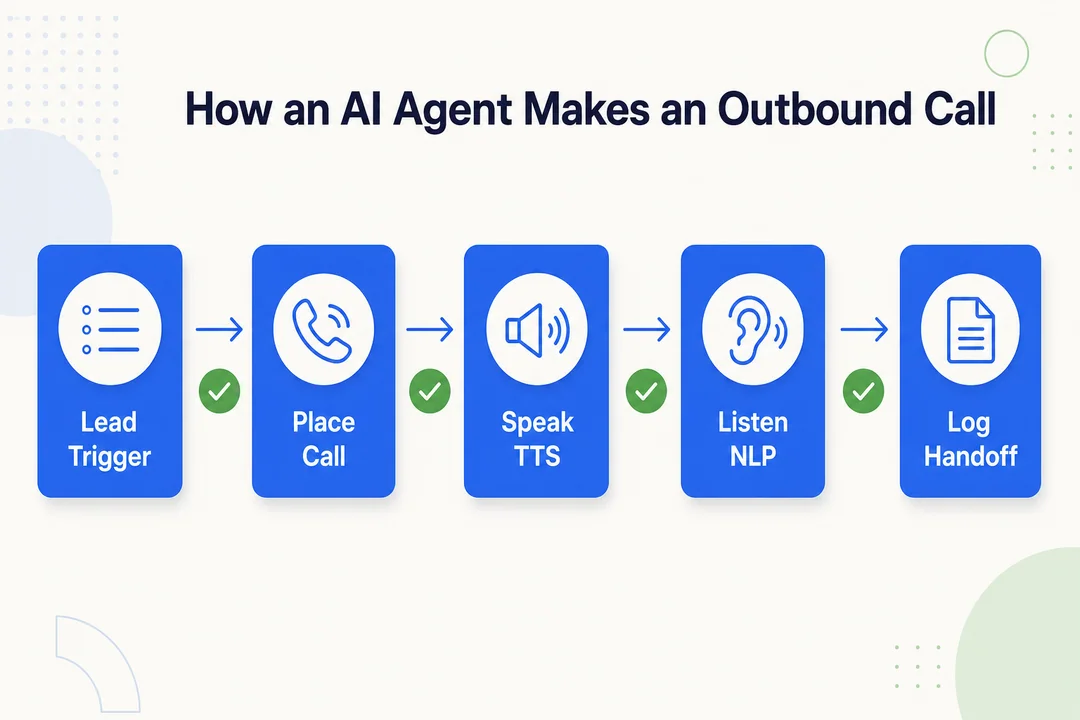
The process is simpler than it sounds. Most outbound systems follow the same pattern: connect contact data, place calls based on rules, handle the conversation, complete a task, log the result, and transfer to a person when needed.
1. Connect a Contact List or CRM
The AI agent needs a contact source before it can call anyone. This usually comes from a CRM, a campaign list, or a segmented outbound database.
Good setup starts with list quality. Bad data creates bad calling results.
Pre-call checks should include:
- Phone number validation
- Duplicate removal
- Lead segmentation
- Consent records review
- DNC Registry suppression
- Internal opt-out suppression
If your CRM integration is clean, the AI can pull the right people into the right campaign. If your data is messy, the AI will scale the mess.
2. Start Programmatic Outbound Dialing
Once the list is ready, the platform starts programmatic outbound dialing. That means the system places calls automatically based on campaign rules.
Typical controls include:
- Time-zone scheduling
- Allowed call windows
- Retry logic
- Pacing limits
- Voicemail handling
This is where an outbound engagement platform usually outperforms manual dialing. It can manage volume, timing, and consistency better than a person working a call list.
But aggressive dialing is a mistake. It can create compliance risk, increase complaints, and hurt brand perception.
3. Listen and Understand the Prospect in Real Time
When someone answers, the AI uses speech-to-text (STT) to convert audio into text. Then natural language understanding (NLU) checks what the person means.
In simple terms, the flow looks like this:
- The AI hears the reply
- It turns the reply into text
- It detects intent and chooses the next response
Common intent categories include:
- Interested
- Not interested
- Wants more details
- Wants a callback
- Wants to opt out
Some systems also use light sentiment detection, but the core job is real-time intent recognition, not mind reading. The system only needs enough accuracy to move the call to the right next step.
4. Respond With a Human-Like AI Voice
After the system decides what to say, it uses text-to-speech (TTS) to speak the response out loud. This is the voice the prospect hears on the call.
The goal is not perfect imitation. The goal is clarity, timing, and consistency.
Practical tips that matter more than realism:
- Use a clear voice, not a gimmicky one
- Keep responses short
- Add pauses so the conversation feels natural
- Build simple branching for common objections
Good voice synthesis technology supports a smooth experience. Bad pacing makes even a strong script sound awkward.
5. Complete a Task During the Call
AI outbound calls are useful because they can complete a job, not just deliver audio.
Common tasks include:
- Lead qualification
- Automated appointment scheduling
- Basic FAQ handling
- Reminder calls
- Survey collection
- Renewal prompts
- Callback scheduling
The best tasks are structured. For example, an AI agent can ask whether a prospect is the right contact, whether there is active interest, and whether they want a demo next week. If the answers fit the rules, it can book the meeting on the spot.
That is where an automated lead qualification workflow creates real value.
6. Log the Outcome Automatically
After the call, the system can update the CRM without manual work. This is one of the biggest operational benefits.
It can log:
- Call summary
- Disposition
- Tags
- Next steps
- Follow-up owner
- Callback date
- Opt-out status
For RevOps, this matters a lot. Cleaner pipeline visibility and data logging means better reporting, better routing, and fewer lost details.
Instead of asking reps to remember every call note, the system captures the basics automatically.
7. Transfer to a Human When Needed
Strong AI outbound programs always include a human fallback. A live transfer is not a failure. It is part of the design.
Common escalation triggers include:
- The prospect asks a custom question
- Buying intent is high
- AI confidence is low
- The person sounds frustrated
- The conversation moves outside the approved script
A good escalation workflow protects conversion and trust. Do not force the AI to stay on the line when the situation clearly needs a person.
What AI Outbound Calls Are Best Used For
AI outbound calling performs best in structured, repeatable, rules-based outreach. If the call has a clear goal and limited paths, AI can usually handle it well.
Lead Qualification
AI is strong at first-pass lead qualification.
It works best when the questions are short and repeatable, such as:
- Are you the right contact?
- Are you evaluating this solution now?
- Would you like a demo?
Qualified leads can then route to human reps for deeper follow-up.
Appointment Booking and Reminders
Automated appointment scheduling is one of the cleanest use cases.
AI can:
- Book meetings
- Confirm time slots
- Send reminders
- Handle simple reschedules
This works well for sales teams, clinics, home services, and local service businesses.
Follow-Up Outreach After Form Fills or Missed Emails
Speed matters after a form fill or a missed response. AI can call quickly while interest is still fresh.
This is a strong use case for:
- Warm inbound leads
- Demo request follow-up
- Missed email recovery
- Callback offers
Fast automated AI voice outreach often beats delayed manual follow-up.
Renewal and Re-Engagement Calls
AI also fits simple renewal and win-back flows.
Examples include:
- Subscription renewal reminders
- Reactivation outreach
- Check-ins with inactive accounts
- Offer-based re-engagement
These conversations are usually structured enough for a narrow renewal workflow.
Customer Feedback and Survey Calls
Post-service surveys are a good fit because the questions are standardized.
AI can ask:
- How satisfied were you?
- Would you recommend the service?
- Would you like a follow-up from the team?
This makes voice-based customer feedback collection easier to scale.
Payment or Service Reminders
Reminder calls are practical and low-complexity.
AI can handle:
- Balance due reminders
- Service window notifications
- Appointment day reminders
- Status update calls
Keep the tone clear, neutral, and useful.
Basic B2B Prospecting
Basic B2B outbound is often a better fit than broad consumer calling.
AI can help with:
- Intro calls to business lines
- Top-of-funnel qualification
- Callback requests
- Meeting interest checks
This works best when the goal is simple and the AI acts like a virtual sales representative calling for first-touch outreach, not deep selling.
What AI Outbound Calls Are Not Good For
AI is not a universal replacement for human calling. The more trust, nuance, and emotional sensitivity involved, the weaker the fit becomes.
Complex Sales Conversations
AI is weak at consultative discovery.
If the call requires:
- Diagnosing needs
- Exploring edge cases
- Mapping solutions
- Adapting to fast-changing context
A human rep will usually perform better.
High-Trust Negotiations
Pricing discussions, procurement reviews, and enterprise buying conversations need judgment.
In these cases, relationship quality matters more than call volume. Human reps are still far better for high-trust selling.
Emotionally Sensitive Support Calls
AI should not lead calls involving distress, complaints, or sensitive support issues.
Examples include:
- Serious service complaints
- Healthcare-adjacent concerns
- Financial stress situations
- Personal hardship discussions
Route these to humans early.
Situations With Many Custom Questions
If people are likely to ask highly specific or technical questions, AI will struggle more often.
This is especially true when:
- The product is complex
- Requirements vary widely
- Each call is unique
Too many edge cases reduce reliability.
Poorly Defined Scripts or Unclear Workflows
AI does not fix a broken process. It scales it.
If the script is weak, the rules are unclear, or the next step is vague, results will suffer. Strong conversation design and guardrails matter more than flashy voice demos.
AI Outbound Calls vs Robocalls vs Human SDRs
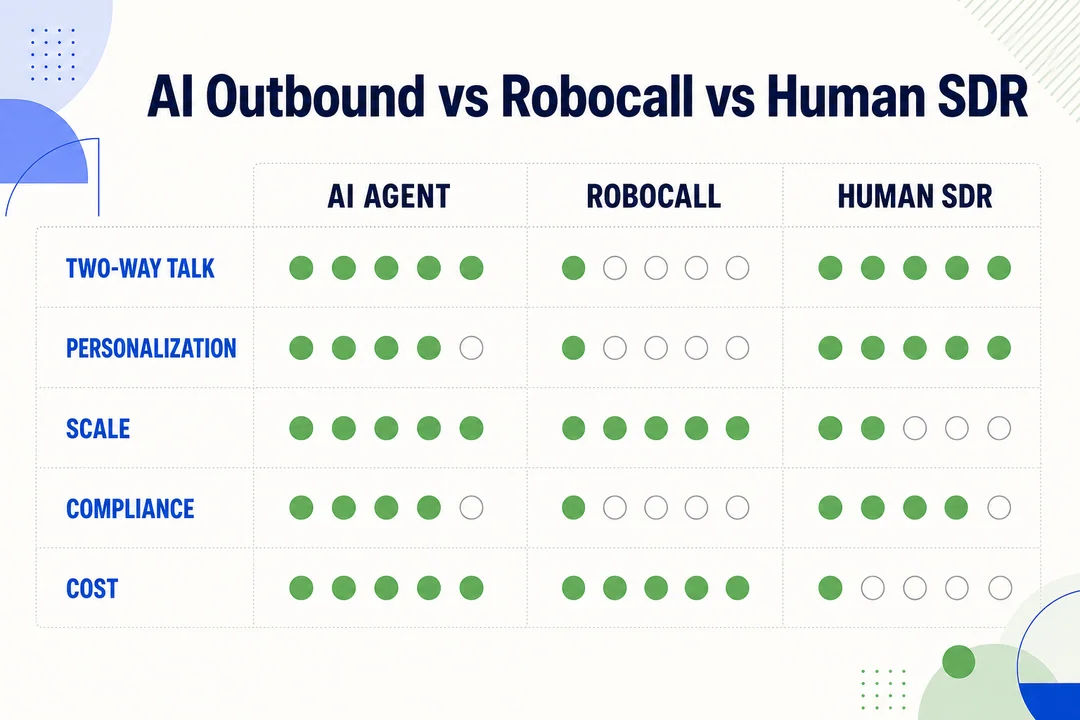
The easiest way to understand fit is to compare AI voice agents, robocalls, and human reps side by side.
| Type | How it speaks | Can it respond live? | Scale | Cost | Best use case | Main limitation |
|---|---|---|---|---|---|---|
| AI voice agent | Generated voice with live response | Yes | High | Medium | Qualification, reminders, booking | Struggles with nuance |
| Robocall | Fixed prerecorded audio | No | Very high | Low | One-way alerts and simple notices | Poor interaction quality |
| Human SDR | Live human conversation | Yes | Lower | Higher | Discovery, persuasion, complex selling | Expensive to scale |
AI Voice Agents vs Robocalls
An AI voice agent is not the same as a robocall.
A robocall usually plays a fixed message. It does not adapt well. A conversational AI system can answer simple questions, detect intent, and change direction during the call.
That said, both can still raise legal and compliance issues depending on how they are used. Interactive capability does not remove scrutiny.
AI Voice Agent vs Human SDR Cost and Scalability
AI wins on consistency, coverage, and repetition. A human SDR wins on nuance, credibility, and persuasion.
In practice:
- AI can handle more calls at once
- AI does not get tired or skip logging
- Humans manage complex objections better
- Humans build trust more effectively in high-value conversations
The tradeoff is simple. AI helps reduce repetitive manual effort. Humans still carry the harder parts of selling.
When AI Should Assist Rather Than Replace Humans
For most businesses, the best rollout is a hybrid workflow.
Use AI for:
- First-touch qualification
- Appointment reminders
- Form-fill follow-up
- Routing and logging
Use humans for:
- Discovery
- Objection handling
- Negotiation
- Closing
This model is usually safer, easier to manage, and more effective than trying to replace the full calling function.
Are AI Outbound Calling Agents Legal in the US?
AI outbound calling can be legal in the US, but it is regulated. Legality depends on who you call, why you call, what technology you use, whether consent is required, and which federal and state rules apply.
At a high level, businesses need to think about:
- Audience
- Call purpose
- Consent status
- Recording rules
- Opt-out handling
- State-level differences
This section is general information, not legal advice. If you plan to run live AI calling campaigns, get legal review before launch.
TCPA Compliance Basics
The Telephone Consumer Protection Act (TCPA) is one of the main US laws businesses need to consider for outbound calling. Automated calling methods and AI-generated voices can raise compliance questions under this framework.
The FCC has also shaped how these rules are interpreted and enforced. The safest assumption is simple: do not assume AI is exempt from outbound calling laws.
Practical cautions:
- Review whether your call type may require consent
- Treat AI voice use as a compliance issue, not a technical detail
- Match calling practices to call purpose and audience
- Document approval before launch
This is the core of TCPA compliance for AI-generated outbound voice calls.
DNC Rules and Internal Opt-Out Management
Businesses should screen against the Do Not Call (DNC) Registry where applicable and maintain internal suppression lists.
Best practices include:
- Remove opted-out contacts quickly
- Record opt-out requests in the CRM
- Suppress future campaigns automatically
- Review state-level DNC requirements as needed
Fast opt-out handling is not optional. It is one of the clearest signs of responsible outbound operations.
Call Recording and Disclosure Rules
Call recording rules vary by state. Some states require consent from one party, while others may require consent from all parties involved.
A simple disclosure at the start of the call is a strong operational practice. Businesses should also clearly identify:
- Who is calling
- Which business is calling
- Why the call is happening
- Whether recording applies where required
If consent or disclosure is needed, document it clearly.
B2B vs B2C Outbound Calling
B2B outbound is often easier to operate than B2C outbound, but that does not mean it is risk-free.
In general:
- B2B may be more workable for simple business outreach
- B2C often carries more compliance exposure
- Broad consumer campaigns deserve extra caution
- Large-scale cold outreach without legal review is a bad idea
If you are asking, are AI outbound calling agents legal for B2B? the practical answer is that B2B can be more manageable in some contexts, but businesses still need compliance review and clear controls.
What Businesses Need Before Using AI for Outbound Calls
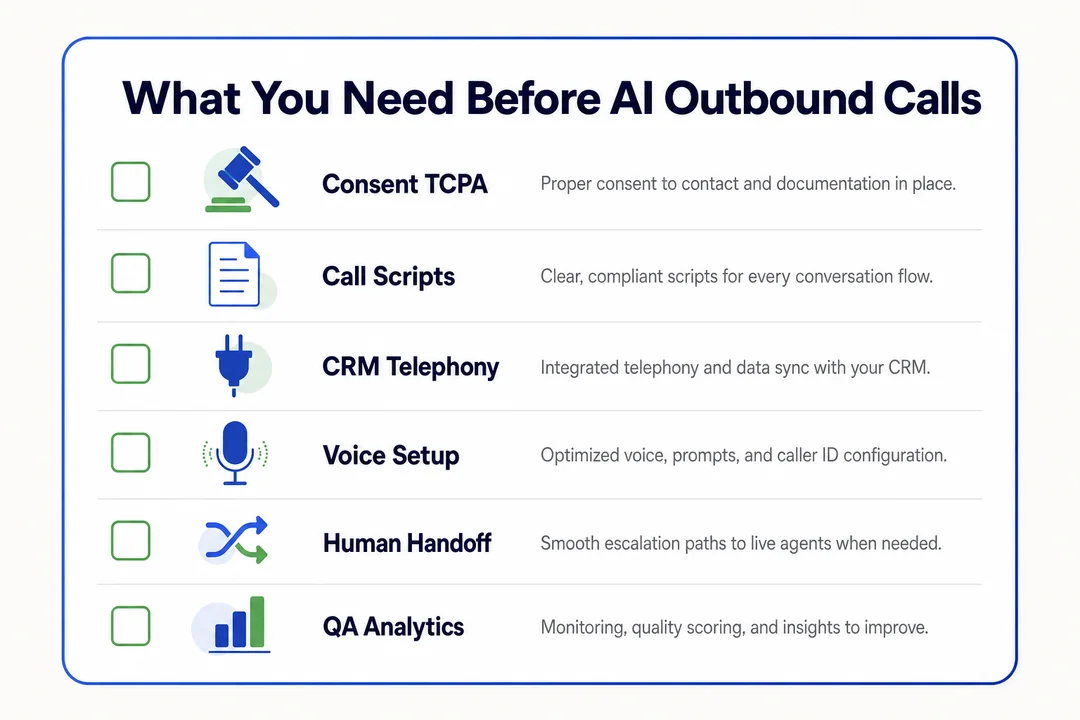
Think of this as a readiness checklist. Most problems happen before the first call, not during it.
A Clear Use Case
Start with one job.
Good examples:
- New lead callback
- Reminder call
- Qualification call
- Renewal reminder
Do not try to automate your full sales process on day one.
Approved Scripts and Guardrails
Your team should define:
- Opening lines
- Allowed claims
- Objection paths
- Escalation triggers
- Opt-out language
AI needs rules. Loose scripts create loose results.
Contact Data and Consent Records
You need clean data and clear records.
Check:
- Contact source quality
- Opt-in tracking
- Suppression history
- DNC handling
- Phone accuracy
If the records are weak, the risk goes up fast.
CRM and Workflow Integrations
The system should connect to the tools your team already uses.
Useful integrations include:
- CRM
- Calendar
- Routing tools
- Follow-up automation
- Reporting dashboards
Without this, the value stays limited.
Human Fallback Process
Every campaign needs a clear fallback process.
That includes:
- Live transfer rules
- Callback routing
- Voicemail review
- Exception handling
This protects conversion, customer experience, and team trust.
A Simple Example of an AI Outbound Call
A common starting use case is a callback to a warm lead who filled out a form but did not book a meeting.
A simple flow might look like this:
- The AI calls within a few minutes of the form submission
- It introduces the business and asks for permission to continue
- It asks two or three qualification questions
- If the lead matches the criteria, it offers available meeting times
- It books the meeting and writes the result into the CRM
- If the lead asks a deeper question, it routes to a human rep
This is a practical fit because the goal is narrow and the next step is clear.
Example Call Script Snapshot
AI Agent: Hi, this is Maya calling from BrightPath. You recently requested information on our scheduling software. Is now a bad time?

Prospect: I have a minute.

AI Agent: Great. I just have two quick questions to see if a demo makes sense. Are you currently using any scheduling tool today?

Prospect: Yes, but we may switch.

AI Agent: Understood. And are you looking to make a change in the next three months?

Prospect: Possibly, yes.

AI Agent: Thanks. Based on that, I can help you book a short demo with a product specialist. Would Tuesday at 2 PM or Wednesday at 11 AM work better?

Prospect: Wednesday at 11.

AI Agent: Done. I’ve reserved Wednesday at 11 AM and sent the details to your email.
Benefits of AI-Powered Outbound Calling
AI-powered outbound calling has real benefits when the workflow is narrow and well designed. The value is operational, not magical.
Faster Outreach at Scale
AI can reach more contacts in less time and respond quickly to inbound signals. This helps with high-volume outreach and time-sensitive follow-up.
Lower Manual Workload
Teams spend less time on repetitive calling tasks, manual dialing, and note entry. That lowers administrative drag and frees reps for higher-value work.
Consistent Script Adherence
AI follows approved flows consistently. It does not drift off script, forget disclosure language, or skip qualification steps because of fatigue.
Better Automated CRM Synchronization
With automated CRM synchronization, call outcomes, tags, and follow-up tasks can update automatically. This improves RevOps visibility and reduces messy handoffs.
Real-Time Call Data Capture
AI can create structured records immediately after each call. That supports cleaner reporting, better analysis, and stronger pipeline visibility and data logging.
Limitations and Risks to Know Before You Start
Results depend as much on workflow design and compliance discipline as on the AI itself. This is where many teams get overconfident.
Trust and Brand Perception
Some people do not like AI voices. If the call feels deceptive, robotic, or irrelevant, trust drops fast.
Best practices:
- Be clear about who is calling
- Keep the call useful
- Avoid pretending the AI is human
- Offer a human path early
Transparency protects brand perception.
Compliance Mistakes Can Be Costly
Consent gaps, DNC errors, and recording issues can create serious risk.
This is why AI compliance and risk management needs process discipline, not guesswork. Legal review, documented workflows, and suppression controls matter.
Weak Conversation Design Hurts Results
Bad prompts, poor branching, and missing fallback logic lead to awkward calls.
If the conversation flow is weak, the technology will not save it. Strong dynamic objection-handling logic and clear routing rules matter more than fancy voice quality.
AI Still Struggles With Nuance and Edge Cases
AI still has limits with:
- Sarcasm
- Ambiguous answers
- Emotional context
- Rare objections
- Complex buying journeys
Use conservative escalation rules. When the AI is unsure, it should hand off instead of guessing.
When AI Outbound Calling Makes Sense
This is where readers can self-qualify quickly. AI outbound calling makes sense when the work is structured and the outcome is easy to define.
High-Volume, Repeatable Outreach
If your team handles lots of similar calls with standardized talk tracks, AI is a strong fit.
Examples include:
- Reminder calls
- Lead screening
- Follow-up callbacks
- Survey calls
Simple Qualification Flows
AI performs well when the logic is simple.
For example:
- Right contact or not
- Interest or no interest
- Book now or later
- Send to rep or suppress
That is ideal for basic routing logic.
Time-Sensitive Follow-Ups
AI is useful when response speed matters.
Examples include:
- New inbound leads
- Missed-call recovery
- Demo request follow-up
- Time-bound offers
Fast speed-to-lead often improves coverage.
Teams That Need Better RevOps Visibility
If your team struggles with incomplete notes, missed follow-ups, or poor reporting, AI can help by capturing structured call data automatically.
This is especially useful for teams that care about CRM integration, attribution, and pipeline visibility.
When Human Reps Should Take Over
Human takeover is a feature, not a failure. In many cases, it is the point.
Discovery Calls With Complex Needs
If the prospect has custom requirements, multiple stakeholders, or unclear pain points, a human should take over early.
This is where real discovery happens.
Enterprise or High-Value Deals
Strategic accounts and large deals need relationship-led selling.
These calls often involve:
- Internal politics
- Budget questions
- Procurement processes
- Multi-step evaluation
AI is not the right lead actor here.
Objection-Heavy Conversations
If the call turns into competitor comparison, pricing pushback, or procurement concerns, a human rep is usually the better choice.
Persuasion still depends on judgment.
Sensitive or Regulated Customer Interactions
Highly regulated or sensitive interactions deserve human escalation.
Examples include:
- Financial hardship discussions
- Sensitive health-related topics
- Escalated complaints
- Risk-heavy disclosures
Do not stretch AI into conversations where trust and care are central.
How to Start With AI Outbound Calling Without Overcomplicating It
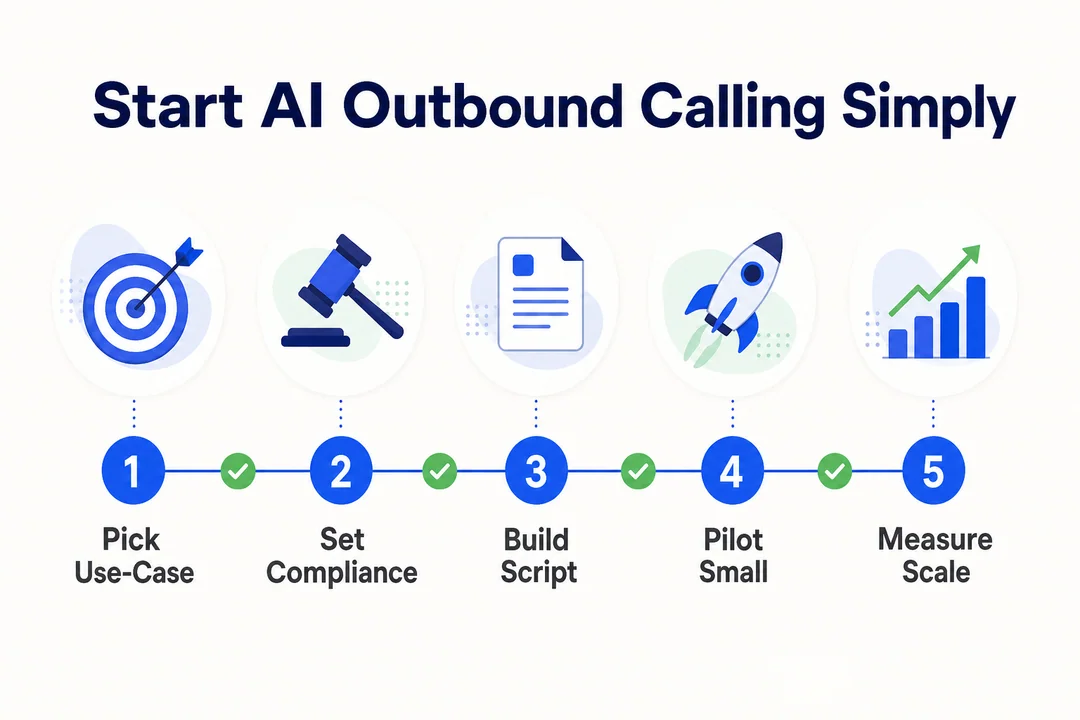
The easiest mistake is trying to do too much too early. Start small and keep the rollout tight.
Start With One Narrow Use Case
Pick one simple workflow, such as form-fill follow-up. This makes testing easier. Do not start with full-funnel automated sales calls.
Use a Small, Compliant Contact Segment First
Launch with a limited segment that has cleaner records and lower complexity. For example, start with recent inbound leads. Do not test on a broad mixed list without compliance review.
Build a Short Conversation Flow
Use a short conversation with one intro, two or three questions, and one clear next step. For example, qualify and book. Long scripts usually break faster.
Measure Outcomes That Matter
Track connect rate, qualification rate, meeting rate, opt-out rate, and transfer rate. For example, if transfers spike, your flow may be too narrow. Do not focus only on call volume.
Improve Before Scaling
Review transcripts, drop-off points, and objections before expanding. For example, fix repeated confusion in the opening line first. Scaling a weak flow only creates more weak calls.
Optional Tool Evaluation Criteria for Buyers
If you are comparing tools, focus on operational fit instead of vendor hype. The best platform is the one your team can control, measure, and govern.
What to Look for in an Outbound Engagement Platform
Prioritize these areas:
- Call quality
- STT/TTS performance
- Live transfer support
- CRM integration
- Analytics and reporting
- Compliance controls
- Scheduling and pacing settings
- Opt-out handling
A polished demo voice is not enough.
Pros and Cons From a User Perspective
Pros:
- Faster rollout for repeatable use cases
- Better coverage than manual dialing
- Cleaner CRM logging
- More consistent execution
Cons:
- Can sound awkward if poorly configured
- Limited in complex conversations
- Requires compliance discipline
- Brand risk if the experience feels spammy
Best Fit by Business Type
Best fit:
- B2B teams with repeatable qualification flows
- Service businesses with reminder-heavy workflows
- Teams with strong CRM process
- Operators who value structured reporting
Poor fit:
- Businesses selling through deep consultative calls
- Teams without clean contact data
- Organizations with weak compliance process
- Brands where trust depends heavily on personal interaction
Frequently Asked Questions
Can AI Agents Really Place Outbound Calls on Their Own?
Yes, within defined workflows. They can dial numbers, speak with prospects, ask qualification questions, log results, and route calls when needed.
Are AI Outbound Calls Legal?
They can be legal, but they are regulated. Businesses need to consider TCPA compliance, FCC guidance, the DNC Registry, recording rules, and state-level requirements.
Do AI Outbound Calls Require Consent?
Often yes, depending on the audience, call purpose, technology used, and applicable law. Businesses should not assume consent rules are the same across every campaign.
Are AI Calls the Same as Robocalls?
No. AI calls can respond in real time, while robocalls usually play fixed messages. But both can still raise compliance questions depending on how they are used.
Can AI Agents Book Meetings During a Call?
Yes. If the system connects to calendars or scheduling tools, it can offer times and complete automated appointment scheduling during the call.
Can AI Handle Lead Qualification?
Yes. AI is well suited for simple, repeatable lead qualification workflows with clear criteria and a defined next step.
Is AI Outbound Calling Better for B2B or B2C?
It is often easier to use in B2B. B2C outreach usually requires more caution because compliance exposure is often higher.
What Happens if the Prospect Asks a Complex Question?
The AI should transfer the call, schedule a callback, or route the lead to a human rep. It should not guess when the conversation moves beyond the approved flow.
Do AI Voice Agents Integrate With CRM Systems?
Yes. Many platforms support CRM integration for notes, dispositions, task creation, tags, and follow-up triggers.
How Do Businesses Start Using AI for Outbound Calling?
Start with one repeatable use case, verify compliance requirements, connect the CRM, define human handoff rules, and test with a small segment before scaling.
Conclusion
Yes, AI agents can make outbound calls, and they work best when the outreach is structured, repeatable, and tied to a clear task like qualification, reminders, or booking. They are not a universal replacement for human reps. Compliance, disclosure, clean data, and human escalation still matter.
The safest path is a narrow rollout. Choose one workflow, build clear guardrails, connect your CRM, and let humans handle complexity.
If you’re considering AI outbound calling, start with one repeatable workflow, confirm your compliance requirements, and test on a small segment before scaling.
Legal disclaimer: This article is for general informational purposes only and is not legal advice. Outbound calling, consent, recording, and telemarketing rules vary by jurisdiction and may change. Review your specific use case with qualified legal counsel before launching an AI outbound calling program.
More in Operations & CX Optimization
View all →
Customer Experience Transformation: Framework and Steps
A telecom customer calls support about a billing error. They explain the problem to the IVR system. Then to the first agent. Then get transferred and explain again. Then escalated—and explain a third time. Forty minutes later, they're exhausted and the problem still isn't solved. This is what broken customer experience looks like. And it's costing you customers. Customer experience…


Web Caller Meaning: JavaScript caller, Calling Tools or Portals
“Web caller” is one of those phrases where the search results and the searcher are frequently talking about different things. Three unrelated audiences use it: developers hitting an error on the legacy JavaScript caller property, buyers evaluating browser-based calling software, and people trying to reach a specific portal or training page whose exact name they cannot recall. That fragmentation is…

Customer Experience Strategy: How to Build One That Works
Customer experience is getting worse, not better. Forrester's 2025 Global CX Index found that 21% of brands declined in CX quality while only 6% improved — and in the US, 25% declined against 7% that improved, the second consecutive year of that pattern. Most of those brands were not neglecting customer experience. They were working on it without a strategy…



 English
  Russian
  Chinese