

Automated outbound calling helps sales teams, call centers, and SMBs reach more people in less time without manual dialing. It can speed up lead follow-up, improve agent productivity, and keep outreach organized. This guide explains what it is, how it works, when to use it, which dialer fits your team, and how to set it up safely.
Key Takeaways
- Automated outbound calling lets software dial numbers for your team and connect answered calls to the right agent.
- It saves time, improves outreach speed, and helps teams handle more calls without adding headcount.
- The right dialer depends on your goals: volume, control, personalization, or compliance.
- Clean data, clear scripts, and compliance rules are not optional.
- CRM integration makes follow-up, reporting, and call tracking much more effective.
What Is Automated Outbound Calling?
Simple Definition of Automated Outbound Calling
Automated outbound calling is a system that dials phone numbers from a contact list automatically. When someone answers, it can connect the call to an agent, play a recorded message, or move to the next action.
It is used to reduce manual work and make outbound calling more efficient.
- It removes the need for agents to dial each number one by one.
- It helps teams reach more contacts in less time.
Automated Outbound Calling vs. Manual Dialing
Manual dialing works best for small lists and high-touch conversations. Automated outbound calling is better when speed, scale, and consistency matter.
| Factor | Manual Dialing | Automated Outbound Calling |
|---|---|---|
| Speed | Slower | Much faster |
| Agent productivity | Lower | Higher |
| Call volume | Limited | Scales better |
| Reporting | Mostly manual | Automatic and detailed |
| Best fit | Small lists, personal outreach | Sales teams, support teams, large campaigns |
Manual dialing still makes sense when every call needs deep personalization. But for most teams, automation saves time and reduces wasted effort.
Automated Outbound Calling vs. Robocalls and Spam
Automated outbound calling is not the same as spam calling.
Legitimate business calling is targeted, permission-aware, and controlled. Spam is usually broad, unwanted, and often non-compliant.
- Legitimate systems use consent rules and opt-out handling.
- Spam ignores customer preference and can create legal risk.
- Good outbound calling protects both the brand and the customer experience.
Common Terms You’ll See
- Dialer software: Tools that place calls automatically from a list.
- CRM: A system that stores customer and lead data.
- VoIP: Internet-based calling.
- Call disposition: The outcome tag for a call, such as answered or no answer.
How Automated Outbound Calling Works
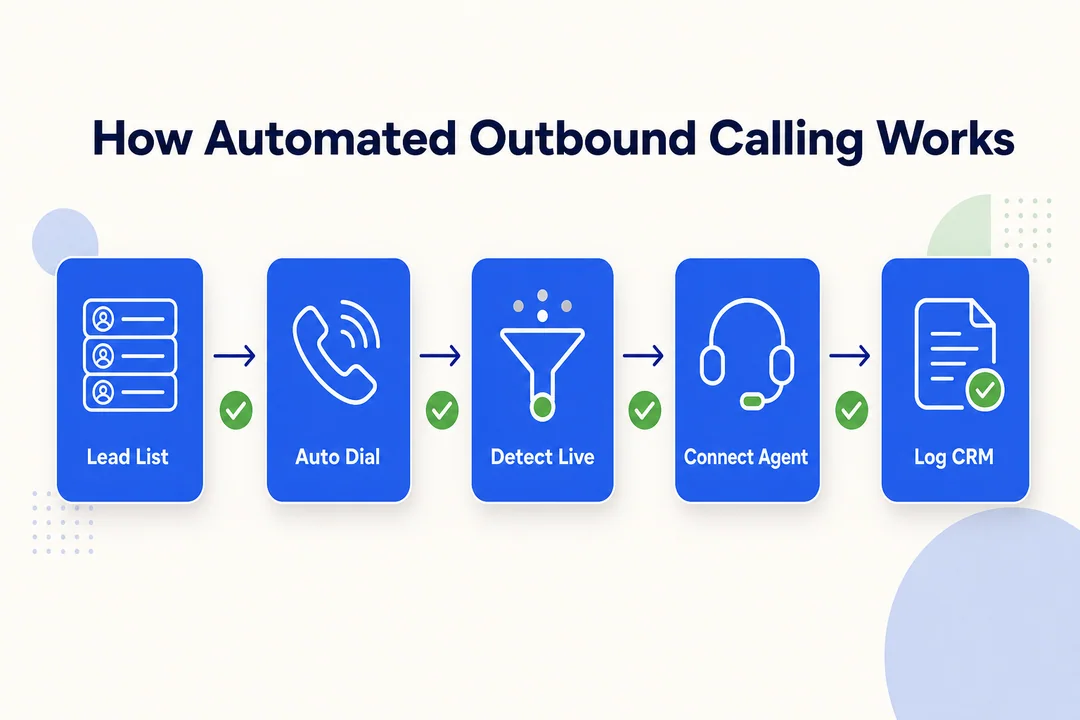
Importing or Syncing Contact Lists from CRM
Most outbound calling starts with a contact list pulled from your CRM. The system syncs lead data, phone numbers, notes, and status fields before the campaign starts.
A clean sync matters because bad data causes duplicate calls, wrong timing, and wasted agent time.
- Import the contact list or connect the CRM.
- Map fields like name, number, account status, and owner.
- Remove duplicates and invalid records.
- Keep records updated in real time.
Automatic Dialing and Call Routing
Once the list is ready, the dialer starts placing calls automatically. The routing logic decides what happens next based on agent availability and dialer type.
A simple flow looks like this:
- The system dials a number from the list.
- It checks whether an agent is free.
- If someone answers, the call connects to an available agent.
- If not, the system moves to the next record or schedules a retry.
This cuts down idle time and keeps outreach moving.
What Happens When a Call Is Answered, Missed, or Sent to Voicemail
Each call outcome triggers a different next step.
- Answered: The call connects to an agent, or in some workflows, plays an approved message first.
- Missed or no answer: The system may retry later or mark it for follow-up.
- Voicemail: The system may leave a voicemail drop (pre-recorded voicemail) or queue a callback task.
Too many retries can frustrate people, so timing and frequency matter.
Call Disposition and Data Logging
After the call, the system logs the result. This is called call disposition.
Common dispositions include:
- Answered
- No answer
- Busy
- Callback requested
- Wrong number
- Do not call
This data helps teams prioritize follow-up, measure performance, and improve future campaigns. It also keeps the CRM updated without manual entry.
The Role of VoIP and Cloud-Based Telephony
Most modern outbound systems run on VoIP and cloud-based telephony. That means calls happen over the internet instead of traditional phone hardware.
This makes the system easier to scale, easier to manage, and easier to connect with analytics and CRM tools.
Key Benefits of Automated Outbound Calling
Saves Time and Reduces Manual Dialing
Manual dialing wastes time before the conversation even starts. Automation removes that step.
- Agents spend less time punching numbers.
- Teams move faster through call lists.
- Follow-up happens sooner.
That time savings becomes significant as call volume grows.
Improves Agent Productivity
With automation, agents focus on talking, not administrative tasks.
They spend more time on live conversations and less time on dialing, logging, and searching for records. That usually leads to better output per rep and a smoother daily workflow.
A common result is better agent energy, because repetitive work drops.
Increases Call Volume and Outreach Efficiency
Automated systems can place more calls in the same time window than manual workflows.
That helps teams:
- Reach more leads.
- Follow up faster.
- Keep campaigns moving even during busy periods.
Volume alone is not the goal. The goal is better reach without losing control.
Supports Better Lead Conversion and Follow-Up
Speed matters in lead handling. The faster you respond, the better your chance of reaching a prospect while interest is high.
Automated outbound calling supports:
- Faster first contact.
- Structured follow-up.
- Consistent call sequencing.
That makes it easier to move leads through the pipeline.
Improves Call Tracking and Reporting
Automated systems capture call data as they work.
Managers can track:
- Answer rate
- Connect rate
- Callback rate
- Disposition trends
This makes it easier to see what is working and where calls are failing.
Helps Scale Outreach Without Adding Headcount
Automation lets smaller teams do more. That is valuable when budget or hiring is limited.
Instead of adding more reps just to handle volume, teams can use workflow automation to expand outreach while keeping operations lean.
Common Use Cases for Automated Outbound Calling
Sales Outreach and Lead Nurturing
This is one of the most common uses. Sales teams use automated outbound calling to reach new leads, qualify interest, and follow up on prior conversations.
It works well when speed-to-lead matters and when reps need to work through a large list quickly.
Appointment Reminders and Confirmations
Automated calls can confirm visits, demos, or service appointments.
This helps reduce no-shows and last-minute confusion. It is especially useful for healthcare, home services, and local businesses.
Customer Follow-Ups and Retention Calls
Teams use outbound calling after a purchase, support case, or onboarding step.
These calls can check satisfaction, answer questions, and reduce churn. They work best when the goal is service, not pressure.
Payment Reminders and Collections
Automated calling can support reminder-based payment workflows.
This use case needs careful compliance handling, clear scripts, and respectful timing. It is useful, but it must be managed carefully.
Surveys, Feedback, and Market Research
Outbound calling can collect customer feedback, survey responses, and market research data.
It is useful when you need direct responses from a targeted audience instead of broad online feedback.
Renewals, Upselling, and Cross-Selling
Account teams can use automated calling to reach customers before a renewal date or when an upsell opportunity appears.
This works best when it is driven by CRM data and customer history.
Types of Automated Outbound Dialers
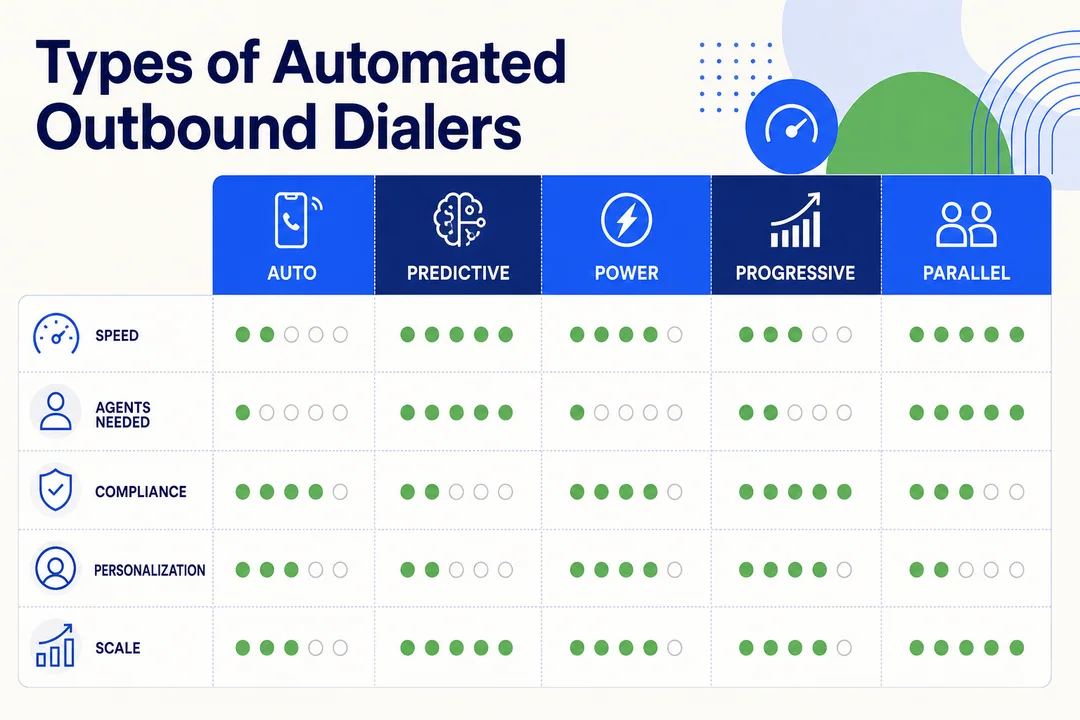
Predictive Dialer
A predictive dialer places multiple calls at once and connects only answered calls to available agents.
Best for:
- High-volume sales teams
- Large call centers
- Fast-paced outreach
Pros:
- Very efficient
- High call volume
- Reduces agent idle time
Cons:
- Less personal
- Not ideal for highly regulated or high-touch work
Power Dialer
A power dialer calls one number at a time for each available agent.
Best for:
- Small to mid-size teams
- Structured outreach
- Better call control
Pros:
- Easier to manage
- Better for compliance-focused teams
- More consistent pacing
Cons:
- Lower volume than predictive dialing
Progressive Dialer
A progressive dialer waits until an agent is ready before placing the next call.
Best for:
- Teams that want control
- Regulated industries
- Balanced workflows
Pros:
- More controlled
- Fewer dropped calls
- Good for quality and compliance
Cons:
- Slower than predictive dialing
Preview Dialer
A preview dialer shows agent context before dialing.
Best for:
- High-value leads
- Personalized outreach
- Account-based calling
Pros:
- Better personalization
- Stronger conversation prep
Cons:
- Lower call speed
- Not ideal for large-volume campaigns
AI-Powered Dialer Features
Some platforms add AI features like sentiment detection (emotion or intent detection) and intelligent call timing.
These features can help teams prioritize better leads and choose better calling windows, but they should support human judgment, not replace it.
How to Choose the Right Automated Outbound Dialer
Best Dialer for Small Teams
Small teams usually do best with a power dialer or progressive dialer.
Why:
- Easier to control
- Better for limited staff
- Stronger balance of speed and personalization
Best Dialer for High-Volume Sales Teams
Predictive dialers fit high-volume teams best.
Why:
- They maximize talk time
- They reduce idle time
- They support fast campaign pacing
Best Dialer for Quality-Focused Outreach
If personalization matters most, choose a preview or progressive dialer.
Why:
- Agents see context before calling
- Conversations feel more relevant
- Better for valuable accounts
Best Dialer for Regulated Industries
Regulated teams should prioritize control, logging, and compliance tools.
A progressive or preview dialer is often the safer fit because it gives more oversight and better recordkeeping.
What to Evaluate Before Choosing
Use this checklist:
- Team size
- Expected call volume
- CRM integration
- Routing control
- Compliance tools
- Analytics depth
- Budget
Pick the system that matches your workflow, not the one with the most features.
Essential Features to Look For
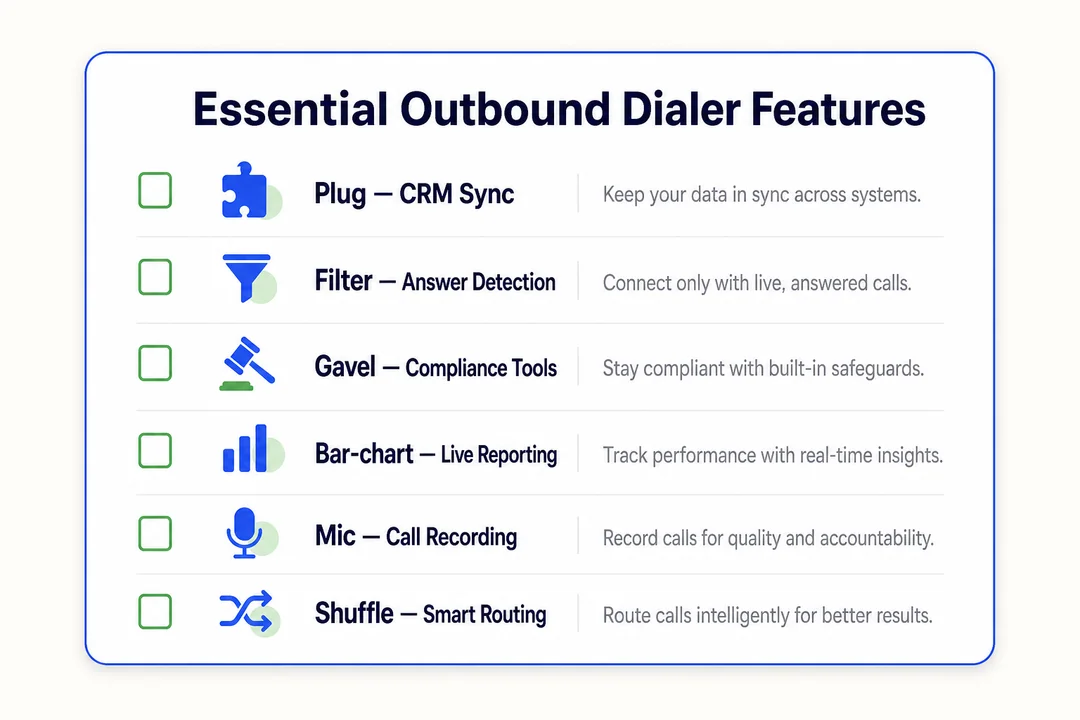
CRM Integration and Real-Time Sync
CRM integration keeps call data and customer records aligned.
This helps with:
- Faster prep
- Better follow-up
- Less manual entry
- More accurate reporting
Real-time sync matters most when multiple teams touch the same lead or account.
Call Routing and Workflow Automation
Good routing sends calls to the right agent based on rules like availability, queue, or lead type.
Workflow automation can also trigger follow-up tasks, callbacks, or next-step actions without manual work.
Real-Time Call Analytics
Look for analytics that show:
- Call volume
- Answer rate
- Connect rate
- Callback rate
- Conversion trends
This helps managers make quick decisions instead of guessing.
Call Disposition Tracking
Call disposition tags give structure to outcomes.
A good system should store and organize these automatically so agents do not have to do extra admin work after every call.
Compliance Tools and Consent Management
This is essential.
Look for:
- DNC scrubbing
- Consent tracking
- Opt-out handling
- Call window controls
- Audit logs
- Recording notices
Compliance features reduce legal risk and protect your brand.
Workforce Management and Agent Support
Helpful systems also support scheduling, coaching, and workload balance.
That matters when you want consistent performance across a team.
Best Practices for Automated Outbound Calling
Keep Contact Data Clean and Updated
Bad data ruins campaigns.
- Remove duplicates.
- Verify numbers.
- Update stale records.
- Sync CRM changes regularly.
Clean data improves connect rates and saves agent time.
Follow TCPA and DNC Requirements
You must respect consent and do-not-call rules.
- Scrub lists against DNC records.
- Honor opt-outs quickly.
- Keep proof of consent where required.
- Follow call-time rules.
Ignoring these rules can create legal and financial risk.
Call at Appropriate Times
Timing affects both results and customer experience.
Use local time zones and segment-based call windows. Do not blast the same list over and over.
Use Clear Scripts and Personalization
Automation should not sound robotic.
- Keep scripts short.
- Use the customer’s context.
- Give agents room to adapt.
- Focus on the next best action.
A strong script still feels human.
Monitor Outcomes and Optimize Campaigns
Track the numbers that matter.
- Which list performs best?
- Which time window gets the most answers?
- Which script drives callbacks?
Use that data to improve every campaign.
Balance Automation with a Human Touch
Automation should handle the repetitive work. Humans should handle trust, nuance, and relationship building.
That balance is what makes the system useful instead of annoying.
How to Get Started With Automated Outbound Calling
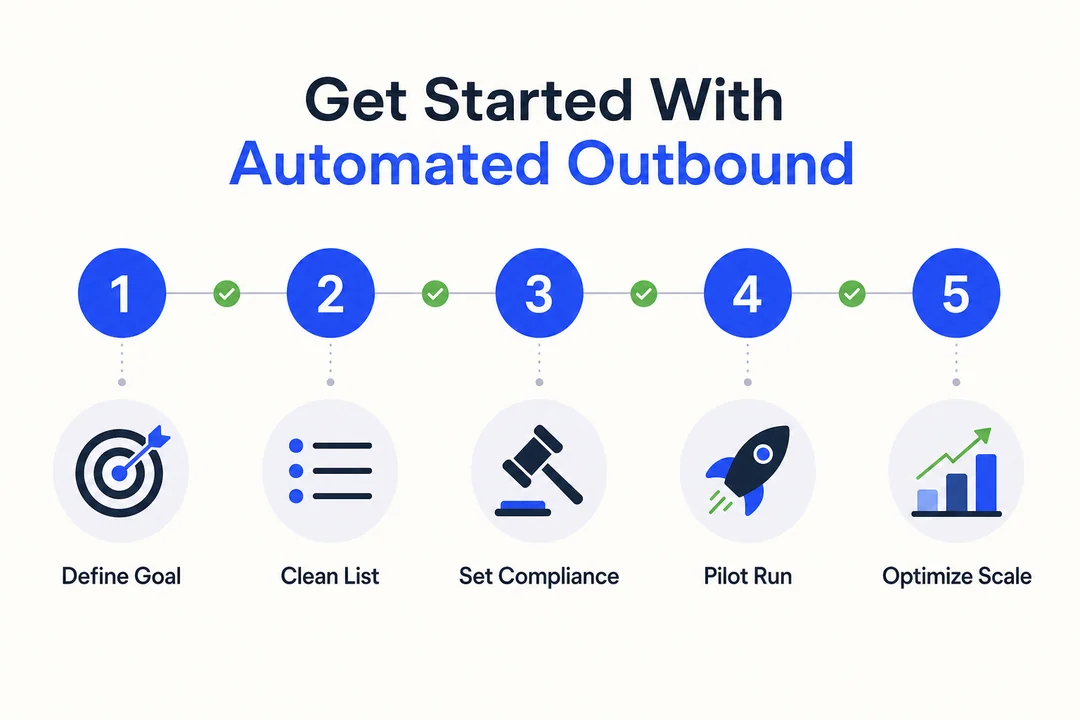
Define Your Goal and Use Case
Start with one clear purpose.
Examples:
- Lead follow-up
- Appointment reminders
- Renewal outreach
- Payment reminders
A narrow goal makes setup easier.
Choose the Right Dialer Type
Match the tool to the task.
- Predictive: high volume
- Power: controlled productivity
- Progressive: balanced outreach
- Preview: personalized calling
Prepare and Scrub Your Contact List
Before launch:
- Remove duplicates
- Check number validity
- Verify consent
- Remove DNC contacts
Do not launch with messy data.
Connect Your CRM and Calling System
Connect the systems so records sync both ways.
That way, call notes, outcomes, and follow-up tasks stay current.
Set Up Scripts, Workflows, and Dispositions
Define the basics before the first call.
- Script
- Outcome tags
- Callback rules
- Escalation steps
Clear structure prevents confusion later.
Test With a Small Pilot Campaign
Do not roll out at full scale first.
Run a small test to check:
- Answer rates
- Agent experience
- Call quality
- Workflow issues
Review Results and Scale Gradually
Use pilot data to improve the process.
Then expand only after the workflow is working well.
Common Mistakes to Avoid
Using Outdated or Poor-Quality Contact Data
Old data leads to bad connects, wrong numbers, and low efficiency.
Clean data is the base of the whole system.
Ignoring Consent and Compliance Rules
This is one of the fastest ways to create risk.
You need clear consent tracking, DNC checks, and opt-out handling.
Choosing the Wrong Dialer for the Team
Do not pick a predictive dialer if your team needs more control. Do not pick a preview dialer if your main goal is volume.
Fit matters.
Over-Automating Without Personalization
If every call sounds the same, people tune out.
Use automation to support the agent, not replace the relationship.
Not Tracking Performance Metrics
If you do not measure results, you cannot improve them.
Track call outcomes, not just call volume.
Is Automated Outbound Calling Right for Your Business?
Good Fit Scenarios
Automated outbound calling is a strong fit if you:
- Handle high lead volume.
- Run appointment-based operations.
- Need faster follow-up.
- Want better reporting.
- Use a CRM system regularly.
When a Lighter Approach May Be Better
A lighter approach may work better if your outreach is:
- Very small scale
- Highly personal
- Low frequency
- Still being built manually
Start simple if your process is not ready for automation.
Practical Recommendation Before Investing
Before you buy, check three things:
- Your compliance process is clear.
- Your contact data is clean.
- Your team knows the workflow.
If those three are not ready, fix them first.
Frequently Asked Questions
Is Automated Outbound Calling Legal?
Yes, if you follow the right rules. That includes consent, DNC requirements, and opt-out handling.
What Is the Difference Between Predictive and Power Dialers?
A predictive dialer places multiple calls at once to maximize volume. A power dialer calls one number at a time for more control.
Can Small Businesses Use Automated Outbound Calling?
Yes. Small businesses often use power or progressive dialers to save time without adding complexity.
What Industries Use Automated Outbound Calling Most?
Healthcare, insurance, financial services, education, home services, and sales teams use it often.
Does Automated Outbound Calling Require CRM Integration?
No, but CRM integration makes it much more effective. It improves sync, follow-up, and reporting.
Conclusion
Automated outbound calling helps teams reach more people, save time, and improve follow-up. The key is choosing the right dialer, keeping data clean, and staying compliant. If you want better outbound results, start with your use case, connect your CRM, and launch with a small pilot. Then scale only after the workflow is working well.
More in Operations & CX Optimization
View all →
Customer Experience Transformation: Framework and Steps
A telecom customer calls support about a billing error. They explain the problem to the IVR system. Then to the first agent. Then get transferred and explain again. Then escalated—and explain a third time. Forty minutes later, they're exhausted and the problem still isn't solved. This is what broken customer experience looks like. And it's costing you customers. Customer experience…


Web Caller Meaning: JavaScript caller, Calling Tools or Portals
“Web caller” is one of those phrases where the search results and the searcher are frequently talking about different things. Three unrelated audiences use it: developers hitting an error on the legacy JavaScript caller property, buyers evaluating browser-based calling software, and people trying to reach a specific portal or training page whose exact name they cannot recall. That fragmentation is…

Customer Experience Strategy: How to Build One That Works
Customer experience is getting worse, not better. Forrester's 2025 Global CX Index found that 21% of brands declined in CX quality while only 6% improved — and in the US, 25% declined against 7% that improved, the second consecutive year of that pattern. Most of those brands were not neglecting customer experience. They were working on it without a strategy…



 English
  Russian
  Chinese