

Introduction
An AI caller helps teams answer inbound calls, make outbound calls, and complete routine phone tasks without adding headcount right away. It can reduce missed calls, speed up response times, and improve coverage across sales, support, and operations.
For operations teams, support leaders, sales teams, founders, and call center buyers, the main value is simple: handle more calls, faster, with less manual work.
Modern AI voice agents are not the same as old IVR systems or robocalls. Legacy IVR relies on phone menus and keypresses. Robocalls play one-way recorded messages. An AI phone agent can hold a live two-way conversation, pull data from business systems, and take actions in real time. That is why more teams now evaluate AI calling software, AI phone call automation, and AI-powered call center software as practical buying options.
The Main Points You Need to Know
- An AI caller is software that can answer or place phone calls, understand spoken requests, and complete defined tasks.
- It is different from IVR because it supports natural conversation instead of only menu-based routing.
- It is different from robocalls because it can respond in two-way conversation instead of playing a one-way script.
- It typically works through STT (speech-to-text), NLP (natural language processing), LLMs (large language models), and TTS (text-to-speech).
- Common use cases include inbound support, lead qualification, appointment scheduling, reminders, and status updates.
- The best AI calling software should do more than talk. It should also update systems, trigger workflows, and route calls well.
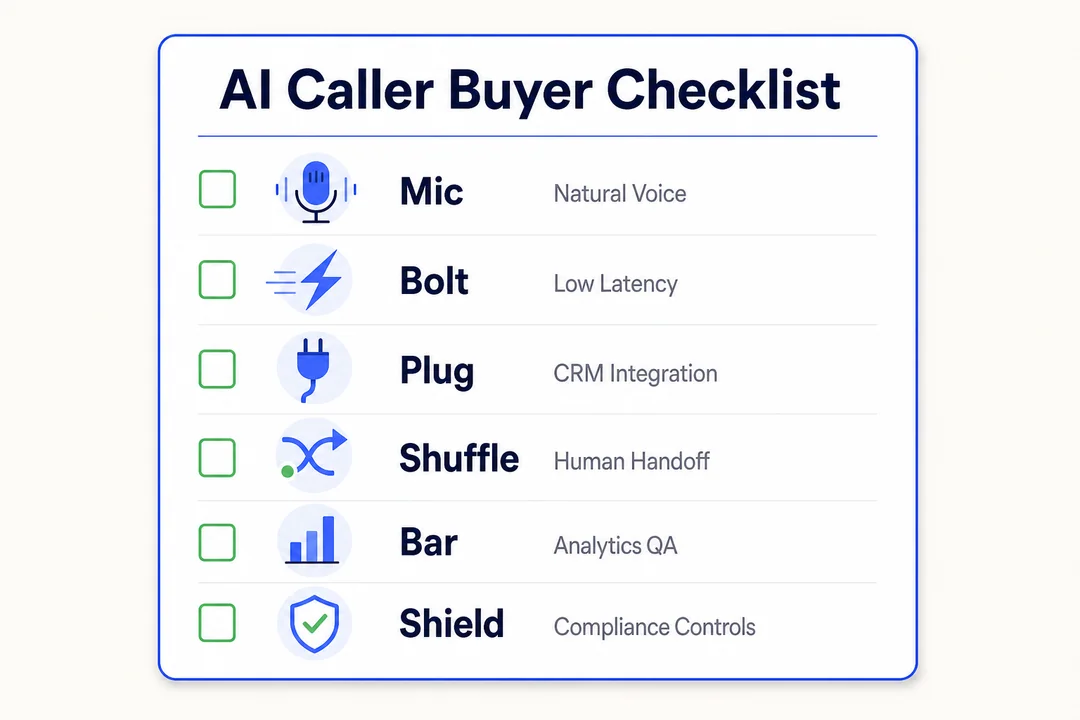
- Key buying factors include voice quality, latency, CRM integrations, telephony fit, analytics, and compliance.
- AI callers work best for high-volume, repeatable phone workflows. They are not the best fit for sensitive or highly complex conversations.
- Before buying, ask vendors about pricing, setup time, human handoff, security controls, and real-world performance.
What Is an AI Caller?
Simple AI caller definition for business buyers
An AI caller is a phone automation system that can answer calls or place calls, understand what the caller wants, speak back naturally, and complete tasks such as booking appointments, qualifying leads, or updating records.
You may also see it described as:
- AI voice agent
- Automated phone assistant
- Virtual voice representative
- Autonomous voice bot
The best platforms usually share three core traits:
- Autonomous operation, so the system can handle routine calls without a person on every step.
- Human-like fluency, so the conversation feels smooth and understandable.
- Real-time data integration, so the agent can check records and take action during the call.
In simple terms, an AI caller is a digital phone agent for repeatable business conversations.
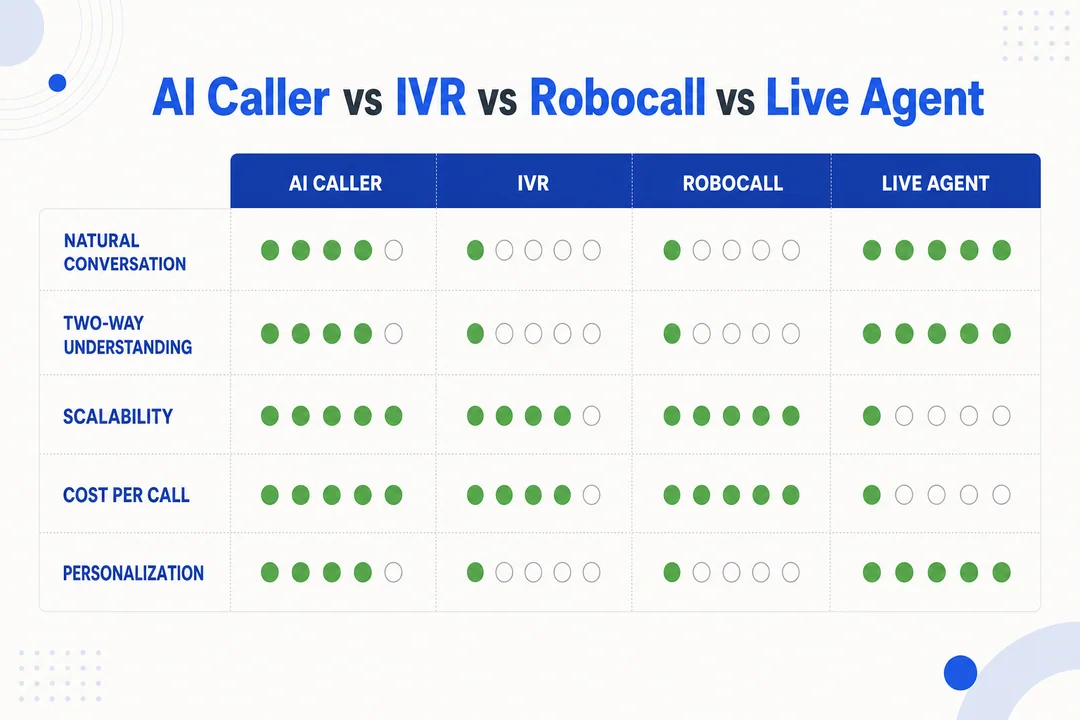
AI caller vs IVR
IVR (interactive voice response) is built around menus. The caller listens to prompts and presses numbers to move through options. That works for simple routing, but it often breaks down when people ask open-ended questions or explain issues in their own words.
An AI caller works more like a conversation. The caller speaks naturally. The system detects intent, asks follow-up questions, keeps context, and moves the call forward.
| Area | IVR | AI Caller |
|---|---|---|
| Interaction style | Menu-based | Conversational |
| Input method | Keypresses, limited speech | Natural speech |
| Flexibility | Low | Higher |
| Multi-turn conversation | Weak | Stronger |
| Intent understanding | Basic | More advanced |
| Best use | Simple routing | Routing plus task handling |
IVR is still fine when your need is basic call routing. If you only need to send callers to billing, support, or sales, a menu may be enough.
But if you want the system to understand requests, answer routine questions, and complete actions, an AI caller is a clear step forward.
AI caller vs robocalls
Robocalls are usually one-way. They play a fixed message and may offer a simple keypress response. They are scripted and limited.
An AI caller is two-way. It listens, responds, and adapts during the call.
Quick comparison:
- Robocalls: One-way playback, low personalization, poor customer experience.
- AI callers: Two-way conversation, better responsiveness, stronger user experience.
For outbound calling, consent and compliance still matter. Better technology does not remove legal and privacy requirements.
AI caller vs live agents
AI callers and live agents are not equal at every task. Each has a strong lane.
AI does best with:
- Repetitive calls
- High-volume workflows
- Structured tasks
- Fast first-line handling
Humans do best with:
- Emotional conversations
- Sensitive topics
- Complex exceptions
- High-risk decisions
The strongest setup is usually hybrid. Let the AI caller handle the first layer. If the issue becomes sensitive, confusing, or high stakes, transfer to a live agent with full context.
That gives you two benefits at once:
- Lower workload for human teams
- Better service quality on complex calls
A good AI-powered call center software setup does not try to force AI into every call. It uses AI where consistency and speed matter most, then brings in people where judgment matters most.
How an AI Caller Works
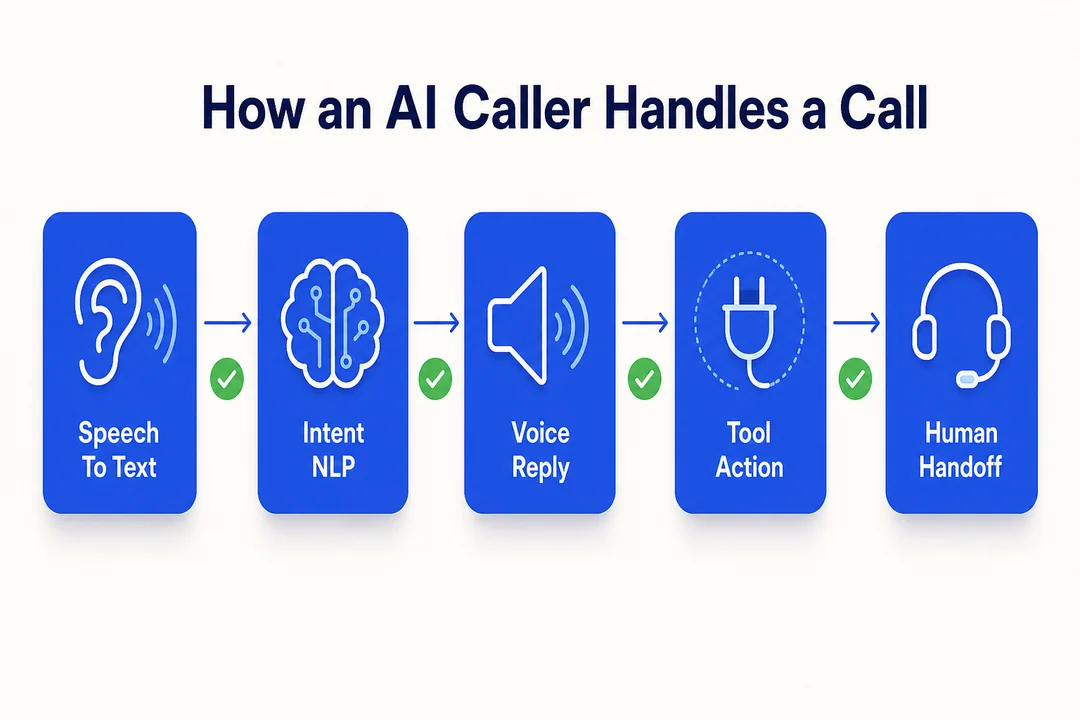
It listens and transcribes speech with STT
The first step is STT (speech-to-text). This turns spoken audio into text in real time.
That matters because the AI caller needs a live transcript to understand what the person is saying and decide what to do next.
- The better the real-time transcription, the better the system can respond accurately.
It understands intent using NLP and LLMs
After transcription, the platform uses NLP (natural language processing) to identify intent. In plain terms, it figures out what the caller means.
Then the LLM (large language model) helps generate a natural reply based on the request, the workflow, and the conversation history.
A simple view of the process looks like this:
- The caller speaks.
- The system converts speech to text.
- It detects intent and checks context.
- It creates the next response.
This is what allows an AI caller to support multi-turn conversations. For example:
- Caller says they need to reschedule.
- The system asks for the preferred date.
- The caller gives a new time.
- The system checks availability and confirms.
That is much more flexible than a rigid script. It also improves caller experience because the exchange feels more natural and less mechanical.
It replies with natural voice using TTS
TTS (text-to-speech) turns the generated reply into spoken audio.
The quality of this step matters a lot. A good voice should sound clear, stable, and easy to follow. Low latency (response delay in milliseconds) also matters because long pauses make the conversation feel broken.
- If the voice sounds unnatural or slow, trust drops fast.
It connects to business tools and takes action
This is where business value becomes real. A strong AI caller does not just answer questions. It also does things during the call.
Common real-time actions include:
- Updating CRM records
- Booking appointments
- Sending reminders
- Checking order status
- Creating support tickets
- Verifying customer details
- Triggering SMS follow-ups
This is often called real-time function calling. In simple terms, it means the AI can connect to your systems and perform tasks while the call is happening.
Typical integrations include:
- Salesforce for CRM updates
- HubSpot for lead and contact workflows
- Zendesk for support tickets
- Twilio for telephony and messaging
- SIP (session initiation protocol) for phone system connectivity
- VoIP (voice over internet protocol) for internet-based calling
| Action | Business value |
|---|---|
| Book an appointment | Reduces manual scheduling work |
| Update a CRM record | Keeps sales and support data current |
| Create a ticket | Speeds up support follow-up |
| Send confirmation SMS | Reduces no-shows and confusion |
| Check order status | Cuts repetitive support calls |
A useful buying rule: if the platform can only talk but cannot act, its value will be limited.
It routes complex calls to a human agent
Not every call should stay with AI. Good platforms use clear escalation rules and transfer the call when needed.
That process is called human handoff. The best version is a warm transfer, where the live agent receives the context before joining the call.
Best practices include:
- Escalate early if the caller sounds upset
- Transfer when the request is outside the workflow
- Route high-risk or sensitive calls to people
- Pass notes, transcript, and intent data to the live agent
A smooth handoff matters because callers do not want to repeat everything. If your AI caller supports shared memory across calls, chat, and SMS, the experience gets even better.
What an AI Caller Can Automate Today
Inbound call automation
Inbound call automation is one of the most common uses for an AI caller. It helps businesses answer more calls without adding staff for every shift.
An AI caller can handle:
- FAQ responses
- Basic call triage
- Call routing
- After-hours coverage
- Status checks
- Intake questions
This is useful if you are trying to figure out how to automate inbound customer service calls without harming the caller experience.
A simple workflow might look like this:
- The caller explains the issue.
- The AI caller identifies the intent.
- It answers the question or gathers needed information.
- It routes or resolves the call.
The main goal is practical: reduce missed calls, reduce hold time, and move callers to the right outcome faster.
Automated outbound calling
Automated outbound calling is another strong fit. This is where AI can scale repetitive outreach without making teams spend hours on manual dialing.
Common outbound workflows include:
- Lead qualification
- Follow-up outreach
- Renewal reminders
- Payment reminders
- Collections outreach
- Reactivation campaigns
This is a common use case for an enterprise voice AI platform running large outbound campaigns.
Outbound automation works best when the workflow is clear and the message is structured. It also requires careful attention to consent, call rules, and internal compliance standards.
Appointment scheduling and confirmations
Scheduling is one of the best use cases for an AI voice bot for appointment scheduling because the workflow is structured and repetitive.
An AI caller can:
- Book new appointments
- Confirm existing appointments
- Reschedule visits
- Process cancellations
- Send reminders
A simple best practice is to keep the workflow short and confirm important details twice, especially date, time, and service type.
This use case works well because success is easy to measure. You can track booked appointments, reduced no-shows, and faster response times.
Customer support call handling
AI callers are useful for support calls that do not require deep judgment.
Examples include:
- Order or case status updates
- Simple troubleshooting steps
- Ticket-related calls
- Account or service information
This reduces call center load by handling repetitive inquiries that would otherwise consume agent time.
A common pattern is simple: the AI handles routine support, while live agents focus on difficult cases. That improves team productivity without forcing customers through long waits for basic questions.
Call overflow and peak-hour coverage
AI callers can absorb spikes in demand when human teams are overloaded.
Useful scenarios include:
- Peak-hour call volume
- Seasonal demand surges
- Product launches
- Service outages
- Promotional campaigns
This gives teams a flexible backup layer without hiring just for short-term volume.
Top 7 Business Use Cases for an AI Caller
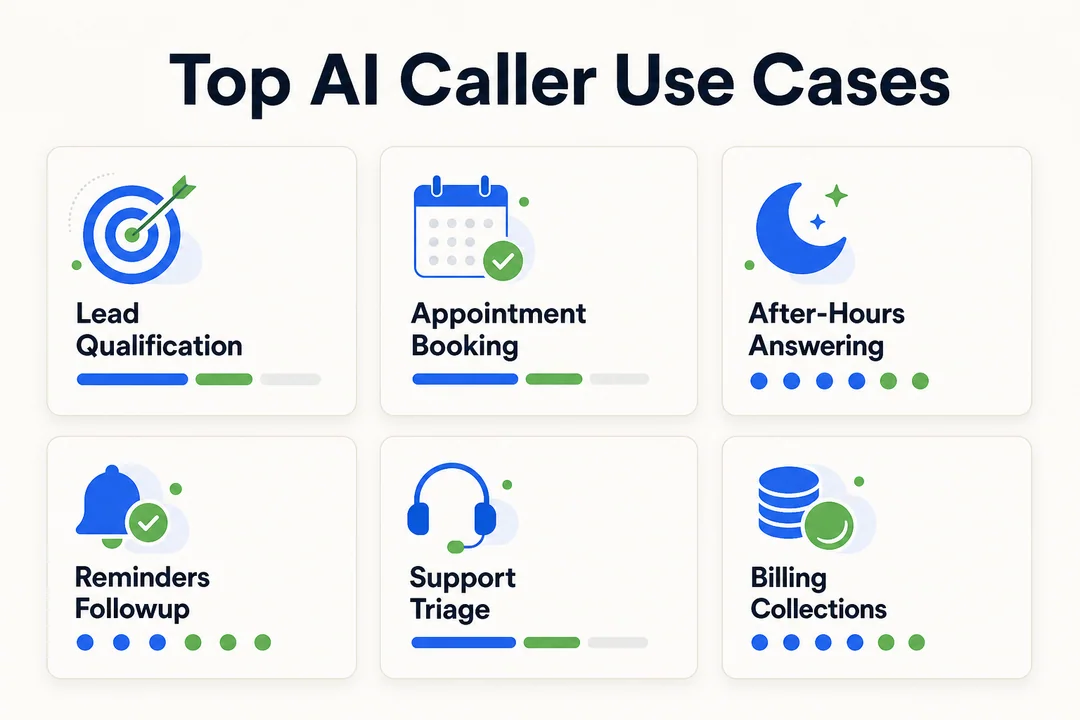
1. Lead qualification for sales teams
Sales teams often lose leads because response time is too slow. An AI caller fixes that by engaging new leads as soon as they come in.
It can:
- Ask qualification questions
- Score urgency or fit
- Book follow-up meetings
- Transfer hot leads to reps
This improves speed-to-lead, which often has a direct impact on conversion.
A simple funnel looks like this:
- New lead enters form or CRM
- AI caller places follow-up call
- Lead answers key questions
- Qualified lead moves to rep or calendar
2. Appointment booking for healthcare and home services
This is a high-fit use case because the workflow is clear and repeats every day.
An AI caller can:
- Book appointments
- Confirm visits
- Reschedule jobs
- Handle cancellations
- Send reminders
For healthcare and home services, this can reduce no-shows, improve schedule utilization, and cut front-desk workload.
3. After-hours call answering for small businesses
Small businesses miss revenue when calls come in after hours and no one answers.
An AI caller can provide:
- 24/7 coverage
- Basic intake
- Lead capture
- Booking support
- Urgent routing when needed
This is why many teams look for the best AI voice agent for small business rather than a full enterprise suite. Even a narrow after-hours use case can deliver fast ROI.
4. Reminder and follow-up calls for no-show reduction
If your business depends on scheduled interactions, reminders matter.
An AI caller can:
- Place reminder calls
- Reconfirm attendance
- Offer rescheduling
- Trigger follow-up messages
This is useful for clinics, service teams, and any operation where attendance rate affects revenue.
5. Customer support triage for repetitive inquiries
Support teams spend too much time on repeat questions. AI callers can handle the first pass.
They can:
- Answer routine questions
- Collect account details
- Identify issue type
- Route with context
This improves ticket pre-qualification and reduces the time live agents spend gathering basic information.
6. Payment, billing, and collections outreach
Payment follow-up is structured and often repetitive, which makes it a strong automation candidate.
AI callers can support:
- Payment reminders
- Billing follow-ups
- Balance notifications
- Simple collections outreach
This use case needs strict compliance controls, clear scripts, and careful escalation rules. Done well, it improves consistency and reduces manual collection workload.
7. Order, delivery, and service status updates
Many support calls are simple status checks.
An AI caller can proactively handle:
- Order status updates
- Delivery notifications
- Service arrival updates
- Delay alerts
This reduces “where is my order” traffic and improves customer lifecycle communication.
Top Industries Using AI Callers
Healthcare
Healthcare teams use AI callers for structured workflows such as:
- Appointment scheduling
- Patient intake
- Reminder calls
- Rescheduling support
This is a strong fit because volume is high and many calls follow repeatable patterns. Healthcare buyers should prioritize HIPAA-ready workflows, secure data handling, and clear escalation for clinical or sensitive conversations.
Insurance
Insurance teams often deal with high call volume and structured intake.
Common uses include:
- Lead intake
- Policy qualification
- Claims routing
- Renewal outreach
AI callers work well here because the opening part of the conversation is often standardized.
Real estate
In real estate, speed matters. AI callers help teams respond fast when new leads come in.
They are useful for:
- Lead follow-up
- Showing coordination
- After-hours answering
- Basic qualification
This helps prevent lost opportunities when agents are in meetings or on the road.
Home services
Home service businesses often lose jobs to missed calls.
AI callers can help with:
- Job booking
- Dispatch coordination
- Reminder calls
- Missed-call recovery
This is especially useful for plumbers, HVAC teams, electricians, and repair companies that depend on fast response.
Ecommerce and retail
Retail and ecommerce teams use AI callers for:
- Order support
- Return updates
- Delivery notifications
- Promotional follow-up
The biggest value usually comes when voice automation connects with SMS, chat, and order systems.
Financial services
Financial services teams use AI callers for structured and regulated workflows such as:
- Verification flows
- Payment reminders
- Billing support
- Account routing
This category needs strong security controls, clear auditability, and careful compliance review before rollout.
Key Features to Look for in AI Calling Software
Natural-sounding, human-like voice
Voice quality affects trust, retention, and conversion. If the caller experience feels robotic, performance usually drops.
When evaluating voice quality, test:
- Tone
- Pacing
- Pronunciation
- Consistency
- Clarity during interruptions
Buyer checklist:
- Does the voice sound natural in a live call?
- Can it handle names, dates, and addresses well?
- Does it stay clear across long conversations?
- Can you choose a voice that fits your brand?
A polished voice is not a nice-to-have. It is a core buying factor.
Low-latency telephony for smooth conversations
Low-latency telephony means the system responds quickly enough that the call feels natural.
If response pauses are too long:
- Callers interrupt more often
- Trust drops
- Calls feel awkward
- Completion rates may fall
Ask vendors about latency under real load, not just in a controlled demo. A system that performs well in one sample call may still struggle when traffic rises.
Inbound and outbound call support
Not every platform supports both inbound and outbound workflows equally well.
Before buying, check whether the product can handle:
- Inbound support calls
- Outbound campaigns
- Routing logic
- Follow-up automation
A broader workflow fit matters if you want one platform that can grow with your operation.
CRM and helpdesk integrations
CRM and helpdesk integration is one of the most important buyer checks. If the AI caller cannot sync with your stack, your team will end up doing manual cleanup.
Look for support with:
- Salesforce
- HubSpot
- Zendesk
- Scheduling systems
- Internal APIs
| Tool | Use | Value |
|---|---|---|
| Salesforce | Update lead and customer records | Better sales visibility |
| HubSpot | Trigger follow-up workflows | Faster lead handling |
| Zendesk | Create and update tickets | Better support continuity |
| Calendar tools | Book or move appointments | Less scheduling friction |
If you want to integrate AI voice agents with CRM software, ask whether the integration is native, API-based, or custom-built. That affects setup speed and maintenance.
Telephony stack compatibility
Your platform should fit your current telephony setup.
Key areas to verify:
- SIP support
- VoIP compatibility
- Twilio connectivity
- Phone number provisioning
- Existing carrier support
This reduces migration friction and avoids avoidable implementation delays.
Workflow automation and real-time actions
The best AI calling software handles complete workflows, not just conversation.
Strong platforms can:
- Schedule appointments
- Update records
- Send SMS confirmations
- Trigger payment flows
- Create or route tickets
This is where real-time function calling matters. It allows the AI caller to complete tasks while it speaks with the caller.
Example:
- A customer calls to reschedule.
- The AI verifies identity.
- It checks calendar availability.
- It updates the booking.
- It sends a text confirmation.
That is end-to-end automation. That is what buyers should look for.
Human handoff and call routing
No AI caller is perfect. You need reliable human handoff for edge cases.
Look for:
- Rule-based escalation
- Warm transfer
- Context preservation
- Routing by issue type or urgency
A poor handoff creates frustration. A good handoff makes automation feel seamless.
Analytics, call QA, and reporting
You need visibility after launch. Otherwise, the system becomes a black box.
Useful analytics features include:
- Outcome tracking
- Drop-off analysis
- Call review
- QA scoring
- AHT (average handle time)
- Conversion rate tracking
This data helps teams improve scripts, refine workflows, and spot failure patterns early.
Multilingual support and language switching
Multilingual support matters for teams serving diverse markets.
Helpful features include:
- Multiple supported languages
- Mid-call language switching
- Consistent workflows across languages
This is especially valuable for support, healthcare, and regional operations.
Compliance and security controls
Compliance and security are not optional, especially in healthcare, finance, and enterprise operations.
Key areas to review:
- HIPAA support where needed
- GDPR readiness for privacy obligations
- SOC 2 controls
- Role-based access control
- Data retention settings
- Recording controls
- Consent workflows
- Audit logs
Ask direct questions about:
- Where recordings are stored
- How sensitive data is redacted
- Who can access transcripts
- Whether the vendor supports cloud, VPC, or on-premise deployment
For regulated teams, strong security controls may matter as much as voice quality. If the vendor cannot answer clearly here, that is a buying risk.
Benefits of Using an AI Caller for Business Operations
Faster response times and 24/7 availability
AI callers can answer immediately, even outside business hours.
That helps teams:
- Capture more leads
- Reduce missed opportunities
- Improve first response speed
- Support customers at any hour
For businesses where response time affects revenue, this is often one of the fastest wins.
Lower call center workload
AI callers reduce repetitive work by handling the first layer of routine calls.
That allows human agents to focus on:
- Complex support issues
- Higher-value sales conversations
- Escalations that need judgment
The result is usually better agent productivity and less time spent on low-value repetition.
More consistent customer communication
AI callers follow the defined workflow every time.
That helps businesses:
- Standardize call handling
- Reduce missed steps
- Improve message consistency
- Lower human error in routine calls
Consistency matters a lot in support, scheduling, and regulated environments.
Better scalability for high-volume calling
As call volume rises, hiring does not always scale fast enough.
AI callers help teams:
- Handle spikes
- Extend coverage quickly
- Support growth without immediate staffing increases
- Maintain service levels during busy periods
This is especially useful for fast-growing teams and seasonal operations.
Stronger follow-up coverage and fewer missed opportunities
Follow-up is where many teams lose revenue.
AI callers improve:
- Contact rate
- Reminder coverage
- Lead follow-up consistency
- Re-engagement at scale
This helps both inbound and outbound operations convert more of the demand they already have.
Improved customer experience when routine calls are handled well
When routine calls are handled quickly and clearly, customers benefit.
That usually means:
- Shorter wait times
- Faster resolution for simple needs
- Less friction in booking, updates, and routing
The key condition is quality. Routine automation only helps if it actually works smoothly.
Limitations of AI Callers and When They Are Not the Best Fit
Sensitive or emotional conversations
Some calls should stay with people.
Examples include:
- Medical anxiety
- Billing disputes with distress
- Escalated complaints
- Serious service failures
In these cases, AI should focus on triage and fast routing, not full resolution. Human agents are better at empathy, reassurance, and judgment.
Highly complex edge cases
AI callers are strongest in structured workflows. They can struggle when the issue is unusual, layered, or outside the expected path.
This is why edge-case handling differs so much between vendors. Some platforms manage exceptions well. Others break down quickly once the script gets messy.
Always test uncommon scenarios before rollout.
Poor setup can create bad caller experiences
A weak setup can ruin the value of a good platform.
Common causes include:
- Poor prompt design
- Weak routing logic
- Missing integrations
- High latency
- Bad fallback behavior
The fix is simple: pilot before scaling. Run test calls, review failures, and tighten the workflow before wider launch.
Compliance risk if workflows are not configured properly
Even if the platform is capable, your business still needs proper configuration.
Risk areas include:
- Consent management
- Data privacy
- Recording rules
- Retention settings
- Sensitive information handling
This is a shared responsibility between your team and the vendor. Do not assume a certification alone solves workflow-level compliance.
Not every business needs full call automation
If call volume is low and workflows are simple, a live receptionist or basic routing setup may be enough.
Automation makes the most sense when there is enough volume, repetition, or missed-call cost to justify it.
How to Choose the Right AI Caller Platform
Start with your main call workflow
Do not start with vendors. Start with the problem.
Pick one primary workflow first, such as:
- Inbound support
- Outbound sales
- Appointment scheduling
- Billing follow-up
- Collections outreach
This keeps evaluation grounded in business needs. It also makes it easier to compare platforms based on one real use case instead of vague feature lists.
Match the platform to your business size and industry
A small business and a regulated enterprise should not buy the same way.
Use this logic:
- SMBs: often need simple setup, fast ROI, and narrow workflows.
- Enterprise teams: often need deeper integrations, stronger controls, and deployment flexibility.
- Regulated industries: need security, auditability, and compliance support first.
Some buyers need a broader CX suite. Others only need a focused point solution.
Check integration fit with your current stack
Your AI caller should connect cleanly with the systems your team already uses.
Review fit across:
- CRM
- Helpdesk
- Scheduling tools
- Telephony stack
- APIs
- Messaging channels
If you need omnichannel continuity, ask about shared memory across calls, SMS, and chat. Avoid tools that create another data silo.
Evaluate voice quality and latency with live test calls
Do not rely only on polished demos.
Ask for live test calls and check:
- Response speed
- Voice clarity
- Interrupt handling
- Pronunciation quality
- Recovery when the caller goes off script
A real call reveals far more than a slide deck.
Review automation depth and edge-case handling
Ask whether the platform can complete the full workflow from start to finish.
Key questions:
- Can it resolve the task end-to-end?
- Can it recover when the caller changes direction?
- Can it fail gracefully?
- Does it escalate at the right moment?
This is where strong platforms separate from shallow ones.
Compare onboarding, support, and deployment model
Implementation support matters, especially for first-time buyers.
Common models include:
- Self-serve setup
- Managed setup
- White-glove implementation
Also ask about:
- Migration support
- Testing support
- Launch assistance
- Ongoing optimization help
A strong product with weak onboarding can still fail.
Understand pricing structure before committing
AI caller pricing can vary a lot.
Common models include:
- Per-minute pricing
- Platform fee
- Setup fee
- Usage-based pricing
- Custom enterprise pricing
Do not compare only headline rates. Model the total cost based on your actual call volume, call length, support needs, and integration scope.
Confirm compliance, security, and deployment options
Before procurement moves forward, confirm the deployment model and security fit.
Check whether the vendor offers:
- Cloud deployment
- VPC deployment
- On-premise deployment
- Role-based access
- Audit logs
- Data controls
This matters most for enterprise and regulated buyers, but it is still a smart check for every team.
Questions to Ask Vendors Before Buying an AI Caller
Does it support inbound calls, outbound calls, or both?
Some platforms are much stronger on one side than the other. Confirm the exact workflow coverage so you do not buy a tool that fits only half of your needs.
How natural does the voice sound in real conversations?
Ask for a live demo, not only recorded samples. Listen for tone, pace, pronunciation, interruption handling, and whether the pauses feel natural.
What integrations are available out of the box?
Ask which CRM, helpdesk, scheduling, and telephony systems are supported natively. Then ask how much implementation work is still required on your side.
How does human transfer work during live calls?
You want warm transfer, context preservation, and clear escalation timing. If the caller has to repeat everything, the handoff is not good enough.
What analytics and QA tools are included?
Ask about dashboards, call review, outcome tracking, transcript search, and QA tooling. You need data to improve performance after launch.
What compliance certifications does the platform have?
Ask for specific certifications such as HIPAA, SOC 2, or GDPR support where relevant. Verify details directly instead of relying on broad marketing claims.
How long does setup usually take?
Ask for a realistic deployment timeline by use case. A simple scheduling workflow may launch quickly, while a regulated multi-system rollout may take longer.
How is pricing calculated at scale?
Ask how pricing changes with higher volume, longer calls, extra integrations, support tiers, and deployment requirements. Hidden costs often appear after the pilot stage.
Who Should Use an AI Caller and Who Should Wait?
Best fit teams
AI callers are a strong fit for teams with:
- High-volume inbound or outbound calls
- Repeatable phone workflows
- Need for 24/7 coverage
- Real-time data integration needs
- Pressure to improve response speed without hiring fast
These teams usually see the clearest ROI.
Teams that should start small
Some teams should begin with a narrow pilot instead of full rollout.
That includes teams with:
- Highly sensitive conversations
- Very custom workflows
- Weak internal process clarity
- Unproven ROI assumptions
In these cases, start with one use case, validate outcomes, then expand.
Final Buyer Takeaways on AI Caller Platforms
What matters most in a buying decision
When comparing platforms, focus on the factors that affect business outcomes most:
- Voice quality
- Reliability
- Integration depth
- Compliance fit
- Ease of deployment
- Human handoff quality
A flashy demo matters less than a system that performs well in real calls and fits your existing operation.
Best first step before choosing a platform
Start with one workflow. Pilot it. Measure the result.
A smart rollout usually looks like this:
- Choose one repeatable call flow
- Test it with live calls
- Review outcomes and failure points
- Improve the workflow
- Expand only after proof
That approach keeps the decision practical. It also helps you buy for business process automation, not novelty.
If you are evaluating an AI caller now, the next move is simple: pick one real workflow, request live test calls, and compare platforms on voice quality, integrations, and compliance before you scale.
FAQ, Common Questions About AI Callers
What is an AI caller?
An AI caller is software that can answer or place phone calls, understand speech, respond naturally, and complete tasks such as scheduling, routing, or follow-up.
How is an AI caller different from IVR?
IVR uses menus and keypresses. An AI caller supports conversational AI, so callers can speak naturally and get more flexible responses.
Can an AI caller handle both inbound and outbound calls?
Yes, many platforms support both. But not every vendor is equally strong in both inbound calls and outbound calls, so confirm fit before buying.
What can an AI voice agent automate?
An AI voice agent can automate appointment scheduling, lead qualification, support triage, reminders, status updates, and other structured phone workflows.
Is AI calling software suitable for small businesses?
Yes. It is often a good fit for after-hours answering, lead capture, and missed-call recovery, especially when the business cannot staff phones around the clock.
What features should I look for in an AI phone agent?
Focus on voice quality, low latency, CRM integrations, workflow automation, human handoff, analytics, and compliance controls.
Are AI callers compliant with HIPAA, GDPR, or SOC 2 requirements?
They can be, depending on the vendor and how the workflow is configured. Always verify certifications, privacy controls, and deployment options directly.
Can an AI caller integrate with CRM and telephony systems?
Yes. Many platforms support CRM integration, telephony systems, and API connections. Check whether the integration is native or custom.
When should a call be transferred to a human agent?
Transfer when the call becomes complex, sensitive, high risk, or emotionally charged, or when the AI cannot resolve the issue confidently.
How much does an AI caller platform usually cost?
Common pricing models include per-minute pricing, platform fees, usage-based pricing, and setup fees. Total cost depends on volume, call length, integrations, and support level.
More in Operations & CX Optimization
View all →
Customer Experience Transformation: Framework and Steps
A telecom customer calls support about a billing error. They explain the problem to the IVR system. Then to the first agent. Then get transferred and explain again. Then escalated—and explain a third time. Forty minutes later, they're exhausted and the problem still isn't solved. This is what broken customer experience looks like. And it's costing you customers. Customer experience…


Web Caller Meaning: JavaScript caller, Calling Tools or Portals
“Web caller” is one of those phrases where the search results and the searcher are frequently talking about different things. Three unrelated audiences use it: developers hitting an error on the legacy JavaScript caller property, buyers evaluating browser-based calling software, and people trying to reach a specific portal or training page whose exact name they cannot recall. That fragmentation is…

Customer Experience Strategy: How to Build One That Works
Customer experience is getting worse, not better. Forrester's 2025 Global CX Index found that 21% of brands declined in CX quality while only 6% improved — and in the US, 25% declined against 7% that improved, the second consecutive year of that pattern. Most of those brands were not neglecting customer experience. They were working on it without a strategy…



 English
  Russian
  Chinese