

Manual outbound calling still creates the same bottlenecks most teams already know too well: agents waiting between calls, reps wasting time on voicemails, and managers struggling to improve throughput with limited reporting. Predictive dialer software can solve that problem, but only when the dialer type, pricing model, compliance controls, and workflow fit actually match your operation.
This guide is built as a decision-support resource for buyers evaluating outbound platforms. It covers what predictive dialers are, when they fit, how they compare with other dialer types, which vendors are worth shortlisting, what pricing models to expect, and which compliance questions should be answered before go-live.
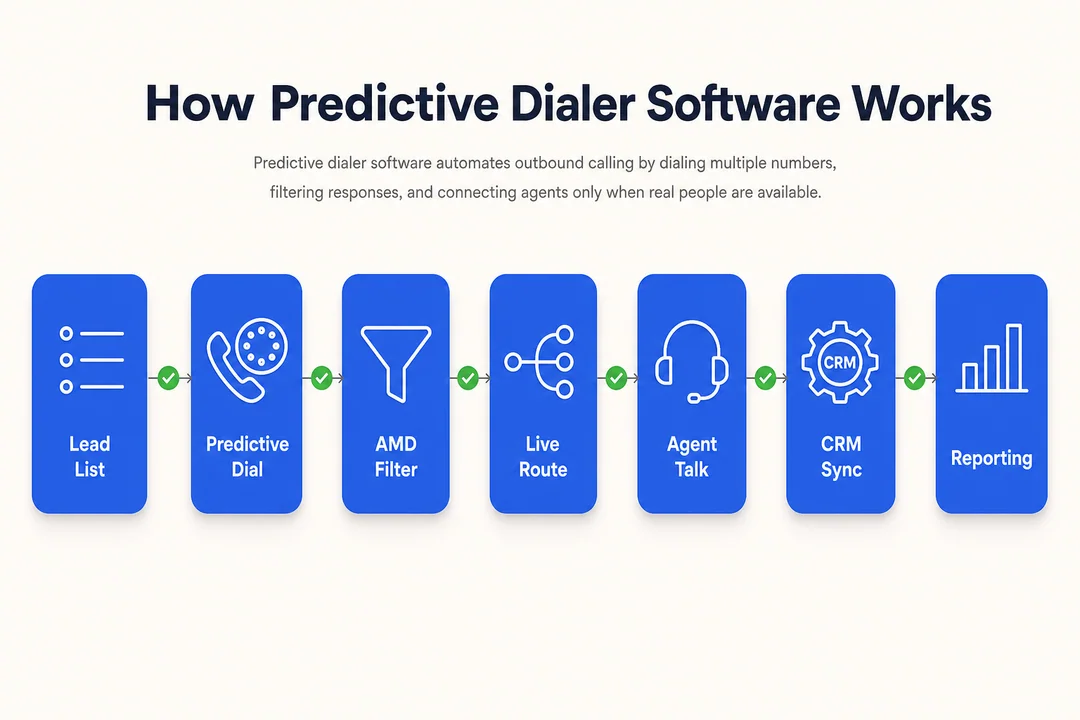
What Predictive Dialer Software Is and Why Businesses Use It
Predictive dialer software is an outbound calling system that automatically places calls based on expected agent availability, using a call pacing algorithm to reduce idle time and increase live-agent conversations. It is commonly used by medium- and high-volume teams that want better agent productivity, higher throughput, and less manual dialing waste.
In practical terms, the software tries to make sure an agent finishes one call and is connected to the next live conversation with minimal delay. That matters in outbound environments where voicemail-heavy lists, low answer rates, and manual dialing can drag down campaign performance.
Businesses typically use predictive dialers to improve:
- Agent talk time
- Agent occupancy
- Outbound campaign management
- Throughput across larger lead lists
- Manager visibility into performance
For teams making a few highly personalized calls per day, this may be unnecessary. But for sales, collections, reminders, BPO, and large outreach programs, the efficiency gain can be material.
How a predictive dialer works in simple terms
- It dials multiple contacts based on how many agents are expected to become available soon.
- A call pacing algorithm adjusts dialing speed in real time based on answer rates and agent status.
- Where supported, Answering Machine Detection (AMD) helps filter no-answer calls, busy lines, and voicemails.
- Live answered calls are routed to available agents so they spend less time waiting and more time speaking.
When predictive dialing is worth it
- Strong fit for medium- and high-volume outbound teams
- Useful for sales, payment reminders, collections, BPO, and large outreach programs
- Helpful when manual dialing creates low agent productivity and inconsistent pacing
- Less suitable for low-volume outreach
- Less suitable for highly consultative sales
- Less suitable when teams need deep context before every call
A common mistake is assuming more automation always means better results. In reality, predictive dialing works best when volume, workflow design, and compliance controls support it.
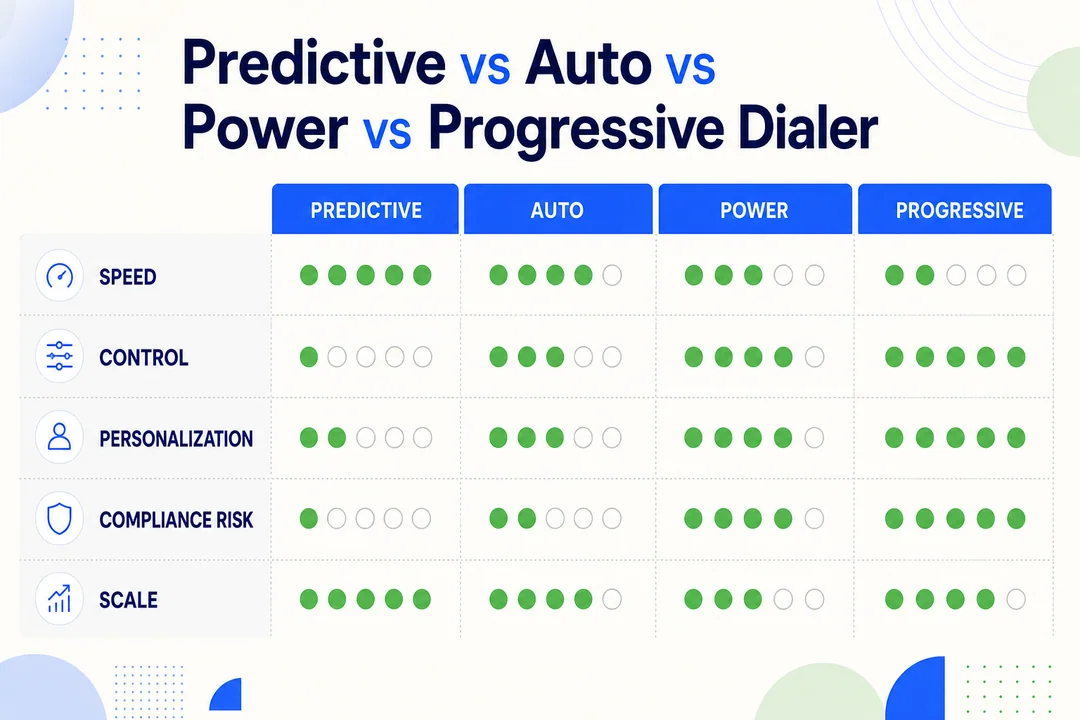
Predictive Dialer vs Auto, Power, and Progressive Dialers
Many buyers start with the phrase “auto dialer,” but that term is too broad to support a serious software decision. The better question is which dialing mode fits your team’s speed, personalization needs, compliance sensitivity, and campaign scale.
A predictive dialer vs auto dialer comparison often misses the point because predictive, progressive, and power modes can all sit inside a broader outbound platform. What matters is how each mode behaves operationally.
| Dialer Type | Best For | Main Strength | Main Limitation | Best Choice When |
|---|---|---|---|---|
| Predictive Dialer | High-volume outbound teams | Maximizes talk time and occupancy | Higher abandonment risk if misconfigured | You need scale and throughput |
| Progressive Dialer | Compliance-sensitive or contextual outreach | Better control and lower pacing risk | Slower than predictive | You need context and more agent control |
| Power Dialer | Small-to-midsize sales teams | Faster than manual dialing | Less efficient at scale | You want steady automation without complexity |
| Auto Dialer | Basic outbound automation | General time savings | Too broad as a buying term | You need simple automated dialing |
A progressive dialer typically places the next call only when an agent is available. That gives agents more context and reduces pacing risk. A power dialer usually dials one contact after another at a fixed pace, which is useful for smaller teams that want faster calling without the complexity of predictive pacing. “Auto dialer” often just means some level of automated dialing, which is not specific enough for procurement.
Quick fit guidance by use case
- Choose predictive if you run high-volume campaigns and care most about agent occupancy and throughput.
- Choose progressive if compliance risk, conversation context, or controlled pacing matters more than maximum volume.
- Choose power if you want steady automation for a smaller team without heavy operational complexity.
- Choose basic auto dialing if your use case is simple and you do not need advanced outbound campaign management.
When predictive is the wrong fit
Predictive dialing is not always the smartest choice. It is often a poor fit for:
- Low-volume outreach
- Highly consultative sales
- Teams that prioritize context over speed
- Compliance-sensitive workflows where progressive may be safer
- Small teams that do not have enough call volume for predictive pacing to work well
One frequent buyer mistake is overbuying predictive features for a workflow that really needs progressive control instead.
What to Look for in Predictive Dialer Software
The most useful buying criteria are rarely the longest feature lists. Buyers should focus first on capabilities that affect throughput, compliance, reporting visibility, and workflow fit before paying for AI or add-ons they may never operationalize.
Must-have capabilities
- Predictive pacing controls to manage dialing speed and reduce unnecessary abandonment risk
- Multiple dialing modes such as predictive, progressive, and power for different campaign types
- CRM integration and screen pop so agents see lead context when calls connect
- Answering Machine Detection and voicemail handling to reduce wasted agent time
- Call disposition tools and after-call workflows to keep data clean and reporting useful
- Reporting dashboards and campaign analytics for managers tracking performance in real time
- Compliance controls including suppression logic, opt-out handling, and audit visibility
- API or integration flexibility for custom workflows, lead systems, and downstream tools
Nice-to-have capabilities
- AI call summaries
- QA automation
- Lead prioritization
- Dynamic scripts
- Local presence
- SMS or email follow-up
- Real-time coaching cues
- Advanced segmentation rules
These features can add value, but they should come after the operational basics are proven.
Operational KPIs buyers should ask vendors about
- Connect rate
- Agent occupancy
- Abandonment rate
- Calls per agent per hour
- Impact on AHT (Average Handle Time)
- Uptime / SLA (Service Level Agreement)
- Time to launch new campaigns
- Reporting availability for managers without extra setup
In real outbound teams, the difference between good and poor software often shows up in how quickly managers can diagnose low connect rates, list fatigue, pacing issues, or agent underutilization. A vendor with many features but weak reporting can still create operational blind spots.
Another common buyer mistake is treating every integration as equal. Some vendors offer deep native CRM integration, while others rely on lighter connectors or custom work that adds cost and delays rollout.
Mid-funnel CTA: If your team is comparing dialing modes, reporting depth, and deployment speed, review Flyfone’s outbound workflow options to assess whether a faster, usage-based model fits your operation.
Best Predictive Dialer Software to Shortlist
There is no single best predictive dialer software for every business. The right shortlist depends on team size, outbound motion, compliance sensitivity, integration needs, deployment speed, and how well the pricing model matches your staffing structure.
Some buyers need enterprise governance and broad CX tooling. Others need a leaner cloud-based predictive dialer that launches quickly and scales with fluctuating campaign volume. The shortlist below is more useful when read as a fit map, not a ranking.
| Provider | Best For | Pricing Model | Standout Strength | Tradeoff |
|---|---|---|---|---|
| Five9 | Enterprise outbound teams | Per-user / tiered | Mature AI and enterprise depth | Higher cost, heavier setup |
| RingCentral RingCX | Distributed teams needing broader CX stack | Per-agent / tiered | Strong integrations and monitoring | Broad suite may exceed pure outbound needs |
| Genesys | Large operations with complex workflows | Tiered / enterprise | Advanced orchestration and governance | Complexity and add-on pricing |
| NICE CXone | Enterprise contact centers | Tiered / enterprise | Deep analytics and AI | Expensive for smaller teams |
| Convoso | High-volume outbound operations | Quote-based | Outbound-specific controls | Pricing transparency can be limited |
| DialedIn | Budget-conscious smaller teams | Lower-cost per-user | Simpler entry point | Lighter feature depth |
| Flyfone | Fast-scaling teams needing flexibility | Usage-based / no seat fee positioning | Fast deployment, flexible scaling, AI QA, global routing | Best fit depends on workflow and compliance needs |
Five9
Five9 is typically a strong fit for mature outbound operations that want enterprise depth, broader contact center tooling, and an AI-powered dialer environment tied to larger workflow orchestration.
It works well for larger teams that need multiple dialing modes, analytics, and a platform that can support more than just basic outbound calling. Buyers already operating at scale often value its enterprise maturity and broad ecosystem.
The tradeoff is commercial and operational weight. Five9 can be more expensive than lighter alternatives, and setup may feel heavier for teams that just want a focused outbound calling solution.
RingCentral RingCX
RingCentral RingCX fits distributed teams that want predictive dialing inside a broader communications and customer experience stack.
It is often a reasonable shortlist option when buyers already value integrations, monitoring, and a more unified environment across voice and other business communications. For remote or hybrid teams, that broader platform context can be attractive.
The tradeoff is scope. Some outbound teams may find the suite broader than they need if the main goal is efficient campaign execution rather than a wider call center software investment.
Genesys / NICE CXone
Genesys and NICE CXone are usually strongest in large-scale environments with more complex governance, orchestration, analytics, or regulated-process requirements.
Genesys tends to appeal to organizations that need sophisticated workflow control across bigger operations. NICE CXone is often shortlisted by enterprises that place high value on analytics, quality management, and AI-assisted insight.
For both, the main tradeoff is complexity. These platforms can be powerful, but smaller or faster-moving teams may face longer evaluation cycles, more layered pricing, and more implementation effort than they actually need.
If your outbound program is still evolving, enterprise depth can become overbuying.
Convoso / DialedIn
Convoso is better known as an outbound-focused option for high-volume operations that care about dialing performance, list handling, and campaign intensity.
That makes it relevant for teams where outbound throughput is the primary operational objective. It can be particularly relevant when voicemail handling and campaign execution controls are central to performance.
Its tradeoff is commercial transparency. Pricing is often quote-driven, so buyers should validate cost structure, support, and reporting depth early.
DialedIn, by contrast, is more attractive for budget-conscious teams that want a simpler entry point.
It can make sense for smaller in-house sales or telemarketing groups that want faster improvement over manual calling without adopting a larger enterprise suite. The tradeoff is lighter feature depth and less headroom for more complex operations.
Flyfone
Flyfone is a relevant shortlist option for teams that care about speed, flexibility, and commercial efficiency more than heavyweight enterprise packaging.
It is especially relevant for fast-moving BPO, fintech, crypto, iGaming, and cross-border teams that need a cloud-based predictive dialer, support for predictive, progressive, and power modes, real-time monitoring, open API flexibility, and global routing. Standard deployments can go live in under an hour, which is useful when campaign launch speed matters. Its usage-based pricing and no-seat-fee positioning also fit teams with fluctuating headcount or seasonal volume.
Flyfone also brings AI-powered quality assurance, real-time performance visibility, and infrastructure designed for global business communication, which can be useful for APAC and international teams that need a practical outbound calling solution without a long implementation cycle.
The tradeoff should still be validated carefully. Buyers should confirm compliance workflows, integration fit, reporting depth, and management requirements against their exact use case before rollout. It is not automatically the best fit for every enterprise environment, especially where deeply layered governance or highly customized procurement standards dominate the decision.
Need to compare vendors against real outbound workflows instead of feature lists alone? Request a practical platform walkthrough and shortlist review with the Flyfone team.
Predictive Dialer Software Pricing: What Buyers Should Expect
Predictive dialer software pricing is often less transparent than buyers expect. Many vendors do not publish full costs publicly, especially once telephony, implementation, AI, analytics, and support options are added.
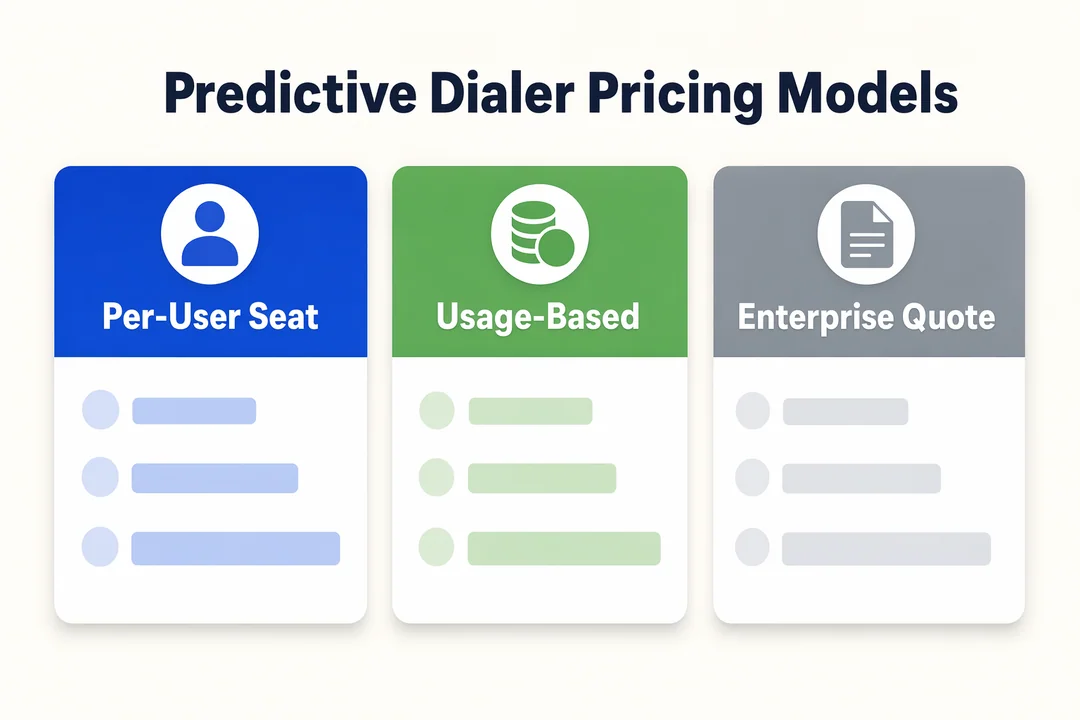
The most common software pricing model patterns are:
- Per-user pricing or per-seat pricing
- Usage-based pricing
- Quote-based enterprise pricing
Per-user pricing often works well for teams with stable staffing and predictable usage. Usage-based pricing can be a better fit for operations with seasonal volume, variable headcount, or campaign-driven demand. Quote-based pricing is common in enterprise deals where procurement, security review, and customization matter more than simple list pricing.
Which pricing model fits which team
- Stable headcount -> per-user pricing can work
- Seasonal or fluctuating volume -> usage-based pricing may fit better
- Enterprise procurement -> quote-based pricing is common
- Smaller teams -> avoid paying for complexity you will not use
Buyers should also ask about hidden or overlooked call center cost items:
- Implementation or setup fees
- Telephony usage
- AI add-ons
- Premium analytics
- Integration or customization work
- Support tiers
- Training and onboarding
A practical procurement watchout: a cheaper headline price can still become expensive if reporting, compliance tools, or integrations are sold as add-ons.
Compliance and Risk: What to Check Before You Buy
Predictive dialing can create real risk if pacing, consent, or suppression controls are weak. Compliance features should be evaluated before procurement, not after go-live.
For many teams, the biggest operational failure points are not technical. They are process failures such as weak DNC management, inconsistent opt-out handling, missing consent tracking, or poor visibility into the call abandonment rate.
This is where buyers need to go beyond generic claims like “compliant by design” and ask for concrete controls.
Buyer compliance checklist
- Verify DNC list management and suppression workflows
- Check opt-out handling across campaigns and lists
- Ask how the platform controls call abandonment rate
- Confirm consent management and consent tracking workflows
- Review call recording controls and retention options
- Validate support for regional calling rules and telemarketing regulation
- Ask whether managers can access audit logs and compliance reporting
- Confirm role-based access, permissions, and core data security controls
In the US, TCPA compliance questions are especially important for outbound teams. But requirements vary by market, industry, and use case.
Regulatory requirements vary by country, state, and industry, so buyers should validate deployment plans with internal legal or compliance teams before launch.
If a vendor cannot clearly explain how its controls support your workflow, that is a buying risk in itself.
How to Choose the Right Predictive Dialer Software for Your Team
A good buying process reduces risk by testing workflow fit early. The right choice should come from operational validation, not from the longest feature list or the strongest demo narrative.
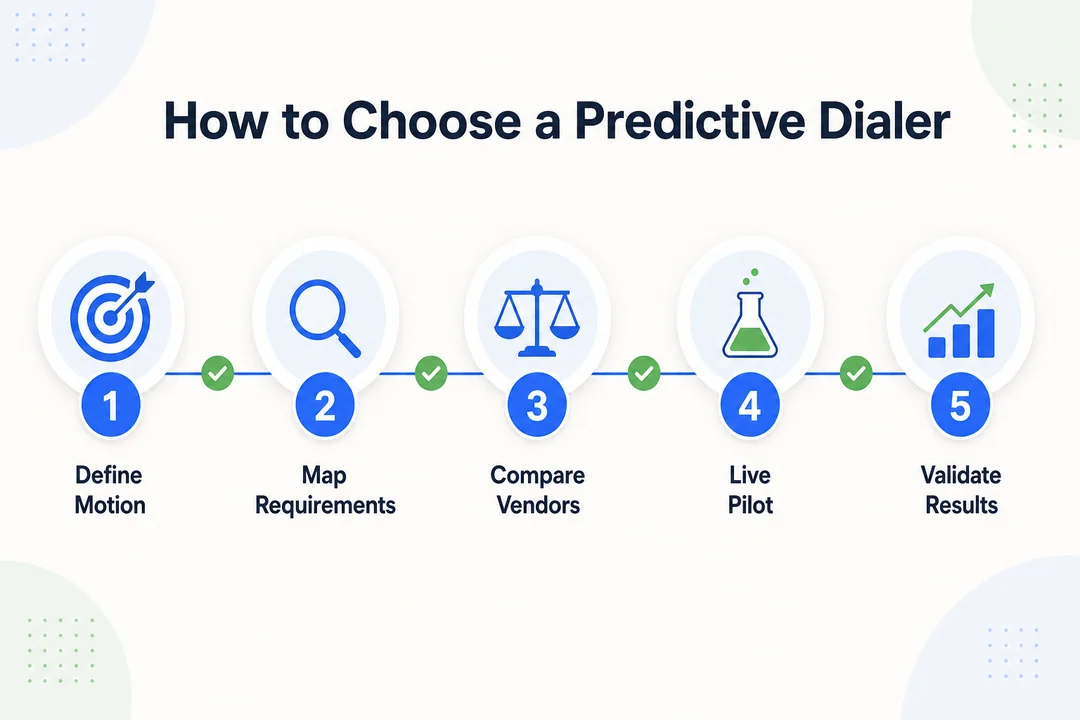
A simple 5-step selection framework
-
Define the outbound motion
Clarify whether you run sales, collections, reminders, BPO campaigns, callbacks, or a mix. Different motions need different pacing, reporting, and compliance controls. -
Confirm predictive is the right dialer mode
Do not assume predictive is always best. In some cases, progressive or power dialing is a better fit for context-heavy or lower-volume teams. -
Set non-negotiables
Lock in must-haves around compliance, CRM integration, analytics, support quality, and deployment speed before comparing extras. -
Match the pricing model to staffing and volume
Check headcount volatility, campaign volume, and hidden-cost exposure. This step often eliminates mismatched vendors quickly. -
Run a live demo or pilot with real campaign data
This is the most important step. Use your actual workflows, test manager reporting, review abandonment controls, test AMD behavior, validate the deployment timeline, and confirm what post-go-live support looks like.
A pilot is often where buyers discover the difference between polished demos and real operational fit.
Questions to ask every vendor demo
- How does pacing adapt in real time?
- What abandonment controls are built in?
- How accurate is AMD?
- What integrations are native vs custom?
- What is the actual deployment timeline?
- What support is included after launch?
- What reporting can managers access without extra setup?
If a vendor cannot answer these questions clearly, your call center software evaluation is still incomplete.
Verdict: Which Type of Buyer Each Platform Fits Best
For skimmers, the fastest way to narrow a vendor shortlist is to match the platform category to your operating model.
- Choose enterprise suites if you need complex governance, layered administration, broader CX orchestration, and cross-functional procurement support. This is where Genesys, NICE CXone, and often Five9 tend to fit.
- Choose outbound specialists if performance-heavy campaign execution is the top priority and the outbound platform is central to operations. Convoso is often relevant here.
- Choose simpler lower-cost tools if you are a smaller team that wants meaningful automation without enterprise complexity. DialedIn is more aligned with that scenario.
- Choose flexible cloud platforms like Flyfone if you need a cloud predictive dialer with fast deployment, global routing, flexible scaling, and usage-based pricing rather than seat-heavy commercial models.
From a use-case standpoint, the best predictive dialer software for sales teams is not always the same as the best predictive dialer for BPO. Teams running high-volume cross-border outreach, variable staffing, or fast launch cycles will often evaluate fit differently from enterprise buyers optimizing for governance depth.
Conclusion
The right predictive dialer software decision comes down to a few practical variables: your workflow, whether predictive is truly the right dialer mode, how strong the compliance controls are, how usable the reporting is, how fast the platform can be deployed, and whether the pricing model fits your operating structure.
A strong shortlist should reduce operational friction, not just add features. That means comparing vendors against real outbound requirements, validating manager workflows in demos, and checking hidden costs before procurement moves forward.
If your team is evaluating a cloud-based predictive dialer and priorities include fast deployment, flexible scaling, AI QA, real-time monitoring, and usage-based economics, Flyfone is worth reviewing alongside broader enterprise options. Request a tailored outbound workflow review on the Flyfone pricing page to compare fit, rollout approach, and commercial model against your actual campaign needs.
Frequently Asked Questions
What is predictive dialer software?
Predictive dialer software is an automated calling system that uses an algorithm to predict agent availability and place outbound calls before the current call ends. It removes manual dialing wait time and connects agents directly to live answers, which can significantly raise agent talk-time productivity.
What is the difference between predictive and progressive dialers?
A predictive dialer uses an algorithm to forecast when agents will be free and can dial multiple numbers simultaneously to maximize throughput. A progressive dialer places one call at a time in list order, which gives better control and reduces the risk of dropped or mis-paced connections.
Does using a predictive dialer break call regulations?
Not if it is configured correctly. Professional platforms include built-in DNC (Do Not Call) management, abandonment-rate controls, and consent tracking to comply with TCPA, GDPR, and similar regional rules. Compliance failures usually come from misconfiguration, not the technology itself.
How do I choose the right dialer for my team?
Evaluate five factors: (1) campaign goals, (2) software scalability, (3) CRM integration depth, (4) compliance feature coverage, and (5) pricing model (per-user vs pay-as-you-go). Always request a live demo with your real data before committing.
Which businesses should consider a predictive dialer?
The technology fits teams with medium-to-high call volume, outbound sales teams, customer service contact centers, debt collection agencies, and BPO operations that need to maximize agent productivity and minimize idle time.
What pricing models are common for predictive dialer software?
Common models include per-user/per-seat pricing, usage-based or pay-as-you-go pricing, and enterprise quote-based packages. Watch for hidden costs such as implementation fees, integration charges, and bundled AI add-on tiers.
More in Operations & CX Optimization
View all →
Customer Experience Transformation: Framework and Steps
A telecom customer calls support about a billing error. They explain the problem to the IVR system. Then to the first agent. Then get transferred and explain again. Then escalated—and explain a third time. Forty minutes later, they're exhausted and the problem still isn't solved. This is what broken customer experience looks like. And it's costing you customers. Customer experience…


Web Caller Meaning: JavaScript caller, Calling Tools or Portals
“Web caller” is one of those phrases where the search results and the searcher are frequently talking about different things. Three unrelated audiences use it: developers hitting an error on the legacy JavaScript caller property, buyers evaluating browser-based calling software, and people trying to reach a specific portal or training page whose exact name they cannot recall. That fragmentation is…

Customer Experience Strategy: How to Build One That Works
Customer experience is getting worse, not better. Forrester's 2025 Global CX Index found that 21% of brands declined in CX quality while only 6% improved — and in the US, 25% declined against 7% that improved, the second consecutive year of that pattern. Most of those brands were not neglecting customer experience. They were working on it without a strategy…



 English
  Russian
  Chinese