

Call center workforce management helps you put the right people in the right place at the right time. If you manage support operations, lead a contact center team, or want to improve staffing basics, this guide shows how workforce management works, why it matters, and how to improve service levels without driving up labor costs.
Key Takeaways
- Call center workforce management is the process of forecasting demand, scheduling agents, tracking adherence, and adjusting staffing in real time.
- Good workforce management helps you protect service levels, control payroll, and reduce the damage caused by overstaffing or understaffing.
- The core of WFM is simple: match customer demand with the right number of agents and the right skills at the right time.
- Forecasting, capacity planning, scheduling, Real-Time Adherence, and intraday management all work together as one operating cycle.
- The most useful WFM metrics include SLA, average speed of answer, occupancy rate, adherence, shrinkage, and average handle time.
- Spreadsheets can work for very small teams, but WFM software becomes valuable when scheduling grows more complex or service levels become harder to manage.
- The fastest way to improve is to audit your current process, standardize KPIs, fix schedule gaps, and add better real-time monitoring.
What Is Call Center Workforce Management?
A simple definition of call center workforce management
Call center workforce management is the process of predicting customer demand and matching staffing to that demand. In plain terms, it helps make sure enough agents are available, with the right skills, when customers need help.
It includes more than filling shifts. It covers how many contacts you expect, when they will arrive, how long they will take, who can handle them, and what changes are needed during the day.
If calls spike at 9 a.m. and only half the right agents are available, WFM failed. If the schedule matches that spike and wait times stay under control, WFM worked.
WFM usually includes:
- Forecasting future call, chat, and email volume.
- Scheduling agents based on demand and skills.
- Adherence tracking to see if agents follow planned schedules.
- Intraday management to adjust when real conditions change.
How workforce management fits into contact center operations and operational excellence
Workforce management is a core part of contact center operations. It turns demand data into staffing decisions. Without it, even good agents and solid tools can still produce poor customer experiences.
WFM supports several business goals at once. It helps protect customer experience, maintain cost control, and improve operational consistency. That is why it sits close to routing, reporting, quality review, and team management.
It also depends on connected systems such as:
- ACD (automatic call distribution), which routes incoming contacts.
- CRM (customer relationship management), which stores customer and case data.
- IVR (interactive voice response), which handles self-service and call menus.
- Quality assurance, reporting, and payroll tools.
A few common examples make this clear:
- A marketing campaign drives more inbound calls than usual.
- A product outage creates a sudden support spike.
- Holiday season changes customer demand patterns for several weeks.
WFM helps managers respond before these situations damage service levels.
Call center workforce management vs. workforce optimization (WFO)
Workforce management and workforce optimization are related, but they are not the same thing. WFM focuses on staffing and scheduling. WFO is broader and usually includes WFM plus quality management, analytics, coaching, and performance tools.
| Area | WFM | WFO |
|---|---|---|
| Main focus | Staffing and scheduling | Overall workforce performance |
| Primary goal | Put the right agents in place | Improve quality, efficiency, and performance |
| Typical functions | Forecasting, scheduling, adherence, intraday management | WFM, QA, coaching, analytics, performance management |
| Common users | Workforce planners, operations managers | Operations leaders, QA teams, training managers |
The main goal: the right agents, the right skills, the right time
This is the core rule of call center workforce management.
- The right agents means enough people are available.
- The right skills means those people can handle the contact type, product, language, or escalation need.
- The right time means staffing matches demand by interval, not just by day.
This matters because headcount alone can mislead you. A team may have enough total agents on paper, but still miss service levels if too few can handle billing calls, Spanish support, or live chat.
In omnichannel operations, this becomes even more important. Voice, chat, and email do not behave the same way. Skill-based staffing is what makes coverage real, not just theoretical.
Why Call Center Workforce Management Matters
How WFM improves customer experience and service levels
When staffing matches demand, customers wait less. Calls are answered faster. Queues stay shorter. Abandonment drops. This is the most visible benefit of WFM.
WFM also helps teams hit service level agreements, or SLA (response targets). A common target might be 80/20, which means answering 80% of calls within 20 seconds. That target is difficult to meet without solid forecasting and schedule planning.
Good WFM improves consistency. Customers get better service not only during quiet hours, but also during busy periods when pressure is highest.
How it supports payroll control, resource allocation, and operational efficiency
Labor is one of the biggest costs in a call center. WFM helps you spend that labor budget with more precision.
Instead of using habit-based staffing, such as keeping the same coverage every day, WFM matches labor to actual demand. That reduces wasted paid hours during slow periods and lowers the need for emergency overtime during spikes.
It also improves resource allocation. Managers can place more staffing where demand is highest and avoid putting too many people into low-value coverage blocks.
How better staffing improves agent productivity and morale
WFM is not just about numbers. It affects the daily experience of agents.
When schedules are realistic, agents are less likely to feel overloaded. Breaks happen on time. Coaching and training do not constantly get canceled. Workload feels more balanced.
That improves morale and supports retention. In practice, teams with better staffing often see fewer attendance issues, less frustration, and better engagement because agents do not spend every peak period firefighting.
Overstaffing vs. understaffing: what each one costs in practice
Both are expensive. They just hurt in different ways.
| Issue | Overstaffing | Understaffing |
|---|---|---|
| Cost impact | Excess payroll spend | Overtime, missed revenue, rework |
| Agent impact | Idle time, disengagement | Stress, burnout, absenteeism |
| Customer impact | Usually stable | Long wait times, abandoned calls |
| KPI effect | Low occupancy | Missed SLA, higher ASA, poor FCR |
| Management risk | Waste | Service failure |
A simple example:
If you schedule 10 extra agents every weekday morning, payroll waste builds quietly. If you schedule 10 too few agents during a demand spike, the damage is louder: long waits, angry customers, and exhausted agents.
Most operations struggle more with chronic understaffing because the customer impact is immediate. But repeated overstaffing can drain margin just as badly over time.
The Core Components of Call Center Workforce Management
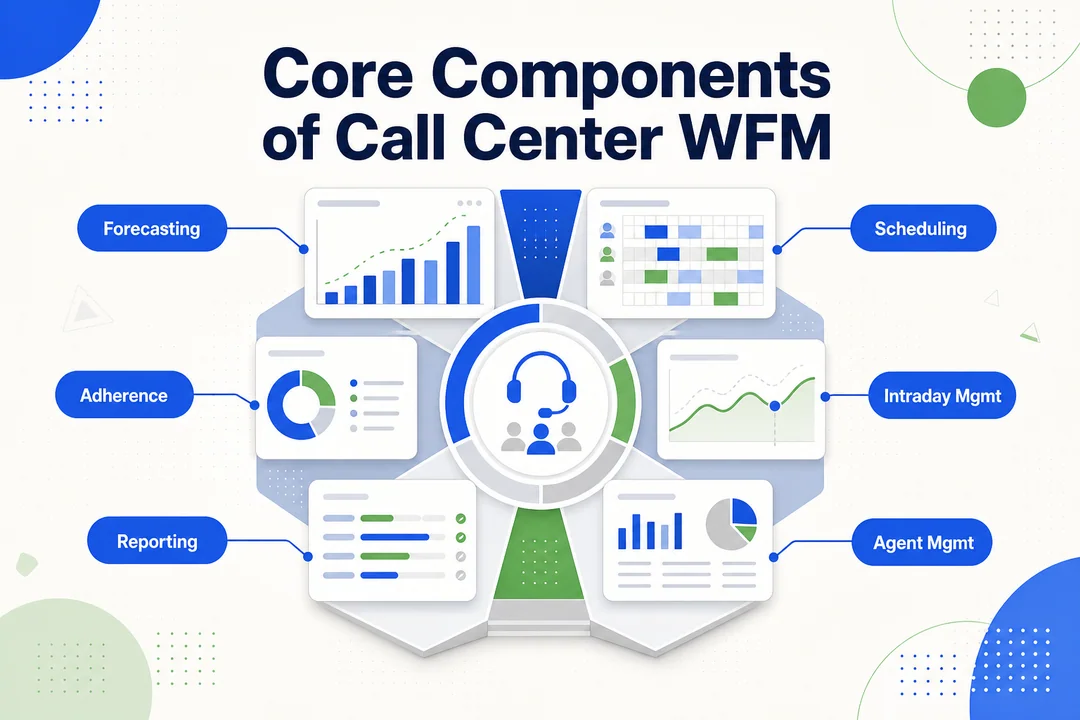
| Component | Purpose | Business outcome |
|---|---|---|
| Forecasting | Predict future demand | Better staffing accuracy |
| Capacity planning | Calculate staffing needs | More realistic coverage |
| Scheduling | Assign shifts and breaks | Better demand fit |
| Real-Time Adherence | Track schedule execution | Faster control |
| Intraday management | Adjust during the day | Better service recovery |
| KPI reporting | Measure and improve | Stronger future planning |
Staff forecasting using historical data, seasonality, and call volume trends
Forecasting is the starting point of WFM. If the forecast is wrong, the schedule will likely be wrong too.
Most teams forecast using past contact volume, handle time, day-of-week patterns, seasonality, and known business events. This can include product launches, billing cycles, or marketing campaigns.
Useful forecast inputs often include:
- Historical voice, chat, and email volumes
- Average handle time by channel
- Day and hour patterns
- Seasonal trends
- Promotions, outages, or policy changes
The goal is not perfect prediction. The goal is accurate enough planning to make better staffing decisions.
Contact center capacity planning based on skills, availability, and shrinkage
Capacity planning turns demand into staffing requirements. It answers a simple question: how many agents do you actually need to meet expected demand?
This is where shrinkage matters. Shrinkage means paid time when agents are not available for live contacts.
Common shrinkage sources include:
- Breaks and lunches
- Meetings
- Training
- Coaching
- Paid time off
- Sick leave
- System downtime
- Admin work
Ignoring shrinkage is one of the fastest ways to create chronic understaffing. A schedule may look full on paper, but real available capacity is lower.
Skills matter too. Ten agents are not equal if only three can handle escalations or only two can support a critical language queue.
Shift scheduling and call center scheduling optimization
Scheduling takes the staffing requirement and turns it into actual shifts. That includes start times, end times, breaks, lunches, and time off.
The goal is to fit staffing to demand as closely as possible across the day. This may involve fixed shifts, staggered starts, split shifts, or part-time coverage for peak windows.
Good scheduling also needs to be practical. A schedule that looks perfect in theory but feels unfair in real life will create resistance, swaps, and adherence problems.
In strong operations, schedule optimization balances three things:
- Demand coverage
- Agent skill fit
- Fairness and workability
Real-Time Adherence (RTA) and schedule compliance
Real-Time Adherence, or RTA, measures whether agents are doing what the schedule says they should be doing right now.
If an agent is scheduled for calls but is offline, that affects real-time capacity. One missed agent may not matter much. Ten missed agents during peak hours absolutely do.
It helps to separate two terms:
- Adherence means real-time alignment to the schedule.
- Conformance means how total worked time matched the schedule over a period.
Small adherence gaps can create large queue problems at scale. That is why operations teams monitor RTA closely and act early with alerts, follow-up, or queue support.
Intraday management for spikes, outages, and unexpected demand
Intraday management is what happens after the day begins. It focuses on short-term control.
No forecast is perfect. Agents call out sick. Handle time rises. A system issue triggers more contacts. Intraday management helps leaders react fast enough to limit damage.
Common intraday actions include:
- Moving breaks or lunches
- Reassigning cross-skilled agents
- Offering voluntary overtime
- Delaying non-urgent offline work
- Adjusting overflow routing
- Updating the forecast mid-day
Speed matters here. The earlier the response, the easier service recovery becomes.
KPI tracking, reporting, and data-driven decision making
WFM improves through measurement. Managers need to compare what was planned against what actually happened.
Key reports usually include forecast accuracy, SLA performance, occupancy, adherence, shrinkage, and schedule fit. These metrics show where planning was strong and where it broke down.
Over time, this creates better decisions. You stop guessing. You learn which days run hot, which skill groups stay exposed, and which schedule rules need to change.
How Call Center Workforce Management Works Step by Step
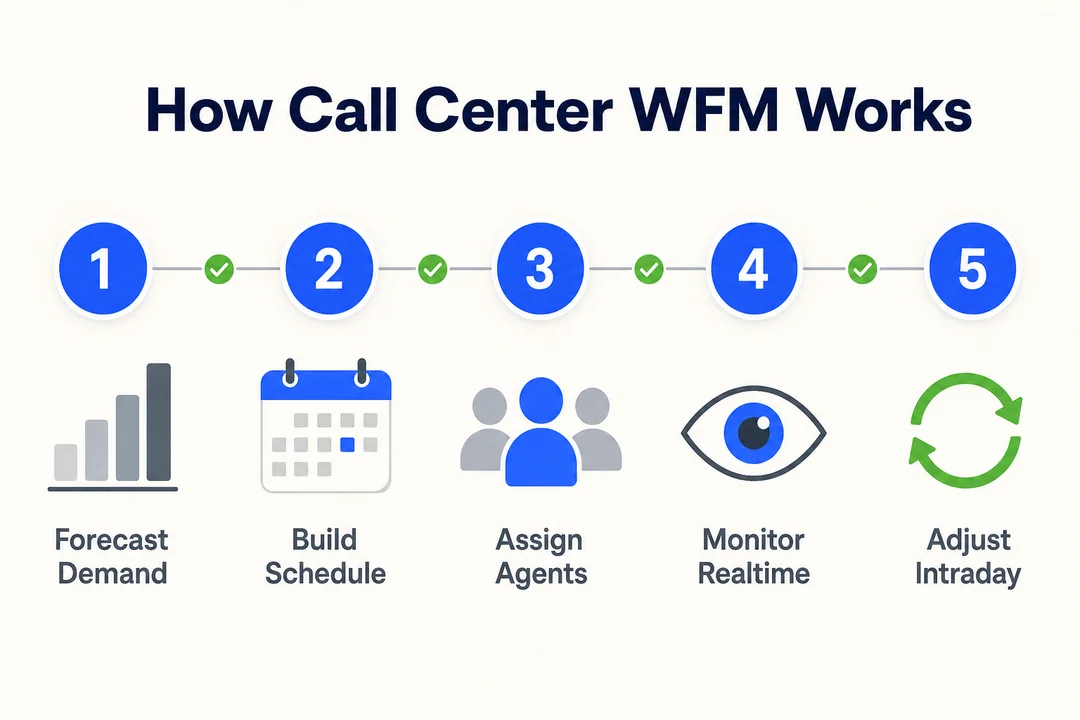
Step 1: Gather historical data from voice, chat, email, and other channels
Start with data. Pull historical contact volumes by interval, handle time, abandonment, service levels, shrinkage, and channel mix.
Use more than voice if your team is omnichannel. Chat, email, messaging, and back-office tasks all affect staffing capacity.
Clean the data before using it. Remove anomalies when needed, such as outage days, one-off events, or reporting errors. Bad data creates bad forecasts.
Common mistake: using high-level daily totals instead of interval data.
Practical tip: review at least several weeks of interval-level patterns, then layer in known business events.
Step 2: Forecast demand with trends, campaigns, and AI-powered demand prediction
Once the data is clean, forecast future demand. Start with historical trends, then adjust for business context.
Look for seasonality, billing cycles, holiday effects, campaigns, product releases, and known service risks. If marketing expects a spike, that should show up in workforce planning before the spike arrives.
AI can help by finding patterns faster, but it is not magic. If your data is weak or the business context is missing, forecast quality will still suffer.
Common mistake: trusting historical averages without adjusting for current events.
Practical tip: build a baseline forecast, then add human review from operations, marketing, and product teams.
Step 3: Build schedules around service level agreements (SLA) and agent skills
Turn the forecast into schedules that support your service targets. This means matching staffing to demand by interval and assigning the right skills where needed.
Use SLA as a planning anchor. If a queue has a faster answer target, it may need stronger early coverage or more flexible relief options.
Also account for:
- Skill-based routing
- Break timing
- Approved time off
- Legal or labor constraints
- Fair schedule distribution
Common mistake: building schedules around total headcount instead of skill coverage.
Practical tip: check whether each high-risk interval has the right skill mix, not just enough bodies.
Step 4: Monitor queues, occupancy rate, and staffing gaps in real time
Once schedules go live, shift from planning to control. Watch queue conditions, average speed of answer, occupancy, adherence, and available staff in real time.
This helps managers spot problems before they grow. A queue can deteriorate quickly if adherence falls, handle time rises, or contacts arrive above forecast.
Common mistake: reviewing performance too late.
Practical tip: use a live dashboard or a simple command view that shows queue stress, occupancy, and staffing gaps at once.
Step 5: Make intraday adjustments when call volume changes
When the day changes, staffing has to change with it. This is where intraday action matters most.
If volume rises, you may need to move breaks, ask for voluntary overtime, reroute overflow, or shift multi-skilled agents into the busiest queue. If volume drops, you may pull forward coaching, admin work, or training.
Common mistake: waiting for a full service failure before acting.
Practical tip: create response options by severity so supervisors know exactly what to do at each threshold.
Step 6: Review results and refine the next planning cycle
After the shift, day, or week ends, compare plan versus reality.
Review forecast variance, schedule effectiveness, adherence, occupancy, SLA results, and where queues struggled. This is where planning gets smarter.
If Monday mornings always miss plan, fix the recurring issue. If a certain team has high shrinkage every Friday, reflect that in future capacity assumptions.
Common mistake: treating each day as separate.
Practical tip: run a regular review cycle so lessons from one period improve the next one.
Key Metrics Used in Call Center Workforce Management
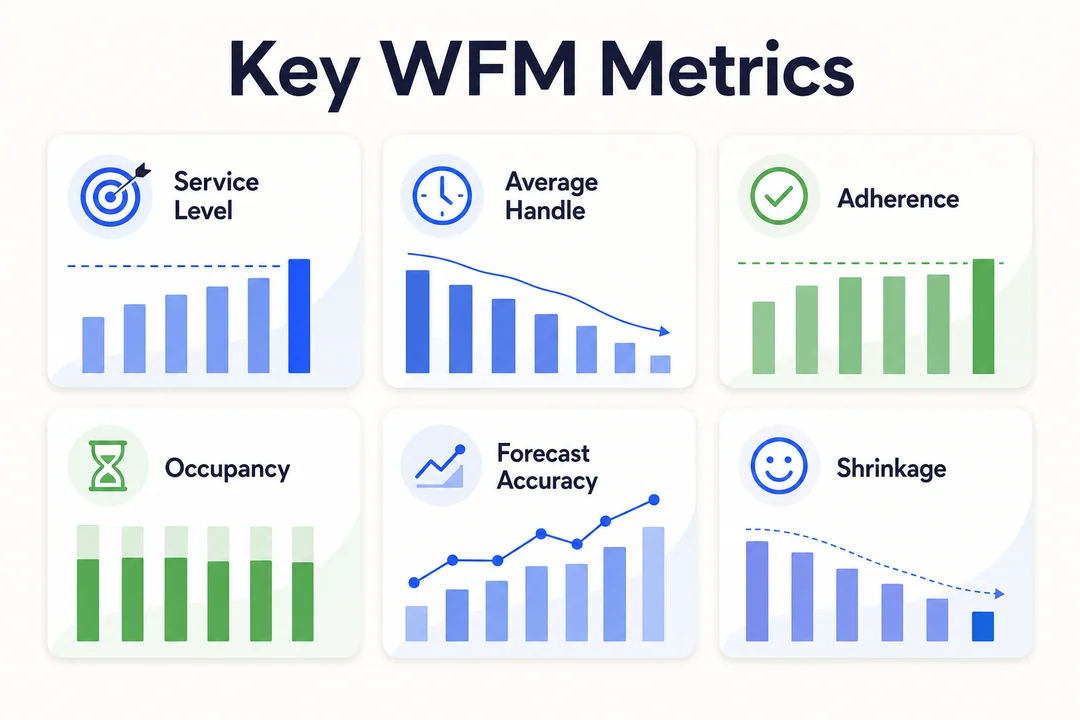
| Metric | What it means | Why it matters | Risk if ignored |
|---|---|---|---|
| SLA | Response target achievement | Guides staffing goals | Missed service expectations |
| ASA | Average speed of answer | Shows queue pressure | Long waits and abandonment |
| Occupancy | Percent of time agents handle work | Shows workload intensity | Burnout or excess idle time |
| Adherence | Real-time schedule compliance | Protects planned coverage | Hidden staffing gaps |
| Shrinkage | Paid time unavailable for contacts | Makes staffing realistic | Chronic understaffing |
| AHT | Average handle time | Affects staffing demand | Forecast errors |
| FCR | First contact resolution | Measures resolution quality | Repeat contacts |
| Absenteeism | Missed attendance rate | Impacts staffing reliability | Last-minute coverage failures |
Service level agreements (SLA)
In a call center, SLA means the response target your team aims to meet. A common example is 80/20, meaning 80% of calls answered within 20 seconds.
SLA matters because it drives staffing needs. Higher service expectations usually require stronger coverage, especially during peaks. If the target is aggressive, schedules need less room for error.
Average speed of answer and customer wait time
Average speed of answer, or ASA, measures how long customers wait before an agent answers. It is one of the clearest signs of whether staffing was sufficient.
Long wait times usually lead to more abandoned contacts and lower customer satisfaction. If ASA rises during specific intervals, that often points to a schedule mismatch or an adherence issue.
Occupancy rate and agent workload
Occupancy rate measures how much of an agent’s logged-in time is spent handling or being ready for work. High occupancy can look efficient, but too much of it for too long creates fatigue.
A healthy operation balances productivity with sustainability. If occupancy stays extremely high every day, burnout risk increases and service quality often slips.
Schedule adherence and conformance
Schedule adherence shows whether agents are following the planned schedule in real time. Conformance looks at whether their total actual time matched the schedule over a longer period.
Both matter because the best forecast and schedule only work if execution follows the plan. Weak adherence often explains why a schedule that looked fine on paper failed in practice.
Shrinkage and available capacity
Shrinkage is the share of paid time that cannot be used for live customer contact. This includes training, breaks, meetings, and time off.
Planning without shrinkage creates false confidence. You may think you scheduled enough staff, but real available capacity ends up too low to meet demand.
Average handle time and first contact resolution
Average handle time, or AHT, measures the average duration of a customer interaction, including talk, hold, and after-call work. First contact resolution, or FCR, measures whether the customer’s issue was solved in the first interaction.
Both affect WFM. If AHT rises, more staffing may be needed. If FCR is poor, repeat contacts increase demand. Lower AHT is not always better if quality and resolution suffer.
Agent productivity, absenteeism, and burnout risk
Human-centered metrics matter because staffing reliability depends on people, not only plans.
Absenteeism creates immediate gaps. Burnout increases turnover risk and reduces schedule stability. Agent productivity helps show whether the team is supported well or stretched too hard.
Watch these trends together. A team with strong productivity but rising absence and burnout signals may be running too hot.
Common Challenges in Call Center Workforce Management
Inaccurate forecasting during promotions, seasonality, or sudden spikes
Historical patterns do not always hold. Promotions, outages, weather events, or holiday demand can break normal forecast behavior.
That is why pure history-based planning often fails during unusual events. Teams need business input, scenario planning, and fast forecast updates when conditions change.
Practical tip: build best-case, expected, and high-volume scenarios for major events instead of relying on one forecast.
Scheduling complexity across shifts, breaks, time off, and skill groups
Scheduling is harder than it looks because it has many constraints at once. You need to balance agent availability, breaks, approved time off, skill coverage, and queue demand by interval.
The more channels and skill groups you add, the harder manual scheduling becomes.
Practical tip: use standard schedule templates for common patterns, then adjust around peak windows and skill gaps.
Balancing service levels with agent satisfaction and burnout prevention
Many teams chase efficiency too aggressively. That can create high occupancy, back-to-back contacts, delayed breaks, and low flexibility.
Short-term service levels may improve, but agent experience gets worse. Over time, that leads to burnout, absenteeism, and attrition.
Practical tip: set staffing goals that protect both customer response and sustainable workload, not just queue speed.
Managing absenteeism, attrition, and unpredictable shrinkage
Even good schedules break when attendance is unstable. Last-minute absence can quickly expose weak coverage, especially in smaller teams or narrow skill groups.
Attrition makes this worse because experience leaves the floor and new hires often need ramp time.
Practical tip: track shrinkage and absence trends by team and day, then build realistic buffers into high-risk intervals.
Omnichannel contact center workloads across phone, chat, and email
Different channels behave differently. Voice needs immediate response. Email often has more flexibility. Chat may allow concurrent handling, which means one agent can manage more than one conversation at once.
A single staffing model will not fit all of them. Teams that plan every channel the same way usually misallocate capacity.
Practical tip: forecast and schedule by channel behavior, not just total contact volume.
Working with disconnected systems, including CRM, ACD, and IVR
When data sits in separate tools, visibility drops. Managers struggle to connect call routing, customer behavior, self-service usage, and staffing outcomes.
Disconnected systems slow response and weaken forecast quality.
Practical tip: improve integration between CRM, ACD, IVR, and reporting so planners can work from one clearer view of demand.
7 Best Practices for Call Center Workforce Management
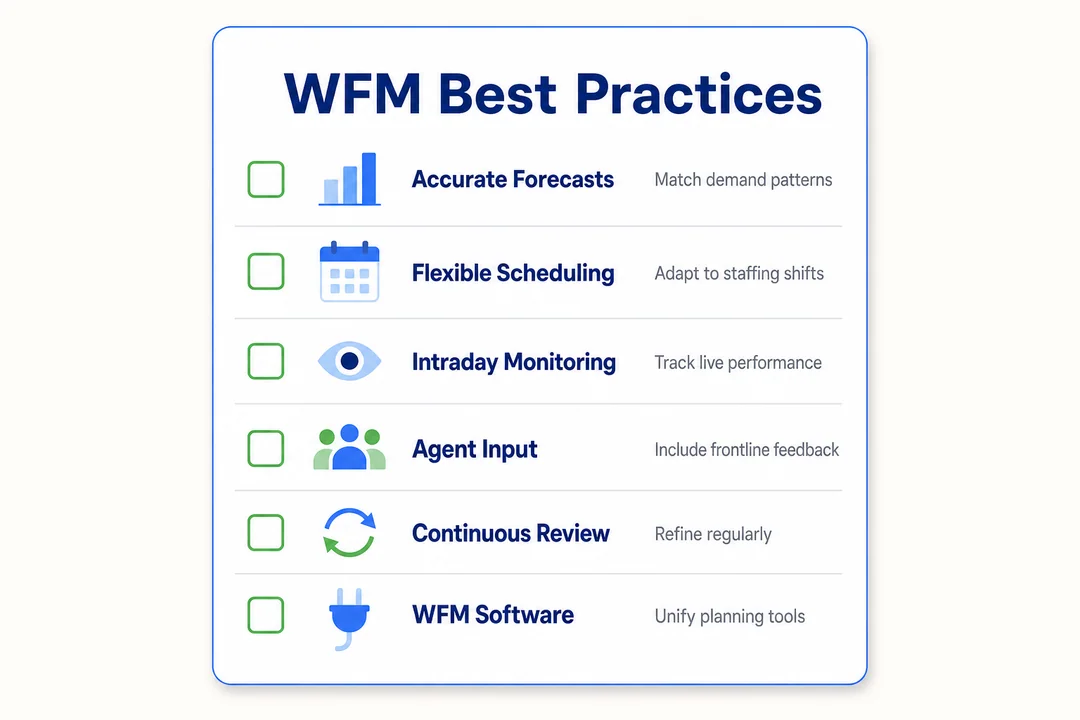
1. Use historical data to improve forecasting accuracy
Use interval-level history, not just daily totals. Compare similar days, similar seasons, and similar business conditions. Remove anomalies that would distort the forecast.
Why it works: cleaner history produces more realistic staffing assumptions.
How to apply it: review the same weekday pattern over multiple weeks and flag unusual spikes before using the data.
2. Schedule by skills, not just headcount
Total headcount does not guarantee real coverage. A queue can fail even when enough agents are on the floor if the needed skills are missing.
Why it works: skill-based scheduling protects critical queues.
How to apply it: map each interval by language, product, channel, and escalation needs before finalizing schedules.
3. Build flexibility into shifts, breaks, and shift bidding
Forecasts are estimates. Flexibility gives you room to react when reality shifts.
Why it works: staggered starts, moveable breaks, and shift bidding reduce rigidity.
How to apply it: keep some peak-period coverage adjustable and use fair rules for schedule changes and bids.
4. Track Real-Time Adherence and act early
A small adherence issue becomes a large staffing gap fast when several agents drift off schedule at once.
Why it works: early action prevents queue buildup.
How to apply it: set alert thresholds for key queues and train supervisors to respond quickly and consistently.
5. Prepare intraday playbooks for volume spikes
When service starts slipping, teams should not improvise from scratch. They need a predefined response.
Why it works: playbooks shorten decision time under pressure.
How to apply it: define actions by severity level, such as moving breaks, pulling cross-skilled support, or offering overtime.
6. Include training, coaching, and offline work in schedules
If you ignore offline time, your staffing plan will look stronger than it really is.
Why it works: accurate schedules reflect true available capacity.
How to apply it: reserve time for QA reviews, coaching, admin tasks, and training inside the schedule, not outside it.
7. Support employee engagement to reduce burnout and turnover
A stable workforce is easier to plan. Better engagement improves attendance, retention, and schedule reliability.
Why it works: fair schedules and manageable workload reduce preventable attrition.
How to apply it: give agents more schedule visibility, use fair rotation, and avoid running occupancy at extreme levels for long periods.
How WFM Software Helps Call Centers Run More Efficiently
What WFM software does better than spreadsheets
Spreadsheets can handle simple planning, but they become fragile as complexity grows. Manual updates take time. Errors are easy to miss. Real-time visibility is limited.
WFM software is built for ongoing staffing control. It helps automate forecasting, schedule creation, adherence tracking, and intraday response.
Here is the practical difference:
| Area | Spreadsheets | WFM software |
|---|---|---|
| Forecast updates | Manual | Faster and automated |
| Scheduling | Time-consuming | Rule-based and scalable |
| Real-time monitoring | Limited | Live visibility |
| Adherence tracking | Hard to maintain | Built-in alerts |
| Scenario planning | Slow | Easier to test options |
Automation for forecasting, scheduling, and adherence tracking
WFM software reduces repetitive admin work. It can generate schedules faster, apply staffing rules automatically, and monitor adherence without constant manual checking.
Typical automation flow looks like this:
Input historical demand
Apply forecast model
Adjust for shrinkage and skills
Generate schedules
Monitor adherence in real time
Trigger alerts for staffing gaps
This does not replace management judgment. It gives managers faster, cleaner inputs so they can make better decisions.
Real-time visibility into staffing gaps, occupancy, and service levels
One of the biggest advantages of WFM software is live visibility. Managers can see queue performance, occupancy, staffing gaps, and adherence in one place.
That means faster intervention. Instead of finding out later that a queue was exposed for 90 minutes, the team can respond while the issue is still manageable.
How integrations with CRM, ACD, and IVR improve planning
Better planning depends on better signals. When WFM software connects with CRM, ACD, and IVR, it gets a clearer picture of demand.
ACD data shows queue behavior. CRM data adds customer and case context. IVR data shows self-service usage and call flow patterns. Together, these help planners understand not just how much demand exists, but what kind of demand it is.
This improves staffing accuracy and helps teams anticipate changing contact drivers earlier.
Benefits of using WFM software for contact centers
The biggest benefits are practical:
- Better forecast accuracy
- Faster schedule creation
- Stronger adherence tracking
- Lower manual admin effort
- More consistent service levels
- Better staffing visibility across channels
Software will not solve every staffing issue by itself. But it makes good WFM easier to execute and scale.
When a small team should consider switching to WFM software
A small team may not need dedicated WFM software right away. But the need grows fast when operations become more complex.
Common trigger points include:
- Multiple support channels
- More complex shift patterns
- Frequent missed service targets
- Heavy manual scheduling effort
- Fast team growth
- Repeated intraday surprises
If the schedule takes too much time to maintain or service levels keep slipping, software may be the next logical step.
What to Look for in Call Center Workforce Management Software
Easy forecasting and schedule creation
Choose software that makes forecasting and schedule building simple. Useful features include templates, drag-and-drop editing, and scenario testing. If the tool is hard to use, adoption will suffer.
Real-time monitoring and intraday management tools
Look for live dashboards, alerting, and quick schedule editing. Intraday tools matter because staffing problems often appear after the schedule is published, not before.
Reporting dashboards and KPI tracking
The software should make KPI tracking easy. Standard reports for SLA, occupancy, adherence, shrinkage, and forecast accuracy save time and improve decision quality.
Omnichannel support for voice, chat, and email
If your team handles more than calls, the platform should support mixed channel planning. Voice, chat, and email need different staffing logic.
Integration with existing contact center systems
Check compatibility with CRM, ACD, IVR, and payroll systems. Better integration means better visibility, fewer manual exports, and stronger planning accuracy.
Usability, scalability, and total cost of ownership
Look beyond price. Consider setup effort, training time, support quality, and how well the tool will scale as your team grows. The cheapest option can become expensive if it creates admin drag.
A Simple Example of Call Center Workforce Management in Practice
Scenario: understaffed morning shift and rising wait times
A support team sees repeated problems between 8:30 a.m. and 10:30 a.m. Morning call volume is higher than expected, and the schedule starts too late.
The result:
- ASA rises from 25 seconds to 95 seconds
- Queue length doubles
- Occupancy stays above 92%
- Agents report stress and skipped recovery time
What the manager changes using forecasting and intraday management
The manager reviews interval data and finds that Monday and Tuesday demand starts earlier than the existing schedule assumed.
They make three changes:
- Move some shift start times 30 minutes earlier
- Delay non-urgent coaching from 9 a.m. to 11 a.m.
- Reassign two cross-skilled agents into the main queue during the morning peak
They also add an intraday rule: if the queue exceeds a set threshold, breaks are staggered instead of running at the original time.
The outcome for wait time, occupancy rate, and agent workload
After the changes, the morning period becomes more stable.
| Metric | Before | After |
|---|---|---|
| ASA | 95 seconds | 38 seconds |
| Occupancy | 92%+ | 84% to 87% |
| Queue build-up | Frequent | Reduced |
| Agent stress | High | More manageable |
The result is not perfection. It is control. That is what strong WFM usually delivers.
How to Start Improving Workforce Management in Your Call Center
Audit your current scheduling and forecasting process
Start by documenting how forecasting and scheduling work today. Identify which tools you use, where data comes from, what is done manually, and where errors usually appear.
Look for delays, duplicate work, and decisions based on guesswork.
Use this checklist:
- Where does demand data come from?
- How often are forecasts updated?
- How are schedules created and approved?
- Where do adherence issues appear most often?
- Which steps depend too much on one person?
Identify your biggest staffing gaps and service level issues
Focus on root causes. Do not stop at symptoms like long wait times.
Check which intervals miss staffing targets, which channels run hot, which skill groups stay exposed, and where absence patterns create recurring problems.
A simple interval review often reveals more than a monthly average ever will.
Standardize KPIs and reporting
Every team should work from the same definitions. If one manager reads occupancy one way and another reads it differently, planning quality drops.
Start with a small KPI set:
- SLA
- ASA
- Occupancy
- Adherence
- Shrinkage
- AHT
- Absenteeism
That gives you one version of the truth for daily decisions.
Introduce better scheduling rules and Real-Time Adherence monitoring
You do not need new software to improve basic control. Tighten schedule rules first.
Clarify attendance expectations. Review break timing. Create escalation paths for adherence issues. Make sure supervisors can see when planned coverage is slipping in real time.
Small control improvements often produce fast gains.
Decide whether WFM software is needed for the next stage
If your operation is growing, serving multiple channels, or spending too much time on manual planning, software may be the right next step.
Ask:
- Is scheduling too manual?
- Are service misses becoming frequent?
- Is intraday control too slow?
- Are disconnected systems limiting visibility?
- Will scale make current tools unworkable?
If the answer is yes to several of these, WFM software is worth evaluating.
Frequently Asked Questions
What is workforce management in a call center?
Workforce management in a call center is the process of forecasting customer demand, scheduling agents, tracking schedule adherence, and making real-time staffing adjustments. Its main purpose is to make sure the right number of agents, with the right skills, are available when customers need support.
Why is workforce management important in contact centers?
It is important because it connects staffing to service performance. Good WFM helps contact centers reduce wait times, protect service levels, control labor costs, and create more balanced workloads for agents. Without it, teams often swing between overstaffing and understaffing.
What is the difference between workforce management and workforce optimization?
Workforce management focuses on forecasting, scheduling, adherence, and intraday staffing control. Workforce optimization is broader. It often includes WFM plus quality management, analytics, coaching, and other tools used to improve overall team performance.
What does intraday management mean in a call center?
Intraday management means adjusting staffing during the day as real conditions change. This includes reacting to volume spikes, higher handle time, absenteeism, or queue issues by moving breaks, reassigning agents, or changing priorities to protect service levels.
What is Real-Time Adherence in WFM?
Real-Time Adherence, or RTA, measures whether agents are doing what their schedule says they should be doing right now. It matters because even small gaps in adherence can reduce available staffing and hurt service levels during busy periods.
Which KPIs matter most in call center workforce management?
The most important WFM KPIs usually include SLA, average speed of answer, occupancy rate, schedule adherence, shrinkage, average handle time, and absenteeism. These metrics show whether staffing plans are accurate, sustainable, and effective in live operations.
How does WFM software improve call center scheduling?
WFM software improves scheduling by automating repetitive planning work, applying schedule rules consistently, and giving managers real-time visibility into staffing gaps. It reduces manual effort, improves accuracy, and makes it easier to respond when demand changes during the day.
How can managers balance agent satisfaction with service levels?
Managers can balance both by building fair schedules, keeping workloads manageable, using flexibility where possible, and avoiding constant high occupancy. Better forecasting also helps because accurate staffing reduces last-minute pressure on agents and supports a healthier work environment.
Conclusion
The key value of call center workforce management
Call center workforce management is about matching demand with staffing in a disciplined, practical way. Done well, it improves service levels, reduces unnecessary labor cost, and creates a more sustainable workload for agents.
Next steps to improve staffing, service levels, and cost control
The best place to start is simple: audit your current process, clean up your KPIs, and fix the biggest schedule gaps first. Then decide whether stronger automation or WFM software is needed as your operation grows.
Review your current staffing process, tighten forecasting and scheduling habits, and build a WFM routine that supports both customers and agents.
More in Operations & CX Optimization
View all →
Customer Experience Transformation: Framework and Steps
A telecom customer calls support about a billing error. They explain the problem to the IVR system. Then to the first agent. Then get transferred and explain again. Then escalated—and explain a third time. Forty minutes later, they're exhausted and the problem still isn't solved. This is what broken customer experience looks like. And it's costing you customers. Customer experience…


Web Caller Meaning: JavaScript caller, Calling Tools or Portals
“Web caller” is one of those phrases where the search results and the searcher are frequently talking about different things. Three unrelated audiences use it: developers hitting an error on the legacy JavaScript caller property, buyers evaluating browser-based calling software, and people trying to reach a specific portal or training page whose exact name they cannot recall. That fragmentation is…

Customer Experience Strategy: How to Build One That Works
Customer experience is getting worse, not better. Forrester's 2025 Global CX Index found that 21% of brands declined in CX quality while only 6% improved — and in the US, 25% declined against 7% that improved, the second consecutive year of that pattern. Most of those brands were not neglecting customer experience. They were working on it without a strategy…



 English
  Russian
  Chinese