

Even capable teams still miss inbound calls when demand arrives in short bursts and calls are distributed unevenly. In many cases, the problem is not headcount alone. It is the lack of a clear way to hold, organize, and route callers when everyone is already busy. That is where a phone queue becomes useful. It gives businesses a structured way to manage waiting callers, distribute calls more consistently, and reduce the chaos of random ringing. This guide explains what a phone queue is, how it works, how it differs from a hunt group and IVR, when a business should use one, which settings matter most, and how to manage it well over time.
What is a phone queue?
A phone queue is a feature that places callers in line when no agent is available, then sends each call to the next suitable person based on pre-set rules. It helps businesses handle busy periods in a more orderly way, rather than letting incoming calls ring randomly or go unanswered.
Simple definition
A phone queue is not just a ringing pattern. It is a structured waiting system inside a business phone system that helps manage inbound call routing when demand temporarily exceeds available staff.
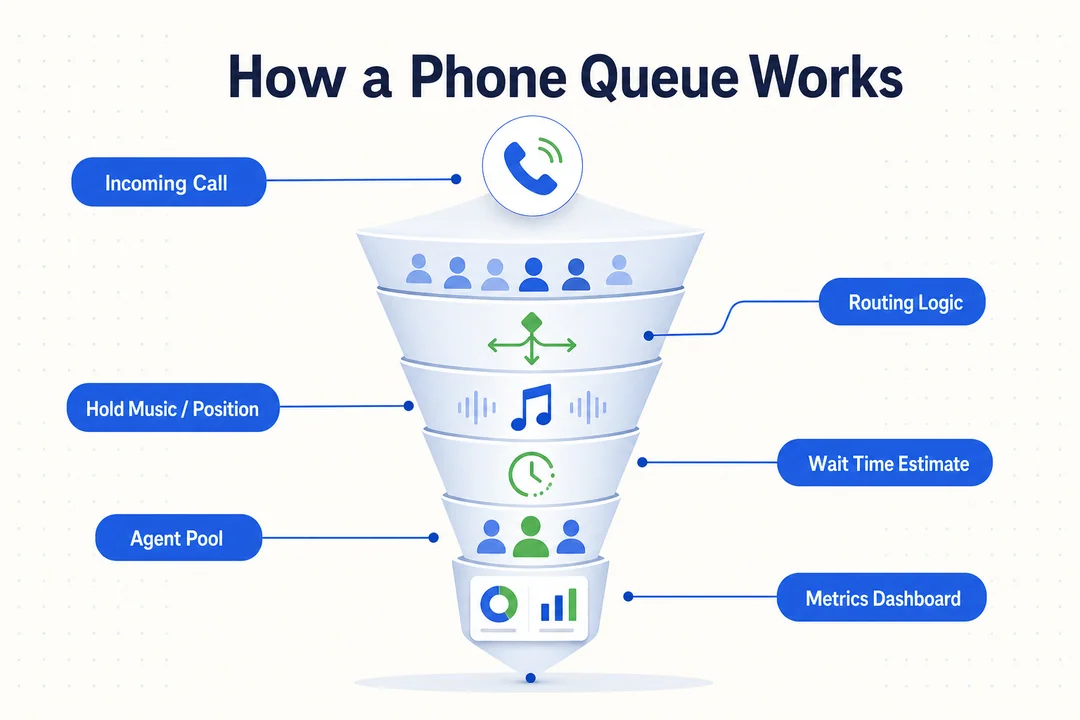
In practice, queues become useful when inbound demand is uneven rather than constant. If three or four customers call at the same time and all agents are already on other calls, a call queuing system can hold those callers in an organized line instead of dropping them into confusion.
This matters because a call queuing system helps reduce missed-call chaos, but it does not remove waiting by itself. If staffing is too thin or routing rules are poor, callers may still wait too long.
Where phone queues are commonly used
A phone queue is common in environments where several people may answer the same line, including:
- Customer support teams
- Inbound sales teams
- Booking and scheduling desks
- Reception or front desk operations
- Service or help lines
- Small call center and cloud call center setups
You will often find queueing inside a cloud PBX, UCaaS platform, or broader calling environment where inbound call routing needs to be more organized than simple line ringing.
Takeaway: a phone queue is best understood as a way to structure waiting and distribution, not as a guarantee of faster answers.
How a phone queue works in a business call flow
If you want to understand how phone queue works, think of it as structured waiting plus routing rules. The system checks who should receive the call, whether anyone is free, and what should happen if no one is available right away.
A caller enters the queue
- A customer calls the main business number or a department line.
- The system checks the routing rules for that number or team.
- It checks agent availability to see whether someone can take the call now.
- If no one is free, the call becomes one of the queued calls.
- The caller waits while hearing messaging, announcements, or hold music.
- The call is answered by the next available agent or sent to another destination based on overflow settings.
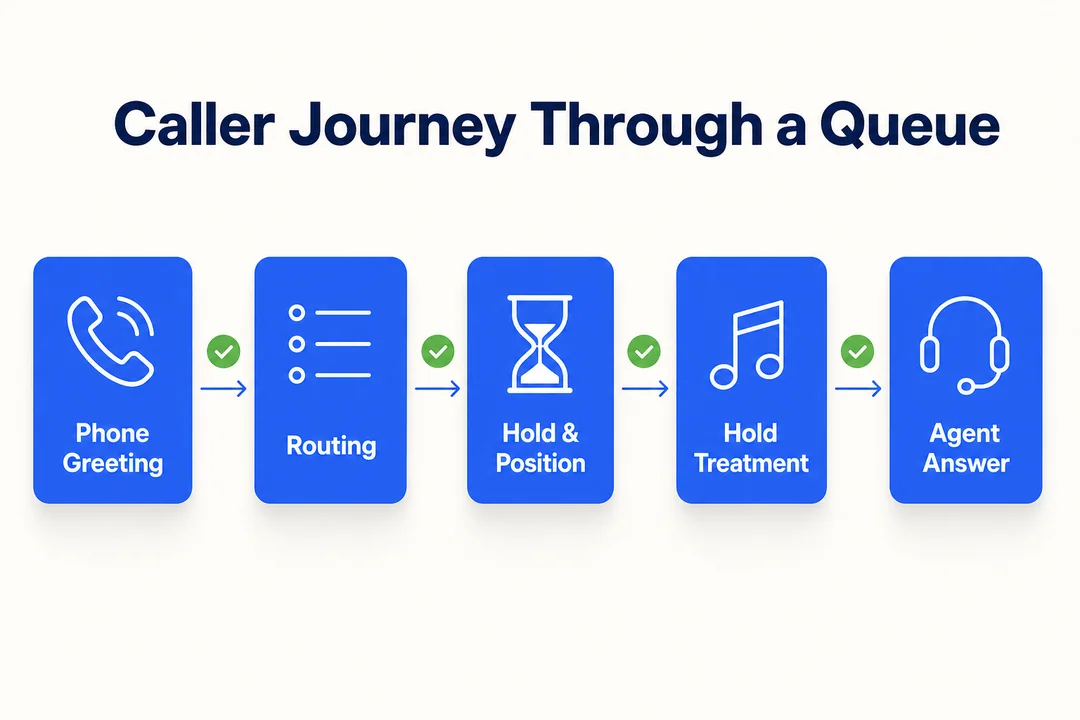
This is why how phone queue works is often less about telecom complexity and more about sensible operating rules. A queue gives your team an orderly way to deal with short spikes, not instant service.
How the system chooses the next agent
Common routing methods include:
- Round robin: Sends each new call to the next agent in rotation.
- Longest idle: Sends the next call to the agent who has been free the longest.
- Top-down: Always offers calls in a fixed order from top to bottom.
- Skill-based routing: Sends calls to agents with the most relevant skill or role.
Each method affects workload fairness, caller experience, and how evenly the team shares demand.
What happens if the wait gets too long
If waiting exceeds the queue’s thresholds, the business can decide what happens next. Common options include:
- Play queue announcements with wait updates
- Continue hold music
- Send the call to voicemail
- Offer a callback
- Route the call to another team or backup destination
Good overflow settings matter as much as the queue itself. A poorly designed queue can make callers feel trapped, especially when messaging is repetitive or the backup path is unclear.
Takeaway: a queue works best when routing, waiting treatment, and overflow are designed together.
Phone queue vs. hunt group vs. IVR: what’s the difference?
Many buyers mix these features together because they often appear in the same phone system. The easiest way to understand phone queue vs hunt group is this: a queue manages waiting, a hunt group manages ringing, and IVR manages menu-based direction.
Quick comparison table
| Feature | Main Purpose | Caller Waits in Line? | Best For |
|---|---|---|---|
| Phone Queue | Holds and distributes calls when agents are busy | Yes | Teams handling shared inbound demand |
| Hunt Group | Rings users in a pattern such as simultaneous or sequential | Usually no formal waiting logic | Small teams that just need calls offered to several people |
| IVR / Auto Attendant | Presents menu options and routes callers to the right destination | Not by itself | Directing callers before they reach a team |
In a phone queue vs hunt group discussion, the main distinction is whether the system can hold callers in line with rules around waiting, messaging, and overflow. A hunt group usually just rings users based on a pattern. An IVR, also called an auto attendant, is different again. It gives callers options such as “Press 1 for support” or “Press 2 for sales.”
How they work together in one flow
These tools often work together in a single call routing flow. For example:
- The caller reaches an IVR
- They hear “Press 1 for support”
- The system routes them to the support team
- If support is busy, the phone queue holds the caller and distributes the call when an agent becomes available
That is why interactive voice response should not be confused with queueing. One helps callers choose a path. The other handles waiting and distribution after that path is selected.
Takeaway: IVR, hunt groups, and queues are different tools, but they often work best when combined.
When a business should use a phone queue
The main benefits of phone queue appear when call demand is uneven, peaky, or hard to distribute fairly. A queue is often less about total volume and more about what happens during short busy windows.
Signs you likely need a queue
You likely need stronger inbound call management if you are seeing:
- Too many missed or unanswered calls
- Calls ringing unevenly across the team
- Peak windows creating congestion
- Too many manual transfers between people
- Customers hanging up before being answered
- Rising call abandonment rate
- Poor visibility into customer wait time
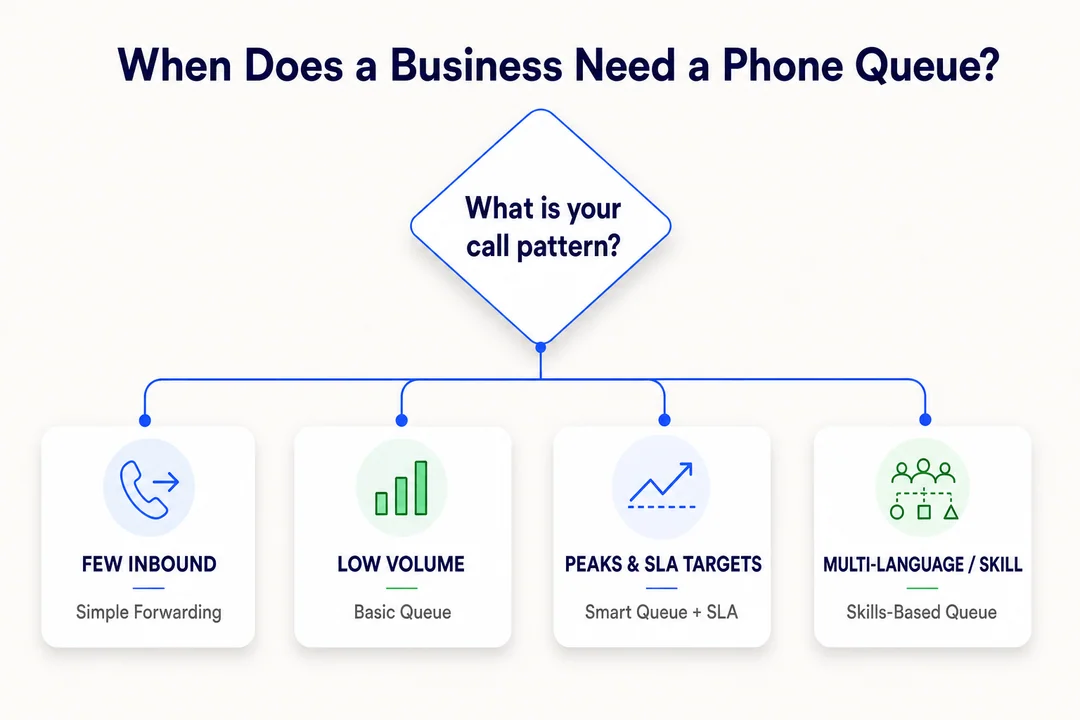
A queue becomes especially useful when ringing feels random and no one has a clear backup path.
Common business scenarios
A small business phone queue can be useful in situations such as:
- Support teams handling morning spikes
- Booking and scheduling desks
- Inbound sales teams during campaigns
- Reception teams covering multiple staff members
- Dispatch or field service operations
The benefits of phone queue are practical: fewer calls lost during busy periods, clearer handling rules, and better visibility into where callers are getting stuck. Still, very low-volume teams may not need a formal queue if one person usually answers immediately.
Takeaway: use a queue when demand arrives in bursts or shared call handling has become inconsistent.
The most important phone queue settings to configure
Good queue settings shape fairness, caller experience, and missed-demand prevention. Many businesses focus on turning the queue on, but the real result depends on how the rules are configured.
- Choose the routing method
- Set queue size and timeout rules
- Configure greetings and wait messages
- Define overflow policy and callback rules
- Keep agent assignment accurate
Routing method
Your routing method affects both workload balance and customer experience.
- Round robin: Good when you want basic fairness across the team.
- Longest idle: Useful when you want work distributed more evenly over time.
- Top-down: Works when calls should follow a fixed order, such as seniority or role.
- Skill-based routing: Best when certain call types should go to agents with the right expertise.
Strong routing logic should reflect how your team actually works, not just what the default setting happens to be.
Queue size and timeout rules
Two settings matter early: maximum queue size and maximum wait time. If too many callers are allowed to stack up with no realistic answer path, frustration rises quickly. If the timeout is too short, calls may overflow too aggressively and create confusion elsewhere.
Bad timeout thresholds often raise abandonment rate because callers either wait too long without clarity or are moved too often. The goal is not to keep people in line forever. It is to define a reasonable path when service cannot happen immediately.
Caller experience settings
The waiting experience should be simple and honest. Important queue settings include:
- Welcome greeting
- Estimated wait time
- Hold music
- Comfort messages between hold periods
- Short announcements that explain what is happening
Keep queue announcements brief and truthful. If waits are often unpredictable, avoid overpromising. Repetitive messaging is one of the fastest ways to make waiting feel longer.
Overflow and callback logic
A strong overflow policy protects the caller experience when the queue cannot absorb more demand. Common options include:
- Send the call to voicemail
- Route to another team
- Route to a backup number or destination
- Offer a callback instead of continued waiting
This is often where teams make the biggest mistake. They focus on the main path but forget the backup path.
Agent assignment and availability status
A queue only works if the right people are in it and their status is accurate. Review:
- Who belongs to the queue
- Who should be active at certain times
- Which users are unavailable, offline, or not taking calls
- Whether temporary staff should join during peaks
If agent availability is wrong, the queue makes poor decisions. Calls may wait even though someone could have answered, or they may be sent to agents who are not ready.
Takeaway: the best queue settings are the ones that match real staffing patterns, real customer expectations, and a clear backup plan.
Best practices for managing a phone queue
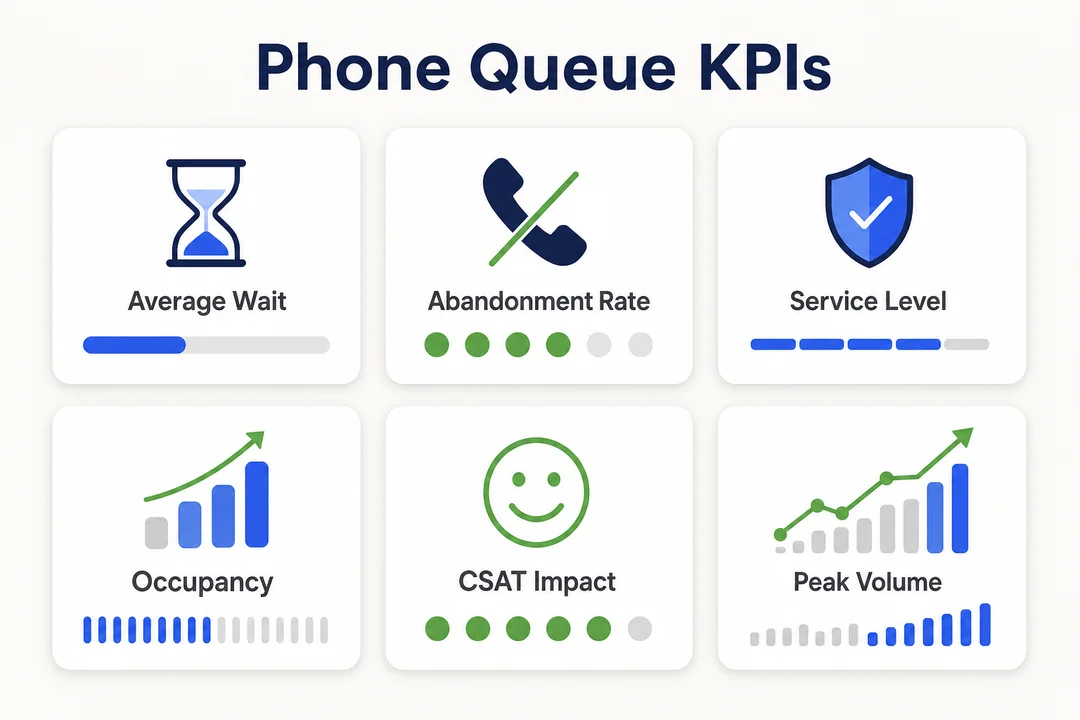
To manage phone queue performance well, focus on a small set of useful measures rather than a crowded dashboard. Good queue analytics should support decisions, not create reporting noise.
Metrics worth watching
- Average speed of answer: How long callers wait before a call is answered.
- Abandonment rate: The percentage of callers who hang up before reaching someone.
- Missed calls: Calls that were not answered or not recovered through another path.
- Service level: The share of calls answered within a target time window.
- Peak-hour patterns: The times when demand spikes beyond normal staffing.
These metrics help you see whether routing rules, staffing coverage, and messaging are actually working. Real-time monitoring can also help supervisors spot congestion before it becomes a larger service problem.
Common mistakes to avoid
- Letting queues grow too long without a backup path
- Using confusing or repetitive messages
- Having no overflow plan
- Choosing the wrong routing rule for the team
- Ignoring staffing gaps during known peak hours
A queue organizes demand, but it does not automatically fix poor staffing alignment or weak communication. That is why queue analytics should be reviewed regularly, especially after schedule changes, promotions, or seasonal peaks.
Takeaway: effective service level management comes from steady adjustments, not from setting the queue once and forgetting it.
A simple example of a phone queue in practice
Support hotline scenario
Here is a simple phone queue example. A software company has an inbound support queue with five agents available. On Monday morning after a product update, 30 calls arrive in a short period. Without queueing, calls would ring unevenly and some would be missed.
Instead, the caller first hears an IVR menu. After choosing support, the system places them into the queue. Calls are distributed based on longest idle. While callers wait, they hear a brief message and hold treatment. If the wait exceeds a defined threshold, the system offers voicemail or a callback.
This queue routing example shows why queues are useful during short spikes rather than only in large contact centers. In modern cloud call center environments, platforms such as Flyfone can make these queue flows easier to adjust when teams need to change routing or capacity quickly.
- 30 calls arrive in a short window
- 5 agents are active
- IVR sends callers to support
- The queue holds and distributes calls
- Overflow offers voicemail or callback
Conclusion
A phone queue helps businesses structure busy inbound periods so calls are handled more consistently instead of being lost to uneven ringing or unclear backup paths. Good queue management depends on a few core elements working together: routing rules, caller messaging, overflow logic, callback options, and accurate agent status.
The most practical lesson is simple: a queue is not just about volume. It is about handling short bursts of demand in a more controlled way. If you want to keep learning, the next useful topics are IVR, inbound routing, and broader cloud call center workflows that shape how callers move through your communication system. If you want a structured fit assessment for your inbound call queue workflow, book a tailored walkthrough with the Flyfone team.
Frequently Asked Questions
What is a phone queue and why do businesses use one?
A phone queue is a system that organizes inbound calls by placing callers in line when every agent is busy. It helps businesses manage call traffic more effectively, reduce missed customers, and deliver a more professional service experience.
How does a phone queue differ from a hunt group and an IVR?
A phone queue holds callers in line with hold music and announcements while they wait. A hunt group simply rings agents in rotation without any waiting logic. An IVR is an automated voice menu that lets callers choose an option to reach the right department.
How do you know your business needs a phone queue?
Consider a phone queue if you see inbound spikes during peak hours, agents missing calls regularly, or customers reporting busy signals. A queue distributes work more fairly across the team and raises the connection rate.
Which settings matter most when configuring a phone queue?
Focus on the routing strategy, maximum wait time, hold music and announcements, overflow rules for handling overload, and agent availability status. These settings together determine response rate and customer satisfaction.
How do you manage a phone queue effectively over time?
Track core metrics such as average speed of answer (ASA), abandonment rate, and service level. Adjust staffing based on real call volume and refine hold announcements regularly to reduce caller frustration.
Can a phone queue reduce the call abandonment rate?
Yes. A phone queue can significantly reduce abandonment by giving callers useful information such as position in line and estimated wait time, or by offering a callback option. Reasonable overflow rules are essential so callers are not stuck waiting for too long.
More in Operations & CX Optimization
View all →
Customer Experience Transformation: Framework and Steps
A telecom customer calls support about a billing error. They explain the problem to the IVR system. Then to the first agent. Then get transferred and explain again. Then escalated—and explain a third time. Forty minutes later, they're exhausted and the problem still isn't solved. This is what broken customer experience looks like. And it's costing you customers. Customer experience…


Web Caller Meaning: JavaScript caller, Calling Tools or Portals
“Web caller” is one of those phrases where the search results and the searcher are frequently talking about different things. Three unrelated audiences use it: developers hitting an error on the legacy JavaScript caller property, buyers evaluating browser-based calling software, and people trying to reach a specific portal or training page whose exact name they cannot recall. That fragmentation is…

Customer Experience Strategy: How to Build One That Works
Customer experience is getting worse, not better. Forrester's 2025 Global CX Index found that 21% of brands declined in CX quality while only 6% improved — and in the US, 25% declined against 7% that improved, the second consecutive year of that pattern. Most of those brands were not neglecting customer experience. They were working on it without a strategy…



 English
  Russian
  Chinese