
Best Contact Center Software at a Glance
A quick comparison makes it easier to narrow the field before demos. The table below focuses on practical buying criteria, not vendor marketing language.
Quick Comparison Table
| Software | Best for | Deployment model | Primary channels | Key features | AI capabilities | CRM/help desk integrations | Pricing model | Ideal business size | Implementation level |
|---|---|---|---|---|---|---|---|---|---|
| Nextiva | Growing teams wanting one ecosystem | Cloud | Voice, SMS, chat, email | IVR, routing, analytics, UCaaS tie-in | AI features vary by package | Salesforce, HubSpot, Zendesk, others | Tiered and quote-based | SMB to mid-market | Easy to moderate |
| Five9 | Enterprise-ready automation | Cloud CCaaS | Voice, chat, email, SMS, social | WFO, routing, agent assist, analytics | Strong AI, sentiment, automation | Salesforce, Zendesk, ServiceNow, others | Custom quote | Mid-market to enterprise | Moderate to advanced |
| Genesys Cloud CX | Complex CX operations | Cloud | Voice and digital omnichannel | Journey tools, routing, self-service, knowledge | Predictive and AI-driven features in higher tiers | Salesforce, Zendesk, Microsoft, others | Tiered and quote-based | Mid-market to enterprise | Advanced |
| NICE CXone | Large service operations | Cloud | Voice and omnichannel digital | WFO, QA, analytics, compliance tooling | Copilot-style guidance, automation, analytics | Salesforce, Zendesk, ServiceNow, others | Custom quote | Enterprise | Advanced |
| Talkdesk | Flexible workflows without full custom build | Cloud SaaS | Voice, chat, email, SMS, social | IVR, automation, app ecosystem, routing | AI and automation available by package | Salesforce, Zendesk, HubSpot, others | Package or custom quote | Mid-market to enterprise | Moderate |
| RingCentral Contact Center | Existing RingCentral users | Cloud | Voice, chat, SMS, digital channels | Unified comms, analytics, coaching | AI features depend on bundle | Salesforce, Zendesk, Microsoft, others | Bundled or quote-based | SMB to mid-market | Easy to moderate |
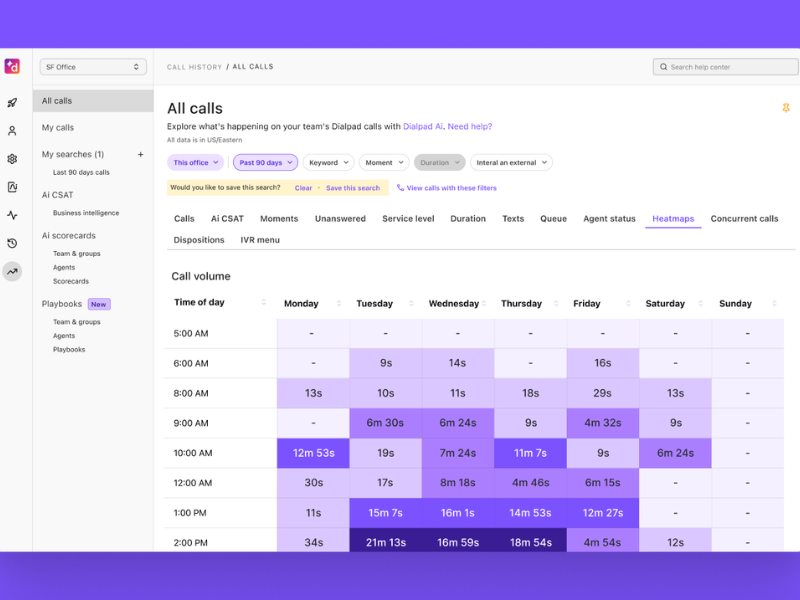
| Dialpad | AI-first distributed teams | Cloud | Voice, SMS, messaging, some digital support | Transcription, coaching, VoIP, analytics | Real-time transcription, sentiment, coaching | Salesforce, HubSpot, Zendesk, others | More transparent tiered pricing | SMB to mid-market | Easy |
| 8×8 Contact Center | Global organisations | Cloud | Voice, chat, SMS, digital | Omnichannel, analytics, international support | AI features vary by plan | Salesforce, Zendesk, Microsoft, others | Bundled or custom quote | Mid-market to enterprise | Moderate |
| Aircall | SMB voice-first teams | Cloud | Voice, limited digital extensions | IVR, queuing, power dialer tools, integrations | Lighter AI than enterprise suites | HubSpot, Salesforce, Zendesk, Intercom, others | Tiered pricing | Small business to lower mid-market | Easy |
| Salesforce Service Cloud | Salesforce-centric service teams | Cloud | Omnichannel service workflows | Case management, automation, customer context | Einstein AI options vary by licence | Native Salesforce ecosystem, partner telephony | Licence plus add-ons | Mid-market to enterprise | Moderate to advanced |
| Cisco Webex Contact Center | Regulated enterprises | Cloud and hybrid options | Voice and digital | AI assistant, summaries, monitoring, enterprise governance | AI assistant and summaries | Salesforce, ServiceNow, Microsoft, others | Custom quote | Enterprise | Advanced |
| Twilio Flex | Custom workflows and developer-led teams | Cloud programmable platform | Voice, messaging, digital channels | APIs, programmable routing, workflow orchestration | AI depends on build and add-ons | Broad API-led integration options | Usage-based or custom | Mid-market to enterprise | Advanced to developer-led |
Quick Picks by Use Case
If you want a shortlist fast, start here.
- Best for small business: Aircall is a strong fit for small teams that need fast setup, simple calling workflows, and solid CRM / help desk integration.
- Best for mid-sized teams: Nextiva is a strong fit for growing teams that want voice, messaging, and support tools in one manageable stack.
- Best for enterprise and high call volume: Genesys Cloud CX is a strong fit for complex operations that need advanced routing, self-service, and scalable orchestration.
- Best for remote teams: Dialpad is a strong fit for distributed teams that value simple rollout, browser-friendly workflows, and live AI assistance.
- Best for AI-powered analytics: NICE CXone is a strong fit for large teams focused on QA coverage, performance monitoring, and coaching consistency.
- Best for outbound sales: Aircall is a strong fit for lighter outbound teams, while Twilio Flex fits teams with custom outbound workflow needs.
- Best for customer support: Talkdesk is a strong fit for service teams that want omnichannel workflows and flexibility without building from scratch.
- Best for Salesforce-centric companies: Salesforce Service Cloud is a strong fit when customer service workflows already revolve around Salesforce data and case management.
- Best for customisation: Twilio Flex is a strong fit for organisations with engineering support and non-standard routing or messaging requirements.
Top 12 Best Contact Center Software Platforms Compared
1. Nextiva
- Best for: Growing teams that want communications and customer support functions in one platform.
- Key features: Omnichannel support, IVR, intelligent call routing, analytics dashboards, CRM integrations, and a built-in UCaaS (unified communications as a service) connection.
- Pros:
- Easy to manage for SMB and mid-market teams.
- Good fit if you want to reduce tool sprawl.
- Combines business phone, messaging, and support workflows in one ecosystem.
- Cons:
- Less ideal for highly complex enterprise workflow customisation.
- Reporting depth and advanced AI may depend on package level.
- Pricing note: Pricing can be tiered or quote-based depending on the package. Verify what’s included for advanced analytics, AI, and digital channels.
- Best fit: Teams that want a practical all-in-one platform instead of stitching together separate phone, messaging, and support tools.
- Watch-outs: Clarify add-ons, reporting depth, and channel coverage before signing.
Nextiva stands out because it is easier to administer than many enterprise-heavy platforms. That matters if your team wants to move fast and avoid a long rollout.
It is especially appealing for companies already looking at business phone replacement and contact centre software at the same time. In that case, the shared ecosystem can simplify vendor management and internal adoption.
Good option if you want a balanced platform with enough room to grow. Less ideal if your operation depends on highly specialised enterprise routing logic or deep custom orchestration.
2. Five9
- Best for: Mid-market and enterprise teams focused on automation, agent productivity, and CX improvement.
- Key features: Workforce optimisation, conversational AI, sentiment analysis, agent assist, predictive analytics, remote workforce management, and omnichannel routing.
- Pros:
- Mature automation and operational depth.
- Strong fit for larger service environments.
- Broad capabilities for coaching, forecasting, and QA.
- Cons:
- Can be too heavy for simple use cases.
- Costs may rise quickly depending on AI and WFO modules.
- Pricing note: Typically custom quote. Ask which AI, analytics, and WFO modules are included versus sold separately.
- Best fit: Teams that want a more advanced CCaaS platform and are willing to handle a more involved rollout.
- Watch-outs: Ask for live demos of actual AI workflows, not just slides.
Five9 is often on shortlists when buyers want more than voice routing and standard dashboards. It has the depth many mid-market and enterprise teams need once scheduling, coaching, and automation become operational priorities.
Its value shows up most clearly in environments where supervisors need better visibility and agents need help handling complex conversations more consistently.
Good option if your team already knows it needs AI-assisted workflows and stronger performance management. Less ideal if you only need basic inbound calling and simple reporting.
3. Genesys Cloud CX
- Best for: Complex customer experience operations with advanced inbound and outbound needs.
- Key features: Customer journey mapping, omnichannel routing, self-service, predictive behavioural routing, federated knowledge management, and enterprise scalability.
- Pros:
- Powerful routing and CX orchestration.
- Strong enterprise feature depth.
- Supports complex customer journeys across channels.
- Cons:
- More setup complexity than SMB-focused tools.
- Advanced features often live in higher pricing tiers.
- Pricing note: Usually tiered or quote-based. Confirm which routing, AI, and journey capabilities are included in the tier you’re evaluating.
- Best fit: Mature CX teams, large service operations, and organisations managing complex customer paths.
- Watch-outs: Implementation time can grow fast if you plan custom workflows, multiple channels, or deep integrations.
Genesys Cloud CX is one of the stronger fits for enterprises that need more than a standard omnichannel contact centre solution. It is built for depth.
That depth comes with trade-offs. Buyers should expect more planning, more admin effort, and a clearer implementation strategy. If your workflows are complex, that investment may be worth it.
Good option if routing logic, self-service, and customer journey management directly affect service quality or revenue. Less ideal if you want the fastest possible deployment with minimal administration.
4. NICE CXone
- Best for: High-volume service teams that need strong QA, WFM, analytics, and governance.
- Key features: Workforce optimisation, real-time agent co-pilot, AI-assisted guidance, analytics dashboards, omnichannel engagement, and compliance support.
- Pros:
- Strong QA and WFM stack.
- Good oversight for enterprise service operations.
- Deep monitoring and coaching capabilities.
- Cons:
- More platform than smaller teams usually need.
- Setup and admin training can be significant.
- Pricing note: Quote-based. Verify how QA, WFM, AI, and analytics modules are packaged.
- Best fit: Large support environments where consistency, compliance, and performance management are major priorities.
- Watch-outs: Ask about onboarding, reporting setup effort, and admin complexity during the buying process.
NICE CXone is usually strongest when buyers care as much about governance as they do about routing. It is often evaluated by organisations where service quality must be measured closely.
This is not the lightest platform to roll out, but it can be the right one if QA automation, coaching structure, and workforce planning are central to your operation.
Good option if you run a large contact centre and need enterprise oversight. Less ideal if your team is small, budget-sensitive, or unlikely to use a full WFO stack.
5. Talkdesk
- Best for: Mid-sized to enterprise teams that want flexibility without building a custom platform.
- Key features: Automation, IVR, CRM integration, SaaS deployment, workflow orchestration, customer engagement tools, and omnichannel support.
- Pros:
- Broad app ecosystem.
- Flexible workflows.
- Easier path than full developer-led customisation.
- Cons:
- Add-on costs can grow quickly.
- Packaging may require close review to avoid overbuying.
- Pricing note: Usually package-based or quote-based. Compare automation and AI tiers carefully.
- Best fit: Teams that need flexible service workflows and solid integrations but do not want to build from scratch.
- Watch-outs: Review contract structure, modules, and upgrade paths before committing.
Talkdesk sits in a useful middle ground. It is more flexible than basic SMB tools, but it does not force every buyer into a developer-first model.
That makes it appealing for customer support leaders who need workflow control, omnichannel service, and integrations without turning the implementation into a major software project.
Good option if you need room to customise and scale. Less ideal if your budget is tight and you want very simple packaging.
6. RingCentral Contact Center
- Best for: Businesses already using RingCentral for internal communications.
- Key features: Unified communications, voice, chat, SMS, analytics, and coaching tools.
- Pros:
- Strong ecosystem fit for existing RingCentral customers.
- Useful if you want internal and external communications in one environment.
- Easier vendor consolidation.
- Cons:
- Less compelling if you are not already in the RingCentral stack.
- Buyers should validate depth for more advanced omnichannel support.
- Pricing note: Pricing may depend on bundling with existing UCaaS services.
- Best fit: Businesses that want to connect team communications and contact centre operations under one vendor.
- Watch-outs: Confirm digital channel depth, analytics packaging, and service support levels.
RingCentral Contact Center makes the most sense when the broader communications stack matters. If your company already uses RingCentral for phone and messaging, staying inside that environment can reduce friction.
The value is less obvious if you are starting from zero and comparing pure-play contact centre software options side by side.
Good option if ecosystem consistency matters. Less ideal if your decision is based only on contact centre depth and advanced service workflows.
7. Dialpad
- Best for: Startups, SMBs, and distributed support teams that want AI-first simplicity.
- Key features: Real-time transcription, sentiment analysis, AI coaching, cloud-based calling, VoIP (internet-based calling), and remote workforce support.
- Pros:
- Clean user experience.
- Useful live assistance features.
- Often easier to price and deploy than enterprise-first platforms.
- Cons:
- May not match the workflow depth of larger enterprise suites.
- Buyers should check outbound and reporting depth carefully.
- Pricing note: Often more transparent than enterprise-only vendors, but advanced functionality may sit in higher tiers.
- Best fit: Teams that want fast rollout, easy adoption, and practical AI features from day one.
- Watch-outs: Verify reporting detail, dialler options, and integration depth for your use case.
Dialpad appeals to buyers who want modern cloud calling plus AI-powered analytics without a heavy implementation project. It is especially strong for remote and hybrid teams.
Its real-time guidance features can be genuinely useful in daily operations, especially for coaching and note reduction. Still, not every team needs or uses every AI feature equally.
Good option if usability and speed matter. Less ideal if you need enterprise-grade orchestration or highly specialised routing.
8. 8×8 Contact Center
- Best for: Global and multi-location organisations.
- Key features: Omnichannel support, analytics, CRM integration, international support, and a cloud-based stack for distributed teams.
- Pros:
- Good global reach.
- Useful unified communications and contact centre combination.
- Strong fit for international operations.
- Cons:
- User and admin experience may vary by package or region.
- Buyers should confirm local support details in target countries.
- Pricing note: Usually custom or bundled.
- Best fit: Companies with cross-region operations and a need for one platform across multiple locations.
- Watch-outs: Confirm local number availability, country coverage, and region-specific support before rollout.
8×8 is often shortlisted by companies that care about international deployment as much as feature depth. Global coverage can matter more than flashy AI if your team supports customers across several markets.
It also fits organisations that want one vendor for both employee communications and customer contact workflows.
Good option if your footprint is international or highly distributed. Less ideal if your business is domestic, simple, and focused mostly on cost control.
9. Aircall
- Best for: Small business and lower mid-market teams that need fast, voice-first deployment.
- Key features: Cloud-based setup, call queuing, IVR, help desk integration, CRM integration, and a lightweight virtual contact centre system.
- Pros:
- Fast deployment.
- Easy for teams to learn.
- Strong integration story for sales and support basics.
- Cons:
- Less suitable for complex omnichannel environments.
- Advanced enterprise controls and analytics are more limited.
- Pricing note: Often easier to understand than quote-heavy enterprise vendors, but compare minutes, numbers, and add-ons.
- Best fit: Small support and sales teams that need quick rollout and low admin overhead.
- Watch-outs: Compare digital-channel expansion limits early so you do not outgrow it too fast.
Aircall is one of the simplest options in this list for teams that want calling, routing, and CRM connectivity without a long project plan.
That simplicity is the main strength. It helps smaller teams move quickly, but it also means some organisations will outgrow it once omnichannel service, advanced QA, or deeper workforce tools become necessary.
Good option if your operation is voice-heavy and practical. Less ideal if you already know you need a full omnichannel contact centre solution.
10. Salesforce Service Cloud
- Best for: Support organisations that already run heavily on Salesforce.
- Key features: Case management, automation, customer data access, omnichannel workflows, CRM ecosystem alignment, and service representative workflows.
- Pros:
- Rich customer context.
- Strong workflow visibility.
- Excellent fit for Salesforce-centric service operations.
- Cons:
- Can become expensive and admin-heavy.
- Telephony and contact centre depth may depend on partner integrations or additional products.
- Pricing note: Usually base licences plus add-ons. Total cost depends heavily on modules and ecosystem choices.
- Best fit: Teams where service workflows, customer history, and reporting already live inside Salesforce.
- Watch-outs: Clarify how telephony, routing, and channel support will work in your final stack.
Salesforce Service Cloud is not always the simplest answer to contact centre software selection, but it can be the strongest one when the CRM is the centre of service operations.
Its main advantage is context. Agents can work with customer history, cases, and service workflows in one system. That can be more valuable than a standalone phone-first tool.
Good option if you want service operations tightly tied to Salesforce data and automation. Less ideal if you want an all-in-one contact centre stack with predictable packaging and low admin burden.
11. Cisco Webex Contact Center
- Best for: Security-conscious and regulated enterprises.
- Key features: AI assistant, call summaries, performance monitoring, enterprise integrations, and strong governance support.
- Pros:
- Strong enterprise credibility.
- Appealing for regulated environments.
- Good fit for organisations with strict security and oversight needs.
- Cons:
- Often too much platform for smaller teams.
- Enterprise buying and implementation cycles can be longer.
- Pricing note: Typically custom quote.
- Best fit: Large organisations in healthcare, finance, government-adjacent, or security-sensitive sectors.
- Watch-outs: Confirm exact compliance coverage by region, deployment, and contract terms. Ask for documentation on SOC 2, GDPR, and HIPAA-related support rather than relying on broad statements.
Cisco Webex Contact Center is usually considered when governance, security posture, and enterprise integration standards carry major weight in procurement.
Its AI assistant and summary features add value, but the stronger buying case is often around trust, control, and enterprise readiness.
Good option if your procurement process includes strict security review. Less ideal if you mainly want a lightweight platform for a small or fast-moving team.
12. Twilio Flex
- Best for: Organisations with engineering support and unique workflow requirements.
- Key features: APIs (software connectors), programmable workflows, messaging, voice, digital channels, and automated workflow orchestration.
- Pros:
- Extremely flexible.
- Strong fit for non-standard routing and customer journeys.
- Broad integration and channel possibilities.
- Cons:
- Requires technical resources.
- Total cost can increase with customisation, telephony, and support needs.
- Pricing note: Usage-based or custom pricing can vary significantly depending on build-out and traffic volume.
- Best fit: Teams that need to design a contact centre around their business rather than adapting to packaged software.
- Watch-outs: Evaluate customisation cost, internal engineering bandwidth, support model, and telephony charges before committing.
Twilio Flex is not the easiest platform on this list, but it can be the right one when packaged contact centre software does not fit.
Its biggest strength is control. You can build workflows around your exact business logic. The trade-off is clear: more flexibility usually means more responsibility.
Good option if your requirements are unique and your team can support a developer-led rollout. Less ideal if you want a plug-and-play deployment with predictable administration.
Best Contact Center Software by Business Type and Use Case

Best Contact Center Software for Small Business
Small business buyers usually need quick deployment, low admin overhead, transparent pricing, and solid voice plus CRM integration. They usually do not need a heavy enterprise suite.
- Aircall: Strong fit for small teams that want fast setup, simple calling flows, and reliable CRM / help desk integrations.
- Dialpad: Strong fit if you want a clean interface, remote-friendly setup, and useful AI features without a long implementation.
- Nextiva: Strong fit if you want business phone, messaging, and support functions under one vendor as you grow.
A practical caution: if you have fewer than 20 agents, be careful not to overbuy enterprise AI and full workforce optimisation. Those features sound attractive, but many small teams do not use them enough to justify the cost.
Also compare hidden cost areas early:
- Phone numbers
- Minutes or usage
- CRM integrations
- Recording storage
- Premium support
For many SMBs, the best contact centre software is the one that solves today’s workflow cleanly and leaves room to expand later.
Best Contact Center Software for Mid-Sized Teams
Mid-market buyers usually need room to scale without jumping straight into the most complex enterprise stack. The priorities are broader than basic calling.
Most mid-sized teams should focus on:
- Omnichannel support
- Workflow automation
- Reporting depth
- Help desk connectivity
- Scalability for the next 2 – 3 years
Strong fits include:
- Nextiva: Good balance of usability, ecosystem value, and growth potential.
- Talkdesk: Strong option for teams that need more workflow flexibility and omnichannel support.
- Five9: Good option when productivity, automation, and more advanced operational control matter.
One common mistake at this stage is choosing a voice-only platform because it is cheaper upfront. Many mid-sized teams outgrow that fast once chat, SMS, self-service, and stronger reporting become necessary.
The right choice is usually the platform that balances ease of use today with realistic future needs. You do not need the heaviest enterprise suite, but you also should not buy a tool you expect to replace in 12 months.
Best Enterprise Contact Center Software for High Call Volumes
Enterprise buyers tend to care most about reliability, workforce optimisation, advanced routing, compliance, uptime, and governance. At this level, implementation quality matters as much as product features.
Strong fits include:
- Genesys Cloud CX: Strong for complex routing, self-service, and broad CX orchestration.
- NICE CXone: Strong for large-scale QA, WFM, analytics, and oversight.
- Five9: Strong for automation, agent productivity, and enterprise-ready cloud deployment.
- Cisco Webex Contact Center: Strong for security-conscious and regulated organisations.
Cheaper tools can become expensive later if they break down under scale, weak QA coverage, or limited reporting. That is why enterprise selection should focus on operational fit, not just base licence cost. For more options, see our roundup of enterprise contact center solutions.
If your call volume is high, test these areas during evaluation:
- Queue and routing flexibility
- Supervisor visibility
- Forecasting and scheduling
- Security and compliance controls
- Reporting performance at scale
A platform that handles complexity well usually saves money over time by reducing service friction and rework.
Best Cloud-Based Contact Center Solutions for Remote Teams
Remote teams need more than browser access. They need reliable VoIP, supervisor visibility, secure remote logins, and coaching tools that still work when agents are distributed. Compare more options in our guide to cloud call center solutions.
Strong fits include:
- Dialpad: Strong for distributed teams that want simple rollout and live AI support.
- 8×8 Contact Center: Strong for remote teams spread across countries or offices.
- RingCentral Contact Center: Strong if internal collaboration and external customer channels need to live together.
- Five9: Strong when remote workforce management and larger-scale supervision matter.
A practical tip: during a trial, test real home-agent workflows. Check call quality, login controls, queue visibility, coaching, and reporting from actual remote environments.
Also be cautious with broad remote-ready claims. Some platforms are easy for agents to access remotely but still weak on supervisor tools, QA workflows, or secure administration.
The best cloud-based contact centre solutions for remote teams support both agent flexibility and management control.
Best Contact Center Software with AI-Powered Analytics
For most buyers, useful AI means practical help. Not hype. The strongest AI use cases usually include:
- Conversation summaries
- Sentiment analysis
- Agent assist
- Coaching prompts
- QA automation
Strong fits include:
- Five9: Good for mature AI-assisted workflows and productivity gains.
- NICE CXone: Good for QA automation, oversight, and coaching consistency.
- Dialpad: Good for real-time transcription, prompts, and easy adoption.
- Genesys Cloud CX: Good for advanced routing and predictive experience tools.
Focus on measurable outcomes:
- Reduced handle time
- Better QA coverage
- More consistent coaching
- Faster wrap-up work
- Stronger customer sentiment visibility
One warning matters here: AI-powered is too broad to compare on its own. Ask vendors to show the exact workflow in a live demo. A summary feature is not the same as automated QA, and sentiment analysis is not the same as practical coaching support.
Best Platforms for Sales and Outbound Teams
Outbound teams care about different things than service teams. The priorities are usually:
- Diallers
- CRM sync
- Call scripting
- Analytics
- Workflow support
Strong fits include:
- Aircall: Good for small and mid-sized sales teams that want simple outbound workflows and CRM integration.
- Dialpad: Good for agile teams that value transcription, coaching, and fast rollout.
- RingCentral Contact Center: Good if outbound activity sits inside a broader communications stack.
- Twilio Flex: Good for organisations with custom lead workflows, messaging logic, or developer support.
Some service-first platforms are weaker for outbound-heavy operations. If outbound performance matters, confirm dialler options, call logging, scripting, and CRM sync in detail.
Also do not ignore compliance. Outbound calling rules vary by use case, region, and industry, and your software setup needs to support those requirements.
Best Platforms for Customer Support and Service Teams
Service teams usually care most about these areas:
- Omnichannel inbox
- Ticketing integration
- Self-service
- Routing
- Customer context
Strong fits include:
- Salesforce Service Cloud: Best when service workflows already revolve around Salesforce data and case management.
- Genesys Cloud CX: Strong for advanced service operations with broad channel and routing needs.
- Nextiva: Strong for growing service teams that want simple consolidation.
- Talkdesk: Strong for flexible omnichannel support workflows.
The key requirement is a unified agent view. When agents can see customer history, open cases, channel activity, and routing context in one place, service quality improves.
One common mistake is using disconnected telephony and help desk systems. That usually leads to more app switching, slower handling, and weaker reporting.
For customer support teams, the best platform often is not the one with the most features. It is the one that keeps conversations, context, and workflows aligned.
Key Features to Look for in Contact Center Software
Omnichannel Communication
Omnichannel communication means handling voice, chat, email, SMS, and social messaging from one workspace. That matters because customers rarely stay on one channel.
Benefits include:
- Agents see more complete customer context across conversations.
- Teams reduce handoff problems when customers switch channels.
- Customers get a smoother experience because they do not need to repeat themselves as often.
Even if your team is voice-first today, check how easily the platform can expand into digital channels later. Many companies start with calling and then add chat, SMS, or email support within a year.
The point is not to buy every channel now. It is to avoid getting trapped in a platform that makes expansion hard later.
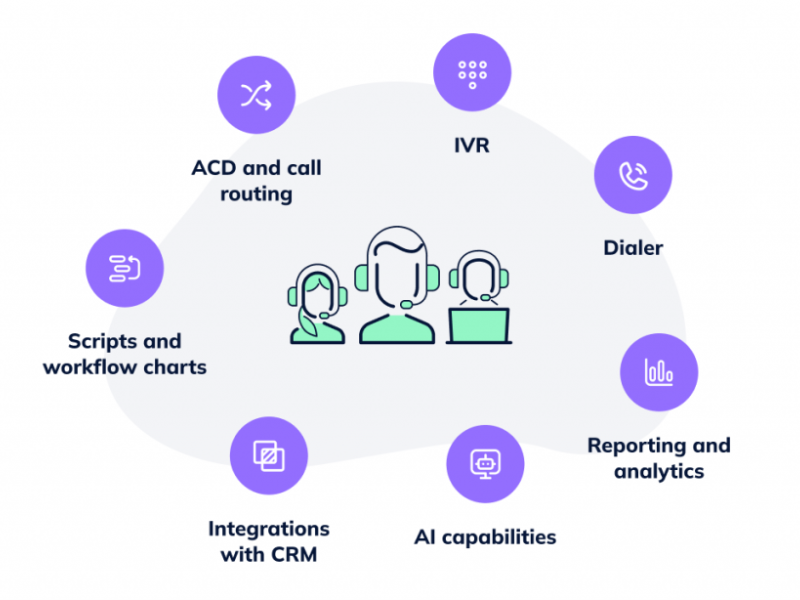
Intelligent Call Routing, ACD, and IVR
These three features shape the customer’s first experience.
- ACD (automatic call distribution) sends incoming calls to available agents or queues based on rules.
- IVR (interactive voice response) gives callers self-service menus.
- Intelligent routing or skill-based routing sends customers to the best-fit agent based on skills, language, team, or issue type.
Why this matters:
- Fewer transfers improve first-call resolution.
- Shorter wait times reduce customer frustration.
- Better routing makes agents more efficient.
Buyer tip: routing should be editable without heavy technical help. If every menu change or queue update requires special support, daily administration becomes slow and expensive.
You do not need deep telecom detail here. You need a platform that makes routing clear, manageable, and effective.
| Feature | What it does | Why buyers care |
|---|---|---|
| ACD | Distributes calls by rules | Keeps queues moving |
| IVR | Handles self-service menus | Reduces simple call load |
| Intelligent routing | Matches customer to best agent | Improves resolution and experience |
CRM Integration and Help Desk Connectivity
This is one of the most important buying areas because it affects both agent speed and customer context.
A strong integration setup should support:
- Screen pops with caller or customer details
- Case or ticket sync
- Customer history visibility
- Click-to-call and call logging
Why it matters:
- Less app switching helps agents work faster.
- Better context improves service quality.
- Logged activity supports reporting and follow-up.
Common integrations buyers look for include Salesforce, HubSpot, and Zendesk. If those systems are already central to your workflow, test them early.
A practical rule: native integrations are usually easier to maintain than custom builds. Custom setups may offer more flexibility, but they also add cost, risk, and ongoing admin work.
Analytics, Reporting, and Dashboards
Reporting should help managers make decisions, not just generate charts.
There are three basic layers:
- Real-time dashboards: Show live queue status, agent states, active conversations, and service levels.
- Historical reporting: Shows trends over time for staffing, outcomes, and performance.
- KPI tracking: Measures operational targets such as handle time, resolution, occupancy, and SLA (service level agreement) performance.
Important metrics often include:
- Queue status
- Handle time
- Service level
- Occupancy
- Resolution trends
- Abandonment rate
- Agent productivity
Buyer tip: confirm which reporting features are included by default. Some vendors reserve better dashboards, exports, or QA reporting for higher tiers.
Good reporting makes it easier to spot staffing issues, coach agents, and justify platform ROI.
AI and Automation
Useful AI in contact centre software usually falls into a few practical buckets:
- Chatbots or self-service for simple requests
- Conversation summaries that reduce wrap-up work
- Agent assist for live prompts and suggested next steps
- Workflow automation for repetitive tasks
- Sentiment insights to flag difficult interactions
Start with one or two measurable use cases. Good examples include cutting after-call work, improving QA coverage, or reducing handle time.
Do not buy AI just because it sounds advanced. Many vendors describe very different tools under the same label. What matters is whether the feature helps your team perform better in a clear way.
Balanced view: AI can help a lot, but execution matters more than labels. The feature has to work in your actual workflow, with your data, and at your scale.
| AI feature | Practical value |
|---|---|
| Summaries | Saves agent wrap-up time |
| Agent assist | Helps newer agents respond faster |
| QA automation | Expands review coverage |
| Chatbots | Deflects simple requests |
| Sentiment analysis | Flags difficult interactions |
Call Recording, QA, and Coaching
Recording and QA matter because they support service consistency, compliance, and training.
Key capabilities include:
- Call recording
- Live monitoring
- Whisper coaching
- Barge-in support
- Transcription
- QA scorecards
- Coaching workflows
These features help supervisors review interactions, spot problems, and coach more consistently. They also matter for onboarding newer agents faster.
Buyer tip: verify storage limits, searchability, retention settings, and compliance controls. A platform may offer recording, but the details around storage and retrieval can change the real value a lot.
If your team depends on continuous coaching, QA should be easy to run and easy to connect to agent feedback.
Workforce Optimization
Workforce optimisation means forecasting demand, scheduling agents, and supporting adherence and performance.
In plain English, it helps answer three questions:
- How many people do we need?
- When do we need them?
- Are we staffing the operation correctly?
Why it matters:
- Better staffing accuracy improves service levels.
- Forecasting helps reduce overstaffing and understaffing.
- Scheduling tools become more important as teams get larger.
Smaller teams may not need a full WFO suite right away. But once volume grows, scheduling and forecasting often become operational pain points fast.
For larger teams and high-volume environments, workforce optimisation can be one of the most valuable platform areas.
Security and Compliance
Security review should be practical. Buyers should check:
- Access controls
- Role-based permissions
- Audit trails
- Encryption and security posture
- Data handling policies
- Regional privacy support
Common terms include SOC 2, GDPR, and HIPAA. These matter most when your industry, customers, or internal policies require stricter controls.
Buyer tip: ask for documentation, not just a sales statement. Security and compliance claims need proof.
Also confirm whether support varies by region or deployment model. A feature or compliance posture may not look identical across every package.
How Much Does Contact Center Software Cost?

Typical Pricing for Small Business Plans
For small business plans, pricing is often simpler but still not fully predictable. Many vendors offer per-user monthly pricing, but the real total depends on calling usage, integrations, and channel needs.
Small business plans usually include:
- VoIP calling
- IVR
- Call routing
- Basic analytics
- Limited integrations
Often extra:
- Advanced reporting
- Digital channels
- AI features
- Premium support
- Extra storage
For SMB buyers, the key is to compare total monthly cost, not just seat price. A lower seat price can still become expensive once numbers, minutes, recordings, and integrations are added.
If your team is small and mostly voice-first, transparent pricing matters. But you still need to confirm what happens as your team adds channels or grows beyond basic support workflows.
Mid-Market Pricing Expectations
Mid-market pricing rises because the software usually includes more than calling. Costs often increase when buyers need:
- Omnichannel support
- Advanced routing
- Workflow automation
- Better analytics
- Higher support tiers
- More integrations
CRM integration and advanced reporting can push pricing up quickly, especially when sold in premium packages. That is why mid-market buyers should model costs for both current and future agent counts.
A common mistake is pricing the platform only for today’s team size. If you expect headcount growth, new channels, or deeper automation, build that into the comparison now.
The right decision is not always the cheapest current option. It is often the one that fits the next few years without forcing a disruptive migration.
Enterprise Pricing and Custom Quotes
Enterprise pricing is usually quote-based because deployments vary more.
Pricing often depends on:
- Channel mix
- Usage volume
- Security requirements
- WFO modules
- AI capabilities
- Onboarding and professional services
- Support terms
When requesting pricing, ask vendors for line-item detail by module. That makes it easier to compare offers and spot where costs really sit.
Also ask about:
- Implementation fees
- Professional services
- Premium support
- Contract minimums
- Renewal terms
Custom quotes are normal in enterprise buying, but they can hide cost differences if proposals are not structured clearly. Push for pricing detail early.
Common Hidden Costs to Watch For
- AI add-ons
- Workforce optimisation modules
- Digital channels beyond voice
- Telephony and usage charges
- Call recording storage
- Onboarding and professional services
- Custom integrations
- Premium support
- Contract minimums and term commitments
Hidden costs often matter more than the base seat price.
Transparent Pricing vs Quote-Based Pricing
Both pricing models have trade-offs.
| Pricing model | Best for | Main pros | Main cons | Comparison difficulty | Negotiation flexibility |
|---|---|---|---|---|---|
| Transparent pricing | SMBs, fast-moving teams, early research | Easier to budget, easier to compare, faster shortlist | May hide limits in lower tiers, less tailored | Low | Usually lower |
| Quote-based pricing | Mid-market and enterprise buyers with complex needs | More tailored packaging, room to negotiate, fits custom deployments | Harder to compare, slower buying cycle, less visibility upfront | High | Usually higher |
Quote-based pricing is common in enterprise CCaaS buying, but it slows apples-to-apples comparison. If you get custom quotes, ask every vendor for the same pricing structure and line items.
How to Choose the Right Contact Center Software

Start With Your Main Communication Channels
Start with what your team actually handles today.
- Voice-only
- Inbound support
- Outbound sales
- Mixed operations
- Digital support
Buy for real current needs plus reasonable growth. Do not pay for every possible channel if your team will not use them.
Good prompts to ask:
- Are we mostly inbound, outbound, or mixed?
- Do customers expect chat, SMS, or email support now?
- Will we add digital channels within the next year?
- Do we need one agent workspace across channels?
A smaller, focused platform may be enough if your operation is voice-led. But if channel growth is already happening, choose a platform that can expand without a full migration.
Match the Platform to Your Team Size and Support Volume
Needs change fast as teams grow.
- Up to 10 agents: Simplicity, fast setup, and core integrations matter most.
- 10 to 50 agents: Reporting, routing flexibility, and supervisor visibility become more important.
- 50 to 100+ agents: Reliability, QA, WFO, and scaling support become major buying factors.
A tool that works for 10 agents may fail at 100. Queue complexity, staffing needs, and reporting expectations rise with volume.
When comparing platforms, ask whether the software still works well when:
- Queues multiply
- More supervisors need visibility
- More channels are added
- Service levels become stricter
The right platform should fit your current size and your likely near-term growth.
Check CRM, ERP, and Existing Tech Stack Compatibility
Integration fit affects daily work more than many buyers expect.
Review compatibility with:
- CRM
- ERP
- Help desk
- UCaaS
- Internal communication tools
Why it matters:
- Agents work faster with connected systems.
- Admins deal with fewer manual workarounds.
- Reporting is cleaner when data flows properly.
A practical step: test must-have integrations before signing. Do not assume that a listed integration matches your exact workflow.
Also compare native versus custom integration options. Native connections are often easier to maintain. Custom builds may solve edge cases, but they increase cost and support burden.
Prioritise the AI and Automation You Will Actually Use
Useful AI should connect to a business result.
Good examples include:
- Summaries that reduce after-call work
- Agent assist that helps newer agents respond faster
- QA automation that expands review coverage
- Chatbots that contain simple requests
Before buying, define success metrics such as:
- Lower handle time
- Better QA coverage
- More consistent coaching
- Less manual wrap-up
This keeps the evaluation grounded. It also makes demos easier to judge because you know what result you want.
The best AI capability is not always the most advanced one. It is the one your team will actually use at scale.
Compare Ease of Use and Implementation
A powerful platform is only useful if your team can adopt it quickly. Heavy tools with long rollouts can stall projects and frustrate agents before they see value.
Before you commit, weigh:
- How fast agents can learn the interface
- How much admin work setup and changes require
- Whether onboarding and migration support are included
- How quickly you can adjust routing, IVR, and reports yourself
Run a short pilot with real agents before you sign. The platform that feels simple in daily use usually wins on adoption, even if a rival lists more features on paper.
Conclusion
The best contact center software is the one that fits your size, channels, budget, and growth plans, not the one with the longest feature list. Small teams usually do best with simple, fast-to-deploy tools, while enterprises need scale, governance, and workforce optimisation.
Shortlist two or three platforms, test them against your real workflows, and judge them on usability, integrations, and total cost over time. Choose deliberately and your contact center software becomes a long-term advantage rather than a recurring headache.
Frequently Asked Questions
What is contact center software?
Contact center software is a platform that manages customer interactions across voice, email, chat, SMS, and social channels in one place. It typically adds routing, IVR, analytics, QA, and CRM integration so teams can handle support and sales at scale.
What is the difference between call center and contact center software?
Call center software focuses mainly on voice calls. Contact center software is broader and handles voice plus digital channels like chat, email, SMS, and social, giving customers a consistent omnichannel experience.
How much does contact center software cost?
Most platforms charge per agent per month, often from around $50 to $150+ depending on features, AI capabilities, and contract terms. Enterprise deployments with advanced routing, workforce management, and analytics cost more, so price the full scope, not just the base licence.
What is the best contact center software for small business?
Smaller teams usually prefer platforms that are quick to deploy and easy to manage, such as Nextiva, RingCentral, Dialpad, or Aircall. The right pick depends on your channel mix, integrations, and budget.
Is cloud-based contact center software better than on-premise?
For most teams, yes. Cloud platforms are faster to deploy, easier to scale, and better suited to remote or hybrid agents. On-premise still suits a small set of organisations with strict control or compliance needs.
What features matter most in contact center software?
Prioritise omnichannel support, intelligent routing and IVR, CRM and help desk integration, reliable analytics, and AI or automation that ties to a real result like lower handle time or better QA coverage.
Continue Exploring
- 12 Best Inbound Call Center Software in 2026 (Features & Pricing)
- Top 10 Cloud Call Center Solutions Compared (2026 Guide)
- Cloud Contact Center: Definition, Benefits & How It Works
More in Operations & CX Optimization
View all →
Customer Experience Transformation: Framework and Steps
A telecom customer calls support about a billing error. They explain the problem to the IVR system. Then to the first agent. Then get transferred and explain again. Then escalated—and explain a third time. Forty minutes later, they're exhausted and the problem still isn't solved. This is what broken customer experience looks like. And it's costing you customers. Customer experience…


Web Caller Meaning: JavaScript caller, Calling Tools or Portals
“Web caller” is one of those phrases where the search results and the searcher are frequently talking about different things. Three unrelated audiences use it: developers hitting an error on the legacy JavaScript caller property, buyers evaluating browser-based calling software, and people trying to reach a specific portal or training page whose exact name they cannot recall. That fragmentation is…

Customer Experience Strategy: How to Build One That Works
Customer experience is getting worse, not better. Forrester's 2025 Global CX Index found that 21% of brands declined in CX quality while only 6% improved — and in the US, 25% declined against 7% that improved, the second consecutive year of that pattern. Most of those brands were not neglecting customer experience. They were working on it without a strategy…



 English
  Russian
  Chinese