

Best AI Receptionist Software: Compare Top Tools for 2026
An AI receptionist helps small businesses, service teams, healthcare offices, and support teams answer calls, book appointments, and capture leads without adding full front desk headcount. If you miss calls during busy hours or need after-hours coverage, the right tool can improve response time, reduce lost revenue, and make scheduling far easier.
Key Takeaways
- The best AI receptionist for small business is usually the one that balances easy setup, call handling, and appointment scheduling without forcing a complex rollout.
- Bookipi, IONOS, and Jobber are strong starting points for most buyers because each targets a clear use case instead of trying to do everything.
- Healthcare teams should verify HIPAA support, BAA availability, data handling, and access controls before choosing any AI phone answering service.
- Budget tools with pay-per-minute or pay-per-call pricing can work well at low volume, but they may become expensive as call volume grows.
- Enterprise buyers should prioritize routing, analytics, governance, and integration depth over low entry price.
- CRM integration, calendar sync, SMS handling, and human call escalation matter more in practice than flashy AI claims.
- If you miss calls after hours, prioritize 24/7 availability, call routing, and lead capture over advanced customization.
Quick Answer: Which AI Receptionist Is Right for Your Business?
Best AI receptionist for small business
Best fit: Bookipi
Why: It is easy to launch, practical for small teams, and built around common needs like scheduling, lead capture, and simple workflows.
Practical note: If you want something your team can start using quickly without heavy setup, this is a strong first option.
Best AI receptionist for home service businesses
Best fit: Jobber Receptionist
Why: It fits field service teams that need fast response, booking support, and customer communication while staff are on the road.
Practical note: Best for plumbing, HVAC, cleaning, electrical, and similar service businesses already working in Jobber’s ecosystem.
Best AI receptionist for healthcare and HIPAA-sensitive teams
Best fit: Coextro is often mentioned for healthcare, but from this shortlist, buyers should treat healthcare as a verification-first category rather than a quick purchase.
Why: Healthcare needs more than good call handling. You need verified HIPAA support, BAA terms, access controls, and clear data practices.
Practical note: Do not assume a vendor is HIPAA-compliant just because it serves healthcare. Confirm this directly in vendor documentation.
Best budget-friendly AI phone answering service
Best fit: IONOS AI Receptionist or My AI Front Desk
Why: IONOS offers low monthly entry pricing. My AI Front Desk offers a lower-risk pay-per-minute model for lighter call volume.
Practical note: Cheap at low volume does not always stay cheap at scale. Model your expected call load first.
Best AI receptionist for enterprise call handling
Best fit: Mosaicx
Why: It is better suited for large call volume, advanced routing, analytics, and governance.
Practical note: This is likely overkill for many small businesses. Choose it if you need enterprise-grade control, not just basic answering.
Best option for teams that need CRM and calendar integrations
Best fit: Dialpad or Synthflow
Why: Dialpad is strong for communication and workplace integrations. Synthflow is better if you want custom flows without heavy coding.
Practical note: If your current stack matters more than plug-and-play simplicity, these are worth shortlisting first.
Top 10 AI Receptionist Software Options to Compare
1. Bookipi, Best for simple all-in-one small business workflows
- Best for: Small businesses, solo operators, and lean teams that want easy setup.
- Pros: Simple onboarding, practical appointment scheduling, lead capture, SMB-friendly workflow design.
- Cons: Less flexible than enterprise-focused platforms, fewer advanced integrations than some larger systems.
- Who it’s for: Businesses that need a working AI receptionist fast without a complex setup project.
- Why it stands out: It focuses on usability. That matters more than feature depth for many small teams.
- Limitations/tradeoffs: If you need advanced routing logic, deep compliance controls, or heavy customization, you may outgrow it.
- Pricing model: Check vendor docs for current plans.
Verdict: Bookipi is one of the safest picks for small businesses that want core AI receptionist features without a long learning curve. It is strongest when simplicity is the priority.
2. IONOS AI Receptionist, Best for affordable 24/7 call answering
- Best for: Local businesses, small offices, and teams that need low-cost after-hours coverage.
- Pros: Low starting price, 24/7 call answering, works with existing number through call forwarding, simple setup.
- Cons: Lower-cost plans may have usage limits, advanced features vary by plan.
- Who it’s for: Businesses that mainly want to stop missing calls and handle basic inquiries consistently.
- Why it stands out: It gives clear value fast. For many buyers, affordability plus quick setup is enough.
- Limitations/tradeoffs: It may not be the best fit if you need deep workflow automation or complex CRM-based call logic.
- Pricing model: Monthly subscription with included call limits, then usage charges depending on plan.
Verdict: IONOS is a strong fit for small teams that need reliable 24/7 automated call answering without a big software commitment.
3. Jobber Receptionist, Best for home service businesses
- Best for: Home service companies like HVAC, plumbing, cleaning, landscaping, and electrical services.
- Pros: Built for service workflows, customizable handling, transcripts, summaries, keyword-based escalation, strong fit for busy mobile teams.
- Cons: Best value is tied to Jobber users, less universal if your business runs on a different core platform.
- Who it’s for: Field service businesses that miss calls while working on jobs.
- Why it stands out: It is shaped around how service businesses actually operate. That makes adoption easier.
- Limitations/tradeoffs: If you are not already using Jobber, the fit may be weaker than a more neutral AI receptionist.
- Pricing model: Included with certain Jobber plans or available as an add-on. Check vendor docs.
Verdict: If your team works in the field and speed-to-response affects booking, Jobber Receptionist is one of the most practical choices on this list.
4. My AI Front Desk, Best budget pay-per-minute option
- Best for: Small businesses with light to medium call volume that want low-risk entry.
- Pros: Lower upfront commitment, inbound and outbound support, budget-friendly starting point.
- Cons: Costs can rise as volume increases, integrations may depend on third-party connectors, support depth may be limited.
- Who it’s for: Buyers testing AI receptionist software for the first time.
- Why it stands out: The pay-per-minute model lowers the barrier to trying AI call handling.
- Limitations/tradeoffs: Predictable budgeting gets harder when usage fluctuates.
- Pricing model: Pay-per-minute.
Verdict: My AI Front Desk is a smart trial option for cost-sensitive teams, but you should monitor usage closely before scaling it across a busier operation.
5. RingCentral AI Receptionist, Best for businesses already using RingCentral
- Best for: Companies already invested in RingCentral.
- Pros: Native ecosystem fit, strong call routing, familiar admin environment, good for unified communications.
- Cons: Less compelling if you are not already on RingCentral, pricing may be higher than SMB-focused tools, scheduling depth may vary.
- Who it’s for: Mid-size teams and larger businesses standardizing on one communications stack.
- Why it stands out: Existing platform fit reduces rollout friction and integration headaches.
- Limitations/tradeoffs: If you need a broad front-desk automation tool rather than a communications-first tool, compare carefully.
- Pricing model: Varies by plan and environment.
Verdict: RingCentral AI Receptionist makes the most sense when your phone system already runs on RingCentral and you want tighter native routing.
6. Dialpad AI Receptionist, Best for communication and productivity integrations
- Best for: Teams that want voice AI plus strong productivity integrations.
- Pros: Good integration potential, modern communication stack, helpful for calendar and CRM-connected workflows.
- Cons: Some teams may face a learning curve, quality can depend on setup discipline and existing processes.
- Who it’s for: Businesses that want their AI receptionist tied into the tools employees already use daily.
- Why it stands out: It connects call handling with business productivity, not just front-desk coverage.
- Limitations/tradeoffs: Not every small team needs this level of ecosystem depth.
- Pricing model: Check vendor docs.
Verdict: Dialpad is a strong option when integrations matter as much as call answering, especially for teams that live in Google Workspace and connected business apps.
7. Zendesk Answer Bot, Best for support teams using Zendesk
- Best for: Support teams focused on customer service automation inside Zendesk.
- Pros: Works with existing support content, helps reduce repetitive inquiries, strong fit for ticket-driven support.
- Cons: Not a full front-desk replacement, less ideal for businesses that mainly need voice-first scheduling and receptionist tasks.
- Who it’s for: Customer support organizations that want faster deflection of routine questions.
- Why it stands out: It leverages an existing support environment rather than forcing a separate workflow.
- Limitations/tradeoffs: It is more support automation than classic receptionist software.
- Pricing model: Varies by Zendesk plan and usage structure.
Verdict: If your main need is support automation inside Zendesk, it is worth considering. If you need a true AI receptionist, other tools on this list are a better fit.
8. Synthflow, Best for no-code customization
- Best for: Teams that want custom call flows without traditional development work.
- Pros: Strong no-code flexibility, good for custom scripts and business logic, broad integration potential.
- Cons: Better results require careful setup, conversation design still matters, some teams may need time to tune flows.
- Who it’s for: Businesses with unique intake, booking, or qualification flows.
- Why it stands out: It gives more control than basic plug-and-play tools.
- Limitations/tradeoffs: More flexibility can mean more setup effort.
- Pricing model: Check vendor docs.
Verdict: Synthflow is ideal if your business needs custom call handling and you are willing to spend time shaping a better experience.
9. Dialzara, Best plug-and-play AI-powered virtual assistant
- Best for: Small teams that want fast setup and minimal complexity.
- Pros: Quick deployment, straightforward experience, lifelike voice options, simple starting point.
- Cons: Fewer advanced features than more customizable platforms, lighter market footprint than larger vendors.
- Who it’s for: Businesses that want an AI-powered virtual assistant without a technical rollout.
- Why it stands out: It is easy to understand and easy to launch.
- Limitations/tradeoffs: You may hit feature limits if your workflows become more advanced.
- Pricing model: Check vendor docs.
Verdict: Dialzara is a good fit for buyers who value speed and simplicity over deep customization.
10. Mosaicx, Best enterprise-grade intelligent voice receptionist
- Best for: Enterprises with high call volume and more complex operational needs.
- Pros: Advanced language handling, real-time insights, large-scale capacity, stronger governance potential.
- Cons: Higher cost, more complex setup, unnecessary for many small and mid-size businesses.
- Who it’s for: Enterprises that need scalability, analytics, and structured deployment.
- Why it stands out: It is built for larger, more demanding environments.
- Limitations/tradeoffs: Most small businesses will not use enough of its power to justify the complexity.
- Pricing model: Usually custom or vendor-led. Check vendor docs.
Verdict: Mosaicx is the enterprise option here. Choose it for scale and control, not for simplicity.
Comparison Table: Best AI Receptionist Tools at a Glance
| Tool | Best For | Pricing Model | Appointment Scheduling | SMS/Text Handling | CRM Integration | Calendar Sync | HIPAA/Compliance | Setup Difficulty | Standout Strength |
|---|---|---|---|---|---|---|---|---|---|
| Bookipi | Small business workflows | Check vendor docs | Yes | Varies by plan | Yes | Yes | Check vendor docs | Easy | Simple all-in-one workflow |
| IONOS AI Receptionist | Affordable 24/7 answering | Monthly + usage by plan | Higher plans | Yes | Limited/varies | Yes | Privacy-focused, verify specifics | Easy | Low-cost after-hours coverage |
| Jobber Receptionist | Home service businesses | Included/add-on by plan | Yes | Yes | Strong in Jobber ecosystem | Yes | Check vendor docs | Easy to moderate | Best fit for field service |
| My AI Front Desk | Budget, low-risk entry | Pay-per-minute | Yes | Varies | Often via connectors | Yes | Check vendor docs | Easy | Low upfront commitment |
| RingCentral AI Receptionist | Existing RingCentral users | Plan-based | Varies | Varies | Yes | Varies | Enterprise controls vary by plan | Moderate | Native communications fit |
| Dialpad AI Receptionist | Productivity integrations | Plan-based | Varies | Varies | Yes | Yes | Check vendor docs | Moderate | Strong connected workflows |
| Zendesk Answer Bot | Zendesk support teams | Plan/usage-based | Limited | Varies | Yes | Limited | Check vendor docs | Moderate | Support automation |
| Synthflow | No-code customization | Check vendor docs | Yes | Varies | Yes | Yes | Check vendor docs | Moderate | Custom call flows |
| Dialzara | Plug-and-play setup | Check vendor docs | Varies | Varies | Via integrations | Varies | Check vendor docs | Easy | Fast deployment |
| Mosaicx | Enterprise call handling | Custom | Varies | Varies | Yes | Varies | Enterprise-grade options, verify | Harder | Scale and analytics |
Key comparison points: best for, pricing model, scheduling, SMS, integrations, compliance, setup difficulty
- Best for tells you whether the product is built for SMB, field service, support, or enterprise use.
- Pricing model matters because low entry price can become expensive at higher call volume.
- Scheduling and calendar sync are essential if your business books appointments by phone.
- SMS handling matters if callers also expect text follow-up.
- CRM integration helps your team avoid manual lead entry.
- Compliance should be verified directly with the vendor, especially for healthcare and regulated workflows.
- Setup difficulty matters more than many buyers expect. Simple tools often win in real operations.
What Is an AI Receptionist?
Simple definition in plain English
An AI receptionist is software that answers business calls, talks to callers in a natural voice, gathers information, routes calls, books appointments, and sends summaries to your team. Think of it as a virtual front desk that works around the clock.
How an automated call answering service works
- A caller reaches your business number or a forwarded line.
- The AI answers, understands the reason for the call, and asks follow-up questions.
- It takes action, such as routing the call, booking an appointment, collecting lead details, or answering common questions.
- It sends a transcript or summary to your team and escalates to a human if needed.
Common tasks an AI receptionist can handle
- Answer incoming calls 24/7.
- Route calls based on department, urgency, or keywords.
- Book or reschedule appointments.
- Capture leads and contact details.
- Send transcripts, recordings, and call summaries.
- Handle basic FAQs and after-hours inquiries.
Why Businesses Are Using AI Receptionists
Reduce missed calls and missed revenue
Missed calls often mean missed leads. That is especially true for local services, clinics, and small offices where the first caller often books with whoever answers first.
An AI receptionist gives you a consistent first response, even when your staff is busy or unavailable.
Provide 24/7 availability without hiring more staff
Many businesses do not need a full-time receptionist, but they still need coverage after hours, on weekends, or during lunch breaks.
AI fills that gap well. It gives you overflow coverage without the cost and scheduling limits of adding more front desk staff.
Improve appointment scheduling and follow-up speed
Phone tag slows down booking. AI receptionists reduce that friction by offering real-time appointment scheduling with calendar sync.
This helps service businesses and appointment-based teams respond faster, which often improves conversion.
Support lead generation and customer support automation
A good AI receptionist does more than answer calls. It captures names, phone numbers, service requests, and other lead details your team can act on.
That improves lead handling and reduces manual note-taking.
Handle multiple calls at the same time with instant scalability
A human receptionist can only handle one call at a time. AI can manage multiple inbound calls at once.
This matters during peak hours, promotions, storms, seasonal spikes, or emergency service demand.
Key Features to Look for in AI Receptionist Software
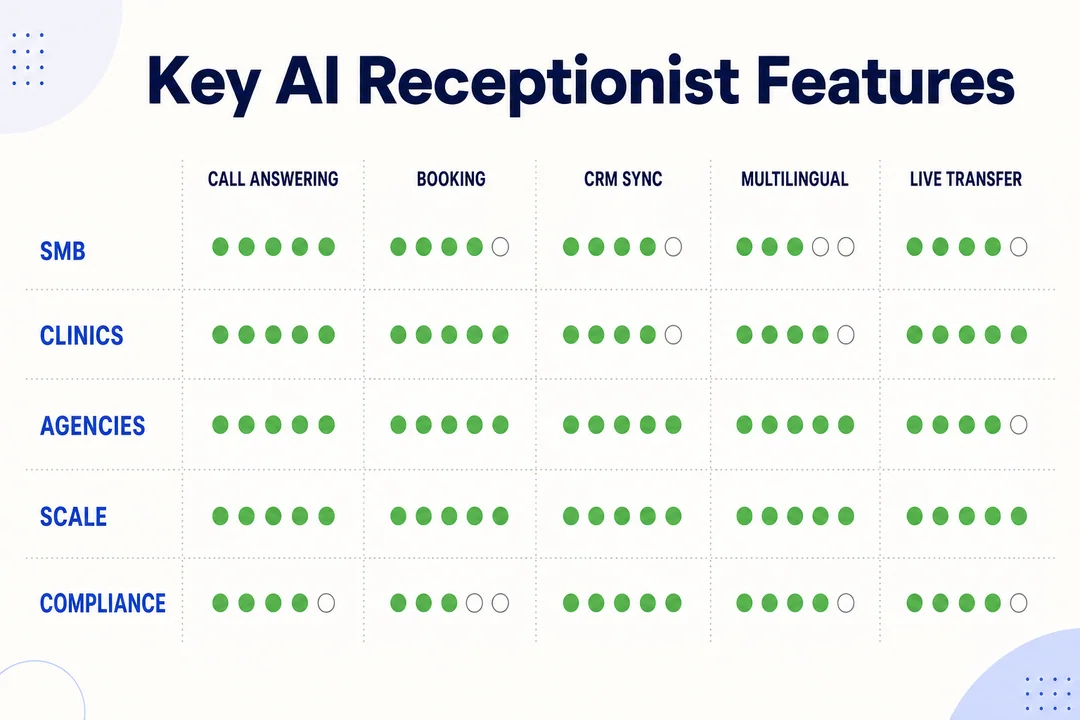
Natural voice quality and conversational AI
The voice should sound clear, calm, and professional. It should understand natural phrasing without forcing callers into awkward menus.
If voice quality is weak, callers may hang up or ask for a human immediately.
Call forwarding, routing, and escalation rules
Your AI receptionist should know where to send calls and when to stop trying to handle them.
Look for:
- Department routing
- After-hours logic
- Emergency keyword escalation
- Live transfer or voicemail fallback
Without this, even good conversations can end in poor handoff.
Appointment scheduling with calendar sync
If your business books calls, estimates, visits, or appointments, calendar sync is essential.
Look for:
- Real-time availability
- Rescheduling support
- Confirmation workflows
- Support for your current calendar tools
Without reliable scheduling, staff may still need to manually fix bookings.
CRM integrations and business process automation
CRM integration lets the AI log leads, update records, and reduce duplicate data entry.
This matters if your team follows up inside a CRM instead of email or spreadsheets.
SMS and text handling
Some tools support text-based follow-up, confirmations, or intake.
That is useful when:
- A caller wants a text link
- You need appointment reminders
- Your business handles both calls and texts
Call recordings, transcripts, and analytics dashboard
Transcripts and summaries help your team review what happened without listening to every call.
Useful reporting includes:
- Missed call trends
- Lead source patterns
- Common questions
- Booking outcomes
- Escalation rates
If reporting is weak, you lose visibility fast.
Multi-language support
If your callers speak more than one language, check language support early.
Do not assume every AI receptionist handles multilingual conversations well. Verify supported languages and voice quality in each one.
No-code configuration and setup simplicity
Many small teams do not have IT support. No-code setup matters because it reduces launch time and lowers maintenance.
Simple setup usually includes:
- Guided call flow setup
- FAQ entry
- Business hours rules
- Calendar connection
- Routing setup without development work
Security, privacy, and HIPAA considerations
Security claims should be checked, not assumed.
For healthcare or sensitive data, verify:
- HIPAA support
- BAA availability
- Data retention rules
- Role-based access
- Recording and transcript controls
If a vendor cannot explain its data handling clearly, move on.
How Much Does an AI Receptionist Cost?
Common pricing models: monthly subscription vs pay-per-call vs pay-per-minute
The main pricing models are simple:
- Monthly subscription: Fixed monthly fee, often with usage limits or tiered features.
- Pay-per-call: You pay based on number of answered calls.
- Pay-per-minute: You pay based on talk time.
Monthly pricing is easier to budget. Usage-based pricing is easier to try.
What affects total cost
Your actual cost depends on more than the sticker price.
Main cost drivers:
- Call volume
- Call length
- Scheduling features
- SMS usage
- CRM integrations
- Multi-location support
- Compliance requirements
- Human escalation setup
A low base plan can become expensive if your business handles many inbound calls.
Hidden costs to watch for
Watch for:
- Overage charges
- Extra fees for outbound calls
- Added costs for SMS
- Charges for extra numbers or locations
- Premium integration costs
- Higher fees for advanced analytics or compliance features
Always check what happens after you exceed included usage.
When an AI receptionist offers better ROI than a human receptionist
AI usually has better ROI when:
- You need coverage outside normal business hours
- You miss calls during busy periods
- Your call volume is steady but repetitive
- You mainly need booking, routing, and lead capture
A human receptionist still adds more value for complex conversations, relationship-heavy roles, or sensitive situations.
Simple pricing comparison
| Pricing Model | Best For | Strength | Risk |
|---|---|---|---|
| Monthly subscription | Predictable volume | Easier budgeting | May include limits |
| Pay-per-call | Short calls | Low entry barrier | Can spike with volume |
| Pay-per-minute | Light or variable usage | Flexible testing | Cost grows with longer calls |
How to Choose the Best AI Receptionist for Your Business
Choose based on business size
- Solo or very small team: Prioritize ease of setup, affordability, and scheduling.
- Growing SMB: Prioritize CRM integration, better routing, and reporting.
- Enterprise: Prioritize governance, scalability, and advanced analytics.
If your business is small, do not buy enterprise complexity just because it sounds impressive.
Choose based on industry
- Home services: Choose tools built for fast booking and field workflows.
- Healthcare: Verify HIPAA, BAA, and access controls first.
- Support teams: Choose platforms that connect tightly with help desk workflows.
- Professional services: Prioritize intake quality, call summaries, and clean scheduling.
Industry fit often matters more than broad feature count.
Choose based on call volume and after-hours needs
- Low volume: Pay-per-minute or lower-tier monthly plans may be enough.
- High volume: Look for stronger routing, scalable pricing, and better reporting.
- Heavy after-hours demand: Prioritize reliable 24/7 handling and escalation rules.
If most missed calls happen after hours, solve that first.
Choose based on your current software stack
- If you already use RingCentral, start there.
- If you already use Jobber, shortlist Jobber Receptionist.
- If your team relies on Zendesk, review whether support automation is your real goal.
- If you need custom integrations, look at Dialpad or Synthflow.
The best AI receptionist is often the one that fits your current tools with the least friction.
Choose based on technical comfort and setup time
- Need something live fast: Choose plug-and-play options like IONOS or Dialzara.
- Need more customization: Choose Synthflow or a more configurable platform.
- No internal tech support: Avoid tools that require heavy setup tuning.
A simpler tool with fewer features often performs better than a powerful tool nobody configures well.
AI Receptionist vs Human Receptionist: Which One Makes More Sense?
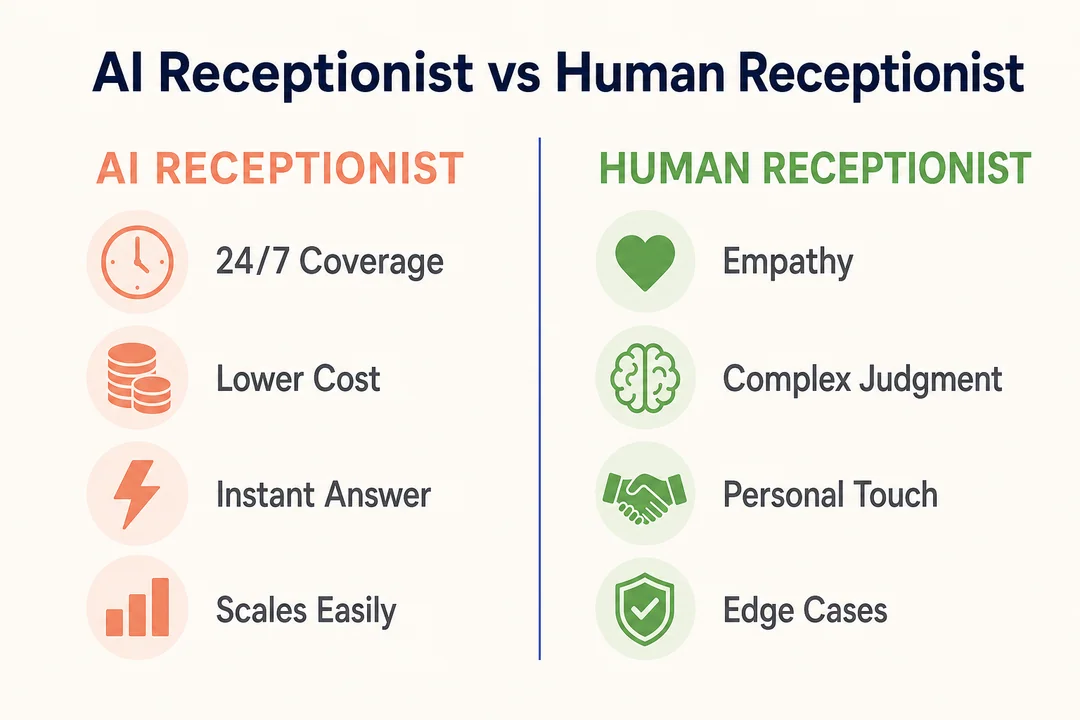
Where AI receptionists work best
AI works best for:
- Repetitive inbound calls
- Appointment scheduling
- After-hours coverage
- Basic lead intake
- Overflow call handling
Where human receptionists still matter
Humans still matter for:
- Emotional or sensitive conversations
- Complex multi-step issues
- VIP client handling
- High-trust industries with nuanced communication
When a hybrid front desk model is the better choice
A hybrid model works well when AI handles first response, basic routing, and after-hours coverage, while humans handle complex or sensitive calls.
| Option | Best Use | Main Advantage |
|---|---|---|
| AI receptionist | Repetitive, scalable call handling | Lower cost and 24/7 coverage |
| Human receptionist | Complex or high-touch calls | Better judgment and empathy |
| Hybrid model | Mixed call environments | Best balance of efficiency and service |
Common Limitations of AI Receptionists
Complex or emotional conversations
AI can struggle when callers are upset, confused, or dealing with unusual requests.
Industry-specific compliance and edge cases
Some industries need stricter controls around data, consent, and records.
Situations that require live human takeover
Good tools should let you transfer, alert staff, or create escalation paths quickly.
Why testing call flows before launch matters
Poor routing, weak answers, or calendar mistakes can hurt trust fast. Always test real call scenarios before sending all traffic to the AI.
How to Set Up an AI Receptionist for Incoming Calls
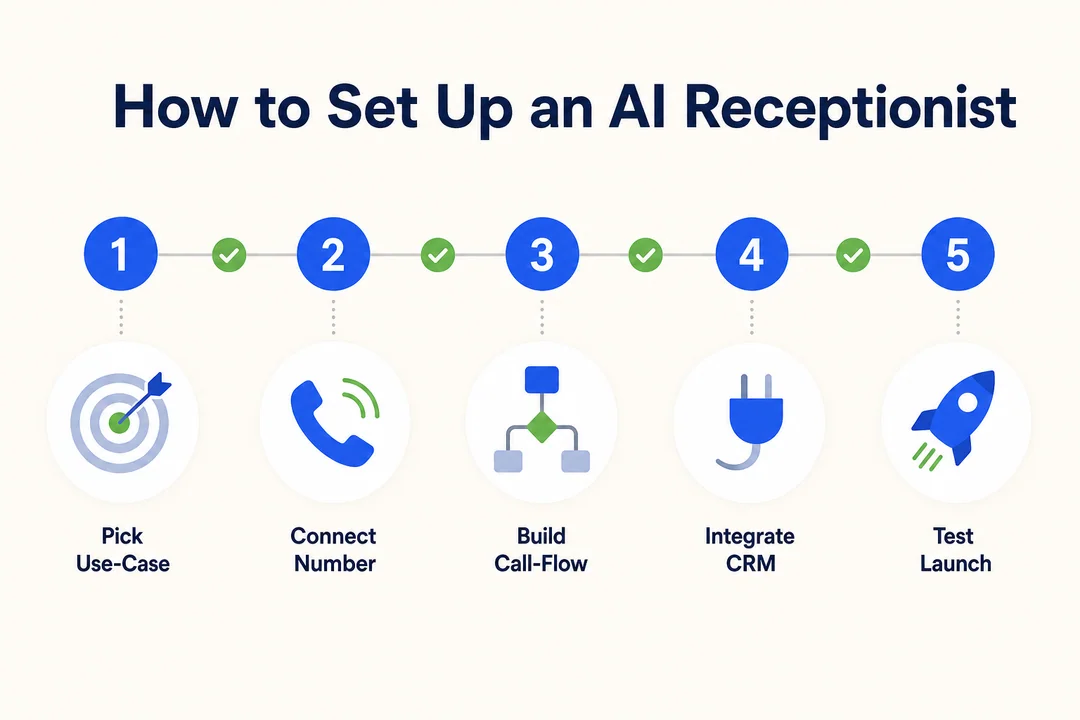
Connect your existing number with call forwarding
Start by forwarding your business number to the AI receptionist or using vendor-supported number setup.
Add business information, FAQs, and call scenarios
Include:
- Business hours
- Services
- Service areas
- Common questions
- Escalation triggers
- Preferred greeting
The better the input, the better the call handling.
Connect scheduling tools, CRM, and Zapier if needed
Add your calendar, CRM, and automation tools so the AI can actually book, log, and route information correctly.
Test routing, voicemail fallback, and escalation paths
Run test calls for:
- New appointment
- Existing customer support
- Emergency keyword
- Wrong number
- After-hours call
Monitor transcripts and optimize scripts over time
Review transcripts weekly at first. Tighten weak answers, update FAQs, and improve routing logic based on real calls.
Who Should Use an AI Receptionist?
Small businesses that miss calls during busy hours
If you are answering calls between meetings, jobs, or client work, an AI receptionist can stop leads from going cold.
Service teams that need affordable AI receptionist with appointment scheduling
Teams that book quotes, inspections, repairs, or visits by phone often get quick value from AI scheduling and summaries.
Businesses that want to automate business calls with AI voice agents
If many calls follow the same pattern, AI is a strong fit. It handles repeatable tasks well.
Teams that need overflow, after-hours, or weekend call coverage
If your staff cannot be available all day, every day, AI can cover the gaps without adding another shift.
Final Buying Tips Before You Commit
Start with one clear use case
Do not try to automate everything on day one. Start with one goal:
- Answer after-hours calls
- Book appointments
- Capture leads
- Route inbound calls
Check whether the tool works with your existing number and calendars
Verify number forwarding, calendar sync, and CRM compatibility before signing.
Compare setup simplicity against customization depth
More customization is not always better. If your team needs fast results, simplicity wins.
Make sure reporting and lead capture are easy to review
If transcripts, summaries, and lead details are hard to find, your staff will stop using the system well.
Ask vendors these five questions
- Can it keep my current business number?
- How does pricing change at higher call volume?
- What calendars and CRM tools does it support?
- How does human escalation work?
- What compliance and data controls are included?
Frequently Asked Questions
What is the best AI receptionist for small business?
For many small businesses, Bookipi is one of the strongest starting points because it combines ease of use, scheduling support, and practical workflow tools. IONOS is also a strong option if low-cost 24/7 answering is your main goal.
Can an AI receptionist keep my existing phone number?
Yes, many tools let you keep your current number through call forwarding, and some may also support number porting. Always confirm the setup method before you buy.
Can an AI receptionist handle appointment scheduling?
Yes, many AI receptionist tools support appointment scheduling when connected to a calendar. The quality of scheduling depends on the tool’s calendar sync and booking rules.
Does an AI receptionist answer multiple calls at once?
Yes. One of the biggest benefits is instant scalability, which means the system can handle multiple inbound calls at the same time without putting callers on hold.
How much does an AI receptionist cost per month?
Costs vary by vendor and pricing model. Entry plans may start low, but total cost depends on call volume, scheduling, SMS, integrations, and compliance needs.
Is an AI receptionist better than a live virtual receptionist?
It depends on your calls. AI is better for speed, scale, and cost-efficient routine handling. A live virtual receptionist is often better for complex, sensitive, or highly personalized conversations.
Can AI receptionist software send transcripts and call summaries?
Yes, many platforms provide transcripts, call recordings, and summaries after each interaction. This feature may vary by plan, so check vendor details.
Is an AI phone answering service suitable for healthcare?
It can be, but only if the vendor clearly supports HIPAA-related requirements and offers the right contractual and technical safeguards. Verify BAA availability, data handling, and access controls before using it for protected health information.
Do I need technical skills to set up an AI receptionist?
Usually not. Many tools are designed for no-code setup with guided onboarding, call forwarding, and simple configuration. More customizable tools may require more setup effort.
Can an AI receptionist integrate with CRM and calendar tools?
Yes. Many tools support direct CRM and calendar integrations, and some also connect through Zapier. Confirm your exact stack before committing.
Reduce Missed Calls and Book More Appointments
The right AI receptionist can help you answer more calls, capture more leads, and keep your team focused on real work instead of constant phone interruptions. Start by shortlisting two or three tools based on your business type, call volume, and current software stack. Then compare pricing, test the scheduling flow, and request a demo or trial before you commit.
More in Operations & CX Optimization
View all →
Customer Experience Transformation: Framework and Steps
A telecom customer calls support about a billing error. They explain the problem to the IVR system. Then to the first agent. Then get transferred and explain again. Then escalated—and explain a third time. Forty minutes later, they're exhausted and the problem still isn't solved. This is what broken customer experience looks like. And it's costing you customers. Customer experience…


Web Caller Meaning: JavaScript caller, Calling Tools or Portals
“Web caller” is one of those phrases where the search results and the searcher are frequently talking about different things. Three unrelated audiences use it: developers hitting an error on the legacy JavaScript caller property, buyers evaluating browser-based calling software, and people trying to reach a specific portal or training page whose exact name they cannot recall. That fragmentation is…

Customer Experience Strategy: How to Build One That Works
Customer experience is getting worse, not better. Forrester's 2025 Global CX Index found that 21% of brands declined in CX quality while only 6% improved — and in the US, 25% declined against 7% that improved, the second consecutive year of that pattern. Most of those brands were not neglecting customer experience. They were working on it without a strategy…



 English
  Russian
  Chinese