
Dialers are software tools that automate outbound calling. They help teams save time, reduce manual dialing, and reach more people with less effort. In a call center, sales team, or customer service workflow, dialer software can place calls, route answered calls, log outcomes, and keep campaigns moving.
If you are trying to understand what dialers do, how different types work, and which one fits your team, this guide breaks it down in plain English. You will see the main dialer types, how they compare, and how to choose the right one for your workflow.
Key Takeaways
- Dialers automate outbound calling and reduce the time agents spend on manual work.
- Predictive dialers are built for high-volume calling and use pacing logic to dial ahead.
- Power dialers give agents more control and work well for sales teams that need speed and context.
- Auto dialers are a broad category for basic outbound automation.
- Preview dialers are best when agents need to review account details before calling.
- Progressive dialers dial only when an agent is ready, which lowers drop risk.
- IVR/bot dialers work well for reminders, alerts, and simple automated flows.
- Compliance matters. Teams should pay attention to TCPA, DNC lists, consent, and calling windows.
What Is a Dialer?
A dialer is an automated dialing system used to place outbound calls for live agents or automated workflows. It sits inside call center software, CCaaS (contact center as a service), or other outbound calling software, and it helps teams move through contact lists faster than manual dialing.
In simple terms, a dialer replaces repetitive tasks. Instead of an agent typing each number, waiting for it to ring, and logging the result by hand, the system handles those steps automatically. That improves agent occupancy rate, reduces idle time, and helps teams process more leads or customer records in less time.
Manual calling vs. dialer-based calling is easy to understand:
- Manual dialing is slower and depends on the agent doing every step.
- Dialer-based calling automates dialing, routing, and logging.
- Manual calling gives more control, but it is harder to scale.
- Dialer-based calling is better for structured outreach and larger call volumes.
Dialers are common in sales, collections, appointment reminders, follow-ups, and contact centers. Think of a dialer as the engine behind outbound calling. It does the repetitive work so your team can focus on the conversation.
Why Businesses Use Dialers
Businesses use dialers to improve speed, consistency, and scale. The main goal is simple: spend less time on repetitive dialing and more time on useful conversations.
Reduce manual work and improve calling efficiency
Agents lose time when they dial numbers one by one, wait through unanswered calls, and log results manually. Automated calling cuts that waste and keeps the team moving.
- Less time spent on repetitive tasks
- More time spent talking to live contacts
- Better call center productivity metrics
Improve outbound lead management and campaign execution
Dialers help teams work through lists in a structured way. That matters when you run daily follow-up campaigns, win-back lists, or time-sensitive outreach.
A campaign management system can use list processing and customer interaction history to organize who gets called, when, and by whom.
Support customer engagement automation
Dialers are not only for sales. They also support appointment reminders, collections, notifications, and service follow-ups. That makes it easier to communicate at scale without adding manual work.
How a Dialer Works in Practice
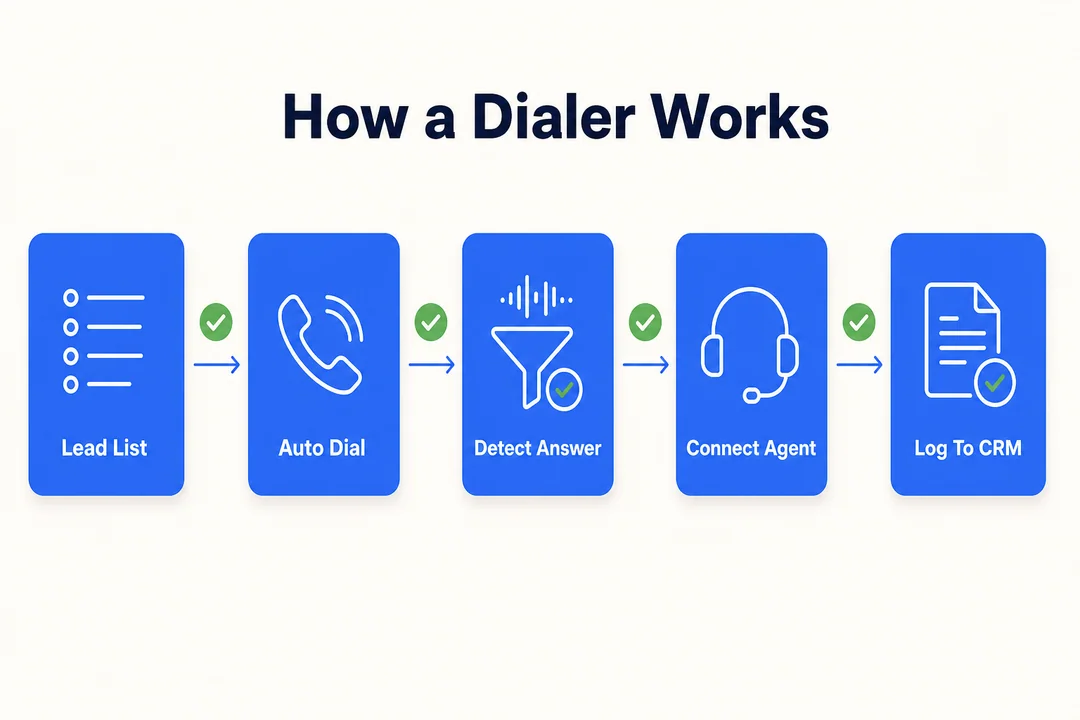
A dialer usually follows a simple workflow. Most modern tools connect with a CRM, apply calling rules, place calls automatically, and log the results.
Step 1: Import contact lists or connect CRM data
The process starts with contact data. Teams either upload a list or sync the dialer with a CRM so records flow in automatically. Good CRM integration gives agents access to customer data and customer interaction history before and after the call.
Many modern systems use cloud-based telephony, which makes setup easier and keeps calling infrastructure flexible.
Bad data hurts results fast. Duplicate contacts, stale numbers, and incomplete records lower answer rates and waste agent time.
Step 2: Apply call routing logic and campaign rules
The system needs rules for who gets called, when, and by whom. This is where call routing logic matters.
Common rules include:
- Agent availability
- Skills-based routing
- Time zone-conscious dialing
- DNC list filtering
If these rules are weak, teams can run into poor connection rates or compliance problems. The best setup matches the campaign goal, the list type, and the team’s working hours.
Step 3: Automatically place outbound calls
Once the rules are set, the dialer starts calling. Some systems use sequential dialing, where one number is dialed at a time. Others use simultaneous dialing or pacing algorithms to dial ahead based on expected agent availability.
Predictive dialing is the most aggressive version. It tries to keep agents talking by estimating when the next rep will be free and placing calls before that moment arrives.
Step 4: Handle call outcomes automatically
The system then reacts to each outcome.
- If a live person answers, the call routes to an agent.
- If no one answers or the line is busy, the system can skip or retry later.
- If voicemail picks up, the tool may drop a recorded message or mark the call.
- If the issue is simple, an IVR flow or bot can handle it.
Some platforms also support callback scheduling, voicemail drop, answering machine detection (AMD), and multi-channel outreach capability such as voice, SMS, or IVR.
Step 5: Track results and optimize future campaigns
Good dialer software does not stop at dialing. It also tracks performance. Managers monitor connection rate, agent performance, agent occupancy rate, call outcomes, and campaign analytics.
That data helps teams improve pacing, timing, and list quality. It also shows what the software cannot fix. If the list is weak or the pitch is poor, even the best dialer will underperform.
Main Types of Dialers Explained
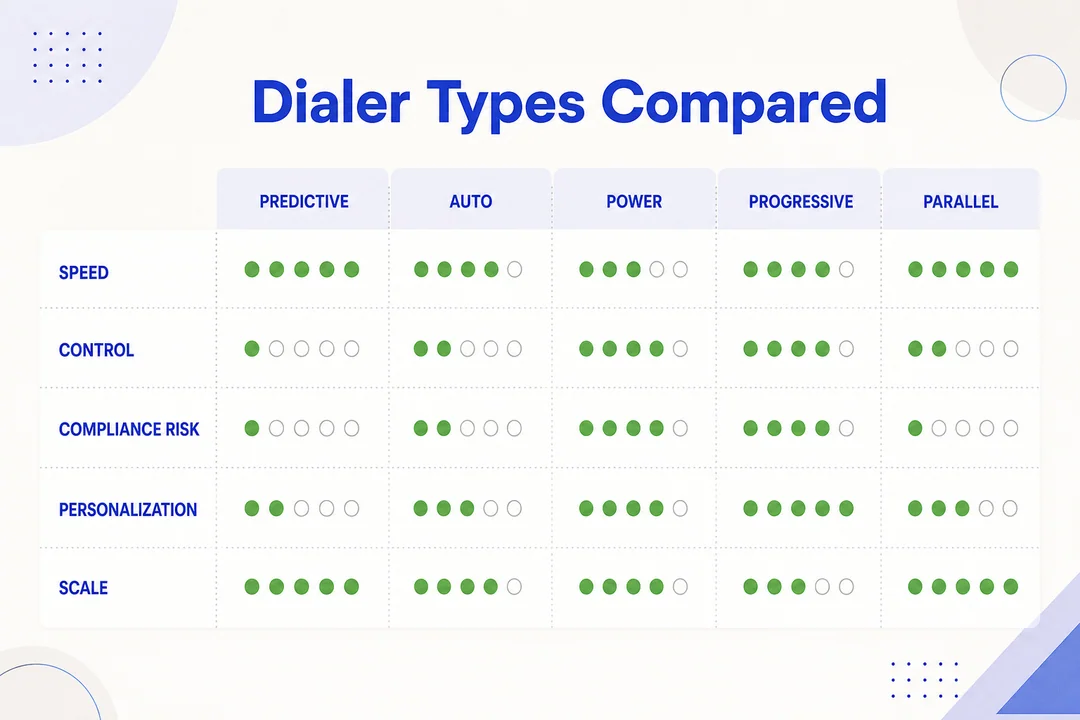
Dialers are not all the same. Some focus on speed. Others focus on control or personalization. The right choice depends on your team’s volume, workflow, and call complexity.
Auto Dialer
An auto dialer automatically dials numbers from a list. It is the simplest form of outbound calling automation.
It works well for basic campaigns where speed matters more than deep personalization.
- Best for: reminders, simple outbound campaigns, and basic automation
- Pros: easy to use, faster list coverage
- Cons: less flexible for complex outreach
Predictive Dialer
A predictive dialer uses algorithms to predict agent availability and dial ahead. It is designed to maximize live connections and reduce idle time.
This is the fastest option in most outbound environments, but it needs careful setup. If pacing is too aggressive, it can create abandoned calls.
- Best for: large outbound teams and high-volume sales campaigns
- Pros: high efficiency, higher connection rates
- Cons: compliance and abandoned-call risk if poorly configured
Power Dialer
A power dialer dials the next number after the previous call ends. It gives agents a steady pace without the pressure of predictive automation.
It is a strong fit for SDRs and inside sales teams that want speed but still need control and context.
- Best for: sales teams that want structured, manageable outreach
- Pros: simple workflow, better rep control
- Cons: slower than predictive at scale
Progressive Dialer
A progressive dialer only dials when an agent is available. It is more controlled than predictive dialing and usually creates fewer dropped calls.
This makes it a good choice for B2B outreach or quality-first campaigns.
- Best for: lower-risk, higher-quality outreach
- Pros: controlled pacing, lower drop risk
- Cons: lower total volume
Preview Dialer
A preview dialer shows contact details before the call starts. The agent can review the CRM record, customer interaction history, and notes before deciding how to handle the call.
That extra context is useful for high-value accounts and consultative sales.
- Best for: personalized, research-led outreach
- Pros: more preparation, better context
- Cons: slower workflow
IVR or Bot Dialer
An IVR or bot dialer plays recorded messages or guides contacts through interactive voice response flows. It is useful for reminders, alerts, and basic service tasks.
It is efficient, but it is not ideal for complex human conversations.
- Best for: reminders, notifications, and simple self-service
- Pros: scalable, low manual effort
- Cons: limited for nuanced conversations
Predictive Dialer vs Auto Dialer vs Power Dialer
These three are often confused, but they solve different problems. The difference comes down to speed, control, and use case.
Key difference in dialing speed
A predictive dialer is usually the fastest. An auto dialer is fast too, but its pace depends on setup. A power dialer is steadier and more controlled because it moves one call at a time.
Key difference in agent control
Predictive gives agents the least direct control over pacing. Power dialers give the most control. Auto dialers sit in the middle.
Key difference in ideal use case
- Predictive dialer: high-volume outbound call centers
- Auto dialer: simple automation and reminders
- Power dialer: sales conversations that need speed and control
When a predictive dialer makes the most sense
Use predictive when you have a large team, a strong contact list, and close reporting oversight. It is best when volume matters most.
Be careful with abandoned calls and compliance settings.
When a power dialer is the better fit
Use power dialing when your team needs more context, better pacing, and stronger rep control. It is often the best fit for small to mid-sized sales teams.
When a basic auto dialer is enough
Use a basic auto dialer when the job is straightforward: reminders, notifications, or simple outbound operations. If the campaign does not need heavy personalization, this is often enough.
Quick Comparison of Dialer Types
Here is the fastest way to compare the main options. No single dialer type is best for every team.
| Dialer Type | How It Works | Calling Pace | Agent Involvement | Best Use Case | Main Limitation |
|---|---|---|---|---|---|
| Auto Dialer | Automatically dials numbers from a list | Medium to high | Medium | Basic outbound automation, reminders, simple campaigns | Less flexible for complex outreach |
| Predictive Dialer | Uses pacing algorithms to dial ahead based on agent availability | Very high | Lower | Large outbound call centers, high-volume sales | Risk of abandoned calls if poorly configured |
| Power Dialer | Dials the next number after each call ends | Medium | High | Sales teams that want speed with control | Slower than predictive at scale |
| Progressive Dialer | Dials only when an agent is available | Medium | High | B2B outreach, quality-focused campaigns | Lower total volume |
| Preview Dialer | Shows contact info before the call starts | Low to medium | Very high | High-value leads, consultative sales | Slowest workflow |
| IVR/Bot Dialer | Plays recorded messages or routes callers through IVR | High | Low to medium | Alerts, reminders, automated service flows | Limited for nuanced live conversations |
The best choice depends on how much volume you need, how much control you want, and how personal each call needs to be.
Common Features Found in Dialer Software
Most dialers share a core feature set, but the depth varies by vendor.
CRM integration
Dialers sync leads, notes, call outcomes, and statuses with your CRM. That cuts down on tool switching and keeps customer data current.
Call recording and reporting
These tools help managers review calls, coach reps, and track performance over time.
Call routing and queue management
Dialers can distribute calls based on rules, priorities, and team structure.
Voicemail drop and callback tools
These features save time on repeat follow-up work and keep next-step actions organized.
IVR support and automated messages
Some dialers can send reminders, route simple requests, or run self-service flows.
Local presence caller ID
Some systems can show a local number where permitted and used responsibly. This can improve trust, but it should be used with compliance and spoofing prevention in mind.
AI-powered voice analytics and monitoring
Advanced dialers may analyze calls for sentiment, script adherence, and trends. This helps managers spot patterns faster.
Benefits of Using Dialers
Dialers are valuable because they improve output without forcing teams to work harder in manual ways.
Higher agent productivity
Agents spend less time on dialing and more time on real conversations. That usually improves agent occupancy rate and workflow efficiency.
More consistent outbound sales activity
Dialers help sales teams keep a stable daily calling rhythm. That supports follow-up consistency and better outbound sales strategy execution.
Faster response times for customer outreach
When timing matters, dialers help teams reach out quickly for follow-ups, reminders, and issue resolution.
Better visibility into campaign performance
Managers can use connection rate and other call center productivity metrics to see what is working and what is not.
Easier scaling for outbound operations
Dialers let teams handle more calls without adding the same amount of manual effort. That is why they matter in cloud-based telephony and modern CCaaS stacks.
Potential Drawbacks and Limits to Know
Dialers are useful, but they are not a perfect fit for every situation.
Poor fit for highly personalized calls
If each call needs deep research or a custom approach, a slower dialer mode like preview is usually better.
Risk of abandoned calls with aggressive pacing
An abandoned call happens when a system connects a customer but no agent is ready. This is a common risk with aggressive predictive dialing and can hurt customer experience and compliance.
Good results depend on clean data
Bad lists reduce performance fast.
- Duplicate contacts
- Invalid numbers
- Stale leads
- Incomplete CRM fields
Training and workflow setup still matter
Software does not replace scripts, coaching, or campaign planning. A good dialer still needs a good process.
How to Choose the Right Dialer
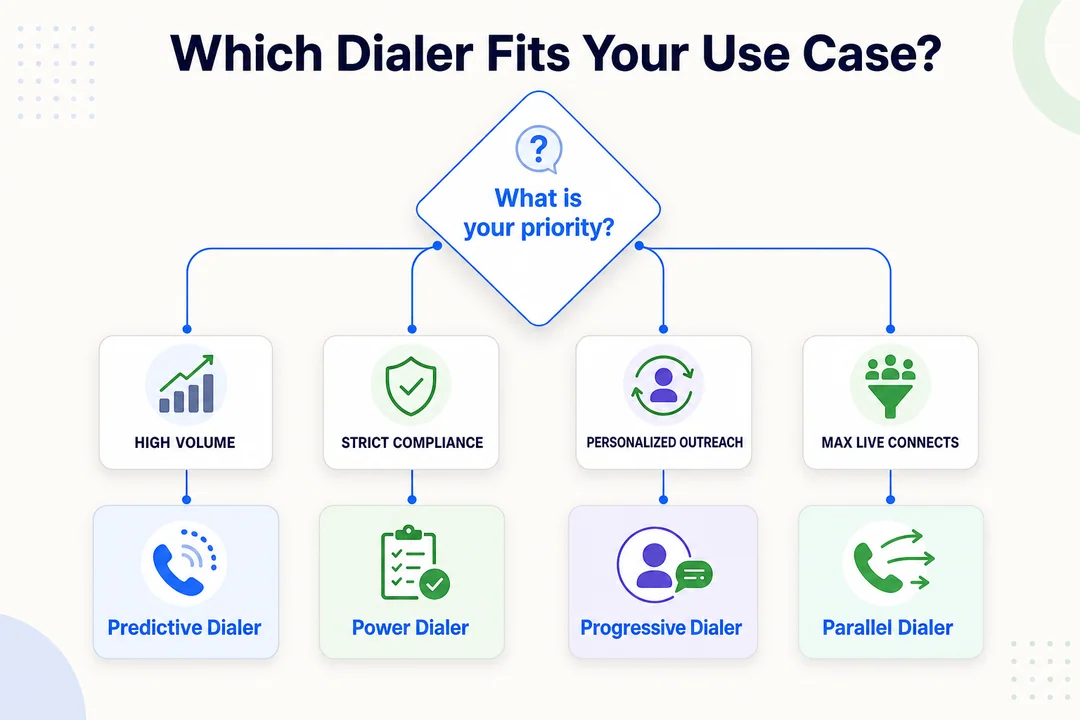
The best dialer for outbound call centers depends on your volume, workflow, team size, lead quality, tech stack, and compliance needs.
Choose based on call volume
High-volume teams usually benefit from predictive or auto workflows. Lower-volume or high-context outreach usually fits power or preview better.
- High volume: predictive dialer
- Moderate volume: auto dialer or power dialer
- Low volume, high value: preview dialer
Choose based on sales vs customer service workflows
Sales teams often want speed and rep productivity. Customer service follow-ups may need more context and timing sensitivity. IVR works well for reminders and notifications.
Choose based on team size and agent availability
Larger teams benefit more from algorithmic pacing. Small teams often do better with simpler control and fewer moving parts.
Choose based on lead quality and call complexity
If the lead list is broad and the goal is volume, predictive can work well. If the outreach is high-value or complex, you need more context before dialing.
Choose based on CRM and telephony infrastructure
Make sure the dialer fits your current stack. Strong CRM integration, cloud-based telephony, and CCaaS compatibility matter more than flashy features.
Choose based on compliance requirements
Before choosing a dialer, know:
- Who you can call
- When you can call
- Whether consent is required
- Whether TCPA or DNC list rules apply
- What your calling windows are
Regulations govern automated dialing operations, so confirm legal requirements with qualified compliance or legal professionals.
Which Dialer Type Fits Which Use Case?
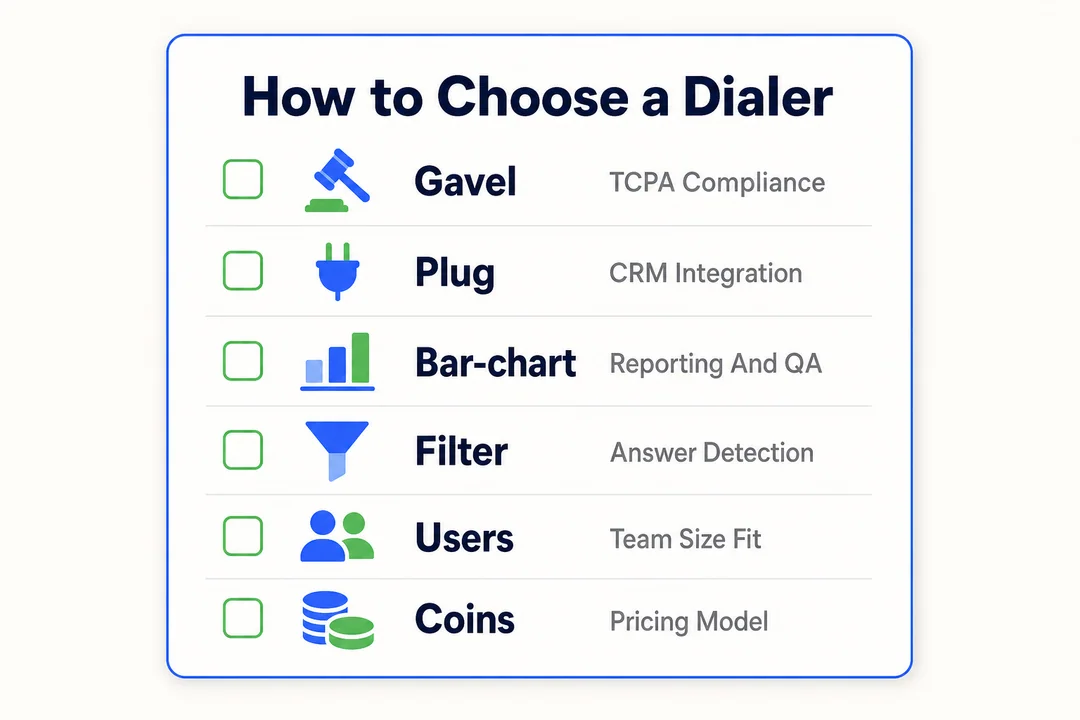
The fastest way to decide is to match the dialer to the job.
For outbound sales teams
Power dialers are often the best fit for small and mid-sized teams. Predictive dialers make more sense when the team is larger and volume is the top priority.
For collections and reminders
Auto dialers or IVR dialers work well here because the outreach is repeatable and structured.
For customer service follow-ups
Progressive or power dialers are usually better because they balance timing, context, and lower-pressure pacing.
For high-value account outreach
Preview dialers are the best choice when the rep needs to review the account and customer interaction history first.
For high-volume campaign management
Predictive dialers are the strongest option when you need speed, scale, and reporting controls.
Best Practices for Using Dialers Effectively
A dialer works best when the process around it is tight.
Keep contact data clean
Validate lists, remove duplicates, and update CRM records regularly. Clean data improves answer rates and saves rep time.
Match dialing mode to campaign goals
Not every campaign should use predictive dialing. Choose the mode that fits the level of complexity and conversation quality you need.
Monitor connection rate and agent occupancy rate
These metrics show whether the campaign is healthy. If agents are overloaded or idle, adjust pacing.
Use scripts and CRM notes to improve conversations
Automation works better when reps have context and a consistent talk track.
Review compliance settings regularly
Check DNC filters, time zone-conscious dialing, and consent rules often. Compliance should be part of routine operations, not an afterthought.
Frequently Asked Questions
What is a dialer in a call center?
A dialer is call center software that automates outbound calling. It helps agents reach more contacts in less time by handling dialing, routing, and logging automatically.
What is the difference between a power dialer and predictive dialer?
A power dialer dials the next number after each call ends. A predictive dialer uses algorithms to predict agent availability and dial ahead for faster volume.
Is an auto dialer the same as a predictive dialer?
No. An auto dialer is the broader category. A predictive dialer is a more advanced type of automated dialing system.
Which dialer is best for small sales teams?
A power dialer is usually the best choice for small sales teams because it balances speed, control, and personalization.
Are dialers legal to use?
Dialers can be legal when used in compliance with applicable rules. Teams should follow TCPA, DNC list, consent, and calling time requirements, and confirm legal obligations with qualified professionals.
Conclusion
Dialers automate outbound calling and help teams work faster with less manual effort. The right choice depends on your volume, workflow, team size, CRM integration, and compliance needs.
Use predictive dialer for high-volume calling, power dialer for speed with control, preview dialer for personalized outreach, and auto or IVR for simple automation. Before you choose, evaluate your process first, then compare tools by dialing mode, integrations, and compliance support.
More in Operations & CX Optimization
View all →
Customer Experience Transformation: Framework and Steps
A telecom customer calls support about a billing error. They explain the problem to the IVR system. Then to the first agent. Then get transferred and explain again. Then escalated—and explain a third time. Forty minutes later, they're exhausted and the problem still isn't solved. This is what broken customer experience looks like. And it's costing you customers. Customer experience…


Web Caller Meaning: JavaScript caller, Calling Tools or Portals
“Web caller” is one of those phrases where the search results and the searcher are frequently talking about different things. Three unrelated audiences use it: developers hitting an error on the legacy JavaScript caller property, buyers evaluating browser-based calling software, and people trying to reach a specific portal or training page whose exact name they cannot recall. That fragmentation is…

Customer Experience Strategy: How to Build One That Works
Customer experience is getting worse, not better. Forrester's 2025 Global CX Index found that 21% of brands declined in CX quality while only 6% improved — and in the US, 25% declined against 7% that improved, the second consecutive year of that pattern. Most of those brands were not neglecting customer experience. They were working on it without a strategy…



 English
  Russian
  Chinese