

Robo dialer software helps outbound teams scale calling, improve contact rates, and reduce manual work. If you are comparing tools, the real challenge is telling apart robo dialers, auto dialers, predictive dialers, and voice broadcasting platforms.
This guide is built for buyers. You will learn what each tool does, which features matter most, how compliance affects your choice, and how to shortlist the right vendor for your workflow. Because US calling laws vary by use case, always validate compliance requirements with your legal team.
Key Takeaways
- Robo dialer software automates outbound calling and may connect live calls to agents or play prerecorded messages.
- Auto dialer software is the broader category, while robo dialer often implies prerecorded or broadcast-style outreach.
- Predictive dialers fit high-volume teams; power and progressive dialers fit most sales workflows better.
- Answering Machine Detection (AMD), CRM integration, reporting, and compliance controls should be on your checklist.
- TCPA, FCC rules, and DNC handling matter before you launch any campaign.
- The best tool depends on your calling model, not on headline call volume.
- A good demo should use your real workflow, list type, and compliance needs.
What Is Robo Dialer Software?
Robo dialer software is a tool that automatically dials phone numbers from a contact list. In some setups, it connects answered calls to agents. In others, it plays a prerecorded message.
Many buyers use “robo dialer” and “auto dialer” interchangeably. Vendors do not always use the terms the same way, so you need to confirm the actual calling mode before you buy.
Simple Definition for Business Users
At its core, robo dialer software removes manual dialing. It helps teams place more calls in less time and keep outreach moving at a steady pace.
Common uses include:
- Sales prospecting and lead follow-up
- Collections and payment reminders
- Fundraising and political outreach
- Surveys and customer notifications
- Appointment reminders
For example, a 5-person sales team can use it to call new demo requests faster and keep speed-to-lead high.
Robo Dialer Software vs. Auto Dialer Software
In market language, auto dialer software is the broader product category. Robo dialer usually refers to automated calling with prerecorded audio or broadcast-style outreach.
If you need live agent conversations, you may need a power, progressive, or predictive dialer instead. If you only need one-to-many announcements, a broadcast calling tool may be enough.
Bottom line: robo dialer is often the term buyers hear first, but the real choice is usually about calling mode.
Robo Dialer vs. Predictive Dialer vs. Power Dialer
| Dialer type | Best for | Pros | Limits |
|---|---|---|---|
| Robo dialer / broadcast | Announcements, reminders, alerts | Fast, simple, scalable | Limited two-way selling |
| Predictive dialer | High-volume call centers | Maximum throughput | Less control, more aggressive pacing |
| Power dialer | Sales teams needing live conversations | Better control and personalization | Slower than predictive |
| Progressive dialer | Balanced outreach teams | Steady pacing, cleaner workflow | Lower volume than predictive |
| Preview dialer | High-value or complex leads | Rep sees context first | Slowest option |
For most SMB sales teams, a power or progressive dialer is often a better fit than a pure robo dialer.
How Robo Dialer Software Works
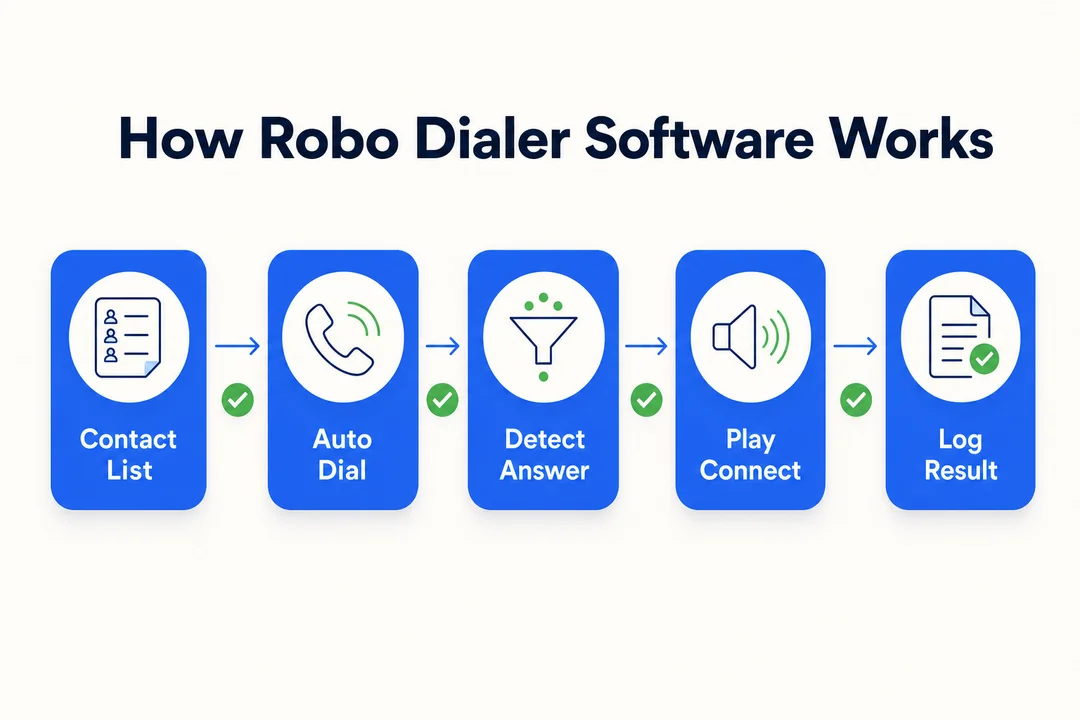
A robo dialer campaign is usually simple to run, but the setup matters. Clean data, the right dialer mode, and good pacing make a real difference.
Basic Workflow From List Upload to Live Campaign
- Upload your contact list.
- Clean and segment the list. Remove duplicates, bad numbers, and unneeded contacts.
- Set campaign rules. Define calling hours, retries, and routing.
- Record or upload the message, or assign agents.
- Choose the dialer mode. Match it to your goal.
- Launch the campaign.
- Monitor results and adjust pacing, scripts, or lists.
For a demo-request follow-up campaign, this process lets a team call the hottest leads first and move faster on fresh interest.
What Happens During the Call
Once the system dials, a few things can happen:
- A live person answers, and the call connects to an agent.
- A voicemail picks up, and the system may leave a message.
- The line is busy or unanswered, and the system schedules a retry.
- The number is invalid, and the record is flagged.
Answering Machine Detection (AMD) helps identify voicemail or machine pickup, but it is not perfect. Test it in real conditions before you rely on it.
Where Automation Improves Outbound Productivity
Automation removes repetitive manual work. That means less dialing, more talk time, faster follow-up, and better campaign consistency.
A manual team might waste time on dial tone, busy signals, and dead numbers. A dialer-driven team can focus more on live conversations.
Just remember: more calls do not guarantee more conversions. List quality, timing, and script quality still matter.
Key Features to Look for in Robo Dialer Software
Automated Dialing Modes
The dialer mode changes how the system works:
- Predictive: best for maximum volume.
- Power: best for controlled sales outreach.
- Progressive: best for steady, balanced calling.
- Preview: best for complex or high-value leads.
Choose the mode based on workflow, not vendor marketing.
Call Handling and Connection Features
Look for:
- AMD for voicemail detection
- Live transfer to agents
- Call routing rules
- Retry logic
- Pacing controls
Ask vendors how they handle false machine detection and how transfers work in real campaigns.
Campaign and Contact Management Tools
Strong campaign tools should include:
- List upload and import
- Segmentation
- Scheduling
- Auto-redial
- Internal suppression lists
- DNC filtering
These features help keep campaigns organized and reduce compliance risk.
Reporting and Optimization Capabilities
You should be able to track:
- Contact rate
- Answer rate
- Transfer rate
- Agent talk time
- Performance by list, source, and time window
Reporting matters because it shows what is working, not just what happened.
Integrations and System Connectivity
A good dialer should fit your CRM and other core systems. That reduces double entry and gives reps more context before the call.
Check for:
- Native CRM integrations
- API access
- Help desk or ticketing sync
- Sync speed and error handling
Do not assume all integrations work the same. Test the actual data flow.
Advanced Functionality Some Teams Need
Some teams also need:
- Text-to-Speech (TTS)
- Caller ID reputation tools
- Compliance filtering
- Multi-campaign management
These are especially useful for large-scale or regulated outbound operations.
Benefits of Robo Dialer Software for Sales and Contact Centers
Higher Contact Rates and More Conversations
Automation helps teams reach more people faster. That usually means more live conversations and faster follow-up on fresh leads.
The best gains often come from speed-to-lead, list hygiene, and better pacing.
Better Agent Productivity
Agents spend less time dialing and more time talking. That improves utilization and cuts repetitive work.
A poorly tuned dialer can feel too aggressive, though. Pacing matters for both rep experience and call quality.
More Consistent Outbound Workflows
A dialer standardizes retries, timing, and messaging. That makes performance easier to manage and coach.
It also helps managers see which campaigns are delivering real results.
Scalable Outreach for Different Team Sizes
Robo dialer software can support:
- Small teams that need efficiency
- Growing sales orgs that need structure
- Large contact centers that need volume
- Agencies running multiple campaigns
Scaling works best when your process is already solid.
Best Use Cases for Robo Dialer Software
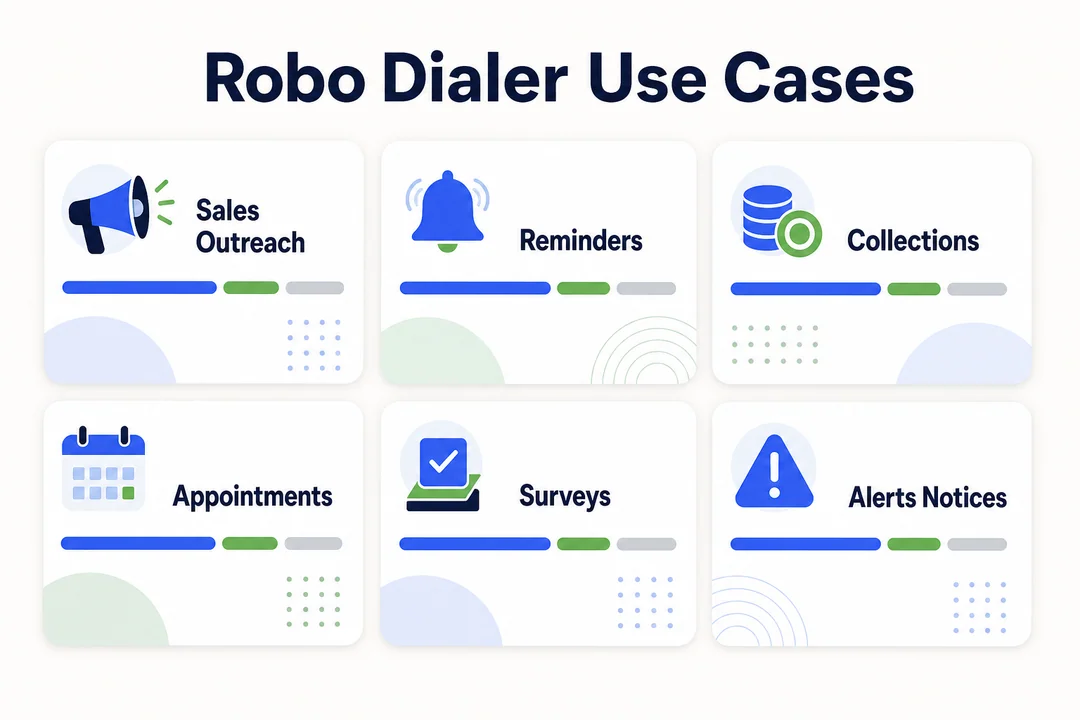
Sales Prospecting and Lead Generation
Best for fast follow-up, especially with power or progressive dialing.
Collections and Payment Reminders
Useful for scheduled reminders and structured follow-up. Compliance controls matter here.
Political Campaigns and Fundraising
Works well for high-volume outreach and prerecorded messaging.
Emergency Notifications and Alerts
A strong fit for one-to-many alerts, especially with scheduling and TTS.
Customer Outreach, Surveys, and Appointment Reminders
Good for reminders, feedback requests, and service notifications. Simple broadcast tools may be enough for these use cases.
Compliance Rules Buyers Need to Understand
This section is for general informational purposes and is not legal advice.
TCPA and FCC Basics in Plain English
The Telephone Consumer Protection Act (TCPA) and FCC rules affect automated calling in the US. If your software automates dialing or uses prerecorded messages, compliance review matters.
The legal details can be nuanced, especially around ATDS use and call type. Review your use case with legal counsel.
Robo Calls, Consent, and Prerecorded Messages
Prerecorded messages usually carry more compliance risk than live agent calls. Consent rules can vary by audience and message type.
Ask vendors how they handle:
- Consent records
- Opt-outs
- Message controls
- Suppression lists
DNC Management and Safe Calling Practices
Your platform should help you respect:
- The National DNC Registry
- Internal suppression lists
- Time-of-day rules
- State-specific restrictions where relevant
Good list hygiene is not optional. It protects both performance and reputation.
Why Compliance Tools Should Be Part of Vendor Evaluation
Compliance features should be visible in the admin layer, not buried in policy docs.
Look for:
- Audit trails
- Role-based access
- Automatic suppression
- Consent status visibility
- Campaign restrictions
If a vendor cannot show these in a demo, keep looking.
Top Robo Dialer Software Tools to Consider
The market changes fast, so treat this as a starting shortlist and confirm current features and pricing directly with each vendor.
- Convoso: Best for high-volume outbound teams focused on contact rates.
- Five9: Best for enterprises that want predictive, power, and preview modes in one cloud platform.
- PhoneBurner: Best for sales teams that want a fast power dialer with no connect delay.
- CallTools: Best for outbound call centers that need answering machine detection and TCPA tools.
- CloudTalk: Best for SMB sales and support teams scaling outbound with CRM integration.
- Kixie: Best for teams that want a simple dialer tightly integrated with their CRM.
The right pick depends on your call volume, compliance needs, and existing tech stack.
How to Choose the Right Robo Dialer Software
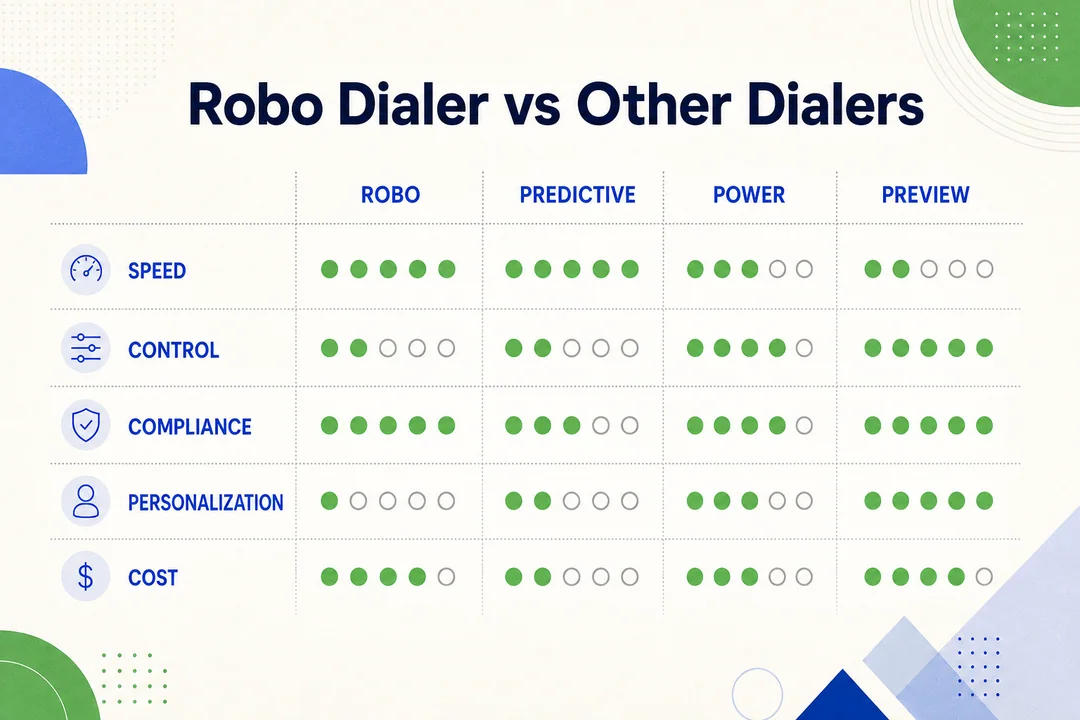
Start With Your Outbound Calling Model
Start with the job, not the software. Ask whether you need:
- Live sales calls
- Broadcast messaging
- Blended workflows
- One team or many teams
A demo request for an SDR team should look very different from a reminder campaign.
Match Dialer Type to Your Goals
Use this simple rule:
- Predictive for maximum throughput
- Power for controlled sales outreach
- Progressive for balanced efficiency
- Preview for complex conversations
The best dialer is the one that fits your process.
Evaluate the Features That Affect Results
In demos, focus on:
- AMD accuracy
- CRM integration
- Reporting depth
- Retry logic
- Scheduling
- Live transfer
- Compliance controls
Ask the vendor to show your use case, not a canned demo.
Consider Operational Fit
Also check:
- Setup time
- Admin controls
- Training effort
- Support quality
- Pricing clarity
A tool that is hard to run will slow your team down.
Vendor Checklist Before Requesting a Demo
Use this checklist to eliminate weak-fit tools before spending time on demos:
- Does it support your CRM?
- Does it offer the dialer modes you need?
- Are reporting metrics easy to access?
- Are compliance tools built in?
- Can it scale with your team?
- Is onboarding clear?
- Is pricing easy to understand?
Robo Dialer Software vs. Other Outbound Calling Tools
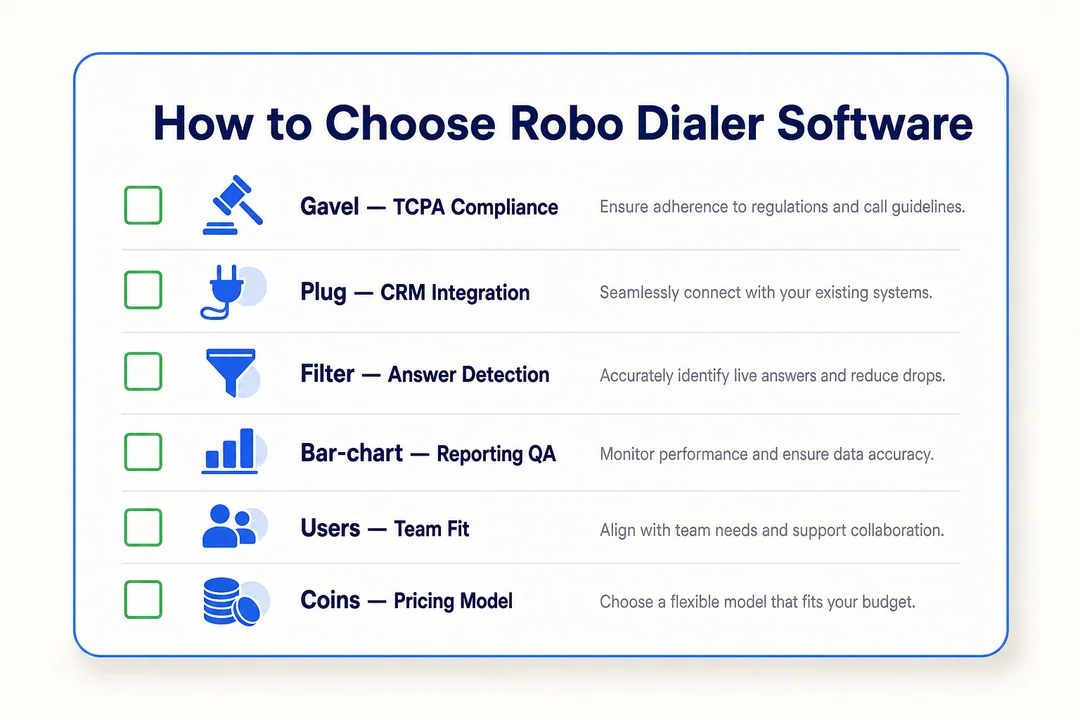
Robo Dialer vs. Manual Dialing
Manual dialing is slower and harder to scale. It can still work for very small or highly personalized outreach.
Robo Dialer vs. Auto Dialer
Auto dialer software is the broader term. Robo dialer often refers to prerecorded or broadcast-style calls.
Robo Dialer vs. Predictive Dialer Platform
Predictive platforms are usually better for large teams focused on speed and throughput.
When a Broadcast Calling Tool Is Enough and When You Need a Full Outbound Engagement Tool
Use broadcast calling for simple announcements. Use a full outbound engagement tool when you need agents, CRM sync, and follow-up workflows.
Best Robo Dialer Software Features by Team Type
Small Business Outbound Teams
Look for ease of use, affordable automation, CRM integration, and simple reporting.
High-Volume Sales Teams
Prioritize predictive dialing, pacing controls, analytics, and lead prioritization.
Contact Centers With Compliance Risk
Prioritize DNC controls, audit logs, consent support, and admin restrictions.
Broadcast and Notification Teams
Prioritize voice broadcasting, TTS, press-1 campaigns, and scheduling at scale.
Common Mistakes to Avoid When Buying Robo Dialer Software
Focusing Only on Call Volume
More calls do not always mean better results. Contact quality and conversion matter more.
Ignoring Compliance and Caller Reputation
Skipping compliance features can lead to complaints, filtering issues, and campaign disruption.
Choosing the Wrong Dialer Mode for Your Workflow
A predictive dialer may be too aggressive for a small sales team. A preview dialer may be too slow for a reminder campaign.
Overlooking CRM and Reporting Requirements
Weak integration and shallow reporting create manual work and poor visibility.
Not Testing Usability With Real Campaigns
Always test list import, transfers, reporting, and admin controls with a realistic campaign.
How to Use Robo Dialer Software for Marketing Campaigns
Build a Clean List First
Remove duplicates, invalid numbers, and contacts that should not be called.
Segment by Audience and Intent
Different segments need different scripts, timing, and follow-up paths.
Use the Right Message and Timing
Keep messages short. Respect timing windows. Avoid overcalling the same lead.
Track Response and Optimize Follow-Ups
Measure contact rate, transfer rate, callbacks, and opt-outs. Use that data to improve the next campaign.
Frequently Asked Questions
What is robo dialer software?
It is software that automatically dials phone numbers from a list. It may connect live calls to agents or play prerecorded messages.
Is robo dialer software the same as auto dialer software?
Not always. The terms overlap, but auto dialer is usually the broader category.
What is the difference between a robo dialer and a predictive dialer?
A robo dialer often focuses on prerecorded or broadcast calls. A predictive dialer uses algorithms to match calls with agent availability.
How does robo dialer software improve contact rates?
It speeds up dialing, reduces manual work, and helps teams follow up faster.
Is robo dialer software legal in the US?
It can be, but legality depends on how it is used, what type of calls you make, and whether consent rules apply.
What compliance features should I look for?
Look for DNC filtering, suppression lists, audit logs, consent support, and admin controls.
Which teams benefit most from robo dialer software?
Sales teams, contact centers, collections teams, notification teams, and fundraising groups often benefit most.
Does robo dialer software integrate with CRM systems?
Many platforms do, but integration quality varies. Check native support, sync speed, and data direction.
What is the best auto dialer software for small business?
The best fit is usually the one that is easy to use, affordable, supports your CRM, and includes basic compliance controls.
When should I use voice broadcasting instead of agent-led dialing?
Use voice broadcasting for simple announcements. Use agent-led dialing when you need conversations, qualification, or objection handling.
Conclusion
The best robo dialer software is the one that fits your workflow, compliance needs, CRM stack, and reporting goals. Do not buy based on call volume alone. Buy based on how well the tool supports your actual outbound process.
Shortlist vendors, request demos, and test with real campaign scenarios before you commit. Make sure compliance controls, CRM integration, and dialing modes are proven in the demo, not just listed on the product page.
More in Operations & CX Optimization
View all →
Customer Experience Transformation: Framework and Steps
A telecom customer calls support about a billing error. They explain the problem to the IVR system. Then to the first agent. Then get transferred and explain again. Then escalated—and explain a third time. Forty minutes later, they're exhausted and the problem still isn't solved. This is what broken customer experience looks like. And it's costing you customers. Customer experience…


Web Caller Meaning: JavaScript caller, Calling Tools or Portals
“Web caller” is one of those phrases where the search results and the searcher are frequently talking about different things. Three unrelated audiences use it: developers hitting an error on the legacy JavaScript caller property, buyers evaluating browser-based calling software, and people trying to reach a specific portal or training page whose exact name they cannot recall. That fragmentation is…

Customer Experience Strategy: How to Build One That Works
Customer experience is getting worse, not better. Forrester's 2025 Global CX Index found that 21% of brands declined in CX quality while only 6% improved — and in the US, 25% declined against 7% that improved, the second consecutive year of that pattern. Most of those brands were not neglecting customer experience. They were working on it without a strategy…



 English
  Russian
  Chinese