

Businesses usually start researching nextiva alternatives when the platform no longer matches how their teams actually work. In practice, the triggers are familiar: rising seat costs, support responsiveness concerns, mobile app friction, setup complexity, or a mismatch between simple office-phone needs and more demanding call operations. The best replacement is rarely the most recognizable brand. It is the one that fits your communication model, admin capacity, growth pattern, and cost structure. This guide compares realistic options by business fit, trade-offs, pricing direction, and switching risk so you can evaluate Nextiva competitors with a buyer’s lens instead of a feature-list mindset.
Quick List: Best Nextiva Alternatives at a Glance
The best Nextiva alternatives for most businesses include Flyfone, RingCentral, Zoom Phone, Dialpad, Aircall, 8×8, Vonage, GoTo Connect, CloudTalk, and Microsoft Teams Phone.
Some of these nextiva competitors are stronger as broad business phone system alternatives for internal collaboration. Others are better suited to higher-volume customer operations or cloud call center software needs.
| Provider | Best for | Watch-out |
|---|---|---|
| Flyfone | Fast deployment, outbound-heavy teams, flexible global calling | Less relevant for simple office-only phone needs |
| RingCentral | Large businesses needing mature UCaaS breadth | Pricing and tiers can become complex |
| Zoom Phone | Teams already standardized on Zoom | Less depth for advanced call center operations |
| Dialpad | AI-assisted calling, transcription, coaching | Advanced AI can raise total monthly cost |
| Aircall | CRM-led sales and support teams | Costs can climb as team size grows |
| 8×8 | Enterprise and international communications | Admin experience may feel less modern |
| Vonage | Flexible voice workflows and customization | Key capabilities may sit behind add-ons |
| GoTo Connect | SMBs wanting simple unified communications | Not ideal for complex outbound workflows |
| CloudTalk | Smaller teams prioritizing ease of use | Limited fit for QA-heavy or omnichannel needs |
| Microsoft Teams Phone | Microsoft-native organizations | Best experience depends on broader Microsoft setup |
For most buyers, the shortlist should end with 2–3 realistic Nextiva replacements, not 10 tabs left open.
Why Businesses Look for Nextiva Alternatives
Businesses usually look for Nextiva alternatives when pricing, support responsiveness, setup complexity, mobile usability, or feature fit no longer match how their teams operate. The right replacement depends less on brand popularity and more on use case, team structure, and total cost.
In shortlist-stage evaluations, the most common issues are not always dramatic failures. More often, teams hit gradual friction around pricing transparency, support quality, or day-to-day admin overhead. For SMBs, that may mean paying for seats or features they barely use. For outbound or support-heavy teams, it may show up in routing limits, weak analytics, or poor fit for faster-moving operations. For globally distributed teams, mobile app issues and international coverage can become the deciding factor.
Not every problem justifies switching. Some organizations are still well served by Nextiva, especially if their needs are stable and their current setup is working. But a review is usually justified when the operational mismatch starts affecting cost, rollout speed, or service continuity.
When switching is justified
- Your team has outgrown a basic business phone setup.
- You are paying for seats or features you do not use.
- Admin overhead is slowing setup, changes, or daily operations.
- You need better international coverage, AI-powered quality assurance, or omnichannel workflows.
- Poor support responsiveness is affecting continuity.
- Your team needs better call routing, reporting, or supervisor visibility.
- You are comparing Nextiva competitors because contract structure feels restrictive.
SMBs usually care most about simplicity and predictable cost. Contact-center or outbound teams care more about routing flexibility, QA, scale, and support responsiveness. Global teams care more about reliability, international numbering, and global call routing.
Best Nextiva Alternatives Compared
The best nextiva alternatives are not all solving the same problem. In any realistic nextiva vs competitors review, some platforms are better positioned as VoIP business phone system alternatives for internal collaboration, while others are closer to cloud-based call center software alternatives built for volume, routing control, and performance visibility.
Flyfone
Best for
High-volume outbound teams, fast-moving support teams, BPOs, and global businesses that need quick setup and flexible routing.
Strengths
Flyfone is a strong fit when deployment speed and operational flexibility matter more than bundled office-suite features. The platform can be deployed in under 1 hour, supports pay-as-you-go pricing with no seat fees, and is designed for teams that need scalable communication infrastructure without long setup cycles. It also offers a built-in auto-dialer, AI-powered quality assurance, real-time monitoring, flexible workflows, integrations, and global call routing with failover logic. That combination is especially relevant for teams with fluctuating headcount, fast campaign launches, or region-specific routing needs.
Limitations
Less relevant for businesses that only need a basic internal office phone system with minimal call complexity.
Pricing fit
Particularly attractive when seat-based pricing becomes inefficient. Usage-based economics can be a better fit for teams with variable volume or seasonal staffing.
RingCentral
Best for
Enterprises that want mature UCaaS breadth across calling, messaging, meetings, and integrations.
Strengths
RingCentral is a suite-first option with broad ecosystem coverage, strong integrations, and solid support for internal collaboration. It is often shortlisted by larger organizations that want one communications layer spanning multiple teams and workflows.
Limitations
Pricing tiers can get complex, and the platform may feel heavy for smaller teams or businesses with simpler needs.
Pricing fit
Usually makes more sense for organizations that will actually use its breadth, not just core calling.
Zoom Phone
Best for
Video-first organizations already using Zoom.
Strengths
Zoom Phone benefits from a familiar interface, strong meeting ecosystem alignment, and accessible entry-level positioning. If your business already lives inside Zoom, the adoption curve is usually lower.
Limitations
It does not offer the same contact-center depth as more specialized platforms.
Pricing fit
Often attractive as an ecosystem-fit decision, but buyers should still validate what additional capabilities require higher tiers or separate products.
Dialpad
Best for
Teams prioritizing AI transcriptions, coaching, and workflow intelligence.
Strengths
Dialpad has a strong AI-native position in the market. It combines calling, messaging, and video in one experience while adding real-time transcription and coaching features that can help sales and support teams improve execution.
Limitations
Advanced AI capabilities may increase total cost beyond the advertised starting tier.
Pricing fit
Best for buyers that will actively use the AI layer, not just basic telephony.
Aircall
Best for
CRM-centric sales and support teams.
Strengths
Aircall is widely appreciated for strong CRM integrations, user-friendly setup, and a workflow that feels intuitive for teams where phone activity sits close to pipeline or ticket workflows.
Limitations
It can get expensive as team size grows, and it is less ideal for complex omnichannel or high-volume routing environments.
Pricing fit
Good fit when CRM convenience drives real productivity gains and the team is not scaling into heavier call-ops complexity.
8×8
Best for
International and enterprise communications.
Strengths
8×8 is often shortlisted for global coverage and a broad communications stack. It is relevant for companies that need enterprise-grade international voice support and a more consolidated communications environment.
Limitations
Some teams find the admin experience less modern or less streamlined than newer alternatives.
Pricing fit
Works best for enterprise buyers that value global capability and breadth over lightweight simplicity.
Vonage
Best for
Businesses that want flexible voice workflows and more customization.
Strengths
Vonage appeals to customization-minded buyers who want scalable plans and configurable voice workflows. It can be a practical option when teams need more control than entry-level UCaaS platforms usually offer.
Limitations
Advanced capabilities may sit behind higher tiers or add-ons, so plan evaluation matters.
Pricing fit
Worth considering if your team is willing to compare plan depth carefully and pay for configuration flexibility where it matters.
GoTo Connect / CloudTalk / Microsoft Teams Phone
-
GoTo Connect
Best for: Cost-conscious SMBs needing simple UCaaS.
Strengths: Straightforward unified communications, familiar SMB positioning.
Limitations: Less ideal for complex outbound, QA-heavy, or omnichannel operations.
Pricing fit: Often attractive for simpler environments. -
CloudTalk
Best for: Smaller teams wanting straightforward cloud calling.
Strengths: Ease of use, fast adoption, practical for light-to-mid call needs.
Limitations: Limited fit for more advanced routing, analytics, or broader channel complexity.
Pricing fit: Best when simplicity matters more than platform depth. -
Microsoft Teams Phone
Best for: Microsoft-native environments prioritizing ecosystem fit.
Strengths: Natural alignment with Microsoft collaboration workflows.
Limitations: Less ideal if your main need is advanced outbound performance, AI QA, or flexible call operations.
Pricing fit: Strongest when Teams is already central to internal communication.
Comparison Table: Nextiva Alternatives by Use Case
The best Nextiva alternative depends on your use case, not just feature count or starting price.
This is where many teams lose time. A platform that looks strong in a general demo may still be the wrong fit operationally. Buyers comparing omnichannel contact center alternatives, internal collaboration suites, or a global business phone system should narrow based on actual workflow, not marketing breadth.
| Use Case | Recommended Option | Why It Fits | Watch-Out |
|---|---|---|---|
| Best Nextiva alternative for small business | GoTo Connect / CloudTalk | Simple setup, easier adoption, lower complexity | May not scale well for advanced routing or QA |
| Video-first team | Zoom Phone | Best fit if Zoom is already central to daily work | Less contact-center depth |
| Enterprise communications suite | RingCentral / 8×8 | Broad UCaaS coverage and enterprise feature depth | Complexity and pricing can rise quickly |
| AI-assisted calling workflows | Dialpad | Strong transcription, coaching, and AI-led workflow support | AI-rich plans may cost more than expected |
| CRM-centric sales/support team | Aircall | Tight CRM alignment and user-friendly workflows | Can become expensive as seats increase |
| Nextiva alternative for outbound calls | Flyfone | Fast deployment, flexible routing, no seat fees, strong for dynamic call operations | Less relevant for basic internal telephony |
| Microsoft-centric organization | Teams Phone | Natural ecosystem fit for Microsoft-heavy environments | Not always the best fit for advanced call operations |
A non-technical buyer should be able to use this table to narrow a shortlist quickly.
How to Choose the Right Nextiva Alternative
To choose the right Nextiva alternative, evaluate six areas: use case, integrations, real monthly cost, reliability and SLA, admin simplicity, and migration effort.
A good business phone system comparison goes beyond features. In practice, the wrong purchase usually happens when buyers focus on brand familiarity or starting price and underweight routing, support, onboarding, and operational fit.
A practical 6-point evaluation framework
-
Define your primary use case
If your team is mostly internal and collaboration-heavy, your shortlist should look very different from one built for outbound campaigns or support queues. The buying implication: do not compare every vendor as if they serve the same operating model. -
Map must-have channels and integrations
Check whether you need voice only, or voice plus messaging, email, CRM, and help desk workflows. The buying implication: weak integration fit creates process friction long after the demo ends. -
Estimate true monthly cost beyond entry pricing
Low starting prices can be misleading if analytics, AI, storage, international routing, or advanced reporting are extra. The buying implication: test pricing transparency before procurement gets surprised later. -
Validate reliability, support responsiveness, and SLA expectations
Review uptime expectations, support channels, escalation paths, and any SLA (Service Level Agreement) commitments. The buying implication: support quality matters most during rollout and early incidents, not just at renewal time. -
Test admin simplicity and agent onboarding
Ask how fast a new team, number, or call flow can be added. The buying implication: admin friction quietly increases cost and slows operations. -
Review migration effort before committing
Assess number porting, IVR mapping, recordings, call routing, permissions, and fallback plans. The buying implication: the easiest platform to buy is not always the easiest platform to switch to.
One important pricing nuance: seat-based pricing works well for stable teams with predictable headcount. Usage-based pricing can be more efficient for businesses with variable call volume, rotating shifts, or seasonal scaling.

Pricing Reality: What to Verify Beyond the Starting Price
Before choosing a Nextiva alternative, verify what the starting price does not include.
This is where pricing transparency matters most. In communications software, advertised entry pricing often understates the real monthly cost because of feature gating, contract minimums, storage limits, route charges, support tiers, or optional AI modules. Common hidden VoIP costs include seat fees, onboarding fees, international route charges, and AI add-on pricing.
Pricing questions to ask every vendor
- What is included by default?
- Which features are paid add-ons?
- Are there setup, onboarding, or support fees?
- How are international routes billed?
- What happens if team size changes month to month?
- Are call recording storage and analytics limited by plan?
- Are there user minimums or contract commitments?
- Is reporting depth included or gated behind higher tiers?
In practice, entry pricing rarely equals true operating cost. The right model depends on your staffing pattern and usage behavior, not just the cheapest first number on the pricing page.
Switching From Nextiva: A Low-Risk Migration Checklist
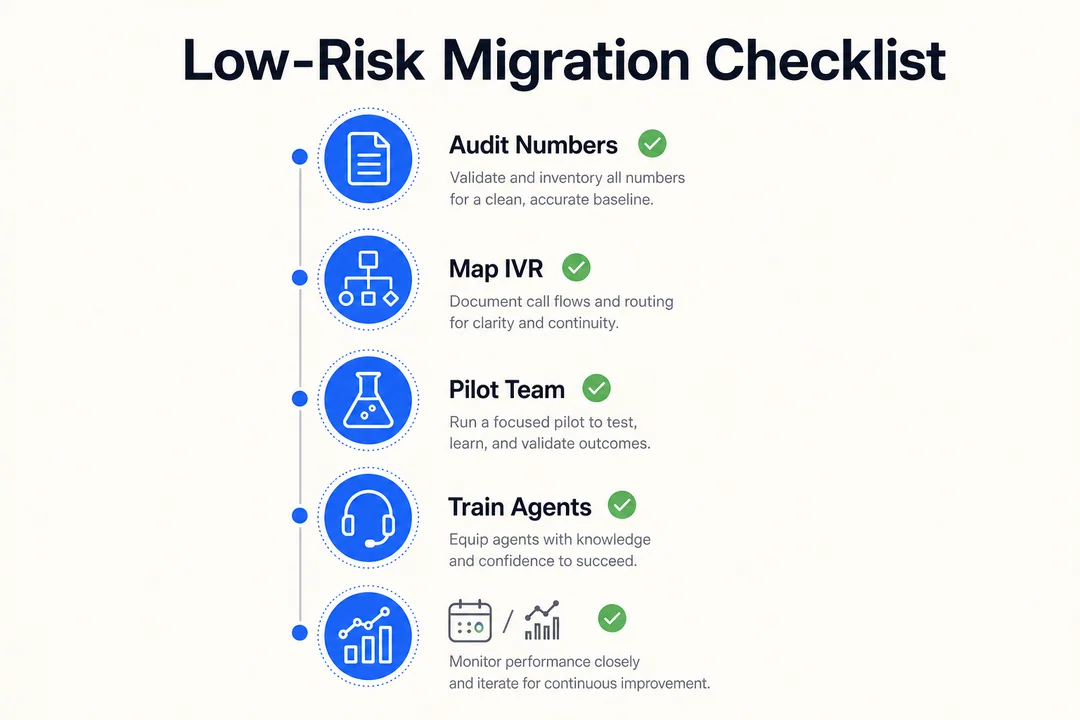
A low-risk migration from Nextiva starts with documenting numbers, call flows, IVR logic, integrations, reporting needs, and rollback options.
Teams planning to switch from Nextiva often overfocus on vendor demos and underprepare the move itself. A practical migration checklist reduces disruption, especially when phone number porting, IVR migration, and staged call center deployment are involved.
What to prepare before you switch
- Audit active numbers, extensions, and call flows.
- Document IVR logic, routing rules, and business-hour behavior.
- Review CRM and help desk integrations.
- Identify reporting, analytics, and call recording retention needs.
- Prepare agent onboarding steps and admin permissions.
- Ask about porting timeline, fallback routing, and rollback plan.
What a smooth transition usually looks like
- Pilot with one team first.
- Validate routing, recordings, and reporting.
- Train supervisors and agents.
- Monitor first-week call quality and support response.
- Expand rollout only after early issues are resolved.
In practice, phased rollout is safer than a big-bang switch. Pilot-first deployment, fallback routing, and rollback planning protect continuity while the new setup is being proven.
Which Nextiva Alternative Is Best for Your Team?
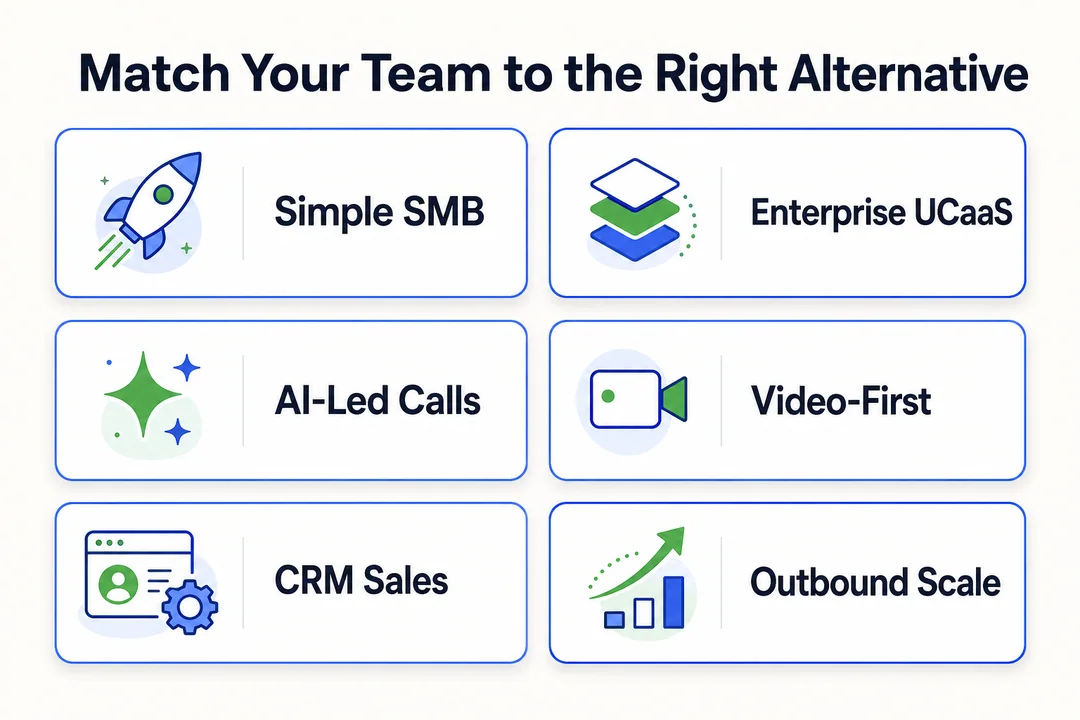
The best Nextiva alternative depends on how your team communicates, scales, and supports customers.
There is no universal best nextiva alternative. The right nextiva replacement depends on whether your priority is simple internal collaboration, AI-assisted calling, CRM alignment, enterprise breadth, or a more operationally flexible best VoIP alternative or cloud call center alternative.
Scenario-based verdicts
- For simple SMB communications: GoTo Connect or CloudTalk
- For enterprise UCaaS breadth: RingCentral or 8×8
- For AI-focused calling workflows: Dialpad
- For Zoom-centric environments: Zoom Phone
- For CRM-heavy sales/support teams: Aircall
- For fast-scaling, outbound-heavy, globally distributed call operations: Flyfone
This section should help internal stakeholders move from longlist to shortlist without forcing a one-size-fits-all decision.
Conclusion
The strongest nextiva alternatives are the ones that match your real operating model, not the ones with the longest feature page. In most evaluations, the best nextiva alternative comes down to four practical decision pillars: use case, pricing model, deployment speed, and operational fit.
Teams often make poor replacement decisions when they buy based on familiarity alone. A platform built for internal collaboration may not fit outbound-heavy operations. A low starting price may not hold once AI, storage, support, or routing costs are added. And a broad suite is not always better if it slows setup or daily administration.
If your team is narrowing a shortlist, the next step is simple: compare 2–3 realistic options against your workflows, support expectations, and migration complexity. If you want a tailored walkthrough for outbound-heavy or globally distributed call operations, Flyfone can help you assess fit, pricing structure, and rollout risk before you commit.
Frequently Asked Questions
What is Nextiva and why do businesses look for alternatives?
Nextiva is a unified communications (UCaaS) platform centered on cloud phone service. Businesses search for alternatives when they hit long contract terms, hidden fees, inconsistent mobile app performance, or setup complexity that no longer matches how their teams operate.
What are the best Nextiva alternatives in 2026?
The top picks depend on your operating model. Flyfone suits outbound-heavy teams and fast deployment. RingCentral fits large enterprises wanting UCaaS breadth. Zoom Phone works for video-first organizations. Dialpad stands out for AI transcription and coaching. Aircall is strong for CRM-led sales and support teams.
How do I choose the right Nextiva alternative?
Evaluate six areas: primary use case (internal collaboration vs outbound operations), must-have integrations, real monthly cost beyond entry pricing, reliability and SLA commitments, admin simplicity, and migration effort. Brand familiarity and starting price alone do not predict operational fit.
Is there a more cost-effective alternative to Nextiva?
Yes. Platforms like Flyfone use pay-as-you-go pricing with no per-seat fees and no long-term contracts, which can significantly reduce cost for teams with variable headcount or seasonal call volume. Always compare true monthly cost including AI, storage, and international routing.
Will switching from Nextiva disrupt my business?
Not if you follow a phased rollout: audit active numbers and call flows first, pilot with one team, validate routing and integrations, prepare fallback routing, and keep a rollback plan ready. Big-bang migrations carry more risk than staged ones.
Which features should I prioritize when comparing Nextiva alternatives?
Prioritize flexible call routing, deep CRM integrations, real-time reporting, omnichannel support, and AI tools (automated QA and conversation analytics). Match priorities to whether your team is mostly internal collaboration, sales-led, or support-volume-driven.
More in Operations & CX Optimization
View all →
Customer Experience Transformation: Framework and Steps
A telecom customer calls support about a billing error. They explain the problem to the IVR system. Then to the first agent. Then get transferred and explain again. Then escalated—and explain a third time. Forty minutes later, they're exhausted and the problem still isn't solved. This is what broken customer experience looks like. And it's costing you customers. Customer experience…


Web Caller Meaning: JavaScript caller, Calling Tools or Portals
“Web caller” is one of those phrases where the search results and the searcher are frequently talking about different things. Three unrelated audiences use it: developers hitting an error on the legacy JavaScript caller property, buyers evaluating browser-based calling software, and people trying to reach a specific portal or training page whose exact name they cannot recall. That fragmentation is…

Customer Experience Strategy: How to Build One That Works
Customer experience is getting worse, not better. Forrester's 2025 Global CX Index found that 21% of brands declined in CX quality while only 6% improved — and in the US, 25% declined against 7% that improved, the second consecutive year of that pattern. Most of those brands were not neglecting customer experience. They were working on it without a strategy…



 English
  Russian
  Chinese