
You do not create a phone number from scratch. You get one from a carrier number provider, a virtual phone number app, Google Voice, or a dual SIM/eSIM setup. This guide shows the fastest way to get the right number for privacy, work, travel, or business, plus the limits you should know before you choose.
Key Takeaways
- You do not manually invent a phone number; a provider assigns one from its available inventory.
- The four main options are a carrier number, a virtual phone number app, Google Voice, or a dual SIM/eSIM setup.
- A carrier number is usually the best choice for 2FA, banking, and important account recovery.
- A virtual phone number is usually the easiest choice for privacy, convenience, and fast setup.
- Google Voice is a simple low-cost option for basic second-number use in supported cases.
- eSIM and dual SIM are best when you want two real mobile lines on one phone.
- Paid services usually make more sense for a business line, client calls, or team use.
- Before you sign up, check area code availability, app quality, portability, and verification support.
What Does It Mean to Create a Phone Number?
When people ask how do I create a phone number, they usually mean how to get a new number. That is the correct way to think about it.
Phone numbers are part of telecommunications systems. Providers control the available number inventory and assign numbers that can be routed across calling and texting networks. In plain English, you choose from numbers a provider has available. You do not make one up yourself.
This matters because the type of provider affects how the number works. A number from a mobile carrier behaves differently from a VoIP (Voice over Internet Protocol, calling over the internet) number from an app. That affects call quality, texting, 2FA, and whether you can move the number later.
Plain-English answer:
- You do not create a phone number from scratch.
- You get assigned a number by a carrier or virtual provider.
- Your best option depends on whether you need privacy, business use, travel flexibility, or account verification.
You’re getting a new number, not inventing one
When people say create a phone number, they usually mean getting a new number from a phone carrier or virtual phone service.
That number comes from the provider’s inventory. It is connected to routing systems inside digital communication networks, so calls and texts can reach you.
Common examples:
- A mobile carrier gives you a number when you open a new line.
- Google Voice assigns a number during setup if numbers are available in your area.
- A virtual phone app gives you a second phone number after signup and verification.
The main choice is not the number itself. The real choice is the service behind it.
New phone number vs second phone number vs virtual phone number
| Type | What it means | How it works | Best for | Main limitation |
|---|---|---|---|---|
| New phone number | Any newly assigned number | Comes from a carrier or app provider | Anyone starting fresh | Varies by provider |
| Second phone number | An extra number in addition to your main one | Can be carrier-based or virtual | Privacy or work/personal separation | May add cost or setup steps |
| Virtual phone number | A number that runs mainly through an app/internet | Uses VoIP technology | Fast setup, privacy, flexibility | Often weaker for 2FA |
| Business phone number | A number used for customer or client communication | Usually carrier-based or paid virtual service | Freelancers, small business, teams | Better features usually cost more |
| VoIP number | A number that works over internet connectivity | Managed by VoIP service providers | Remote work, multi-device use | Not always accepted for verification |
A second phone number is a broad category. It can be a real mobile line from a carrier or a virtual line from an app.
Why people usually want one
People usually get a new or second phone number for practical reasons:
- They want privacy when selling on Facebook Marketplace or Craigslist.
- They want to separate work and personal calls on one phone.
- They freelance and need a client-facing business line.
- They travel and want a flexible setup with eSIM or internet-based calling.
- They need a temporary line for a short project or signup.
A few common examples:
- A seller wants to avoid sharing a personal number with strangers.
- A freelancer wants business calls to go to a separate voicemail.
- A traveler wants a second line without carrying another phone.
Important caution:
- Not every number works well for 2FA, bank logins, or sensitive account recovery. For that, a carrier number is usually safer.
The 4 Main Ways to Get a New Phone Number
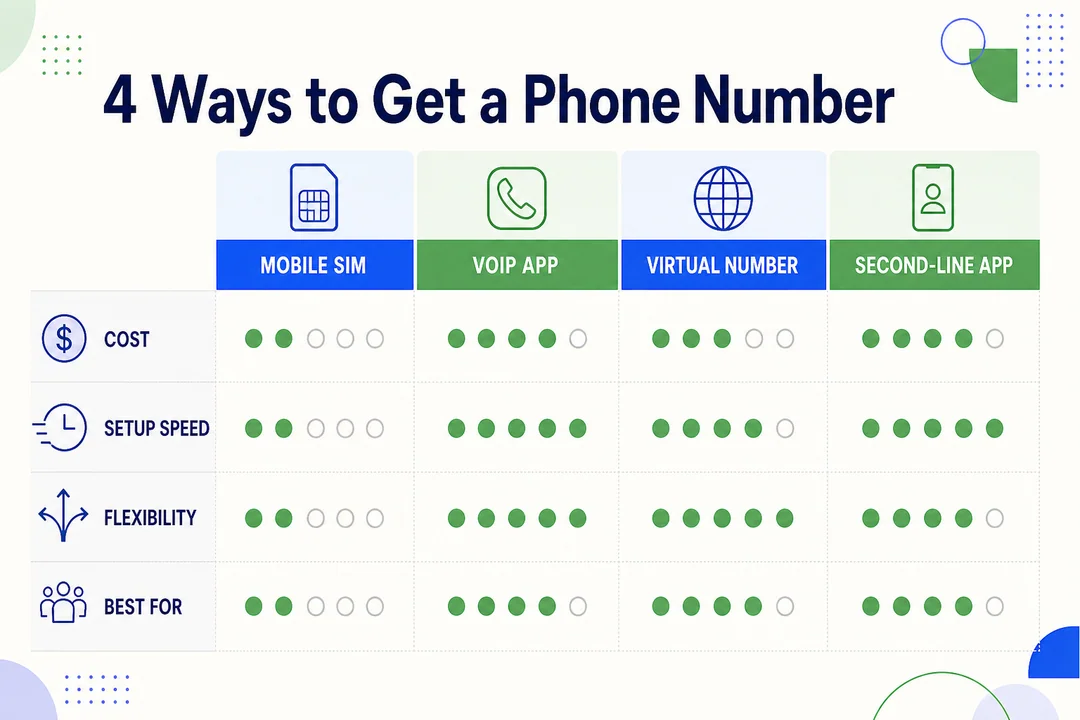
Most people get a number in one of four ways. Each option fits a different need. The best one depends on how you plan to use the number.
Use your mobile carrier
A carrier-based number is the standard phone number you get from a mobile company. This is the most traditional setup and usually the most reliable for everyday calling and texting.
A physical SIM is a removable card inside your phone. An eSIM is a digital SIM activated on the device without a physical card.
Basic setup usually looks like this:
- Choose a carrier plan.
- Open a new line.
- Activate a SIM or eSIM.
- Receive your assigned number.
Pros
- Best for standard calling and texting
- Usually best for 2FA and account verification
- Strong device compatibility
- Good long-term reliability
Cons
- Usually costs more than free apps
- Setup may take longer
- May require a plan commitment
Best for
- Banking and secure logins
- People who need a reliable second line
- Users who want fewer verification issues
Use a virtual phone number app
A virtual phone number app gives you a number through VoIP technology. That means calls and texts work through your internet connection instead of only through a cellular network.
This is often the fastest way to get a second phone number. You can usually use it on the same phone you already own. Many services also work on tablets and desktops, which helps with multi-device synchronization.
Pros
- Fast setup
- No second phone needed
- Strong privacy benefits
- Often works across mobile and desktop
- Useful features like call forwarding and voicemail
Cons
- Some numbers may fail for verification
- Call quality depends on provider and internet connectivity
- App quality varies
Best for
- Personal privacy
- Online selling
- Temporary use
- Budget-friendly second lines
Avoid if
- You need strong bank or 2FA compatibility
- You need a mission-critical business line without testing first
Real-world use case:
- If you sell items online, a virtual number helps you talk to buyers without exposing your personal number.
Use Google Voice or a similar free app
Google Voice is one of the best-known options in the US for basic second-number use. It is a good entry point if you want to test the idea before paying for a more advanced service.
It usually offers core features such as calling, texting, voicemail, and call screening. Setup is straightforward in supported cases.
Pros
- Easy to start
- Low-cost or free in some use cases
- Good for basic second-number needs
- Includes voicemail and call screening
Cons
- Not available in every situation
- Limited fit for business use
- Common restrictions with 2FA and some verification flows
- Number availability varies by area
Best use case:
- Someone who wants a simple second number for personal use and does not want to commit to a paid service yet.
Use dual SIM or eSIM on one phone
Dual SIM or eSIM lets one phone handle two mobile lines. This is different from a virtual number because both lines can be real carrier lines.
This setup makes sense if you want stronger compatibility for calls, texts, and verification, but still do not want to carry two phones. It is also useful for travel, especially when using one personal line and one temporary travel line.
Pros
- Two real mobile lines on one device
- Better compatibility for texting and verification
- Good for work/personal separation
- Useful for travel flexibility
Cons
- Your phone must support dual SIM or eSIM
- Carrier support varies
- Setup can be less simple than an app
Best for
- Users who want two true carrier lines
- People who need better verification support
- Travelers and professionals
Which Option Is Best for You?
The best option depends on what you need the number for.
Best for personal privacy
A virtual phone app or Google Voice is usually the best fit.
Why it works:
- It keeps your real number private.
- It is easy to set up and easy to stop using later.
- It works well for marketplace listings, delivery apps, and temporary registrations.
Watch out for this:
- Free or recycled numbers may be less trusted.
- Some services may not work well for verification.
Best for work and personal separation
A virtual business line or dual SIM/eSIM setup is usually best.
Why it works:
- You get separate voicemail.
- You can use different notification rules.
- It creates better boundaries between work and personal time.
Practical tips:
- Set business hours if the service offers it.
- Record a custom voicemail greeting.
- Turn off work notifications outside work hours when possible.
Best for small business or freelancers
A paid virtual number provider is usually the strongest option.
Free tools can work for testing, but they often fall short when real customers are involved. If clients will call or text you regularly, you need better controls and more reliable tools.
Look for these features:
- Business texting
- Call forwarding
- Inbound call routing
- Shared inbox
- CRM integration
Good fit example:
- A freelancer can get a professional line without buying another phone, while keeping personal calls separate.
Best for fast setup or temporary use
Google Voice or a virtual number app is usually the fastest route.
This works well for:
- Short-term projects
- Temporary campaigns
- Travel
- Quick privacy protection
You can often set it up in minutes, especially with an app-based service.
Best if you need reliable 2FA support
Use a carrier number first.
Many banks, payment apps, and high-security platforms reject VoIP numbers. Even when a virtual number works today, it may fail later for password recovery or one-time passcodes.
Best practice:
- Use a carrier line for critical logins and recovery.
- Only test virtual numbers on non-critical services first.
How Do I Create a Phone Number in 5 Simple Steps?
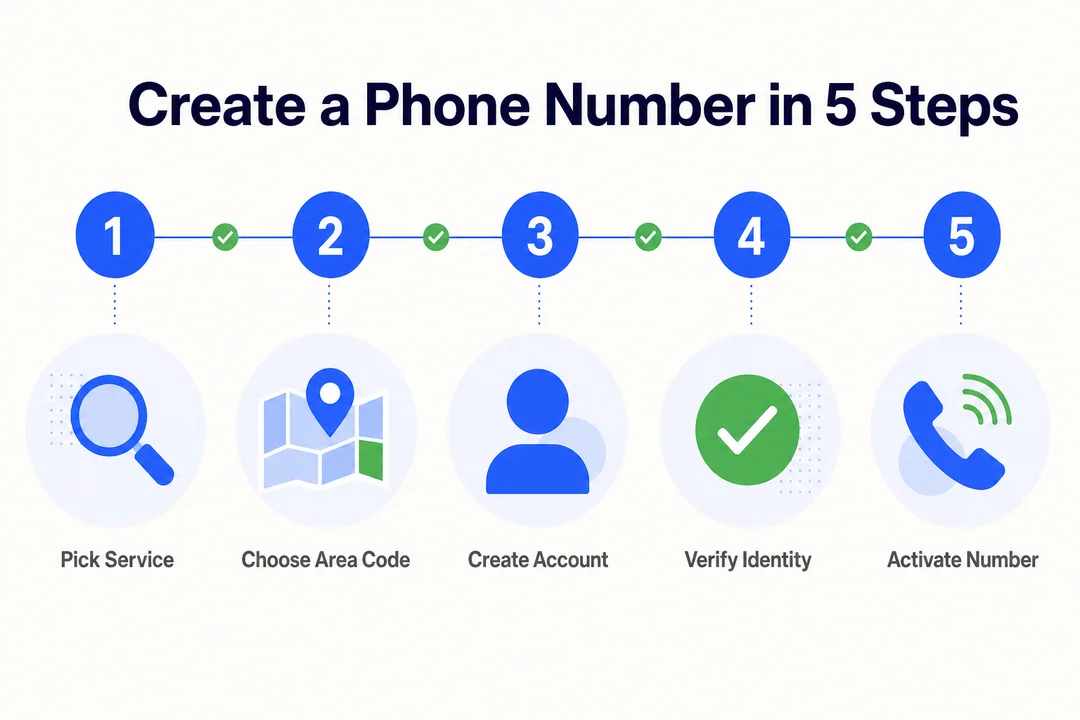
Here is the simplest way to get a new number quickly. These five steps work for most carrier, virtual app, and Google Voice setups.
Step 1: Choose the type of number you need
Start with the use case. This prevents most mistakes.
| Need | Best starting option |
|---|---|
| Reliable 2FA and banking | Carrier |
| Privacy or online selling | Virtual app |
| Low-cost second number | Google Voice |
| Two real lines on one phone | Dual SIM/eSIM |
| Client or customer communication | Paid business line |
Quick guide:
- Choose a carrier number if reliability matters most.
- Choose a virtual app if flexibility and speed matter most.
- Choose Google Voice if you want a basic low-cost option.
- Choose eSIM if you want a real second mobile line.
Common mistake:
- Picking a free app before deciding whether you need verification support.
Step 2: Pick a provider and plan
Now compare providers inside the category you chose.
Check these points before signup:
- Monthly cost
- Calling and texting support
- Area code availability
- Portability
- App reviews in the Apple App Store or Google Play Store
- Cancellation terms
- Device compatibility
Provider categories to compare:
- Mobile carrier
- Google Voice
- Virtual number provider
- eSIM provider
Practical tip:
- Always read the refund and cancellation rules first. This matters if the number quality or area code does not meet your needs.
Step 3: Choose your area code or number type
Most providers let you choose a local area code, but exact number choice is often limited.
Common options:
- Local area code for personal trust
- Area code that matches your target market
- Toll-free number for business-focused use
Helpful advice:
- Local area codes often feel more familiar to customers and contacts.
- A toll-free number can look more national and professional.
- Inventory changes quickly, so a specific area code may not always be available.
Common mistake:
- Waiting too long to claim a good area code once you find it.
Step 4: Verify your identity or link an existing number
Most providers will ask you to verify your account before giving you full access.
Common verification methods:
- Email address
- Existing mobile number
- Payment method
- ID in some cases
Why this happens:
- Fraud prevention
- Account security
- Compliance requirements
Important caution:
- Do not rely on throwaway or temporary numbers for important account recovery. If the service becomes unavailable, recovery can become difficult.
Step 5: Set up calling, texting, and preferences
Before sharing the number, finish the basic setup and test it.
Do this in order:
- Enable voicemail.
- Set call forwarding if needed.
- Turn on spam filtering or call screening if available.
- Adjust notifications.
- Set business hours or auto-replies if your plan includes them.
- Test one inbound call, one outbound call, and one text.
Why testing matters:
- You want to confirm the number works before you post it online, print it on business materials, or share it with clients.
Practical tip:
- If customers or clients may call, record a short professional voicemail greeting right away.
How to Create a Phone Number Without a SIM Card
The simple answer is this: use a virtual phone number or VoIP service. That is how to create a phone number without a SIM card in practical terms.
How SIM-less phone numbers work
A SIM-less number comes from a VoIP provider, not from a traditional mobile line. The number works through your internet connection, so you can use it on a smartphone, tablet, or desktop.
That makes setup simple and flexible. It also improves accessibility because you are not tied to one physical device.
This is why many people use virtual numbers for:
- Privacy
- Remote work
- Temporary projects
- Budget second lines
What you need before setup
- A stable internet connection
- The provider’s app or browser access
- An email address
- An existing number in some cases for verification
- A payment method in some cases
When a SIM-less number makes the most sense
A SIM-less number is a smart choice when you want:
- Privacy protection
- A low-cost second line
- A remote work number
- Travel flexibility
- Small business communication without another phone
Caution:
- It is not ideal for every emergency, banking, or secure-login use case. For those, a carrier line is usually safer.
Free vs Paid Phone Number Services
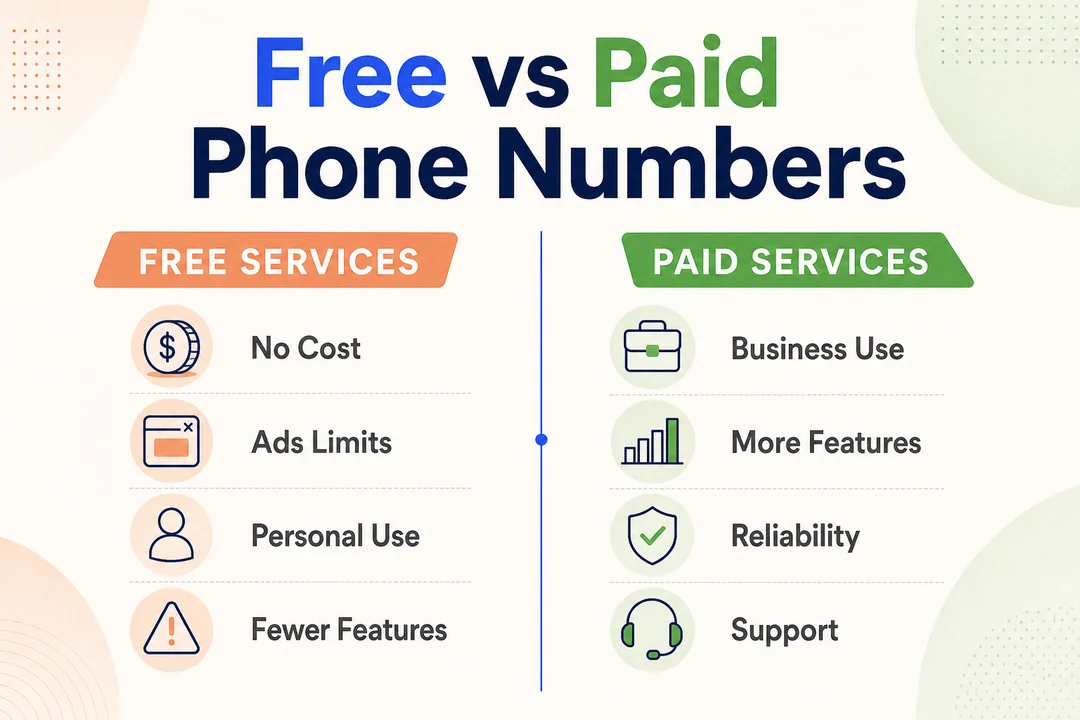
Free and paid services can both work. The right choice depends on how important the number is to your daily life or business.
Quick comparison table
| Option | Cost | Best For | Main Benefits | Main Limitations |
|---|---|---|---|---|
| Free app or basic free tier | $0 to low cost | Testing, casual personal use | Cheap, fast setup | Limited support, verification issues |
| Google Voice | Free or low cost in supported use cases | Basic second number | Easy setup, voicemail, texting | Limited business fit, 2FA issues |
| Paid virtual number provider | Monthly fee | Privacy, freelancers, business use | Better controls, forwarding, multi-device use | Ongoing cost |
| Carrier number | Monthly fee | Reliability, 2FA, banking | Strong compatibility, stable calling | Higher cost, less flexible |
| Dual SIM/eSIM | Varies by line and device | Two real numbers on one phone | Strong compatibility, travel flexibility | Device and carrier support required |
Short interpretation:
- Free works for light use.
- Paid is usually worth it once missed calls, client trust, or verification issues can hurt you.
What free services usually include
- Basic calling and texting
- Basic voicemail
- Limited support
- Fewer controls and business tools
- Ads or usage restrictions in some apps
Free services are good for testing, but not always for serious business use.
What paid services usually add
Paid services usually improve reliability and control. They also add tools that matter once communication becomes important.
Common upgrades include:
- Better call handling
- More call forwarding and routing controls
- Shared inbox features
- CRM integrations
- Admin settings
- Better support
- More consistent multi-device synchronization
This is why paid plans make more sense for freelancers, client work, and business communication.
When paying is worth it
Paying is usually worth it if:
- Customer or client calls matter
- You need a professional voicemail
- You want stronger privacy controls
- You need multi-device use
- You want team support
- Missed calls can cost you money
Simple rule:
- If the number affects income, trust, or account access, paid is usually the safer choice.
What to Check Before Choosing a Service
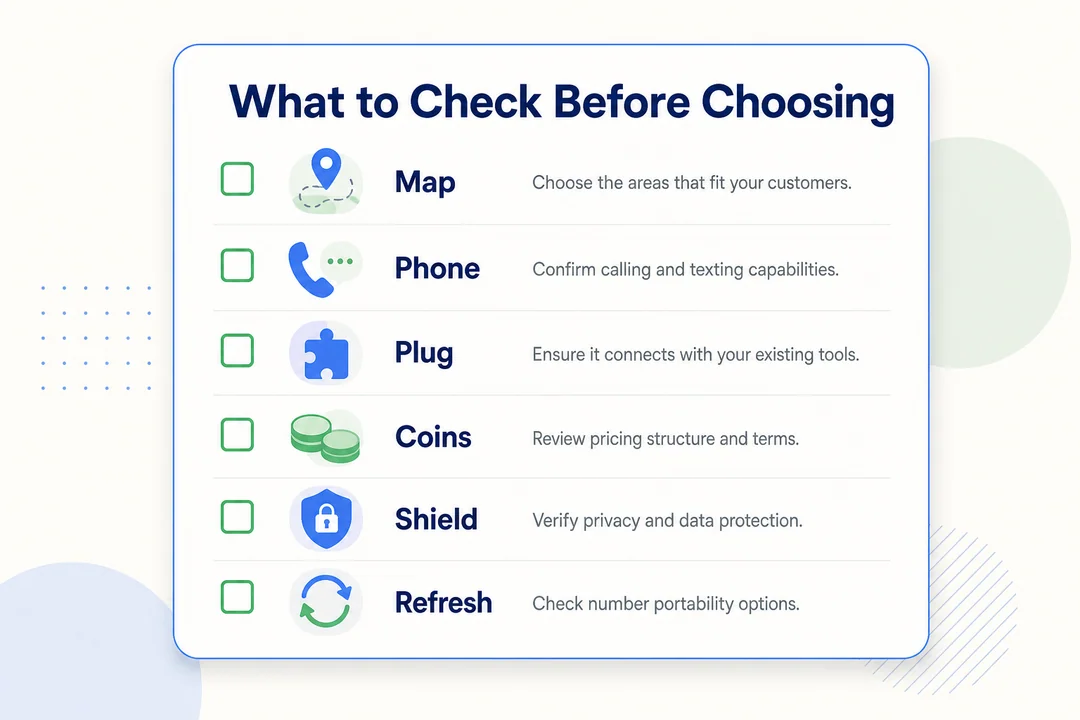
Before you sign up, check a few details that people often miss. These small checks can save you from losing a good number or choosing the wrong service.
Country, area code, and number availability
- US availability varies by provider.
- Popular area codes may have limited inventory.
- Local number availability changes often.
- Toll-free numbers may cost more.
- Some providers offer only certain states or cities.
Calling, texting, and app quality
Check the basics before you commit:
- Call quality
- Text message support
- Ease of use
- Reliability across devices
- Desktop and mobile sync
- Recent reviews in the Apple App Store or Google Play Store
Practical advice:
- Read recent reviews, not just the average rating. A high score from two years ago does not tell you how the app performs today.
Privacy and security
Privacy matters because the whole point of a second number is often to protect your personal number. You also want control over spam and a clear idea of how your data is handled.
Look for:
- Spam filtering
- Call screening
- Clear privacy policy
- Account security settings
- For sensitive business use, support for standards like HIPAA or SOC 2 if relevant
Do not assume every service handles data the same way. Check the provider’s policy before you rely on it.
Portability and number ownership
Portability means whether you can move the number in or out later.
Check these points before signup:
- Can you port a number in?
- Can you port a number out later?
- What happens to the number if you cancel?
- Who controls the number if the account closes?
This is easy to overlook. It becomes a big problem if you build contacts, client records, or account logins around that number.
2FA and account verification compatibility
Many VoIP numbers fail with:
- Banks
- Payment apps
- High-security platforms
- Some recovery and one-time passcode systems
Clear recommendation:
- Use a carrier line for critical logins and account recovery.
Real-world example:
- A virtual number may work fine for calls and texts but still fail when your bank sends a verification code.
Can You Have Two Phone Numbers on One Phone?
Yes, you can have two phone numbers on one phone.
The two main ways are a virtual number app or a dual SIM/eSIM setup. The better choice depends on whether you want speed and simplicity or stronger carrier compatibility.
Yes, by using a virtual number app
This is the easiest option for most beginners. You keep your current phone, install an app, and get a second phone number without a second handset.
It is great for privacy, temporary use, and fast setup. It is also the simplest way to keep one phone with two numbers.
Yes, by using dual SIM or eSIM
This is better when you want two true carrier lines on one device. It usually gives you stronger compatibility for regular texting, calling, and verification.
It is a practical choice for work and personal separation or for travel.
Which option is simpler for most people
- Virtual app: easier, faster, lower cost
- Dual SIM/eSIM: better verification support and carrier compatibility
Simple takeaway:
- Most people should start with a virtual app unless they specifically need stronger 2FA support.
Common Use Cases and the Best Setup for Each
For online selling and personal privacy
Best setup: second phone number app
Why it works:
- Protects your real number
- Easy to retire later
- Good for Facebook Marketplace and Craigslist
- Fast to set up
Downside:
- It may not be ideal for long-term customer handling or sensitive verification.
For work and personal separation
Best setup: virtual business line or dual SIM/eSIM
Why it works:
- Separate voicemail
- Cleaner work-life boundaries
- Better notification control
- One phone can still handle both lines
Downside:
- A business-ready setup may cost more than a casual app.
For freelancers and small business
Best setup: paid virtual number provider
Why it works:
- Business texting
- Call forwarding
- Inbound call routing
- CRM support
- Easier growth as your client volume increases
Advice:
- Choose a service that can scale with you, so you do not need to change numbers later.
For travel or international use
Best setup: eSIM or internet-based number
Why it works:
- Good travel flexibility
- Can reduce international calling and messaging costs
- Useful if you want a local or temporary line
Caution:
- Always check country support and roaming details before relying on it.
For account signups and verification codes
Best setup: carrier number
Why it works:
- Better trust and acceptance across secure apps
- More reliable for one-time passcodes
- Better for long-term account recovery
Warning:
- Avoid free or VoIP numbers for important banking or security-related accounts.
Recommended Types of Services to Consider
Carrier-based phone line
Best for
- Reliable calling
- 2FA
- Banking and account recovery
Pros
- Strong compatibility
- Native device support
- Stable long-term use
Cons
- Higher cost
- Less flexible than app-based options
Google Voice and similar free options
Best for
- Easy setup
- Light personal use
- Low-cost second number needs
Pros
- Simple setup
- Familiar interface
- Core calling and texting features
Cons
- Verification limitations
- Not ideal for serious business use
Virtual number providers for personal use
Best for
- Privacy
- Temporary use
- Online selling
- Flexible second numbers
Pros
- Quick setup
- Call screening
- Forwarding options
Cons
- 2FA support may be inconsistent
Virtual number providers for business use
Best for
- Customer communication
- Team use
- Scaling a small business line
Pros
- Routing features
- Team access
- Professional tools
Cons
- Monthly cost
- More setup options to manage
Mistakes to Avoid When Getting a New or Second Number
A few common mistakes cause most problems. Avoid these early.
Choosing a free service for critical accounts
This is one of the biggest mistakes. Free numbers may fail for 2FA, password recovery, or long-term account reliability.
Use a carrier number for:
- Banks
- Payment apps
- Main email recovery
- High-security accounts
Ignoring number portability rules
If you ignore portability, you may lose the number later.
Check before signup:
- Can you transfer the number out?
- Can you bring your own number in?
- What happens if you cancel?
Assuming every app supports business use
Casual apps often lack:
- Routing
- Team access
- Admin controls
- Business texting tools
If customers will contact you, check business features first.
Not testing call and text quality immediately
Always test the number right after setup.
Use this quick checklist:
- One inbound call
- One outbound call
- One text message
- Voicemail setup and playback
Do this before you post the number publicly or share it with clients.
Final Takeaway: The Easiest Way to Create a Phone Number
You do not create a phone number from scratch. You get one from a provider.
For most people, the easiest option is a virtual phone number app because it is fast, flexible, and works well for privacy or a second phone number. If you need stronger security, 2FA, or bank compatibility, choose a carrier-based number. If you need a business line, a paid virtual business service is usually the better long-term fit.
Choose your use case first. Then compare providers by area code availability, portability, app quality, and verification support before you sign up.
Frequently Asked Questions
Can I create a phone number for free?
Yes, in some cases. Services like Google Voice and some free apps can give you a free or low-cost number. The trade-off is usually fewer features, weaker support, and limited compatibility with 2FA or account verification.
Can I get a second phone number without another phone?
Yes. A virtual app or Google Voice can give you a second phone number on the phone you already use. You do not need a second handset for this setup.
Can I choose my own area code?
Usually yes, if the provider has that area code available. Exact number choice is often limited, and popular area codes may run out quickly.
Do I need a SIM card to get a new number?
No for a virtual or VoIP number. Yes in most carrier setups, unless your device uses an eSIM, which is a digital version of a SIM.
Is a virtual phone number legal to use?
Yes, for normal lawful personal or business use. If you use it for business texting or outreach, you still need to follow platform rules and laws such as TCPA.
Can I use a virtual number for 2FA or bank verification?
Sometimes, but it is not reliable. Many banks and secure platforms reject VoIP numbers, so a carrier number is the safer choice for critical accounts.
What is the best way to separate business and personal calls on one phone?
A virtual business line is usually the easiest option. Dual SIM/eSIM is better if you want two real carrier lines and stronger verification compatibility.
Can I port my number to another provider later?
Often yes, but it depends on the provider’s policy. Check both port-in and port-out support before you sign up so you do not get stuck later.
More in Operations & CX Optimization
View all →
Customer Experience Transformation: Framework and Steps
A telecom customer calls support about a billing error. They explain the problem to the IVR system. Then to the first agent. Then get transferred and explain again. Then escalated—and explain a third time. Forty minutes later, they're exhausted and the problem still isn't solved. This is what broken customer experience looks like. And it's costing you customers. Customer experience…


Web Caller Meaning: JavaScript caller, Calling Tools or Portals
“Web caller” is one of those phrases where the search results and the searcher are frequently talking about different things. Three unrelated audiences use it: developers hitting an error on the legacy JavaScript caller property, buyers evaluating browser-based calling software, and people trying to reach a specific portal or training page whose exact name they cannot recall. That fragmentation is…

Customer Experience Strategy: How to Build One That Works
Customer experience is getting worse, not better. Forrester's 2025 Global CX Index found that 21% of brands declined in CX quality while only 6% improved — and in the US, 25% declined against 7% that improved, the second consecutive year of that pattern. Most of those brands were not neglecting customer experience. They were working on it without a strategy…



 English
  Russian
  Chinese