

Introduction
A PBX phone system is a business phone system that manages internal calls, external calls, and call routing from one central setup. If you are comparing office phone options, this guide shows what PBX means, how it works, the main types, key features, and how to choose the right setup for your business.
What Is a PBX Phone System?
What Does PBX Mean?
PBX stands for Private Branch Exchange. In simple terms, it is a private phone network for a business.
Instead of giving every employee a separate outside phone line, a PBX lets everyone use one shared business phone system. Employees can call each other using short extension numbers, and the system also handles calls to and from customers, vendors, and partners.
A simple example helps. If your office has 20 employees, you do not need 20 separate traditional phone lines. A PBX can connect all 20 users internally while sharing outside calling capacity more efficiently.
Compared with a regular phone setup, a PBX gives a business more control and more useful calling features.
Key points:
- A PBX creates one organized phone system for the whole company.
- A PBX lets employees call each other using extensions.
- A PBX routes outside calls through shared business lines or internet calling.
- A PBX usually includes features a basic phone line does not have.
How PBX Supports Business Communication
A PBX supports both sides of business communication: internal team calls and external customer calls.
Inside the company, it makes it easier for employees to reach the right person fast. Outside the company, it helps route incoming calls to the right team, transfer calls without confusion, and keep missed calls under control with voicemail and forwarding.
In practice, this removes a lot of friction. A sales rep can transfer a customer directly to billing. A front desk team can send calls to support based on time of day. A manager can receive calls on a mobile app when away from the office.
Common ways a PBX helps:
- It routes inbound calls to the right person or department.
- It supports transfers, forwarding, hold, and voicemail.
- It reduces missed calls by using rules and backup routing.
- It gives callers a more professional experience.
- It keeps communication organized across teams.
For small businesses, this often means fewer manual handoffs. For support or sales teams, it means faster response times and cleaner call handling.
Who Uses a PBX Phone System?
A PBX phone system is commonly used by:
- Small businesses that want a more professional business phone system.
- Offices that need extension dialing between employees.
- Multi-location businesses that want one phone system across branches.
- Call centers that need queues, routing, recording, and monitoring.
- Remote and hybrid teams that need mobile apps and softphones.
How a PBX Phone System Works
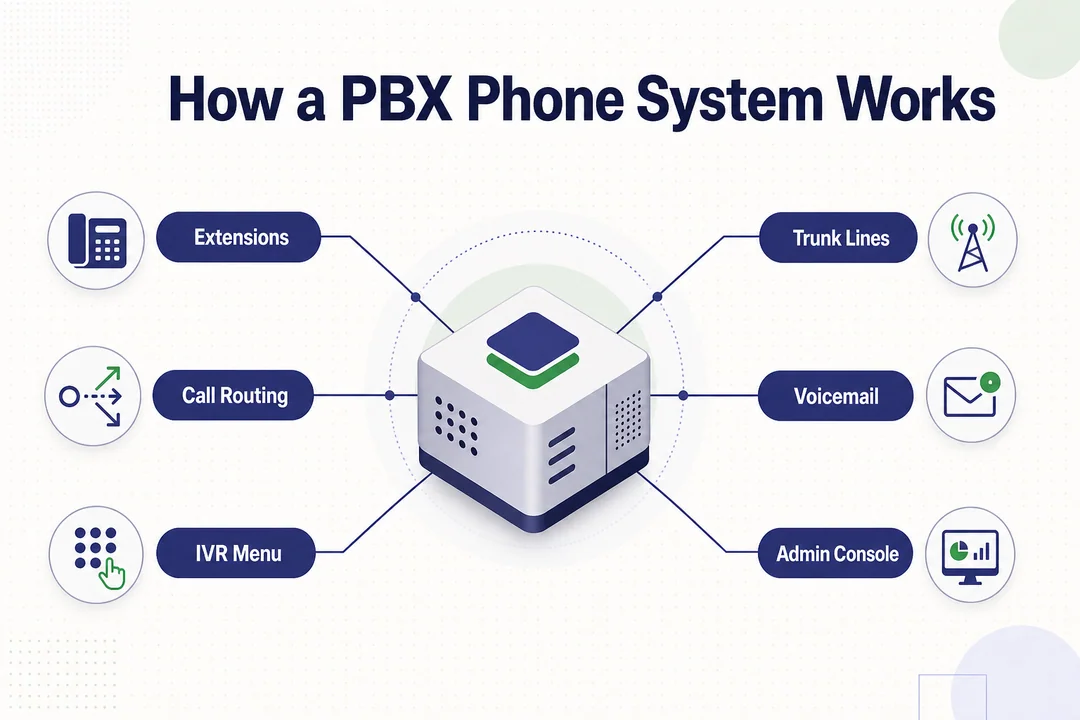
Internal Extensions and Extension-to-Extension Dialing
An extension is a short internal number assigned to a user, desk phone, or department. Instead of dialing a full public phone number, employees can dial a few digits to reach someone inside the same company.
The PBX handles that connection. It recognizes the extension and sends the call to the right device or user account.
Example:
- Sales uses extension 203.
- Accounting uses extension 214.
- A sales rep dials 214 to reach accounting directly.
- The PBX connects the call inside the company network.
This matters because it is faster than using full outside numbers. It also keeps internal communication simple as the team grows.
Benefits of extension dialing:
- It speeds up communication between departments.
- It reduces the need for separate public numbers for every user.
- It makes user management easier for admins.
- It supports both desk phones and softphones in the same system.
In modern systems, extensions can ring more than one device at the same time. For example, extension 203 can ring a desk phone, laptop app, and mobile app together.
Call Routing for Inbound and Outbound Calls
Call routing is one of the core jobs of a PBX.
For inbound calls, the system decides where the call should go. That decision can be based on the dialed number, business hours, caller input, department rules, or agent availability.
For outbound calls, the PBX decides how the call leaves the system. It selects the path, connects the user, and applies any rules the business has set.
Typical routing actions include:
- Auto-routing sends calls to a department automatically.
- Transfer moves a live call to another person.
- Forwarding sends calls to another number or device.
- Queues hold callers in line until someone is available.
- Time-based routing changes call flow during business hours, after hours, or holidays.
A common example looks like this:
- A customer calls the main company number.
- The PBX plays a greeting.
- The caller presses 1 for sales.
- The call goes to the sales queue.
- If no one answers, the call forwards to voicemail or a backup mobile number.
This structure helps customer-facing teams stay organized. It also reduces the chance that calls get lost or sent to the wrong person.
Trunking and Public Network Connectivity
A PBX still needs a way to connect with the outside world. That connection is handled through trunking, which is the path between your PBX and the public phone network.
A traditional setup may connect through the PSTN (Public Switched Telephone Network, the standard public phone network). A modern setup often uses SIP trunking (internet-based phone line service that connects a PBX to outside callers).
The main idea is simple: users share outside calling capacity instead of each person needing a separate dedicated line.
| Trunk Type | How It Connects | Best Known For |
|---|---|---|
| Traditional trunk | Physical phone network | Legacy systems and older office setups |
| SIP trunking | Internet connection | Flexibility, easier scaling, lower line costs |
Why this matters:
- A business can support many users without matching one outside line per employee.
- It is easier to add calling capacity with SIP trunking.
- Modern businesses can reduce dependence on legacy phone wiring.
Main PBX Components
A basic PBX setup usually includes:
- Desk phones, which are physical office phones for daily calling.
- Softphones, which are calling apps on laptops or smartphones.
- PBX software, which manages extensions, routing, voicemail, and call rules.
- A VoIP service provider, which enables internet-based calling in modern systems.
- A data network, which carries voice traffic across the office or internet.
Main Types of PBX Systems
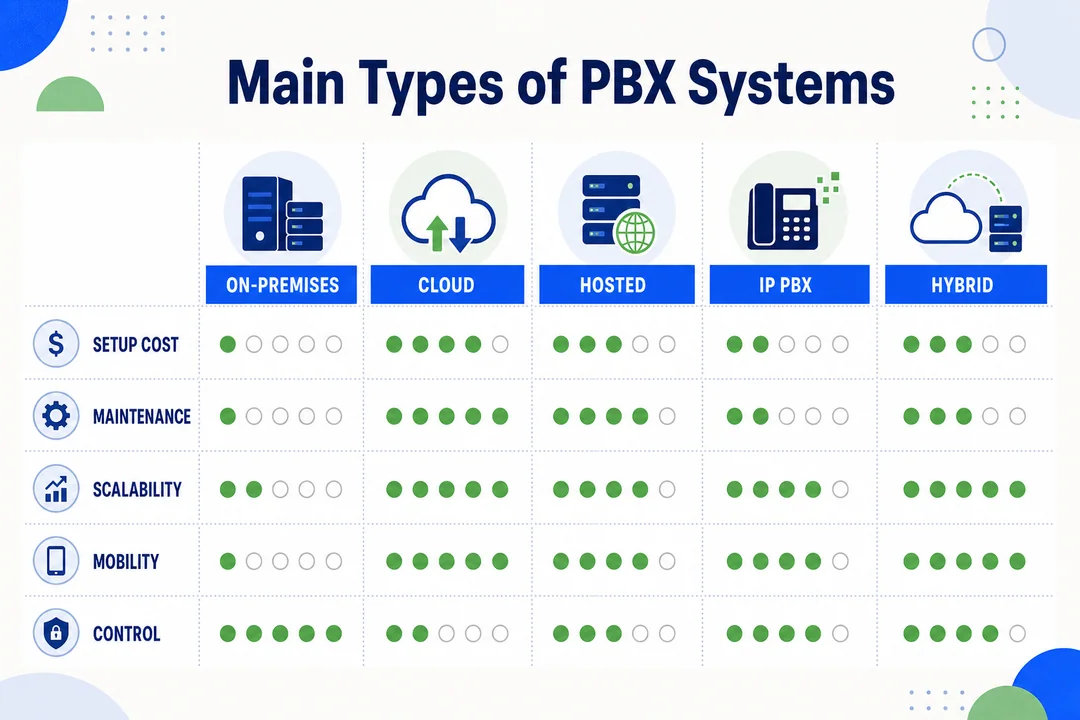
On-Premises PBX
An on-premises PBX is installed at your office or facility. The business owns or manages the core equipment on site.
This gives you more direct control over the phone environment. It can be a good fit for companies with strict internal policies, custom setup needs, or in-house IT staff that can manage telecom systems.
Pros:
- More direct control over system configuration.
- Can fit businesses with complex internal requirements.
- May align with companies that prefer on-site infrastructure.
Cons:
- Higher upfront cost for hardware and setup.
- Ongoing maintenance is your responsibility.
- Usually needs more IT support and physical space.
Best fit:
- Businesses with internal IT resources.
- Companies that want deeper control over office phone infrastructure.
- Organizations that are not ready to depend heavily on cloud services.
Cloud PBX
A cloud PBX runs over the internet and is managed mostly by the service provider. You usually do not need major on-site hardware.
This is the most practical option for many modern businesses because it is faster to deploy, easier to scale, and simpler to support remote users.
| Cloud PBX Pros | Cloud PBX Cons |
|---|---|
| Lower upfront cost | Depends on internet reliability |
| Fast deployment | Less physical control than on-site systems |
| Easy to add users and extensions | Feature quality varies by provider |
| Strong fit for remote and hybrid teams | May require network planning for call quality |
Cloud PBX is often the right choice when you want flexibility, predictable monthly pricing, and less maintenance.
Hosted PBX and Virtual PBX
Hosted PBX and virtual PBX are closely related to cloud PBX. In most cases, the provider runs the phone system for you.
This model works well when you want business calling features without managing telecom hardware yourself.
Main advantages:
- Little to no complex on-site equipment.
- Quick setup for small and midsize teams.
- Easier management through a web dashboard.
- Good fit for businesses without dedicated telecom staff.
When this is a better choice than on-premises:
- You need a fast rollout.
- You have a distributed team.
- You want the provider to handle updates and backend maintenance.
IP PBX
An IP PBX uses an IP network (internet protocol, the same type of network used for business data traffic) to manage and route calls. It often works with VoIP and SIP.
Instead of relying fully on analog phone lines, an IP PBX handles voice through the company network or internet connection. That makes it much more flexible than older systems.
Why businesses choose IP PBX:
- It works well with modern data networks.
- It supports softphones, mobile access, and integrations.
- It is easier to scale than many older phone setups.
- It fits today’s business communication needs better than analog-only systems.
In real-world use, many cloud PBX and hosted PBX platforms are also IP-based. That is why IP PBX is now one of the most common approaches.
Hybrid PBX
A hybrid PBX combines older phone infrastructure with newer IP or cloud capabilities.
This is useful for businesses that cannot replace everything at once. Instead of doing a full cutover in one step, they keep part of the legacy system and add modern calling tools gradually.
Benefits:
- Reduces disruption during migration.
- Protects some existing hardware investment.
- Allows a phased move toward cloud or IP calling.
Example:
A company keeps its existing office desk phone setup but adds SIP trunking and softphone support for remote employees. That lets the business modernize without rebuilding the entire phone environment in one project.
Cloud PBX vs. On-Premises PBX
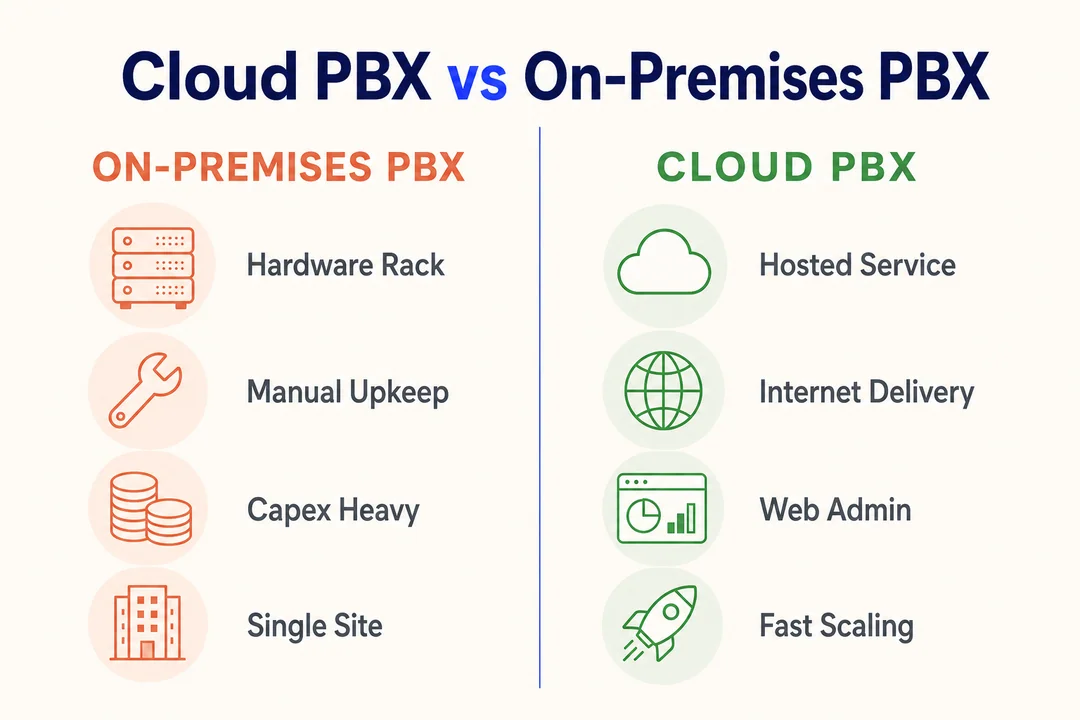
Setup and Deployment
| Factor | Cloud PBX | On-Premises PBX |
|---|---|---|
| Deployment speed | Usually faster | Usually slower |
| Hardware needs | Minimal on-site hardware | Requires on-site equipment |
| Installation complexity | Lower | Higher |
| Best for | Fast rollout and flexibility | Full local control |
Cost Model
| Cost Area | Cloud PBX | On-Premises PBX |
|---|---|---|
| Upfront cost | Lower | Higher |
| Payment model | Monthly subscription | Capital expense plus maintenance |
| Hardware spending | Limited | Significant |
| Upgrade cost | Often included by provider | Often paid by the business |
Simple rule:
- Cloud PBX usually spreads cost over time.
- On-premises PBX usually requires more money at the start.
When comparing vendors, look beyond the sticker price. Include phones, setup, licensing, support, maintenance, training, and future upgrades.
Maintenance and IT Support
Cloud PBX reduces day-to-day maintenance because the provider handles much of the backend work.
On-premises PBX puts more responsibility on your internal team.
Key differences:
- Cloud PBX usually includes vendor-managed updates and support.
- On-premises PBX often requires in-house troubleshooting and system upkeep.
- Cloud PBX is easier for teams with limited IT staff.
- On-premises PBX makes more sense when you already have telecom and server support in place.
Scalability and Remote Work
Cloud PBX is usually stronger for scaling and remote access.
You can often add users, extensions, or locations through an admin portal without major hardware changes. That makes it easier to support growth.
For remote or hybrid teams, cloud systems are especially useful because employees can use:
- Softphones on laptops
- Mobile apps on smartphones
- Shared company extensions from almost anywhere
On-premises systems can support remote work too, but setup is often more involved.
Security and Business Continuity
Important areas to review:
- Network security matters for both cloud and on-premises systems.
- Business continuity planning helps keep calling available during outages.
- Geographic redundancy means service can continue from backup locations if one site fails.
Key Features of a PBX Phone System
Auto-Attendant and IVR
An auto-attendant answers calls with a recorded greeting and menu. IVR (Interactive Voice Response, a menu system that lets callers press keys or speak to reach the right option) takes that a step further by guiding callers to the right destination.
This feature helps businesses handle calls professionally without relying on a live receptionist for every call.
A simple example:
- Caller dials the company number.
- The system says, press 1 for sales, 2 for support, 3 for billing.
- The caller chooses an option.
- The PBX routes the call to the correct team.
Why it matters:
- It reduces front-desk workload.
- It helps callers reach the right team faster.
- It creates a more polished business image.
- It supports after-hours call handling.
For small businesses, even a basic menu can make the company sound more organized and easier to reach.
Call Forwarding, Transfer, and Routing
These are the daily tools that keep calls moving.
Call forwarding sends a call to another number or device if the original user is unavailable.
Call transfer moves a live call from one person or department to another.
Call routing uses rules to decide where calls should go.
Common routing rules include:
- Department-based routing
- Time-of-day routing
- After-hours routing
- Backup routing when no one answers
These features matter because they reduce missed calls and prevent callers from bouncing around the business.
Voicemail and Voicemail-to-Email
Voicemail stores messages when no one answers. Voicemail-to-email sends that message to an email inbox, often as an audio file or notification.
This is useful because people do not always sit at a desk all day. A manager on the road or a sales rep in meetings can still review missed messages quickly.
Best use cases:
- Sales teams that need to follow up fast
- Support managers handling multiple priorities
- Small businesses without full-time reception coverage
Call Recording and Call Management
Call recording helps businesses review calls for quality, training, dispute handling, and compliance needs.
Call management tools help supervisors monitor activity, track missed calls, and improve response workflows.
In some systems, you may also see AI-driven call analytics. This usually means the platform helps summarize patterns, measure call activity, or flag common issues.
One important note: call recording should be used with clear internal rules and legal awareness, especially around privacy and consent requirements.
Softphone and Mobile Access
A softphone is a phone app on a computer, tablet, or smartphone. It lets users make and receive business calls without a dedicated desk phone.
This is one of the most useful features in modern PBX systems because it supports remote and hybrid work without changing the business number structure.
Benefits include:
- Users can answer business calls from anywhere.
- The same extension can work across multiple devices.
- Teams can transfer or manage calls without being in the office.
For many growing businesses, softphone support is now a must-have, not a nice-to-have.
SIP Trunking and VoIP Support
VoIP (Voice over Internet Protocol, calling over the internet instead of traditional phone lines) is the main calling method in many modern PBX systems.
SIP trunking is the service that connects your PBX to the outside world over the internet. Together, they give a business a more flexible way to place and receive calls.
Why modern PBX systems use them:
- They make scaling easier.
- They reduce dependence on older phone lines.
- They often lower communication costs.
- They support cloud and IP-based calling models.
Unified Communications Integrations
Many PBX systems can connect with other business tools, such as:
- Unified communications platforms for voice, chat, and meetings
- CRM systems for customer call context
- ERP tools where phone activity supports operations
Benefits of Using a PBX Phone System
Better Internal Communication
A PBX makes internal calling faster and cleaner. Employees can reach each other with short extensions instead of full outside numbers.
This helps teams collaborate with less friction, especially across departments.
More Professional Call Handling
Auto-attendant, IVR, transfer rules, and department routing make the business sound more organized.
That improves the caller experience and helps customers reach the right person faster.
Lower Communication Costs
A PBX can reduce costs by sharing outside calling capacity and using VoIP-based calling where appropriate.
Cloud PBX often lowers upfront spending because there is less hardware to buy and maintain.
Easier Support for Growing Teams
As your team grows, you can add users, extensions, and locations more easily than with a basic phone setup.
This avoids a full system replacement every time the business expands.
Remote and Hybrid Work Flexibility
With softphones and mobile access, employees can use the business phone system from home, on the road, or across multiple offices.
That keeps the company reachable without tying communication to a single building.
Improved Call Center Management
For customer-facing teams, PBX tools can support:
- Call queues to manage high inbound volume.
- Recording for quality review and training.
- Monitoring for supervisor visibility.
- Analytics to improve performance over time.
How to Choose the Right PBX System for Your Business
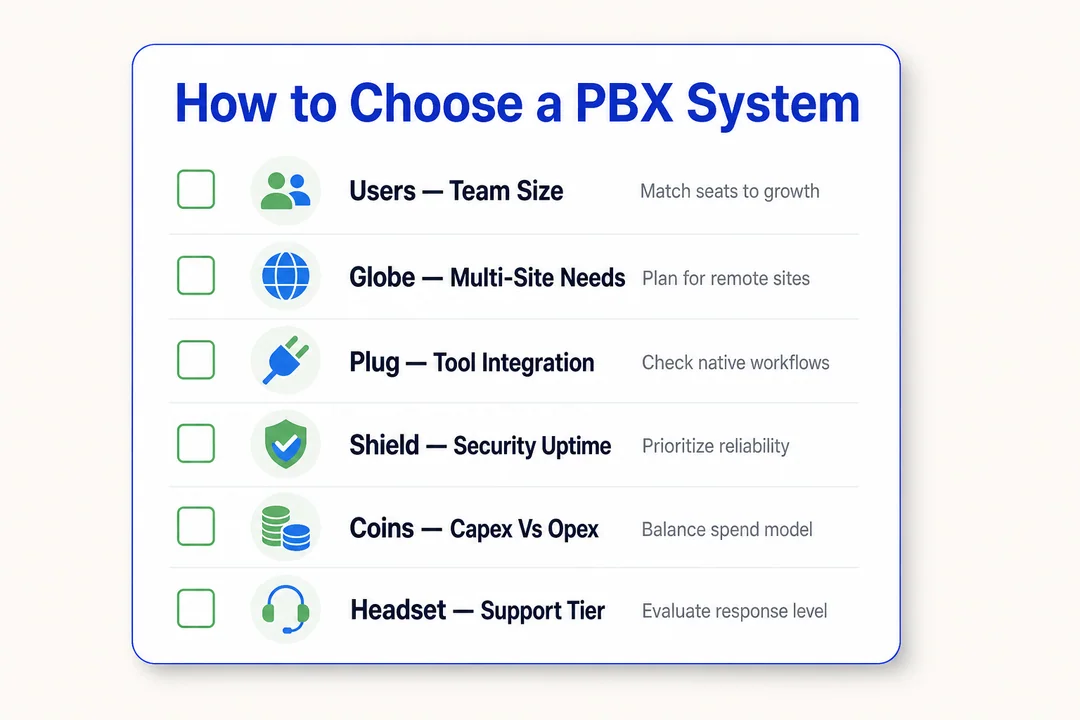
Assess Your Current Phone Setup
Start with what you already have.
Look at:
- How many users need phone access
- Whether you use desk phones, mobile phones, or both
- How calls are handled today
- Where calls are being missed or delayed
- Whether you have one office or multiple locations
This step prevents buying a system that solves the wrong problem.
Match the System to Team Size and Growth
Choose for the next stage of the business, not just the current moment.
If you have 10 users today but expect 30 next year, your PBX should scale without a major rebuild. Think about future extensions, departments, branch offices, and remote users.
As a rule:
- Small stable teams can keep it simple.
- Growing teams should prioritize scalability from day one.
Compare Features You Actually Need
Do not overbuy.
Make a list of must-have features first, such as:
- Call routing
- Auto-attendant
- Voicemail
- Call transfer
- Softphone access
- Mobile app support
Then separate optional features from essential ones. This keeps the system practical and controls costs.
Evaluate Setup and Ongoing Costs
Look at total cost, not just monthly price.
Review:
- Initial setup fees
- Hardware costs
- User licensing
- Monthly subscription charges
- Support fees
- Upgrade costs
A lower upfront offer can become expensive if support, add-ons, or expansion costs are high later.
Check Reliability, Support, and Security
This is where many buyers should spend more time.
Ask about:
- Service uptime
- Support hours and response times
- Security controls
- Backup and failover options
- Business continuity planning
A PBX system is part of your customer access. If it fails, sales and support can stop quickly.
Plan for Migration from Legacy Systems
If you already have an older phone system, plan the move carefully.
Focus on:
- A phased rollout where possible
- Clear cutover timing
- Testing before full launch
- Steps to reduce downtime
A hybrid or staged migration often works better than a rushed full replacement.
PBX vs. VoIP: What’s the Difference?
PBX as the Call Management System
PBX is the system that manages business calling.
It handles:
- Extensions
- Call routing
- Transfers
- Voicemail
- User and department call flow
In short, PBX is about control and management.
VoIP as the Voice Transmission Technology
VoIP is the technology that carries voice over a data network or the internet.
It is the transport method for the call. Unlike traditional phone lines, VoIP sends voice digitally through IP networks.
In short, VoIP is about how the call travels.
How They Work Together
Today, these two usually work together.
A modern business may use:
- A PBX to manage extensions and call flow
- VoIP to carry the voice traffic
- SIP trunking to connect the PBX to outside callers
Simple example:
Your employee uses a laptop softphone to call a customer. The PBX manages the extension and routing. VoIP carries the audio. SIP trunking connects that call beyond the company system.
Frequently Asked Questions
What Is the Difference Between PBX and a Regular Phone System?
A PBX is more advanced than a regular phone system. It supports extensions, routing, transfers, voicemail, and shared call management, while a regular phone setup is usually more basic and less flexible.
Is Cloud PBX Better Than On-Premises PBX?
Not always. Cloud PBX is usually better for flexibility, faster setup, and lower upfront cost, while on-premises PBX can be better for businesses that want tighter local control and have IT resources to manage it.
How Much Does a PBX Phone System Cost?
The cost depends on the system type, number of users, features, hardware, and provider. Cloud PBX usually has lower upfront cost and monthly pricing, while on-premises PBX usually requires more initial investment plus maintenance.
Can a PBX System Support Remote Employees?
Yes. Cloud PBX, hosted PBX, and IP PBX systems often support remote employees through softphones, mobile apps, and internet-based access to company extensions.
Is PBX Still Used with VoIP?
Yes. Many modern PBX systems use VoIP and SIP trunking as the standard way to deliver business calling. PBX is still highly relevant, but the technology behind it has changed.
Key Takeaways
- A PBX phone system is a business phone system that manages internal extensions and external calls.
- A PBX improves call routing, transfers, voicemail handling, and overall call organization.
- Cloud PBX and IP PBX are now the most common choices for many businesses.
- The right system depends on your team size, growth plans, budget, support needs, and remote work requirements.
- A smart buying process starts with your current setup, then compares features, cost, reliability, and migration path.
If you are evaluating a new business phone system, start by mapping your current call flow, listing the features you actually need, and comparing a few PBX providers through demos or trial accounts.
More in Operations & CX Optimization
View all →
Customer Experience Transformation: Framework and Steps
A telecom customer calls support about a billing error. They explain the problem to the IVR system. Then to the first agent. Then get transferred and explain again. Then escalated—and explain a third time. Forty minutes later, they're exhausted and the problem still isn't solved. This is what broken customer experience looks like. And it's costing you customers. Customer experience…


Web Caller Meaning: JavaScript caller, Calling Tools or Portals
“Web caller” is one of those phrases where the search results and the searcher are frequently talking about different things. Three unrelated audiences use it: developers hitting an error on the legacy JavaScript caller property, buyers evaluating browser-based calling software, and people trying to reach a specific portal or training page whose exact name they cannot recall. That fragmentation is…

Customer Experience Strategy: How to Build One That Works
Customer experience is getting worse, not better. Forrester's 2025 Global CX Index found that 21% of brands declined in CX quality while only 6% improved — and in the US, 25% declined against 7% that improved, the second consecutive year of that pattern. Most of those brands were not neglecting customer experience. They were working on it without a strategy…



 English
  Russian
  Chinese