VoIP Phone System Installation: A Simple Step-by-Step Guide

VoIP Phone System Installation: A Simple Step-by-Step Guide


VoIP Phone System Installation: A Simple Step-by-Step Guide

If your current phone setup feels outdated, hard to manage, or unclear to install, you are not alone. VoIP phone system installation is usually simpler than most teams expect, but a smooth business VoIP setup still depends on a few smart decisions before you start. This guide explains what installation actually includes, what you need in place, which setup path fits your situation, and how to install the system step by step. For many small teams, same-day setup is realistic. If you are transferring existing numbers, though, that part often takes longer.

What a VoIP Phone System Installation Actually Involves

VoIP phone system installation is the process of setting up internet-based calling for a business or home office. It usually includes creating the provider account, assigning numbers and users, connecting phones or softphones, setting basic call routing, and testing call quality before going live.

In plain terms, voip phone system installation is more than plugging in a phone. A proper business VoIP setup also covers account setup, user permissions, phone number assignment, device connection, and basic cloud-based phone system configuration so calls reach the right people.

For most small teams using a hosted service, the core of an IP telephony deployment can be done quickly. What often delays a voip phone system installation is not the phone itself, but number transfers, more advanced call routing, or a wider team rollout.

What installation includes

  • Provider account setup
    Create the admin account and set core business settings.

  • Phone number assignment
    Choose new numbers or prepare existing numbers for 号码移植.

  • Users and extensions
    Add staff, assign extensions, and connect direct numbers if needed.

  • Device connection
    Set up desk phones, laptops, mobile apps, or a mix of both.

  • Basic network readiness
    Confirm internet stability and check that the connection can support calling.

  • Call routing and voicemail
    Set business hours, forwarding, greetings, ring groups, and 语音留言.

  • 测试
    Verify inbound and outbound calling, transfers, audio quality, and caller ID.

What can be done the same day vs what takes longer

Usually same day

  • Admin account setup
  • User creation
  • Softphone app installation
  • Desk phone connection
  • Basic routing and voicemail setup
  • Internal and external test calls

May take longer

  • Number porting from another carrier
  • Advanced call flows or department routing
  • CRM or helpdesk integration
  • Large team rollout
  • End-user training across multiple locations
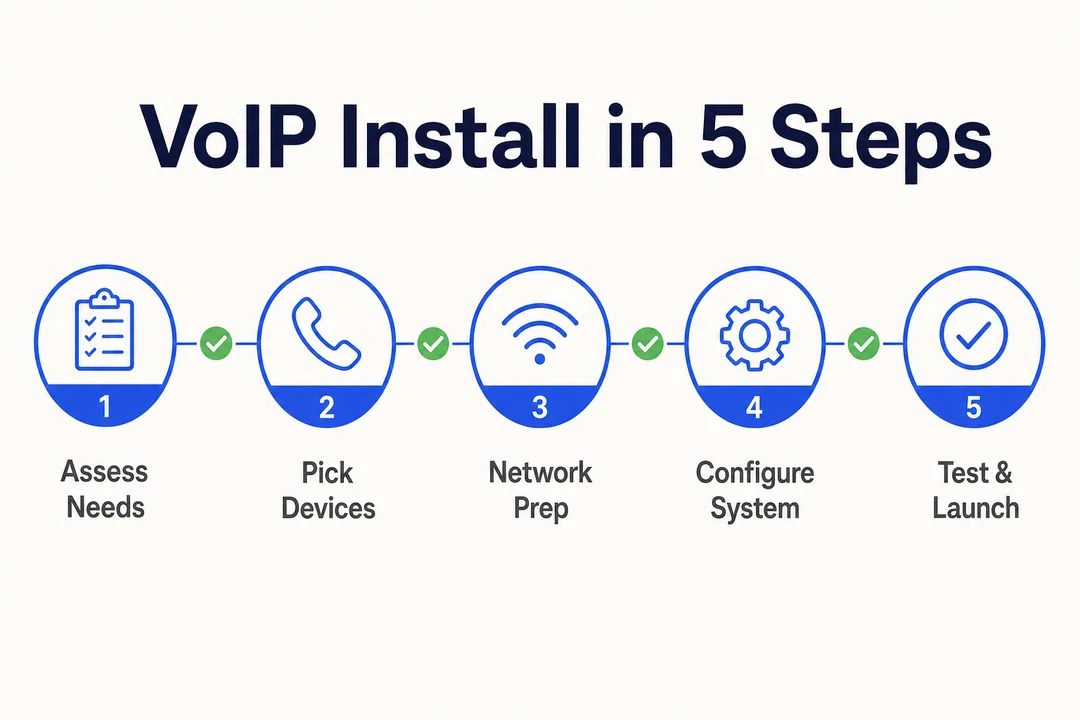
VoIP Install in 5 Steps, editorial infographic supporting the article body.
VoIP Install in 5 Steps

What You Need Before You Start

A smooth setup depends on preparation more than hardware. In practice, most installation delays come from missed details such as unclear routing, missing user lists, or weak network stability.

Internet basics in plain language

Your internet connection does not need to be perfect, but it does need to be stable. A common rule of thumb for bandwidth requirements is about 100 kbps per concurrent call for both upload and download.

Before you begin, check:

  • Speed and stability
    Fast internet helps, but stable internet matters more than raw speed.

  • Latency (delay between speaking and hearing)
    If latency gets too high, conversations feel delayed.

  • Jitter (inconsistent packet timing that makes audio choppy)
    High jitter often causes robotic or broken audio.

  • Testing during normal business hours
    Run tests when your network is actually busy, not late at night.

  • Ethernet for main desk users
    A wired Ethernet connection is usually more reliable than Wi-Fi.

  • Quality of Service (QoS) (a setting that prioritizes voice traffic)
    If your router supports 服务质量(QoS), enable it to help keep calls clear during busy periods.

Device options and when each makes sense

You do not need every device type. Choose the path that fits how your team works.

  • IP电话
    Best for front desk staff, fixed office users, or teams that prefer a familiar desk-phone workflow.

  • Softphone
    Best for remote staff, mobile users, startups, and flexible teams. A 软电话 usually runs on a laptop or smartphone.

  • Analog terminal adapter (ATA)
    使用 analog terminal adapter only if you must keep older analog phones.

  • Headsets
    A good headset often improves call clarity more than an expensive phone does.

What to gather before provider setup

Before opening your VoIP provider portal, have this checklist ready:

  • User list
    Who needs access, and on which device?

  • Extension plan
    Decide extension numbers before setup starts.

  • New numbers or numbers to port
    Confirm what stays, what changes, and what needs 号码移植.

  • 工作时间
    Set open, closed, and holiday behavior.

  • Greetings
    Prepare your main greeting and voicemail recordings.

  • Voicemail owners
    Decide who receives missed calls by team or function.

  • Routing basics
    Define the main line, departments, forwarding rules, and backup destinations.

  • Admin access and contact owner
    Make sure one person owns the account and can approve changes with the VoIP provider.

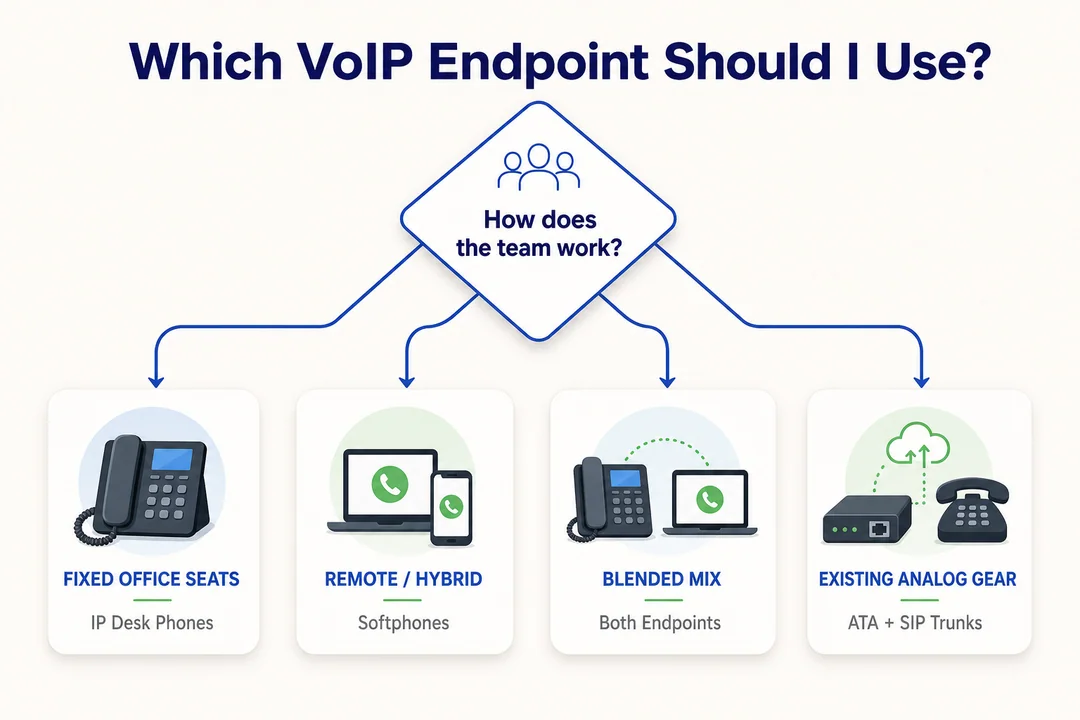
Which VoIP Endpoint Should I Use?, editorial infographic supporting the article body.
Which VoIP Endpoint Should I Use?

If you want a faster planning pass before go-live, use a downloadable setup worksheet or internal VoIP installation requirements and checklist document so nothing important gets missed.

Choose the Right Installation Path for Your Setup

权利 business VoIP setup depends less on features and more on where people work and how they answer calls. For many teams, the simplest option is also the best one.

设置类型 最适合 What You Need Setup Complexity Typical Speed
Softphone-only Remote teams, startups, home office VoIP, mobile users App, headset, stable internet 最快
Desk phones Front desk, office-based staff, customer-facing teams IP电话, Ethernet, provider account 中度 快速
混合动力 Mixed office and remote teams Desk phones + softphones 中度 Fast to moderate
ATA-based Teams keeping legacy analog devices Existing analog phone + analog terminal adapter 中度 中度

Softphone-first installation

A 软电话-first approach is usually the easiest path for a 小型企业电话系统.

  • Best for remote or hybrid users
  • Lowest hardware cost
  • Fastest rollout
  • Often just requires the app, login details, and a headset

For most small teams, this is the lowest-friction starting point.

Desk phone installation

一个 IP电话 still makes sense when staff stay at a fixed desk or answer a high volume of calls.

  • Best for front desks and reception
  • Common in office-based workflows
  • Usually works best with wired Ethernet
  • Feels familiar for users moving from traditional phones

Hybrid setup and ATA edge case

A hybrid setup combines IP电话 users in the office with 软电话 users working remotely. This is often the most practical option for growing teams.

使用 analog terminal adapter only when an older analog phone must remain in service. It works, but it should not be the default choice unless legacy hardware truly matters.

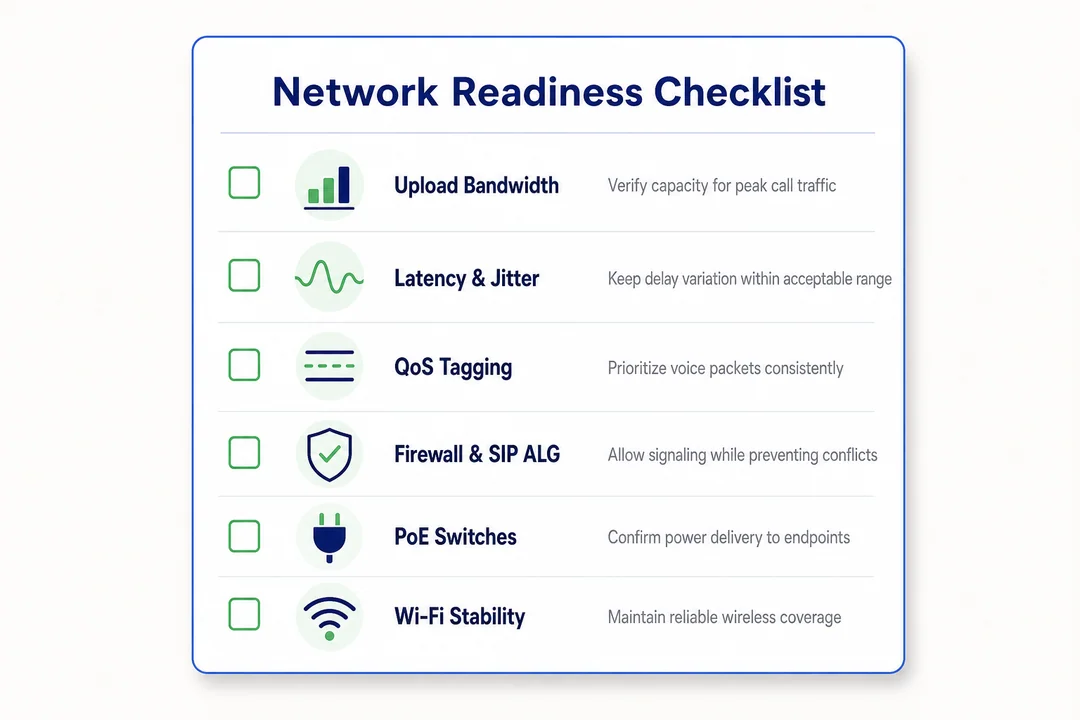
Network Readiness Checklist, editorial infographic supporting the article body.
Network Readiness Checklist

How to Install a VoIP Phone System Step by Step

The easiest way to think about voip phone system installation is to move in order: prepare the network, set up the account, connect devices, configure call handling, and test before launch. If you are wondering how to set up VoIP phone system for small business use, the sequence below covers the most common hosted setup.

  1. Confirm internet and network readiness
  2. Choose your provider and create the admin account
  3. Add users, extensions, and phone numbers
  4. Install and connect devices
  5. Configure call handling and voicemail
  6. Apply simple network optimization
  7. Test everything before going live
  8. Train users and launch in phases if needed
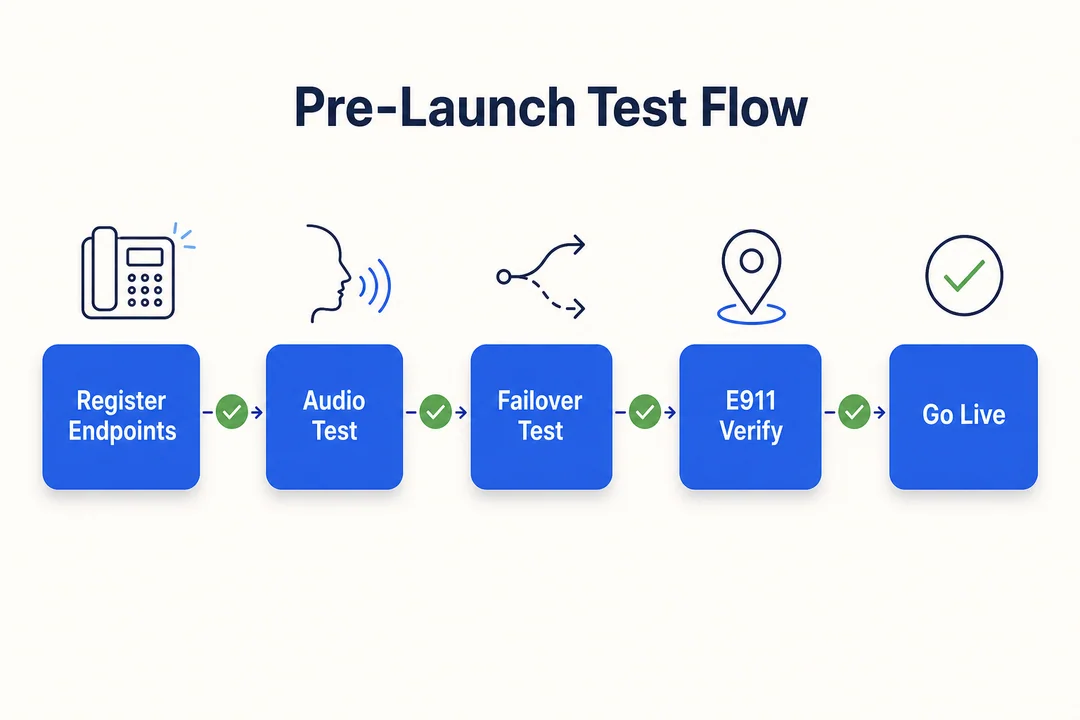
Pre-Launch Test Flow, editorial infographic supporting the article body.
Pre-Launch Test Flow

Step 1: Confirm internet and network readiness

Start with the network, not the phones. Many VoIP issues come from skipped prep rather than the phone system itself.

Check these basics first:

  • Run a speed test
  • Confirm network stability during working hours
  • 使用 Ethernet for key desk users where possible
  • Make sure the router is reliable and not overloaded

A faster internet plan does not automatically guarantee better calls. What matters is consistent performance under normal use. If your team already experiences lag during video calls or large file uploads, fix that first before moving into voice rollout.

Step 2: Choose your provider and create the admin account

Next, choose a hosted VoIP provider and create the main admin account. This is where your settings, numbers, users, and devices will be managed.

During this step, decide whether to:

  • Get new business numbers
  • Start 号码移植 for existing numbers
  • Set one admin owner for billing and changes

If you are porting numbers, keep your current phone service active until the port is fully complete. Do not cancel early. That is one of the most avoidable setup mistakes in VoIP troubleshooting.

Step 3: Add users, extensions, and business phone numbers

Once the account is ready, create your users and assign numbers logically.

设置:

  • Individual users
  • Extension numbers
  • Main company line
  • Department lines if needed
  • Direct inward numbers for key staff

For small teams, a simple extension plan is enough. For larger teams, grouping users by sales, support, or operations makes the system easier to manage later. Keep the numbering pattern clean so future hires can be added without confusion.

Step 4: Install and connect your devices

Now connect the devices your team will use.

对于一个 软电话 setup:

  • Download the provider app
  • Log in with user credentials
  • Test microphone, speaker, and headset settings

For an IP电话 setup:

  • Connect the phone to power and network
  • 使用 Ethernet when possible
  • Follow the provider’s provisioning steps

For legacy hardware:

  • 使用 analog terminal adapter only if older analog phones must remain

Some devices may ask for SIP (a signaling protocol used to start and manage calls) credentials, but most hosted systems keep this part simple.

Step 5: Configure basic call handling

This is where your phone system starts behaving like a real business line rather than just a set of devices.

Configure the basics:

  • 工作时间
  • Main greeting
  • Voicemail
  • 自动服务员 for menu options
  • Call forwarding
  • Ring groups
  • Main 呼叫路由
  • 出境 caller ID

Keep it simple at first. A short greeting, one main menu, and clear fallback routing are enough for many small teams. You can always add more later once real call patterns are visible.

Step 6: Apply simple network optimization

If your network gear supports 服务质量(QoS), turn it on. 服务质量(QoS) is a setting that gives voice traffic higher priority than less time-sensitive activity like downloads.

This helps when:

  • multiple people are online at once
  • large files are moving across the network
  • call quality drops during busy periods

Do not overcomplicate this step. For most SMB environments, basic QoS plus wired connections for key users is enough. If calls still fail to register or connect, review whether the firewall or router settings are interfering with the service.

Step 7: Test everything before going live

A system is not ready just because users can log in. Test it in real conditions before launch.

Run these checks:

  • Inbound calls to the main number
  • Outbound calls from each user
  • Extension-to-extension calling
  • Transfers
  • Hold and mute functions
  • Voicemail
  • Caller ID
  • Main 呼叫路由
  • Ring groups and forwarding

If possible, test during your normal office load. In practice, this is when hidden issues appear, especially with shared Wi-Fi or overloaded consumer-grade routers.

Step 8: Train users and launch in phases if needed

The final step is people, not hardware. Show users the few things they need on day one:

  • how to answer and transfer calls
  • how to use hold and mute
  • how to check 语音留言
  • how to switch between desk phone and app if needed

For most very small teams, a same-day launch is realistic. For larger teams, a phased rollout is safer. Start with one group, confirm call quality and routing, then expand. Also confirm who owns future admin changes after launch so the system stays organized.

If your team wants an extra layer of prep, a simple pre-launch worksheet or VoIP installation requirements and checklist can help standardize testing before go-live.

Common VoIP Installation Mistakes to Avoid

Most setup issues are preventable. They usually come from rushed prep, unclear routing, or weak testing rather than the phone platform itself.

  • Skipping internet readiness checks
    Why it causes problems: weak network stability leads to dropped or distorted calls.
    Quick fix: run speed and reliability tests before installing devices.

  • Relying too heavily on unstable Wi-Fi
    Why it causes problems: Wi-Fi fluctuations are a common cause of poor call quality.
    Quick fix: use wired connections for fixed users and key desks.

  • Ignoring QoS or router limitations
    Why it causes problems: voice traffic competes with other internet use, which hurts latency and jitter management.
    Quick fix: enable 服务质量 if available and upgrade an outdated router if needed.

  • Starting number porting too late
    Why it causes problems: 号码移植 often takes longer than account setup.
    Quick fix: begin the porting request early and track the provider timeline.

  • Canceling old service too early
    Why it causes problems: you may lose call continuity before the transfer finishes.
    Quick fix: keep the old service active until the port is confirmed complete.

  • Skipping call flow setup and testing
    Why it causes problems: callers reach the wrong person or hit dead ends.
    Quick fix: test greetings, routing, ring groups, and voicemail before launch.

  • Buying more hardware than needed
    Why it causes problems: it adds cost and slows deployment.
    Quick fix: start with a 软电话-first model unless desk phones are clearly needed.

  • Overlooking a firewall issue when calls fail
    Why it causes problems: some firewall settings may block registration or audio.
    Quick fix: review provider guidance and basic network settings during VoIP troubleshooting.

A Simple Post-Installation Checklist

A phone system is ready when users can actually work with it, not just when the account is live. Use this VoIP installation checklist to confirm your business phone setup is operational.

类别 What to Verify
Users Every user can place and receive calls on their assigned device
Numbers Main number, direct numbers, and extensions route correctly
特点 Voicemail, transfers, forwarding, and caller ID all work as expected
设备 Desk phones, apps, and headsets stay connected and sound clear
网络 Call quality is stable during normal business hours
文件 Save admin access, extension list, greetings, and 呼叫路由 规则

一个好 VoIP installation checklist should also confirm who owns account changes after launch. Save the admin login, extension map, and greeting files in one place so future updates are easier and less risky.

When DIY Installation Is Enough and When to Get Help

For many small teams, DIY installation is enough. A standard business VoIP setup 正在使用 hosted VoIP can often be handled internally without much difficulty.

DIY is usually enough when…

  • you are a solo user or home office professional
  • your team is small
  • you are using a standard softphone setup
  • you only need basic desk phone deployment
  • you do not need complex integrations or advanced routing

Get help when…

  • you have multi-location routing
  • you need CRM or helpdesk integration
  • your workflows are compliance-sensitive
  • you handle high call volume or run an 自动拨号 workflow
  • you have several departments and layered call flows
  • your team has limited internal IT time

Support is helpful because of complexity, not because basic setup is impossible. A hosted platform designed for fast activation can reduce friction for distributed teams. In that context, a 云呼叫中心 solution like Flyfone may be relevant if your environment needs quick deployment and cloud telephony infrastructure that scales without a long setup cycle.

结论

A successful voip phone system installation usually comes down to four stages: prepare, choose, install, and test. If you get the network basics right, choose the right device path, and verify routing before launch, the process is much more manageable than it first appears.

Most avoidable problems come from skipped preparation, rushed number transfers, or weak testing. That is why a simple VoIP installation checklist is often more useful than adding extra hardware or settings too early.

Before go-live, review your provider's onboarding steps, confirm your routing and voicemail setup, and use a checklist or testing worksheet to make sure nothing important gets missed. If you want a structured fit assessment for your business phone rollout, 预约专属演示 与 Flyfone 团队一起。

常见问题

What is VoIP phone system installation?

VoIP phone system installation is the process of setting up internet-based business calling in place of a traditional telephone line. It covers signing up with a provider, assigning phone numbers, connecting devices, and configuring call routing rules so the system is ready to use.

How do I install a VoIP system for my business myself?

A self-install usually follows five steps:

  1. Check internet connection and available bandwidth.
  2. Create an account with a VoIP provider.
  3. Set up users and assign phone numbers.
  4. Configure call routing.
  5. Connect devices (softphone or IP phone) and test call quality.

What do I need for a successful VoIP installation?

You need a stable internet connection (allow at least 100 kbps for each concurrent call), compatible devices (IP phones or softphones), a router that supports QoS so voice traffic can be prioritized, and the configuration details supplied by your service provider.

Is VoIP better than a traditional phone line for business?

VoIP wins on cost and flexibility. It scales quickly, integrates with other software, and supports remote work. Traditional landlines only make sense when a business specifically needs a fixed line that does not depend on the internet.

Why is my VoIP call quality unstable?

Call quality issues usually trace back to one of these causes:

  • Inconsistent or insufficient bandwidth.
  • High latency or jitter on the internet connection.
  • No QoS configured on the router, so voice traffic isn't prioritized.
  • Using Wi-Fi instead of a wired Ethernet connection.

Can I keep my existing phone number when moving to VoIP?

Yes. You can keep the existing number through "number porting." Important: do not cancel the old phone service until porting has fully completed, otherwise you risk losing the number.

How long does VoIP installation take?

A small softphone-based deployment can be live within a few hours. If you need to port phone numbers or configure more complex routing, expect the timeline to stretch from several days to a few weeks.