Call Center KPIs

Call Center KPIs for Customer Experience: What to Track


Call center managers face a common trap: dashboards packed with metrics, yet customer satisfaction keeps declining. You hit Average Handle Time targets every week while CSAT scores drop. Your team tracks 20+ KPIs, but customers still complain about repeat calls and long holds.

The problem isn’t measurement—it’s measuring the wrong things. Traditional call centers prioritize efficiency metrics like call volume, handle time, and agent utilization because they’re easy to track. But customers don’t judge service by how efficient your operation looks internally. They care about one simple question: “Was my problem solved easily?”

This guide cuts through the noise. You’ll learn which five call center KPIs actually drive customer satisfaction, why experience metrics outperform efficiency metrics, and how to prioritize KPIs without drowning your team in data.


Key Takeaways Call Center KPIs

  • What You’ll Learn:Why fewer KPIs produce better results: Call centers tracking 5-7 core customer experience metrics consistently improve satisfaction faster than teams monitoring 20+ operational statistics. The reason is simple—focus drives action. When priorities are clear, agents make better decisions during calls instead of wondering which metric matters most.The metrics that reveal customer perception: Customer Satisfaction Score (CSAT), Net Promoter Score (NPS), and First Call Resolution (FCR) measure outcomes customers actually feel. Efficiency metrics like Average Handle Time (AHT) support these goals but should never override them—speed without resolution destroys trust.

    How declining KPIs show up in operations: Poor customer experience metrics don’t stay hidden in dashboards. They surface as repeat calls (low FCR), increased escalations (high customer effort), negative reviews (low CSAT), and ultimately churn (declining NPS). Each symptom points to specific friction in your customer journey.

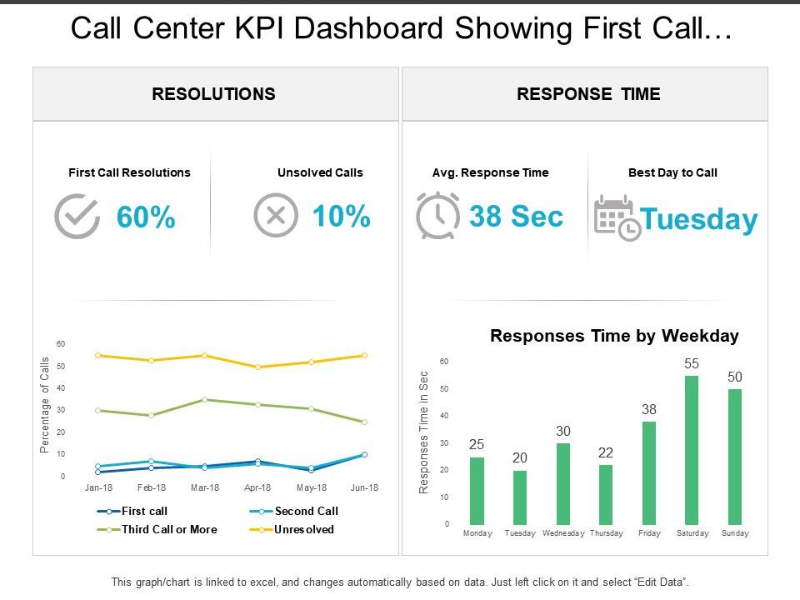
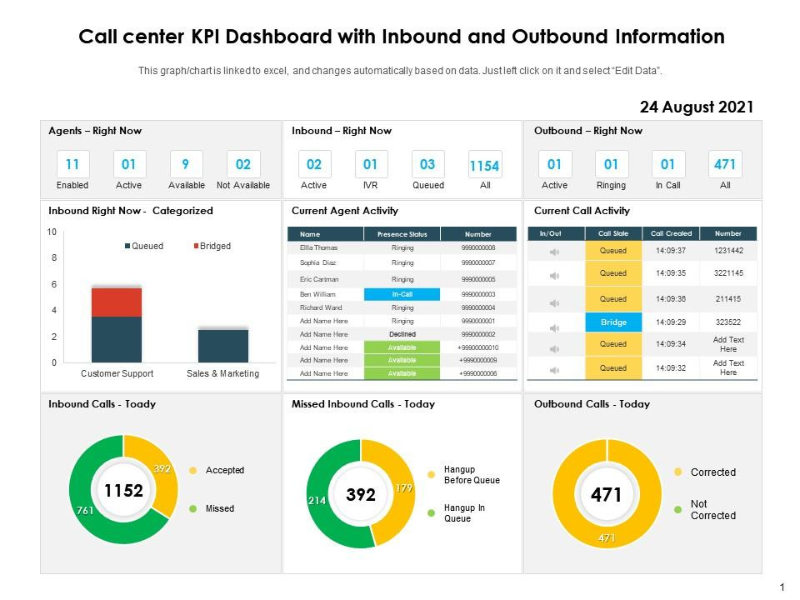
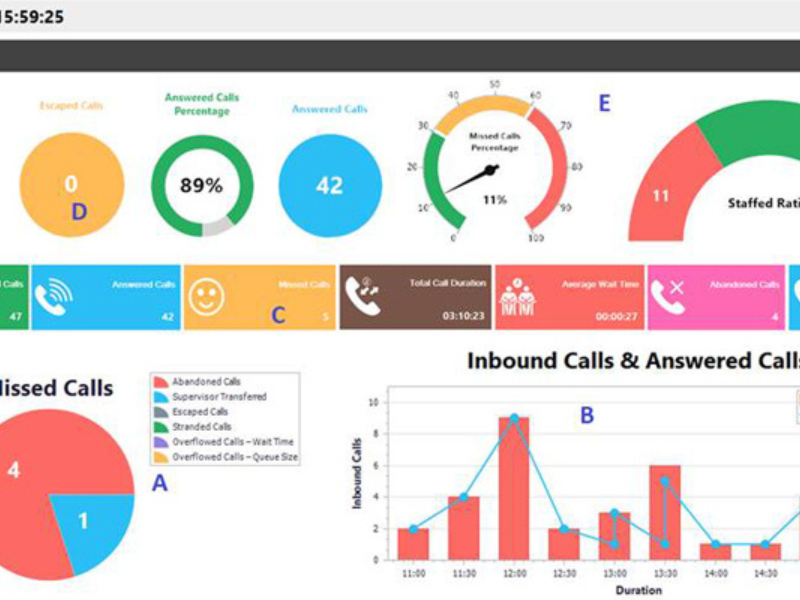
    Building dashboards that drive decisions: The best KPI dashboards help managers and agents make real-time decisions—not just generate reports. When metrics are clear and actionable, teams spot problems early and fix them before they become systemic.


Why Customer Experience–Focused Call Center KPIs Matter

Call centers used to be measured mainly as cost centers. Speed, volume, and handle time dominated dashboards. Today, that mindset breaks customer experience.

Customers don’t judge a call by how efficient your operation looks internally. They judge it by one question: “Was my problem solved easily?” CX-focused KPIs answer that question directly.

Tracking too many metrics creates noise. Teams chase targets without understanding impact. A common example is Average Handle Time pushed too low. Agents rush calls, customers feel dismissed, and issues resurface. On paper, performance looks strong. In reality, loyalty drops.

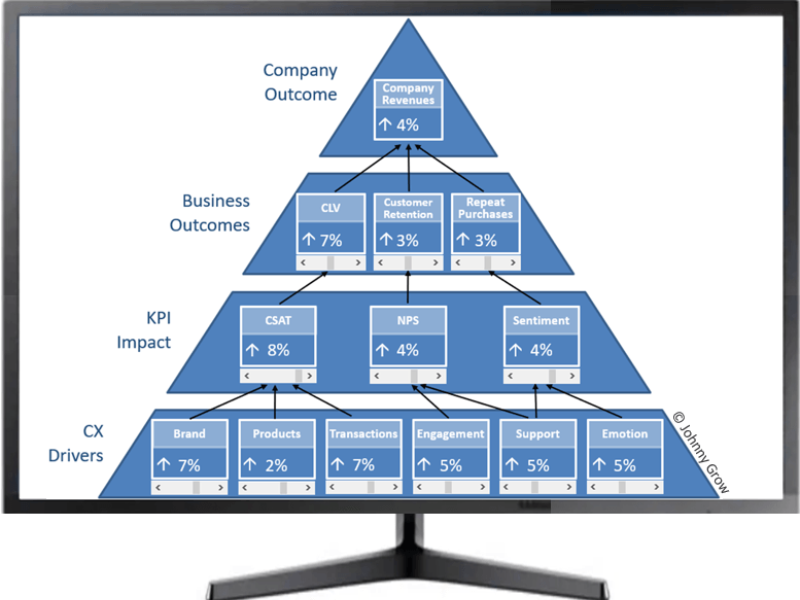
Customer experience KPIs act as a reality check. They connect call outcomes to customer perception, effort, and trust. When these KPIs move in the wrong direction, they signal real business risk: repeat contacts, negative word of mouth, and churn.

Real-world example:

A 200-agent contact center set an aggressive Average Handle Time target: reduce from 8 minutes to 5 minutes per call. Within three months, the team hit the goal consistently. Management celebrated the efficiency gain.

But the cost became clear in other metrics:

  • First Call Resolution dropped from 78% to 61%—agents rushed calls and didn’t fully resolve issues
  • Repeat call volume increased 34%—customers called back multiple times for the same problem
  • CSAT scores declined from 4.2 to 3.6 out of 5—customers felt dismissed and unheard
  • Overall resolution time increased—counting all callbacks, customers spent MORE time getting help despite shorter individual calls

The operation looked efficient on paper (faster calls, higher call volume handled). In reality, costs rose due to duplicate handling, agent morale suffered from frustrated repeat callers, and customer loyalty eroded.

This is why customer experience KPIs matter. They act as reality checks. When efficiency metrics improve but experience metrics decline, that’s a warning signal—not success. CX KPIs keep teams focused on outcomes customers actually notice: resolution, effort, and satisfaction.

That’s why CX KPIs matter. They keep teams focused on outcomes customers feel, not just numbers managers see.


What Makes a KPI a Customer Experience KPI

Definition: Customer Experience KPI

A customer experience KPI measures how customers perceive and feel about an interaction. It focuses on satisfaction, effort, and resolution from the customer’s point of view.

Unlike operational metrics, CX KPIs are usually lagging indicators. They reflect what already happened during the interaction. This makes them powerful. They summarize the real impact of your service quality.

CX KPIs answer questions like:

  • Was the issue resolved?
  • Was the process easy?
  • Would the customer trust us again?

If a metric doesn’t connect clearly to these questions, it’s not a CX KPI.


How Poor CX KPIs Show Up in Real Life

When CX KPIs decline, symptoms appear fast.

  • Repeat calls increase, often linked to low First Call Resolution.
  • Customer complaints rise, signaling low CSAT or high effort.
  • Escalations grow, showing agents couldn’t resolve issues confidently.
  • Churn increases, often following poor NPS trends.

Each symptom points to friction in the customer journey. CX KPIs help you spot and fix these issues early, before they become systemic.


CX KPIs vs Efficiency Metrics

Area CX KPIs Efficiency Metrics
Primary focus Customer perception Internal productivity
Typical owner CX or support leadership Operations management
Customer impact Direct and visible Indirect
Risk if misused Misreading sentiment Harming experience


The 5 Most Important Call Center KPIs for Customer Experience

Customer Satisfaction Score (CSAT)

CSAT measures how satisfied customers feel right after an interaction. It’s usually collected through a short post-call or post-chat survey.

CSAT reflects immediate sentiment. That makes it one of the fastest signals of experience quality. A single bad process change often shows up here first.

Example question:
“How satisfied were you with the support you received today?”

CSAT works best when surveys are short and sent immediately. Delayed surveys reduce accuracy. Low response rates can also skew results toward extreme opinions.

常见陷阱:

  • Asking too many questions.
  • Sending surveys long after the call.
  • Using CSAT alone without context from other KPIs.

Used correctly, CSAT tells you how customers feel while the experience is still fresh.


Net Promoter Score (NPS)

NPS measures loyalty by asking how likely a customer is to recommend your company. It groups responses into promoters, passives, and detractors.

Call center interactions heavily influence NPS, especially for support-driven businesses. A single unresolved issue can turn a neutral customer into a detractor.

NPS is best for spotting long-term trends. It’s less useful for evaluating individual calls. Use it to understand whether your overall support experience builds trust over time.


First Call Resolution (FCR)

FCR tracks whether a customer’s issue is fully resolved in the first interaction. It’s one of the strongest predictors of satisfaction and loyalty.

High FCR reduces effort. Customers don’t want to repeat themselves. They want closure.

How it works in practice:
A billing issue resolved during the first call leads to higher CSAT and fewer repeat contacts. The same issue escalated twice increases effort and frustration.

How to improve First Call Resolution:

1. Implement skill-based routing
Route calls based on issue complexity and agent expertise, not just who’s available next. Billing disputes should reach agents trained in payment systems. Technical troubleshooting goes to product specialists. Poor routing forces agents to transfer calls mid-conversation, resetting customer context and damaging FCR.

Example: A contact center routing all calls to a general queue saw 40% of technical calls transferred at least once. After implementing skill-based routing, technical call transfers dropped to 8%, and FCR improved from 68% to 79%.

2. Give agents instant access to customer history
Agents waste 30-45 seconds per call looking up account information while customers wait. Worse, they often can’t see previous interactions—forcing customers to re-explain issues.

Solution: Integrate your call center platform with your CRM so account details, previous tickets, and interaction history appear automatically when calls connect. This eliminates the “let me pull up your account” delay that frustrates customers and consumes agent time.

3. Create clear escalation paths
When agents can’t resolve issues independently, they need fast access to supervisors or specialists. Unclear escalation processes lead to:

  • Long holds while agents search for help
  • Multiple transfers that reset context
  • Customers re-explaining problems to 3+ people

Best practice: Enable “warm transfers” where the first agent briefs the specialist before handing off the call. This maintains continuity and prevents customers from repeating their story.

4. Build comprehensive knowledge bases
Agents need quick answers to non-routine questions. When they can’t find information fast, they either guess (risking incorrect resolution) or transfer unnecessarily (harming FCR).

Effective knowledge bases are:

  • Searchable by keywords, not buried in folder structures
  • Updated regularly based on new issues
  • Written in plain language agents can quickly scan
  • Accessible from the same screen as the call interface

Realistic FCR benchmarks:

  • Industry average: 70-75%
  • Top-performing contact centers: 80-85%
  • World-class operations: 85%+

If your FCR is below 65%, audit your routing, training, and knowledge access systems. The issue is rarely “agents aren’t trying hard enough”—it’s usually a systems or process problem preventing them from resolving issues.


Customer Effort Score (CES)

CES measures how easy it was for the customer to get help. It focuses on effort, not speed.

An interaction can be fast but still frustrating. Multiple transfers, unclear explanations, or complex steps increase effort even if resolution is quick.

Customers consistently prefer simple, predictable experiences. Lower effort builds trust more reliably than speed alone.


Call Abandonment Rate

Call abandonment rate shows how many customers hang up before reaching an agent. High abandonment damages trust and signals perceived unresponsiveness.

Abandonment is often a symptom. Long queues, poor staffing, or unclear IVR paths usually cause it.

Reducing abandonment improves experience only when root causes are addressed, not when the metric is optimized in isolation.


Supporting Call Center KPIs That Indirectly Affect Customer Experience

Supporting Metrics That Enable Customer Experience

While the five core KPIs (CSAT, NPS, FCR, CES, abandonment) directly measure customer perception, operational metrics act as leading indicators. They help you prevent CX problems before they show up in satisfaction scores.

Average Speed of Answer (ASA) shapes first impressions

Customers form opinions about your service quality before speaking with an agent. A two-minute wait feels like abandonment. A 15-second wait feels responsive.

ASA benchmarks:

  • Industry standard: 20-30 seconds
  • Good performance: 15-20 seconds
  • Excellent performance: <15 seconds
  • Problem threshold: >45 seconds (abandonment risk increases sharply)

When ASA degrades, customers often start interactions frustrated—making even perfect agent performance feel inadequate. They remember the wait, not just the resolution.

First Response Time (FRT) must stay consistent across channels

In omnichannel environments, customers expect consistency. If phone support answers in 20 seconds but email takes 8 hours, frustration builds even when both channels eventually resolve issues.

The problem: customers don’t see channels as separate. They see one company responding at different speeds. Inconsistent FRT creates perception of neglect: “They answer phones immediately but ignore my emails.”

Best practice: Set target FRT for each channel and monitor compliance:

  • Phone: <30 seconds
  • Live chat: <2 minutes
  • Email: <4 hours during business hours
  • Social media: <1 hour

These targets should match your customer base’s expectations. B2B enterprise support can often sustain longer FRT than B2C consumer services.

Average Handle Time (AHT) requires careful balance

AHT is useful when tracked correctly—and dangerous when optimized incorrectly.

The right approach: Track AHT by issue type. Different problems need different handling times:

  • Password reset: 2-3 minutes
  • Billing inquiry: 5-7 minutes
  • Technical troubleshooting: 8-12 minutes
  • Dispute resolution: 10-15 minutes

Optimizing all interactions to the same target creates problems. Agents rush complex issues, damaging FCR. Conversely, agents spend excessive time on simple requests, creating unnecessary queue buildup.

The wrong approach: Setting a single AHT target (e.g., “all calls under 6 minutes”) and tracking agents against it. This incentivizes speed over resolution.

Warning signs your AHT targets are hurting CX:

  • FCR declining while AHT improves
  • Agents frequently cutting calls short at the target time
  • Customers calling back with unresolved issues
  • CSAT dropping despite hitting AHT goals

The principle: Operational metrics should support customer experience KPIs, not compete with them. When efficiency metrics improve while experience metrics decline, efficiency is being optimized incorrectly.


How to Prioritize Call Center KPIs Without Tracking Everything

More KPIs don’t lead to better decisions. Clear priorities do.

Start with a core set of five CX KPIs: CSAT, NPS, FCR, CES, and abandonment rate. These cover satisfaction, loyalty, resolution, effort, and access.

As teams scale, supporting metrics help diagnose issues, not replace CX goals. Review KPIs quarterly. Remove metrics that don’t drive action.

A simple rule works well: if a KPI doesn’t change behavior, it doesn’t belong on the dashboard.


Common Mistakes When Using Call Center KPIs

  • Mistake 1: Optimizing AHT at the expense of resolutionA mid-size contact center reduced Average Handle Time from 6 minutes to 4 minutes by implementing strict time targets. Supervisors praised agents who finished calls fastest. The efficiency gains looked impressive in weekly reports.Within two months, the consequences became clear:
    • First Call Resolution dropped from 78% to 61%—agents rushed through calls without fully resolving issues
    • Repeat call volume increased 34%—customers had to call multiple times for the same problem
    • Customer Satisfaction declined from 4.2 to 3.6—customers felt dismissed and unheard

    The paradox: individual calls became shorter, but total resolution time increased when counting all the callbacks. Customers spent more aggregate time getting help. Costs rose despite “improved efficiency.”

    The lesson: AHT should be monitored, not minimized. Track it by issue complexity. Simple requests should be fast. Complex problems need appropriate time.

    Mistake 2: Using NPS for individual agent evaluation

    Net Promoter Score measures loyalty toward the company, not individual agent performance. Yet many call centers use NPS as a performance metric, even tying it to agent compensation.

    This creates two problems:

    Problem 1 – Selection bias:
    Agents avoid handling difficult cases because they know complex issues produce lower NPS scores regardless of handling quality. They become experts at transferring “risky” calls before they own them. FCR suffers as agents prioritize protecting their scores over resolving issues.

    Problem 2 – Survey coaching:
    When agents know they’re judged by NPS, they start coaching customers: “If you’re satisfied with our help today, please give us a 9 or 10 on the survey—anything less really hurts my evaluation.” This makes the data meaningless.

    The fix: Use NPS for strategic decisions about products, policies, and overall service quality. Use CSAT for agent-level coaching and evaluation—it more accurately reflects individual interaction quality.

    Mistake 3: Tracking too many metrics without clear priorities

    A BPO operation tracked 28 different KPIs across their management dashboard. Every week, the leadership team spent 4+ hours in reporting meetings reviewing charts, graphs, and trend lines.

    Despite all this measurement, they couldn’t answer simple questions:

    • Which metrics actually predict client satisfaction?
    • Should we prioritize reducing AHT or improving FCR?
    • When metrics conflict, which takes precedence?

    Analysis paralysis set in. Teams debated dashboard design instead of improving service. Agents received mixed signals—praised for AHT but criticized for low FCR, without clarity on which mattered more.

    The solution: Start with 5-7 core KPIs. Add supporting metrics only when they answer specific questions or diagnose known problems. Follow this rule: if a metric doesn’t change your decisions or actions, remove it from the dashboard.

    Mistake 4: Ignoring the “why” behind the numbers

    Quantitative KPIs show what’s happening. Customer comments and call recordings explain why.

    A contact center saw CSAT decline from 4.2 to 3.8 over six weeks. The team reviewed all the usual suspects: AHT was stable, FCR hadn’t changed significantly, abandonment rate was low.

    They finally reviewed customer comment transcripts and found a pattern. Customers repeatedly wrote:

    • “I already explained this to the last agent”
    • “Why do I have to start over every time?”
    • “No one seems to know about my previous calls”

    The issue wasn’t agent skill or attitude—it was system failure. Agents couldn’t see previous interaction history during calls, forcing customers to re-explain issues every time they called back.

    The lesson: Pair quantitative KPIs with qualitative review. Read customer comments. Listen to call recordings. Numbers reveal symptoms; context reveals causes.


Using Technology to Track Customer Experience KPIs (High-Level)

Modern tools help centralize CX insights.

  • Interaction analytics reveal recurring pain points.
  • Smart routing reduces effort and transfers.
  • Real-time alerts flag CX risks early.

Technology supports decisions, but KPIs define direction.


How to Start Improving Customer Experience With Call Center KPIs

  1. Step 1: Audit your current KPI dashboardStart by listing every metric you’re currently tracking. Be thorough—include metrics on agent dashboards, management reports, and executive presentations.For each metric, ask:
    • Does this directly measure customer perception? (satisfaction, loyalty, effort)
    • Does this support a metric that measures customer perception? (e.g., ASA supports abandonment rate)
    • Has this metric changed our behavior in the last 90 days?

    If the answer to all three questions is “no,” remove it.

    Most teams discover they can eliminate 40-60% of tracked metrics without losing meaningful visibility. Those eliminated metrics were creating noise, not insight.

    Step 2: Define your core five CX KPIs with clear targets

    Choose these five as your foundation:

    1. Customer Satisfaction Score (CSAT)
      Target: 4.2+ out of 5 (or 85%+ satisfaction rate)
    2. Net Promoter Score (NPS)
      Target: Industry-dependent (B2B typically 30-50, B2C consumer 50-70)
    3. First Call Resolution (FCR)
      Target: 75%+ (80%+ for competitive industries)
    4. Customer Effort Score (CES)
      Target: <3 on a 7-point scale (lower is better)
    5. Call Abandonment Rate
      Target: <5% (aim for <3% in competitive markets)

    Important: Adjust these targets based on your industry context. Debt collection operations will naturally score lower on CSAT and NPS than account onboarding teams. Benchmark against similar operations, not unrelated verticals.

    Step 3: Implement automated measurement infrastructure

    Manual KPI tracking doesn’t scale. You need systems that automatically capture data without requiring agent input or manager compilation.

    Essential automation:

    • Post-interaction surveys: SMS or email triggered immediately after call completion (within 60 seconds)
    • Call recording: Automatic recording of all interactions with searchable transcripts
    • Real-time dashboards: Live KPI displays visible to both agents and managers
    • Scheduled reports: Weekly automated summaries highlighting trends and outliers

    Without automation, KPI improvement becomes guesswork. Agents can’t self-correct because they don’t see their own performance. Managers can’t identify patterns because data arrives too slowly.

    Step 4: Review KPIs on different timescales

    Different cadences serve different purposes:

    Real-time monitoring (continuous):
    Watch for immediate problems: queue buildups, unusual abandonment spikes, system outages. Real-time alerts help supervisors intervene before small issues become crises.

    Weekly reviews (every Monday):
    Examine trend lines over the past 7 days. Did recent changes (new scripts, routing adjustments, training sessions) improve or harm KPIs? Weekly reviews show whether actions are working.

    Monthly analysis (first week of each month):
    Study patterns across 30-90 days. Identify seasonal trends, systemic improvements, or gradual degradation. Monthly reviews catch slow-moving problems that weekly data masks.

    Quarterly deep-dives (end of quarter):
    Comprehensive analysis connecting KPIs to business outcomes: revenue, retention, and cost per contact. Quarterly reviews inform strategic decisions about staffing, technology investments, and service model changes.

    Avoid daily obsession: Individual day-to-day score fluctuations are mostly noise. An agent having a bad day isn’t a trend. Three bad weeks is a problem.

    Step 5: Connect KPIs to action, not just observation

    Dashboards full of data but empty of action waste everyone’s time. For every KPI, define what action you’ll take when it moves outside acceptable ranges.

    Example action triggers:

    KPI Trigger 行动
    CSAT drops below 4.0 Review last 20 call recordings Identify common failure patterns; update training or scripts
    FCR drops below 70% Analyze transfer reasons Check if routing is sending complex issues to undertrained agents
    Abandonment spikes above 8% Check queue depth by time Adjust shift schedules or implement callback options
    NPS declines 10+ points Survey detractors directly Conduct follow-up interviews to understand root causes

    Without defined actions, KPIs become scoreboards instead of management tools.

    Step 6: Tie metrics to coaching, not punishment

    KPIs should drive improvement, not fear. When metrics are used punitively, agents game the system:

    • Rushing calls to hit AHT targets (harming FCR)
    • Transferring difficult calls to protect CSAT scores
    • Coaching customers on how to respond to surveys

    Better approach: Use KPIs diagnostically. When an agent’s FCR is low, listen to their calls. Are they undertrained on certain topics? Do they lack access to information? Are they getting routed issues outside their skill set?

    Fix the system issues first. Coach individual performance second.

    Step 7: Simplify, then maintain discipline

    Five core CX KPIs. Weekly reviews. Monthly deep analysis. Defined action triggers.

    That’s enough structure to drive continuous improvement without creating bureaucracy.

    Resist the temptation to add more metrics just because you can measure them. Every new KPI dilutes focus. Complexity doesn’t equal sophistication.

    The rule: If you can’t explain why a metric matters in one sentence, and can’t define what action you’d take if it changed—don’t track it.


FAQ – Call Center KPIs for Customer Experience

Which KPI matters most for customer experience?

First Call Resolution is often the strongest predictor, especially when combined with CSAT.

How many CX KPIs should a call center track?

Five core KPIs are enough for most teams.

Are efficiency metrics bad for CX?

No. They support CX when balanced, but harm it when optimized alone.

Can small teams use these KPIs effectively?

Yes. Simpler setups often act on insights faster.


结论

Customer experience doesn’t improve because dashboards grow more complex. It improves when teams track fewer metrics that actually matter—and act on what they reveal.

The five core KPIs covered in this guide—CSAT, NPS, FCR, CES, and abandonment rate—measure what customers feel, not just how your operation performs internally. Track these consistently, and you’ll spot friction before it becomes churn. Ignore them in favor of pure efficiency metrics, and you’ll optimize your way into customer dissatisfaction.

Your next steps:

  1. 本周: Audit your current KPI dashboard. List every metric you track. Eliminate anything that doesn’t directly measure or support customer experience.
  2. 这个月 Define clear targets for your five core CX KPIs. Make sure every agent and manager knows what “good” looks like—and why these numbers matter more than operational efficiency metrics.
  3. 本季度 Build the automation infrastructure to track these KPIs without manual effort. You can’t improve what you measure inconsistently.

The principle is simple: Five KPIs tracked religiously with clear action triggers will improve customer experience more than twenty metrics reviewed occasionally without follow-through.

Your customers don’t care how many metrics you monitor. They care whether their problems get resolved easily. Focus your measurement on outcomes they feel, and everything else gets easier.

更多信息 

索引