Click to Call Software: How to Choose the Right Tool for Faster Response and Better Team Workflows

Click to Call Software: How to Choose the Right Tool for Faster Response and Better Team Workflows


Click to Call Software: How to Choose the Right Tool for Faster Response and Better Team Workflows

Manual dialing still slows down too many sales and support teams. It wastes rep time, delays callbacks, hurts lead response time, and makes call activity harder to track across CRM, helpdesk, and website workflows. The challenge is that click to call software is not just a website button. Depending on the product, it may also include CRM dialing, call logging, routing, analytics, and team management. That is why buyers need to look beyond basic demos and compare real workflow fit. This guide explains what click to call software is, how it works, the business benefits, the features that matter most, the difference between a lightweight tool and a broader platform, and how to choose the right option without overbuying or underbuying.

What Is Click to Call Software?

Click to call software is a business calling tool that lets users start a phone call directly from a website, CRM, helpdesk, or browser interface without manual dialing. It is commonly used to improve response speed, reduce rep friction, support call tracking, and make communication workflows easier to manage.

In plain terms, the software turns a phone number or call button into an action. Instead of copying a number, opening a separate app, and dialing manually, a user clicks once and the system starts the call through 网络电话 (internet-based business calling). In many products, this also supports browser-based telephony, which means reps can place or receive calls inside a web app rather than relying on desk phones.

The term is often used alongside click-to-dial. In practice, they overlap. Click-to-dial is usually used for internal business workflows, such as a rep clicking a number in HubSpot销售团队. Click to call can also refer to website calling, where a visitor clicks “Call Now” on a pricing or contact page.

The 3 Common Forms of Click-to-Call

  • Website click-to-call: A visitor clicks a call button on a landing page, pricing page, demo page, or support page.
  • CRM click-to-dial: A sales or account rep clicks a number inside HubSpot, 销售团队, 或 Pipedrive to call without manual entry.
  • Cloud call center or cloud calling platform use case: A support or operations team uses click-to-call inside a larger workflow that includes queues, reporting, and team management.

A sales rep clicking a phone number inside HubSpot, a visitor clicking Call Now on a pricing page, and a support team handling calls inside a broader cloud workflow are all valid examples. Not every click to call software product includes routing, analytics, or team management, so category fit matters before vendor comparison.

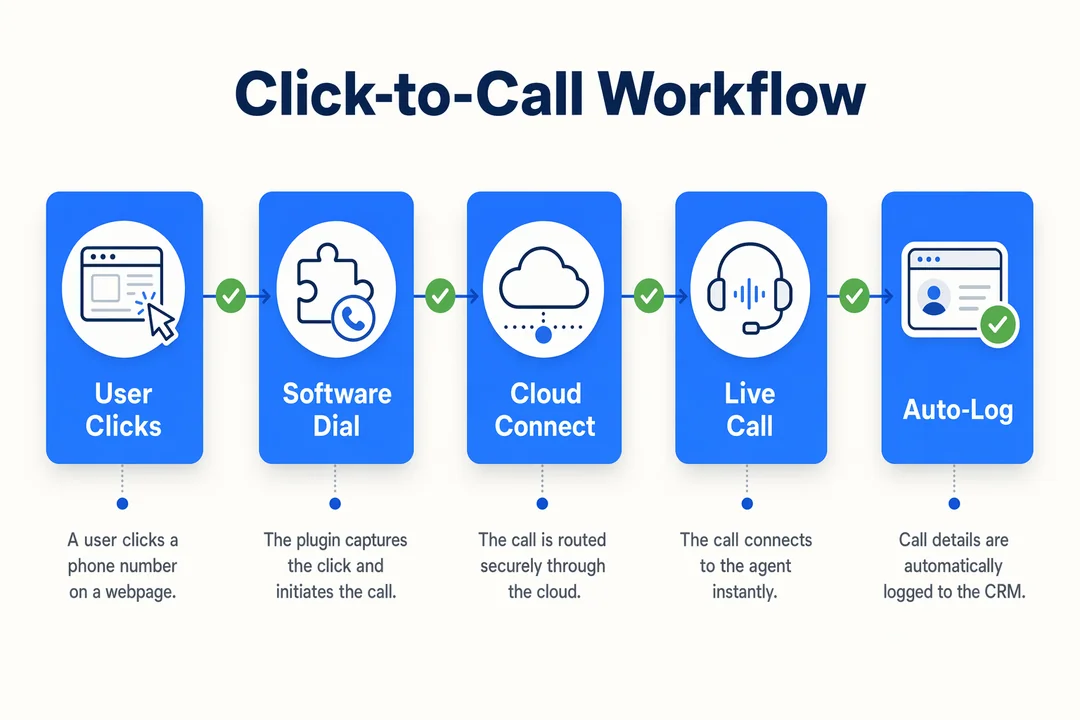
Click-to-Call Workflow, editorial infographic supporting the article body.
Click-to-Call Workflow

How Click to Call Software Works in a Business Workflow

The click itself is only the starting point. The business value comes from what happens next: context, routing, records, and visibility.

  1. A user clicks a phone number or call button.
  2. The system launches the call through 网络电话 or connected telephony.
  3. Relevant customer or lead context may appear from 客户关系管理集成 or helpdesk data.
  4. The call is recorded in the system through automatic 通话记录.
  5. 呼叫路由 sends the interaction to the right rep, agent, or queue.
  6. Activity becomes visible in dashboards, reports, or follow-up workflows.

Website Click-to-Call

A website visitor clicks “Call Now” on a pricing, demo, support, or checkout page. Depending on the setup, the action may open a mobile dialer, start a browser flow, or trigger a callback request. This is especially useful when the buyer has a high-intent question and does not want to fill out a form or wait for email follow-up.

CRM Click-to-Dial

In a sales or account workflow, a rep clicks a phone number directly inside the CRM. This avoids manual number entry, reduces context switching, and can improve lead response time. It is commonly used in sales, account management, collections, and customer support. Strong 客户关系管理集成 matters here because the best experience is not just dialing fast, but also seeing contact records, deal status, notes, and previous activity before the call starts.

What Happens After the Click Matters

This is where products separate quickly. A basic tool may only launch the call. A stronger platform also handles 呼叫路由, automatic 通话记录, 和 呼叫分析 so managers can see source, outcome, rep activity, and missed-call patterns.

That visibility supports better follow-up, clearer manager oversight, and more consistent 实时通信 across teams. The real value depends on workflow design and visibility, not just instant call initiation.

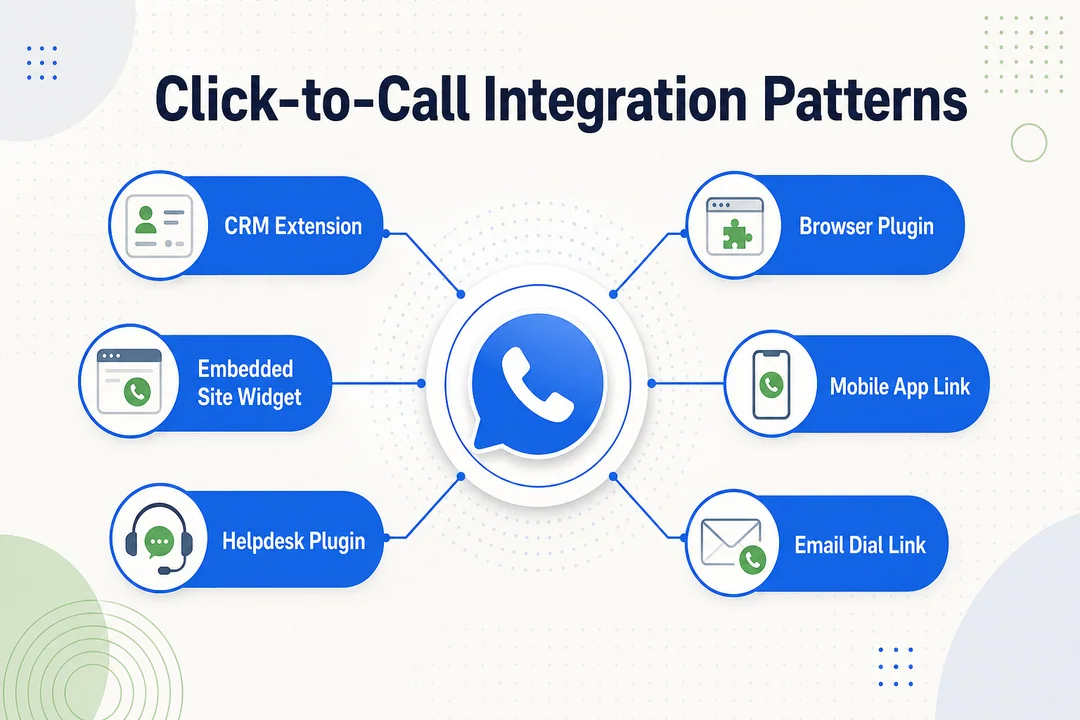
Click-to-Call Integration Patterns, editorial infographic supporting the article body.
Click-to-Call Integration Patterns

Gaps in your current call workflow? Explore Flyfone’s cloud calling capabilities and request a workflow audit at https://flyfone.com.

Business Benefits of Click to Call Software

The main value of click to call software is not convenience alone. It helps reduce workflow friction at the moment a team needs speed, context, and accountability.

For Sales Teams

Sales teams benefit first from faster follow-up. When reps can call directly from the CRM, they spend less time copying numbers, switching tabs, and fixing dialing errors. That improves 销售生产力 in a very practical way.

It also helps teams place more calls per rep without forcing them into a more complex workflow. In addition, when the system logs activity automatically, the CRM stays cleaner. That gives managers better visibility into outreach volume, contact attempts, and follow-up consistency.

For many RevOps teams, the gain is not dramatic technology. It is operational discipline: faster calling, fewer missed records, and more reliable sales activity data. In some environments, pairing click-to-dial with an 自动拨号 creates even stronger 销售生产力 when reps work through high-volume lead queues.

For Support and Service Teams

Support teams use click-to-call differently. The value often comes from moving a customer from a web page or ticket into a live conversation without forcing them to restart the issue from scratch. That can improve 客户体验, especially when the system preserves context and routes the interaction correctly.

Better routing helps urgent issues reach the right queue faster. Call recording, call notes, and activity history also support QA, escalation, and follow-up. This is especially useful when multiple agents or shifts handle the same customer over time.

For Website Conversion

On high-intent pages, click-to-call can reduce friction for visitors who want immediate answers. That is often valuable on pricing, demo, onboarding, checkout, or complex purchase pages where a short call can remove hesitation.

This does not guarantee more conversions. But it can support website conversion by helping buyers connect quickly when timing matters. For urgent or high-consideration purchases, the ability to speak with a person right away can improve both 客户体验 and response speed.

The key is fit. Click to call software works best when it is connected to the right workflow, not treated as a standalone button.

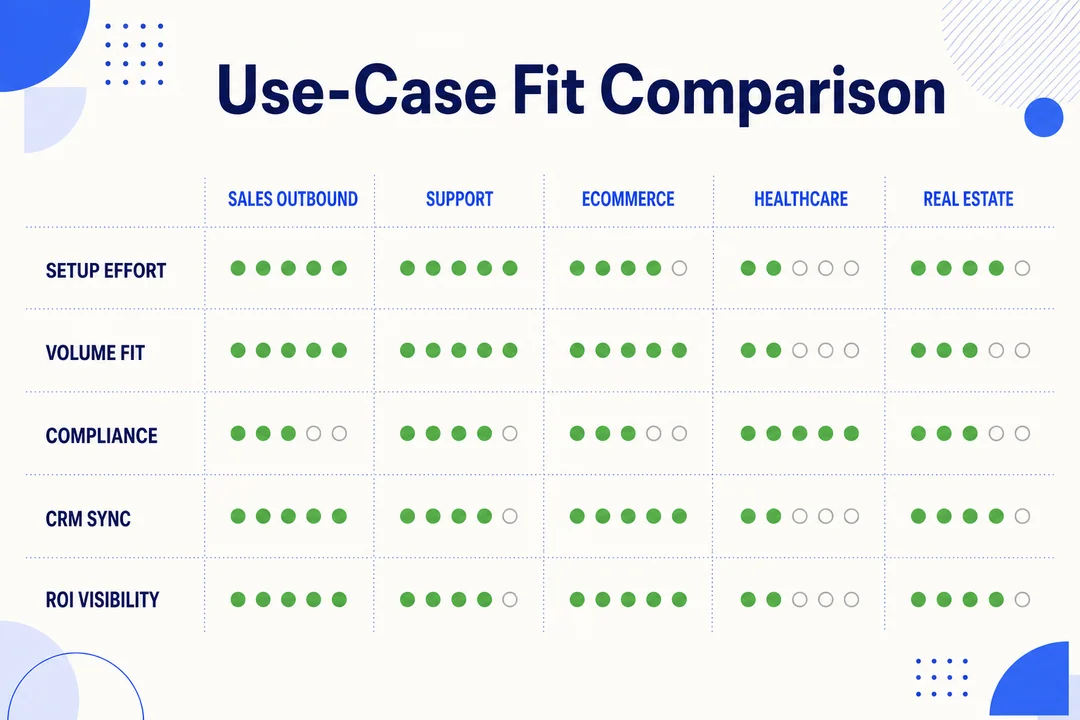
Use-Case Fit Comparison, editorial infographic supporting the article body.
Use-Case Fit Comparison

Need a call workflow that supports both website inquiries and agent operations? See Flyfone’s platform options at https://flyfone.com.

Common Use Cases by Team and Business Type

The question is not whether click-to-call exists. The real question is what form of it fits your team.

Sales Teams and RevOps

For sales teams, the most common need is CRM-based calling. Reps want to click a number inside the CRM, call immediately, and keep activity records clean. This is especially relevant for SDR and BDR teams where speed-to-lead directly affects follow-up quality.

If your team works from lead lists and relies on structured outreach, click-to-dial inside the CRM usually matters more than a website call button.

Support Teams and Contact Centers

对于 客户支持, click-to-call often appears inside helpdesk or web support flows. A user may click to call from a support page, or an agent may launch a call directly from a ticket. This works best when the system supports queue-based handling, call recording, monitoring, and clear ownership across teams.

A simple tool may be enough for a small service desk. A larger support environment often needs broader 云呼叫中心 capabilities.

High-Volume Outbound Teams

Teams running 对外宣传活动 have different needs. They often work through lead lists, repeat attempts, and productivity-focused workflows. In this case, click-to-call alone may be too limited. They may need dialer capability, better reporting, retry logic, and stronger supervisor visibility.

This is an important buying boundary. Basic click-to-call is not enough for every team, especially when outbound volume grows.

Growing or Global Businesses

As businesses add more agents, geographies, and channels, complexity rises quickly. They may need stable routing, international calling support, queue logic, manager dashboards, and even omnichannel customer engagement beyond voice.

At that point, the decision shifts from simple click-to-call toward a broader calling platform built for scale. Teams focused on website conversion alone may not need that yet. Multi-agent or cross-border operations often do.

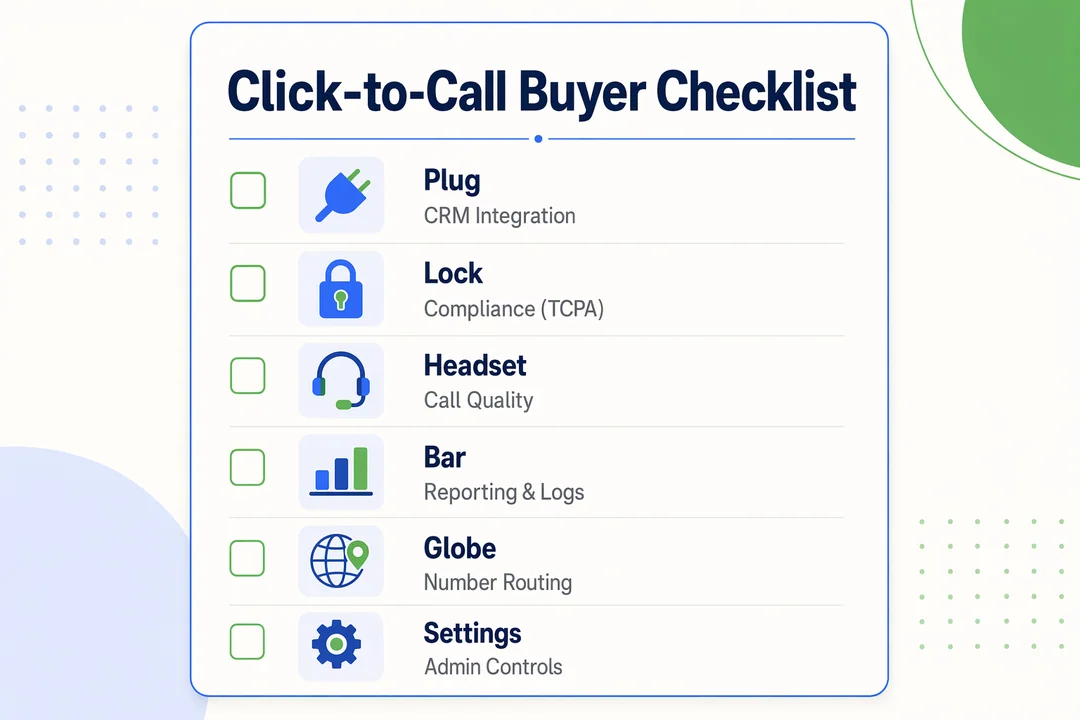
Click-to-Call Buyer Checklist, editorial infographic supporting the article body.
Click-to-Call Buyer Checklist

Must-Have Features to Look for in Click to Call Software

The most important features to compare are:

  • One-click dialing from CRM, browser, or app
  • Website call buttons and callback requests
  • 自动 通话记录
  • 呼叫路由 and queue handling
  • Reporting and 呼叫分析
  • 本地 客户关系管理集成
  • Security, support, and 扩展性

Core Functional Requirements

At a minimum, the software should let users place calls with one click from the tools they already use. That may include CRM records, browser extensions, contact lists, or business apps.

Core features to compare:

  • One-click dialing from CRM, browser, or app
  • Website call buttons
  • Callback request options
  • 自动 通话记录
  • Caller ID or number handling
  • Basic inbound and outbound support

These features answer the question: can the tool actually make calling easier day to day?

Workflow and Management Features

This is where many buyers discover the gap between a simple dialer and a team-ready system.

寻找:

  • 呼叫路由 to the right rep or queue
  • IVR where needed for inbound sorting
  • Agent or rep dashboard
  • 通话录音
  • Transcription if available
  • QA workflows or review support
  • Reporting by user, queue, source, or campaign
  • 清晰 呼叫分析 for managers

This group answers the more important question: can the software support a real workflow reliably, not just place calls?

Integration and Deployment Requirements

For most B2B teams, weak integration creates more problems than missing features. A dial button without strong 客户关系管理集成 often leaves reps switching tools and managers chasing incomplete activity records.

Key areas to evaluate:

  • Native integrations with HubSpot, 销售团队, Zendesk, 和 Pipedrive
  • Whether calls only launch or also sync notes and outcomes
  • API or webhook support for custom workflows
  • Easy onboarding
  • Low IT dependency for rollout

Strong deployment design usually means faster adoption and lower admin overhead.

Reliability, Security, and Scale

Buyers should also evaluate vendor quality, not just product features. A strong demo is not enough if support is slow, uptime is unclear, or compliance readiness is weak.

回顾:

  • 可扩展性 for more users, queues, and call volume
  • Reliability and uptime expectations
  • Encryption and access control
  • GDPR 合规性 readiness
  • Support responsiveness
  • SLA clarity
  • Transparency around setup and service expectations

This is especially important for teams handling customer data, cross-border calling, or multi-agent operations.

Download a practical vendor comparison checklist and feature scorecard from https://flyfone.com to speed up your shortlist process.

Lightweight Click-to-Call Tool vs Full Cloud Calling Platform

A lightweight tool is designed for simple call initiation. A broader platform supports inbound and outbound workflows, routing, reporting, and team operations across a growing business.

标准 Lightweight Click-to-Call Tool Full Cloud Calling Platform
Main use Simple call initiation End-to-end team calling workflows
设置 Usually fast and basic Fast or moderate, depending on workflow needs
CRM sync 通常受限 Usually deeper and more structured
路由 最少或没有 Advanced 呼叫路由 and queues
报告 Basic activity visibility Rich analytics by rep, team, queue, or campaign
规模 Best for small teams Built for multi-user growth
Outbound capability Basic click-to-dial Stronger outbound workflows and dialer options
最适合 Low-volume teams, simple website lead capture Sales, support, and operations teams needing more control

When a Basic Tool Is Enough

Many small teams do not need a full platform yet. A lightweight option is often enough when you have:

  • A small team
  • Low call volume
  • Simple website lead capture
  • Limited reporting needs
  • No complex routing
  • No major outbound workflow

In these cases, a simple VoIP provider with basic click-to-dial may be the right choice.

When You Need More Than Click-to-Call

A broader 云呼叫中心 or calling platform makes more sense when your workflow includes:

  • Multiple agents or departments
  • Outbound campaigns
  • Queue and routing needs
  • QA or call review
  • 性能跟踪
  • 全球业务
  • More formal call center infrastructure

这就是 扩展性 and analytics start to matter more than basic dialing convenience. A basic tool is not worthless. It is just not built for every stage of growth.

How to Choose the Right Click to Call Software

A practical buyer framework usually works best:

  1. Define the primary use case.
  2. Check integration depth.
  3. Review operational visibility.
  4. Assess deployment and scalability.
  5. Compare support and pricing logic.

Start with the Primary Use Case

Begin with the workflow you need to improve most. The right answer for website conversion is not always the right answer for CRM dialing, support workflows, or outbound campaigns.

Common starting points:

  • Website conversion and instant call access
  • CRM-based calling for sales reps
  • Support escalation from helpdesk or web pages
  • Outbound campaigns and list-based calling

A team searching for click to call software for small business may only need a simple tool. A growing multi-agent operation may need a broader 云通信平台.

Check Integration Depth

Look beyond whether the software can dial. Ask whether it can also log calls, sync notes, show customer context, and fit your current systems.

回顾:

  • Depth of 客户关系管理集成
  • Helpdesk compatibility
  • Automatic logging behavior
  • API flexibility
  • Workflow fit with your current stack

A polished demo can still hide weak real-world integration.

Evaluate Operational Visibility

Managers need more than a call button. They need call tracking, missed-call visibility, activity by rep or agent, and reporting by queue or campaign. That operational view is what supports coaching, staffing, and follow-up accountability.

If visibility is shallow, the tool may create hidden friction even if the interface looks simple.

Review Deployment and Scalability

Time to launch matters, but so does what happens after launch. Evaluate onboarding effort, admin complexity, scale readiness, and international coverage if your business needs it.

This is especially important if your team expects seasonal growth, more agents, or cross-border calling.

Don’t Ignore Support and Pricing Logic

Pricing and support can change the long-term value of the software more than buyers expect.

Check for:

  • 按使用量定价 vs 按座位计价
  • Hidden setup or support costs
  • Support responsiveness during rollout
  • Fit for fluctuating team size
  • Ongoing admin overhead

良好 vendor evaluation means rejecting tools that look good in a demo but create friction in the real workflow.

Questions to Ask on a Demo

  • What happens after the click?
  • How deep is CRM integration?
  • What reporting is available by rep, team, or campaign?
  • How fast can we go live?
  • What support do we get during rollout?
  • How does pricing change as our team grows?

Why Growing Teams Often Choose a Platform Like Flyfone

For teams that need more than basic click-to-call, a platform like Flyfone can make more sense because the requirement is no longer just call initiation. It becomes a workflow question: routing, reporting, QA, deployment speed, and support for both inbound and outbound operations.

Where Flyfone Fits Best

Flyfone is a stronger fit for teams that need:

  • 快速部署
  • Inbound and outbound calling in one environment
  • More than a simple call button
  • Multi-agent coordination
  • Global communication support

This is especially relevant when a basic click to call software tool no longer gives enough visibility or control.

Practical Advantages Relevant to This Buyer

Relevant strengths include:

  • Deployment in under 1 hour
  • CRM, API, and SIP flexibility
  • 人工智能驱动的质量保证 for automated call review
  • Real-time monitoring and reporting
  • Stable 全球路由
  • 现收现付定价
  • 无座位费用
  • AWS-hosted stability

For buyers moving toward an AI-powered cloud call center, those capabilities matter because they affect not only calling, but also manager oversight and operating efficiency.

Best-Fit Buyer Profiles

Flyfone is usually a better fit for:

  • BPO teams
  • Fintech or fast-moving sales and support teams
  • Cross-border SMEs
  • Businesses outgrowing simple click-to-dial tools

It is not necessary for every buyer. Small teams with very light usage may not need this level of platform. But for scaling operations that need routing, analytics, monitoring, and flexibility, Flyfone can be a more practical next step than stacking separate tools.

See how Flyfone supports click-to-call, outbound workflows, AI QA, and global operations at https://flyfone.com.

结论

The best click to call software does more than start a call. It improves the full workflow around that call, including context, call tracking, routing, reporting, and follow-up visibility. That is why buyers should evaluate category fit before comparing vendors.

Start with the use case, then review integration depth, reporting, routing, 扩展性, support quality, and pricing model. A lightweight tool may be enough for a small team with simple needs. A broader 云通信平台 becomes more valuable when you need multi-agent workflows, outbound operations, or stronger visibility across growing teams.

If your business is deciding between a basic tool and a more flexible calling platform, 预约专属演示 with the Flyfone team to assess workflow fit, deployment speed, and long-term operational value.

常见问题

What is click to call software?

Click to call software is a business tool that lets users place a call directly from a browser, CRM, or website with a single click. It removes manual dialing, which improves customer response time and gives operations teams a central view of calling activity.

Is click-to-call different from click-to-dial?

They mean essentially the same thing. "Click-to-dial" is typically used inside a CRM context (placing a call straight from a customer record), while "click-to-call" usually refers to call buttons on a website that connect a visitor with a support or sales team.

Why should I integrate click to call with my CRM?

CRM integration automates call logging, surfaces customer context the moment a call begins, and lifts rep productivity. It reduces data entry errors and gives managers a tighter view of individual rep performance.

Does click to call software support international calls?

Yes. Modern click-to-call solutions ride on VoIP infrastructure that routes calls globally. The system handles country codes automatically and maintains a stable connection, which lets businesses expand into new markets without heavy on-premise hardware.

How do I know whether I need a simple tool or a full cloud platform?

If your team is small and only needs basic calling, a simple tool is enough. If you need intelligent routing, deeper reporting, multi-agent management, and AI to optimize operations, a full cloud calling platform is the better fit.

Does click to call improve website conversion?

Yes. Placing a call button on pricing or checkout pages helps customers get help in the exact moment they hesitate. That noticeably reduces cart abandonment and improves close rates by putting a human in the loop at the right time.

Does Flyfone offer click to call?

Yes. Flyfone is a cloud call center platform with built-in click-to-call, designed for larger operations that need fast deployment, flexible CRM integration, and AI-based operational management rather than a standalone calling tool.