
A phone auto attendant is an automated phone system that answers incoming calls, plays a menu, and routes callers to the right person or team. If you are comparing business phone systems, this guide shows what an auto attendant does, how it works, where it helps, where it falls short, and which features matter before you buy.
Key Takeaways
- A phone auto attendant is a virtual receptionist that answers calls and routes them using menu options.
- It helps businesses handle inbound calls faster, more consistently, and with less manual transferring.
- Basic auto attendants focus on call routing, while IVR (interactive voice response) can also collect information and complete tasks.
- The best menus are short, clear, and built around what callers need, not your internal org chart.
- After-hours routing, voicemail, ring groups, and business-hours rules are core features for most businesses.
- Small businesses often get strong value from an auto attendant because it improves professionalism without adding front-desk headcount.
- Poor setup can hurt caller experience if menus are too long, confusing, or missing a live fallback option.
- Most modern auto attendants work inside VoIP (internet-based calling), Cloud PBX (cloud-hosted phone system), or UCaaS (unified communications platform) environments.
- When your call flow needs account lookup, payments, or more advanced self-service, you may need IVR or AI instead of a basic auto attendant.
What Is a Phone Auto Attendant?
Simple definition of a phone auto attendant
A phone auto attendant is a system that answers business calls automatically and tells callers where to go next. In plain English, it replaces the basic call-routing work a front desk person or receptionist would otherwise handle.
A more technical way to say it: it is a call-handling feature inside a business phone system that plays greetings, presents menu options, and routes calls based on caller input.
Common names include:
- Virtual receptionist
- Digital receptionist
- Automated phone menu
- Automated phone system
- Auto receptionist
A phone auto attendant is not the same as a human receptionist. A person can listen, ask follow-up questions, and handle unusual situations. An auto attendant follows pre-set rules.
Simple example:
- “Thank you for calling. Press 1 for Sales, 2 for Support, 3 for Billing, or 0 for the operator.”
That is the core idea. It greets the caller, offers choices, and sends the call to the right destination.
What a phone auto attendant does in a business phone system
Inside a business phone system, the auto attendant usually sits at the front of inbound call handling. Its job is to make sure callers reach the right person or next step without relying on someone to answer every call manually.
Main functions include:
- Answer inbound calls as soon as they arrive.
- Play greetings for business hours, after-hours, or holidays.
- Offer menu navigation so callers can choose where to go.
- Route calls to an employee, department, ring group, queue, or voicemail.
- Forward calls based on schedules, availability, or backup rules.
- Reduce manual transfers that slow down the caller experience.
This can be simple or moderately complex. A small local service business may only need Sales, Scheduling, and Support. A larger office may need department menus, location-based routing, and time-of-day rules.
Mini scenario:
A law firm gets calls about new cases, existing clients, billing, and appointment scheduling. Instead of having one person answer everything, the auto attendant can direct new client calls to intake, existing matters to the right assistant, and billing questions to accounting. That saves time and reduces interruptions across the office.
Where it fits in modern business communication
A phone auto attendant is usually one feature inside a broader communication platform. It is often the first layer of inbound call handling, not the full customer service system by itself.
You will commonly see it deployed inside:
- VoIP infrastructure, where calls run over the internet
- Cloud PBX, where the phone system is hosted in the cloud
- UCaaS, where calling, messaging, and meetings are bundled together
- Contact center or customer engagement platforms for higher-volume support teams
In most businesses, the auto attendant is the front door. Other tools handle the rest.
How Does a Phone Auto Attendant Work?
Step-by-step caller journey
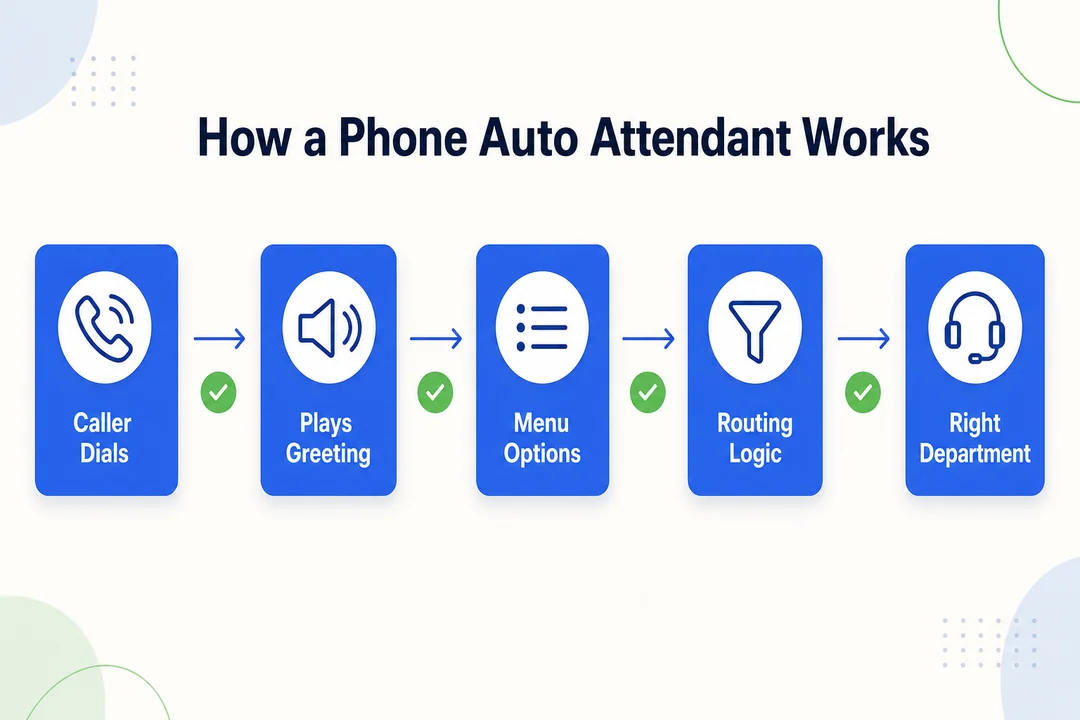
When someone calls your business, the auto attendant follows a defined path. Here is the typical sequence.
-
An incoming call arrives.
The call reaches your business phone number or a specific line tied to the auto attendant. -
A greeting plays.
The system answers and plays a recorded message. This may change based on business hours, weekends, or holidays. -
The caller chooses an option.
The caller presses a number on the keypad or, in some systems, speaks a command. -
Routing logic checks the rules.
The system looks at the caller’s choice and matches it to a destination. This is the rule set behind the menu. -
The call is sent to the right place.
That destination could be:- an extension
- a department
- a ring group
- a call queue
- voicemail
- a forwarded number
-
Fallback rules take over if needed.
If no one answers, the line is busy, or the business is closed, the system follows backup rules. It may send the call to another team member, voicemail, or an after-hours line.
This flow sounds simple because it should be. Good auto attendants make the caller path obvious and fast.
Common routing options
Different businesses need different call paths. The most useful systems support several routing methods.
| Routing option | What it does | Best use case |
|---|---|---|
| Department routing | Sends callers to Sales, Support, Billing, or another team | Businesses with clear functional teams |
| Extension dialing | Lets callers enter a direct extension | Offices where callers know who they need |
| Ring groups | Rings several people at the same time or in sequence | Small teams sharing the same call type |
| Call queue routing | Places callers in line when all agents are busy | Support or service teams with steady call volume |
| Voicemail routing | Sends calls to a mailbox if no one answers | After-hours or low-priority inquiries |
| Call forwarding | Redirects calls to another number or device | Remote teams or mobile staff |
| Time-of-day routing | Changes behavior based on business hours | Teams with different day and night handling |
| Holiday or after-hours schedules | Plays alternate greetings and routes differently when closed | Businesses that need clear off-hours coverage |
Practical tips:
- Use department routing only if callers understand those departments.
- Enable extension dialing if you have repeat callers.
- Use ring groups for shared phones or small front-line teams.
- Use queues when calls often arrive faster than people can answer.
- Avoid sending too many callers straight to voicemail unless that is truly the best outcome.
- Set time-based rules early. They are one of the biggest quality-of-life features.
Key technologies behind the system
Most phone auto attendants rely on a few core building blocks:
- Automated greetings to answer calls and deliver instructions
- Menu-driven navigation so callers can choose options
- Call routing mechanisms that apply pre-set rules
- VoIP or cloud delivery so admins can manage the system online
- Optional voice recognition so callers can speak instead of press keys
- AI voice assistant features in more advanced systems
Basic voice recognition listens for simple commands. More advanced NLU (natural language understanding) tries to interpret intent from normal speech. Many small businesses do not need that complexity.
Real-world advice before you build one
Before you create a menu, keep the caller experience simple.
- Keep the top menu short. Three to five options is usually enough.
- Start with common caller reasons. Build around what people ask for most.
- Use plain language. Say “appointments” instead of internal team names people do not know.
- Always include a human fallback. A zero-out option or operator path matters.
- Plan after-hours behavior carefully. Closed hours still shape customer experience.
- Avoid long greetings. Most callers want direction, not a speech.
- Test on a real phone. What looks fine in a dashboard can feel slow in practice.
A common mistake is building menus around your internal structure. Callers do not care how your company is organized. They care about solving a problem fast.
From experience, long menus cause abandonment. People hang up when the path feels like work.
Example of a Simple Phone Auto Attendant Call Flow
Basic daytime call flow example
Thank you for calling BrightPath Dental.

If you are a patient and need to schedule or change an appointment, press 1.
If you have a billing question, press 2.
If you need to speak with the front desk, press 3.
To reach a staff member by extension, press 4.
To repeat these options, press 9.
To leave a general message, press 0.
Why this works:
- Appointments comes first because it is likely the most common reason.
- Billing gets its own path to avoid front-desk transfers.
- Front desk remains available for callers who are unsure.
- Extension dialing helps repeat patients or partners.
- Repeat menu reduces frustration.
- General voicemail prevents dead ends.
After-hours call flow example
Thank you for calling BrightPath Dental. Our office is currently closed.

If you are experiencing a dental emergency, press 1.
To leave a message for the front desk, press 2.
To hear our office hours and location, press 3.
To repeat these options, press 9.
Why this matters:
- Emergency forwarding protects urgent cases.
- Voicemail routing captures non-urgent calls cleanly.
- Business-hours information answers a common off-hours question.
- Separate after-hours logic is a key buying feature, not a nice extra.
What this example shows
- A clear menu reduces unnecessary transfers.
- Different schedules need different greetings and routing rules.
- Repeat and fallback options improve caller confidence.
- General voicemail is better than sending people nowhere.
- If many callers press 0 or repeat the menu often, your wording may be unclear.
Benefits of Using a Phone Auto Attendant
Better inbound call handling
A phone auto attendant improves inbound call handling by removing repetitive front-desk work. Instead of answering every call live and transferring it manually, the system routes common requests immediately.
Key improvements include:
- Faster first response because calls are answered right away
- More consistent routing because the same rules apply every time
- Less interruption for staff who no longer need to redirect routine calls
- Better triage during busy periods when multiple calls arrive at once
For small teams, this matters a lot. One office manager should not have to act as a full-time switchboard. With the right menu, many calls reach the right place without touching the front desk.
Example:
A home services company gets booking calls, technician updates, billing questions, and vendor inquiries. An auto attendant separates those paths early, so dispatch does not get buried in calls meant for accounting.
Business benefits
The business case is usually straightforward.
- Cost efficiency: It is often cheaper than hiring dedicated reception coverage for every hour you need.
- 24/7 availability: Your business can answer calls even when live staff are unavailable.
- Professional image: A clear greeting and structured menu make even a small business sound organized.
- Scalability: As call volume grows, the menu can handle more traffic without adding the same amount of labor.
- Support for remote teams: Calls can route to mobile devices, home offices, or shared queues.
These gains are real, but only when the setup is clean. A confusing system does not feel professional. A good one does.
Customer experience benefits
Customers benefit when the menu is short and the routing is accurate.
- Faster access to the right department means less bouncing between staff.
- Shorter waits for simple needs like hours, scheduling, or billing.
- Better after-hours support through voicemail, emergency forwarding, or recorded information.
- More predictable call paths because the system behaves consistently.
There is one important condition: the menu has to be designed well. Bad automation slows people down. Good automation removes friction.
Operational advantages
An auto attendant also helps internal operations.
- Forwarding flexibility supports remote and hybrid teams.
- Call queues help teams handle peaks more smoothly.
- Cloud-based edits make it easier to update greetings and schedules.
- Consistent processes reduce ad hoc call handling across staff.
This is especially useful when people work from multiple locations.
Who benefits most
Best-fit businesses include:
- Small businesses with repeat call categories and limited staff
- Multi-location companies that need location or department routing
- Support teams that handle steady inbound traffic
- Service businesses that need after-hours coverage or emergency handling
Limitations and Common Drawbacks
When auto attendants frustrate callers
Auto attendants frustrate callers when they make simple tasks feel complicated.
Common problems:
- Too many options
- Long greetings
- Unclear wording
- Outdated prompts
- No live person option
- Menus that use internal jargon
Real scenario:
A caller needs to reschedule an appointment. The menu starts with a long brand message, then lists six departments the caller does not understand, and never offers a front-desk option. That caller may hit random numbers, loop through the menu, or hang up.
Bad automation can feel worse than waiting for a receptionist. The goal is speed and clarity, not complexity.
What an auto attendant cannot do well on its own
A basic auto attendant is good at routing. It is not built to solve more complex, account-specific tasks on its own.
What it usually cannot do well:
- Handle payments or transactions
- Look up account-specific information
- Understand messy or ambiguous caller intent
- Manage exception-heavy situations
- Replace human empathy in sensitive calls
That is where IVR or a live agent may be better. IVR can collect information and complete tasks. Humans can ask follow-up questions and adapt.
When you may need more than a basic auto attendant
A basic system may no longer be enough if you notice these signs:
- Your team handles high call volume with frequent overflow.
- Callers have many different request types.
- You need account lookup, booking logic, or status checks.
- Routing depends on CRM integration or ticket status.
- You want personalized routing based on caller history.
- Callers are still getting transferred multiple times.
At that point, look at IVR, contact center tools, or AI-assisted routing. The goal is not to buy more than you need. It is to match the tool to the call flow you actually have.
Common setup mistakes to avoid
| Mistake | Better approach |
|---|---|
| Building the menu around departments callers do not recognize | Build around caller intent, such as sales, support, billing, or appointments |
| Making greetings too long | Keep them short and instruction-focused |
| Routing too many calls to voicemail | Use ring groups, queues, or backup forwarding first when possible |
| Forgetting to update schedules | Review hours, holidays, and staffing changes regularly |
| Using vague prompts | Tell callers exactly what each option is for |
| Ignoring analytics | Watch where callers drop, repeat, or misroute and fix those paths |
| Leaving no operator fallback | Provide a human escape path for edge cases |
Phone Auto Attendant vs IVR vs Live Receptionist
Quick comparison table
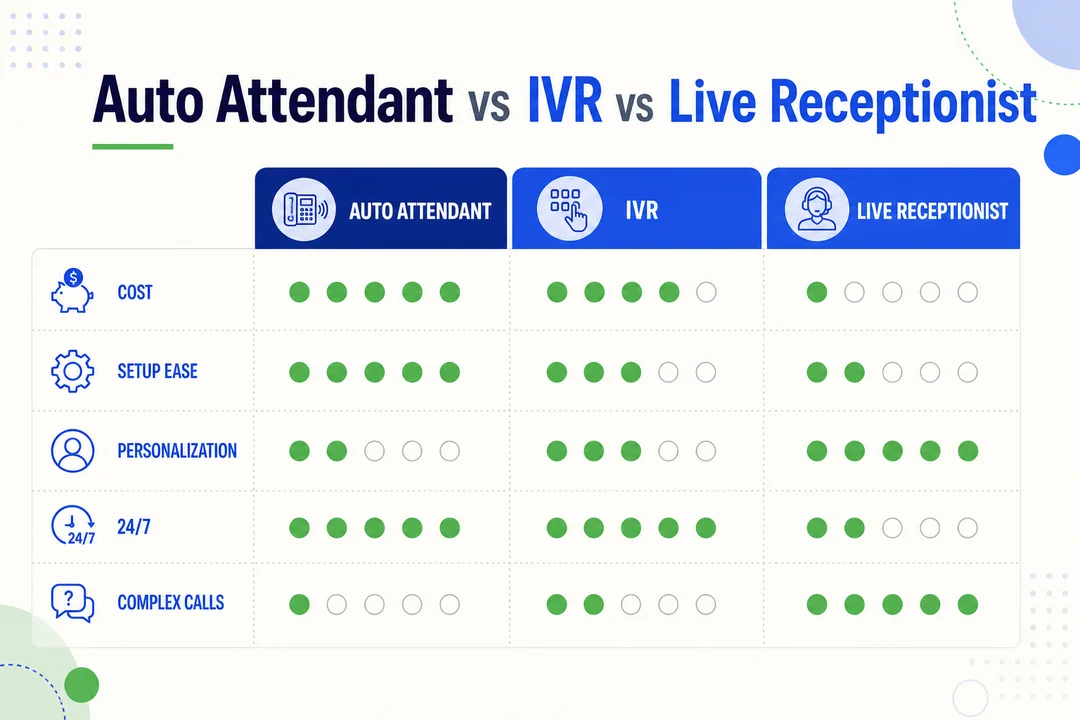
| Option | Best for | Main strength | Main limitation | Typical cost/complexity |
|---|---|---|---|---|
| Auto attendant | Basic call routing | Fast, consistent call direction | Limited self-service | Lower |
| IVR | Routing plus task handling | Can collect data and complete actions | More setup and complexity | Medium to high |
| Live receptionist | High-touch caller handling | Human judgment and flexibility | Higher staffing cost | Medium to high |
Auto attendant vs IVR
The difference is simple.
An auto attendant answers calls and routes them. An IVR can do that too, but it can also collect information and help callers complete tasks.
Auto attendant examples:
- Press 1 for Sales
- Press 2 for Support
- Press 3 for Billing
IVR examples:
- Enter your account number
- Say the reason for your call
- Make a payment
- Confirm or change an appointment
- Check order or case status
In short:
- Auto attendant = routing
- IVR = routing plus self-service
IVR usually costs more and takes more planning because the call flow is deeper. For many small businesses, a well-built auto attendant is enough. If callers need to do more than choose where to go, IVR becomes more useful.
Auto attendant vs live receptionist
A live receptionist brings judgment that automation does not.
Auto attendant strengths:
- Available all the time
- Consistent every call
- Lower cost for routine routing
- Easy to scale across more calls
Live receptionist strengths:
- Can understand unusual requests
- Can calm frustrated callers
- Can screen calls with nuance
- Can handle exceptions without rigid menu rules
A practical middle ground is the hybrid model. Use an auto attendant for first-level routing, then send edge cases or high-value calls to a person.
That approach often gives the best mix of cost control and caller experience.
Which option is right for your business?
Use this framework:
- Choose an auto attendant if you mainly need simple routing and after-hours coverage.
- Choose IVR if callers need self-service, data entry, or task completion.
- Choose a live receptionist if your calls are complex, sensitive, or highly relationship-driven.
- Choose a hybrid setup if you want automation for routine traffic and human help for important exceptions.
If most of your calls start with “I need the right department,” start with an auto attendant. If they start with “I need to do something with my account,” look at IVR.
Who Should Use a Phone Auto Attendant?
Small businesses
Small businesses are one of the strongest fits for a phone auto attendant. They often have limited staff, recurring call types, and no dedicated person to answer every call all day.
Benefits for small businesses:
- Looks more professional to new callers
- Reduces missed calls during busy periods
- Cuts front-desk burden on owners or office staff
- Routes repeat call types like booking, billing, or support more efficiently
For many small teams, this is one of the simplest upgrades to a business phone system. It can improve call handling without the cost of full-time reception coverage.
Multi-location or multi-department companies
If you have multiple branches or departments, an auto attendant helps standardize the way calls are handled.
It can route callers by:
- location
- department
- region
- business function
This is especially useful in cloud-managed systems where one admin can update routing across sites.
Service and support teams
Support-oriented teams benefit when call types repeat often.
Common gains include:
- Better triage before the call reaches an agent
- Fewer manual transfers
- Cleaner queue distribution
- More consistent handling during peak times
This works well for help desks, field service teams, and customer support groups.
Businesses that need after-hours coverage
After-hours coverage is one of the strongest reasons to buy an auto attendant.
It allows you to:
- play a closed-hours greeting
- route urgent calls to an emergency line
- send routine issues to voicemail
- share hours or location information automatically
This matters in industries where urgent calls cannot wait, such as healthcare, property services, legal intake, or maintenance.
Must-Have Features in an Auto Attendant Phone System
Essential call handling features
When comparing providers, focus on the features that solve real call problems.
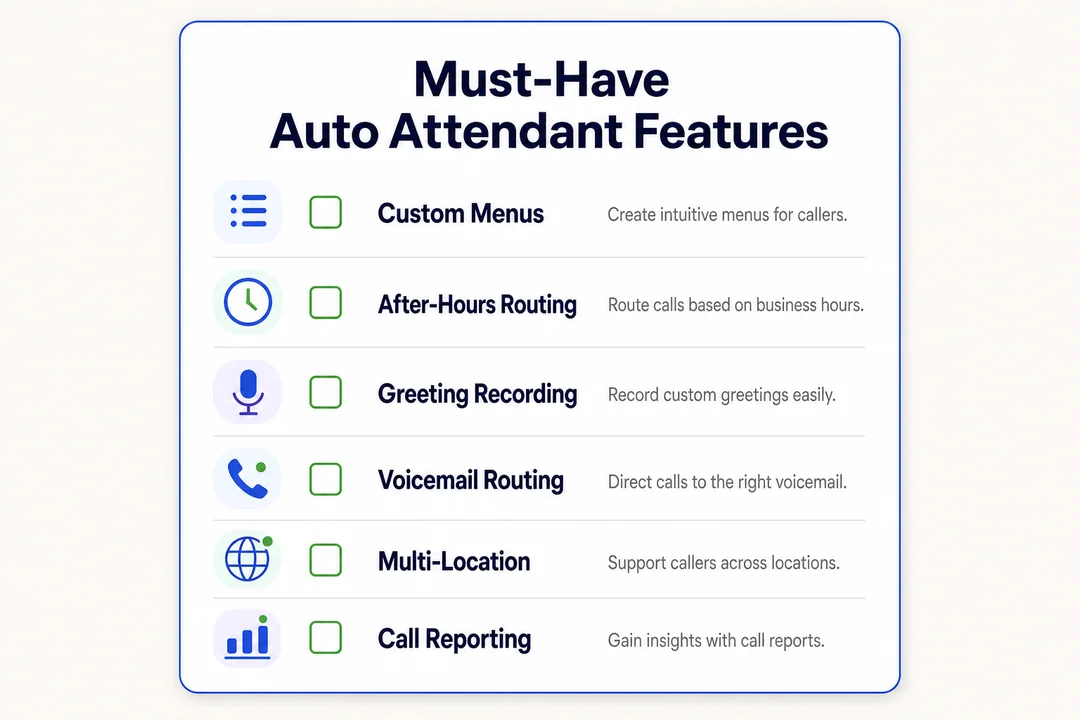
- Custom greetings: Lets you create professional messages for business hours, after-hours, and holidays.
- Nested menus: Supports multi-level options when one menu is not enough.
- Extension dialing: Helps repeat callers reach a known person quickly.
- Voicemail routing: Captures calls when no one is available.
- Call forwarding: Sends calls to mobile phones, backup staff, or offsite teams.
- Business-hours rules: Changes behavior automatically based on time and schedule.
- Operator fallback: Gives callers a human path when they need help.
These are the basics. If a system lacks several of them, it may be too limited.
Routing and workflow features
Once your call flow gets busier, routing depth matters.
- Ring groups: Route one option to several people.
- Call queues: Hold callers in line when all agents are busy.
- Availability-based routing: Route based on who is free.
- Time-based routing: Change destinations by hour or day.
- Overflow or failover rules: Send calls elsewhere if the first destination fails.
These features matter most during peak periods, staff shortages, or hybrid work setups.
Platform and integration features
The phone menu is only part of the buying decision. The platform around it matters too.
- Cloud PBX or UCaaS support: Makes the system easier to manage and scale.
- Mobile and desktop management: Lets staff and admins manage calls from anywhere.
- CRM integration: Helps connect call handling with customer records.
- Help desk or contact center compatibility: Supports more advanced service workflows later.
A simple rule: choose a system that fits the rest of your communication stack, not just the greeting menu.
Reporting, security, and reliability
These are often overlooked until something breaks.
- Call analytics: Shows call volume, missed calls, and routing outcomes.
- Menu performance insights: Helps identify confusing options or high drop-off points.
- Uptime guarantees: Reduces the risk of routing outages.
- Admin controls: Limits who can change call flows and schedules.
- Audit visibility: Helps track system changes.
- Data encryption: Protects call-related data in transit and at rest.
- Provider support quality: Matters when the phone system is down.
A provider can look good in a demo and still be weak in real operations. Reliability and support often matter more after purchase than before it.
Advanced features to compare
If your needs are more complex, compare these extras:
- Voice input
- AI-assisted routing
- NLU for spoken intent
- Personalized routing
- Spam call mitigation
These are more useful for larger teams or heavier call environments.
Buyer warning signs
Watch for these red flags:
- Hidden add-on pricing for basic features
- Weak or missing analytics
- Greetings that are hard to edit without support
- Limited after-hours routing
- No real queue options
- Shallow or missing integrations
- Routing logic that cannot grow with your business
Ask for a live demo. Do not rely only on a feature list.
How to Choose the Right Phone Auto Attendant
Match the system to your business needs
Start with your real call flow, not a vendor brochure.
Check these factors:
- team size
- average call volume
- number of departments or locations
- common caller reasons
- after-hours needs
- whether callers need routing only or self-service too
If your call patterns are simple, do not overbuy. If they are complex, do not force a basic menu to do enterprise work.
Evaluate ease of setup and ongoing management
A good system should be manageable by ordinary staff, not just technical admins.
Look for:
- a clear admin dashboard
- fast edits to greetings and schedules
- simple routing changes
- non-technical usability
- solid onboarding support
- responsive customer support
A practical test: can your office manager update holiday hours without opening a ticket?
Compare total value, not just price
Low monthly pricing can be misleading.
| Cost factor | Why it matters |
|---|---|
| Included features | Some vendors charge extra for queues, recordings, or schedules |
| Add-ons | Basic plans may exclude key routing tools |
| Setup fees | One-time costs can be significant |
| Integration costs | CRM or help desk connections may cost extra |
| Scalability | Cheap plans can become expensive as users or locations grow |
| Support and downtime | Poor support can create hidden business cost |
Compare the full operating value, not just the entry price.
Questions to ask before buying
- Are after-hours, holiday, and business-hour routing included?
- Can we build ring groups and queues without extra licenses?
- How easy is it to update greetings and schedules?
- What analytics are included?
- Which CRM or support integrations are native?
- What happens if no one answers a routed call?
- Can we test live routing before purchase?
- How does the system handle growth across users or locations?
Ask the vendor to show your real call flow in a demo.
Best Practices for Auto Attendant Menu Design
Keep menus short and easy to follow
- Limit top-level options.
- Put common caller needs first.
- Use customer language.
- Keep the structure intuitive.
Write better greetings and prompts
- Start with the company name.
- Give a short instruction fast.
- Keep the intro brief.
- Use a calm, clear voice.
- Skip marketing-heavy wording.
Mini sample:
- “Thank you for calling Northside Plumbing. For service requests, press 1. For billing, press 2. For all other calls, press 0.”
Reduce caller drop-off and confusion
- Offer a repeat menu option.
- Provide an operator fallback.
- Test the menu with real users.
- Review analytics for drop-off points.
- Watch where callers get misrouted.
Maintain and improve over time
- Review call analytics regularly.
- Update schedules for holidays and staffing changes.
- Adjust menu options as services change.
- Collect feedback from staff and callers.
How to Set Up an Auto Attendant for Business
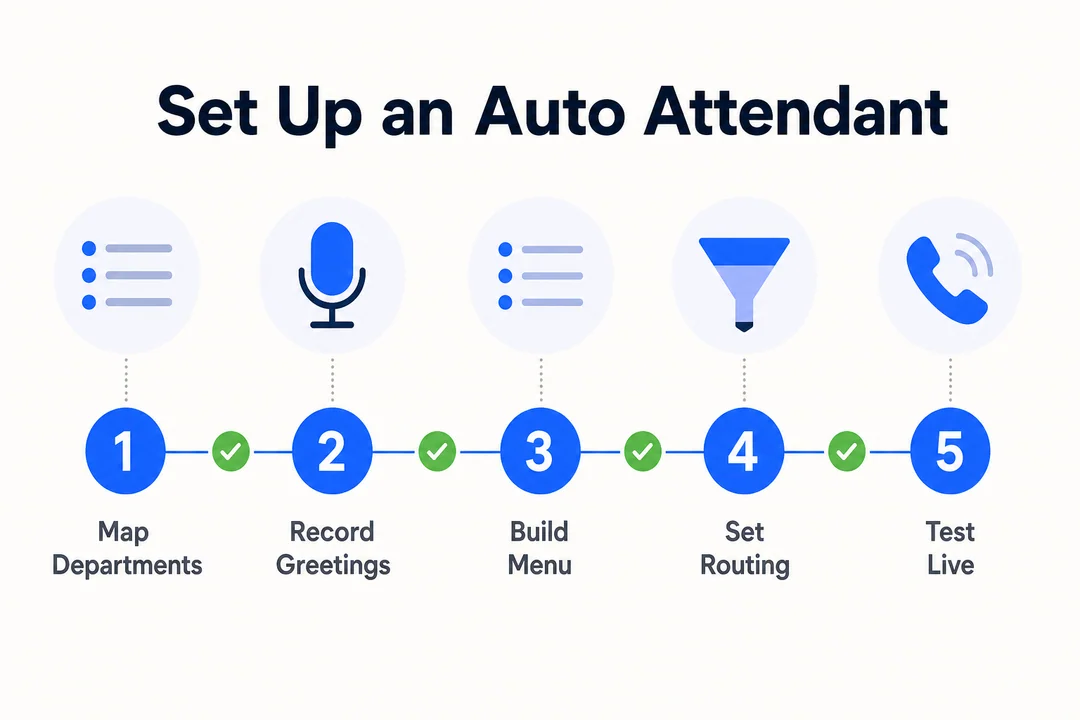
Plan your call flow first
- List the top reasons people call.
- Group those reasons into clear options.
- Assign each option a destination.
- Build around caller intent, not your org chart.
Configure the system
- Record your greetings.
- Build menu branches.
- Assign routing rules.
- Set business-hour and holiday schedules.
- Add failover destinations.
Test before going live
- Test every menu path.
- Confirm voicemail works.
- Check mobile and remote routing.
- Test after-hours logic.
- Make sure there are no dead ends.
Practical launch advice
- Start simple.
- Watch week-one mistakes closely.
- Revise prompts quickly.
- Do not add complexity too early.
Signs You May Need IVR or AI Instead of a Basic Auto Attendant
When a basic phone menu system is no longer enough
You may need an upgrade if:
- callers have many different request types
- you need payment or booking workflows
- transfers happen too often
- call volume is high and repetitive
- callers need account-specific help
Where AI-powered systems help
AI can help with:
- intent recognition
- smarter routing
- repetitive question handling
- basic personalization
- reducing transfers
Keep expectations realistic. AI improves some workflows. It does not automatically fix bad process design.
How to decide without overspending
Use this simple model:
- Routing only: auto attendant
- Self-service tasks: IVR
- Scale and personalization: AI-enabled system
Buy for today’s real need, with enough room for tomorrow.
Top Questions to Ask Auto Attendant Providers Before You Buy
Pricing and contract questions
- What is included in the base plan?
- Which features cost extra?
- Are there setup fees?
- Is pricing per user, per location, or per system?
- What is the contract length?
- Are there penalties for changing plans?
Reliability and support questions
- What uptime SLA (service level agreement) do you offer?
- What support channels are available?
- How fast are response times?
- How are critical routing issues escalated?
- What happens during a service outage?
Integration and growth questions
- Which CRM and help desk tools do you support?
- Can the system scale across locations?
- Can we upgrade to IVR or AI later?
- Are admin controls flexible enough for multiple teams?
Frequently Asked Questions
What is the difference between an auto attendant and IVR?
An auto attendant mainly answers calls and routes them using menu choices. An IVR can also collect information, ask follow-up questions, and help callers complete tasks such as payments, appointment changes, or account lookups.
Is a phone auto attendant worth it for a small business?
Yes, in many cases it is. If your business gets repeat call types and does not have full-time front-desk coverage, an auto attendant can improve professionalism, reduce missed calls, and save staff time at a lower cost than manual call handling.
Can a phone auto attendant route calls after business hours?
Yes. Most systems can use schedules to play after-hours greetings, send calls to voicemail, forward urgent calls to an emergency number, and apply separate rules for weekends and holidays.
Can callers use voice commands instead of pressing numbers?
Sometimes. Basic systems often rely on keypad input, while more advanced platforms may support voice recognition or AI voice assistants for spoken commands.
How much does an auto attendant phone system usually cost?
Cost varies based on whether the feature is bundled into a business phone plan or sold as an add-on. Pricing often depends on:
- number of users
- locations
- queue features
- analytics
- integrations
Compare total cost, not just base price.
Does an auto attendant work with VoIP and cloud PBX systems?
Yes. Most modern auto attendants are built for VoIP, Cloud PBX, and similar business phone platforms. In many current systems, this is a standard feature.
What features matter most when comparing providers?
Focus on custom greetings, routing flexibility, schedules, queues, voicemail options, analytics, integrations, reliability, and ease of management. The best provider is the one that fits your real call flow and is easy to maintain after purchase.
Conclusion
A phone auto attendant helps businesses answer calls faster, route them more accurately, and stay available beyond normal office hours. For most buyers, the right choice is not the most advanced system. It is the one that matches real caller needs, supports clear after-hours handling, and stays easy to manage as your team grows.
Map your call flow first, compare features second, and ask vendors to demo your exact routing needs. Then test the menu, after-hours rules, and fallback paths before you commit.
More in Operations & CX Optimization
View all →
Customer Experience Transformation: Framework and Steps
A telecom customer calls support about a billing error. They explain the problem to the IVR system. Then to the first agent. Then get transferred and explain again. Then escalated—and explain a third time. Forty minutes later, they're exhausted and the problem still isn't solved. This is what broken customer experience looks like. And it's costing you customers. Customer experience…


Web Caller Meaning: JavaScript caller, Calling Tools or Portals
“Web caller” is one of those phrases where the search results and the searcher are frequently talking about different things. Three unrelated audiences use it: developers hitting an error on the legacy JavaScript caller property, buyers evaluating browser-based calling software, and people trying to reach a specific portal or training page whose exact name they cannot recall. That fragmentation is…

Customer Experience Strategy: How to Build One That Works
Customer experience is getting worse, not better. Forrester's 2025 Global CX Index found that 21% of brands declined in CX quality while only 6% improved — and in the US, 25% declined against 7% that improved, the second consecutive year of that pattern. Most of those brands were not neglecting customer experience. They were working on it without a strategy…



 English
  Russian
  Chinese