

Voice over IP programs help you make calls over the internet instead of traditional phone lines. If you want a simple answer to what these tools are, how they work, and which ones are worth using, this guide gives you the basics fast. You’ll learn the main types of VoIP software, what affects call quality, how popular programs compare, and how to choose the right option for personal calls, remote work, or small business use.
Key Takeaways
- Voice over IP programs are apps or platforms that let you make voice calls over the internet.
- Many people already use VoIP software through tools like WhatsApp, Signal, Teams, and Google Voice.
- Some VoIP apps are only for app-to-app calling, while others can call real mobile or landline numbers.
- VoIP works by turning your voice into digital data packets and sending them over IP networks.
- Call quality depends heavily on internet stability, Wi-Fi strength, latency, and device quality.
- Personal calling apps and business VoIP software serve different needs and should not be treated as the same thing.
- The best choice depends on your use case, budget, setup comfort, and privacy needs.
- For travel or remote work, reliable mobile data can make VoIP much more dependable.
What Are Voice Over IP Programs?
Simple definition of voice over IP programs
Voice over IP programs are software tools that let you make and receive voice calls over the internet instead of traditional phone lines. You may also see them called VoIP software, internet telephony, IP telephony, digital voice calling tools, or a virtual phone system.
They can appear in different forms, including mobile apps, desktop apps, browser-based calling tools, and business phone platforms.
What matters is simple: they use an internet connection to handle voice communication.
- They can work on phones, laptops, tablets, and desktop computers.
- They may support voice, video, messaging, or full business calling features.
- Some are built for personal use, while others are made for teams or companies.
- Some include a real phone number, but many do not.
What counts as a VoIP program?
A VoIP program is any software that lets you place or receive calls over an internet connection. That includes simple calling apps and full business phone systems.
Common categories include:
- Softphone apps: A softphone is software that works like a phone on your computer or mobile device.
- Browser calling tools: These let you make calls or join voice meetings without installing much software.
- Cloud communication platforms: These combine voice with chat, meetings, and collaboration.
- Business phone systems: These add phone numbers, extensions, call routing, and admin controls.
It helps to separate them by purpose:
- Consumer calling apps are usually best for personal conversations.
- Remote work platforms are better for internal team communication.
- Business-grade VoIP systems are built for customer-facing calls and company workflows.
Not all VoIP programs do the same job. Some are lightweight. Some are full phone systems.
Common examples people already recognize
Many readers already know VoIP programs, even if they do not use the term.
- Microsoft Teams Phone: Best for companies that want voice calling inside a work platform.
- Google Voice: Good for simple phone number management and small business use.
- Zoom Phone: Useful for teams that already rely on Zoom meetings.
- WhatsApp: Great for personal app-to-app calling, especially international chats.
- Signal: Best for users who care strongly about privacy.
- Discord: Popular for communities, casual groups, and always-on voice chat.
- Jitsi: Helpful for fast browser-based meetings with little setup.
- Linphone: Better for users who want a more configurable SIP-based setup.
What VoIP programs are not
VoIP programs are not the same as traditional phone service. They also are not all equal.
Many users assume every internet calling app works the same way. That causes bad choices.
What they are not:
- They are not a traditional landline.
- They are not always a full business phone system.
- They are not guaranteed to call regular phone numbers.
- They are not all equal in privacy, pricing, or reliability.
- They are not immune to weak internet problems.
A common beginner mistake is treating WhatsApp, Google Voice, and a business phone platform as interchangeable. They are not. One may be great for family calls, while another is designed for customer support or sales teams.
How Do VoIP Programs Work?
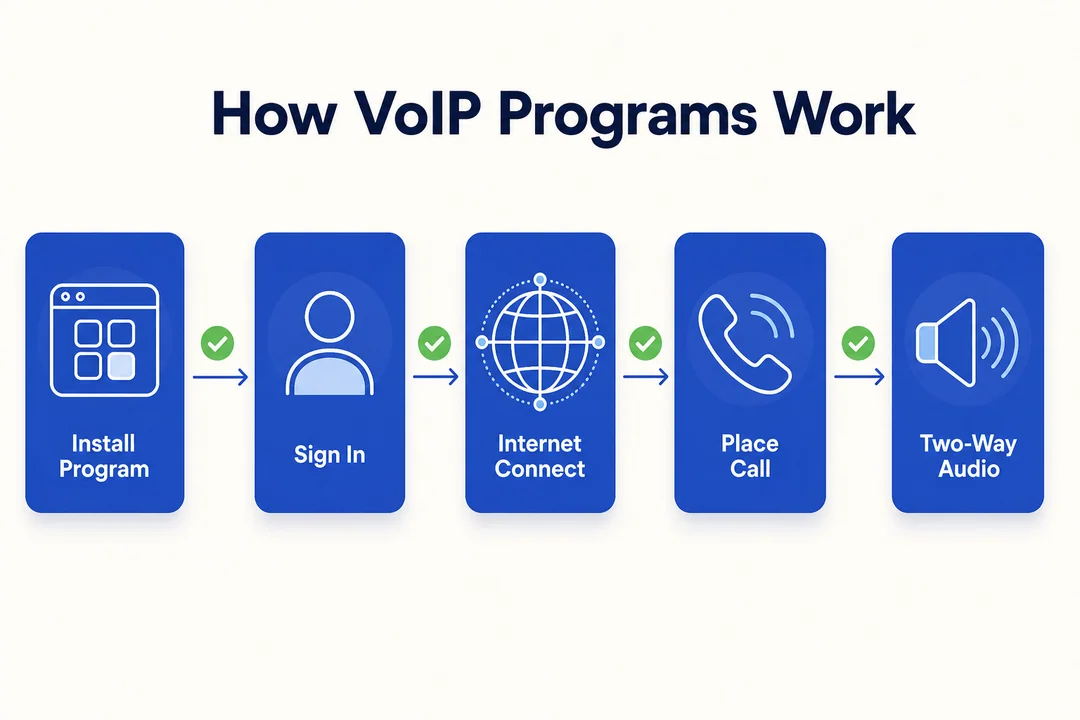
How VoIP works in simple terms
VoIP works by turning your voice into small pieces of digital information and sending them over the internet. In plain English, it is like sending small pieces of audio across an IP network, then rebuilding them at the other end.
Here is the basic process:
- Your microphone captures your voice.
- The VoIP software converts that voice into digital data packets.
- Those digital data packets travel across Internet Protocol (IP) networks.
- The receiving device puts the packets back together and converts them into audio.
That is the core idea behind VoIP.
The internet connection enables voice communication by moving those packets quickly enough that the call feels live. When the network is stable, the process feels smooth. When it is unstable, you may hear delay, echo, or broken audio.
What you need to use VoIP software
You do not need much to start using VoIP software. Most people already have the basics.
Minimum setup:
- A stable internet connection
- A smartphone, tablet, laptop, desktop, or IP phone
- A VoIP app or service account
- A microphone and speaker, or a headset
Optional but helpful:
- A USB or Bluetooth headset for clearer calls
- A quiet space for work calls
- A backup mobile connection
A softphone is often the simplest flexible option. It lets you make calls from software instead of needing a desk phone. Many tools also support mobile device integration and multi-device sync, which means you can use the same account on more than one device.
Why call quality changes from one call to another
Poor call quality is often a network problem, not a software problem. In real use, weak Wi-Fi causes more complaints than the app itself.
Main factors include:
- Bandwidth: This is the amount of internet capacity available for your call.
- Latency: This is delay in the connection. High latency makes conversations feel out of sync.
- Wi-Fi strength: Weak signal often causes dropped audio or robotic sound.
- Network congestion: Busy networks can slow delivery of voice packets.
- Device quality: Older phones or laptops may process calls less smoothly.
- Microphone or headset quality: Cheap built-in mics can add echo or background noise.
You may also hear terms like codecs and adaptive jitter buffering.
- Codecs help compress and deliver audio efficiently.
- Adaptive jitter buffering helps smooth uneven packet arrival so calls sound more natural.
You do not need to manage those directly. Just know this: if your network is unstable, call quality will suffer.
How VoIP connects with regular phone networks
Some VoIP calls stay fully online. Others connect to regular phone numbers.
The key difference is this:
- App-to-app calling: Both people use the same app or compatible service, and the call stays on the internet.
- App-to-phone-number calling: The VoIP service connects your internet call to the PSTN (the traditional phone network).
This second option usually needs provider-side routing through a VoIP gateway. A VoIP gateway is the bridge between internet calling and regular phone numbers.
Why this matters:
- Calling another app user is often free.
- Calling mobile or landline numbers usually needs a paid plan.
- If you need a real business number, you should check support before choosing a tool.
Where SIP fits in without making it complicated
SIP stands for Session Initiation Protocol. It is a common method used to start, manage, and end internet-based calls.
Many softphone apps and business VoIP systems use SIP behind the scenes.
Simple glossary:
- SIP: Helps set up and control VoIP calls.
- SIP trunking: A business method for connecting phone systems over the internet.
Most everyday users never need to configure SIP manually. It matters more in business setups or advanced softphone environments.
Why People Use VoIP Software Instead of Traditional Phone Service
Lower call costs for many users
For many users, VoIP is cheaper than traditional phone service. The biggest savings usually come from lower long-distance and international calling costs, plus fewer hardware and line installation needs.
Where savings often show up:
- International calls: App-based calls can cost far less than carrier rates.
- Remote teams: One internet-based platform can replace separate calling tools.
- Startups: Lower setup cost than building a traditional phone system.
- Small businesses: Easier to pay for users or features as needed.
That said, cheaper does not always mean free.
Important reality:
- Free plans are often limited to app-to-app use.
- Real phone numbers and business features usually cost extra.
- Advanced admin controls, analytics, or call routing often sit behind paid tiers.
The real benefit is cost efficiency with flexibility, not magic free calling.
More flexibility across devices and locations
VoIP software works well because it is not tied to one place or one device. You can often sign in on your laptop, phone, or tablet and keep using the same account.
This helps in real situations:
- Remote work: Take calls from home without a desk phone.
- Hybrid work: Move between office and home with the same setup.
- Travel: Keep internet-based calling available abroad.
- Cross-border communication: Stay reachable without being tied to a local line.
This is where geographic number independence matters. In simple terms, your number or account can stay useful even when your physical location changes.
Softphones also reduce hardware dependence. That makes it easier to stay connected without building your setup around office phones.
Built-in features that replace separate tools
One reason businesses move to VoIP is simple: one platform can replace several separate communication tools.
Useful built-in features include:
- Voicemail: Receive messages when you miss calls.
- Call forwarding: Send calls to another device or teammate.
- Video meetings: Use the same platform for voice and face-to-face calls.
- Messaging: Keep chat and calling in one place.
- Call recording: Save calls for training or review where allowed.
- Screen sharing: Useful for support and internal collaboration.
- Auto attendants: Route callers with menu options.
- Call queues: Organize incoming calls for support or sales teams.
- Dynamic call routing: Direct calls based on rules like time or availability.
Bundling matters because it improves productivity and business continuity. Instead of managing separate tools for calls, meetings, chat, and voicemail, teams can work from one system.
Easier scaling for teams and small businesses
VoIP is easier to scale than traditional phone setups because it is software-driven and cloud-based. You can usually add users, lines, or extensions without installing physical phone lines.
This is especially useful for:
- Customer support teams growing fast
- Sales teams working across regions
- Startups that need flexibility
- Small businesses opening new locations
In cloud-based communication systems, scaling often means changing your plan or adding seats in an admin panel. That is much simpler than rebuilding old hardware setups.
Businesses also use unified communications to keep voice, meetings, and messaging aligned as teams grow.
Real-world situations where VoIP makes more sense
In practice, VoIP makes the most sense when flexibility matters more than old-school phone infrastructure.
Common examples:
- Small business with one shared phone presence: A business can use one number, basic routing, and voicemail without setting up traditional lines.
- Freelancer switching between laptop and mobile: A softphone or app-based setup works well when work happens across devices.
- Remote team across time zones: Teams can keep calls, meetings, and chat in one platform.
- Traveler or digital nomad: Internet-based calling can reduce communication costs and make international contact easier.
From a practical point of view, the best setup is rarely the most complex one. It is the one that matches how you actually communicate.
Types of Voice Over IP Programs You’ll See
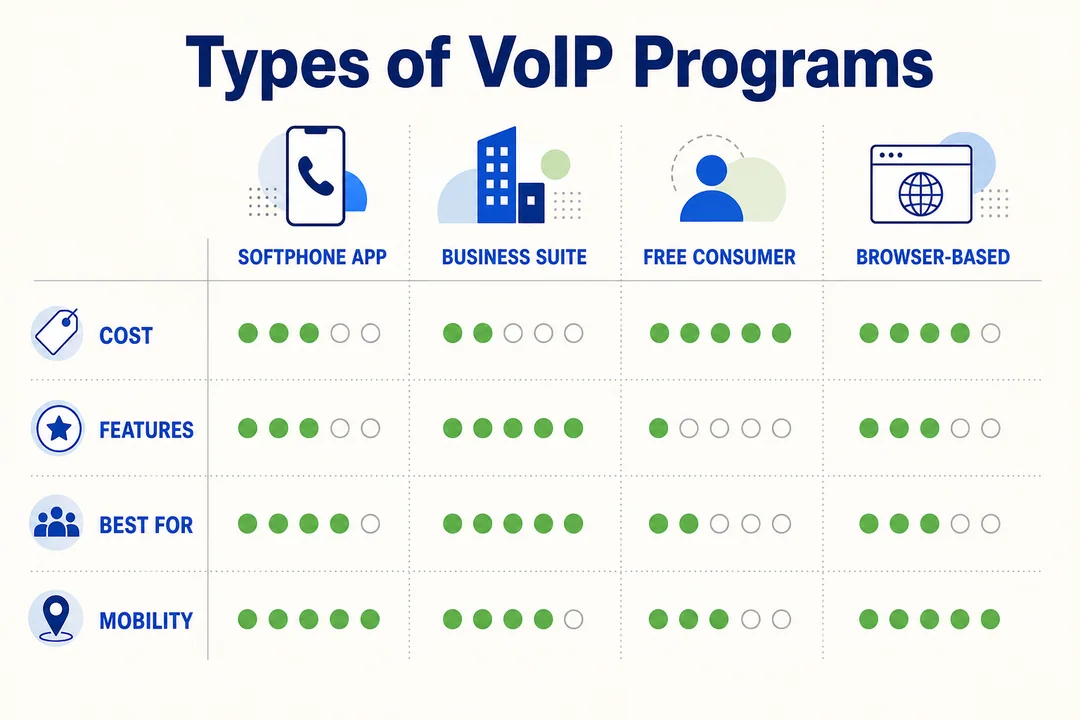
Personal VoIP calling apps
This category includes tools like WhatsApp, Signal, and Discord. These are usually built for direct communication between users inside the same app ecosystem.
Pros:
- Easy to install and use
- Often free for app-to-app calling
- Strong for international personal communication
Cons:
- May not support real phone numbers
- Limited business features
- Not ideal for customer-facing phone workflows
Best for: Friends, family, casual groups, and basic personal use.
These apps are useful, but they are not full business telephony tools.
Softphones
A softphone is software that works like a phone on a computer, tablet, or mobile device. It replaces a desk phone with an app-based interface.
Benefits of using softphones:
- No desk phone required
- Works across desktop and mobile
- Good fit for remote and hybrid work
- Often supports business calling setups
- Can connect through SIP in more advanced environments
Softphones are common in business use because they make calling more flexible. They also reduce hardware needs. For beginners, the main appeal is simple: use software instead of being tied to a physical phone.
VoIP tools for remote teams
Remote team tools like Microsoft Teams and Zoom Phone combine calling with collaboration. They fit companies that want more than voice alone.
Common strengths include:
- Voice calling
- Video meetings
- Team chat
- File sharing
- Better internal communication
These tools are strong examples of unified communications. They work especially well when teams already use the larger platform for daily work.
Business VoIP phone systems
Business VoIP software is a full phone system delivered through cloud infrastructure. It is built for company workflows, not just simple calling.
Common features include:
- Extensions
- Auto attendant
- Call queue
- Analytics
- Call routing
- Admin controls
- Shared business numbers
This is different from a basic calling app. A business VoIP platform is a virtual phone system designed for customer communication, team structure, and operational control.
Secure VoIP calling apps
Some VoIP apps focus more heavily on privacy and secure communication. These tools often highlight end-to-end encryption, which means only the sender and intended recipient can read or hear the content.
Security checklist:
- Check whether voice calls are end-to-end encrypted
- Review the provider’s privacy claims carefully
- Confirm whether encryption applies to calls, messages, or both
- Separate personal privacy needs from business compliance needs
Signal is a common privacy-first example. Jitsi may suit certain lightweight secure use cases. Not every provider offers the same protection level, so verification matters.
Best Voice Over IP Programs to Compare
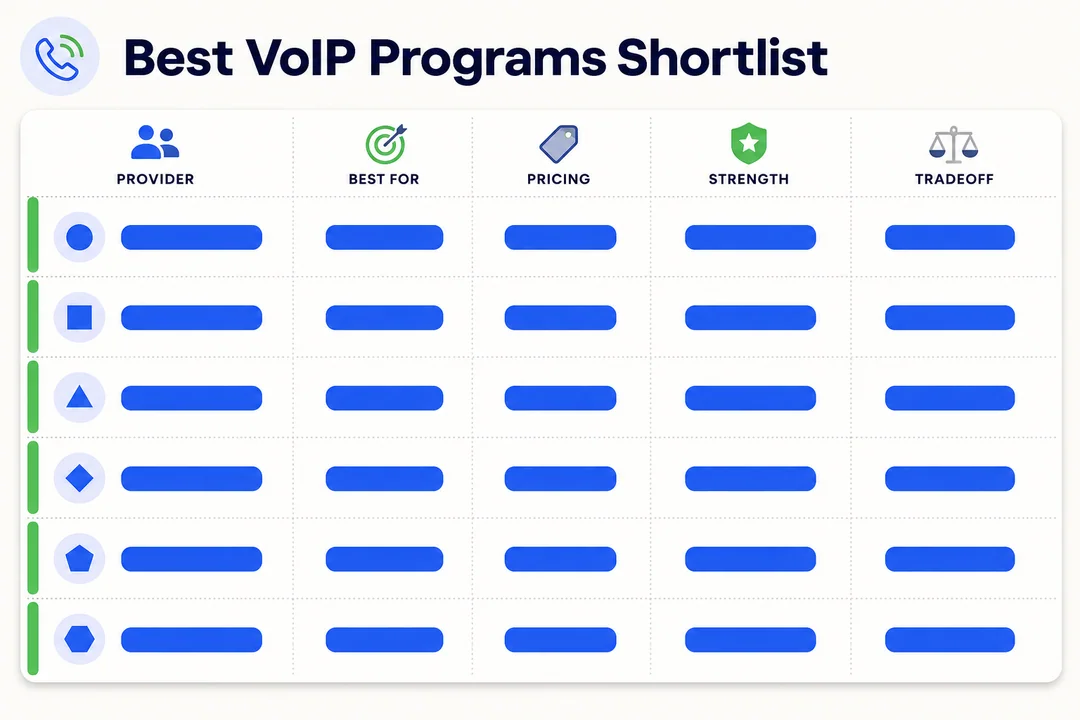
Microsoft Teams Phone
Microsoft Teams Phone is a business-focused VoIP solution built into the Microsoft ecosystem.
Best for: Companies already using Microsoft 365.
Pros:
- Strong integration with meetings, chat, and collaboration
- Good admin controls for business communication
- Works well for remote and hybrid teams
Limitations:
- Can feel heavier than simple calling apps
- Best value often depends on existing Microsoft usage
Verdict: A strong choice for organizations that want voice inside a broader work platform, but not the simplest pick for casual users.
Google Voice
Google Voice is a straightforward VoIP service that gives users a practical way to manage calling and phone numbers.
Best for: Small businesses, solo professionals, and users who want simplicity.
Pros:
- Easy setup and familiar interface
- Real phone number support
- Good fit for users already in Google Workspace
Limitations:
- Feature depth is lighter than larger business phone systems
- Availability and features can vary by region or plan
Verdict: One of the easiest mainstream choices for simple business or personal calling needs.
Zoom Phone
Zoom Phone extends Zoom from meetings into business calling.
Best for: Teams already relying on Zoom for work.
Pros:
- Smooth connection between meetings and phone calls
- Good fit for hybrid teams
- Business-focused features like routing and administration
Limitations:
- Better for work than casual calling
- Best value depends on whether Zoom is already part of your workflow
Verdict: A practical choice for companies that want one familiar platform for voice and meetings.
WhatsApp is a mobile-first VoIP app widely used for personal communication.
Best for: Personal calling and international app-to-app communication.
Pros:
- Very familiar for mainstream users
- Free app-to-app calls in many situations
- Great for keeping in touch across countries
Limitations:
- Not a full business phone system
- Limited for calling regular landline or mobile numbers in most cases
Verdict: Excellent for personal communication, but not the right tool for most business phone needs.
Signal
Signal is a privacy-focused communication app known for secure messaging and calling.
Best for: Users who prioritize privacy.
Pros:
- Strong reputation for end-to-end encryption
- Clean and simple interface
- Good for private personal communication
Limitations:
- Not built as a business phone platform
- Limited traditional phone system features
Verdict: A strong pick for secure personal calls, but not a replacement for a full work phone system.
Discord
Discord is a communication platform built around voice channels, chat, and community interaction.
Best for: Communities, gaming groups, creator teams, and casual voice chat.
Pros:
- Great for group voice spaces
- Strong for live communities
- Good desktop and mobile support
Limitations:
- Not designed as a business phone system
- Real phone number calling is not the core use case
Verdict: Great for community communication, not ideal for mainstream business telephony.
Jitsi
Jitsi is a browser-friendly communication tool that works well for lightweight meetings and quick voice or video sessions.
Best for: Users who want low-friction browser access.
Pros:
- Simple to access
- Useful for quick meetings
- No heavy setup for many use cases
Limitations:
- Less polished for full business telephony
- Feature depth depends on how it is deployed
Verdict: Good for lightweight calling and meetings, especially when speed matters more than enterprise structure.
Linphone or another SIP softphone
Linphone is a more advanced SIP softphone option for users who want control and flexibility.
Best for: IT-led setups, configurable environments, and advanced users.
Pros:
- Strong for SIP-based calling
- Flexible across devices
- More control than casual calling apps
Limitations:
- Setup can feel technical for beginners
- Not the easiest tool for mainstream users
Verdict: Useful when you need a real softphone environment, but not the best first stop for non-technical users.
Quick shortlist by use case
- Best for personal calling: WhatsApp
- Best for privacy: Signal
- Best for remote teams: Microsoft Teams Phone
- Best for simple small business use: Google Voice
- Best for Zoom-heavy workplaces: Zoom Phone
- Best for advanced SIP setups: Linphone
Quick Comparison of Popular VoIP Programs
What most readers should compare first
Most people should start with the basics before looking at advanced telecom features.
Compare these first:
- Ease of use: If setup feels hard, adoption usually fails.
- Pricing: Check what is free and what costs extra.
- Device compatibility: Make sure it works on the devices you already use.
- Phone number support: Not every tool can call regular numbers.
- Video support: Useful if you want one app for calls and meetings.
- Security: Check encryption and account protection.
- Business features: Look for routing, voicemail, extensions, or admin tools if needed.
- Admin controls: Important for teams and company management.
- International calling value: Some apps are much better for global communication than others.
These factors matter more than feature overload.
Simple comparison table
Here’s a quick side-by-side view of popular voice over IP programs.
| Program | Best For | Real Phone Number Support | Devices | Main Strength | Main Limitation |
|---|---|---|---|---|---|
| Microsoft Teams Phone | Businesses using Microsoft 365 | Yes | Desktop, mobile, web | Unified work communication | More complex than casual apps |
| Google Voice | Small business and solo users | Yes | Desktop, mobile, web | Simple number management | Less advanced than full enterprise tools |
| Zoom Phone | Zoom-based workplaces | Yes | Desktop, mobile, web | Voice + meetings in one workflow | Better for work than personal use |
| Personal international calling | Limited | Mobile, desktop, web | Easy app-to-app calling | Not a full phone system | |
| Signal | Private personal communication | No, for most users | Mobile, desktop | Strong privacy | Limited business phone features |
| Discord | Communities and group chat | No | Desktop, mobile, web | Voice channels and group communication | Not built for business telephony |
| Jitsi | Quick browser-based meetings | Limited | Web, desktop, mobile | Low-friction access | Not a full business phone platform |
| Linphone | Advanced SIP use | Yes, depending on setup | Desktop, mobile | Flexible softphone control | Technical setup for beginners |
Fast recommendations for mainstream readers
- Choose Google Voice if you want a simple number-based solution.
- Choose Microsoft Teams Phone if your company already lives in Microsoft 365.
- Choose Zoom Phone if Zoom is your team’s main meeting tool.
- Choose WhatsApp for easy personal and international app-based calls.
- Choose Signal if privacy matters more than business features.
- Choose Linphone only if you actually need a configurable SIP softphone.
Best VoIP Programs for Business
If you run a business team rather than personal calls, the SERP for VoIP programs is dominated by B2B platforms. Treat this as a starting shortlist and validate features directly with each vendor.
- Nextiva: Best for unified communications with strong reliability and built-in CRM.
- RingCentral: Best for enterprises that need voice, video, messaging, and broad integrations in one platform.
- CloudTalk: Best for growing sales teams that need native CRM integration and outbound features.
- 8×8: Best for global businesses that need international calling and contact-center capabilities.
- Dialpad: Best for AI-first teams that want live transcription, summaries, and coaching.
- Zoom Phone: Best for teams already on Zoom that want a simple, affordable add-on.
- OpenPhone: Best for startups and solo founders that need a fast, modern shared phone.
For most business buyers, the right pick depends on team size, integration needs, and how much AI you actually want in the workflow.
How to Choose the Right VoIP Program
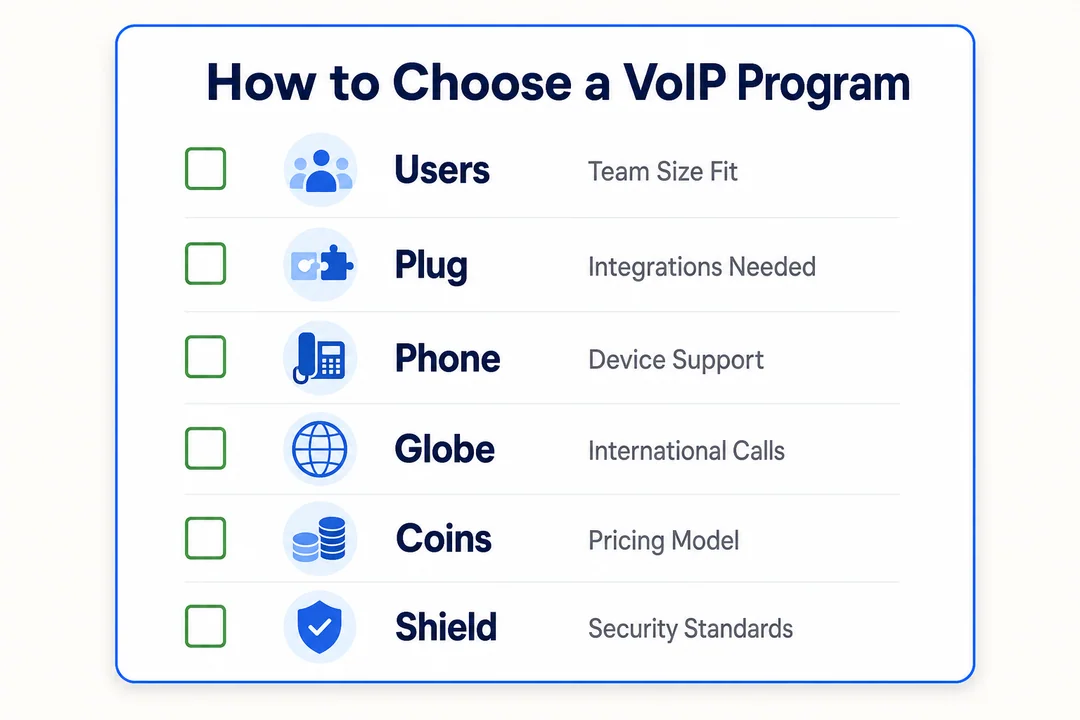
Start with your main use case
The best VoIP tool depends on who you need to call and why.
Use-case guide:
- Personal calls: Use a simple app like WhatsApp or Signal.
- Remote work: Use a work platform like Teams or Zoom Phone.
- Customer support: Choose a business system with queues and routing.
- Small business phone setup: Look for a real number, voicemail, and admin controls.
- Team collaboration: Pick a platform that combines calling, chat, and meetings.
- International calling: Check whether app-to-app use is enough or if you need outbound number calling.
The right app for friends is often the wrong tool for clients.
Decide whether you need a real phone number
This is one of the biggest filters.
If you only need app-to-app calling:
- Tools like WhatsApp, Signal, or Discord may be enough.
If you need to call or receive calls from regular phone numbers:
- Look at Google Voice, Teams Phone, Zoom Phone, or a SIP-based setup.
Why this matters:
- Customers expect a reachable number.
- Businesses may need number-based verification or credibility.
- App-only tools can feel limiting in professional use.
Check setup difficulty before choosing
Some VoIP tools are almost instant. Others need real configuration.
Setup types:
- App-only setup: Fastest and best for beginners.
- Desktop setup: Good for work use and better audio control.
- Browser access: Handy for quick entry with fewer installs.
- SIP or manual configuration: Better for advanced users or managed business environments.
If you are new, avoid complex setups unless you truly need advanced control.
Compare pricing the smart way
VoIP pricing can look simple at first, but the real cost depends on what you need.
Check these pricing factors:
- Free vs paid: Free often means app-to-app only.
- Subscription vs pay-per-use: Some tools charge monthly, others by usage.
- International rates: Outbound calls may still have per-minute pricing.
- Team scaling costs: Costs rise when you add users, numbers, or features.
- Hidden add-ons: Extra numbers, recording, analytics, or admin features may cost more.
A free app can be enough for casual use. A business team usually needs more than a free tier.
Review security and privacy needs
Security needs vary a lot between personal use and business use.
What to review:
- Encryption: Check whether calls are protected in transit or with end-to-end encryption.
- Account security: Use strong passwords and multi-factor authentication when available.
- Admin controls: Businesses need oversight, access control, and account management.
- Compliance needs: Some industries need more than basic privacy claims.
Do not assume all VoIP tools offer the same protection. Security depends on the provider, the setup, and the use case.
Use this simple decision path
- Define who you need to call.
- Decide if you need a real phone number.
- Choose a casual app, softphone, or business platform.
- Check internet quality and device support.
- Compare pricing and privacy before committing.
Voice Over IP Programs vs Traditional Phone Service
Biggest differences in plain English
Traditional phone service uses the PSTN, the standard public phone network. VoIP uses packet switching, which means voice is sent as digital packets over the internet.
In plain terms:
- Traditional phone service depends on phone-line infrastructure.
- VoIP depends on internet connectivity.
- VoIP is usually more flexible and software-driven.
For most modern users, the main advantage of VoIP is convenience across devices and locations.
Comparison table
| Factor | VoIP Programs | Traditional Phone Service |
|---|---|---|
| Network | Internet-based | Phone-line based |
| Flexibility | High across devices and locations | Lower |
| Setup | Usually faster and software-based | Often tied to physical service |
| Cost | Often cheaper, especially for long-distance use | Often higher for international or multi-line setups |
| Features | Voice, video, chat, routing, admin tools | More limited by default |
| Reliability | Strong with good internet | Strong where line service is stable |
When traditional phone service may still make sense
Traditional service can still be useful in some cases.
- Areas with poor or unstable internet
- Homes or offices that want a simple backup line
- Emergency planning where redundant communication matters
- Hybrid setups that combine VoIP with traditional fallback service
A balanced setup is often smarter than assuming one method fits every situation.
Basic Setup Tips for New VoIP Users
Pick the simplest tool that matches your need
Do not overbuy. Start with the tool that solves your actual problem.
Good rule of thumb:
- Use mainstream apps for casual calling
- Use a basic number-based service for simple business needs
- Move to advanced SIP or business systems only when required
Simple tools are often easier to maintain and easier for others to use with you.
Test your internet before blaming the software
In real use, the network is often the weak point.
Check these first:
- Test Wi-Fi stability where you actually take calls
- Look for enough bandwidth for voice or voice plus video
- Check latency if calls feel delayed
- Retry from the same device and same room for a fair test
- If possible, compare Wi-Fi with mobile data
Many users blame the app too quickly. Often, unstable internet is the real issue.
Use a headset for better call clarity
A headset often improves call quality more than people expect.
- Better microphone quality reduces muffled audio
- Less echo makes calls easier to follow
- Work calls sound more professional
- Background noise is easier to manage
Try a free plan or trial first
If a provider offers a free plan or trial, use it before committing. Test it on your real devices and your real network. A tool that looks good on paper may feel very different in daily use.
Keep expectations realistic
VoIP is convenient, but results still depend on setup quality. A simple mainstream app on strong internet can outperform a more advanced system on poor Wi-Fi. Better tools help, but better conditions matter too.
Staying Connected While Traveling or Working Remotely
Why internet quality matters even more when using VoIP abroad
When you use VoIP while traveling, internet quality becomes even more important. Abroad, weak public Wi-Fi, expensive roaming, or unstable local networks can quickly affect calling performance.
Common problems include:
- Dropped calls on weak hotel or café Wi-Fi
- Login issues on unstable connections
- Poor meeting quality during remote work
- Delays or broken audio on crowded public networks
VoIP works best when your connection is steady, not just technically available.
Where an eSIM can support VoIP use on the go
A reliable mobile data connection can make VoIP much more usable on the move. That is where The Bitjoy eSIM can help as a practical travel tool.
Useful travel scenarios include:
- Taking work calls when public Wi-Fi is weak
- Staying available for app-based voice chats on the road
- Joining remote meetings with backup data
- Using tethering when your laptop connection is unreliable
If you travel often, having reliable data matters just as much as choosing the right app.
Practical travel use cases
Here are a few simple examples:
- Taking WhatsApp or Signal calls abroad without relying on hotel Wi-Fi
- Joining Teams or Zoom calls through tethering when local Wi-Fi is unstable
- Avoiding roaming-heavy costs while keeping internet-based calling available
For remote workers and frequent travelers, better connectivity often solves more VoIP problems than changing software.
Frequently Asked Questions
What are voice over IP programs?
Voice over IP programs are apps or software platforms that let you make and receive calls over the internet. They are commonly called VoIP software and can range from simple personal calling apps to full business phone systems.
Do voice over IP programs need a phone number?
No, not always. Some voice over IP programs only support app-to-app calling, while others provide a real phone number for calling mobile or landline numbers. Whether you need a number depends on your use case.
Are VoIP programs free to use?
Some are free, but many are only free for app-to-app communication. If you need a real phone number, outbound calling, or business features, you will usually need a paid plan.
What internet speed do I need for VoIP calls?
VoIP calls do not usually need very high internet speed, but they do need stable internet. Low latency, steady bandwidth, and strong Wi-Fi matter more than raw speed for clear calls.
Which voice over IP program is best for small business?
For many small businesses, Google Voice is a simple starting point. Microsoft Teams Phone or Zoom Phone may be better if your team already uses those platforms for daily work and needs stronger business features.
Are VoIP calls secure?
VoIP calls can be secure, but security depends on the provider and setup. Some tools offer end-to-end encryption, while others focus more on account protection, transport security, or business admin controls.
Can I use VoIP programs for international calling?
Yes. VoIP programs are often a strong option for international calling. App-to-app calls can be very cost-effective, while calls to regular phone numbers may require a paid plan or international calling credits.
What is a softphone in VoIP?
A softphone is a software-based phone that runs on a computer, smartphone, or tablet. It lets you make VoIP calls without needing a traditional desk phone.
Conclusion
Final takeaway and CTA
Voice over IP programs are internet-based calling tools that range from simple personal apps to full business phone systems. The main reason people use them is flexibility, lower calling costs in many cases, and better cross-device communication. The right choice depends on your real use case, whether you need a phone number, and how much setup complexity you can tolerate.
Compare your needs first, choose the simplest tool that fits, and if you plan to work or call while abroad, make sure your internet is reliable with a travel-ready data option like The Bitjoy eSIM.
More in Operations & CX Optimization
View all →
Customer Experience Transformation: Framework and Steps
A telecom customer calls support about a billing error. They explain the problem to the IVR system. Then to the first agent. Then get transferred and explain again. Then escalated—and explain a third time. Forty minutes later, they're exhausted and the problem still isn't solved. This is what broken customer experience looks like. And it's costing you customers. Customer experience…


Web Caller Meaning: JavaScript caller, Calling Tools or Portals
“Web caller” is one of those phrases where the search results and the searcher are frequently talking about different things. Three unrelated audiences use it: developers hitting an error on the legacy JavaScript caller property, buyers evaluating browser-based calling software, and people trying to reach a specific portal or training page whose exact name they cannot recall. That fragmentation is…

Customer Experience Strategy: How to Build One That Works
Customer experience is getting worse, not better. Forrester's 2025 Global CX Index found that 21% of brands declined in CX quality while only 6% improved — and in the US, 25% declined against 7% that improved, the second consecutive year of that pattern. Most of those brands were not neglecting customer experience. They were working on it without a strategy…



 English
  Russian
  Chinese