

Key Takeaways
- VoIP text messaging lets businesses send and receive texts through internet-based software instead of relying on one mobile phone.
- You can text from a text-enabled number, but not every VoIP provider or number type supports SMS/MMS by default.
- It works well for business text messaging such as reminders, support replies, missed-call text back, and delivery updates.
- Compared with traditional texting, VoIP texting usually offers better team access, a shared inbox, and easier CRM integration.
- Setup often includes provider selection, number verification, and 10DLC compliance for US business messaging.
- Compliance matters because customer consent, opt-out handling, and registration all affect deliverability.
- VoIP texting is often easier to scale than phone-based texting, especially for customer-facing teams.
- The best way to start is small: choose a few high-value workflows and improve them over time.
What Is VoIP Text Messaging?
Simple definition of VoIP text messaging
VoIP text messaging is the ability to send and receive business text messages over the internet using software and a business phone number. VoIP stands for Voice over Internet Protocol, but in this case, the same internet-based system is used for texting too. The number can be a virtual phone number or a text-enabled number, and the person receiving the message usually sees it as a normal SMS or MMS on their phone.
Can you send text messages from a VoIP number?
Yes, if the number is text-enabled and your provider supports SMS/MMS.
This confuses many first-time buyers because a business VoIP number may support calling but not texting. That means you cannot assume every VoIP number is ready for two-way messaging.
Before you port a number or print it on your website, check:
- Whether the number can send texts
- Whether it can receive replies
- Whether MMS is supported
That is what enables true two-way SMS communication.
SMS vs MMS in VoIP texting
SMS is plain text messaging.
MMS is multimedia messaging. It can include images, files, or richer content. Support depends on the provider, and limits may apply to file size, pricing, and delivery behavior.
| Type | What it includes | Notes |
|---|---|---|
| SMS | Text only | Usually the simplest option |
| MMS | Text plus media | Support and limits vary by provider |
How Does VoIP Text Messaging Work?
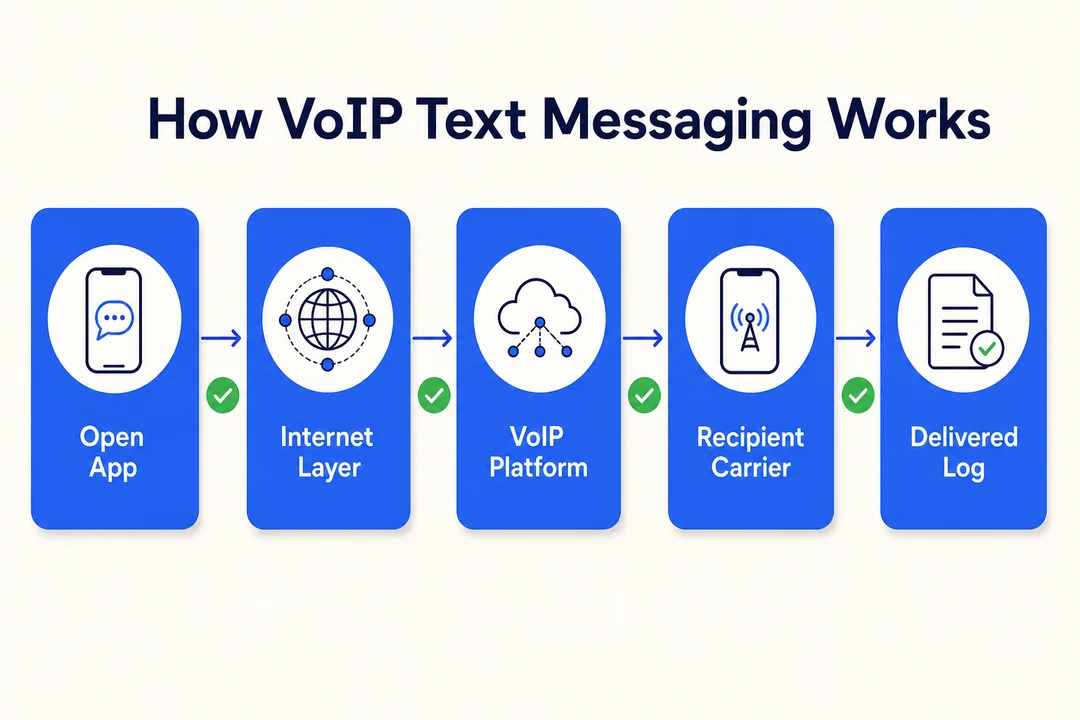
The basic process in simple terms
VoIP texting uses Internet Protocol to move messages through a cloud platform. In simple terms, the process looks like this:
- A user writes a message in a business app, web dashboard, or unified communications platform.
- The message is sent through the internet instead of from a personal mobile phone.
- The provider routes the message to the recipient’s mobile carrier or messaging network.
- The recipient receives it as a regular SMS or MMS on their device.
Example: a dental office sends a reminder from its desktop dashboard, and the patient receives a normal text on their phone.
What makes VoIP texting different from normal phone texting
The biggest difference is that VoIP texting happens through business software, not one person’s phone.
That creates a better workflow for teams:
- Multiple people can access the same conversations
- Messages can appear in a shared inbox
- Texts can be routed by department or schedule
- Sales, support, and front desk teams can all work from one number
Example: a front desk agent starts a conversation, sales follows up, and support can still see the full thread.
What the recipient sees on their side
In most cases, the customer sees a normal text thread on their phone. They usually do not need a special app.
Behind the scenes, the platform handles the conversion and routing. For the customer, the experience feels familiar, which is one reason voip sms works well for business communication.
VoIP Texting vs Traditional SMS
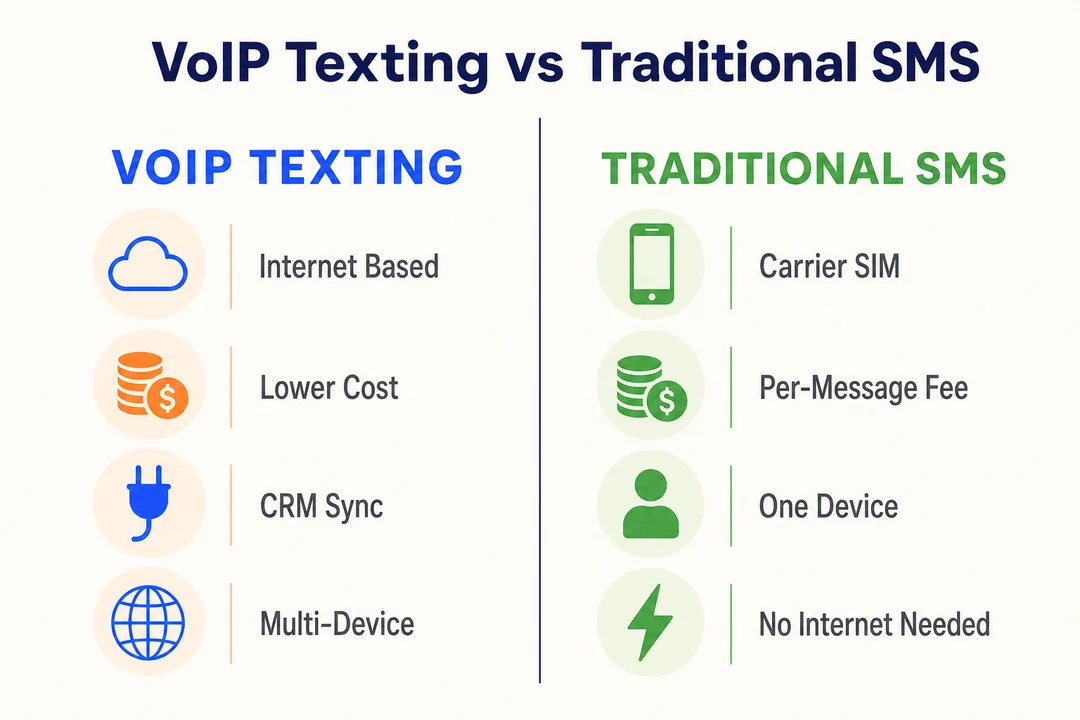
Quick comparison table
| Feature | VoIP Texting | Traditional SMS |
|---|---|---|
| Delivery method | Internet-based platform | Cellular network from a phone |
| Device access | Desktop, mobile, tablet | Usually one phone |
| Team use | Strong | Limited |
| Automation | Common | Limited |
| CRM integration | Often supported | Rare or manual |
| Best for | Team workflows and business messaging | Simple one-to-one texting |
| Number identity | Shared business number | Personal or single-device number |
| Message history visibility | Searchable and shared | Usually tied to one device |
Key differences in cost, flexibility, and workflows
For business use, VoIP texting usually gives more flexibility than standard phone texting. It supports shared access, software integration, routing, and automation from one business number.
Cost depends on your provider, registration fees, message volume, and features. In many team-based workflows, VoIP texting is more efficient than handing one mobile phone around. But it is not automatically cheaper in every case.
Key differences:
- VoIP texting supports a unified identity for calls and texts
- It scales better for growing teams and multi-location operations
- It fits software-driven workflows such as CRM syncing and auto-replies
When traditional SMS still makes sense
Traditional SMS still works well when:
- You are a solo operator
- You send very few messages
- You only need simple one-to-one texting
The limit appears when message volume grows. Manual texting becomes harder to track, share, and manage.
Why Businesses Use VoIP Text Messaging
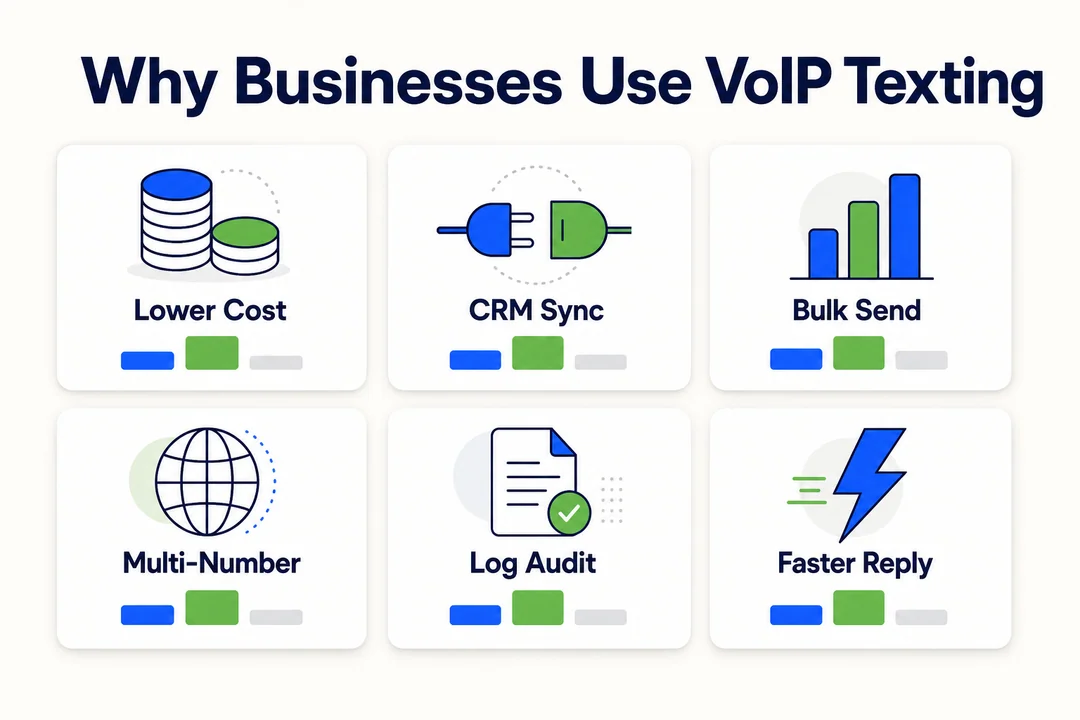
Better customer engagement
Text messages often get faster attention than email and may work better than calls for short updates. This makes VoIP texting useful for reminders, confirmations, quick support replies, and service updates.
It works best for short, actionable messages. That is why many teams use it as part of a mobile-first support workflow.
One business number for calls and texts
Using one recognizable business number builds consistency. Customers know where to call and where to text.
This works especially well for:
- Clinics
- Home service businesses
- Ecommerce support teams
- Field service teams
A single number also looks more professional than switching between personal and business lines.
Lower costs and easier scaling
VoIP texting can reduce the mess of using separate mobile phones for customer conversations. It is usually easier to manage more conversations as the team grows.
One caveat:
- Final cost depends on provider pricing, registration, features, and message volume
Better visibility and team collaboration
VoIP texting improves operational visibility because conversations are easier to manage across a team.
- Shared conversation threads reduce duplication
- Searchable history makes handoffs easier
- Managers can monitor response quality
- Teams can assign ownership more clearly
This is one reason many businesses move texting into broader cloud communication workflows.
Common Use Cases for VoIP Texting
Customer support follow-ups
Use VoIP texting for short support follow-ups such as:
- Post-call summaries
- Help links
- Ticket updates
Sample message:
Hi Sarah, this is Alex from BrightFix. Your support ticket is now in progress. Reply here if you want us to send the setup guide.
Appointment reminders and confirmations
This works well for clinics, salons, consultants, and repair teams. A well-timed reminder can reduce no-shows and save staff time.
Best practice: send one reminder far enough ahead to be useful, then avoid overdoing it.
Example:
Reminder: Your appointment with Northside Dental is tomorrow at 10:30 AM. Reply C to confirm or call us if you need to reschedule.
Missed-call text back
If your team misses a call during busy hours, an automatic text back can help capture the lead.
Example:
Sorry we missed your call. This is GreenLine Plumbing. Reply here with your issue and we’ll get back to you shortly.
This is especially useful for small businesses that cannot answer every call in real time.
Sales follow-up and lead nurturing
VoIP texting can support sales follow-up when used with restraint.
Useful message types:
- Quote follow-ups
- Demo links
- Booking links
- Next-step reminders
Keep timing reasonable. Avoid spammy templates. Personalization matters more than volume.
Order, shipping, and delivery updates
Ecommerce and logistics teams use VoIP texting for proactive updates. Customers usually value these messages because they reduce uncertainty.
This is also a good place to separate transactional messages from promotional ones. A delivery update serves a different purpose than a marketing offer.
Internal team alerts and operational messaging
Some businesses also use VoIP texting for internal coordination, depending on policy and platform support.
- Shift reminders
- Incident alerts
- Team coordination updates
Keep internal use structured so it does not create noise.
Main Benefits of VoIP Text Messaging
Convenience across devices
VoIP texting can work across desktop, mobile, and tablet. That matters for hybrid teams, remote staff, and anyone who does not want business texting tied to one phone.
This usually improves response speed because team members can reply from the device they are already using.
Scalable business text messaging
Using one phone for all customer texts breaks quickly as a business grows. VoIP texting gives teams a more manageable structure.
It is a practical fit for:
- Growing small businesses
- Multi-location teams
- Customer-facing departments with steady message volume
Easier CRM integration and personalization
A CRM means Customer Relationship Management software. It stores customer records, interactions, and context.
When VoIP texting connects with a CRM, teams can:
- Sync contacts
- View conversation history
- Assign ownership
- Personalize messages using real customer details
That usually leads to a smoother customer experience and fewer dropped conversations.
Automation through platforms and programmable messaging
Programmable messaging means messages can be sent by rules, templates, or software triggers instead of by hand every time.
Common examples include:
- Auto-replies
- Missed-call text back
- Routing by team or department
- API-based sends from apps or internal systems
Platforms such as Twilio and Vonage are common examples in this space. The key rule is simple: automation should still respect consent, timing, and relevance.
Support for omnichannel communication
Texting works best when it supports other channels, not when it replaces all of them. Many businesses use it alongside voice, email, web chat, and support tools.
That creates a more consistent customer experience across the full communication flow.
Limitations and Challenges to Know Before You Start
Not every VoIP provider or number supports texting
Some providers focus mainly on calling. Some number types also have restrictions.
Before you port a number or launch a campaign, verify:
- SMS support
- MMS support
- Two-way texting support
- Any number-specific limitations
This is one of the most common setup mistakes.
Message length, MMS, and file size limits
Keep expectations realistic.
- SMS is best for short text
- MMS support varies by provider
- File size limits may affect images or attachments
- Media-heavy workflows do not always perform equally well
Sending limits and deliverability issues
Deliverability is not just about pressing send. Repetitive, spam-like, or poorly timed messaging can hurt performance.
Deliverability often depends on registration, message quality, list quality, and provider reputation.
Avoid these mistakes:
- Sending too many messages too fast
- Reusing generic promotional text
- Messaging people who did not clearly opt in
International messaging can vary by provider
If you serve customers outside the US, check country support before launch. International messaging rules, coverage, and pricing vary widely by provider.
Do not assume that domestic texting support means global support.
Compliance can affect setup and daily usage
Compliance can slow the setup process because registration, consent, and opt-out handling need to be in place.
That is normal. It protects your business, supports legitimacy, and usually improves deliverability over time.
Compliance Basics for Business VoIP Text Messaging
Why customer consent matters
Customer consent means the person agreed to receive texts from your business.
Opt-in means they said yes. Opt-out means they can stop future messages.
Good places to collect consent include:
- Checkout forms
- Booking forms
- Lead forms
- Support request flows
Do not text people without permission. That creates compliance risk and damages trust.
What 10DLC means for US businesses
10DLC stands for 10-digit long code. In practice, it is a registration framework for business messaging sent through standard phone numbers in the US.
It helps carriers identify legitimate business traffic. For many businesses, this is a normal part of setting up compliant texting.
Why compliance helps message deliverability
Compliance supports deliverability because registered and transparent messaging looks more trustworthy to carriers and customers.
Put simply, 10DLC regulations help message deliverability by making business traffic easier to identify and evaluate. That does not guarantee success, but it usually creates a better foundation.
Basic compliance best practices
- Get clear consent before sending business texts
- Identify your business in the message when needed
- Tell users what type of messages to expect
- Keep message frequency reasonable
- Offer a clear opt-out path
- Keep records of consent
- Review your provider’s messaging rules
How to Get Started With VoIP Text Messaging
Step 1: Choose a provider that supports VoIP SMS
Compare providers based on real use case needs, not price alone.
Look for:
- SMS/MMS support
- Shared inbox features
- Compliance help
- CRM integration
- Automation options
- Reporting and admin controls
Nextiva, Vonage, and Twilio are common examples, but the best option depends on your workflow.
Step 2: Decide whether to use a new or existing business number
Your main options are:
- A new local number
- A toll-free number
- Porting your existing business number
If customers already know your current number, keeping it often makes the transition easier.
Step 3: Confirm the number is text-enabled
Not all virtual numbers can text by default. This is one of the most common setup errors.
Ask provider support to confirm:
- Outbound texting
- Inbound replies
- MMS support
- Any usage restrictions
Step 4: Complete any required registration or compliance steps
For US business messaging, this often includes 10DLC-related registration. Approval can take time, so do not leave this to the last minute.
Use accurate business details during registration. Mistakes here can delay launch.
Step 5: Set up inboxes, workflows, and team access
A good setup is not just technical. It is operational.
Define:
- Who handles sales messages
- Who handles support replies
- Who covers after-hours responses
- How conversations are assigned
- What permissions each user has
This prevents confusion later.
Step 6: Start with a few high-value message types
Start small. Pick workflows that are easy to measure.
Good first use cases:
- Appointment reminders
- Missed-call text back
- Support replies
- Order confirmations
- Sales follow-up
Launch a few, track results, then expand.
Best Practices for Using VoIP Texting Effectively
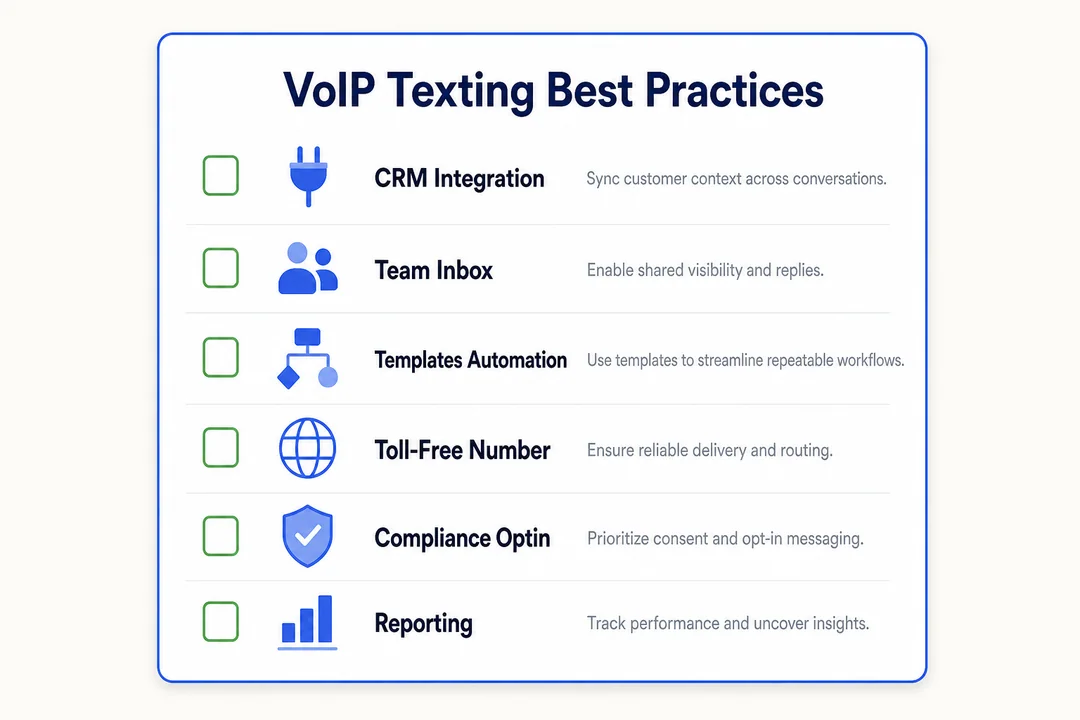
Keep messages short, clear, and useful
- One message should have one clear purpose
- Avoid long blocks of text
- Make the action obvious
- Write for mobile readability
Use texting for timely and relevant communication
Texting works best for reminders, updates, confirmations, and quick support. It is less effective for long explanations or complex back-and-forth.
Choose the channel based on the message type, not habit.
Personalize when possible
Use names, booking dates, order details, or service context when appropriate. Small details can improve response rates and build trust.
This becomes easier when texting is connected to your CRM or customer records.
Do not over-message customers
Too many messages create fatigue. That often leads to opt-outs and weaker trust.
Set internal guidelines for:
- Frequency
- Time of day
- Promotional versus service messaging
Match the message type to the audience and use case
- Transactional message: order update, reminder, verification
- Promotional text: offer, announcement, campaign
- Lead message: booking link, follow-up, intro
- Customer message: support reply, update, confirmation
Relevance matters. A useful text feels helpful. An irrelevant one feels intrusive.
Review results and improve your workflow
Track a few simple indicators:
- Reply rates
- Opt-outs
- Delivery issues
- Response time
Use that data to improve timing, templates, and ownership rules. In real operations, small workflow changes often improve outcomes more than sending more messages.
Is VoIP Text Messaging Right for Your Business?
Businesses that benefit most
- Small businesses with regular customer communication
- Service businesses that book appointments or send updates
- Support teams that need fast two-way replies
- Sales teams that follow up on leads
- Ecommerce operations sending order and delivery messages
- Any team that needs shared access to conversations
Situations where it may not be the best fit
- You send very few texts
- You do not have a clear consent process
- You do not need shared workflows
- You expect instant mass texting without registration
- Your team is not ready to manage replies consistently
Simple decision checklist
- Do you want customers to text your business number?
- Do multiple team members need shared access?
- Do you want message history in one place?
- Would CRM syncing improve follow-up?
- Are you ready to handle consent and opt-outs?
If most answers are yes, VoIP texting is worth evaluating.
Related Terms You May See When Researching VoIP Texting
VoIP, UCaaS, and cloud communications
- VoIP: calling and messaging over the internet
- UCaaS: Unified Communications as a Service, a cloud platform for business communication
- Cloud communications: internet-based tools for voice, messaging, video, and more
These terms often overlap in provider marketing and product design.
Virtual phone number and text-enabled number
A virtual phone number is a business number managed through software, not tied to one physical line.
A text-enabled number is a number that can send and receive texts. The overlap is common, but not every virtual number is text-enabled by default.
Two-way SMS communication
Two-way SMS communication means your business can send messages and receive replies on the same number.
That matters because texting works best when customers can answer back.
Programmable messaging
Programmable messaging means messages can be triggered by rules, systems, or software APIs instead of manual sending.
For most readers, the key point is simple: it supports automation.
SIP trunking
SIP trunking is a telecom infrastructure term related to internet-based calling connections.
You do not need to understand it deeply to evaluate basic VoIP text messaging.
Pros and Cons of VoIP Text Messaging
Pros
- Stronger customer engagement for short, timely updates
- One number for calls and texts
- Better team collaboration through shared access
- Multi-device access across desktop and mobile
- Easier scaling for growing teams
- Better CRM and workflow integration
- Potential cost efficiency in many business setups
Cons
- Not all numbers support SMS
- Compliance adds setup steps
- Deliverability can suffer with poor messaging practices
- International support varies by provider
- Advanced automation may increase cost
Who it is best for
VoIP texting is best for growing, customer-facing teams that send reminders, updates, follow-ups, and support messages on a regular basis. It is especially useful for businesses moving toward cloud-based communication workflows.
Frequently Asked Questions
Can you text from a VoIP number?
Yes, if the number is text-enabled and your provider supports SMS or MMS. Some VoIP numbers only support calling, so you need to verify texting support before using the number for business messaging.
Can you text a VoIP number?
Yes, if the VoIP number is set up to receive messages. Many business numbers support two-way texting, but inbound messaging still depends on the provider and number configuration.
Do all VoIP numbers support SMS?
No. Support depends on the provider, the number type, and whether the number has been enabled for texting. Always confirm this before porting or publishing the number.
What is the difference between VoIP texting and SMS?
VoIP texting uses internet-based business software to send and manage messages. Traditional SMS is usually tied to a mobile phone and cellular carrier. For business use, VoIP texting often offers better team access and workflow control.
Is VoIP text messaging cheaper than traditional business texting?
Often yes, especially for team workflows and shared communication. But pricing varies by provider, registration, message volume, and features, so it is not always cheaper in every situation.
Can I use my existing business number for VoIP texting?
Often yes, if your provider supports porting and the number can be enabled for texting. This is a common option for businesses that want continuity for customers.
Do I need customer consent before sending business texts?
Yes. Clear customer consent and a working opt-out process are essential for compliant business texting. This helps protect your business and improves trust and deliverability.
Does VoIP texting support MMS and group messaging?
Many providers support MMS, but support levels vary. Group messaging also depends on the platform, provider rules, and the specific use case, so check the details before launch.
VoIP text messaging gives businesses a practical way to send and receive texts through software instead of relying on one phone. It works because it improves customer communication, team visibility, and workflow flexibility. Before you start, check three things first: your provider’s texting support, whether your number is text-enabled, and what compliance steps apply.
If your business needs faster, more manageable customer communication, VoIP text messaging is a practical place to start, especially when you choose a text-enabled number, set clear consent rules, and begin with a few high-impact use cases.
More in Operations & CX Optimization
View all →
Customer Experience Transformation: Framework and Steps
A telecom customer calls support about a billing error. They explain the problem to the IVR system. Then to the first agent. Then get transferred and explain again. Then escalated—and explain a third time. Forty minutes later, they're exhausted and the problem still isn't solved. This is what broken customer experience looks like. And it's costing you customers. Customer experience…


Web Caller Meaning: JavaScript caller, Calling Tools or Portals
“Web caller” is one of those phrases where the search results and the searcher are frequently talking about different things. Three unrelated audiences use it: developers hitting an error on the legacy JavaScript caller property, buyers evaluating browser-based calling software, and people trying to reach a specific portal or training page whose exact name they cannot recall. That fragmentation is…

Customer Experience Strategy: How to Build One That Works
Customer experience is getting worse, not better. Forrester's 2025 Global CX Index found that 21% of brands declined in CX quality while only 6% improved — and in the US, 25% declined against 7% that improved, the second consecutive year of that pattern. Most of those brands were not neglecting customer experience. They were working on it without a strategy…



 English
  Russian
  Chinese