

If you need a better phone system without the cost and limits of old landlines, this guide helps you compare the best voip calling service provider options fast. You’ll see which services fit small businesses, remote teams, solo professionals, and home office users, plus what to watch for on pricing, features, reliability, and integrations before you buy.
Key Takeaways
- The best voip calling service provider for most businesses is RingCentral if you want depth and scale, while Zoom Phone is a better fit if you want calling, video, and chat in one simple workflow.
- Ooma is one of the best picks for small teams and home office users who want low friction, simple setup, and core calling features without enterprise complexity.
- Nextiva stands out for customer-facing businesses that need strong support, CRM integration, and better visibility into calls and client communication.
- Dialpad is a strong choice for remote teams that will actually use AI features like transcription, summaries, and coaching insights.
- Google Voice and Grasshopper work best for light-use buyers, solo professionals, and simple business number needs, but both have limits as teams grow.
- The cheapest advertised plan is not always the best value because add-ons, number porting, international calling, and higher-tier features can raise total cost fast.
- Business users usually need features like auto-attendant, call routing, analytics, and shared numbers, while home users often only need voicemail, app access, and reliable calling.
- Before choosing a cloud phone service provider, compare app quality, call reliability, integrations, support, and how well the service fits your next 12 to 24 months.
What Is a VoIP Calling Service Provider?
A VoIP provider is a company that lets you make phone calls over the internet instead of a traditional phone line. You may also see this called a cloud phone service provider, virtual phone system provider, or internet-based telephony service.
For most buyers, the main appeal is simple. You get more flexibility, easier setup, and better business features without relying on old phone hardware. That matters for small businesses, remote teams, solo professionals, and home office users who want calls on desktop, mobile, or desk phones.
Simple Definition of a VoIP Provider
A voip calling service provider is a service that routes voice calls through the internet rather than a legacy landline network.
These providers are used by:
- Small businesses that need a business phone system
- Remote and hybrid teams that need calling across devices
- Solo professionals who want a separate business number
- Home office users who want a simple, affordable calling setup
Common labels include:
- Cloud phone service provider
- Virtual phone system provider
- IP telephony platform (internet-based calling system)
How VoIP Calling Works in Simple Terms
- Your voice is converted into digital data.
- That data travels over your internet connection.
- The other person hears your voice through their phone, desktop app, mobile app, or desk phone.
Most services support several ways to call:
- Mobile app
- Desktop app
- Browser
- Compatible desk phone
This is why a cloud phone system is flexible. You are not tied to one device or one office.
Why Businesses and Home Users Switch to VoIP
- It usually costs less than maintaining traditional business phone lines.
- It makes remote work easier because calls work across mobile and desktop apps.
- It often includes useful features like call forwarding, voicemail, and team messaging.
- It is easier to scale when you add users, numbers, or locations.
- Setup is usually faster than installing traditional phone infrastructure.
VoIP is not ideal for every case. If your internet is unstable, call quality can suffer.
VoIP vs. Traditional Phone Service at a Glance
| Factor | VoIP | Traditional Phone Service |
|---|---|---|
| Connection | Internet-based | Physical phone lines |
| Pricing | Usually subscription-based and more flexible | Often higher and less flexible |
| Setup | Faster, often remote | Slower, may require on-site setup |
| Flexibility | Works on apps, desk phones, laptops | Mostly tied to fixed lines |
| Features | Strong feature sets, easier upgrades | Often limited or extra-cost |
| Main limitation | Depends on internet quality | Less flexible and harder to scale |
Bottom line: VoIP usually wins on cost and flexibility, but it depends on stable internet.
Quick Comparison of the Best VoIP Calling Service Providers
Side-by-Side Comparison Table
| Provider | Best for | Starting price* | Core features | Integrations | Call reliability / uptime reputation | Main limitation | Business or home fit |
|---|---|---|---|---|---|---|---|
| Zoom Phone | Teams already using Zoom | Starting at business-tier pricing | Calling, video, chat, voicemail, AI features | Google Workspace, Salesforce, Slack | Strong reputation for business use | Can be more than needed for simple phone replacement | Business, remote teams |
| RingCentral | Growing and larger teams | Starting at business-tier pricing | Voice, video, messaging, analytics, routing | Salesforce, Google Workspace, Microsoft tools | Strong enterprise reputation | More setup complexity and higher cost | Business |
| Nextiva | Customer-facing businesses | Starting at business-tier pricing | Calling, routing, analytics, customer communication tools | CRM tools, Salesforce | Strong reputation for service-focused teams | Pricing can rise with advanced features | Business |
| Vonage | Flexible business setups | Starting at entry business pricing | Auto-attendant, call forwarding, APIs, routing | CRM and business app integrations | Generally solid | Add-ons can raise cost quickly | Business |
| Ooma | Small business simplicity | Starting at small business pricing | Calling, voicemail-to-email, forwarding, mobile app | Common business app support | Good for everyday SMB use | Less depth for larger organizations | Small business, home office |
| Dialpad | AI-forward remote teams | Starting at entry business pricing | Calling, messaging, transcription, analytics | Google Workspace, Salesforce, help desk tools | Strong app-based reliability | AI value is less useful for basic users | Business, remote teams |
| 8×8 | Global calling and value | Custom or business-tier pricing | Voice, video, chat, analytics | CRM and productivity apps | Strong business reputation | Pricing can be less transparent | Business |
| Grasshopper | Solo pros and micro-businesses | Starting at low monthly pricing | Business number, extensions, forwarding, voicemail | Limited compared with UC platforms | Fine for basic use | Not a full collaboration system | Solo business, very small teams |
| Google Voice | Google-centric light use | Free personal tier / paid business plans | Calling, texting, voicemail transcription | Google Workspace | Reliable for simple usage | Limited advanced routing and analytics | Home office, solo, small teams |
| Intermedia Unite | All-in-one communications stack | Starting at business-tier pricing | Voice, video, chat, file sharing, reporting | Broad business app support | Solid business-grade reputation | Lower brand recognition than bigger rivals | Business |
*Pricing varies by plan, contract length, and region. Check current provider pricing before purchase.
What This Comparison Helps You Decide
Use the table to cut your shortlist fast.
- Choose Ooma, Google Voice, or Grasshopper if ease and low complexity matter more than feature depth.
- Choose RingCentral or Nextiva if you need stronger structure, administration, and room to scale.
- Choose Zoom Phone if your team already lives in Zoom and wants one app for voice, video, and chat.
- Choose Dialpad if AI summaries, transcription, and coaching tools will help your team.
- Choose Google Voice for Google Workspace simplicity, and Nextiva or RingCentral if Salesforce and customer workflows matter more.
For most buyers, this table helps narrow 10 providers down to 3 or 4 realistic finalists.
Top 10 VoIP Calling Service Providers Reviewed
1) Zoom Phone
Best for: Teams already using Zoom or businesses that want calling, video, and chat in one place.
Zoom Phone is one of the easiest options to understand if your team already uses Zoom Meetings. Instead of adding a separate phone tool, you extend the same workspace into voice calling. That makes it appealing for remote and hybrid teams.
Key features
- Cloud calling
- Team chat and video integration
- Voicemail and call recording
- AI-powered transcription and summaries
- Mobile and desktop app access
Integrations
- Google Workspace
- Salesforce
- Slack
- Other business apps depending on plan
Pros
- Strong fit for modern collaboration
- Familiar interface for Zoom users
- Good app experience across devices
- Useful AI features for active teams
Cons
- Can feel excessive for basic phone replacement
- Full value depends on broader Zoom usage
- Advanced features may require higher-tier plans
Pricing positioning
- Better positioned as a business platform than a budget pick
Best fit / not ideal for
- Best for remote teams, hybrid offices, and Zoom-heavy businesses
- Less ideal for buyers who only want a simple low-cost business number
Bottom-line verdict: Zoom Phone is one of the best all-around choices if you want a unified communications setup without juggling separate tools.
2) RingCentral
Best for: Growing businesses, multi-location teams, and companies that need structure and scale.
RingCentral is a mature business communications platform. It does more than basic calling and is built for organizations that need admin controls, routing, analytics, and broader collaboration tools. It is often one of the safest picks for businesses that expect to grow.
Key features
- Voice, video, and team messaging
- Advanced call routing
- Auto-attendant
- Analytics and reporting
- Multi-location support
Integrations
- Salesforce
- Google Workspace
- Microsoft ecosystem
- Many business apps
Pros
- Strong feature depth
- Good scalability
- Reliable business reputation
- Strong for structured phone workflows
Cons
- More complex than entry-level tools
- Can cost more than simpler providers
- Overkill for solo users and very small teams
Pricing positioning
- Usually a premium business pick, not the cheapest option
Best fit / not ideal for
- Best for growing companies, operations-heavy teams, and businesses with multiple departments
- Less ideal for buyers who want ultra-simple setup and minimal features
Bottom-line verdict: RingCentral is one of the strongest choices for businesses that need long-term scalability more than simplicity.
3) Nextiva
Best for: Customer-facing businesses that rely on calls for leads, support, appointments, or repeat service.
Nextiva is a good fit when the phone system is tied closely to customer communication. It appeals to service businesses, sales teams, and support teams that want more than just dial tone. Its value is strongest when visibility and workflow matter.
Key features
- Business calling
- Routing and voicemail
- Customer communication tools
- Analytics and reporting
- CRM-oriented workflows
Integrations
- Salesforce
- CRM platforms
- Productivity apps
Pros
- Strong fit for service-led businesses
- Good support reputation
- Useful customer communication features
- Better workflow value than many basic providers
Cons
- Pricing can climb as needs expand
- Not always the cheapest SMB choice
- Some buyers may not need the added customer tools
Pricing positioning
- Mid-to-upper business pricing depending on features
Best fit / not ideal for
- Best for businesses handling inbound leads, customer support, and repeat clients
- Less ideal for solo users or teams with very simple calling needs
Bottom-line verdict: Nextiva is a smart pick if your phone system is part of how you manage customer relationships, not just make calls.
4) Vonage
Best for: Businesses that want flexible configurations and are comfortable comparing plan details closely.
Vonage has long been known for flexibility. It can support a range of calling setups and often works well for businesses that want to customize features over time. That said, customizable does not always mean simple.
Key features
- Auto-attendant
- Call forwarding
- Call routing
- Business calling apps
- API and integration options on some plans
Integrations
- CRM tools
- Productivity platforms
- Business app ecosystem
Pros
- Flexible setup options
- Broad business phone capabilities
- Good fit for customized workflows
- Recognized brand in VoIP
Cons
- Add-on pricing can increase total cost
- Plans may require closer comparison than simpler rivals
- Not the easiest option for non-technical buyers
Pricing positioning
- Can start competitively, but real cost depends on features needed
Best fit / not ideal for
- Best for buyers who want flexibility and are willing to review plan structure carefully
- Less ideal for users who want the simplest buying path
Bottom-line verdict: Vonage is a solid option if flexibility matters, but verify feature tiers and add-on costs before choosing it.
5) Ooma
Best for: Small businesses, home office users, and buyers who want easy setup.
Ooma is one of the most approachable providers on this list. It is easy to understand, typically easy to set up, and often priced well for small teams. This is why it remains popular with less technical buyers.
Key features
- Business calling
- Call forwarding
- Voicemail-to-email
- Mobile app access
- Basic virtual receptionist features
Integrations
- More limited than enterprise-focused platforms, but enough for many SMBs
Pros
- Easy to use
- Good value for small teams
- Lower complexity
- Good fit for simple office calling
Cons
- Less depth for large or complex organizations
- Not the strongest pick for advanced analytics
- Limited compared with full UC platforms
Pricing positioning
- One of the better value picks for smaller users
Best fit / not ideal for
- Best for small offices, home office users, and practical SMB buyers
- Less ideal for companies needing deep routing, advanced admin tools, or broad collaboration features
Bottom-line verdict: Ooma is one of the best low-friction choices if you want reliable business calling without enterprise heaviness.
6) Dialpad
Best for: Remote teams, mobile-first teams, and businesses that will use AI features in daily work.
Dialpad stands out because its AI tools are not just headline features. For some teams, they are genuinely useful. Live transcription, summaries, and coaching insights can help support, sales, and QA workflows. For basic users, though, that extra value may not justify the price.
Key features
- Calling and messaging
- AI-powered call transcription
- Real-time insights
- Mobile-first apps
- Call analytics
Integrations
- Google Workspace
- Salesforce
- Help desk and business tools
Pros
- Strong remote work fit
- Good mobile and desktop experience
- AI tools can improve coaching and documentation
- Modern interface
Cons
- AI features are not equally useful for every buyer
- Some teams may pay for depth they do not use
- Less appealing if you just need a simple phone line
Pricing positioning
- Better value for teams that use analytics and AI regularly
Best fit / not ideal for
- Best for distributed teams, support groups, and sales teams
- Less ideal for simple home office or micro-business use
Bottom-line verdict: Dialpad is a strong modern option when AI and app quality matter in real day-to-day operations.
7) 8×8
Best for: Businesses with international calling needs and buyers looking for broad communications value.
8×8 is often attractive when your team calls across borders or needs international flexibility. It also offers a broader communications platform with voice, video, and chat, which makes it more appealing than domestic-first tools in some cases.
Key features
- Business voice
- Video and chat
- Analytics and reporting
- International calling options
- Multi-device support
Integrations
- CRM tools
- Productivity platforms
- Business apps
Pros
- Strong for global communication
- Good all-in-one value
- Business-ready feature mix
- Useful for distributed organizations
Cons
- Pricing may be less transparent than simpler rivals
- Not always the easiest for very small teams
- Some buyers may not need the broader platform
Pricing positioning
- Value-oriented if you need international capability
Best fit / not ideal for
- Best for globally active teams or businesses with international clients
- Less ideal for light domestic use only
Bottom-line verdict: 8×8 is one of the better picks when international calling is a priority, not an afterthought.
8) Grasshopper
Best for: Freelancers, founders, consultants, and micro-businesses that need a professional business number.
Grasshopper is not a full unified communications platform. That is important. Its strength is simple business presence. You can separate work and personal calls, create extensions, and look more professional without building a full phone system.
Key features
- Business phone number
- Extensions
- Call forwarding
- Voicemail
- Basic call handling
Integrations
- Limited compared with business-first UC platforms
Pros
- Very easy to understand
- Good for solo professionals
- Helps create a professional business presence
- Low complexity
Cons
- Limited collaboration features
- Not built for advanced routing or analytics
- Easy to outgrow
Pricing positioning
- Often affordable for light-use business needs
Best fit / not ideal for
- Best for one-person businesses and very small teams
- Less ideal for growing teams that need deeper workflows
Bottom-line verdict: Grasshopper is great for simple business identity and call handling, but it is not the right tool for scaling operations.
9) Google Voice
Best for: Google Workspace users with simple calling needs.
Google Voice is attractive because it is familiar, clean, and easy to adopt. If your team already works in Google Workspace, the setup feels low-friction. That simplicity is the main reason to choose it.
Key features
- Calling and texting
- Voicemail transcription
- Number management
- Device flexibility
- Google ecosystem alignment
Integrations
- Strongest within Google Workspace
Pros
- Easy to use
- Familiar interface
- Low-friction setup
- Good for light-use teams and home office users
Cons
- Limited advanced routing
- Less robust analytics
- Not the strongest long-term fit for scaling businesses
Pricing positioning
- Often one of the most affordable practical options
Best fit / not ideal for
- Best for solo users, home office setups, and small Google-centric teams
- Less ideal for businesses needing advanced phone workflows
Bottom-line verdict: Google Voice is one of the best budget-friendly choices for simple calling, especially if you already work inside Google Workspace.
10) Intermedia Unite
Best for: Businesses that want an all-in-one communication stack and fewer separate tools.
Intermedia Unite is designed around consolidation. If your business wants voice, video, chat, file sharing, and reporting in one place, it deserves a look. It may not have the same name recognition as larger brands, but practical fit matters more than brand familiarity.
Key features
- Voice, video, and chat
- File sharing
- Reporting
- Business communication management
- Multi-device access
Integrations
- Business app support across common productivity needs
Pros
- All-in-one approach
- Helpful for reducing tool sprawl
- Good fit for businesses that want consolidation
- Broad communication stack
Cons
- Less brand familiarity than top rivals
- Needs careful pricing comparison
- May not beat specialists in every category
Pricing positioning
- Better judged on bundle value than entry-level price
Best fit / not ideal for
- Best for businesses trying to simplify their communication stack
- Less ideal for buyers who only need a very simple phone solution
Bottom-line verdict: Intermedia Unite is a good option for consolidation-focused businesses that want one vendor for more of their communication needs.
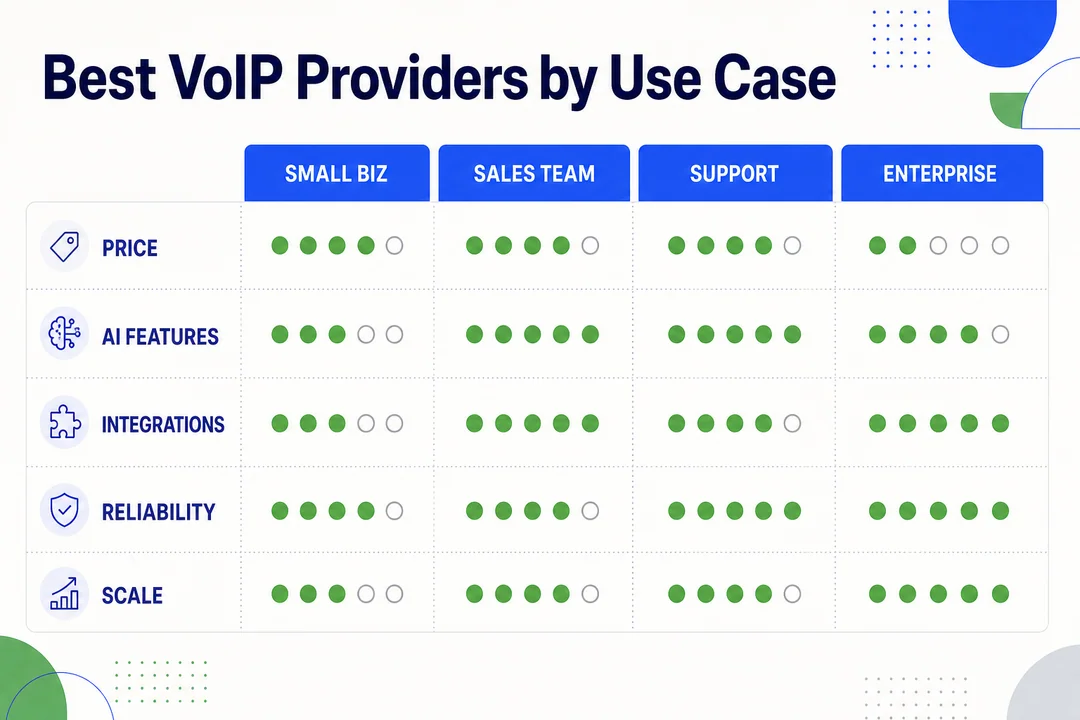
Best VoIP Providers by Use Case
Best VoIP Calling Service Provider for Small Business
- Best pick: Ooma if you want simple setup, solid core features, and low complexity.
- Runner-up: Nextiva if your business depends on customer calls, appointments, or lead handling.
- Also strong: RingCentral if you want to buy once and scale into a more advanced system.
Best if:
- Choose Ooma if ease and cost-effectiveness matter most.
- Choose Nextiva if support and customer workflows matter most.
- Choose RingCentral if you expect team growth and more advanced routing later.
Buyer warning: many small businesses overbuy enterprise features they never use.
Best Cloud-Based Phone System for Remote Teams
- Best pick: Zoom Phone for voice, video, and chat in one workflow.
- Runner-up: Dialpad for mobile-first calling and AI-driven productivity.
- Also strong: RingCentral for stronger admin controls and larger distributed teams.
Why these win:
- Good softphone application quality
- Better mobile usability
- Easier onboarding for remote staff
- Flexible device use without office hardware dependence
Buyer warning: remote teams should test the mobile and desktop app experience, not just compare feature lists.
Best Business VoIP Provider for Growing Companies
- Best pick: RingCentral for scalability, admin depth, and multi-location readiness.
- Runner-up: Dialpad for growth teams that want modern apps and analytics.
- Also strong: Nextiva for growth tied to customer communication workflows.
Focus on:
- Adding users without friction
- Better analytics over time
- Routing flexibility
- CRM sync
- Permission controls as teams expand
Buyer warning: entry-level tools can feel cheap now and expensive later if they force a migration.
Best Budget VoIP Provider
- Best pick: Google Voice for simple low-friction calling.
- Runner-up: Ooma for practical small business value.
- Also strong: Grasshopper for solo business presence.
What to check beyond headline price:
- Add-ons
- Taxes and fees
- Number charges
- Upgrade costs
- Number porting fees
Caution: a lower monthly plan can become more expensive than expected once you add voicemail features, extra numbers, or business routing.
Best Virtual Phone System Provider for Solo Professionals
- Best pick: Grasshopper for a separate business number, extensions, and simple call handling.
- Runner-up: Google Voice for low-cost, easy calling inside the Google ecosystem.
Best for:
- Freelancers
- Consultants
- Real estate agents
- Independent service providers
These tools work well when you mainly need professional separation between personal and work calls.
Best VoIP Provider for Home Office Use
- Best pick: Google Voice for easy everyday calling and voicemail.
- Runner-up: Ooma for more traditional phone replacement feel with small business flexibility.
- Also consider: Zoom Phone if your work already runs through Zoom.
Most home office users need:
- Reliable calling
- Voicemail
- App access
- Basic forwarding
Warning: do not pay enterprise pricing for features you will never touch.
Best VoIP Service With CRM Integration
- Best pick: Nextiva for customer-facing workflows and communication visibility.
- Runner-up: RingCentral for broad business app compatibility and structured call workflows.
- Also strong: Zoom Phone if you want collaboration plus CRM fit.
Why it matters:
- Auto call logging saves time
- Salesforce visibility helps sales and support
- Better records improve follow-up and accountability
This category matters most for teams where calls drive revenue or customer support quality.
Best Unified Communications Platform for All-in-One Collaboration
- Best pick: RingCentral for depth and full business communication coverage.
- Runner-up: Zoom Phone for a streamlined voice, video, and messaging experience.
- Also strong: 8×8 for all-in-one value with global communication appeal.
Choose this category if you want:
- One app ecosystem
- Fewer separate subscriptions
- Better team collaboration across voice, video, and chat
Skip it if you only need a simple business number.
How to Choose the Right VoIP Calling Service Provider
Start With Your Actual Use Case
Do not start with the biggest brand. Start with how you actually work.
Use this checklist:
- How many users do you need now?
- How many users might you need next year?
- Are calls mostly customer-facing or internal?
- Do you need remote or hybrid support?
- Will you use desk phones, mobile apps, or both?
- Do you need a home office setup or a true business system?
- Do calls need to connect to a CRM or help desk tool?
Example:
- A solo consultant may only need a business number, voicemail, and call forwarding.
- A 20-person support team may need auto-attendant, routing, analytics, shared numbers, and admin controls.
This step prevents a common mistake: paying for tools built for companies much larger than yours.
Compare Pricing Beyond the Advertised Monthly Rate
The monthly headline price is only the starting point.
Look at the full cost:
- Monthly per-user fees
- Extra numbers
- International calling rates
- Call recording or analytics add-ons
- Number porting charges
- Setup or onboarding fees
- Annual contract requirements
- Higher-tier plans for key features
Simple example:
A plan that starts at a low monthly rate may look attractive for five users. But if voicemail transcription, call recording, and CRM sync require upgrades, your real monthly cost can increase quickly.
This is where buyers often get surprised. A more expensive base plan can be better value if it already includes the features you actually need.
Good buying rule: build a 12-month cost estimate, not just a first-month estimate.
Check the Core Calling Features First
Ignore flashy extras until the basics are covered.
Prioritize these first:
- Call forwarding so calls reach the right device or person
- Auto-attendant so callers can navigate your business without a receptionist
- Voicemail transcription so you can scan messages quickly
- Call routing so inbound calls go to the right team or extension
- Softphone app so staff can call from mobile or desktop
- Number porting so you can keep your existing business number
Match feature depth to real needs.
A one-person business may only need forwarding and voicemail. A service business may need routing, shared numbers, and call handling rules. Buying based on your actual workflow keeps you from paying for unused tools.
Review Call Quality and Reliability
Call quality depends on two things: the provider and your internet.
A good provider can still sound poor on a weak local network. Likewise, strong internet cannot fix a weak platform experience.
What to review:
- Provider uptime reputation
- Audio stability during busy hours
- Delay in speech, called latency (time lag)
- Jitter (uneven audio timing that causes choppy sound)
- Performance on Wi‑Fi versus wired internet
- Mobile app reliability outside the office
Practical advice:
- Test the service during your busiest hours
- Ask about service guarantees and uptime expectations
- If possible, test on the same network your team will use daily
- Prefer wired connections for critical desk setups when possible
For most businesses, VoIP is reliable enough. But buyers should test real-world performance, not assume all services sound the same.
Look at Integrations and Workflow Fit
Integrations matter most when calls are part of a larger workflow.
Check for fit with:
- Google Workspace
- Salesforce
- Other CRM tools
- Help desk software
- Project tools
- Team messaging apps
Why this matters:
- Calls can log automatically into customer records
- Staff can see contact history faster
- Fewer manual steps reduce mistakes
- Familiar tools improve adoption
If your business does not rely heavily on business apps, integrations may not be a top priority. But for sales, support, and service teams, this can be one of the biggest value drivers.
Think About Scalability Before You Commit
Many buyers choose for today and regret it a year later.
Think about the next 12 to 24 months:
- Will you add users?
- Will you need more phone numbers?
- Will you need analytics later?
- Could you add departments or locations?
- Will you need more complex routing?
- Can admins manage permissions easily as the team grows?
A simple provider can be the right choice if your needs will stay simple. But if growth is likely, moving later can be disruptive. Porting, retraining, and changing call flows all take time.
Buying slightly ahead of current needs is often smarter than buying at the absolute minimum.
Evaluate Support and Ease of Setup
Good onboarding matters, especially for teams without in-house IT.
Compare:
- Self-serve setup quality
- Guided onboarding options
- Live chat or phone support availability
- Help documentation
- Admin dashboard clarity
- Training resources
What to expect in real life:
- Number porting may take time
- Staff may need help learning the app
- Call routing setup may take more effort than expected
For non-technical teams, support quality is not a minor detail. It directly affects rollout speed and day-to-day confidence.
Don’t Ignore Security Basics
Most buyers do not need deep compliance analysis. They do need basic safeguards.
Check for:
- MFA (multi-factor authentication, an extra login verification step)
- Role-based access
- Admin permissions
- User access controls
- Account protection options
- Clear vendor trust signals and documentation
This matters more if your calls involve customer records, payment discussions, or sensitive business conversations.
The best setup is one that is secure without becoming hard to manage. Strong admin controls are useful, but they should still be practical for non-IT teams.
Business VoIP vs. Home VoIP Services
Key Differences in Features
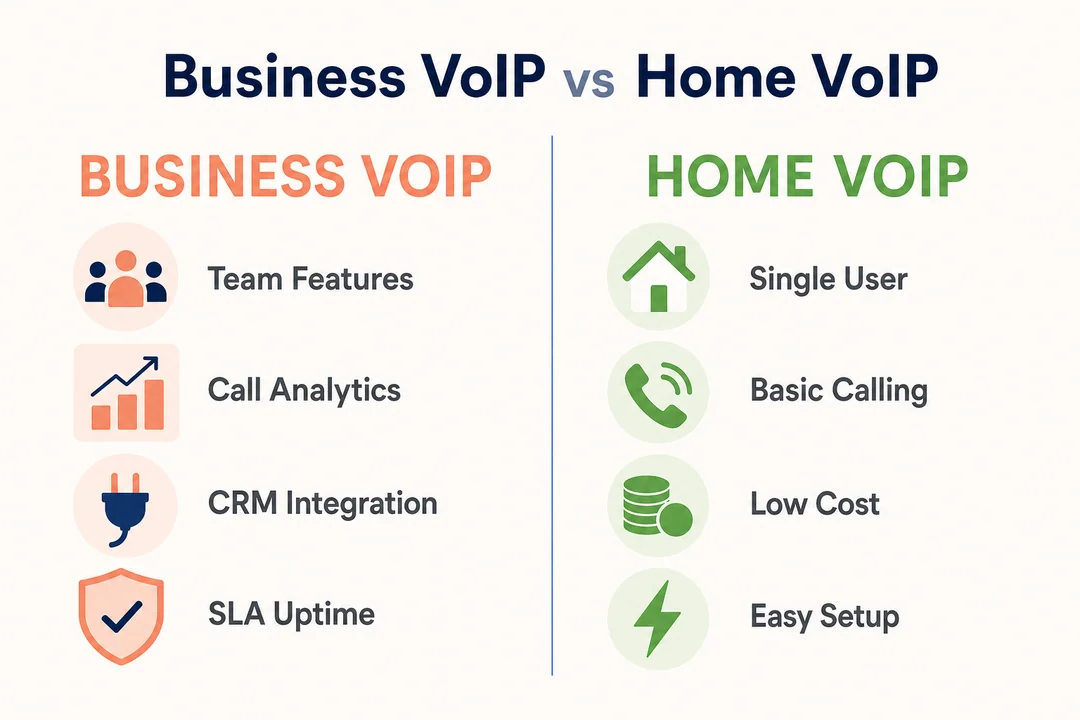
| Area | Business VoIP | Home VoIP |
|---|---|---|
| Call handling | Auto-attendant, shared lines, advanced routing | Basic calling and simple forwarding |
| Collaboration | Often includes messaging and video | Usually limited or not included |
| Analytics | Reporting and call visibility | Minimal analytics |
| Admin controls | User roles and permissions | Basic account management |
| Common fit | Teams, customer service, growth | Individuals, light home office use |
Business services do more, but they also bring more complexity. Home-focused services are easier to manage, but they have lower ceilings.
Differences in Pricing and Plan Structure
Business VoIP usually uses a monthly per-user pricing model. That means cost rises as you add staff, numbers, and advanced features.
Home or light-use services often have simpler pricing. Some use flatter plans or cheaper entry options. That is attractive, but feature limits can appear quickly.
Keep in mind:
- Advanced routing raises cost
- CRM and analytics often sit on higher tiers
- Bundles can be good value if you need voice, video, and chat
- Bundles are wasted money if you only need a phone number
Which Type Is Better for Your Needs
Choose business VoIP if you need:
- Team calling
- Shared numbers
- CRM integration
- Routing and call handling
- Growth flexibility
Choose a simpler service if you need:
- One business number
- Light call volume
- Basic voicemail
- Easy app-based calling
- Minimal setup
The biggest mistake is overbuying. If your needs are simple, a lighter provider may be the smarter choice.
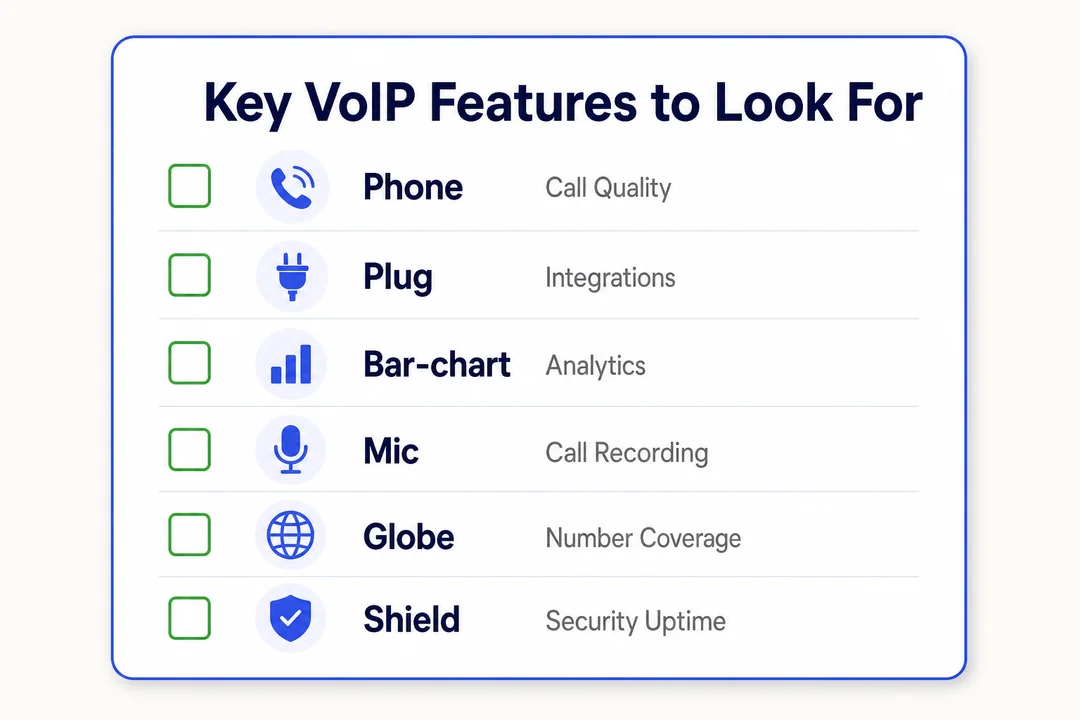
Key Features to Look For in a VoIP Provider
Essential Calling Features
These matter more than trendy extras:
- Call forwarding sends calls to another number or device so you do not miss them.
- Voicemail lets callers leave messages when you are unavailable.
- Caller ID helps you identify incoming calls quickly.
- Number porting lets you keep your current phone number when switching providers.
- Call routing directs calls to the right person, team, or department.
- Auto-attendant answers calls with menu options for a more professional experience.
Everyday examples:
- A consultant uses call forwarding to take office calls on mobile.
- A small clinic uses auto-attendant to direct callers to appointments or billing.
- A sales team uses call routing to send leads to the right rep faster.
Start here. If these basics are weak, advanced features will not make up for it.
Productivity and Unified Communications Tools
Unified communications means voice, video, and messaging in one platform.
This is useful for:
- Remote teams that switch between chat, meetings, and calls
- Cross-functional teams that need faster internal communication
- Businesses trying to reduce separate app subscriptions
Main benefits:
- Fewer tools to manage
- Better internal collaboration
- Easier communication history in one place
This is not necessary for everyone. If you only need a business number and voicemail, an all-in-one platform may be more than you need.
AI and Analytics Features
AI and analytics features can be useful, but only when they solve a real problem.
Common features:
- AI-powered call transcription
- Call summaries
- Voicemail prioritization
- Sentiment analysis (a tool that flags tone patterns in conversations)
- Analytics dashboards
Practical use cases:
- Sales teams review transcripts for coaching
- Support managers spot repeated call issues
- Busy users scan voicemail summaries faster
- Team leads track call patterns over time
Buyer warning: these features often raise plan cost. If you will not review transcripts, use coaching, or act on analytics, you may not get enough value from them.
Integration Capabilities
Integrations save time and reduce manual work.
Look for support with:
- Google Workspace
- Salesforce
- Other CRM platforms
- Help desk tools
- Project management apps
Useful examples:
- Calls log automatically into customer records
- A rep opens caller details before answering
- Follow-up tasks sync into the team workflow
This is one of the easiest ways to improve productivity with a phone system. But only pay for broad integrations if your team will use them.
Security and Admin Controls
Good security should be strong and manageable.
Check for:
- MFA
- User permissions
- Role-based access
- Admin controls
- Access management for numbers and recordings
- Clear account recovery options
Practical rule: choose a provider that gives enough control to protect the business without making daily administration hard for non-technical managers.
Pros and Cons of Using a VoIP Calling Service
Main Advantages
- Lower cost than many traditional phone setups.
- Easier scaling as you add users and numbers.
- Better flexibility across desktop, mobile, and desk phones.
- Stronger feature sets than basic landline services.
- Better support for remote work and multi-device access.
- Easier access to unified communications features.
Common Drawbacks
- Call quality depends on internet stability.
- Poor networks can cause dropped or choppy calls.
- Add-on pricing can make low-cost plans less attractive.
- Some platforms are too complex for simple users.
- Number porting and setup can take longer than expected.
When VoIP Is Worth It
VoIP is worth it if you want lower costs, more flexibility, remote access, or better business features than a traditional phone service can offer. It makes the most sense for small businesses, hybrid teams, solo professionals, and home office users who need calls across devices and do not want to be tied to one location.
Final Recommendations by Buyer Type
Best Overall VoIP Calling Service Provider
If you want the strongest overall business option, choose RingCentral for deeper communications depth, stronger scalability, and more structured business features.
If you want a cleaner modern collaboration experience, choose Zoom Phone. It is the better pick when voice, video, and chat need to work together in one app.
Simple chooser:
- Choose RingCentral for feature depth and growth.
- Choose Zoom Phone for a streamlined modern workflow.
Best for Small Business
- Ooma is the best choice for small businesses that want easy setup, core features, and practical value.
- Nextiva is better for small businesses where customer communication is central to growth.
Best for Remote and Hybrid Teams
- Zoom Phone is the best fit for teams already using Zoom for meetings and collaboration.
- Dialpad is a strong pick for distributed teams that want mobile-first calling and AI support.
Best Affordable VoIP Service
- Google Voice is the best low-friction option for simple calling needs and Google-centric users.
- Ooma offers better small business value if you need a bit more structure without going enterprise.
Best for Home Use
- Google Voice works best for simple home office use, voicemail, and app-based calling.
- Ooma is a strong alternative if you want a more business-ready setup without much complexity.
Best for Advanced Integrations
- Nextiva is a strong choice for customer-facing workflows.
- RingCentral offers broad business compatibility at scale.
- Zoom Phone works well if you want collaboration and CRM fit in the same platform.
Best for Global Calling
8×8 is the clearest pick for global calling because its international communication value is stronger than many domestic-first providers.
The best provider is the one that fits your actual workflow, not the one with the biggest name. Shortlist two or three options, compare current pricing, test app usability, and confirm integrations and number porting before you commit.
Frequently Asked Questions
What Is the Best VoIP Calling Service Provider for Small Business?
There is no one-size-fits-all answer. Ooma is often best for small businesses that want simplicity and value. Nextiva is better for customer-facing teams that need stronger support and workflow tools. RingCentral is the better choice for businesses expecting steady growth and more advanced call handling.
Which VoIP Provider Is Best for Home Use?
Google Voice and Ooma are the best fits for most home users. Google Voice works well if you want simple app-based calling and already use Google tools. Ooma is better if you want a more traditional phone replacement feel with a few extra business-friendly features.
How Much Does a Cloud Phone System Usually Cost?
A cloud phone system usually uses monthly per-user pricing for business plans. Entry pricing may look affordable, but total cost can rise with add-ons like extra numbers, call recording, analytics, or international calling. Always compare full yearly cost, not just the advertised starting rate.
Are VoIP Calls Reliable Enough for Business Use?
Yes, VoIP calls are reliable enough for business use in most cases. The key factor is not just the provider. Your internet quality matters too. Stable connections, low network congestion, and good app performance make a big difference. Test service during normal working hours before switching fully.
What Internet Speed Do I Need for VoIP Calling?
For VoIP calling, stable internet matters more than raw speed alone. A connection with low delay and low congestion is more important than a big headline speed number. If your network gets crowded during work hours, call quality may drop. Test from the same network and devices you will use daily.
Can I Keep My Existing Phone Number With a VoIP Provider?
Yes, most providers support number porting, which means moving your current number to the new service. Porting timelines and fees vary by provider. It can take time, especially for business numbers, so confirm the process early before canceling your current service.
What Features Should I Prioritize in a Business VoIP Solution?
Prioritize these first:
- Call forwarding
- Auto-attendant
- Voicemail transcription
- Call routing
- Mobile and desktop app access
- CRM integrations
- Scalability
- Reliable customer support
These basics usually matter more than premium extras.
Is Google Voice Enough for a Small Business?
Yes, Google Voice can be enough for a very small business with simple calling needs. It works best for solo professionals and light-use teams already using Google Workspace. It becomes less suitable when you need advanced routing, deeper analytics, or more structured call handling as your business grows.
What Is the Difference Between a VoIP Provider and a Unified Communications Platform?
A VoIP provider focuses on internet-based calling. A unified communications platform combines calling with other tools like video meetings and team messaging. Some services offer both. If you only need phone service, a simple VoIP provider may be enough. If your team wants one communication hub, a broader platform makes more sense.
More in Operations & CX Optimization
View all →
Customer Experience Transformation: Framework and Steps
A telecom customer calls support about a billing error. They explain the problem to the IVR system. Then to the first agent. Then get transferred and explain again. Then escalated—and explain a third time. Forty minutes later, they're exhausted and the problem still isn't solved. This is what broken customer experience looks like. And it's costing you customers. Customer experience…


Web Caller Meaning: JavaScript caller, Calling Tools or Portals
“Web caller” is one of those phrases where the search results and the searcher are frequently talking about different things. Three unrelated audiences use it: developers hitting an error on the legacy JavaScript caller property, buyers evaluating browser-based calling software, and people trying to reach a specific portal or training page whose exact name they cannot recall. That fragmentation is…

Customer Experience Strategy: How to Build One That Works
Customer experience is getting worse, not better. Forrester's 2025 Global CX Index found that 21% of brands declined in CX quality while only 6% improved — and in the US, 25% declined against 7% that improved, the second consecutive year of that pattern. Most of those brands were not neglecting customer experience. They were working on it without a strategy…



 English
  Russian
  Chinese