

Call center coaching software helps contact centers improve agent performance with faster, more consistent feedback. If you’re comparing vendors or trying to understand what these tools actually do, this guide gives you both: a practical shortlist of the best call center coaching software for 2025 and a simple framework to choose the right one. You’ll see which tools fit small teams, mid-market operations, and enterprise environments, what features matter most, common buying mistakes, and how to roll out coaching software without overwhelming managers or agents.
Key Takeaways
- Call center coaching software works best when it turns performance data into specific coaching actions, follow-up, and measurable improvement.
- The right platform depends more on your use case, team size, and manager workflow than on the biggest AI claims.
- Some tools focus on post-call coaching, while others are built around real-time agent assist during live conversations.
- Integrations with CRM, CCaaS, LMS, and workforce tools matter because disconnected systems slow adoption and reduce trust in reporting.
- Manager adoption is the biggest success factor, since software does not replace good coaching habits.
- Teams usually get better results when they start with a small set of goals, such as QA consistency, FCR, or onboarding speed.
- Enterprise platforms can be powerful, but they are often too complex for smaller teams with limited admin capacity.
- A pilot rollout and a clear 30-, 60-, and 90-day review plan reduce risk and improve ROI.
What Is Call Center Coaching Software?
Simple definition of call center coaching software
Call center coaching software is a tool that helps managers, team leads, QA teams, and operations leaders turn customer interaction reviews into structured coaching and measurable agent improvement.
In simple terms, it helps teams move from spotting problems to actually fixing them.
A typical workflow looks like this:
- The platform collects call, chat, or email interaction data.
- It highlights performance gaps or repeated issues.
- Managers assign feedback, coaching, or follow-up tasks.
- Agents and leaders track progress over time.
- The team measures whether behavior and results improve.
For example, a manager may notice low FCR (first call resolution, meaning the customer’s issue is solved in one contact). They review calls, find that agents are not asking strong follow-up questions, assign coaching on probing skills, and then track whether FCR improves over the next 30 days.
The main value is not just visibility. It is accountability, consistency, and follow-through.
How it differs from call monitoring, QA software, and training tools
Buyers often confuse these categories because many vendors now bundle overlapping features. The difference is the main workflow each tool is built to solve.
| Tool type | Main purpose | What it does well | What it does not do by itself | Best use case |
|---|---|---|---|---|
| Call monitoring | Record and review interactions | Captures calls for playback and review | Does not structure coaching or track improvement | Basic oversight and compliance review |
| QA software | Evaluate quality and score performance | Identifies issues through scorecards and evaluations | Does not always drive follow-up coaching actions | Teams focused on scoring consistency |
| Training tools / LMS | Deliver learning content | Hosts courses, videos, quizzes, and training paths | Does not connect learning directly to live performance gaps | Onboarding and formal training programs |
| Coaching software | Turn performance insights into action | Assigns coaching, tracks progress, measures improvement | Does not replace human judgment or broader training strategy | Teams that need structured agent development |
Many platforms overlap. But the smarter buying question is this: which workflow do you need to fix first?
If your main problem is finding issues, QA may be enough. If your problem is turning identified issues into better performance, coaching software is the better fit.
Why teams use it
Most teams buy coaching software because manual coaching breaks down at scale.
Common pain points include:
- Managers cannot review enough interactions to coach every agent fairly.
- Feedback varies too much from one supervisor to another.
- Agents get vague advice instead of behavior-based guidance.
- Onboarding takes too long because improvement loops are inconsistent.
- Performance data sits across too many systems.
The software helps solve those issues by creating a more repeatable coaching process. That usually leads to:
- Better agent performance
- More consistent feedback
- Faster onboarding
- Stronger customer experience outcomes
- Better retention through clearer development paths
A mid-sized support team with 80 agents is a good example. Without a system, team leads often coach based on recent complaints or random call reviews. With coaching software, the team can flag repeat issues, assign targeted feedback, track whether coaching happened, and measure whether performance improved after the intervention.
That structure is the real value.
Top 10 Call Center Coaching Software Tools
The best call center coaching software depends on how your team coaches today. Some tools are strongest in manager-led coaching. Others focus on real-time agent assist. Some are best for enterprises that want coaching built into a broader contact center stack. Below is a practical, buyer-first look at 10 leading tools, including where each one fits, where it falls short, and who should shortlist it.
1. AmplifAI
- Best for: Teams that want AI-enabled coaching with strong performance management structure
- Standout features: Next-best coaching actions, trend tracking, gamification, coaching effectiveness visibility, behavior-focused analytics
- Pros: Strong support for manager-led coaching, good visibility into patterns over time, useful for building consistent coaching habits across leaders
- Cons: Best results depend on having some coaching process discipline already in place
- Ideal fit: Mid-market and enterprise teams that want to connect QA, performance trends, and coaching actions
AmplifAI stands out because it focuses on what managers should do next, not just what happened. Its coaching recommendations and trend views are designed to help leaders prioritize the highest-impact actions.
Its behavioral change correlation is useful in plain terms: it helps teams see whether the specific behavior that was coached actually improved before the KPI moved. That is more useful than just counting coaching sessions.
It is a strong option for teams that want to make coaching more structured and measurable.
2. Genesys
- Best for: Enterprises already using Genesys as their CCaaS (contact center as a service, a cloud platform for contact center operations)
- Standout features: Real-time assistance, workflow integration, native ecosystem alignment, enterprise-grade operational support
- Pros: Strong fit for consolidation, smoother workflow alignment for existing Genesys customers, broad platform depth
- Cons: Can feel too large or complex for smaller teams
- Ideal fit: Enterprise contact centers that want coaching inside a larger platform strategy
Genesys is often most attractive when a buyer wants fewer tools, tighter workflow alignment, and less vendor sprawl.
Its coaching value is strongest inside the broader Genesys environment. That means it is less about picking a narrow best-of-breed coaching tool and more about choosing platform consolidation.
If your team is small or wants maximum flexibility, it may be more platform than you need.
3. CallMiner
- Best for: Analytics-heavy teams that want deep conversation intelligence
- Standout features: Speech analytics, sentiment analysis, trend discovery, root-cause analysis
- Pros: Strong at finding patterns across large volumes of interactions, useful for uncovering escalation drivers and recurring service failures
- Cons: Insight-rich platforms still need a solid coaching process to turn findings into action
- Ideal fit: Large teams with mature QA or operations functions
CallMiner is strong when your biggest challenge is finding signal inside large amounts of interaction data.
It can help surface repeat failure points, customer frustration trends, or behaviors linked to escalations. That makes it valuable for leaders trying to understand what is driving poor outcomes at scale.
The trade-off is simple: insight alone is not coaching. If your managers lack time or process discipline, the platform can reveal a lot without changing much.
4. Verint
- Best for: Large contact centers that want coaching aligned with broader WEM (workforce engagement management)
- Standout features: QA, workflow automation, engagement analytics, links to WFM (workforce management, staffing and scheduling tools)
- Pros: Strong for governance, scale, and standardized processes across complex operations
- Cons: May be too broad for teams only looking for a focused coaching tool
- Ideal fit: Mature enterprise organizations with layered operations and governance needs
Verint fits best when coaching is one part of a larger workforce strategy.
It is well suited to enterprises that need consistency across locations, roles, and leadership teams. It also makes sense when buyers want coaching to connect with QA, staffing, and operational planning.
For smaller teams, the platform scope can create extra complexity.
5. Dialpad
- Best for: Teams that want accessible AI support with easier deployment
- Standout features: Live guidance, automated QA scoring, clear performance visibility
- Pros: More approachable than heavier suites, practical for fast-moving teams, easier to understand and adopt
- Cons: May not go as deep as specialist platforms in advanced coaching workflows
- Ideal fit: SMB and mid-market teams that want usable AI support without enterprise overhead
Dialpad is a strong option for teams that value speed, usability, and built-in AI support.
It offers live guidance and automated visibility into performance without forcing teams into a large enterprise stack. That can reduce rollout friction.
It is often the better fit when you want useful coaching features quickly, rather than the deepest specialized toolset on the market.
6. Observe.AI
- Best for: QA-heavy teams that want automation and actionable coaching recommendations
- Standout features: Automated QA, coaching suggestions, performance analysis, workflow support
- Pros: Reduces manual QA effort, helps connect evaluations to coaching actions, supports scale
- Cons: Buyers should validate whether manager-facing recommendations are truly actionable
- Ideal fit: Teams trying to reduce review workload while improving coaching consistency
Observe.AI is especially appealing when the main pain point is manual QA effort.
Its value comes from automating more of the review and scoring process, then using those findings to trigger coaching follow-up. In simple terms, it helps teams move from scoring calls to doing something with the scores.
The key demo question is whether the insights help managers coach faster and better, not just review more data.
7. Cresta
- Best for: Teams that benefit from live, in-the-moment guidance
- Standout features: AI-led coaching, predictive next-best actions, real-time prompts
- Pros: Strong for live support and sales environments, can influence outcomes during the interaction itself
- Cons: Less ideal if your model depends mostly on post-call manager coaching
- Ideal fit: Sales teams, high-volume service teams, and operations where live guidance matters
Cresta is built around real-time performance support.
That means it is often strongest where coaching needs to happen during the call, not days later. For teams handling sales conversions, difficult objections, or high-pressure support interactions, that can be powerful.
If your main goal is structured manager-led development over time, other tools may fit better.
8. LevelAI
- Best for: Buyers who want a balanced mix of QA automation, analytics, and live support
- Standout features: Automated evaluations, conversation intelligence, real-time support, unified visibility
- Pros: Broad AI support without requiring multiple point solutions, balanced feature mix
- Cons: Buyers should confirm where it is deepest based on their own use case
- Ideal fit: Mid-market and enterprise teams looking for broad coverage
LevelAI appeals to teams that do not want to stitch together multiple systems for QA, analytics, and coaching support.
It offers a more balanced platform approach. That can be helpful when your needs span post-call review, trend analysis, and in-call guidance.
The main buying task is to verify whether its strongest capabilities align with your top priority.
9. Balto
- Best for: Compliance-heavy teams that need live script guidance
- Standout features: Real-time in-call prompts, script adherence, compliance reminders
- Pros: Strong support for regulated workflows, useful for reducing missed statements or process errors
- Cons: Less relevant if live prompting is not a top priority
- Ideal fit: Healthcare, insurance, financial services, and other regulated environments
Balto is built around helping agents say the right thing at the right time.
That matters most in industries where missing a required statement creates risk. Live prompts can improve consistency, reduce compliance gaps, and support less experienced agents in complex calls.
If your coaching model is mostly post-call and developmental, Balto may be too narrowly focused.
10. MaestroQA
- Best for: Teams that want structured QA-to-coaching workflows and fair scorecards
- Standout features: Customizable scorecards, coaching session tracking, workflow follow-through
- Pros: Strong for consistency, fairness, and manager accountability, useful for linking evaluation to action
- Cons: Advanced real-time assist may require other tools
- Ideal fit: Support organizations that want cleaner coaching operations without heavy live guidance needs
MaestroQA is a practical choice for teams that want stronger process around evaluation and follow-up.
Its scorecards matter because fair coaching depends on clear standards. If every manager scores differently, coaching trust breaks down fast. MaestroQA helps create more consistent expectations and a better record of what coaching happened next.
For many support teams, that operational clarity is enough.
Quick Comparison of the Best Call Center Coaching Software
Comparison table fields to include
| Tool | Best for | Core coaching approach | AI-enabled vs AI-led | Real-time assistance | Quality management support | Conversation intelligence depth | Integrations | Team size fit | Pricing model visibility |
|---|---|---|---|---|---|---|---|---|---|
| AmplifAI | Structured performance coaching | Manager-led coaching and action planning | AI-enabled | Limited | Strong | Moderate | Broad enterprise stack support | Mid-market to enterprise | Custom quote |
| Genesys | CCaaS ecosystem buyers | Platform-native coaching workflows | Mixed | Strong | Strong | Moderate | Strong native ecosystem | Enterprise | Custom quote |
| CallMiner | Analytics-driven teams | Insight-led coaching | AI-enabled | Limited | Moderate to strong | Deep | Enterprise-focused | Mid-market to enterprise | Custom quote |
| Verint | Large WEM environments | Governance and workflow automation | AI-enabled | Moderate | Strong | Moderate | Broad enterprise integrations | Enterprise | Custom quote |
| Dialpad | Simpler AI adoption | Usable coaching plus live support | Mixed | Strong | Moderate | Moderate | Good business app integrations | SMB to mid-market | Limited public clarity |
| Observe.AI | QA automation | QA-driven coaching workflows | AI-enabled | Moderate | Strong | Strong | Broad contact center stack | Mid-market to enterprise | Custom quote |
| Cresta | Live performance support | In-the-moment guidance | AI-led | Strong | Moderate | Strong | Enterprise-focused | Mid-market to enterprise | Custom quote |
| LevelAI | Balanced coverage | Hybrid QA, analytics, and coaching | Mixed | Strong | Strong | Strong | Broad integrations | Mid-market to enterprise | Custom quote |
| Balto | Compliance-heavy live calls | Scripted live guidance | AI-led | Strong | Limited to moderate | Moderate | Contact center integration support | Mid-market to enterprise | Custom quote |
| MaestroQA | Scorecard-led coaching | QA-to-coaching follow-through | AI-enabled | Limited | Strong | Limited to moderate | QA and support stack integrations | SMB to mid-market | Limited public clarity |
Best tools by use case
- Best for small teams: Dialpad, because it is easier to deploy and use.
- Best for mid-market teams: AmplifAI, because it balances coaching depth with operational structure.
- Best for enterprise: Genesys or Verint, because both fit large-scale governance and platform needs.
- Best for QA-heavy teams: Observe.AI or MaestroQA, because they connect evaluations to coaching workflow.
- Best for compliance-heavy teams: Balto, because live prompts support script adherence and required statements.
- Best for onboarding: Dialpad or MaestroQA, because usability and clear scorecards help newer agents ramp faster.
- Best for analytics-driven teams: CallMiner, because it is strong at surfacing patterns in interaction data.
- Best for CCaaS ecosystem buyers: Genesys, because the value is strongest for existing platform users.
How to read the comparison without getting distracted by feature overload
Feature sheets can make most tools look similar. They are not.
Use this sequence instead:
- Start with your primary use case.
- Narrow by team size and operational maturity.
- Check integration fit with your current stack.
- Confirm the coaching workflow matches how managers actually work.
- Only then compare AI depth and advanced features.
The most useful platform is usually the one managers will actually use every week. Feature count matters less than workflow fit and adoption.
Features That Matter Most in Call Center Coaching Software
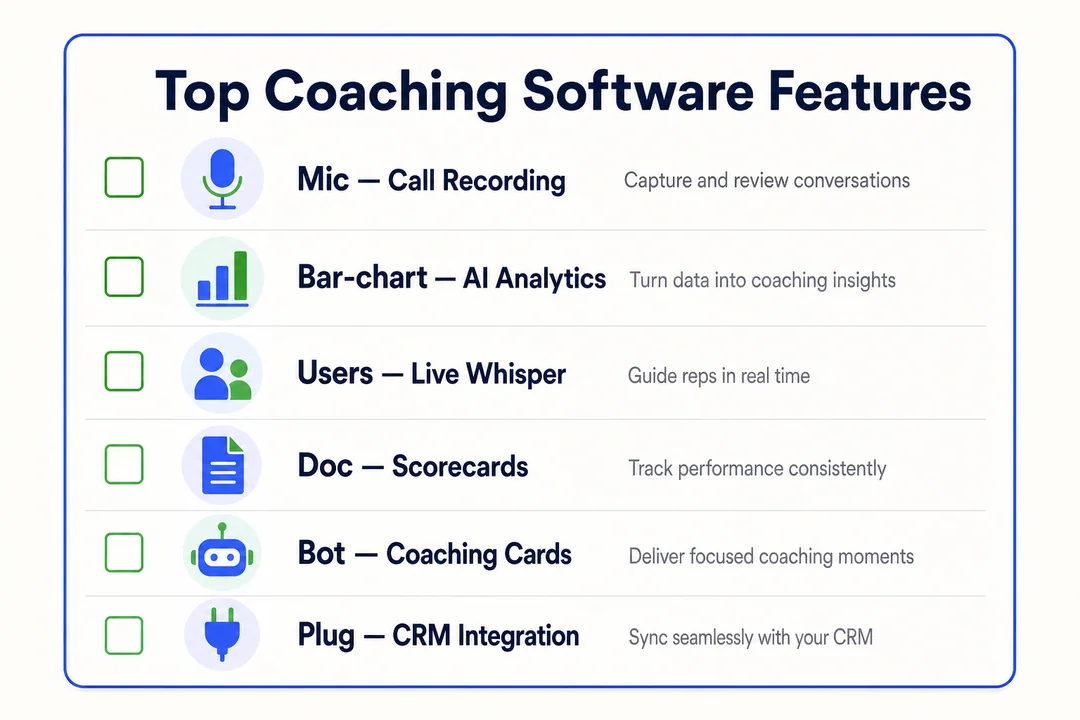
AI insights and conversation intelligence
AI-enabled coaching usually means the system reviews interactions, spots repeated patterns, summarizes calls, and surfaces likely coaching opportunities.
In plain terms, AI is doing the first pass on large volumes of customer conversations so managers do not have to search manually.
Useful capabilities include:
- Identifying repeated reasons for escalations
- Flagging weak empathy or missed policy explanations
- Spotting tone changes through sentiment analysis
- Summarizing calls for faster review
- Grouping patterns across teams or queues
Sentiment analysis can help, but it is not perfect. Tone detection is useful as a signal, not as final truth. A frustrated customer may sound calm. A fast-speaking customer may sound negative when they are not.
The key buyer test is simple: do the insights turn into clear action?
Example:
- The software finds that repeat escalations happen after agents skip expectation-setting on refund timing. That becomes a concrete coaching focus, not just an interesting dashboard point.
If the tool only produces more reports, it is not helping enough.
Real-time agent assist and real-time guidance
Real-time agent assist gives agents prompts or support while the interaction is happening.
That can include:
- Script prompts
- Knowledge retrieval
- Compliance reminders
- Suggested next steps
- Support during difficult conversations
This feature is most useful in:
- High-volume service environments
- Sales teams
- Regulated industries
- Teams with many new agents
- Workflows where missed statements create risk
The benefit is speed. Instead of waiting for post-call coaching, the agent gets help in the moment.
The downside is distraction. If prompts are too frequent or poorly timed, they can make agents less confident or less natural with customers. That is why live guidance should support judgment, not replace it.
Teams should test whether the prompts are relevant, easy to follow, and actually helpful under live pressure.
QA-to-coaching workflows
This is one of the most important features to evaluate.
QA alone identifies issues. QA-to-coaching workflow helps teams do something with them.
A strong workflow usually looks like this:
- A call or interaction is evaluated.
- The system flags the gap or low score.
- A coaching task, review, or follow-up is created.
- The manager delivers feedback and logs the session.
- Progress is tracked against future interactions or KPI movement.
This matters because scoring without follow-through rarely changes behavior.
Some platforms automate parts of the workflow, such as task creation or reminders. Others give managers more manual control. Neither is always better. The right fit depends on how much structure your team needs.
If buyers only compare scoring features, they often miss the bigger question: how easily can a manager move from evaluation to action?
Agent scorecards and performance metrics
Good scorecards should be simple, role-based, and tied to behaviors agents can influence.
Core metrics to track include:
- CSAT (customer satisfaction), because it shows how customers felt about the interaction.
- FCR (first call resolution), because it reflects whether the issue was solved without repeat contact.
- AHT (average handle time), because it helps teams monitor efficiency without making speed the only goal.
- QA score, because it measures adherence to service and process expectations.
- Process adherence, because regulated or operationally strict teams need consistency.
- Coaching completion rate, because assigned coaching only matters if it actually happens.
Do not launch with too many metrics. Most teams get better results by starting with a small set that reflects their biggest business goal.
Goal tracking and coaching effectiveness measurement
The best platforms help teams measure whether coaching changed behavior, not just whether a session took place.
A practical 30-, 60-, and 90-day approach works well:
- Set a baseline for the target behavior and KPI.
- Deliver coaching tied to one specific improvement area.
- Compare behavior change first, then KPI movement over time.
This is where behavioral change correlation matters in plain English. If a team coached agents to improve probing questions, the software should show whether probing behavior improved before FCR improved. That creates a more believable story about impact.
Buyers should also stay realistic. Not every KPI shift comes from coaching software alone. Staffing changes, policy changes, seasonality, and product issues can all affect outcomes.
The software helps track the pattern. It does not prove causation by itself.
Integrations with CRM, CCaaS, LMS, and WFM
Integrations matter because disconnected systems create friction, duplicate work, and weak reporting trust.
Here is what each integration supports:
- CRM: Adds customer context so coaching is not based on isolated call data alone.
- CCaaS: Connects interactions, routing, recordings, and workflows inside the contact center environment.
- LMS: Sends agents to the right learning content after coaching identifies a recurring weakness.
- WFM: Aligns coaching activity with staffing, schedules, and manager capacity.
Poor integrations often lead to:
- Manual exports
- Conflicting reports
- Extra admin work
- Lower adoption from managers
- Less confidence in dashboards
For most buyers, integration quality matters more than a long list of advanced features.
Reporting, dashboards, and manager visibility
A good dashboard should save manager time.
It should help leaders answer questions like:
- Which team trends need attention right now?
- Which agents need coaching first?
- Has coaching actually been completed?
- Are some managers overloaded?
- Are problems improving or repeating?
Actionable reporting is specific. It does not just say performance is down. It shows where, who, and what to coach next.
If a dashboard creates more admin work than clarity, it is not doing its job.
Microlearning and skill-building support
Microlearning means short, targeted training tied to a specific skill gap.
In coaching software, that often looks like:
- A short lesson after repeated QA misses
- A quick refresher for new agents
- Reinforcement after a coaching session
- Practice content tied to one behavior
This works well for onboarding and recurring weak spots.
It works best as follow-up, not as a replacement for coaching. A short lesson can reinforce learning, but it does not replace a manager helping the agent understand context and apply the skill in live work.
Benefits of Using Call Center Coaching Software
Better agent performance and more consistent feedback
Structured coaching helps reduce subjectivity. Instead of vague feedback like be more empathetic, managers can coach against specific behaviors, call moments, and scorecard criteria.
That improves consistency across supervisors and makes coaching feel fairer.
Key benefits include:
- Clearer feedback tied to observable behavior
- Better coaching consistency across team leads
- Stronger accountability for follow-through
Faster onboarding and skill-building
New agents improve faster when expectations are clear and feedback loops are consistent.
Coaching software helps by giving them structured scorecards, repeatable review cycles, and examples of what good performance looks like. That usually shortens ramp time and reduces confusion during early weeks.
Improved customer satisfaction and CX outcomes
Better coaching usually leads to more consistent service quality, stronger issue resolution, and fewer repeated mistakes.
It will not fix every CX problem on its own. But when agents communicate better and follow process more consistently, customer experience outcomes often improve as well.
More scalable coaching for managers and team leads
Managers save time when they do less random call review and more targeted coaching.
The software helps them prioritize who needs help, what skill needs attention, and whether follow-up happened. That makes coaching more scalable, especially when one lead supports a large team.
Better use of interaction data for decision-making
Interaction data is more useful when it reveals patterns beyond individual performance.
Leaders can use it to spot:
- Recurring customer friction points
- Policy confusion
- Queue-specific weaknesses
- Training gaps across teams
That makes coaching more strategic, not just reactive.
Limitations and Challenges to Know Before You Buy
Not every tool replaces human coaching
Coaching software supports managers. It does not replace judgment, empathy, or context.
A dashboard may highlight a problem. A good coach still needs to understand why it happened, how to discuss it, and what support the agent needs next.
AI claims can be overstated
Not all AI features are equally useful. Some tools use AI labels for features that add limited real-world value.
Check for:
- Recommendation quality
- False positives
- Ease of use
- Transparency into why the tool flagged something
If a vendor cannot show how insights become practical coaching actions, be cautious.
Data overload and unclear priorities
Many platforms can generate more data than teams can use.
Too many dashboards and too many metrics often create confusion, not clarity. Most teams do better when they focus on a small number of priorities tied to one or two clear outcomes.
Integration and setup complexity
Implementation often takes more work than the demo suggests.
Common friction points include data mapping, system integration, admin setup, workflow design, and internal IT coordination. That does not mean the platform is wrong. It means buyers should plan for real rollout effort, not just software activation.
Agent resistance and concerns about micromanagement
Some agents hear coaching software and think surveillance.
That concern is real. Teams reduce resistance when they:
- Explain how scorecards work
- Show the goal is development, not punishment
- Use consistent standards across managers
Transparency matters as much as the technology.
Budget and overbuying risk
A lot of teams buy more platform than they can realistically use.
That usually happens when buyers choose based on enterprise feature depth instead of operational readiness. If your managers do not have the time, process, or admin support to use advanced features, simpler software may produce better ROI.
AI-Enabled Coaching vs AI-Led Coaching
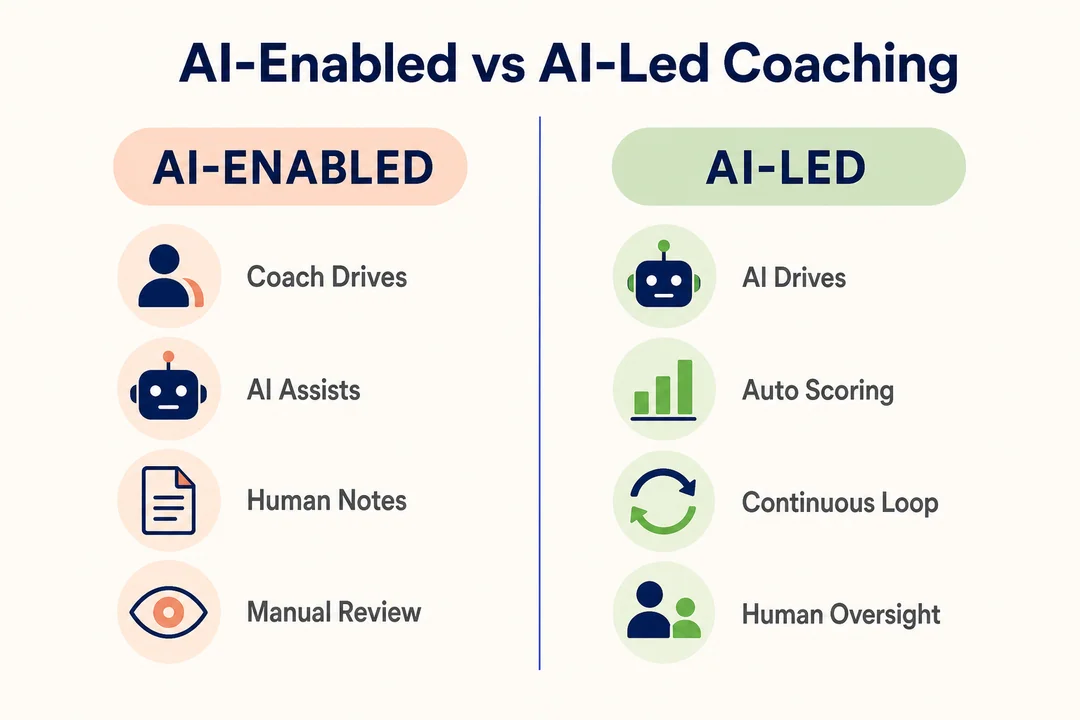
What AI-enabled coaching means
AI-enabled coaching means AI supports the manager. It summarizes interactions, highlights risks, suggests coaching opportunities, and helps leaders prioritize what to address first.
The manager still drives the coaching conversation and decides what action makes sense.
What AI-led coaching means
AI-led coaching means the software gives direct guidance to agents during live interactions.
That can include prompts, next-best actions, compliance reminders, and live support. The system acts more like an in-the-moment coach than a post-call analysis tool.
Which approach fits different team types
- Compliance-heavy teams: AI-led coaching often fits better because live reminders reduce risk in the moment.
- Sales teams: AI-led coaching can help when timing and objection handling affect outcomes immediately.
- Service teams with strong managers: AI-enabled coaching is often enough because post-call development matters more.
- Enterprises with layered leadership: A hybrid approach can work best when some teams need live support and others need structured manager coaching.
- Teams with low manager capacity: AI-led support may help cover gaps, but it should not replace leadership development.
Rule of thumb: choose AI-enabled coaching if you want stronger manager-led improvement. Choose AI-led support if live guidance is the main value driver.
How to Choose the Right Call Center Coaching Software
Start with your primary business goal
Do not start with vendor brand or AI claims.
Start with one clear objective, such as:
- Improve QA consistency
- Increase FCR
- Speed up onboarding
- Reduce agent turnover
- Strengthen compliance
- Improve manager coaching discipline
The right platform depends on the problem you are actually trying to solve.
Match the software to your team size and operational maturity
Different teams need different levels of structure.
- Small teams: Usually benefit most from ease of use, quick setup, and simple reporting.
- Mid-market teams: Often need better workflow discipline, stronger scorecards, and some automation.
- Enterprise teams: Usually need governance, integrations, scale, and standardized coaching across many leaders.
Also assess your maturity in:
- QA process discipline
- Manager bandwidth
- Scorecard consistency
- Admin resources
- Change management readiness
A powerful system will not help much if the team is not ready to use it well.
Decide what type of coaching model you need
Most teams fall into one of three models:
- Manager-led coaching: Best when leaders do regular post-call coaching and want better structure.
- Real-time assist: Best when agents need live prompts during calls.
- Hybrid model: Best when teams want both in-call support and post-call development.
Choose software that fits how your supervisors and agents actually work today, or how you realistically plan to work soon.
Prioritize must-have integrations
Integrations affect adoption more than most buyers expect.
Prioritize:
- CRM connection
- CCaaS alignment
- LMS support
- WFM alignment
- QA stack compatibility
If a workflow depends on manual exports or duplicate updates across tools, adoption usually drops fast.
Look for ease of use, not just feature depth
Unused features do not create ROI.
During evaluation, pay attention to dashboard clarity, workflow friction, reporting usefulness, and how quickly a manager can move from insight to coaching task. A simpler product with stronger adoption often beats a deeper platform that sits underused.
Use a simple vendor shortlist framework
Use this framework to narrow choices:
- Must-haves: Features or workflows you cannot operate without
- Nice-to-haves: Helpful extras that are not required
- Deal breakers: Missing integrations, weak reporting, poor usability
- Budget fit: Total cost relative to team size and expected value
- Time-to-value: How fast you can realistically launch and use it
- Internal readiness: Whether your managers, QA team, and admins can support rollout
Questions to ask on a product demo
Use direct questions. They reveal more than polished feature tours.
- How does the platform turn QA findings into coaching actions?
- What does a manager’s weekly workflow look like inside the system?
- How customizable are scorecards by role or queue?
- Which integrations are native, and which require extra setup?
- How long does implementation usually take for a team our size?
- What reporting do managers use most often after launch?
- How do you reduce false positives in AI recommendations?
- Can we measure coaching effectiveness over 30, 60, and 90 days?
- What admin work is required to maintain the platform?
- How do you support manager training and change management?
- What does adoption reporting look like by manager and team?
- What happens after go-live if usage drops?
How Call Center Coaching Software Fits with Other Tools
Coaching software vs quality management platforms
| Category | Main focus | Best at | Limitation |
|---|---|---|---|
| Coaching software | Development follow-through | Turning issues into coaching action | May depend on separate QA inputs |
| Quality management platform | Evaluation and scoring | Identifying quality issues consistently | May stop at scoring without behavior change tracking |
| LMS / training system | Content delivery | Formal learning and onboarding | Not tied closely enough to live performance |
| WEM platform | Broader workforce optimization | Combining staffing, QA, engagement, and analytics | Can be broader and more complex than needed |
The key difference is simple: QA identifies issues. Coaching software helps teams change behavior after the issue is found.
Coaching software vs workforce engagement management tools
WEM is the broader category. It can include QA, WFM, performance tools, analytics, and coaching.
Coaching software may be a feature inside WEM, or it may be a separate specialized tool. If you need broad governance and standardization, WEM platforms may make sense. If your main gap is coaching execution, a focused solution may be enough.
Coaching software vs contact center training systems
Training systems deliver courses, lessons, videos, and onboarding materials.
Coaching software is different. It responds to live performance patterns and helps managers guide improvement based on real interactions. Training teaches. Coaching corrects and reinforces.
When an all-in-one platform makes sense
- You are an enterprise with multiple teams, regions, or business units.
- You want standardization across QA, coaching, and workforce operations.
- You prefer fewer vendors and tighter governance.
- You have the admin and rollout capacity to support broader implementation.
When a specialized coaching solution is the better fit
- You already have a working QA or CCaaS stack.
- You need faster ROI in one clear area.
- You want less complexity and quicker adoption.
- Your main goal is coaching-specific workflow improvement.
Implementation Best Practices for the First 90 Days
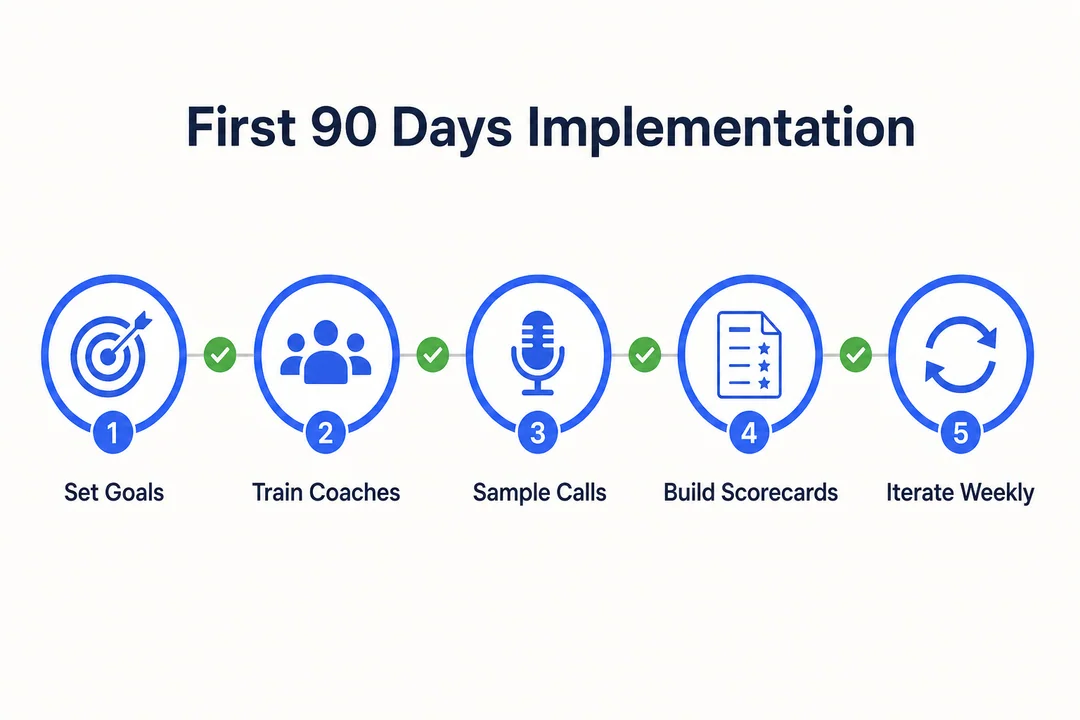
Set one or two coaching goals first
Start narrow.
Good first goals include improving FCR, increasing QA consistency, or reducing ramp time for new hires. If you launch with too many objectives, managers lose focus and reporting becomes noisy.
Train managers before rolling it out to agents
Manager adoption is the main success lever.
Training should cover:
- How to use scorecards
- How to deliver feedback consistently
- How to manage coaching workflows
- How often to coach
- How to log follow-up and progress
If managers are not comfortable first, the rollout will struggle later.
Start with transparent scorecards
Clear scorecards build trust.
Agents should understand what is being measured, why it matters, and how scores are applied. Role-based criteria and regular calibration across managers help reduce fairness concerns and make coaching feel more credible.
Combine AI insights with human coaching
AI should flag patterns and save time.
Managers should provide context, judgment, and support. That balance tends to improve both adoption and trust because agents see the software as a helper, not a replacement for human leadership.
Use a pilot team before full rollout
Pilot by team, queue, or use case first.
Validate:
- Workflow friction
- Reporting quality
- Manager adoption
- Agent reaction
- Scorecard clarity
A pilot gives you a safer place to refine the process before expanding.
Track a small set of KPIs
Early rollout metrics should stay simple:
- QA score
- CSAT
- FCR
- AHT
- Coaching completion rate
- Ramp time for new hires
Fewer KPIs make it easier to see whether the rollout is helping.
Review adoption at 30, 60, and 90 days
Use a simple milestone review:
- 30 days: Check setup quality, manager usage, and early workflow issues.
- 60 days: Review coaching completion, agent sentiment, and reporting trust.
- 90 days: Compare KPI movement, adoption consistency, and whether the process should scale.
This cadence helps teams fix rollout problems before they become permanent habits.
Common Mistakes Buyers Make
Choosing based on AI hype instead of use case
A flashy AI story does not matter if the workflow does not fit your team.
Use case fit is what drives results.
Buying enterprise-grade software that is overkill
Larger platforms often bring more cost, more setup work, and more admin burden.
If your team is small or still maturing, that complexity can slow adoption.
Ignoring manager adoption
Supervisor behavior drives ROI.
If managers do not use the platform consistently, even strong software will underperform.
Failing to define success metrics before launch
Without baseline KPIs and a review cadence, teams cannot tell whether coaching is improving anything.
Define success before rollout, not after.
Treating coaching software like a standalone fix
Software cannot fix weak QA process, unclear expectations, or poor coaching habits on its own.
Better outcomes come from process, people, and platform working together.
Not involving QA, operations, and team leads in selection
Cross-functional evaluation improves fit.
QA sees scoring needs, operations sees workflow impact, and team leads know what managers will actually use. Leaving them out creates adoption risk later.
Pricing Expectations and ROI Considerations
What affects pricing
- Number of seats
- Included modules
- Depth of AI capabilities
- Integration requirements
- Implementation support
- Contract length and structure
Most vendors use custom quotes, especially in mid-market and enterprise deals.
What ROI usually looks like
- Better agent performance
- Faster onboarding
- Improved QA consistency
- Better manager efficiency
- Lower turnover risk through stronger development
- Better use of interaction data
The most believable ROI stories are operational, not flashy.
Signs a platform may be too expensive for your needs
- You are paying for advanced analytics your team will not use.
- Setup requires more admin support than you have.
- Managers already struggle with current tools and process load.
- The platform only makes sense if adoption is near perfect.
- A narrower tool could solve your top issue faster.
Frequently Asked Questions
What is the difference between call center coaching software and QA software?
QA software identifies performance issues. Call center coaching software helps teams turn those findings into coaching actions and measurable improvement.
In practice, QA scores the interaction, while coaching software helps managers follow up, assign development actions, and track whether behavior changes over time.
Is call center coaching software worth it for small teams?
Yes, if the team is growing or struggling with consistency.
It is often worth it when:
- You have multiple supervisors
- QA issues repeat often
- Onboarding takes too long
- Feedback quality varies by manager
If your team is very small and coaching is still easy to manage manually, lighter tools may be enough for now.
What features should I prioritize first?
- Scorecards, because coaching needs clear and fair evaluation standards.
- Reporting, because managers need to know who to coach and why.
- Integrations, because disconnected workflows reduce adoption fast.
- AI insights, because they help prioritize patterns and save review time.
- Real-time assist, because it matters most when live guidance changes outcomes.
How much does call center coaching software cost?
Pricing usually depends on seats, modules, AI depth, integrations, and implementation needs.
Most vendors do not publish full pricing publicly, and custom quotes are common. Buyers should compare total cost, not just license cost, because setup and change management often affect value as much as subscription fees.
How long does implementation usually take?
Simple deployments can take weeks. Enterprise rollouts often take longer.
The biggest variables are integration complexity, scorecard design, workflow setup, manager training, and change management. The software may activate quickly, but adoption takes more time.
Can coaching software improve agent onboarding?
Yes, especially when it includes clear scorecards, microlearning, and regular feedback loops.
It helps new agents understand expectations faster, correct issues earlier, and build confidence through more consistent coaching during ramp-up.
What KPIs should I track to measure success?
Start with a small set:
- QA score
- CSAT
- FCR
- AHT
- Coaching completion rate
- Ramp time
Pick the KPIs that best match your main business goal.
Do I need AI-enabled coaching or real-time agent assist?
Choose AI-enabled coaching if your main goal is better manager-led improvement. Choose real-time agent assist if agents need live support during calls.
- AI-enabled coaching fits teams focused on post-call development, coaching consistency, and manager prioritization.
- Real-time agent assist fits compliance-heavy, sales-driven, or fast-paced service workflows where in-call guidance changes outcomes.
Conclusion
The best call center coaching software is the one that fits your coaching model, business goals, integrations, and manager workflow. Not every team needs the deepest enterprise suite. Not every AI feature matters. What matters is whether the platform helps your team coach more consistently and improve performance in a measurable way.
Shortlist tools by use case first. Compare trade-offs honestly. Ask sharper demo questions. Then pilot before full rollout. That process will help you choose software that supports sustainable coaching, not just a bigger feature stack.
More in Operations & CX Optimization
View all →
Customer Experience Transformation: Framework and Steps
A telecom customer calls support about a billing error. They explain the problem to the IVR system. Then to the first agent. Then get transferred and explain again. Then escalated—and explain a third time. Forty minutes later, they're exhausted and the problem still isn't solved. This is what broken customer experience looks like. And it's costing you customers. Customer experience…


Web Caller Meaning: JavaScript caller, Calling Tools or Portals
“Web caller” is one of those phrases where the search results and the searcher are frequently talking about different things. Three unrelated audiences use it: developers hitting an error on the legacy JavaScript caller property, buyers evaluating browser-based calling software, and people trying to reach a specific portal or training page whose exact name they cannot recall. That fragmentation is…
Customer Experience Strategy: How to Build One That Works
Customer experience is getting worse, not better. Forrester's 2025 Global CX Index found that 21% of brands declined in CX quality while only 6% improved — and in the US, 25% declined against 7% that improved, the second consecutive year of that pattern. Most of those brands were not neglecting customer experience. They were working on it without a strategy…

 English
  Russian
  Chinese