
Automated call routing sends callers to the right team without manual transfers.
If you want to understand what automated call routing actually does, how it works, and why businesses use it, this guide breaks it down in plain English. You’ll learn the main routing methods, the biggest business benefits, common mistakes to avoid, and how to tell whether your company needs a call routing system.
Key Takeaways
- Automated call routing automatically sends inbound calls to the right team, queue, or agent based on rules, caller input, or availability.
- It helps businesses reduce manual transfers, shorten wait times, and create a more consistent customer experience.
- Most systems follow a simple process: the call comes in, the system collects information, routing rules apply, and the call is sent to the best destination.
- Common routing methods include skills-based, time-based, round-robin, fixed-order, least-occupied, geographic, and intelligent routing.
- IVR (Interactive Voice Response, an automated phone menu) collects caller input, while routing uses that input to decide where the call should go.
- ACD (Automatic Call Distribution, a tool that queues and assigns calls) works with routing to deliver calls to available agents.
- Automated call routing is especially useful when a business has growing call volume, multiple departments, or teams with different skills or languages.
- A simple rule-based setup is often enough for small and mid-sized businesses starting to improve phone support.
- The best systems are easy to manage, include fallback options, and can adapt as customer service needs change.
What Is Automated Call Routing?
A simple definition for beginners
Automated call routing is a phone system feature that automatically directs inbound calls to the right team, queue, or agent based on rules, caller input, or availability.
In simple terms, it helps businesses send callers where they need to go without relying on a receptionist or repeated manual transfers.
It is not the same as replacing human agents. It is also not just sending a call to another phone number. It is a structured way to handle incoming calls more accurately.
Example:
- A customer presses 2 for billing, and the system sends the call straight to the billing queue.
Why businesses use automated call routing
Businesses use automated call routing because manual call handling breaks down fast when call volume grows.
Common problems include:
- Too many inbound calls arriving at the same time.
- Front desk staff spending too much time transferring calls.
- Customers repeating the same issue to multiple people.
- General support lines becoming overloaded.
- Calls reaching available agents who are not the right fit.
A growing company with sales, billing, and technical support often reaches this point quickly. Without routing, every call starts in the same place. That creates delays and unnecessary friction.
Automated routing adds structure. It helps teams handle more calls with fewer mistakes. The goal is not automation for its own sake. The goal is better service delivery.
Where it fits in a business phone or contact center setup
Automated call routing is usually one part of a larger phone or customer service system. You will often find it inside a business phone platform, a cloud contact center solution, or a UCaaS platform (Unified Communications as a Service, a cloud-based business communication system).
Related tools often work together:
| Tool | Main role |
|---|---|
| IVR | Collects caller input through menu options like sales, billing, or support |
| Routing engine | Applies rules and decides where the call should go |
| ACD | Queues and distributes calls to available agents |
| Cloud telephony | Makes setup, changes, and scaling easier across locations |
Automated routing matters because it connects these tools into a usable call flow.
How Automated Call Routing Works
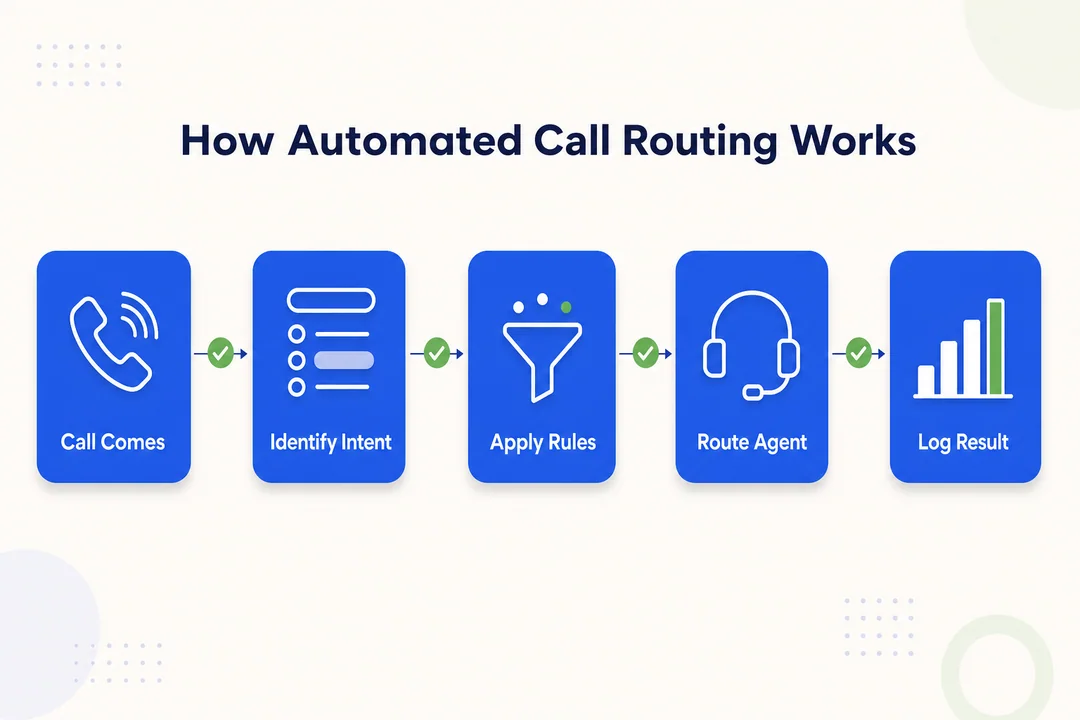
Step 1: An incoming call enters the system
The process starts when a customer calls your main business number. That call enters your phone system or contact center platform.
This can work in both traditional and cloud-based setups, but many modern businesses use cloud systems because they are easier to update and manage.
Step 2: The system collects caller information
Before the system decides where to send the call, it collects basic information. This step is often handled by IVR.
The system may use:
- The menu option selected by the caller
- Caller ID or phone number
- Language preference
- Department choice
- Customer type or support tier
- Business hours status
Example:
- Press 1 for sales
- Press 2 for billing
- Press 3 for technical support
This step is call qualification. It gathers context before the routing decision happens.
Step 3: The routing engine applies rules or logic
Once the system has enough information, it checks the routing rules.
These rules may be based on:
- Selected department
- Required skill set
- Time of day
- Caller location
- Queue load
- Priority level
- Language needs
Most businesses start with simple logic such as:
- If the caller selects billing, send the call to the billing queue.
- If the caller needs Spanish support, send the call to Spanish-speaking agents.
- If the office is closed, send the call to after-hours support or voicemail.
This is called rule-based routing. It is simple, practical, and enough for many teams. Larger organizations may later add more advanced routing logic.
Step 4: The call goes to the best available queue or agent
After the routing decision is made, the call goes to the right destination. That might be a queue for a department or a specific available agent.
This is where ACD often comes in.
A simple distinction helps:
| Function | What it does |
|---|---|
| Routing | Decides where the call should go |
| ACD | Manages queueing and distributes the call to available agents |
Many business phone systems combine both, but they are not exactly the same thing.
Step 5: The system triggers a fallback option if needed
If no agent is available, the system needs a backup path. This matters more than many teams expect.
Common fallback options include:
- Voicemail
- Callback request
- Overflow queue
- Another branch or location
- After-hours line
A routing system is only as useful as its fallback plan. If every path ends in a dead end during busy periods, the customer experience still suffers.
Real-world example: how a billing call gets routed
Here is a simple example:
- A customer calls the company’s main number.
- The IVR menu asks the caller to choose a department.
- The customer presses 2 for billing.
- The system checks whether the billing team is open and whether agents are available.
- The call is sent to the billing queue.
- If the queue is full, the system offers a callback or sends the call to voicemail.
That is automated call routing in practice. It removes guesswork and reduces unnecessary transfers.
Common Types of Automated Call Routing
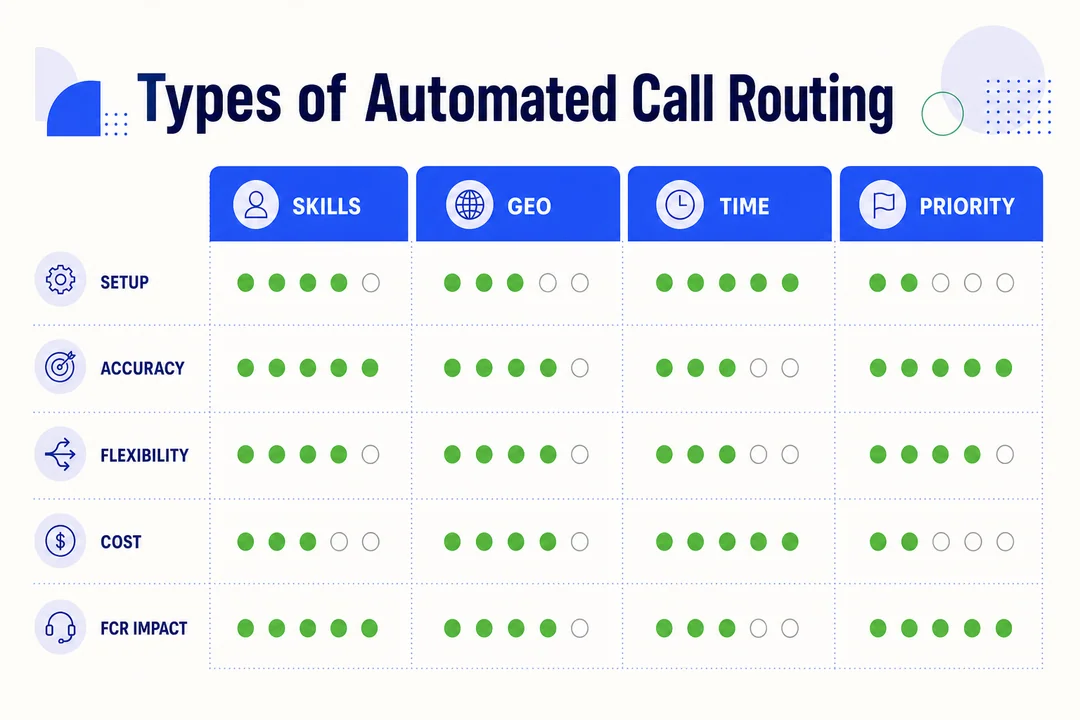
Skills-based routing
Skills-based routing sends calls to agents with the right expertise.
This works well when different agents handle different issue types, product lines, or service levels. It is common in technical support and tiered support teams.
Pros:
- Improves the chance of faster, more accurate answers
- Supports higher FCR (First Call Resolution, solving the issue on the first call)
- Reduces transfers between teams
Cons:
- Requires accurate skill mapping
- Can create bottlenecks if only a few agents have a needed skill
Example:
- A software troubleshooting call is routed directly to technical specialists instead of general support.
Time-based routing
Time-based routing sends calls based on working hours, shifts, holidays, or time zones.
It is useful for businesses with distributed teams or after-hours support coverage.
Common use cases include:
- Sending daytime calls to the main office
- Redirecting evening calls to an after-hours team
- Routing by regional business hours
One caution matters here: if schedules are outdated, calls may go to the wrong place or hit a dead end.
Round-robin routing
Round-robin routing rotates calls evenly among available agents.
This method is often used in sales teams or simple support environments where fairness matters and call types are similar.
Pros:
- Fair distribution across the team
- Easy to set up and understand
Cons:
- Does not consider expertise
- Fair rotation does not always produce the best customer match
It works best when most agents can handle the same kinds of calls.
Fixed-order routing
Fixed-order routing offers calls to agents in a preset sequence.
This is common in small teams, front desk setups, or basic reception workflows where one person should answer first and others act as backup.
Pros:
- Predictable and simple
- Easy to manage in very small teams
Cons:
- Agents at the top of the list may get overloaded
- Distribution is not balanced
Least-occupied or least-talk-time routing
This method sends calls to the least busy available agent. Some systems measure this by current workload. Others use talk time.
It is useful in larger support teams with steady call volume.
Pros:
- Helps balance workload
- Can improve agent productivity
- Reduces the chance that some agents stay overloaded while others sit idle
Caution:
- The least busy agent is not always the best-skilled agent for the issue
Geographic or location-based routing
Geographic routing sends calls based on region, branch, service area, or language zone.
This is valuable for businesses with multiple offices or region-specific support teams.
Useful scenarios include:
- Sending callers to the nearest branch
- Matching callers with local service teams
- Routing by language preference
- Handling region-specific policies or availability
Language-based routing is often a practical extension of this model.
Intelligent or AI-powered routing
Intelligent routing uses more data than standard rule-based routing. It may consider caller history, likely intent, real-time conditions, or past outcomes.
Pros:
- Can improve matching in more complex support environments
- May adapt better when conditions change during the day
Cons:
- More complex to set up and manage
- Not always necessary for smaller businesses
- Results depend on system quality and data quality
For most SMBs, rule-based routing is a strong place to start. Intelligent routing makes more sense when call volume, service complexity, or team size grows.
Key Benefits of Automated Call Routing for Businesses
Shorter wait times
Automated call routing reduces wait times by removing unnecessary handoffs. Instead of sending every caller through a general line first, the system qualifies the call early and places it in the right queue faster.
That shortens the path between the customer and the right team.
Faster issue resolution
When callers reach the correct department earlier, problems get solved faster. There is less back-and-forth and fewer transfers.
This matters most in areas like billing, technical support, and service requests, where the wrong first contact slows everything down.
Better customer satisfaction
Customers want a smooth experience. They do not want to explain the same problem twice or get bounced from one person to another.
Routing helps reduce frustration and creates a more reliable support experience. That often improves customer satisfaction over time.
Higher first call resolution
First call resolution means solving the customer’s issue on the first call.
When routing matches callers to the right expertise from the start, the chance of first-call resolution often improves. That benefits both the customer and the support team.
Better agent productivity and workload balance
Automated routing also helps the internal team.
Benefits include:
- Fewer random transfers
- Less queue confusion
- Better distribution of call volume
- More time spent solving issues instead of redirecting them
This can help reduce pressure on agents, especially during peak periods.
More efficient contact center operations
At an operations level, routing creates cleaner workflows. Calls move more predictably. Queues are easier to manage. Bottlenecks become easier to spot.
It also supports better planning by making it easier to review patterns such as:
- Wait times
- Transfer rates
- Queue length
- Coverage gaps by time or department
Automated Call Routing vs Similar Terms
Automated call routing vs call forwarding
Automated call routing and call forwarding are often confused, but they do different jobs.
| Feature | Automated call routing | Call forwarding |
|---|---|---|
| Main purpose | Sends calls to the right queue, team, or agent based on logic | Sends a call from one number to another number |
| Decision method | Uses rules, caller input, skills, time, or availability | Usually follows a fixed forwarding rule |
| Best use | Managing inbound business calls at scale | Redirecting calls when a person or line is unavailable |
| Complexity | More structured | Simpler |
Call forwarding is useful for basic redirection. Automated call routing is better for structured service workflows.
Automated call routing vs IVR
IVR and automated routing work together, but they are not the same.
| Tool | Main role |
|---|---|
| IVR | Collects caller input through prompts and menu choices |
| Automated call routing | Uses that input and other data to decide where the call goes |
In short, IVR asks the question. Routing uses the answer.
Automated call routing vs ACD
ACD and automated call routing are also closely related.
| Tool | Main role |
|---|---|
| Automated call routing | Decides the best destination for the call |
| ACD | Queues and distributes the call to available agents |
Many systems use both together. Routing handles the decision. ACD helps execute it.
Rule-based routing vs intelligent routing
| Type | How it works | Best for |
|---|---|---|
| Rule-based routing | Uses fixed if/then rules | Small and mid-sized businesses, predictable call flows |
| Intelligent routing | Uses broader data and adaptive logic | Larger teams, more complex service environments |
Rule-based routing is often enough for many businesses. Intelligent routing becomes more useful when operations are more complex.
When Does a Business Need Automated Call Routing?
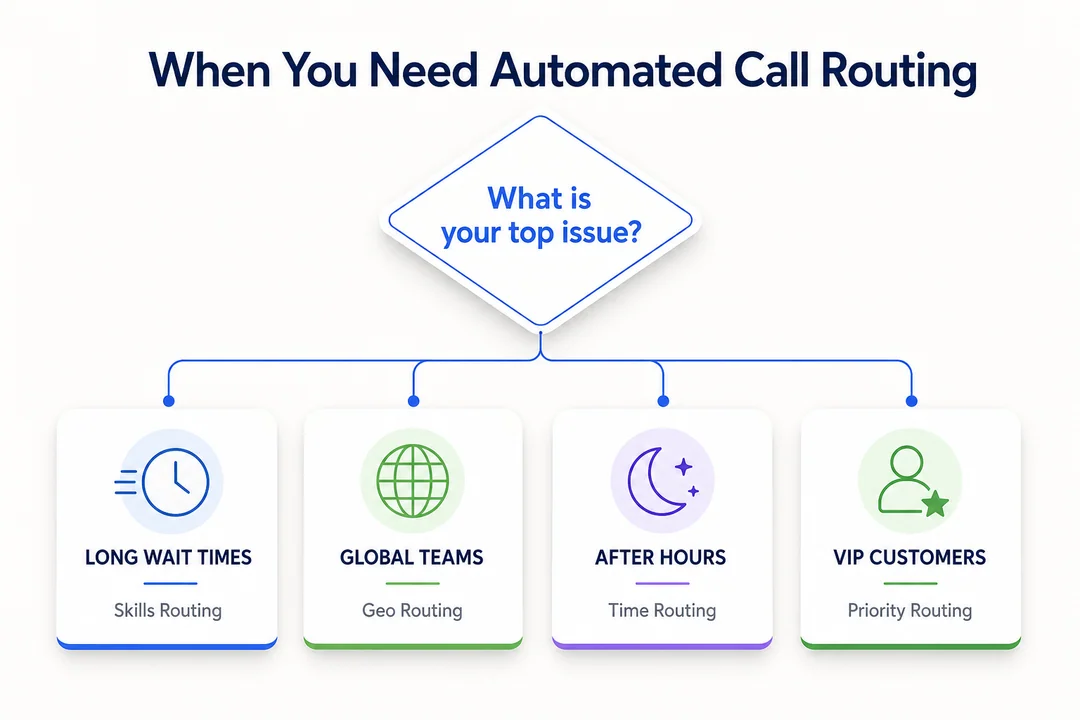
When call volume becomes hard to manage manually
A business usually needs automated call routing when manual handling starts to break down.
Common signs include:
- Missed calls
- Long hold times
- An overloaded receptionist
- Too many repeated transfers
- Customer complaints about reaching the wrong team
This is often the tipping point where structure matters more than effort.
When the business has multiple departments or support tiers
If your company has separate teams for sales, billing, support, and customer service, calls should not all start in one general queue.
Direct routing improves the quality of the handoff and gets customers to the right place faster.
When agents have different skills, languages, or responsibilities
Not every available agent is the right agent.
If some agents handle technical issues, some handle billing, and some support different languages, routing becomes essential. Better matching improves service quality and raises the chance of solving issues on the first call.
When the company operates across locations or time zones
Distributed teams add complexity. One office may be closed while another is open. Regional branches may handle different service areas.
Time-based and location-based routing help businesses manage this without confusing customers. Cloud systems make these changes easier to maintain.
When customer service feels inconsistent
Sometimes the problem is not just volume. It is inconsistency.
Common symptoms include:
- Callers repeating themselves
- Service quality changing by shift
- Calls bouncing between teams
- Unclear ownership of customer issues
Routing helps standardize the first part of the support experience.
Best Practices for Setting Up an Automated Call Routing System
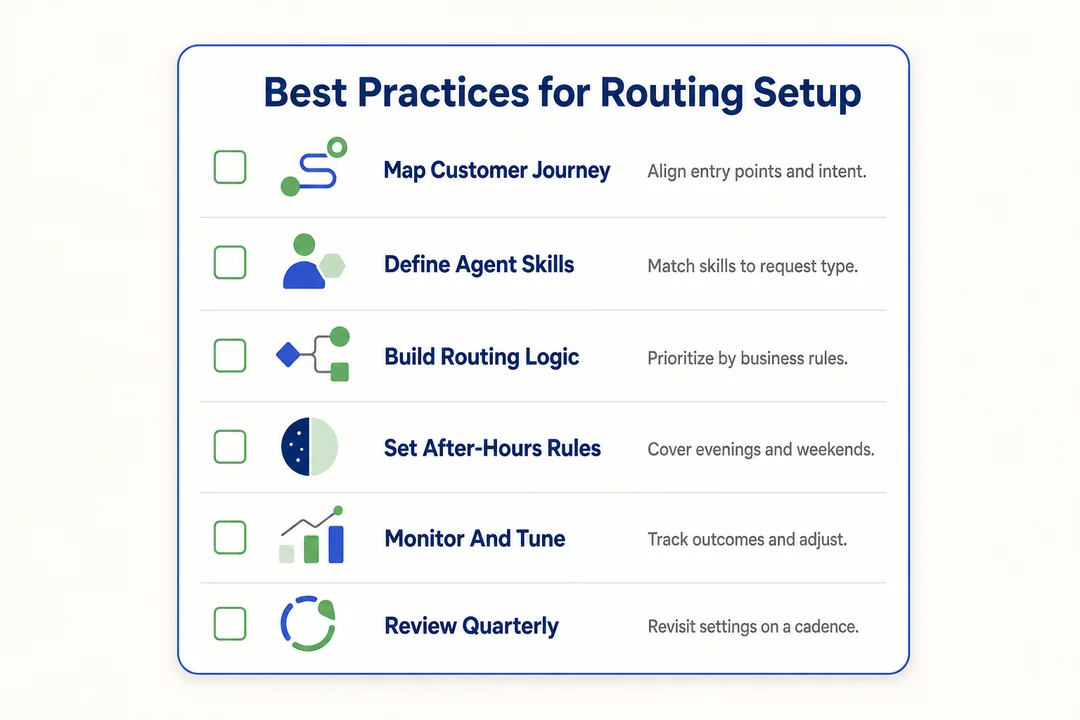
Start with your most common call reasons
Build routing around the reasons people actually call.
Common categories include:
- Sales
- Billing
- Technical support
- Appointments
- Returns
- General account help
Do not design the flow around your org chart alone. Design it around real call patterns.
Keep the call flow simple for customers
Long menus create friction. Customers should reach the right path quickly.
Good practice includes:
- Use clear menu wording
- Limit menu layers
- Avoid too many choices at once
Simple flows reduce abandonment and confusion.
Match routing rules to actual agent skills and availability
Routing logic should reflect reality, not assumptions.
Check that your rules match:
- Agent skills
- Language coverage
- Shift schedules
- Department ownership
- Actual availability
If the rule set is wrong, the call flow will be wrong.
Use data to improve routing over time
Review a few basic metrics regularly:
- Wait time
- Transfer rate
- Queue length
- Resolution rate
If one queue keeps building up or one menu option creates too many transfers, adjust the routing rules.
Build fallback paths before busy periods happen
Do not wait for peak volume to expose gaps.
Set up backup options in advance:
- Voicemail
- Callback requests
- Overflow queues
- Alternate locations
- After-hours routes
Good fallback planning prevents dead ends.
Common Mistakes to Avoid
Making IVR menus too long or confusing
When menu trees get too deep, callers lose patience. Confusing wording also increases wrong selections and drop-off.
Keep menus short and easy to understand.
Routing too many calls to a general queue
A broad general queue may seem simple, but it often creates bottlenecks. It also increases the chance that callers land with the wrong team and need another transfer.
Specific routing usually works better.
Ignoring after-hours and holiday routing
If your business has no clear path for evenings, weekends, or holidays, callers can hit dead ends. That can mean missed revenue, missed service requests, or poor experiences.
Time-based rules matter.
Failing to review call data and customer pain points
Routing should not stay fixed forever. Customer needs change. Teams change. Call reasons change.
If you never review transfer patterns, wait times, or repeat complaints, the system will drift out of sync.
Overcomplicating the system too early
Many businesses try to build a highly advanced routing setup before they need one. That often creates confusion.
A better approach is:
- Start simple.
- Test real call flows.
- Refine based on results.
Automated Call Routing in Modern Customer Service
Its role in customer journey optimization
Routing shapes the first live interaction a customer has with your team. If that first step is smooth, the rest of the experience usually improves.
It is a small part of customer service, but it affects the whole journey.
How it supports omnichannel customer support
Phone support does not exist on its own anymore. Customers may move between channels.
Routing works better when it supports continuity across:
- Phone
- Chat
- Support history
The goal is a more connected service experience, not a disconnected voice channel.
Why cloud telephony makes routing easier for growing teams
Cloud telephony makes routing easier to set up and change. It also supports remote teams, multi-location coverage, and faster scaling.
That is one reason growing businesses often choose cloud-based platforms from vendors such as RingCentral, Genesys, or Vonage. The advantage is flexibility, not just features.
Final Takeaway
Automated call routing is a practical way to send callers to the right team, queue, or agent without relying on manual transfers.
For businesses, the value is clear. It can shorten wait times, improve customer satisfaction, support better agent productivity, and create more consistent service handling.
If your team is struggling with rising call volume, too many transfers, or uneven service quality, automated call routing is often a smart next step to explore.
Frequently Asked Questions
What is automated call routing in simple terms?
Automated call routing is a phone system feature that sends incoming calls to the right team, queue, or agent automatically. It uses rules, caller input, or availability to decide where the call should go.
How does automated call routing work for small business?
- A customer calls the business number.
- The system plays a greeting or IVR menu.
- The caller chooses an option such as sales or billing.
- Routing rules decide the best queue or agent.
- If no one is available, the system uses a fallback such as voicemail or callback.
What is the difference between automated call routing and call forwarding?
| Automated call routing | Call forwarding |
|---|---|
| Uses logic to send calls to the right team, queue, or agent | Redirects a call from one number to another |
| Built for structured inbound call handling | Built for simple redirection |
Is automated call routing the same as ACD?
No. Automated call routing decides where the call should go. ACD helps queue and distribute that call to available agents. Many systems use both together.
Can automated call routing reduce customer wait times?
Yes. It can reduce wait times by qualifying calls earlier, cutting unnecessary transfers, and placing callers into the right queue faster. The result is usually a shorter path to the right help.
Do small businesses need intelligent call routing?
Not always. For many small businesses, simple rule-based routing is enough. Intelligent routing becomes more useful when call volume, team size, or service complexity increases.
What should a business look for in a call routing system?
Look for:
- Easy setup
- Clear IVR options
- Skills-based or department-based rules
- Reporting and visibility into call performance
- Fallback routing for busy or closed periods
- Cloud compatibility for easier scaling
More in Operations & CX Optimization
View all →
Customer Experience Transformation: Framework and Steps
A telecom customer calls support about a billing error. They explain the problem to the IVR system. Then to the first agent. Then get transferred and explain again. Then escalated—and explain a third time. Forty minutes later, they're exhausted and the problem still isn't solved. This is what broken customer experience looks like. And it's costing you customers. Customer experience…


Web Caller Meaning: JavaScript caller, Calling Tools or Portals
“Web caller” is one of those phrases where the search results and the searcher are frequently talking about different things. Three unrelated audiences use it: developers hitting an error on the legacy JavaScript caller property, buyers evaluating browser-based calling software, and people trying to reach a specific portal or training page whose exact name they cannot recall. That fragmentation is…

Customer Experience Strategy: How to Build One That Works
Customer experience is getting worse, not better. Forrester's 2025 Global CX Index found that 21% of brands declined in CX quality while only 6% improved — and in the US, 25% declined against 7% that improved, the second consecutive year of that pattern. Most of those brands were not neglecting customer experience. They were working on it without a strategy…



 English
  Russian
  Chinese