

If you’re comparing UCaaS vs CPaaS, you’re likely trying to solve two very different communication problems. UCaaS gives your team a ready-made system for calls, chat, and meetings. CPaaS gives your business APIs (software connectors) to build messaging, voice, video, or verification into apps and workflows. This guide breaks down definitions, differences, pricing, use cases, and how to choose the right fit.
Key Takeaways
- UCaaS is best for internal communication and team collaboration across calls, chat, and meetings.
- CPaaS is best for customer-facing communication such as alerts, reminders, verification, and in-app messaging.
- The biggest difference is simple: UCaaS is plug-and-play software, while CPaaS is a developer-driven platform.
- UCaaS pricing is usually a per-seat subscription, while CPaaS pricing is usually based on usage such as messages, minutes, or events.
- UCaaS is faster to roll out, while CPaaS gives far more flexibility for custom workflows.
- Many businesses use both: UCaaS for employee communication and CPaaS for customer engagement.
- The right choice depends on your communication goal, technical resources, rollout timeline, and budget model.
What Is UCaaS?
UCaaS definition in simple terms
UCaaS stands for Unified Communications as a Service. It is a cloud-based business communication platform that combines phone calls, team messaging, video meetings, and collaboration tools in one service.
Its main purpose is internal team communication. Instead of using separate tools for office phones, chat, and meetings, your business uses one system managed in the cloud. The provider hosts the platform, maintains it, and updates it.
For example, a company can replace its desk phone system, internal messaging app, and video meeting tool with one UCaaS platform. That makes daily communication easier to manage across office, remote, and hybrid teams.
Plain-English takeaway: UCaaS is ready-made communication software for employees.
Common UCaaS features
Most UCaaS platforms include prebuilt features such as:
- VoIP calling (internet-based phone service)
- Team messaging
- Video meetings
- Presence status (shows whether someone is available)
- Call routing and voicemail
- File sharing
- Mobile and desktop apps
- Basic CRM and productivity integrations
Who should use UCaaS?
UCaaS is a strong fit for businesses that want to simplify employee communication without building custom tools.
Best fit includes:
- SMBs that want one business communication suite instead of several separate apps
- Mid-sized businesses that need centralized admin and easier user management
- Remote and hybrid teams that rely on cloud-based collaboration tools every day
- Organizations replacing legacy phone systems and disconnected meeting tools
A common example is a company with 50 to 300 employees that wants to move phone, chat, and meetings into one platform. In that case, UCaaS usually reduces complexity and lowers admin effort.
Less ideal fit:
- Businesses that need to embed communication into a customer app or digital product
- Teams that need highly customized customer workflows
If communication is mostly between employees, UCaaS usually makes sense first.
Main benefits of UCaaS
- Fast deployment. UCaaS is usually ready to use quickly because the core features are already built.
- Lower IT overhead. Your provider handles infrastructure, updates, and much of the platform maintenance.
- Predictable pricing. Most vendors use a per-seat subscription, which makes budgeting easier.
- Better support for hybrid work. Employees can access calls, messages, and meetings from different devices and locations.
- Less hardware to maintain. Businesses often reduce dependence on on-premise phone systems and related hardware.
- Simpler operations. Replacing PBX (private business phone system), separate video tools, and standalone chat apps can reduce operational sprawl.
A practical limit matters too. UCaaS is less flexible when you need highly customized, customer-facing communication built into apps or automated journeys.
Best when: you want one managed platform for employee communication with minimal technical lift.
What Is CPaaS?
CPaaS definition in simple terms
CPaaS stands for Communications Platform as a Service. It lets businesses add voice, messaging, video, or authentication into apps, websites, and workflows using APIs (software connectors) and SDKs (developer tools).
Unlike UCaaS, CPaaS is not a finished communication app for employees. It is a platform layer that gives your team building blocks to create communication features inside your own systems.
Common examples include:
- SMS order updates
- One-time passcode verification
- In-app chat
- Appointment reminders
- Click-to-call from a website
CPaaS is usually centered on customer-facing communication rather than internal team collaboration.
Plain-English takeaway: CPaaS gives you communication building blocks, not a finished employee communication suite.
Common CPaaS features
Common CPaaS capabilities often include:
- SMS APIs
- Voice APIs
- Video APIs
- WebRTC (browser-based real-time voice and video)
- SDKs
- 2FA (two-factor authentication)
- Omnichannel messaging
- Number masking (hides real phone numbers)
These features are typically embedded into apps, websites, or automated workflows.
Who should use CPaaS?
CPaaS is best for businesses where communication is part of the product, service flow, or customer journey.
Best fit includes:
- Product teams building communication into apps
- Engineering-led businesses that want API-driven communications
- Digital-first brands automating customer touchpoints
- Companies with workflow-heavy customer communication
Common examples:
- Healthcare providers sending appointment reminders
- Ecommerce brands sending delivery updates
- Fintech companies handling verification flows
- SaaS platforms embedding chat or calling into their products
One key condition matters: CPaaS usually requires developers or a trusted implementation partner. Business teams may choose it strategically, but execution needs technical ownership.
If you do not have development resources, CPaaS can become slow, fragmented, or hard to maintain.
Main benefits of CPaaS
- Deep customization. You can design communication around your exact workflow instead of adapting to a fixed app.
- Flexible integration. CPaaS can connect with your business technology stack, including apps, CRM systems, and customer portals.
- Scalability by usage volume. It can grow with messaging, call, or event volume instead of employee seat count.
- Automation support. Messages, alerts, or verification can be triggered by customer actions or system events.
- Strong fit for digital products. CPaaS works well when communication is part of the product experience.
A simple example: an online retailer can trigger shipping updates automatically every time an order status changes.
There are trade-offs:
- Implementation is more complex.
- Costs can rise quickly without usage controls.
- Monitoring, testing, and optimization still require internal ownership.
CPaaS is powerful, but it rewards businesses that need flexibility and can support it properly.
UCaaS vs CPaaS at a Glance
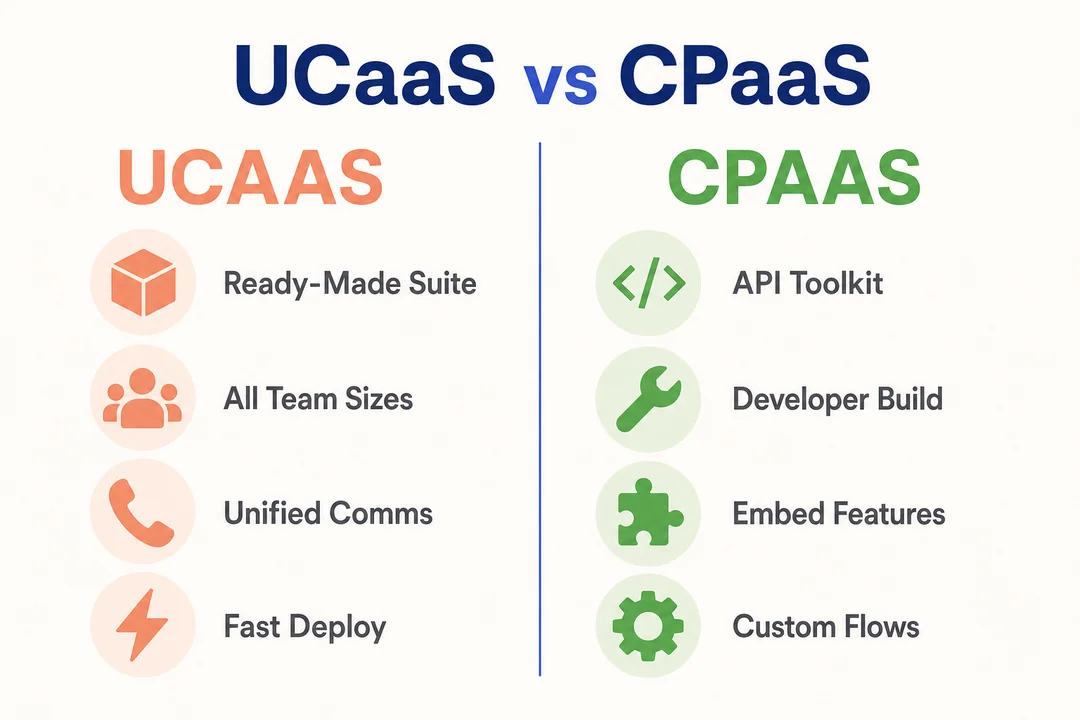
Quick comparison table
| Category | UCaaS | CPaaS |
|---|---|---|
| Definition | Unified communications software in the cloud | Communication APIs and SDKs in the cloud |
| Primary purpose | Team communication and collaboration | Embedded customer communication |
| Primary user | Employees, admins, IT teams | Developers, product teams, digital businesses |
| Focus | Internal communication | External, customer-facing communication |
| Deployment method | Ready-made platform | API/SDK integration |
| Coding required | Usually little or none | Usually yes |
| Setup complexity | Low to moderate | Moderate to high |
| Time to launch | Days or weeks | Weeks or longer, depending on scope |
| Integration method | Native integrations | Custom integrations via API |
| Pricing model | Per-seat subscription | Usage-based pricing |
| Scalability model | By user count | By message, minute, event, or API volume |
| Customization level | Limited to vendor features | High |
| Security responsibility | More provider-managed by default | Shared responsibility, with customer implementation ownership |
| Best fit | Businesses needing plug-and-play communication | Businesses needing custom workflows and embedded communication |
The simplest way to understand the difference
UCaaS = ready-made communication software for employees.
CPaaS = programmable communication building blocks for apps and customer journeys.
That distinction matters because both may support voice, video, and messaging, but they solve different problems. UCaaS helps your team work together. CPaaS helps your systems communicate with customers in a custom way.
A simple analogy works well here: UCaaS is like buying a finished office communication system. CPaaS is like adding communication features to your own product.
Key Differences Between UCaaS and CPaaS
Ready-made platform vs customizable platform
UCaaS is a packaged platform. You buy a finished set of communication tools and roll them out to employees. That usually means faster setup, less maintenance, and a simpler buying process.
CPaaS is a customizable platform layer. You use APIs to build communication into your own workflows, products, or customer experiences. That gives you more control, but also more ownership.
In practice:
- If you need phone, chat, and meetings for staff, UCaaS is usually simpler.
- If you need custom messaging inside an app or event-triggered alerts, CPaaS is usually the better fit.
The trade-off is clear: UCaaS favors speed and simplicity. CPaaS favors flexibility and customization.
Internal team collaboration vs customer-facing communication
This is the most important difference for most buyers.
UCaaS supports internal team collaboration, such as:
- Employee phone calls
- Team chat
- Video meetings
- Cross-department coordination
CPaaS supports customer-facing communication, such as:
- Shipping notification SMS
- Appointment reminders
- OTP verification
- In-app messaging
- Automated alerts
A daily standup meeting is a UCaaS use case. A delivery update text is a CPaaS use case.
Both platforms may use the same channels, like voice or messaging. The difference is not the channel. The difference is who the communication is for and how it is delivered.
No-code or low setup vs developer dependency
UCaaS is typically easier to deploy. An admin or IT team can usually configure users, numbers, routing, and permissions without deep engineering work.
CPaaS usually depends on developers. APIs need to be integrated, tested, monitored, and maintained over time. That makes technical ownership a real buying factor.
Check these before choosing CPaaS:
- Do you have developers available?
- Do you need communication inside an app or workflow?
- Can your team maintain API-based integrations over time?
A common mistake is choosing CPaaS because it looks flexible, then discovering nobody owns implementation. That often leads to delays and a poor user experience.
Per-seat subscription vs usage-based pricing
UCaaS usually uses a per-seat subscription. You pay by user, often monthly or annually. That makes costs easier to forecast, especially for stable teams.
CPaaS usually uses usage-based pricing. You pay for what you use, such as:
- Messages
- Voice minutes
- Verification events
- API calls
- Channel usage
Business impact:
- UCaaS gives more budget predictability.
- CPaaS gives more elasticity if usage varies by campaign, workflow, or season.
Example:
- A business with 100 employees can usually estimate UCaaS costs easily.
- A retailer running seasonal alert campaigns may see CPaaS costs rise and fall sharply.
One warning matters: rate cards alone do not show total cost.
Fast rollout vs custom implementation timeline
UCaaS usually goes live faster because the platform is already built. For many businesses, rollout is more about setup, user training, and number migration than development.
CPaaS takes longer because timeline depends on scope, integrations, testing, and internal approval. If customization creates real business value, the extra time can be worth it. If not, the added complexity may not pay off.
Provider-managed security vs customer-managed implementation
With UCaaS, the provider usually handles more default platform controls because it is a finished service. Your team still manages access, policies, and usage, but less of the technical implementation is custom.
With CPaaS, security is more of a shared responsibility model.
What the provider often handles:
- Core platform availability
- API infrastructure
- Base service security controls
What the customer still owns:
- How APIs are implemented
- Access controls in connected systems
- Workflow design and data handling choices
That difference matters if your team is comparing risk, effort, and governance.
UCaaS vs CPaaS Features Compared
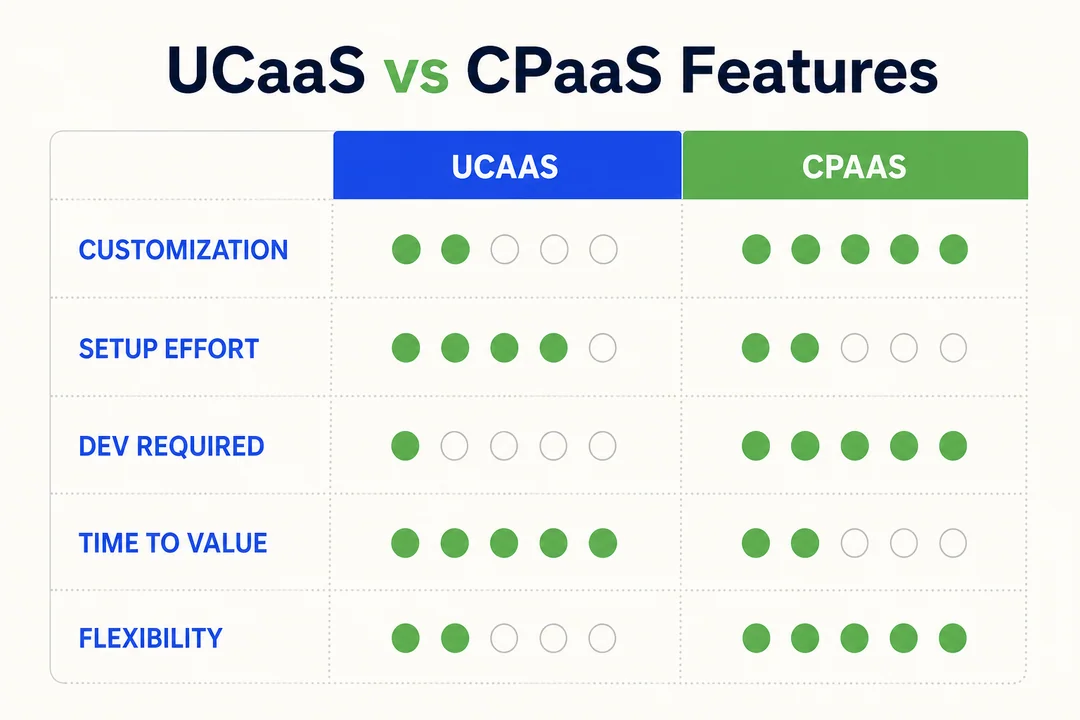
Features commonly found in UCaaS
These features are built for daily team communication:
- VoIP calling
- Video conferencing
- Team chat
- Voicemail
- Call routing
- Presence
- File sharing
- CRM integrations
- Mobile and desktop access
Features commonly built with CPaaS
These features are usually triggered by workflows, APIs, or user events:
- SMS alerts
- 2FA
- Voice notifications
- In-app messaging
- Click-to-call
- WebRTC calling or video
- Chatbot flows
- Omnichannel messaging
- Verification events
Features both can support
Both UCaaS and CPaaS can support voice, video, and messaging. But channel overlap does not mean platform equivalence.
The real difference is how those channels are used:
- UCaaS delivers them as a finished employee communication system.
- CPaaS delivers them as programmable components for apps and workflows.
That is why comparing channels alone can lead to the wrong decision.
UCaaS vs CPaaS Pricing Models Explained
How UCaaS pricing usually works
UCaaS pricing is usually based on per-user or per-seat subscription plans. Businesses pay a monthly or annual fee for each employee using the platform.
Pricing often varies by:
- Feature tier
- User volume
- Support level
- Calling options
- Compliance or admin features
Main advantages:
- Predictable monthly costs
- Simpler procurement
- Easier long-term budgeting
This model works well when your headcount is fairly stable and communication usage is part of daily operations. For many SMBs and mid-sized companies, that makes UCaaS easier to justify and manage financially.
How CPaaS pricing usually works
CPaaS pricing is usually usage-based. Instead of paying per employee, you pay based on how much communication activity your business generates.
Common billing units include:
- Per message
- Per minute
- Per API request
- Per authentication event
- Per channel interaction
This model can be cost-effective when communication volume is event-driven or highly variable. It also fits businesses that do not need a full employee communication suite.
Watch for hidden or overlooked costs:
- Carrier or channel fees
- Retries and failed message attempts
- Developer time
- Testing and monitoring
- Support and maintenance
That is why a low unit price does not always mean a low total cost. Usage, workflow design, and operational discipline all affect spend.
Which pricing model is better for different businesses?
| Business scenario | Better fit | Why |
|---|---|---|
| Stable internal team communication | UCaaS | Easier budgeting with seat-based pricing |
| Event-driven customer alerts | CPaaS | Costs scale with usage volume |
| Seasonal messaging campaigns | CPaaS | Flexible for fluctuating demand |
| Replacing office phone and meeting tools | UCaaS | More practical than paying by event |
| Need both employee communication and customer workflows | Both | Each platform fits a different job |
The best pricing model depends on your operating model.
- Choose UCaaS if you want stable, predictable communication costs tied to users.
- Choose CPaaS if you want flexible spending tied to message or event volume.
- Choose both if your business needs internal collaboration and automated external communication.
Always compare total cost, not just sticker price.
When to Choose UCaaS
Choose UCaaS if you want a ready-to-use system
UCaaS makes sense when you want a communication platform that works out of the box. You do not need to build core calling, chat, or meeting features from scratch.
Key advantages:
- One vendor
- One admin console
- One user experience
- Faster deployment
This is often the right move when a business is replacing several disconnected tools with a single business communication suite.
Choose UCaaS if your focus is internal communication
If your main goal is to help employees communicate better, UCaaS is usually the natural choice. It is built for internal calls, meetings, messaging, and collaboration.
This matters even more for remote and hybrid teams. When employee productivity depends on fast, reliable communication across locations, a unified platform usually works better than piecing tools together.
If the core problem is team coordination, choose UCaaS first.
Choose UCaaS if you have limited technical resources
Many small and mid-sized businesses lean toward UCaaS for a simple reason: it reduces dependency on developers.
Why that matters:
- Setup is usually lighter
- Admin training is more straightforward
- Ongoing management is easier for lean IT teams
If your business does not have engineers available to build and maintain communication workflows, UCaaS is usually the safer option.
Choose UCaaS if you want predictable monthly costs
UCaaS is often a better fit when budgeting simplicity matters. Per-seat pricing is easier to explain, approve, and forecast than variable usage-based billing.
One caveat matters: predictable does not always mean cheapest. If some users do not need full communication licenses, seat-based pricing can become less efficient. Still, for many businesses, the stability is worth it.
When to Choose CPaaS
Choose CPaaS if you need custom communication workflows
Choose CPaaS when communication is part of the workflow itself, not just a standalone app your team uses.
Examples include:
- Triggered appointment reminders
- Order and delivery alerts
- Fraud or security notifications
- Embedded click-to-call
- In-app chat or calling
UCaaS is not built to replace these custom, event-driven use cases. If your communication needs to respond to system events or customer actions, CPaaS is usually the better tool.
Choose CPaaS if your focus is customer engagement
CPaaS is a strong fit when communication directly supports the customer lifecycle.
That may include:
- Onboarding messages
- Support updates
- Reminders
- Verification
- Service alerts
- Transactional notifications
The value is practical: better timing, faster communication, and a smoother customer experience across channels. If your goal is customer engagement automation rather than employee collaboration, CPaaS deserves close attention.
Choose CPaaS if you have development resources
CPaaS is usually not ideal without developers or a strong implementation partner. The buying decision may come from operations, product, or CX leaders, but execution is normally developer-led.
You will usually need ownership for:
- Integration
- Testing
- Monitoring
- Optimization
- Ongoing maintenance
If product and engineering teams are aligned, CPaaS can be a powerful long-term asset. Without that alignment, it often becomes harder than expected.
Choose CPaaS if flexibility matters more than simplicity
CPaaS is the better choice when control and customization matter more than ease of setup.
The trade-off is simple:
- More flexibility, more effort
- More control, less simplicity
This works well for product-led businesses, digital platforms, and companies with highly customized customer journeys. It is usually the wrong tool if you only need basic office communication.
When It Makes Sense to Use Both UCaaS and CPaaS
How the hybrid model works
A hybrid model is often the most practical answer.
- UCaaS handles employee communication
- CPaaS handles customer communication and automation
This setup works well for businesses that need strong internal collaboration and custom external communication at the same time. Instead of forcing one platform to do everything, you use each platform for what it does best.
That often creates a cleaner communication stack and a better fit by function.
Common examples of using both together
- Customer support teams coordinate internally in UCaaS while customers receive automated SMS status updates through CPaaS.
- Clinics use UCaaS for staff calls and meetings, while CPaaS sends appointment reminders and verification messages.
- Ecommerce businesses use UCaaS for team operations and CPaaS for delivery alerts, OTP login, and order updates.
- SaaS companies use UCaaS for internal collaboration and CPaaS to embed click-to-call or chat inside their product.
- Financial services teams use UCaaS for internal escalation and CPaaS for account alerts and authentication flows.
Why many growing businesses combine both
Growing businesses often need better internal coordination and better customer communication at the same time. Using both platforms reduces compromise.
It also scales well. A company can standardize employee communication with UCaaS while gradually expanding customer workflows through CPaaS as digital needs grow.
Real-World Use Cases for UCaaS and CPaaS
UCaaS use cases
- Connecting teams across locations with one cloud-based communication system
- Supporting hybrid work with calling, meetings, and messaging from any device
- Replacing a legacy business phone system with a cloud-based alternative
- Improving department coordination across sales, support, and operations
- Consolidating disconnected communication tools into one platform
In many businesses, UCaaS is the first step when modernizing internal communication.
CPaaS use cases
- Order and delivery updates for ecommerce customers
- Appointment reminders for healthcare and service businesses
- 2FA and identity verification for fintech, SaaS, and consumer apps
- In-app messaging inside customer platforms
- Click-to-call features on websites or mobile apps
- Workflow-triggered alerts based on customer activity or system events
These use cases are common in ecommerce, healthcare, fintech, logistics, and software platforms.
Hybrid use cases
- A retail brand uses UCaaS for internal coordination and CPaaS for outbound notifications.
- A clinic network uses UCaaS for staff communication and CPaaS for reminders and confirmations.
- A growing SaaS company uses UCaaS for employee collaboration and CPaaS for customer onboarding and in-app communication.
This model is common for businesses moving beyond basic communication needs.
How to Decide Between UCaaS and CPaaS
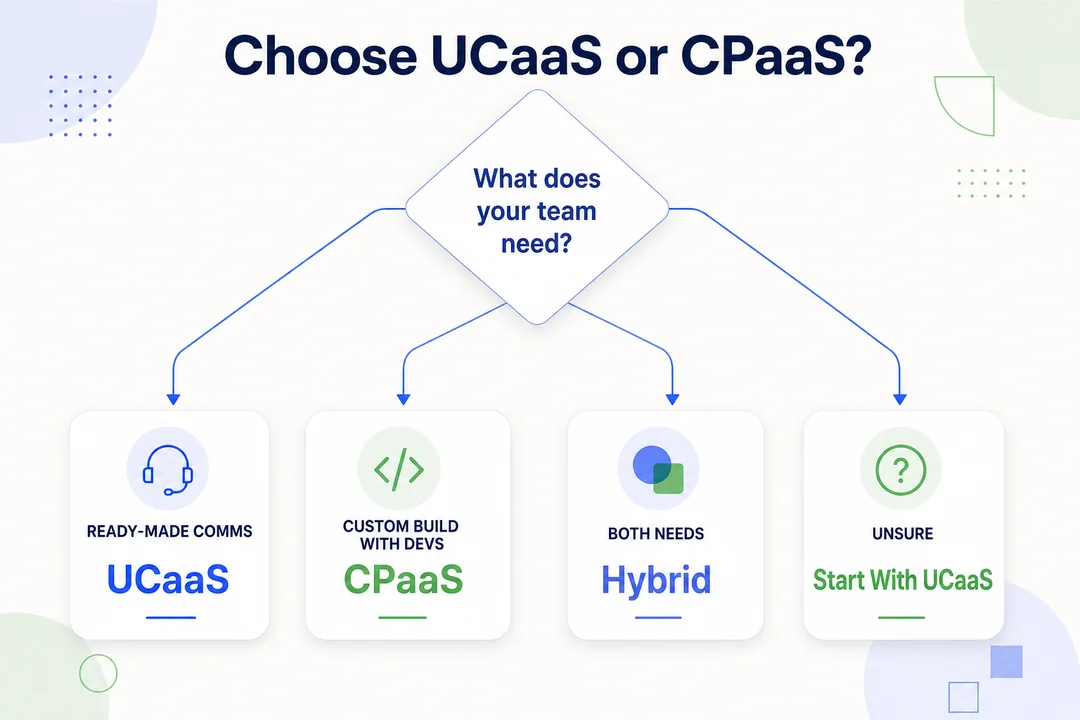
Start with your main communication goal
Start with the job you need the platform to do.
Ask:
- Do you need better employee collaboration?
- Do you need customer-facing communication?
- Do you want a prebuilt platform?
- Do you need communication embedded in an app or workflow?
If the answer is team communication, start with UCaaS. If the answer is embedded or automated customer communication, start with CPaaS.
Check your technical resources
Your technical capacity changes the right answer.
If you have limited internal IT or no development team, UCaaS is usually easier to implement and maintain. If you choose CPaaS, make sure someone owns the technical side from day one.
Use this quick checklist:
- Developers available?
- Implementation partner in place?
- Team able to monitor integrations over time?
CPaaS without ownership is one of the most common failure patterns.
Consider your deployment timeline
If you need to launch quickly, UCaaS usually wins. It is designed for fast rollout.
If you have time to design, test, and refine custom communication workflows, CPaaS may deliver more long-term value. Match the platform to business urgency, not just feature ambition.
Compare budget preferences
Think about cost structure, not just base price.
- UCaaS fits businesses that prefer fixed or predictable monthly spending.
- CPaaS fits businesses comfortable with variable costs tied to usage.
Compare total cost of ownership across:
- Software
- Implementation
- Administration
- Monitoring
- Scaling over time
The cheapest-looking option on paper is not always the best business fit.
Simple decision checklist
- Need a ready-made internal communication suite? → Choose UCaaS
- Need embedded customer messaging, alerts, or verification? → Choose CPaaS
- Need both internal collaboration and external automation? → Use both
- Have limited technical resources? → Lean toward UCaaS
- Need high customization and have developer support? → Lean toward CPaaS
Use case fit matters more than feature count.
Top Mistakes to Avoid When Comparing UCaaS vs CPaaS
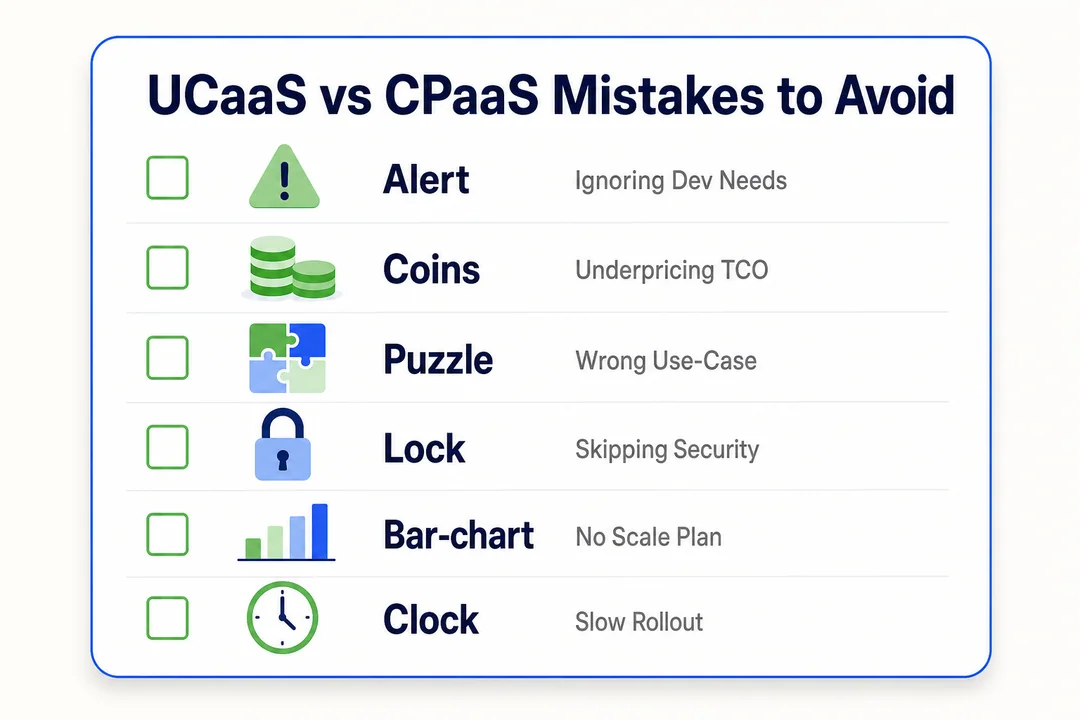
Assuming they are direct substitutes
They are not direct substitutes in most cases. They may overlap in channels like voice or messaging, but they solve different layers of communication needs.
Choosing CPaaS without developer ownership
Common risks include:
- Delayed rollout
- Weak integrations
- Poor monitoring
- Fragmented user experience
Choosing UCaaS when you actually need embedded customer communication
If you really need communication built into an app or workflow, UCaaS alone may lead to workarounds, weak automation, and a fast mismatch between platform and business need.
Comparing price without comparing use case
- A low seat price does not replace a customer messaging engine.
- A low API rate does not replace a full collaboration suite.
The right comparison is not just cost. It is cost for the right job.
Conclusion: Which Is Better, UCaaS or CPaaS?
UCaaS is better for internal team communication, fast deployment, and predictable operations. CPaaS is better for custom, customer-facing communication built into apps and workflows.
If your business needs employee calls, meetings, and chat, choose UCaaS. If your business needs alerts, reminders, verification, or embedded messaging, choose CPaaS. If you need both layers, using both is often the smartest option.
The right choice comes down to three things: your communication goal, your technical resources, and your budget model. Evaluate your internal and customer communication needs clearly before selecting a platform.
Frequently Asked Questions
What is the main difference between UCaaS and CPaaS?
The main difference is that UCaaS is a ready-made communication platform for employees, while CPaaS is a customizable platform that uses APIs to add communication into apps and workflows. UCaaS is mainly for internal collaboration. CPaaS is mainly for customer-facing communication.
Is UCaaS better than CPaaS for small business?
Usually, yes. UCaaS is often better for small businesses that want fast setup, simple management, and predictable costs. But if your business depends on embedded messaging or app-based customer workflows, CPaaS may be the better fit.
Can UCaaS and CPaaS be used together?
Yes. Many businesses use UCaaS for employee communication and CPaaS for customer engagement and automation. This hybrid model is common because it gives each side of the business the right tool.
Is CPaaS only for developers?
Not only as a buying decision. Business leaders often choose CPaaS strategically. But implementation is usually developer-led because it involves APIs, integration, testing, and ongoing maintenance.
Which is better for internal communication: UCaaS or CPaaS?
UCaaS is usually better for internal communication because it is built for employee calling, meetings, messaging, and collaboration. CPaaS can support communication features, but it is not primarily designed as a finished employee communication system.
More in Operations & CX Optimization
View all →
Customer Experience Transformation: Framework and Steps
A telecom customer calls support about a billing error. They explain the problem to the IVR system. Then to the first agent. Then get transferred and explain again. Then escalated—and explain a third time. Forty minutes later, they're exhausted and the problem still isn't solved. This is what broken customer experience looks like. And it's costing you customers. Customer experience…


Web Caller Meaning: JavaScript caller, Calling Tools or Portals
“Web caller” is one of those phrases where the search results and the searcher are frequently talking about different things. Three unrelated audiences use it: developers hitting an error on the legacy JavaScript caller property, buyers evaluating browser-based calling software, and people trying to reach a specific portal or training page whose exact name they cannot recall. That fragmentation is…

Customer Experience Strategy: How to Build One That Works
Customer experience is getting worse, not better. Forrester's 2025 Global CX Index found that 21% of brands declined in CX quality while only 6% improved — and in the US, 25% declined against 7% that improved, the second consecutive year of that pattern. Most of those brands were not neglecting customer experience. They were working on it without a strategy…



 English
  Russian
  Chinese