

Businesses researching modern phone systems often run into the same confusing terms: SIP phone, VoIP, IP phone, and softphone. They are related, but they do not mean the same thing. For business leaders, IT managers, and operations teams, that distinction matters when evaluating office calling, remote team communication, or support workflows. This article gives a practical explanation of what a SIP phone is, how it works, how it differs from VoIP and IP phone terminology, what types exist, why businesses use them, and what to check before rollout.
What Is a SIP Phone?
A SIP phone is a phone that uses the internet to make and receive calls with Session Initiation Protocol, or SIP. In business terms, it is an internet phone that can be a physical desk device or a software app, usually connected to a VoIP phone system instead of a traditional landline.
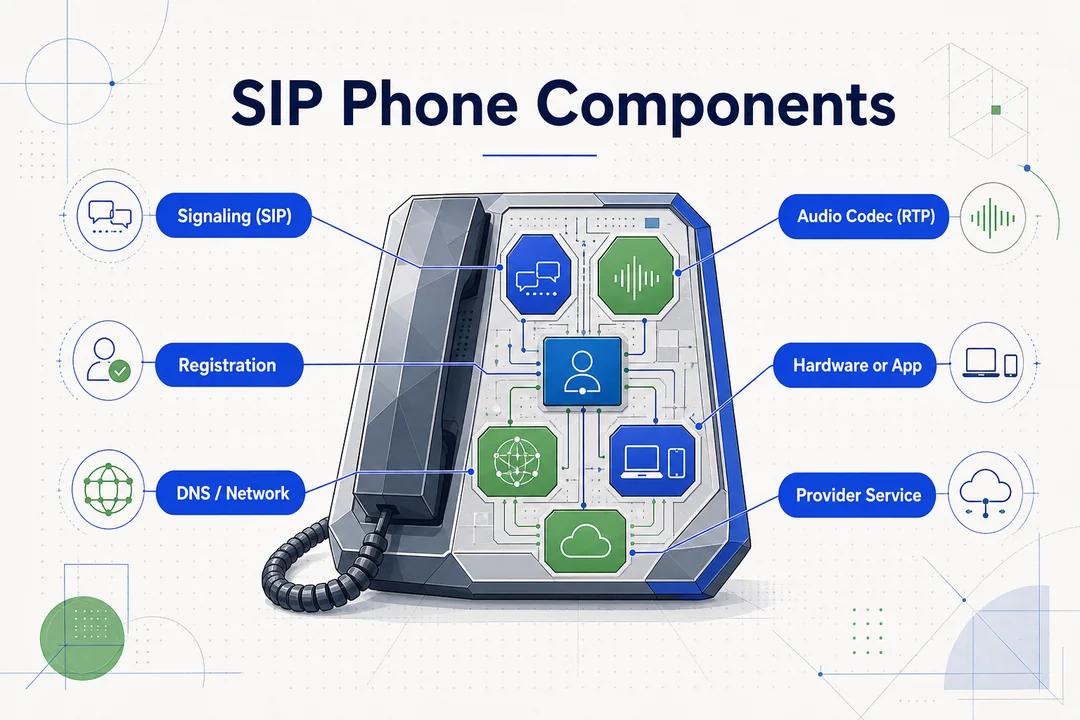
Quick Definition in Business Terms
If you are asking what is a SIP phone, the simplest answer is this: it is an IP phone that uses SIP to handle internet-based calling.
That matters because many businesses assume a SIP phone only means a desk phone on an office table. In practice, a SIP phone can also be a calling app on a laptop or smartphone. The common thread is not the form factor. It is the signaling method used to connect the call.
SIP phones are widely used in business VoIP systems because they support flexible deployment, modern calling features, and easier support for office, remote, and hybrid teams.
What SIP Actually Does
SIP stands for Session Initiation Protocol. It is mainly responsible for handling call setup and control, not for being “the voice” itself.
In simple terms, SIP helps:
- start a call
- manage the connection
- end the session
That is an important distinction. SIP is about creating and managing communication sessions. The voice is then carried digitally over the network once the call is active.
SIP vs VoIP vs IP Phone: What’s the Difference?
When businesses compare phone systems, SIP vs VoIP is one of the most common points of confusion. Vendor pages and everyday conversations often use these terms loosely, but they are not exact synonyms.
Simple Comparison Table
| Term | Meaning | Main Role |
|---|---|---|
| VoIP | Voice over Internet Protocol | Overall method of internet-based calling |
| SIP | Session Initiation Protocol | Protocol that starts and manages calls |
| IP Phone | Phone using an IP network | Device category |
| SIP Phone | IP phone using SIP | Specific type of IP phone |
This is the clearest way to think about the relationship.
VoIP is the broad concept. It refers to making voice calls over the internet rather than traditional phone lines.
SIP is one protocol used within that world. The SIP protocol handles call signaling, which means it helps devices establish, maintain, and end calls.
An IP phone is the device category. It is any phone that works over an IP network.
A SIP phone is a specific kind of IP phone that uses SIP. That is why the terms overlap so often in business phone system discussions. A vendor may casually call the same device a VoIP phone, an IP phone, or a SIP phone depending on the context.
Precision still matters, especially when comparing devices, providers, and compatibility. In most business communications contexts, these terms overlap in conversation, but they should be understood at three different levels: method, protocol, and device.
The One-Sentence Takeaway
VoIP is the broader way to make calls over the internet, while SIP is one of the protocols used to set up and manage those calls.
How Does a SIP Phone Work?
A SIP phone works by using SIP to set up the call and the internet to carry the audio.
For most business users, understanding how SIP phone works does not require protocol-level detail. What matters is the basic flow: dial, connect, talk, end. SIP handles the call signaling, while the voice travels digitally as data packets over the network.
Simple Call Flow
- A user places a call from the SIP phone.
- The device sends a SIP request.
- The phone system or SIP provider routes the call.
- The other party answers.
- Audio flows both ways over the internet.
- The session ends when one party hangs up.
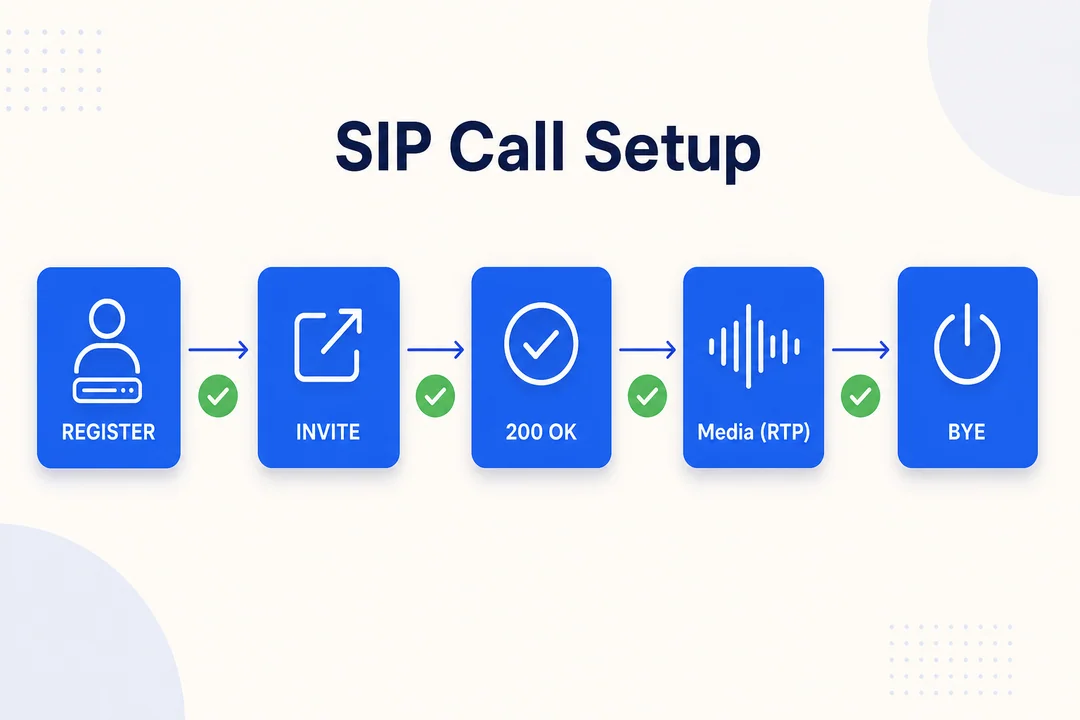
That is the practical explanation of how SIP phone works in daily business use. The user does not need to see the signaling process behind the scenes. They just need a working device, a supported service, and a stable connection.
If you go one level deeper, SIP manages the session, while the live audio is carried separately over the network, often through standard real-time media transport. For most business readers, that distinction is enough.
What a SIP Phone Needs to Work
Before a SIP-based call can happen, a few pieces need to be in place:
- stable internet connection
- SIP-compatible device or software
- SIP account or SIP provider
- optional cloud PBX or business phone platform
This is why a phone that looks modern on a desk is not enough by itself. The service, account setup, and network quality all shape the real calling experience.
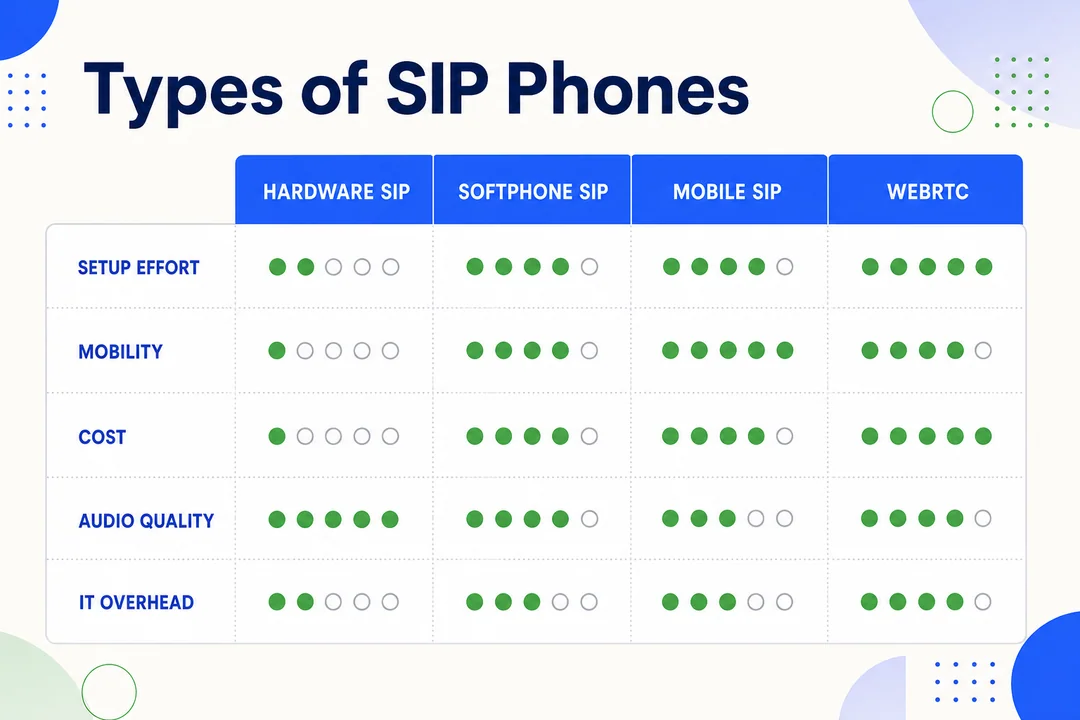
Types of SIP Phones
The term SIP phone does not refer to one single device format. Businesses usually choose between physical phones and software-based calling tools, depending on how teams work.
Hardware SIP Phones
A hardware SIP phone is a physical desk phone that connects through the network, usually by Ethernet. These are common in fixed workstations, front desks, admin stations, and teams that handle calls all day.
Some models support PoE (Power over Ethernet), which means the same network cable can carry both data and power. That can simplify deployment in office environments.
For many teams, the main advantage is familiarity. A dedicated VoIP desk phone feels predictable, is easy to leave at a known location, and works well for roles that need a stable call-handling setup.
Software SIP Phones (Softphones)
A softphone is a software app that turns a laptop, desktop, tablet, or smartphone into a calling endpoint. It can still function as a SIP-based phone, even though there is no dedicated hardware handset.
For hybrid and remote teams, a softphone often makes rollout easier. Users sign in, connect a headset, and start calling from wherever they work. This also reduces dependence on fixed office locations.
A softphone can be a practical option for sales staff, account managers, supervisors, or support agents who need mobility and quick access across devices.
Which Type Fits Which Business Scenario?
There is no universal winner. The right SIP-based endpoint depends on workflow.
- desk-based office staff → hardware phone
- hybrid or remote teams → softphone
- customer support or cloud calling environments → often a mixed setup
Many businesses end up using both. That gives them flexibility without forcing every team into the same device model.
Why Businesses Use SIP Phones
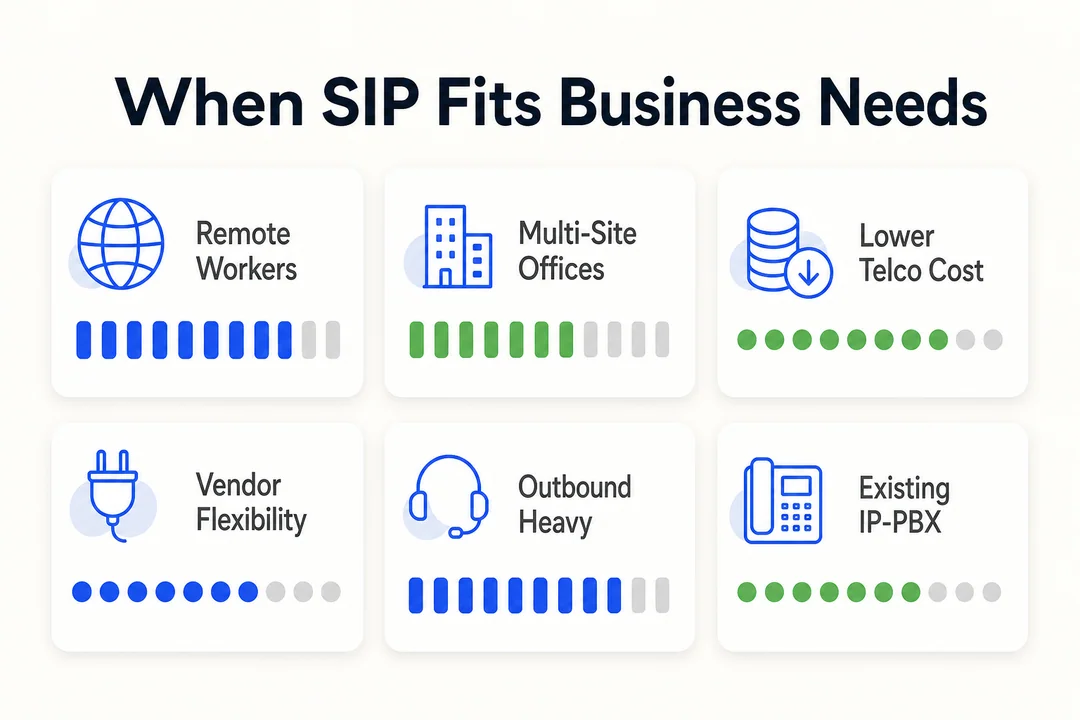
Common benefits of SIP phones for business include easier scaling, support for remote teams, and access to modern calling features.
Businesses do not adopt SIP phones only because they are newer than legacy phone lines. They use them because they fit how modern teams work: distributed staff, cloud-managed operations, and changing call volume across locations.
Operational Benefits
Many businesses value the benefits of SIP phones because they support more flexible operations.
Key advantages often include:
- faster deployment than traditional line-based setups
- easier provisioning for new users and locations
- stronger support for remote teams and hybrid work
- centralized management through a business phone system
- less dependence on legacy phone lines
- better support for growth and scalability
This operational flexibility matters more than simple price comparisons. Cost savings may be part of the equation, but results depend on provider choice, usage patterns, support quality, and network readiness.
Communication Features Commonly Associated with SIP Setups
Depending on the provider and platform, SIP-enabled environments often include features such as:
- call forwarding
- voicemail
- auto-attendant
- call recording
- call routing
- HD voice
- basic integration with business tools
These features are often why a modern business phone system feels more useful than a traditional office line setup. The phone itself is only one piece. The broader service design shapes the day-to-day experience.
Common Business Use Cases for SIP Phones
A SIP phone for business can fit several different environments. The device or app may vary, but the goal is the same: reliable office communication, flexible reachability, and better support for modern work patterns.
Office and Front Desk Environments
In a traditional office setup, SIP phones often serve fixed-location calling needs. Reception, administration, and front desk roles may prefer a dedicated device that stays in one place and is always ready for inbound calls.
This is where a physical SIP desk phone still makes strong sense. It supports consistent handling for users who do not need mobility but do need dependable access throughout the workday.
Remote and Hybrid Teams
For distributed staff, a SIP phone for business is often a softphone rather than desk hardware. That allows users to stay reachable from different locations without relying on office-bound equipment.
This model works well for remote teams, especially sales, account management, and cross-functional staff who move between home, office, and travel.
Support and Call Center Operations
SIP endpoints are also common inside cloud call center environments and broader customer support operations. In these setups, phones or softphones connect into routing logic, reporting tools, and agent workflows.
In cloud calling environments, platforms such as Flyfone can fit into SIP-enabled workflows when businesses need flexible routing and scalable agent operations.
Things to Check Before Using a SIP Phone
Before using a SIP phone, businesses should check network stability, device compatibility, account setup, and provider support.
This is one of the most important practical points. Even a well-designed device cannot overcome poor internet quality or a weak deployment setup. In real business rollouts, many problems come from unstable Wi‑Fi, unsupported devices, incorrect login credentials, or poor audio accessories rather than the phone itself.
Basic Readiness Checklist
- stable network for consistent call quality
- compatible SIP device or app
- correct account credentials
- suitable headset or audio accessories if needed
- active account with a SIP provider
- business phone platform support
- basic scalability review if more users may be added later
A good summary of SIP phone requirements is this: the phone, the network, and the service all have to work together. Device compatibility matters. So does the SIP provider. And network quality affects call quality as much as the phone itself.
Poor Wi‑Fi, unsupported hardware, or weak headsets can create avoidable problems, even when the calling platform is otherwise solid.
Conclusion
A SIP phone is a phone that uses SIP for internet-based business calling, and it can be either a physical desk device or a software app. The main value is not just replacing old phone lines. It is enabling more flexible, scalable cloud communication for office, hybrid, and support teams. If you are evaluating SIP-based calling, the next step is to compare your device options, provider support, and network readiness. For teams exploring broader cloud call center or SIP-enabled communication workflows, Flyfone’s resource pages can be a useful place to continue that evaluation. If you want a structured fit assessment for your SIP-based calling workflow, book a tailored walkthrough with the Flyfone team.
Frequently Asked Questions
What is a SIP phone?
A SIP phone is a device or software application that uses Session Initiation Protocol (SIP) to make and receive calls over the internet. It replaces traditional phone lines by transmitting voice as digital data, giving businesses more flexibility in how they handle communication.
What is the main difference between VoIP and a SIP phone?
VoIP is the broader method of making calls over the internet, while SIP is the protocol used to set up, manage, and end those communication sessions. A SIP phone is an IP-based device that uses SIP to operate within a VoIP system.
Should I choose a hardware phone or a softphone?
Choose a hardware phone if your staff work at fixed desks, such as reception or front-desk roles. Choose a softphone if your team is remote, mobile, or hybrid, since it offers better portability and integrates easily across devices.
Does a SIP phone need a special internet connection?
Yes. A SIP phone needs a stable, low-latency internet connection to maintain call quality. Make sure you have enough bandwidth and prioritize wired connections or high-quality Wi-Fi to avoid dropped calls or distorted audio.
Why should a business switch to SIP phones?
Businesses adopt SIP phones because they scale quickly, reduce dependence on legacy copper infrastructure, and integrate easily with cloud platforms. Modern platforms such as Flyfone can also help optimize the workflow through intelligent call routing.
What factors affect call quality on a SIP phone?
Call quality depends on internet stability, the quality of the device or application in use, and correct configuration from the SIP provider. Weak internal networks or incompatible hardware are common causes of degraded audio.
More in Operations & CX Optimization
View all →
Customer Experience Transformation: Framework and Steps
A telecom customer calls support about a billing error. They explain the problem to the IVR system. Then to the first agent. Then get transferred and explain again. Then escalated—and explain a third time. Forty minutes later, they're exhausted and the problem still isn't solved. This is what broken customer experience looks like. And it's costing you customers. Customer experience…


Web Caller Meaning: JavaScript caller, Calling Tools or Portals
“Web caller” is one of those phrases where the search results and the searcher are frequently talking about different things. Three unrelated audiences use it: developers hitting an error on the legacy JavaScript caller property, buyers evaluating browser-based calling software, and people trying to reach a specific portal or training page whose exact name they cannot recall. That fragmentation is…

Customer Experience Strategy: How to Build One That Works
Customer experience is getting worse, not better. Forrester's 2025 Global CX Index found that 21% of brands declined in CX quality while only 6% improved — and in the US, 25% declined against 7% that improved, the second consecutive year of that pattern. Most of those brands were not neglecting customer experience. They were working on it without a strategy…



 English
  Russian
  Chinese