

Salesforce Dialer: Native Calling vs Third-Party Integrations vs Cloud Call Center
The term salesforce dialer sounds simple, but in real evaluations it often covers very different products. Some buyers mean native Salesforce calling. Others mean a third-party dialer built through Salesforce telephony integration. And some are really looking for a broader Salesforce-connected calling platform for sales, support, or mixed operations.
That distinction matters because each option solves a different workflow problem. This guide breaks down the main categories, the features that actually matter, and how to choose based on team size, call volume, reporting needs, and admin overhead. The goal is not to push one answer, but to help you quickly identify the right fit.
What “Salesforce Dialer” Usually Means
Salesforce dialer usually refers to one of three categories: built-in Salesforce calling, a third-party dialer connected through Salesforce CTI or the ecosystem, or a broader calling platform integrated with Salesforce. Buyers often use the same phrase for all three, even though they support very different levels of workflow complexity.
When teams start researching a salesforce dialer, they are usually trying to solve one of a few practical problems: make calls from the CRM, improve CRM click-to-dial, automate outbound activity, or connect Salesforce with a more capable calling operation. That is why the term gets blurred so often.
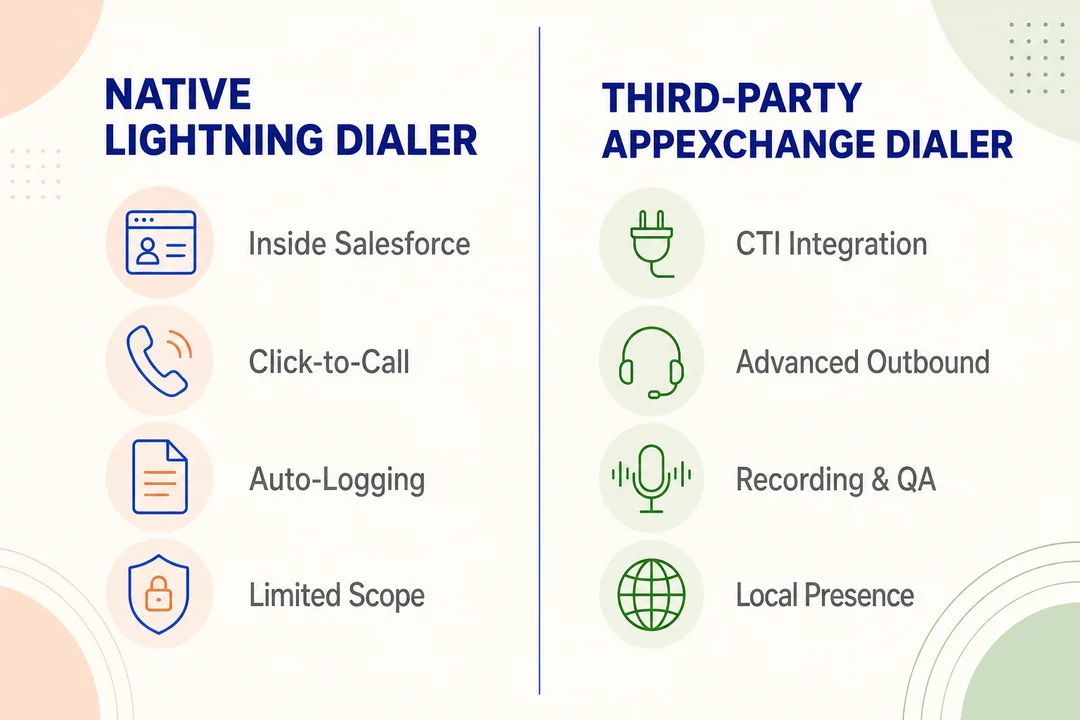
Native Salesforce calling or built-in dialer options
For many teams, the salesforce native dialer is the simplest starting point. It is usually a good fit when the CRM is the center of the rep workflow and calling needs are straightforward.
- Best for teams that mainly want CRM click-to-dial from lead, contact, or account records
- Supports basic calling activity capture without adding a large telephony stack
- Reduces tool sprawl for smaller teams that value simplicity over deep call operations
- Often works well when managers care more about CRM activity visibility than advanced routing or campaign control
Third-party AppExchange dialers
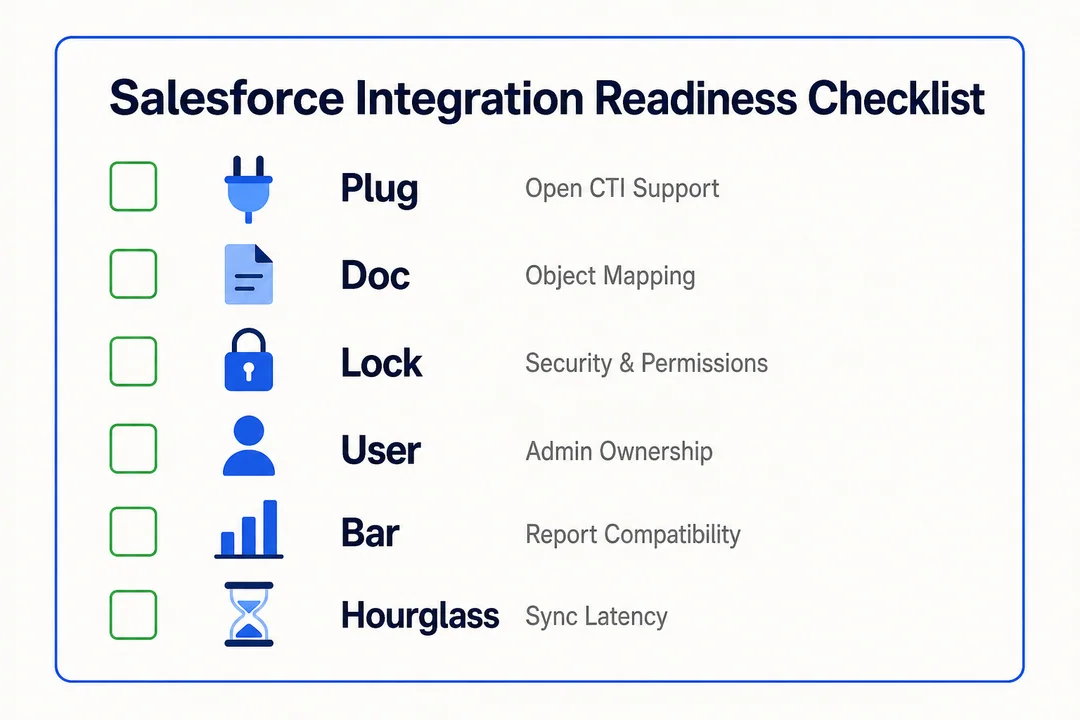
This category expands what a salesforce dialer can do while Salesforce remains the system of record. Most options are found through Salesforce AppExchange and rely on Salesforce CTI (Computer Telephony Integration, the layer that lets telephony tools work inside or alongside Salesforce).
- A practical fit when native calling feels too limited but full contact center software feels too heavy
- Usually offers stronger Salesforce telephony integration for call handling, workflow automation, and rep productivity
- Often adds better outbound controls, recording, local presence, and richer call management
- Lets teams stay inside Salesforce while extending telephony functionality beyond basic CRM calling
Common third-party dialers in this category include JustCall, Kixie, Aircall, CloudTalk, Revenue.io (formerly RingDNA), PhoneBurner, and outbound-engagement suites like Salesloft and Outreach that add a calling layer on top of cadences. Each positions differently around outbound automation, AI call coaching, local presence, or pricing simplicity, so the right pick depends on the workflow rather than a single “best” answer.
Cloud call center platforms integrated with Salesforce
Some teams searching for a salesforce dialer actually need an operational platform, not just a dialer. This is where a cloud call center category enters the picture.
- Better suited for inbound and outbound workflows that need routing, queues, monitoring, and supervision
- Supports higher-volume teams where calling is not just a rep action, but a managed operation
- Often includes broader Cloud Communication Infrastructure such as fallback logic, reporting, and multi-workflow control
- Makes sense when sales, support, or outsourced teams need more than basic record-level calling
Established platforms in this category include Talkdesk, Five9, NICE CXone, Genesys Cloud, and Flyfone, built for managed call operations rather than individual rep calling, with deeper routing, supervisor visibility, and reporting than a standalone dialer.
The right category depends less on the label and more on your workflow complexity. No single option is right for every team.
## Core Features Buyers Expect From a Salesforce Dialer
Most buyers do not need every available feature. The smarter approach is to separate core needs from scale needs. A small team may only need click-to-call and reliable call logging. A more active outbound team may need outbound call automation and better lead handling. Larger operations may need QA, dashboards, and controls that go beyond a basic dialer.
Most buyers expect a Salesforce dialer to include…
- Click-to-call from CRM records
- Reliable call logging and activity sync
- Notes, dispositions, and record updates
- Optional outbound automation for faster workflows
- Manager visibility as the team scales
Baseline features most teams expect
These are the features that usually matter first.
- Click-to-call inside Salesforce so reps can place calls without switching tabs
- Automatic call activity logging to reduce manual updates and improve CRM hygiene
- Contact, lead, and account sync so call outcomes connect to the right records
- Notes and dispositions for follow-up accuracy
- Basic rep activity visibility through simple dashboards or reports
If a tool handles these well, it may already be enough for many CRM-first teams.
Advanced features for more active outbound teams
This is the point where a simple salesforce dialer starts to become a productivity tool, not just a calling button.
- Auto-dialer, power dialer, or progressive dialing options for faster outreach workflows
- Call recording for coaching, review, and dispute handling
- Local presence features to improve answer rates in some outbound environments
- Queue support or lightweight routing for teams with more structured call flows
- Lead prioritization so reps spend time on higher-value records first
- Outbound call automation to reduce repetitive manual dialing steps
Not every team needs these features. They become useful when outbound volume rises and managers need more control.
Features that matter once operations scale
At scale, buyers usually care less about the dial button and more about visibility, oversight, and process control.
- AI summaries or sentiment signals to speed up manager review
- QA scoring and AI-driven quality assurance in calling
- Automated call review to reduce manual sampling
- Real-time dashboards for team activity, outcomes, and bottlenecks
- Compliance monitoring for scripts, disclosures, and policy-sensitive workflows
- API or webhook triggers that support broader sales workflow automation
AI features are only valuable if managers actually use the insights to coach reps, adjust campaigns, or improve compliance. A longer feature list does not automatically mean a better operational fit.
## Salesforce Native Dialer vs Third-Party Dialer Integrations
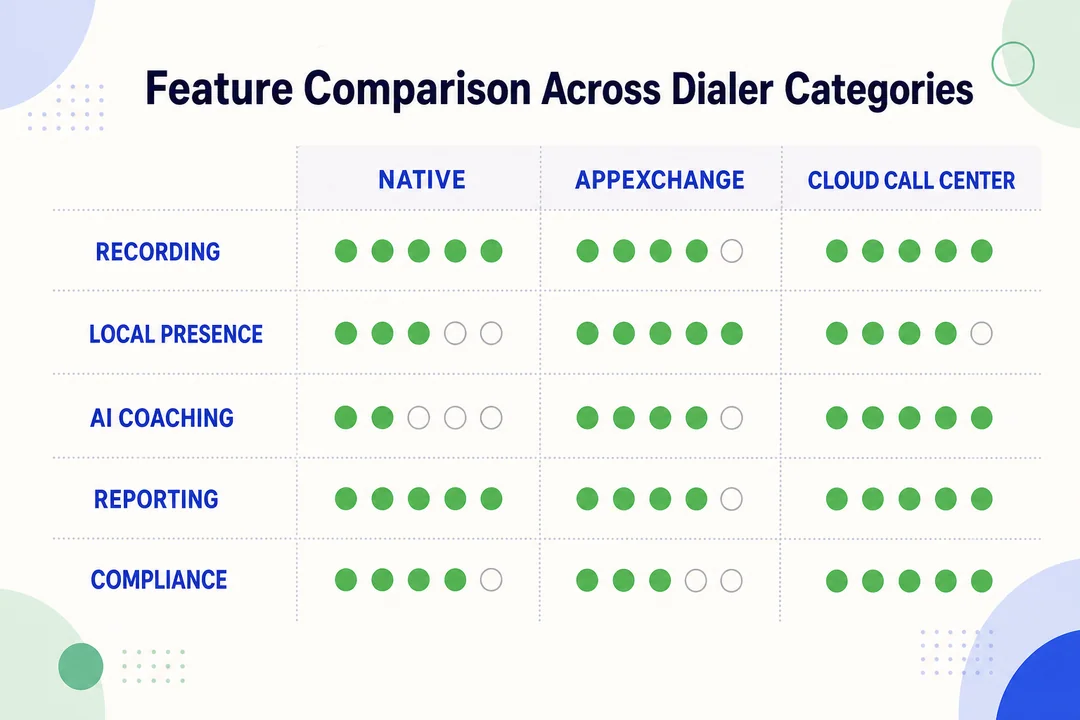
The main buying question is usually not whether a tool has a dial button. It is whether the team needs simple in-CRM calling or a more flexible telephony layer. In most salesforce dialer vs third-party telephony integration evaluations, the right answer depends on workflow complexity, manager visibility, and how much telephony logic sits outside the CRM.
| Criteria | Native Salesforce Calling | Third-Party Dialer Integration |
|---|---|---|
| Setup simplicity | Usually simpler | Varies by vendor and workflow |
| In-CRM experience | Strong in-platform call interface | Often strong, but depends on integration design |
| Outbound automation | Usually more limited | Often broader and more configurable |
| Inbound routing | Limited or basic depending on setup | Typically stronger |
| Reporting depth | Good for CRM activity | Often deeper for telephony and operations |
| AI QA / conversation insights | May be limited | More commonly available in advanced tools |
| Cost model | Varies by licensing structure | Usage-based or seat-based depending on provider |
| Scalability | Good for simpler teams | Usually better for higher-volume workflows |
| Admin flexibility | Lower complexity | Often higher flexibility, but more setup choices |
| Best suited for | CRM-first calling | Teams needing automation, routing, or call ops control |
When native Salesforce calling is usually enough
The salesforce native dialer is often a reasonable choice when the team wants a clean CRM-centered workflow and does not need advanced telephony operations.
- Smaller sales teams with straightforward calling patterns
- Teams that prioritize simplicity and lighter admin overhead
- Workflows where basic activity capture matters more than routing logic
- Environments with limited need for campaign controls, recording governance, or heavy supervisor oversight
For these teams, native may provide enough value without introducing another system to manage.
When third-party dialers make more sense
A third-party telephony integration usually becomes more attractive when calling is a structured operational function, not just an individual rep task.
- SDR or outbound teams with campaign-driven activity
- Support teams that need queues, transfers, or smarter routing
- Teams that rely on stronger reporting, recording, or manager controls
- BPO or distributed teams that need more robust VoIP infrastructure
- Organizations evaluating tools through Salesforce AppExchange to keep seamless CRM integration while expanding telephony capability
A dialer with strong CRM sync but weak routing may still be the wrong fit for high-volume teams.
In practice, native tools usually win on simplicity. Third-party tools usually win when automation, routing, and telephony performance matter more. The right decision is not about which category sounds stronger. It is about which category supports the way your team actually works.
## How to Choose the Right Salesforce Dialer for Your Team
A long feature checklist rarely helps by itself. What buyers need is a short framework that connects the tool to real workflow requirements, adoption risk, and expected business value.
Use this five-point framework to shortlist a Salesforce dialer…
- Team type and use case
- Call volume and workflow complexity
- Integration quality and Salesforce sync
- Reporting, QA, and coaching visibility
- Cost structure and time-to-value
1) Team type and use case
Start with operational fit, not brand familiarity.
A prospecting team, account management group, support desk, BPO, and mixed inbound/outbound team do not need the same tool. Some prioritize rep speed. Others care more about routing, supervision, or customer engagement quality across channels. The right choice should reflect how the team uses calls in daily operations.
2) Call volume and workflow complexity
This is often where the category decision becomes clear.
If calling is mostly manual and user-driven, native or a lighter dialer may be enough. If the team runs campaigns, handles queues, or needs faster throughput, the best Salesforce dialer for high-volume sales is often not a simple CRM-first tool. This is where cloud-based outbound calling for Salesforce or more advanced integrations start to make practical sense.
3) Integration quality and Salesforce sync
Do not treat integration as a checkbox.
Strong Salesforce integration should support screen pops, accurate call logging, disposition mapping, and dependable sync between call events and records. Weak sync creates reporting gaps, poor data quality, and lower manager trust in the system.
4) Reporting, QA, and coaching visibility
Many buyers focus too much on rep features and too little on manager visibility.
Basic rep activity reports may be enough for smaller teams. Larger teams often need dashboards, QA workflows, coaching visibility, and compliance monitoring. These capabilities directly affect sales productivity because managers can spot issues faster and coach against real patterns.
5) Cost structure and time-to-value
A lower sticker price does not always mean lower operational cost.
Compare seat-based and usage-based models, but also look at setup burden, training time, and ongoing admin work. A tool with faster adoption often delivers better operational efficiency and shorter time-to-value than a more feature-heavy option that the team barely uses.
The right shortlist is not the one with the most features; it is the one your team can adopt with the least friction and the clearest operational upside.
## When a Cloud Call Center Integrated With Salesforce Is the Better Option
A dialer is primarily a rep productivity tool. A cloud call center is a broader operational layer. The difference becomes important once teams need routing, supervision, QA, analytics, or multiple workflows across sales and support. At that point, the conversation shifts from simple dialing to cloud communication infrastructure.
Not every team needs this category. But when workflow complexity rises, it often becomes the more practical option.
Common signs a team has outgrown basic dialing
- The team needs IVR, queues, or more structured inbound handling
- Sales and support workflows now run side by side
- Global call routing or fallback logic matters for reliability
- Managers need live monitoring, recording review, or stronger QA oversight
- Higher-volume operations need faster deployment without a heavy enterprise rollout
- Simple dialer tools no longer support the required visibility or control
Where Flyfone fits naturally
For teams that have moved beyond basic dialing but still want a Salesforce-compatible workflow, platforms like Flyfone fit the cloud call center category by combining inbound and outbound operations, flexible routing, fast setup, and Salesforce integration.
This becomes especially relevant for teams that want:
- Inbound and outbound scalability without heavy infrastructure projects
- AI-powered quality assurance and manager visibility
- Transparent pay-as-you-go communication models
- Faster setup for distributed teams or growing operations
- Better support for global workflows and routing flexibility
That does not make a cloud call center the right answer for every buyer. It simply means that once routing, monitoring, and multi-workflow control become central, a broader platform may be a better fit than a basic dialer.
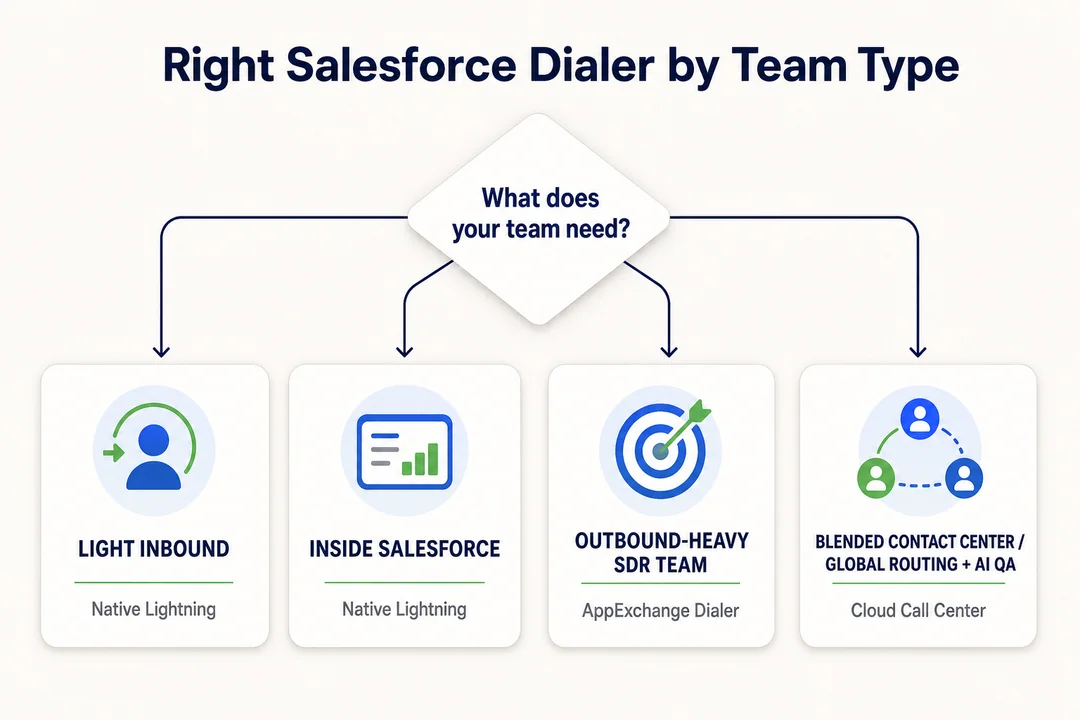
A Practical Buying Verdict by Team Type
For skimmers, the fastest way to evaluate Salesforce telephony integration is to match the category to the team model. The best choice depends on operational fit, not on which tool looks most advanced in a demo.
| Team Type | Best-Fit Option | Why |
|---|---|---|
| Small CRM-first sales team | Native Salesforce calling | Simple workflow, lighter admin burden, solid for basic sales productivity |
| Mid-sized outbound SDR team | Third-party dialer integration | Better automation, stronger outbound campaign efficiency, more control |
| Support, BPO, or global team | Cloud call center integration | Better routing, supervision, and global call routing needs |
| Mixed sales + support team | Depends on workflow complexity | Choose based on routing, reporting, and manager visibility requirements |
A simple rule works well here:
- Small CRM-first teams: native is often enough
- Outbound teams needing automation: third-party dialers often fit better
- Support, BPO, or global operations: cloud call center capabilities usually make more sense
- Mixed teams: decide based on workflow complexity, reporting depth, and routing needs
This approach keeps the decision grounded in actual operations instead of feature overload.
Conclusion
A salesforce dialer is not one single product type. In most buying journeys, it refers to native Salesforce calling, a third-party dialer integration, or a broader cloud call center connected to Salesforce. Native is often enough for straightforward CRM-first calling. Third-party dialers usually fit teams that need more automation, better reporting, or stronger outbound control. Cloud call center platforms make more sense when routing, QA, analytics, and multi-workflow operations become central.
The most practical next step is to review your current workflow before comparing vendors. Look at team type, call volume, routing needs, sync quality, and manager visibility. If your team is unsure whether native is enough or has already outgrown basic dialing, book a tailored walkthrough with the Flyfone team to map the best-fit category before committing to a larger telephony stack.
Frequently Asked Questions
What is a Salesforce dialer?
“Salesforce dialer” is an umbrella term for calling tools that work inside the Salesforce CRM. Depending on the team’s needs, it can mean Salesforce’s native calling feature, a third-party app from AppExchange, or a full cloud call center platform integrated with Salesforce.
What is the difference between a native Salesforce dialer and a third-party app?
The native dialer covers the basics, like click-to-call, and works well for smaller teams. Third-party apps add more advanced capabilities such as intelligent routing, deeper reporting, and process automation, which higher-volume sales operations typically need.
Should I use the native Salesforce dialer?
Yes, if your team only needs basic actions like click-to-call and manual note entry. If you also need routing, real-time reporting, or campaign management at scale, a third-party solution is usually the better fit.
How do I choose the right dialer for my sales team?
Evaluate options against five factors:
- Workflow complexity.
- Daily call volume.
- Reporting and analytics requirements.
- Quality and stability of the CRM integration.
- Total cost of ownership (TCO).
When should a business upgrade from a basic dialer to a cloud call center?
Upgrade when the team’s needs exceed what a standalone dialer can support, such as global call routing, AI-based call quality monitoring, live call supervision, or managing several parallel workflows that a standard dialer cannot orchestrate.
Can a dialer solution integrate with other platforms?
Yes. Cloud call center platforms with Salesforce integration (such as Flyfone) typically expose Open APIs and webhooks, which lets you sync call data with the CRM, ticketing systems, and other line-of-business applications.
More in Operations & CX Optimization
View all →
Customer Experience Transformation: Framework and Steps
A telecom customer calls support about a billing error. They explain the problem to the IVR system. Then to the first agent. Then get transferred and explain again. Then escalated—and explain a third time. Forty minutes later, they're exhausted and the problem still isn't solved. This is what broken customer experience looks like. And it's costing you customers. Customer experience…


Web Caller Meaning: JavaScript caller, Calling Tools or Portals
“Web caller” is one of those phrases where the search results and the searcher are frequently talking about different things. Three unrelated audiences use it: developers hitting an error on the legacy JavaScript caller property, buyers evaluating browser-based calling software, and people trying to reach a specific portal or training page whose exact name they cannot recall. That fragmentation is…

Customer Experience Strategy: How to Build One That Works
Customer experience is getting worse, not better. Forrester's 2025 Global CX Index found that 21% of brands declined in CX quality while only 6% improved — and in the US, 25% declined against 7% that improved, the second consecutive year of that pattern. Most of those brands were not neglecting customer experience. They were working on it without a strategy…



 English
  Russian
  Chinese