

For teams evaluating whatsapp business api for call center use, the real question is not whether WhatsApp is popular. It is whether WhatsApp can support real customer operations without creating another fragmented channel. Many businesses can enable messaging quickly, but still struggle with routing, agent visibility, reporting, and chat-to-voice escalation across an omnichannel environment. That gap matters. This guide explains what WhatsApp can realistically support today, where it fits best, what operational layers you still need beyond the API, and how to compare Meta direct, CPaaS, and cloud contact center platform deployment models before making a shortlist decision.
What WhatsApp Business API Means in a Call Center Context
WhatsApp Business API for call center use is viable when WhatsApp is treated as a communication channel inside a broader operating model. The API enables customer interactions, but it does not by itself provide the routing, agent workspace, analytics, QA, or governance required to run a full contact center environment.
Many buyers assume access to the WhatsApp Business Platform automatically means they have a production-ready contact center capability. In practice, that is the most common misconception. WhatsApp provides a strong customer channel for messaging, and increasingly for calling in certain scenarios, but a working cloud contact center still needs the operational layer around it.
Channel Capability vs Operational Infrastructure
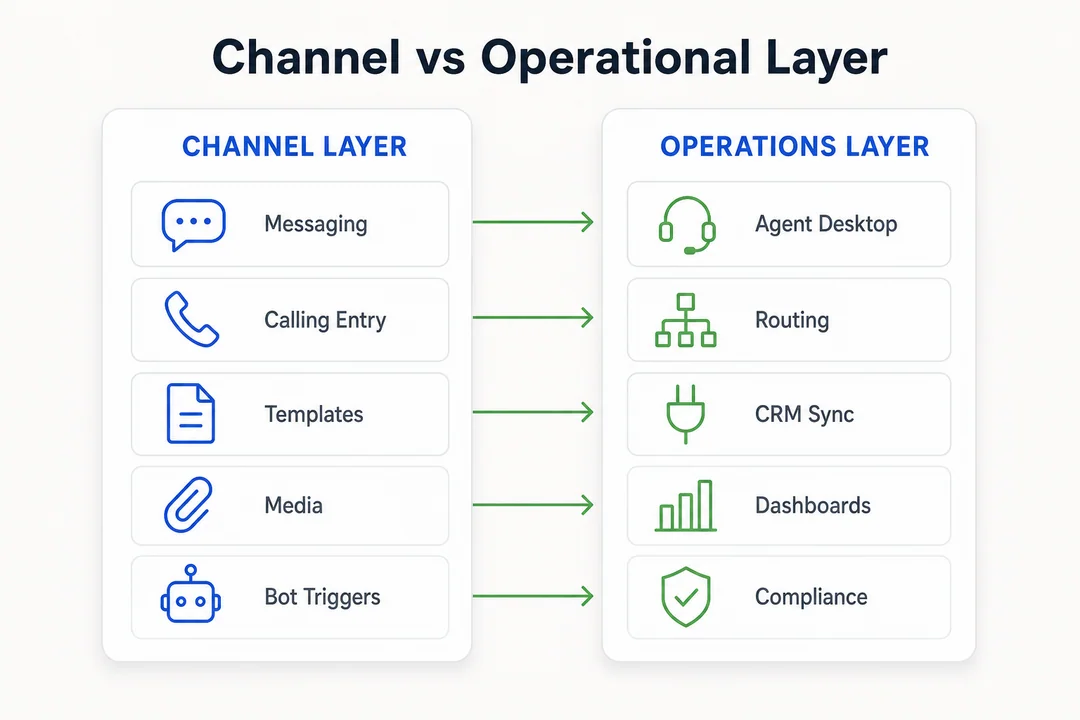
WhatsApp belongs to the channel layer. A call center belongs to the operating layer. Confusing the two often leads to rushed deployments where messages go live, but managers still lack queue control, conversation ownership, service-level visibility, or escalation governance.
A practical whatsapp business api for call center setup usually works best as part of a broader omnichannel communication model rather than as a standalone stack.
The Components a Call Center-Grade Setup Still Needs
To run WhatsApp in a real service or sales environment, businesses still need:
- Agent workspace or unified inbox
- Routing and queue logic
- CRM or helpdesk synchronization
- Reporting dashboard for operational visibility
- QA monitoring and audit review
- Compliance controls and escalation paths
- Supervisor visibility across channels
Messaging vs Calling: What WhatsApp Supports Today
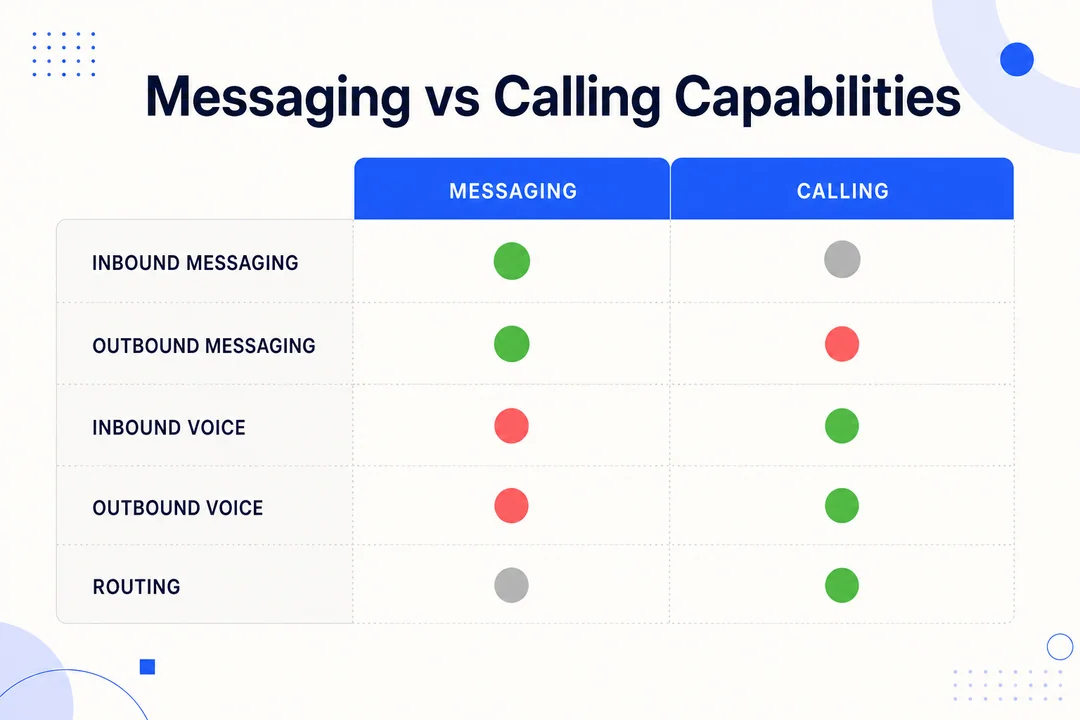
Messaging is still the most mature and widely deployed use of WhatsApp in business operations. Calling capability is emerging and increasingly relevant, but it should be evaluated carefully because deployment readiness, provider support, regional rollout, and policy conditions can differ.
What Messaging Workflows Are Mature Today
For most businesses, WhatsApp is strongest in messaging-led workflows. That includes customer service, status updates, lead follow-up, appointment coordination, media sharing, and interactive journeys using buttons or list-based prompts. This is where the WhatsApp Business Platform is already well aligned with day-to-day customer support operations.
Teams can use message templates, automation triggers, rich media, and interactive flows to move customers through common steps without forcing them into a separate app or channel.
What Calling Enables, and What It Does Not
The WhatsApp Business Calling API expands WhatsApp beyond chat. It can support voice-based customer interactions through VoIP (internet-delivered voice) rather than traditional carrier-first telephony. In some implementations, voice delivery may rely on technologies such as WebRTC (browser or app-based real-time media), which is one reason it behaves differently from legacy phone systems.
That distinction matters. WhatsApp calling is not the same as unrestricted outbound telephony or an open dialer model.
| Capability | Typically Supported | Practical Note |
|---|---|---|
| Messaging | Yes | Most mature workflow |
| Inbound voice | Limited / depends | Often customer-initiated |
| Outbound voice | Limited / permission-based | Not open dialer behavior |
| Routing | Not by API alone | Needs platform logic |
| Compliance / policy | Required | Depends on Meta rules and provider readiness |
Policy, Consent, and Rollout Reality
For buyers, the operational takeaway is simple: treat voice availability as a capability to verify, not assume.
- Inbound calls are generally more aligned with customer-initiated support use cases
- Outbound calls are typically permission-based and constrained by Meta policy
- Regional rollout, account eligibility, and provider readiness may vary
- Calling support is not a substitute for PSTN-heavy outbound operations
- Availability can change as Meta expands or updates program rules
Recent market developments also matter. Meta has continued expanding calling support through approved partners, while messaging pricing shifted toward per-template charging from July 2025. Businesses should also track policy changes around AI usage, template classification, and messaging limits because those can affect both cost and workflow design.
Where WhatsApp Fits Best in Call Center Operations
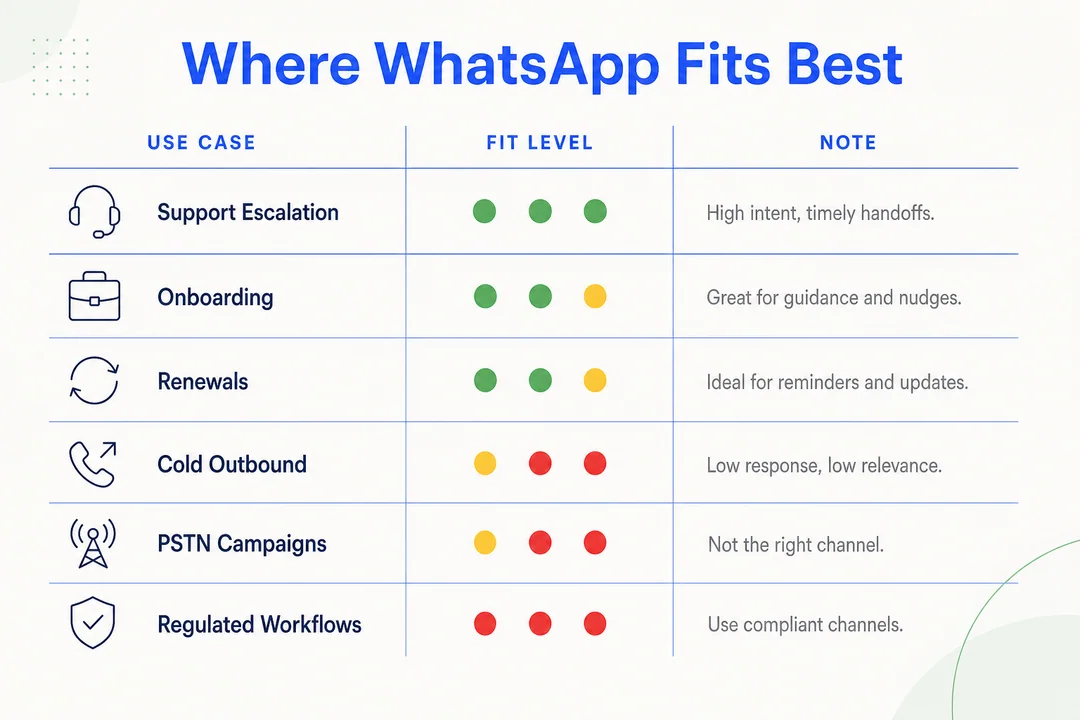
WhatsApp performs best when the business needs low-friction communication, preserved context, and trust inside the customer journey. It is especially effective when customers begin in chat and may need escalation without losing history.
Support Use Case: Keep Context, Escalate When Needed
In customer support, a user may start with a message, share screenshots or documents, then move to a live agent when automation no longer solves the issue. That chat-to-voice escalation continuity is one of the strongest operational reasons to use WhatsApp well. Agents can respond with more context, and supervisors get a cleaner audit trail than when channels are disconnected.
This is also where customer journey orchestration becomes important. If routing, handoff, and history are unified, service teams resolve issues faster. If not, WhatsApp becomes just another inbox.
Sales, Consultation, and Trust-Heavy Journeys
WhatsApp can also work well for lead nurturing, onboarding, renewals, and account assistance. These are journeys where customers may want to start casually, then speak to a human once intent becomes serious. A verified business identity can improve trust, and conversational AI can triage common questions before handoff.
This is especially useful for industries where response speed, reassurance, and continuity influence conversion or retention.
When WhatsApp Should Complement, Not Replace, Your Call Center
Best fit
- Support escalation
- Appointment or service coordination
- Onboarding and account updates
- Trust-sensitive conversations
- Post-lead follow-up
- Relationship-led sales consultations
Poor fit
- High-volume cold outbound
- Unrestricted dialer campaigns
- PSTN-heavy workflows
- Unsupported regulated workflows with stricter control requirements
- Environments that require WhatsApp to replace all telephony
The strongest position for WhatsApp is as a complementary channel inside an omnichannel workflow, not as the sole foundation of a call center.
What Your Business Needs Beyond the API
The most expensive mistake in this category is enabling the channel before designing the operation. The API can open access, but it does not complete the workflow. Without orchestration, businesses end up with fragmented tools, inconsistent ownership, and poor manager visibility.
A production-ready setup usually needs the following:
- Unified agent workspace
- Routing and assignment logic
- CRM integration or helpdesk sync
- Reporting dashboard
- QA monitoring
- Compliance visibility
- Omnichannel escalation path
Agent Desktop and Unified Inbox Requirements
Agents need one workspace that shows customer history, ownership, and next action. If WhatsApp sits outside the main agent desktop, efficiency drops fast. Teams start toggling between tools, handoffs become messy, and routing visibility suffers.
A practical setup should support:
- Presence and agent availability
- Queue and priority assignment
- Conversation ownership
- Supervisor intervention
- Handoff from bot to human
- Cross-channel continuity
This is where API integration matters from a business perspective. It is not just about connecting systems. It is about ensuring that routing, history, and customer identity stay consistent.
Reporting, QA, and Compliance Requirements
Delivery status is not enough. Managers need operating metrics: response time, queue performance, escalation rate, resolution trends, and agent handling quality. Once voice enters the picture, audit visibility becomes even more important.
Depending on the broader voice environment, businesses may also need light coordination with IVR (Interactive Voice Response) logic, SIP connectivity, or other orchestration layers to support escalation and routing across channels.
Common requirements include:
- Real-time and historical reporting
- Interaction-level quality review
- Compliance and policy visibility
- Escalation audit trail
- Performance tracking by queue, agent, and workflow
Need a faster internal assessment? Review your current stack against a simple readiness checklist before choosing a vendor or build path. That usually saves more time than comparing feature lists in isolation.
Direct Meta Setup vs CPaaS vs Cloud Contact Center Platform
There is no single best setup model for every business. The right path depends on how much internal engineering ownership you want, how quickly you need operational readiness, and how mature your contact center workflows already are.
Meta Direct: Control Comes with Technical Ownership
Meta direct can offer the most control for businesses that want tighter ownership over configuration and integration. But that control comes with the highest build burden. Internal teams still need to handle orchestration, workflow logic, reporting, routing, and agent experience design.
This route fits organizations with strong in-house engineering and enough time to build around the channel.
CPaaS: Faster API Enablement, Still Needs Orchestration
A CPaaS model can speed up access to messaging and, where supported, calling capabilities. It is often more flexible than direct setup for custom communication flows. But it still does not automatically solve operational readiness. Teams usually need to add agent tooling, dashboards, supervisor visibility, and workflow orchestration around it.
This is often a good middle path for organizations that want flexibility without building every low-level piece themselves.
Cloud Contact Center Platform: Faster Operational Readiness
A cloud contact center platform is usually the strongest option when the goal is not just channel enablement, but production use. It can reduce integration effort by bundling routing, agent workspace, dashboards, QA, and omnichannel continuity into one operating environment.
That matters for businesses prioritizing deployment speed, cross-channel visibility, and scalability. For teams that need flexible routing, fast setup, AI-assisted quality review, and omnichannel handling without building heavily around the API, a platform such as Flyfone becomes a practical option to evaluate.
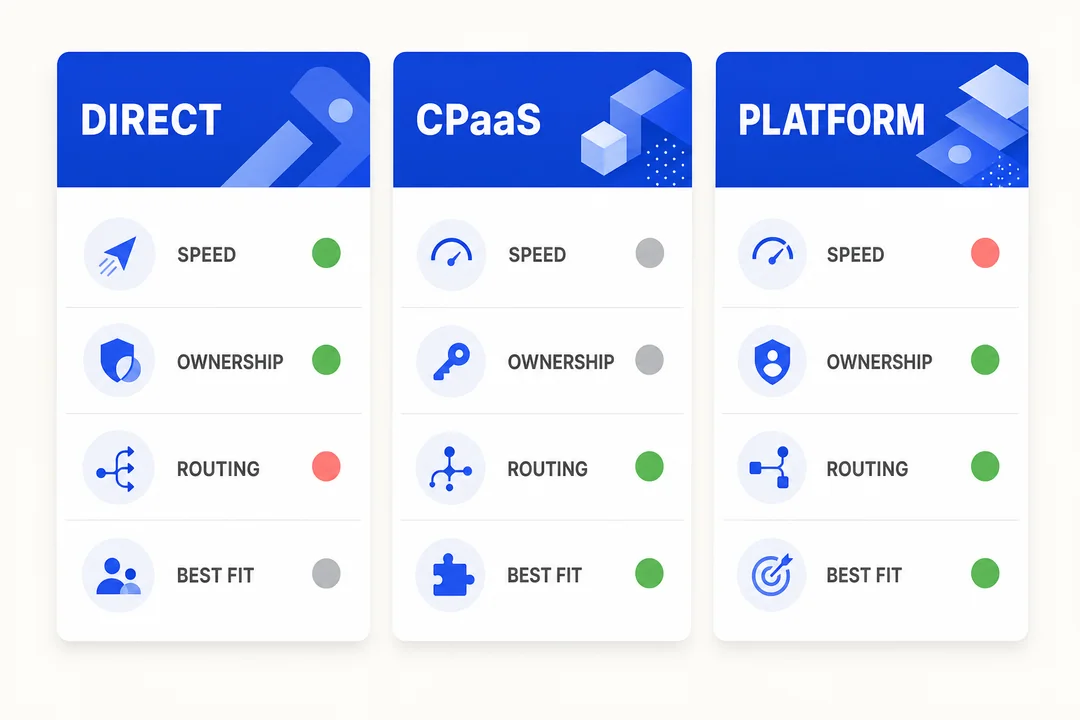
| Criteria | Meta Direct | CPaaS | Cloud Contact Center Platform |
|---|---|---|---|
| Deployment speed | Slowest | Moderate | Fastest for operations |
| Technical ownership | Highest | Medium to high | Lower |
| Messaging support | Strong | Strong | Strong if integrated or native |
| Voice/calling operationalization | Depends on build | Depends on provider + build | Easier when platform supports routing and agent handling |
| Agent workspace | Build separately | Often separate or partial | Usually included |
| Routing and queue management | Build separately | Often requires orchestration | Usually native |
| CRM/helpdesk integration | Custom | Available, varies | Often prebuilt or simpler |
| Reporting and QA | Build separately | Partial, varies | Usually stronger operationally |
| Best fit | Mature engineering teams | Flexible custom communications teams | Businesses needing fast operational readiness |
Which Path Fits Which Business?
- Choose Meta direct if your team wants maximum control and can own the engineering burden
- Choose CPaaS if you want faster channel access with room for custom workflow design
- Choose a cloud contact center platform if you need routing, agent operations, visibility, and time-to-value more than raw API control
How to Evaluate a Provider for WhatsApp Call Center Deployment
For serious provider evaluation, API access should be treated as the starting point, not the deciding factor. Buyers should ask what is available now, what is custom, what is native, and what is still on the roadmap. In this category, transparency matters as much as capability.
What to Ask on a Discovery Call
- How long does deployment usually take?
- Which messaging and calling features are currently available in our region?
- What routing capabilities are native?
- What analytics and QA monitoring functions are included?
- How does CRM or helpdesk integration work?
- What are the SLA terms, support hours, and escalation process?
- How is pricing structured across usage, platform, setup, and support?
- How are compliance requirements handled?
- How are Meta policy changes or platform limitations communicated?
- Which features are production-ready versus planned?
- What does the agent workspace look like for omnichannel handling?
- How are voice escalation and supervisor visibility managed?
For businesses that need fast deployment, flexible routing, AI QA, and continuity across channels, it is worth checking whether an omnichannel platform such as Flyfone provides those capabilities natively instead of through custom add-ons.
A strong vendor will also be clear about limitations. If a provider only describes what works, but not where the model is constrained, that is usually a warning sign.
Teams comparing options can also run a short internal workshop first: define your use case, escalation needs, reporting expectations, and ownership model before the first vendor demo. That improves shortlist quality immediately.
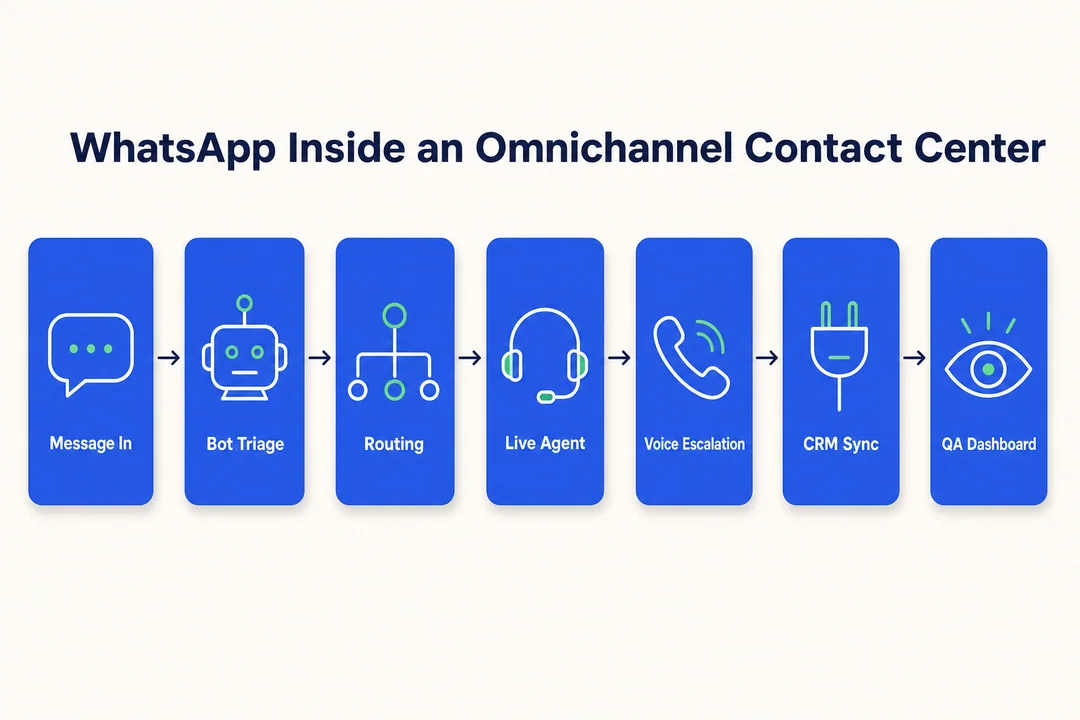
Example Deployment Scenario: WhatsApp as an Escalation Layer in an Omnichannel Contact Center
A realistic deployment treats WhatsApp as one layer in a broader service workflow, not as an isolated tool.
Challenge
- A support team handles high volumes of customer questions across chat and voice
- Customers often begin in messaging, then need faster clarification through live assistance
- The business wants better continuity, fewer handoff errors, and clearer manager visibility
Workflow
- A customer starts in WhatsApp chat through a branded entry point
- Automation captures intent and routes simple requests through guided flows
- A more complex issue triggers customer support escalation to a live agent
- If needed, the interaction moves to voice while preserving prior context
- The agent works from one workspace with WhatsApp integration, queue visibility, and CRM history
- Supervisors review outcomes through reporting and AI QA
Outcome
- Better omnichannel communication continuity
- Less tool switching for agents
- Clearer audit trail for service and compliance
- Faster deployment when built on a cloud call center platform designed for routing and monitoring
For businesses that value fast setup, flexible routing, scalable agent operations, and AI-powered quality assurance on every interaction, Flyfone is relevant as a practical deployment model rather than building the workflow around the API alone.
Where Flyfone Fits for Voice + WhatsApp Call Center Operations
WhatsApp is a channel, not a complete contact center. Teams running omnichannel operations usually pair WhatsApp for messaging with a dedicated voice infrastructure for outbound campaigns, regulated calls, and chat-to-voice escalation. That is where Flyfone fits.
Why Flyfone pairs well with the WhatsApp Business API
- Voice escalation that scales past WhatsApp's permission-based calling, when chat reaches the limits of Meta's outbound calling rules, Flyfone's cloud call center handles PSTN-heavy outbound through a built-in auto-dialer.
- AI-powered quality assurance across both voice and chat-to-voice escalations so supervisors get the same QA visibility on every channel.
- Global voice routing on AWS Singapore for stable APAC connectivity that matches WhatsApp's strong regional usage.
- Pay-as-you-go pricing with no seat fees, aligns with WhatsApp's per-conversation billing model when call volume fluctuates by campaign.
- Under-1-hour deployment to extend an existing WhatsApp setup without long IT projects or rip-and-replace migrations.
The typical omnichannel pattern is WhatsApp for inbound messaging and bot triage, then Flyfone for voice escalation, outbound campaigns, and supervisor QA visibility. Book a discovery call to compare deployment models against your channel mix and routing requirements.
Conclusion
Using whatsapp business api for call center operations is viable, but only when WhatsApp is treated as a channel inside a broader operating model. Messaging is already highly practical for support and relationship-led workflows. Calling can add value too, but it should be evaluated with care around consent, provider readiness, rollout status, and policy constraints.
The more important decision is not “Can WhatsApp work?” It is “Which deployment model fits our business, internal ownership, and operational needs?” Teams with strong engineering capacity may prefer direct or CPaaS-led paths. Teams focused on speed, routing maturity, QA visibility, and omnichannel execution may be better served by a platform approach.
If your business is mapping WhatsApp into a production contact center environment, request a fit assessment to compare Meta direct, CPaaS, and platform-based options against your workflow, compliance, and scalability requirements. For PSTN-heavy outbound campaigns that complement WhatsApp messaging, a dedicated auto-dialer platform often delivers better economics than running outbound voice through the WhatsApp API alone.
Frequently Asked Questions
What is the WhatsApp Business API for call centers?
The WhatsApp Business API lets businesses integrate WhatsApp into a contact center workflow to manage customer conversations at scale. It is a communication channel, not a complete contact center, operations still need routing, agent workspace, CRM sync, QA, and reporting layers around it.
Why integrate WhatsApp into call center operations?
Integration consolidates conversations into one platform and reduces tool fragmentation. It enables seamless transitions between messaging and voice, improves resolution rates, and elevates customer experience by meeting customers on the channel they already use.
Does the WhatsApp Business API support voice calls?
Yes, through the WhatsApp Business Calling API, businesses can place VoIP calls inside WhatsApp. Availability depends on Meta policy and partner readiness. It is most useful for customer-initiated inbound calls and permission-based outbound, not as a replacement for open PSTN dialing.
What does a business need beyond the API to run a real contact center?
Beyond the API, you need: a unified agent inbox, intelligent routing logic, CRM and helpdesk integration, real-time reporting, AI QA tooling, and ongoing Meta policy compliance management.
Should I use Meta direct, a CPaaS, or a cloud contact center platform?
- Meta direct: maximum control, requires strong engineering capacity
- CPaaS: flexible APIs, you still build the operational workflow yourself
- Cloud contact center platform: best when you need turnkey routing, QA, and agent operations on day one
How is WhatsApp Business Calling different from traditional telephony?
WhatsApp Calling runs over VoIP and WebRTC inside the WhatsApp app with end-to-end encryption. Unlike traditional PSTN calling, it requires opt-in consent and strict adherence to Meta's privacy and template policies.
How do I stay compliant when using WhatsApp for call center operations?
Comply strictly with Meta's template policies, capture opt-in consent before outbound contact, and use approved API management tools. Misclassified templates can trigger feature limits or higher operational costs.
More in Operations & CX Optimization
View all →
Customer Experience Transformation: Framework and Steps
A telecom customer calls support about a billing error. They explain the problem to the IVR system. Then to the first agent. Then get transferred and explain again. Then escalated—and explain a third time. Forty minutes later, they're exhausted and the problem still isn't solved. This is what broken customer experience looks like. And it's costing you customers. Customer experience…


Web Caller Meaning: JavaScript caller, Calling Tools or Portals
“Web caller” is one of those phrases where the search results and the searcher are frequently talking about different things. Three unrelated audiences use it: developers hitting an error on the legacy JavaScript caller property, buyers evaluating browser-based calling software, and people trying to reach a specific portal or training page whose exact name they cannot recall. That fragmentation is…

Customer Experience Strategy: How to Build One That Works
Customer experience is getting worse, not better. Forrester's 2025 Global CX Index found that 21% of brands declined in CX quality while only 6% improved — and in the US, 25% declined against 7% that improved, the second consecutive year of that pattern. Most of those brands were not neglecting customer experience. They were working on it without a strategy…



 English
  Russian
  Chinese