
A salesforce call center integration can look simple on paper, yet many Salesforce teams still run voice in a separate tool and live with fragmented data, inconsistent call logs, and slower follow-up. That gap affects more than agent convenience. It changes reporting quality, case handling speed, and how cleanly sales or service workflows run inside Salesforce. The real decision is not whether Salesforce telephony exists, but whether your team should choose a native path, a third-party cloud platform, or keep a legacy CTI model. This guide breaks down the main options, the trade-offs behind each one, the features that matter most, the checks to make before rollout, and a practical framework to build a smarter shortlist.
What a Salesforce Call Center Integration Actually Includes
A salesforce call center integration is a connection between Salesforce and a voice platform that lets teams handle calls inside or alongside Salesforce while syncing call activity back to CRM records. A true integration goes beyond calling. It includes workflow support, call logging, routing, agent context, and reporting tied to business objects.
In practice, this is where buyers often get misled. A basic phone connector may enable click-to-dial and call pickup inside Salesforce. That is useful, but it is not the same as a full salesforce call center integration.
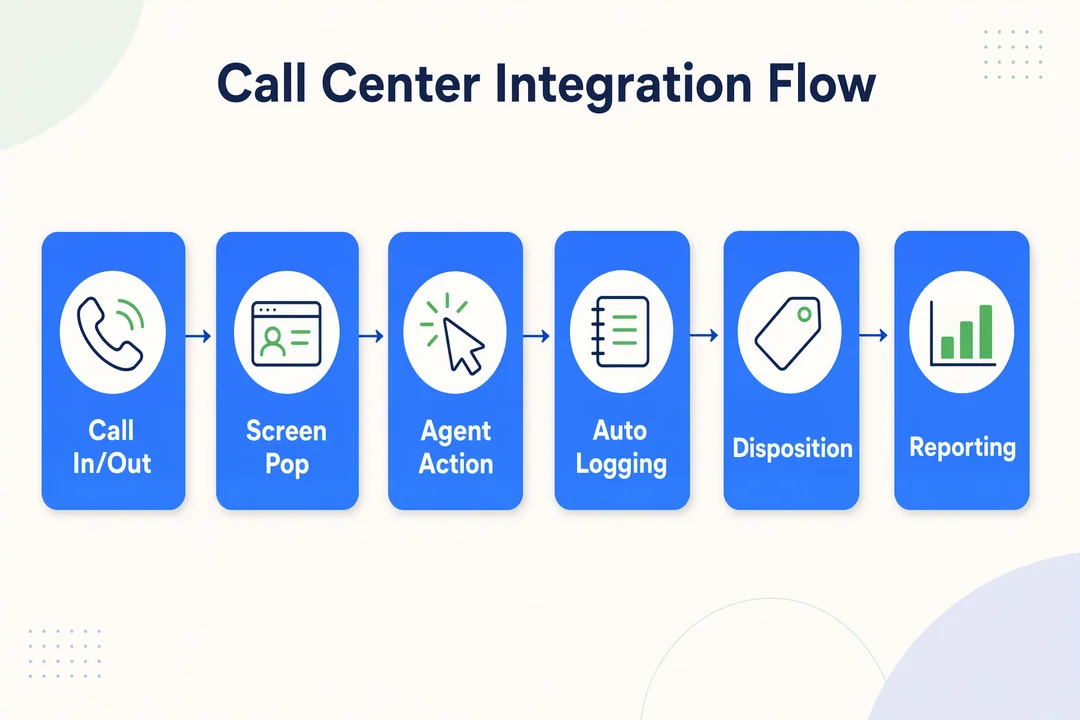
A stronger integration typically supports the full operational flow:
- the call starts or arrives
- the agent sees context through screen pop
- actions happen in one workspace
- activity data is logged automatically
- outcomes are mapped back to Salesforce records
- reporting becomes usable for managers and admins
That distinction matters because Salesforce CTI integration is often judged too narrowly. Teams say they want telephony in CRM, but what they actually need is a CRM-integrated voice system that supports service queues, outbound workflows, or blended operations without reporting gaps.
For example:
- A support team may need queue visibility, case context, and recordings.
- A sales team may care more about dispositions and outbound productivity.
- A blended team may need both, plus flexible routing logic.
Older Open CTI models made it possible to connect external calling tools, but modern buying decisions usually go beyond “can it connect?” The better question is whether the voice layer supports the workflow your team actually runs.
Typical buyer-expected capabilities include:
- Click-to-call
- Inbound screen pop
- Automatic call logging
- Call recordings
- Call dispositions
- Routing and queue visibility
- Reporting tied to leads, contacts, cases, or opportunities
Main Salesforce Call Center Integration Options
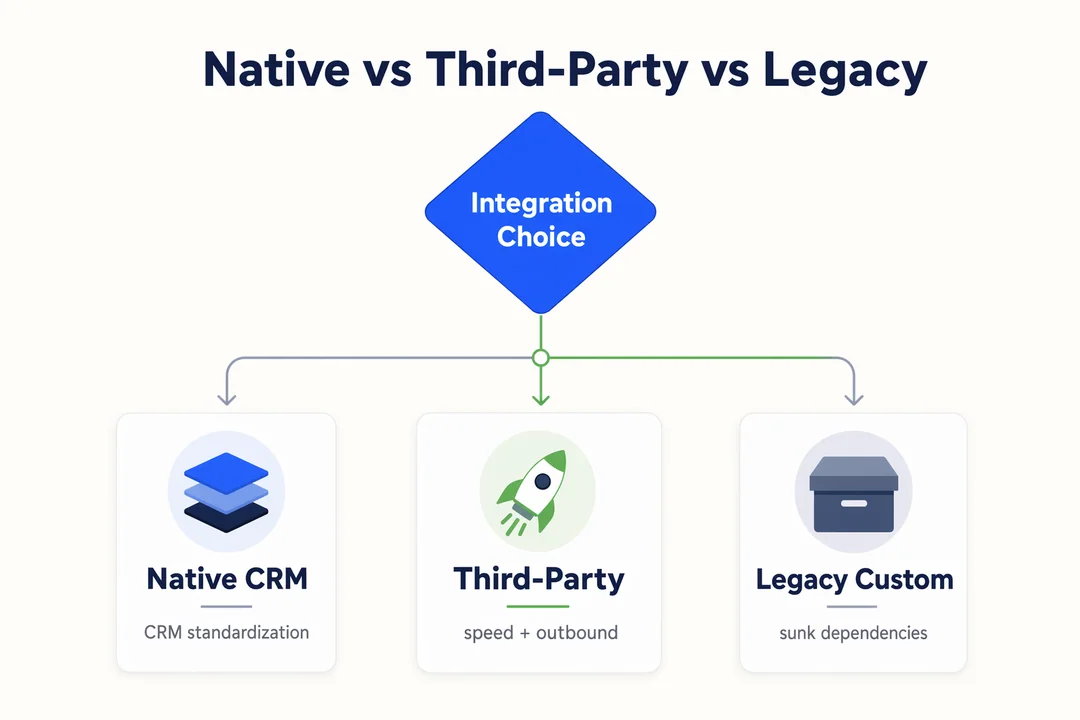
There are three main Salesforce telephony options buyers usually compare:
- Salesforce-native voice options
- Third-party cloud call center integrations
- Legacy or custom CTI setups
The right path depends less on headline features and more on workflow fit, reporting depth, and long-term admin burden. No category is universally best.
Salesforce-native options
Salesforce-native options center on Service Cloud Voice, newer native voice capabilities, and Salesforce’s broader move toward more embedded service operations. With the 2026 launch of Agentforce Contact Center, Salesforce has pushed further toward AI-first, CRM-native voice and digital service workflows. That direction matters for buyers who want tighter alignment with the Salesforce roadmap.
Native options are often strongest when CRM alignment is the top priority. They typically fit teams that want:
- service workflows designed primarily inside Salesforce
- more standardized agent experiences
- tighter relationship to Salesforce reporting and service operations
- a familiar admin environment for Salesforce-led teams
This path is often attractive for structured support organizations where consistency matters more than deep telephony customization.
Trade-offs still matter:
- flexibility may be lower for highly customized call operations
- heavy outbound teams may need more dialing depth
- fit can depend on current Salesforce products, edition, and internal admin maturity
You may also still see references to Salesforce Call Center configurations in older documentation or partner materials, but buyers should assess current roadmap fit carefully.
Third-party cloud call center integrations
A cloud call center for Salesforce is often the better fit when operational flexibility matters as much as CRM connection. This category usually works well for teams that need:
- fast rollout
- high-volume outbound
- blended sales and service workflows
- global routing
- flexible number availability
- API-driven automation
- more adaptable pricing models
Strengths often include:
- faster deployment with ready-made connectors
- richer auto-dialer support for outbound campaigns
- more flexible routing and workflow design
- easier regional expansion
- stronger fit for distributed or remote teams
This is also where many teams find the difference between basic CRM calling and a real CRM-integrated voice system. The connector is only part of the value. The larger benefit is that routing, automation, analytics, and call handling can be shaped around the operating model.
For teams prioritizing rapid deployment, global routing, outbound scale, and flexible support, including AI-powered quality assurance on every call, platforms like Flyfone fit naturally within this third-party category.
Legacy or custom CTI setups
Legacy or custom CTI environments still exist, especially in organizations with sunk cost, older vendor contracts, or deeply customized processes. In some cases, they remain acceptable because replacing them would disrupt dependencies tied to internal workflows.
But the trade-offs are usually clear:
- higher maintainability risk
- more admin burden
- slower adaptation to new Salesforce changes
- weaker long-term roadmap fit
This matters even more now because Salesforce has formally deprecated Open CTI for certain newer environments and set an end-of-life path through 2028. That does not mean every older integration must be replaced immediately, but it does mean buyers should not assume older CTI assumptions are a strong long-term foundation.
In short:
- native options usually offer stronger CRM alignment
- third-party options usually offer more operational flexibility
- legacy or custom CTI only makes sense when existing dependency logic clearly justifies keeping it
Top Salesforce Call Center Integrations to Shortlist in 2026
Below are the integrations most commonly evaluated by Salesforce buyers. Each represents a different category, Salesforce-native, CRM-first phone systems, broader CCaaS suites, or cloud-native flexible platforms. Match the category to your operating model first, then compare features.
Service Cloud Voice (Salesforce-Native)
Best for: Teams committed to Salesforce roadmap (Agentforce, Einstein AI) and tight Service Cloud alignment.
Strength: Deepest CRM integration, AI-first roadmap, single-vendor governance.
Watch-out: Pricing weight and limited flexibility outside the Salesforce stack.
Aircall
Best for: Sales-led SMB and mid-market teams running pipelines inside Sales Cloud or Service Cloud.
Strength: Mature Salesforce integration with click-to-dial, screen pop, automatic logging.
Watch-out: Costs scale with team size; lighter for enterprise contact-center workflows.
RingCentral
Best for: Larger organizations needing UCaaS breadth plus Salesforce integration.
Strength: Broad communications suite, enterprise admin, native Salesforce app.
Watch-out: Total cost depends heavily on plan tier and add-ons used.
Genesys Cloud (for Salesforce)
Best for: Enterprise contact centers extending an established CCaaS into Salesforce workflows.
Strength: Mature contact center governance, deep analytics, AI virtual agents.
Watch-out: Suite weight and pricing favor large operations.
Talkdesk
Best for: Mid-market and enterprise teams that want AI-first contact center inside Salesforce.
Strength: Visual workflow tools, automation, and AI features wired into Salesforce.
Watch-out: Total cost can rise with higher AI tiers; less SMB-friendly.
Zoom Contact Center
Best for: Companies standardized on Zoom that want native Salesforce CTI without adding another vendor.
Strength: Familiar Zoom interface, growing Salesforce integration depth.
Watch-out: Best fit when Zoom is already core to communications.
Flyfone
Best for: Outbound-heavy, BPO, and global teams needing a flexible cloud call center connected to Salesforce.
Strength: Cloud call center with auto-dialer (predictive, progressive, power modes), AI-powered quality assurance on 100% of calls, global routing on AWS Singapore, under-1-hour deployment, pay-as-you-go pricing, no seat fees.
Watch-out: Strongest when voice operations and outbound scale matter more than bundled UCaaS.
Most buyers shortlist 2-3 from this list. A sales team usually compares Service Cloud Voice + Aircall + Flyfone. An enterprise contact center usually compares Genesys + Talkdesk + RingCentral. A cost-sensitive or outbound-heavy team typically compares Aircall + Flyfone + one CCaaS option.
Why outbound-heavy Salesforce teams shortlist Flyfone
For sales operations and BPO teams running outbound campaigns inside Salesforce, the integration math changes. Seat-based pricing becomes inefficient when headcount fluctuates by campaign or season. Predictive dialing on top of Salesforce records needs deeper routing control than basic CTI offers. AI QA on 100% of calls matters more than sampled call review when supervisors coach high-volume reps. Flyfone is built for this profile, with pay-as-you-go economics and global voice routing that fits cross-border sales programs running through Salesforce. Book a discovery call to compare commercial fit against your current Salesforce telephony setup.
Salesforce-Native vs Third-Party Integration: Side-by-Side Comparison
The most common shortlist decision is Salesforce-native vs third-party. That comparison should be made using business criteria, not telephony jargon. Native options are usually stronger for Salesforce-led service standardization. Third-party options are often stronger for speed, flexibility, outbound support, and distributed operations.
| Criteria | Salesforce-Native Options | Third-Party Cloud Call Center Integration | Best Fit |
|---|---|---|---|
| Deployment speed | Moderate; depends on Salesforce setup and scope | Often faster with ready-made connectors | Third-party for speed |
| CRM alignment | Very strong | Strong, but provider-dependent | Native |
| Workflow flexibility | Moderate; more standardized | Higher routing and workflow flexibility | Third-party |
| Outbound support | Varies by product | Often stronger for high-volume outbound | Third-party |
| Inbound service workflows | Strong | Strong, depending on vendor | Tie |
| AI roadmap | Strong in Salesforce ecosystem | Varies by provider | Native / depends |
| Global calling support | Depends on setup and region | Often broader for distributed teams | Third-party |
| Admin overhead | Can be simpler within Salesforce | Varies; some vendors simplify onboarding | Tie |
| Cost structure | May expand across add-ons/licensing | Often more usage- or package-based | Depends on scale |
| Long-term roadmap | Better aligned with Salesforce direction | Better for operational agility | Depends on strategy |
The table is best read as a strategy filter, not a scorecard with one winner. In most Salesforce-native vs third-party decisions, the better path depends on what matters most:
- CRM workflow consistency and Salesforce standardization
- deployment speed
- workflow flexibility
- outbound scale and call automation
- regional coverage and remote team support
- reporting depth and real-time analytics
If your priority is standardizing service operations deeply inside Salesforce, native options often look stronger. If your priority is rapid rollout, broader telephony flexibility, or more adaptable call center software for Salesforce, third-party platforms often move ahead.
Which Option Fits Your Team Best?
The best Salesforce telephony integration depends on the operating model. Teams often evaluate the same shortlist using very different success criteria, which is why feature-heavy demos can be misleading. Fit by team type matters more than broad product claims.
Sales teams
Sales teams usually need:
- click-to-call
- quick dispositions
- clean call outcomes on records
- less manual entry
- some cadence or productivity support
For lightweight sales motions, deep contact center complexity may be unnecessary. A simpler Salesforce Lightning integration with reliable logging and basic call control can be enough.
But once outbound activity increases, especially for prospecting teams, more flexible dialing often matters more than native simplicity.
Support teams
salesforce call center integration for support teams needs more than call access. Support leaders typically care about:
- screen pop
- routing quality
- case context
- queue visibility
- service-level tracking
- reporting tied to case outcomes
When service consistency and in-CRM visibility are the top priority, native-aligned options are often a strong fit. This is especially true when supervisors want cleaner reporting inside existing Salesforce service workflows.
High-volume outbound or blended teams
This is where many shortlist decisions change. High-volume outbound teams usually need:
- dialers
- retry logic
- campaign controls
- call dispositions
- operational reporting
- stronger support for mixed inbound and outbound flows
Third-party cloud platforms often fit better here because they are designed around activity scale, routing flexibility, and agent throughput rather than only CRM standardization.
Global or fast-scaling teams
For global or fast-growing operations, the evaluation lens shifts again. Key concerns usually include:
- deployment speed
- number availability by region
- routing flexibility
- remote team support
- usage-based pricing
- support responsiveness
This is where cloud-native vendors often look more attractive than slower or rigid seat-based models. If a team is growing across regions or launching fast, telephony flexibility can matter as much as CRM alignment.
The best Salesforce telephony integration is usually the one that matches your operating model with the least reporting and admin friction.
Features to Prioritize Before You Choose a Salesforce Call Center Integration
- Click-to-call
- Inbound screen pop
- Automatic call logging
- Routing and queue management
- Call recording and QA visibility
- Reporting tied to Salesforce records
- Workflow automation
- AI summaries or sentiment analysis
- Simple administration and permissions
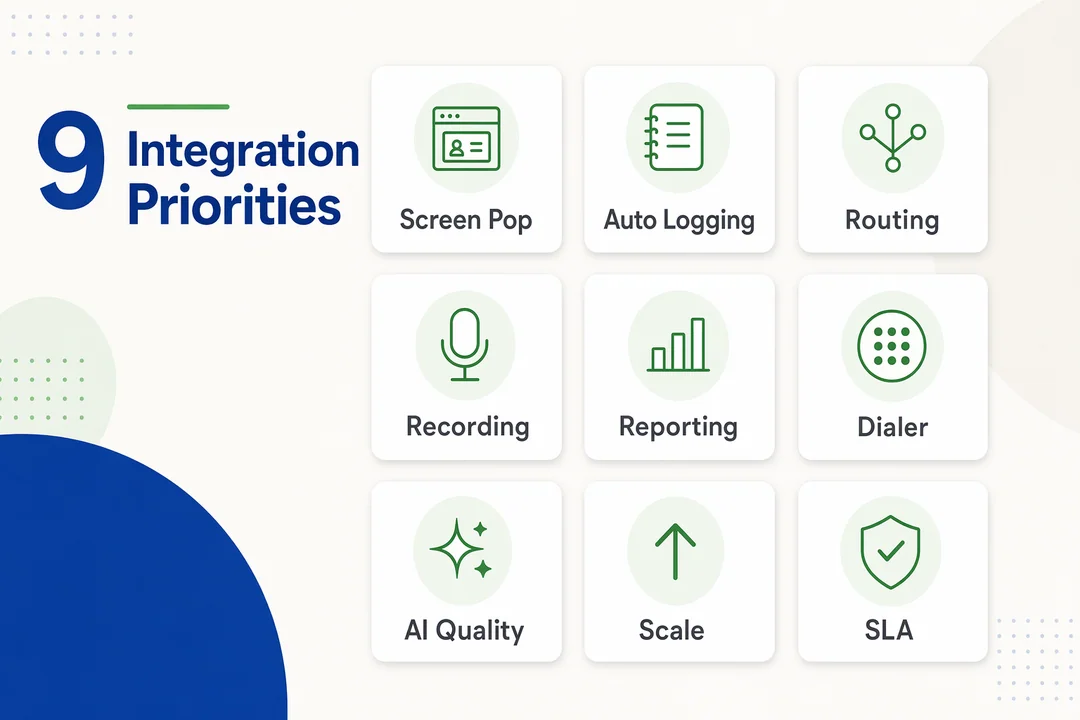
When evaluating features, prioritize workflow impact over feature volume. Buyers often get distracted by long lists, but the highest-value capabilities are usually the ones that reduce manual work, improve reporting, and make supervision easier.
Productivity features
These features help agents work faster with fewer clicks:
- Click-to-call
- automated logging
- call dispositions
- reduced manual data entry
- dialing support where relevant
- clean VoIP usability inside the workflow
For sales or blended teams, this is often where time savings become visible first.
Service and reporting features
For support and service operations, these usually matter more:
- inbound caller recognition
- screen pop
- routing and queue management
- call recording
- reporting tied to Salesforce objects
- real-time analytics
- AI summaries, transcription, or QA visibility
A connector may look strong in a demo, but if recordings, activities, and outcomes do not map back cleanly to leads, contacts, cases, or opportunities, managers will struggle later.
Scalability and admin features
These are often underestimated during selection:
- Salesforce Lightning compatibility
- admin simplicity
- permission management
- inbound and outbound support
- workflow automation
- vendor support responsiveness
Not every team needs the deepest AI stack on day one. In many evaluations, clean logging, usable routing, and manageable administration matter more than advanced feature volume alone.
What to Check Before Implementation
Most rollout friction comes from ownership and workflow design, not the connector itself. These checks should happen before the vendor decision is final.
Platform and admin readiness
- Confirm Salesforce edition and licensing, including whether your environment supports the planned integration path. Some buyers specifically need to verify Salesforce Enterprise plan requirements.
- Confirm Salesforce Lightning compatibility.
- Define who owns admin access: IT, Ops, or the Salesforce Admin team.
- Review the Salesforce permissions model before rollout.
- Clarify whether the workflow is inbound, outbound, or blended.
- Identify any dependency on old CTI setup assumptions.
Data and reporting readiness
- Define object mapping upfront.
- Decide where call logs should live.
- Decide how recordings and metadata should be referenced.
- Align reporting ownership before go-live.
- Review retention, privacy, and recording compliance requirements.
- Confirm the business-level implementation requirements for supervisors, agents, and reporting stakeholders.
Implementation friction usually comes from workflow ownership, logging design, and reporting expectations more than from the CTI setup itself.
A Simple Vendor Evaluation Framework for Salesforce Call Center Integration
Use this Salesforce integration checklist when evaluating vendors:
- How deep is the Salesforce integration beyond basic calling?
- What logs automatically, and where does that data appear?
- How are recordings, dispositions, and activities mapped to Salesforce records?
- How fast can the solution go live in your environment?
- What routing and automation options are included by default?
- How well does it support remote teams, scale, and global operations?
- What SLA and support coverage are included?
- How future-proof is the product against Salesforce roadmap changes?
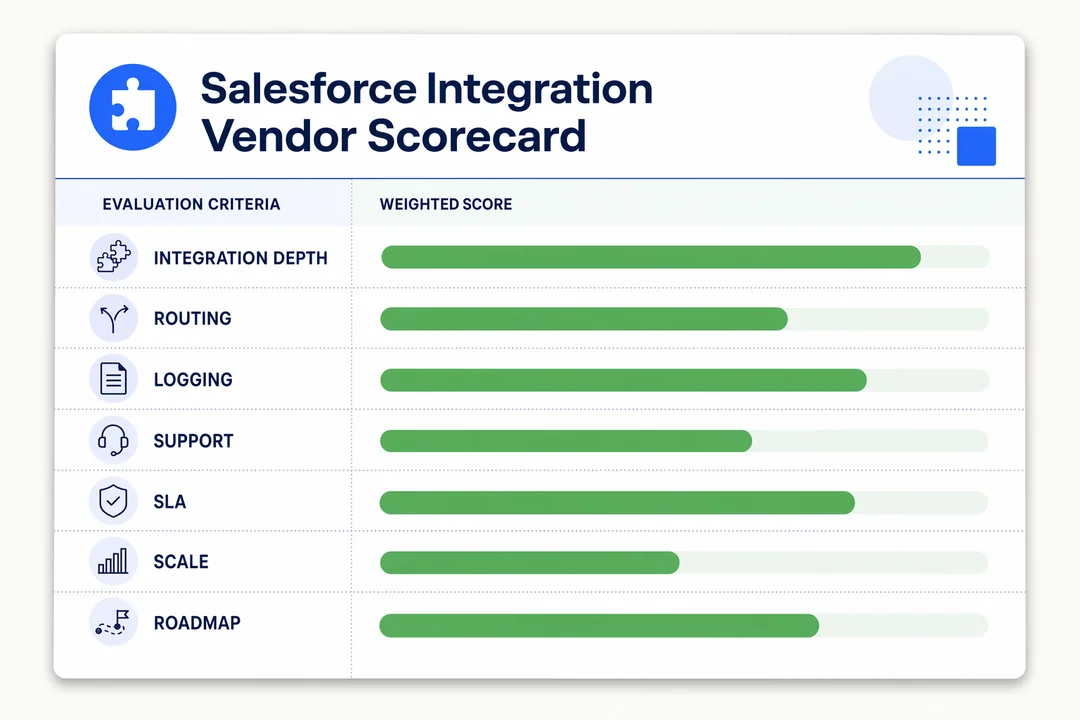
This is the most practical way to evaluate Salesforce telephony vendor options without getting trapped by generic demo messaging. The strongest vendors are rarely the ones with the longest feature page. They are the ones that can prove workflow fit, reporting depth, rollout clarity, and manageable administration.
A useful shortlist should also test:
- whether the platform supports single-pane-of-glass management
- whether it strengthens your customer communication infrastructure
- whether support is responsive during rollout, not only after contract signature
- whether scaling costs remain reasonable as teams grow
As you evaluate Salesforce telephony vendor choices, flexible cloud-native providers often stand out through deployment speed, customization, support responsiveness, and scalable pricing, not just connector marketing.
Conclusion
Choosing the right salesforce call center integration is really a workflow decision. The best fit depends on how your team works, how much reporting depth you need, and whether your priority is Salesforce standardization or operational flexibility. Native options are often stronger when tight CRM alignment leads the strategy. A cloud call center for Salesforce often makes more sense when speed, outbound scale, routing flexibility, or global operations matter more.
The safest next step is not to jump from demo to purchase. Start with an assessment of team workflows, object mapping, reporting expectations, and admin ownership. That usually reveals the right shortlist faster than feature comparisons alone. If your team is comparing native and third-party paths, book a discovery conversation to review your Salesforce environment, operating model, and rollout priorities before making a final decision.
Frequently Asked Questions
What is Salesforce call center integration?
Salesforce call center integration connects your phone system with the Salesforce CRM. It enables agents to place and receive calls, auto-logs activity records, and surfaces a screen pop with customer context directly in the Salesforce UI, keeping all customer communication inside one workflow.
Why choose a cloud call center integration over traditional Open CTI?
Salesforce has announced the deprecation of Open CTI by 2028. Modern cloud call center integrations deploy faster, support AI-native workflows, offer smarter routing, and scale globally without maintaining custom CTI code or on-premise telephony hardware.
What are the main benefits of integrating a phone system into Salesforce?
Centralized communication. Benefits include higher productivity through click-to-dial, automatic call logging, reduced average handle time (AHT), and real-time reporting on Leads, Cases, or Opportunities, all directly inside Salesforce.
How do I choose the right integration for my business?
It depends on team profile and operating need:
- Identify primary use case, Sales (needs strong dialer) vs Support (needs smart routing).
- Evaluate compatibility, Salesforce-native (tighter alignment) vs third-party (more flexible).
- Verify features, call recording depth, reporting, and platform latency.
What is the difference between Service Cloud Voice and a third-party solution?
Service Cloud Voice offers deep, unified integration with the Salesforce ecosystem and Einstein's AI roadmap. Third-party solutions typically win on routing flexibility, usage-based pricing, and faster deployment for remote or global teams.
Does the integration support call reporting and analytics?
Yes. Modern integrations sync call data (duration, status, recordings) directly into Salesforce, allowing custom dashboards to measure agent performance, conversion rate, and customer satisfaction trends on the same CRM record.
How long does typical integration deployment take?
Deployment time depends on workflow complexity (IVR, routing logic). Modern cloud call center integrations can activate in under an hour, while deep custom integration projects may take several weeks for data mapping and permission setup.
More in Operations & CX Optimization
View all →
Customer Experience Transformation: Framework and Steps
A telecom customer calls support about a billing error. They explain the problem to the IVR system. Then to the first agent. Then get transferred and explain again. Then escalated—and explain a third time. Forty minutes later, they're exhausted and the problem still isn't solved. This is what broken customer experience looks like. And it's costing you customers. Customer experience…


Web Caller Meaning: JavaScript caller, Calling Tools or Portals
“Web caller” is one of those phrases where the search results and the searcher are frequently talking about different things. Three unrelated audiences use it: developers hitting an error on the legacy JavaScript caller property, buyers evaluating browser-based calling software, and people trying to reach a specific portal or training page whose exact name they cannot recall. That fragmentation is…

Customer Experience Strategy: How to Build One That Works
Customer experience is getting worse, not better. Forrester's 2025 Global CX Index found that 21% of brands declined in CX quality while only 6% improved — and in the US, 25% declined against 7% that improved, the second consecutive year of that pattern. Most of those brands were not neglecting customer experience. They were working on it without a strategy…



 English
  Russian
  Chinese