
When a crypto exchange experiences a trading surge at 2 AM, or an iGaming platform launches a new market overnight, customer support can’t wait weeks for infrastructure setup. It needs to be ready in hours.
A cloud contact center makes this possible — a fully cloud-hosted platform that manages all customer interactions across voice, chat, and messaging, without servers, without hardware procurement, and without months of IT work. For fast-moving businesses, it’s the difference between capturing the moment and missing it.
Key Takeaways
- A cloud contact center manages all customer interactions through the internet, with no physical servers or PBX systems.
- Businesses use it to lower costs, scale faster, and support remote or hybrid teams.
- All channels and customer data are unified in one system, improving response speed and consistency.
- Setup is fast, maintenance is handled by the provider, and pricing is subscription-based.
- Cloud contact centers deliver better customer experience through context-aware, omnichannel support.
- They are ideal for SMBs and mid-market companies planning to grow or modernize support.
What Is a Cloud Contact Center?
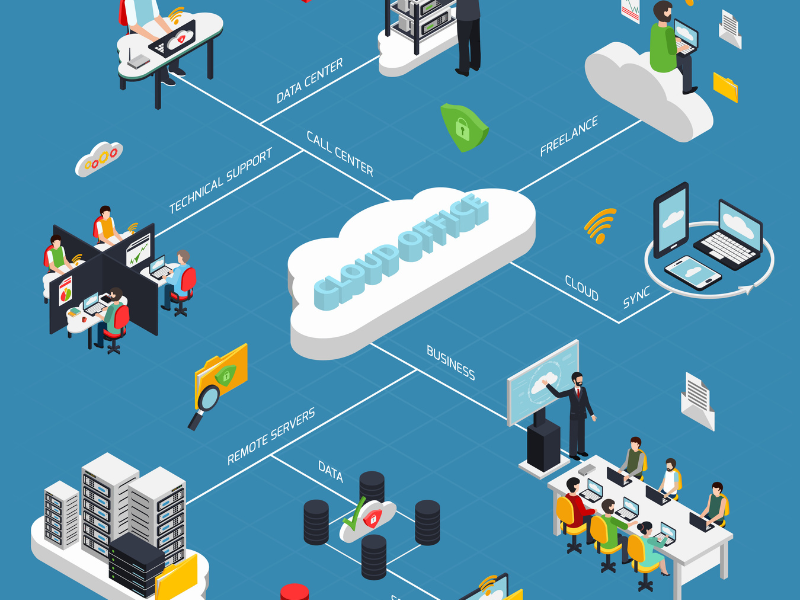
A cloud contact center is a customer communication platform hosted entirely in the cloud. Instead of running phone systems and software on company servers, businesses access the system through a web browser.
It is often called CCaaS (Contact Center as a Service), meaning the technology, updates, security, and scalability are managed by the provider.
At its core, a cloud contact center solves three problems traditional systems struggle with:
- High upfront hardware and maintenance costs.
- Limited flexibility when teams grow or go remote.
- Fragmented customer conversations across channels.
With a cloud contact center, all customer interactions—calls, emails, live chat, messages, and social—flow into one system. Agents see the full customer context and respond from a single dashboard.
Key characteristics:
- Cloud-based infrastructure: No on‑premise servers or telecom hardware.
- Omnichannel support: Voice and digital channels in one place.
- Remote-ready: Agents log in from anywhere with internet access.
- Subscription pricing: Monthly or annual, based on users and features.
In the customer service stack, a cloud contact center sits between your customers and internal teams, often connected to your CRM (customer relationship management system) to keep data consistent across the business.
Cloud Contact Center in Simple Terms
- It runs in a web browser, not in your office.
- You don’t buy or maintain phone hardware.
- Agents can work from anywhere with the same tools.
- All customer messages appear in one shared inbox.
How Does a Cloud Contact Center Work?

A cloud contact center works by routing all customer interactions through cloud servers operated by the provider. Your business connects securely over the internet.
When a customer reaches out—by phone, chat, or message—the system automatically decides what happens next. Routing rules send the interaction to the right agent based on skills, availability, or priority.
Behind the scenes:
- Voice calls use VoIP (Voice over Internet Protocol), meaning calls travel over the internet instead of phone lines.
- Digital channels are processed in real time and queued centrally.
- Supervisors monitor performance through live dashboards.
- Reports and analytics update continuously.
Your IT team does not manage servers, updates, or security patches. The provider handles uptime, backups, and new features, which is why setup is faster and operations stay lighter.
This model lets businesses focus on customers, not infrastructure.
Customer Interaction Flow (Step-by-Step)
- Customer starts contact via phone, chat, email, or message.
- IVR or automation (IVR = interactive voice menu) collects basic info for calls.
- Smart routing (ACD) sends the interaction to the best available agent.
- Agent sees full context, including past conversations from the CRM.
- Conversation is handled across one or multiple channels.
- Data is logged automatically for reporting and quality review.
Each step reduces wait time, avoids repetition, and improves resolution speed.
Role of Omnichannel and CRM Integration
Omnichannel means all channels share the same context. It is not just offering many channels, but connecting them.
In practice:
- A customer starts with chat and follows up by phone.
- The agent sees the full conversation history.
- The customer does not repeat the issue.
CRM integration makes this possible. The contact center pulls customer profiles, orders, and past cases directly from the CRM.
Benefits:
- Faster resolution because agents have context.
- More personalized conversations.
- Better tracking of customer history across teams.
Example: An agent answers a call and immediately sees recent emails, last purchase, and open tickets—without switching tools.
Key Benefits of a Cloud Contact Center for Businesses
Top benefits of a cloud contact center at a glance: 50–65% lower infrastructure costs compared to on-premises systems, deployment in as little as 48 hours instead of 45–180 days, near-infinite scalability, native omnichannel support (voice, chat, email, social, SMS), built-in remote and hybrid agent capability, and continuous access to new AI features without manual upgrades.

Cloud contact centers are adopted for clear business outcomes: lower costs, faster scaling, and better customer experience.
They remove technical barriers that slow down support teams and replace them with flexible, on‑demand capabilities designed for modern operations.
Lower Costs and Predictable Pricing
- Traditional call center deployments require $50,000–$200,000 in upfront hardware, plus dedicated IT staff for maintenance. A cloud contact center eliminates these costs entirely.
- For a growing BPO or fintech startup, this matters practically: instead of a large capital expenditure, you pay a predictable monthly bill based on what you actually use.
- Most businesses reduce total infrastructure spend by 30–50% in year one — and reallocate that budget to hiring agents or expanding campaigns.
Compared to on‑prem systems:
- Setup costs are lower.
- Ongoing maintenance is included.
- Scaling does not require new infrastructure.
This reduces total cost of ownership and makes budgeting simpler.
Scalability and Flexibility as You Grow
- For iGaming platforms, crypto exchanges, and BPO operations, demand spikes are unpredictable. A player acquisition campaign might double inbound volume overnight. A trading surge might require emergency KYC support within hours.
- Cloud contact centers handle this without pre-provisioning: add 50 agents before a campaign launch, scale back down after. No contract amendments, no infrastructure procurement, no waiting. With Flyfone‘s usage-based model, you only pay for what’s active — not idle seats sitting unused between campaigns.
Cloud platforms are built to handle sudden volume spikes without service disruption, which is critical for fast-growing businesses.
Built for Remote and Hybrid Teams
- Agents log in through a browser.
- Managers track performance in real time.
- Teams work consistently from any location.
This allows hiring based on talent, not geography, while keeping quality and visibility high.
Better Customer Experience and Engagement
- Faster responses through smart routing.
- Fewer handoffs and less repetition.
- More personalized support using customer data.
Results businesses typically see:
- Higher customer satisfaction.
- Better retention.
- Stronger brand trust.
Essential Cloud Contact Center Features to Know
Cloud contact centers include many features, but businesses should focus on what directly improves efficiency and customer experience. Avoid overbuying advanced tools you won’t use.
Core Features Explained Simply
- IVR: Automated voice menus that route calls correctly.
- ACD (Automatic Call Distribution): Routes each incoming interaction to the most suitable available agent — based on skills, language, or campaign priority. For a multilingual BPO handling calls from Southeast Asia and Latin America simultaneously, ACD ensures a Spanish-speaking caller never waits in queue while Spanish agents sit idle.
- Omnichannel inbox: All channels in one workspace.
- Analytics: Real-time and historical performance data.
- CRM integration: Shared customer context across systems.
- Basic automation: Simple self-service and routing logic.
Cloud Contact Center vs. Cloud Call Center
A cloud call center focuses mainly on phone calls.
A cloud contact center handles phone calls plus digital channels like chat, email, and messaging.
If your business only handles voice support, a cloud call center may be enough. If customers contact you across multiple channels, a cloud contact center is the better fit.
Key Differences at a Glance
| Aspect | Cloud Contact Center | Cloud Call Center |
|---|---|---|
| Channels | Voice + digital | Voice only |
| Customer context | Unified | Limited |
| CX consistency | High | Moderate |
| Use cases | Support, sales, service | High-volume calling |
Cloud Contact Center vs. Traditional On‑Premises Contact Center

- Faster deployment with cloud systems.
- Lower upfront and maintenance costs.
- Easier scaling and remote work support.
- Automatic updates and higher resilience.
On‑prem systems require hardware, physical presence, and longer upgrade cycles, making them less adaptable today.
Common Business Use Cases for Cloud Contact Centers

Cloud contact centers fit many operational models, especially where flexibility and growth matter.
Growing Customer Support Teams
As ticket volume increases, cloud platforms let teams add agents quickly without disrupting service. Quality stays consistent because tools and data remain centralized.
This is ideal for startups and scaling SMBs facing rapid growth.
Sales and Lead Management Teams
Inbound and outbound teams use cloud contact centers to manage calls, follow-ups, and lead routing more efficiently, with clear visibility into performance.
Remote or Distributed Workforces
Fully virtual teams rely on cloud contact centers to operate as one unit, regardless of location, with the same controls and reporting as an office-based team.
Is a Cloud Contact Center Right for Your Business?
A cloud contact center is a strong fit if your business values flexibility, predictable costs, and modern customer experience.
Signs You Should Consider a Cloud Contact Center
- Customers contact you on multiple channels.
- Your team is remote or hybrid.
- Call or message volume changes frequently.
- IT resources are limited.
- You plan to grow or expand geographically.
When a Simpler Solution May Be Enough
If your business only handles a small number of phone calls and does not expect growth, a basic phone system may be sufficient in the short term.
Cloud Contact Center Pricing Overview
Pricing is usually subscription-based and depends on:
- Number of agents.
- Channels used.
- Features included.
- Usage levels.
This model avoids large upfront costs and allows businesses to pay for what they actually use.
Top Cloud Contact Center Software in 2026
These are the cloud contact center platforms most commonly shortlisted in 2026. Pricing is indicative — most vendors quote custom rates based on agent count, channels, and features.
Genesys Cloud CX
Best for: large enterprises with complex omnichannel routing.
Predictive routing, AI-powered speech analytics, native WFM, and deep integrations make Genesys Cloud CX the pick for global banks, telcos, and enterprise BPOs. Custom pricing (enterprise).
Five9
Best for: high-volume blended inbound + outbound operations.
Strong ACD plus predictive dialer in one platform. Typical pricing $149–$229 per agent per month. Popular with 100+ agent sales and support teams.
NICE CXone
Best for: enterprises that need WFM, QM, and compliance in one suite.
Enlighten AI for real-time coaching, workforce optimization, and advanced analytics. Pricing $71–$249 per agent per month. Common choice for 500+ agent operations in regulated industries.
Talkdesk
Best for: AI-first inbound support teams wanting fast deployment.
Focus on AI routing, sentiment analysis, and 80+ prebuilt integrations. Pricing from ~$75 per agent per month. Popular with SMB to mid-market teams.
RingCentral Contact Center
Best for: teams standardizing on one vendor for both UCaaS and contact center.
Unified voice, video, messaging, and ACD on one platform. Pricing typically $65–$145 per agent per month depending on tier.
Amazon Connect
Best for: AWS-native teams and engineering-heavy organizations.
Pay-per-use pricing (~$0.018/min voice + chat add-ons) — no per-agent seat cost. Deep integration with AWS services (Lambda, Lex, S3). Popular with developers and cloud-first startups.
Zoom Contact Center
Best for: companies already using Zoom for internal comms.
Tight integration with Zoom Meetings and Phone. Video-first CX use cases, good self-service AI. Newer entrant but gaining traction in SMB.
Nextiva
Best for: SMB and mid-market teams wanting UCaaS + contact center in one.
Strong US support, omnichannel features, simple pricing. Good fit for 10–200 agent teams in service businesses, professional services, and retail.
FlyFone
Best for: teams wanting usage-based pricing instead of per-seat lock-in.
Full cloud contact center — ACD, IVR, predictive dialer, AI QA, omnichannel — on pay-per-minute pricing from $0.02/min. No per-seat minimums, no long-term contracts. Good fit for fintech, iGaming, crypto, and BPOs with variable call volume.
How to shortlist the right platform
- Match pricing model to volume: per-agent pricing for stable teams; per-minute pricing (Amazon Connect, FlyFone) for seasonal or low-utilization use cases.
- List integration must-haves: Salesforce, HubSpot, Zendesk, Intercom, your CRM — write down what is non-negotiable before demos.
- Test a 14-day trial: simulate queue overflow, agent reassignment, missed-call callback, and CRM screen pops.
- Clarify compliance: SOC 2, HIPAA, PCI-DSS — ask for audit reports, not just marketing claims.
Future Trends in Cloud Contact Centers

- More AI-driven assistance for agents.
- Smarter automation with human oversight.
- Stronger security and compliance controls.
- Deeper integration with business systems.
The focus is on efficiency without losing trust or quality.
Conclusion
A cloud contact center gives businesses a modern way to manage customer conversations without infrastructure headaches. It lowers costs, supports remote teams, and delivers a more consistent customer experience across channels.
If your business handles high-volume customer communication — whether in iGaming, crypto, fintech, or BPO operations — a cloud contact center is no longer optional. It’s the infrastructure that lets you move fast, stay compliant, and control costs.
Flyfone is built specifically for teams that need to launch quickly and scale without seat-based commitments. Most customers go from signup to first live call in under 60 minutes.
Frequently Asked Questions
What is a cloud contact center?
A cloud contact center is an internet-based customer service solution that manages customer interactions across multiple channels like voice, email, chat, and social media. It operates entirely online, eliminating the need for on-premises hardware and offering flexible, scalable, and remote accessibility for your support team.
How does a cloud contact center work?
Cloud contact centers use cloud infrastructure to handle customer communications. Interactions are routed through a central platform, allowing agents to manage calls, emails, and chats from any location with an internet connection. Features like IVR, ACD, and CRM integration ensure efficient routing and personalized customer experiences.
What are the main benefits of using a cloud contact center?
Key benefits include significant cost savings through subscription-based pricing and reduced IT overhead, enhanced scalability to adapt to business growth, increased flexibility for remote and hybrid teams, and an improved overall customer experience due to omnichannel support and faster resolutions.
Is a cloud contact center more secure than an on-premises system?
Cloud contact centers typically offer robust security measures provided by specialized vendors, including data encryption, multi-factor authentication, and regular security updates. While on-premises systems offer direct control, cloud providers often leverage enterprise-grade security infrastructure and expertise that can be more comprehensive and up-to-date.
Can I integrate a cloud contact center with my existing CRM?
Yes, most cloud contact center solutions offer seamless integration capabilities with popular CRM systems like Salesforce, Dynamics, and HubSpot. This integration provides agents with a unified view of customer data, enabling more personalized and efficient support.
What’s the difference between a cloud contact center and a cloud call center?
A cloud call center primarily handles voice calls. A cloud contact center is broader, managing interactions across multiple channels including voice, email, chat, SMS, and social media, offering a more comprehensive omnichannel customer experience.
How much does a cloud contact center typically cost?
Pricing varies based on the number of users, features, and usage. Most enterprise platforms charge $50–$150 per agent per month — a fixed cost you pay whether agents are active or idle. This model penalizes seasonal businesses and fast-growing teams.
Flyfone takes a different approach: pay-per-minute pricing at $0.02/min, with no setup fees, no seat minimums, and no long-term contracts. A 100-agent BPO running 8-hour shifts pays only for actual talk time — not for 16 hours of idle capacity. For operations with variable volume, this typically saves 30–40% on annual communication costs.
Is a cloud contact center suitable for small businesses?
Absolutely. Cloud contact centers are highly scalable, making them suitable for businesses of all sizes. SMBs can benefit from lower upfront costs, flexible plans, and the ability to access advanced features without significant IT investment.
What are some essential features to look for in a cloud contact center?
Key features include omnichannel support, advanced routing (ACD/IVR), CRM integration, real-time analytics and reporting, workforce optimization tools, AI-powered agent assist, and robust security protocols.
How does AI impact cloud contact centers?
AI is transforming cloud contact centers by powering intelligent virtual agents for self-service, providing real-time guidance to human agents (copilots), automating quality assurance, and enabling hyper-personalization through data analysis. This leads to increased efficiency and improved customer satisfaction.
More in Operations & CX Optimization
View all →
Customer Experience Transformation: Framework and Steps
A telecom customer calls support about a billing error. They explain the problem to the IVR system. Then to the first agent. Then get transferred and explain again. Then escalated—and explain a third time. Forty minutes later, they're exhausted and the problem still isn't solved. This is what broken customer experience looks like. And it's costing you customers. Customer experience…


Web Caller Meaning: JavaScript caller, Calling Tools or Portals
“Web caller” is one of those phrases where the search results and the searcher are frequently talking about different things. Three unrelated audiences use it: developers hitting an error on the legacy JavaScript caller property, buyers evaluating browser-based calling software, and people trying to reach a specific portal or training page whose exact name they cannot recall. That fragmentation is…

Customer Experience Strategy: How to Build One That Works
Customer experience is getting worse, not better. Forrester's 2025 Global CX Index found that 21% of brands declined in CX quality while only 6% improved — and in the US, 25% declined against 7% that improved, the second consecutive year of that pattern. Most of those brands were not neglecting customer experience. They were working on it without a strategy…



 English
  Russian
  Chinese