
A cloud phone system lets your business call, route, and manage conversations over the internet.
If you’re comparing business phone options, this guide helps you understand what a cloud phone system for business actually is, how it works, what features matter, what it may cost, and how to decide if it fits your team. I’ll keep it practical, easy to scan, and focused on what most small and mid-sized businesses need before making a switch.
Key Takeaways
- A cloud phone system for business is a provider-hosted phone service that runs over the internet instead of traditional phone lines.
- For many small businesses, cloud systems reduce hardware burden and make setup easier than legacy office phone systems.
- Most providers use subscription-based pricing, which often makes monthly telecom costs easier to predict.
- A business VoIP phone system depends on stable internet, so call quality starts with network reliability.
- Cloud phone systems usually support desk phones, desktop apps, and mobile devices under one business number.
- Key benefits include easier scaling, better remote work support, and access to modern calling features.
- The best-fit provider is not always the cheapest one, because support, uptime, and onboarding matter a lot.
- Small teams should focus on essential features first and avoid paying for enterprise extras they will not use.
- Before buying, compare total monthly cost, included features, number porting support, and app quality.
- A cloud setup is often a strong fit for growing teams, remote teams, and businesses replacing old landlines or PBX systems.
What Is a Cloud Phone System for Business?
Simple definition in plain English
A cloud phone system for business is a business phone service hosted by a provider and delivered over the internet. Instead of relying on phone lines and on-site phone hardware, your team uses internet-connected devices to make and receive calls.
It can handle the basics and the day-to-day tools businesses actually need. That includes business numbers, extensions, voicemail, call routing, and call forwarding. Many systems also include texting, mobile apps, and simple admin controls.
For small and mid-sized businesses, this matters because setup is usually simpler, hardware needs are lower, and staff can work from more than one location without losing the business phone experience.
Example:
- A 10-person company can answer calls from office desk phones, laptops, and mobile apps while keeping one main business number.
How it differs from a traditional office phone setup
A traditional office phone setup often depends on on-site PBX hardware and physical phone lines. That means more equipment in the office, more fixed infrastructure, and often more effort when you want to add users or change call routing.
A cloud setup works differently. The provider hosts the phone system, and your team connects through the internet. You do not have to maintain the core phone infrastructure in your office.
For buyers, the real difference is not the telecom design. It is the business outcome.
With a cloud phone system, you can usually:
- Support remote or hybrid staff more easily
- Add or remove users faster
- Make office moves with less disruption
- Reduce dependence on office-only phone hardware
- Spend less time on phone system maintenance
Traditional vs Cloud
- Traditional: More tied to office hardware and physical lines
- Cloud: More flexible, provider-managed, and easier to use across locations
Cloud phone system, VoIP, and hosted PBX explained
These terms are related, but they are not exactly the same. Vendors often use them loosely, which is why buyers get confused.
Here is the simple breakdown:
- VoIP technology means voice over internet protocol. It is the method that sends calls over the internet instead of traditional phone lines.
- Hosted PBX means PBX features are managed by the provider instead of being installed on your site. PBX stands for private branch exchange, which is the system that manages internal and external business calls.
- Cloud phone system is the full business phone service most buyers shop for. It usually includes VoIP calling, hosted PBX features, apps, admin tools, and business calling features in one package.
In plain English, VoIP is the calling technology, hosted PBX is the hosted business phone framework, and a cloud phone system is the buyer-friendly service bundle built around both.
So when you compare providers, do not get stuck on labels. Focus on what actually affects your business:
- Included features
- Ease of use
- Support quality
- Real monthly cost
- Device compatibility
- Fit for your workflow
How Does a Cloud Phone System Work?
How calls travel over the internet
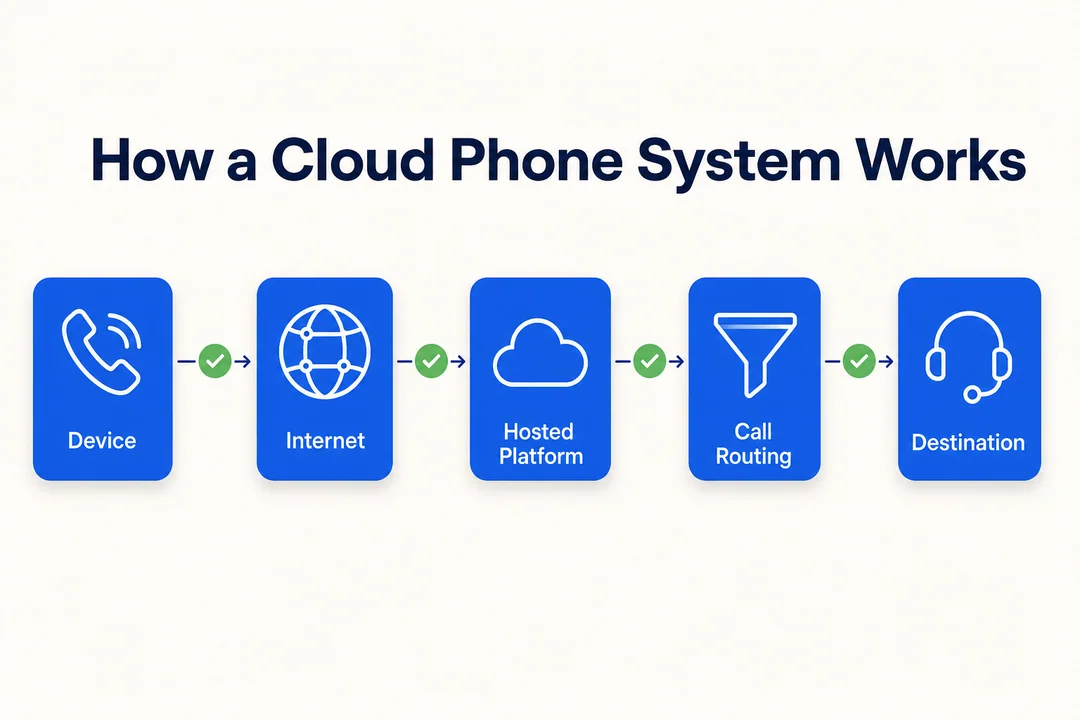
A cloud phone system sends voice over an IP connection (internet protocol, the standard method devices use to communicate over the internet). In simple terms, your voice is converted into digital data, sent through the internet, and delivered to the other person almost instantly.
You do not need to understand the engineering. What matters is this: the system uses your internet connection instead of old-style phone lines.
A stable broadband connection is important. If your team already uses video meetings, cloud software, and messaging tools without trouble, your network may already be good enough for a business VoIP phone system.
A simple view of the process:
- Your voice is converted into digital data.
- The data travels over the internet.
- The provider connects the call to the other person.
What the provider manages behind the scenes
The provider handles the phone system infrastructure, so your business does not need to run its own phone server.
That usually includes:
- Call routing infrastructure
- System updates
- Ongoing maintenance
- Feature improvements
- Core service reliability
- User management tools
- Number services and porting support
This reduces telecom admin work for your team. It also means new features and fixes can roll out faster than they often do with older on-site systems.
For most SMBs, that is a major benefit. You get the function of a business phone platform without the headache of managing the engine behind it.
What employees use day to day
Most employees do not think about the backend. They just use the tools in front of them.
Common device options include:
- Desk phones
- Desktop apps
- Laptops
- Mobile apps
- Smartphones
- Compatible IP phones
Many systems support multi-device synchronization, which means the same business number can ring on approved devices at the same time.
That helps different work styles:
- Office staff can answer from a desk phone
- Remote staff can work from a laptop app
- Field teams can use a mobile app
- Traveling employees can still use the business number
In 4 simple steps
- Choose a provider and a plan.
- Set up users, numbers, greetings, and call routing in the admin dashboard.
- Install the mobile or desktop apps, or connect compatible phones.
- Start making and receiving business calls over the internet.
This is one reason cloud systems are usually faster to deploy than legacy phone systems.
Cloud Phone System vs Traditional PBX and Landlines
Setup and installation
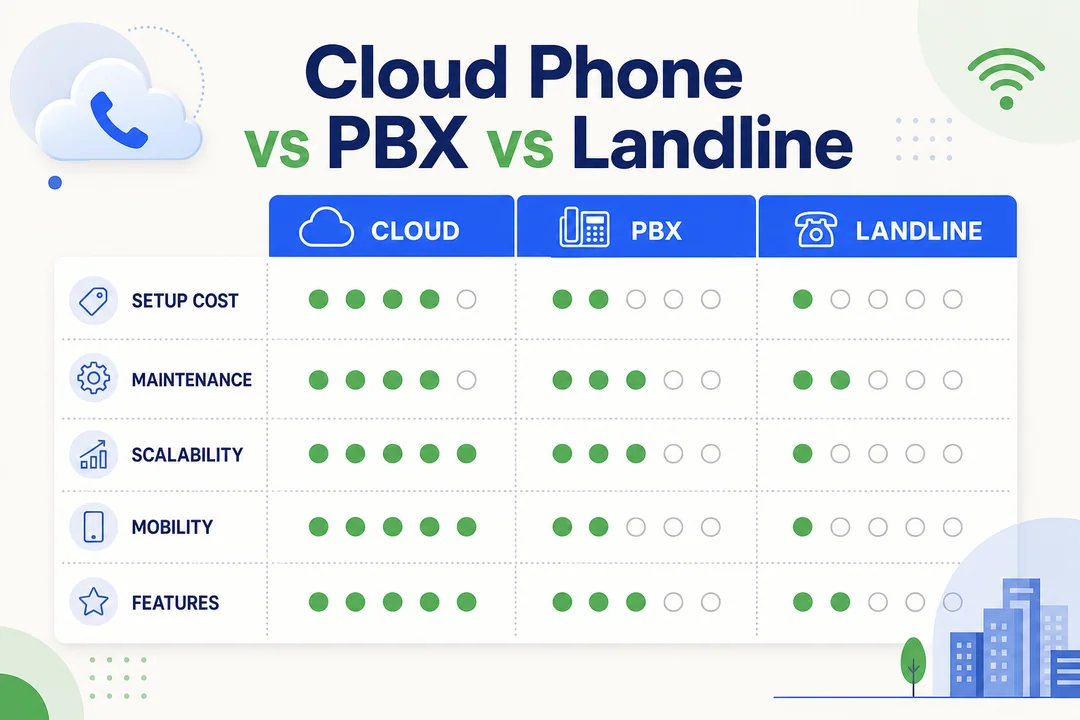
Cloud phone systems usually need less hardware. In many cases, setup can begin with an admin dashboard, user accounts, and installed apps. Some teams are up and running quickly, especially if they use mobile and desktop apps instead of physical desk phones.
Traditional PBX or landline setups are often more involved. They may require wiring, hardware installation, technician visits, and longer setup windows.
For buyers, the practical difference is clear:
- Faster onboarding for new staff
- Easier office moves
- Less waiting on physical infrastructure
- Fewer setup delays for remote teams
If speed matters, cloud usually has the edge.
Cost and maintenance
Traditional phone systems often require higher upfront spending. That can include PBX equipment, installation, wiring, desk phones, and ongoing maintenance. If something needs updating or fixing, the business may need internal support or outside help.
A cloud phone system usually shifts more of that cost into a monthly subscription. That does not always mean it is cheap. But it often means spending is easier to forecast.
This matters for small businesses because predictable monthly costs are often easier to manage than large upfront investments.
At a high level:
- Traditional PBX: Higher capital expense, more maintenance ownership
- Cloud phone system: Lower upfront cost, more predictable monthly billing
- Provider-managed setup: Less need for in-house telecom support
For many SMBs, the value is not just lower entry cost. It is also simpler maintenance and fewer infrastructure surprises.
Flexibility and scalability
A cloud phone system is usually much easier to scale than a traditional setup. You can often add users, assign new numbers, update routing, or create new departments without changing physical office infrastructure.
This helps when your business is growing or changing fast.
Common growth scenarios include:
- Hiring remote staff in new locations
- Opening a second office
- Adding a support team
- Bringing on seasonal workers
- Creating separate sales and service lines
Traditional systems can be slower to adapt, especially if changes depend on office hardware or line configuration.
For SMBs, this flexibility is often one of the strongest reasons to switch.
Features and integrations
Cloud systems often include modern business communication features that may be limited, harder to manage, or more expensive in legacy setups.
Common features include:
- Auto-attendant
- Call routing
- Voicemail-to-email
- Business SMS
- Call forwarding
- Call recording
- Video meetings
- Team messaging
- CRM integration
Some providers also offer broader UCaaS (unified communications as a service), which combines calling, messaging, and meetings in one platform.
Not every business needs an all-in-one communication suite. But integrated tools can reduce app sprawl, improve visibility, and save time switching between systems.
The key is to buy for your workflow, not for the longest feature list.
Quick comparison table
Here’s a practical side-by-side view.
| Feature | Traditional PBX / Landlines | Cloud Phone System |
|---|---|---|
| Setup time | Often slower | Often faster |
| Upfront cost | Usually higher | Usually lower |
| Monthly cost predictability | Less flexible | More predictable |
| Maintenance responsibility | Mostly on the business or vendor contract | Mostly provider-managed |
| Mobility | Limited | Strong |
| Scalability | Slower to change | Easier to scale |
| Integrations | Often limited | Often broader |
| Remote work support | Weak to moderate | Strong |
| Best fit | Fixed office environments with simple legacy setups | SMBs that want flexibility and modern features |
Key Benefits of a Cloud Phone System for Business
Lower upfront costs and more predictable spending
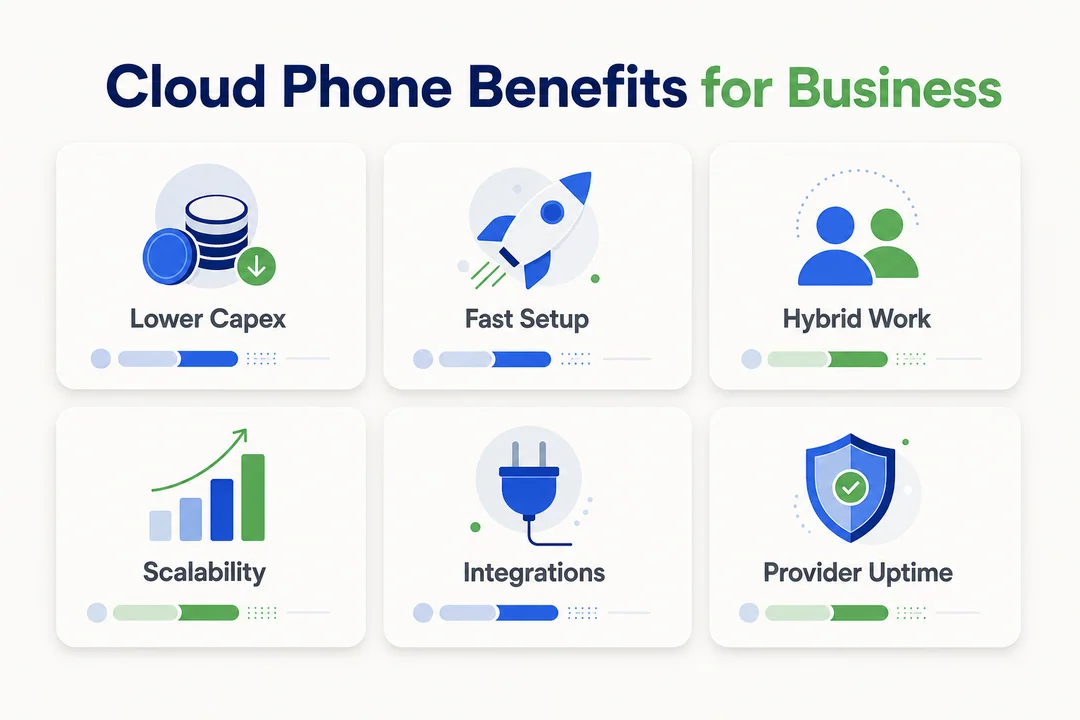
Many businesses switch because they want to avoid large hardware purchases and smooth out telecom spending over time.
Instead of buying and maintaining a lot of office phone infrastructure, they pay a monthly fee similar to other business software.
That helps with:
- Simpler budgeting
- Less hardware investment
- Fewer surprise maintenance costs
A small business with 8 to 15 employees often prefers this model because it preserves cash and reduces setup friction.
Better support for remote and hybrid work
A cloud phone system lets the business number follow the employee, not the desk.
That matters in real work settings. A sales rep can answer a business call on mobile while traveling. A support lead can return the same customer call from a desktop app. The customer still reaches the business through one system.
This creates a smoother experience for:
- Remote teams
- Hybrid teams
- Field service staff
- Traveling employees
- Small teams covering multiple roles
For businesses that no longer work from one fixed office, this flexibility is a major advantage.
Easier scaling as the business grows
Growth creates phone system problems fast if your setup is rigid.
Cloud systems are built to make change easier. You can often add seats, assign numbers, create new departments, and update routing without rebuilding the system.
That helps when you need to:
- Expand headcount
- Launch a new service line
- Add a second location
- Support temporary staffing
For a growing company, that kind of scalability reduces friction.
Access to modern communication features
Modern features improve both customer handling and internal efficiency.
Useful examples include:
- Auto-attendant: Guides callers to the right team faster
- Call forwarding: Helps prevent missed calls
- Call queues: Organizes inbound demand during busy periods
- Voicemail-to-email: Makes follow-up easier
- Call recording: Supports training and quality review
- Business SMS: Helps with quick updates and confirmations
The business outcome is simple:
- Fewer missed calls
- Faster response times
- Cleaner call routing
- Better customer experience
- More consistent communication
Less admin work for small teams
Small businesses often do not have a telecom specialist. They need a system that an office admin or owner can manage without heavy training.
Many cloud systems make common tasks easier from one dashboard.
Typical admin tasks include:
- Adding a new user
- Changing voicemail greetings
- Updating call routing rules
- Managing permissions
- Reviewing missed call activity
That saves time and lowers dependency on outside support.
Faster implementation than legacy systems
Cloud systems are often faster to launch than traditional office phone systems.
This is useful when you need to move quickly, such as:
- Opening a new office
- Relocating a team
- Hiring remote staff
- Expanding during a busy season
The faster the setup, the faster the business gets value from the system.
Potential Drawbacks and Limitations to Consider
It depends on your internet quality
A cloud phone system depends on stable internet. If your connection is unreliable, call quality can suffer.
That may lead to:
- Dropped calls
- Delayed audio
- Choppy conversations
- Inconsistent performance during busy hours
Before switching, check how reliable your internet really is. If your connection struggles with basic cloud apps or video calls, fix that first.
Weak networks can affect call quality
You do not need deep networking knowledge, but these basic terms help:
- Latency: Delay between speaking and hearing
- Jitter: Uneven delivery that makes audio sound unstable
- Packet loss: Missing pieces of audio during the call
To reduce these issues:
- Test your internet before rollout
- Use reliable Wi-Fi or wired connections for key staff
- Avoid overloaded networks during peak hours
- Ask your provider for call quality guidance
For critical teams like sales or support, network quality deserves real attention.
Some plans include more than small teams need
Some providers bundle advanced features into plans that look impressive but add little value for small teams.
You may not need:
- Deep analytics on every seat
- Full video suite for all users
- Premium integrations your team never opens
- Advanced admin controls built for large enterprises
Build a shortlist of must-haves first. Then separate nice-to-haves from true needs.
Provider reliability and support make a big difference
Phone problems affect customers fast. That is why reliability matters as much as features.
Check for:
- Service uptime reputation
- Support response speed
- Onboarding help
- Number porting guidance
- Clear support hours
- Real user reviews
A cheap provider can become expensive if setup is messy, support is weak, or outages hurt your team.
Compliance and security still need review
Even if your business is not heavily regulated, basic security still matters.
Review these areas:
- User permissions
- Admin access controls
- Account protection
- Vendor trustworthiness
- Basic data handling practices
This does not need to become a legal project. But it should be part of the buying decision.
Must-Have Features in a Business Cloud Phone System
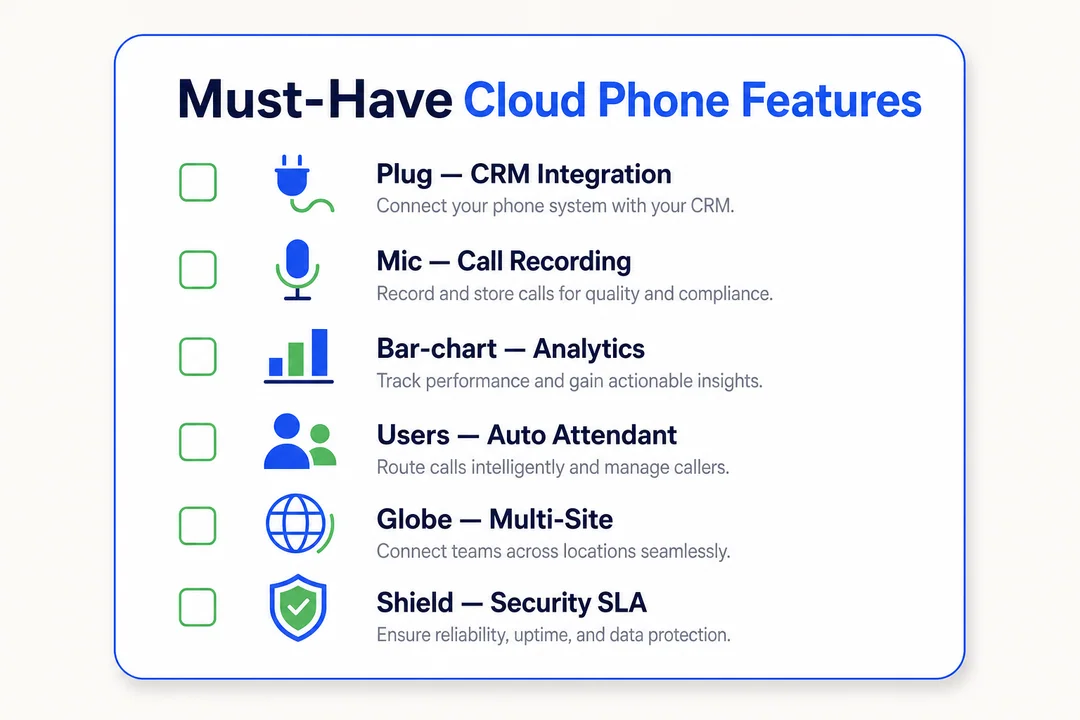
Auto-attendant and call routing
An auto-attendant uses a menu to direct callers to the right destination. You have heard it before: press 1 for sales, press 2 for support.
This matters because it helps callers get to the right person faster without relying on one person to answer every call.
Useful setups include:
- Press 1 for sales
- Press 2 for customer support
- Press 3 for billing
- After-hours calls go to voicemail or an on-call line
Good call routing improves customer experience and reduces missed opportunities.
Mobile app and multi-device access
This feature lets staff use the business number from mobile and desktop devices, not just a desk phone.
It is especially useful for:
- Hybrid employees
- Remote teams
- Field service businesses
- Owners who handle calls on the go
- Traveling staff
The practical benefit is flexibility. Staff can stay reachable through the business number without exposing personal numbers or being tied to one desk.
Voicemail-to-email and call recording
These features help teams follow up faster and keep better records.
Benefits include:
- Easier missed-call follow-up
- Better visibility for managers
- Useful material for training
- Support for quality assurance
A few things to remember:
- Call recording is sometimes plan-dependent
- Some providers charge extra for recording storage
- Businesses should check local recording rules before enabling it
Business SMS and team messaging
Business texting is useful for many everyday workflows.
Common use cases:
- Appointment reminders
- Delivery updates
- Quick customer confirmations
- Follow-up after missed calls
- Service coordination
Internal team messaging in the same platform can also be helpful, though not every business needs it. For many SMBs, the bigger win is customer-facing SMS tied to the business number.
CRM and business tool integrations
Integrations reduce manual work and give staff better context during calls.
They can help with:
- Pulling up customer records automatically
- Logging calls into the CRM
- Improving handoffs between teams
- Keeping communication history cleaner
Common integration categories:
- CRM: Sales and customer records
- Help desk: Support tickets and service workflows
- Collaboration tools: Internal coordination
- APIs: Custom connections to other business tools
A practical example: when a customer calls, the caller’s record appears automatically so the rep does not have to search manually.
Analytics, reporting, and admin controls
Basic reporting helps teams see what is happening, not guess.
Useful items include:
- Missed call tracking
- Call volume trends
- Response patterns
- Basic team visibility
- User permissions
- Admin controls for setup
Small businesses should not overpay for advanced analytics unless they truly need them. Start with the reporting that helps improve response and staffing.
Top Cloud Phone Systems for Business
The SERP for cloud phone systems is a strong commercial listicle. These are the most-cited business platforms, all good candidates for a shortlist.
- RingCentral: Best for businesses that want a full UCaaS platform with deep integrations and 99.999% uptime.
- Nextiva: Best for reliability and customer experience, with strong support and a clean admin portal.
- Zoom Phone: Best for affordable, easy-to-deploy phone for teams already on Zoom.
- Dialpad: Best for AI-powered calling, transcription, and live coaching.
- 8×8: Best for enterprises that need a global cloud phone plus contact center.
- GoTo Connect: Best for SMBs that want unified meetings and phone with a simple Dial Plan editor.
- OpenPhone: Best for startups and small teams that need a modern shared phone fast.
The right cloud phone system depends on your team size, integration needs, and how much you value AI features.
How Much Does a Cloud Phone System Cost?
Common pricing models
Most providers use one of these pricing structures:
- Per-user, per-month: The most common model
- Tiered plans: Different feature levels at different prices
- Add-ons: Extra charges for recording, advanced analytics, or integrations
Pricing changes often, so compare current plans directly on each provider’s site.
What affects the final cost
Headline plan price is only part of the picture. Final cost usually depends on the feature mix.
Common cost drivers include:
- Team size
- Number of business phone numbers
- International calling
- Call recording
- Analytics features
- CRM or tool integrations
- Desk phone hardware
- Support tier
In many cases, total value matters more than the cheapest plan.
Hidden costs to watch for
Watch for extra charges that do not appear obvious at first.
Common examples:
- Setup fees
- Number porting fees
- Contract commitments
- Overage charges
- Hardware upgrades
- Paid support tiers
Ask providers for the real all-in monthly cost before you commit.
Practical budgeting advice for SMBs
- Start with core users and essential features.
- Compare total value, not just low headline pricing.
- Ask what features are included versus paid add-ons.
- Budget for hardware only if your current devices are not a fit.
- If possible, test with a smaller rollout before full migration.
How to Choose the Right Cloud Phone System for Your Business
Start with your business size, call volume, and work model
The best system depends on how your business actually works.
Use this as your first filter:
- Small office: Prioritize easy setup, reliable calling, and simple admin tools
- Remote team: Prioritize mobile and desktop apps, call continuity, and flexibility
- Support-heavy business: Prioritize queues, routing, visibility, and reporting
- Multi-location company: Prioritize shared numbers, centralized control, and easy scaling
This step prevents bad comparisons. A provider that looks great for a sales team may be a poor fit for a local service business.
Match features to real use cases
Do not buy based on a long feature sheet alone. Buy based on the daily work your team needs to do.
Use-case mapping helps:
- Sales team: Call routing, recording, CRM integration, mobile access
- Support team: Queues, shared visibility, voicemail handling, reporting
- Field service: Mobile app, business SMS, forwarding, flexible routing
- Front desk or reception: Auto-attendant, greetings, call transfer, overflow handling
If a feature does not solve a real workflow problem, it should not carry much weight in your decision.
Check ease of setup and daily use
A feature-rich system has low value if your team avoids using it.
Check:
- Is the admin dashboard simple?
- Can a non-technical person manage users?
- How hard is onboarding?
- Is the mobile app easy to use?
- Is daily call handling intuitive?
Usability matters because it affects adoption. If the team finds the tool frustrating, the promised value disappears.
Review integrations before you commit
Do not assume an integration works the way you need. Verify it.
Check compatibility with:
- CRM tools
- Help desk platforms
- Collaboration tools
- Video meeting software
- Other daily business apps
Also ask whether integrations are included in the plan you want. Some providers reserve them for higher tiers.
Compare reliability, support, and security basics
These details are easy to ignore before purchase and painful to ignore after.
Review:
- Uptime expectations
- Support channels
- Support hours
- Onboarding help
- Number porting support
- Access controls
- Account security basics
For many businesses, support quality becomes most visible during setup, migration, and urgent issues.
Use a practical buyer checklist
Use this quick checklist before you buy:
- Can you keep your current business number?
- Does the system support your current devices?
- Are must-have features included, not hidden as add-ons?
- Is pricing clear and easy to model monthly?
- Can the system scale as your team grows?
- Can a non-technical admin manage it?
- Is support available when your business needs it?
Who Should Use a Cloud Phone System?
Small businesses replacing landlines
This is one of the most common upgrade paths. A cloud system gives small businesses more flexibility and more modern features without requiring heavy on-site hardware investment.
Startups that need flexibility
Startups often need fast setup, low upfront commitment, and room to grow. A cloud phone system fits that model well because it can scale without forcing a large infrastructure decision early.
Remote and hybrid teams
Distributed teams benefit from one phone system across locations and devices. That helps maintain a professional business presence without tying communication to one office.
Sales and customer support teams
These teams often benefit most from routing, call queues, recordings, and visibility tools.
Useful strengths include:
- Faster response handling
- Better call distribution
- Easier follow-up
- Stronger quality control
Businesses outgrowing legacy PBX systems
If an older PBX system feels rigid, expensive to maintain, or hard to expand, a cloud phone system can be a practical modernization step with easier growth support.
When a Cloud Phone System May Not Be the Best Fit
Businesses with unreliable internet
If your internet is unstable, cloud calling can become frustrating. Fix connectivity first before migrating your phone system.
Teams with very basic calling needs
If you only need one basic line with very low call volume, a full cloud phone platform may be more than you need.
Highly specialized telecom environments
Some businesses with niche compliance needs or advanced call center requirements may need more specialized solutions than a standard SMB cloud phone system.
Cloud Phone System for Small Business: What Matters Most
Prioritize ease of use over feature overload
Small teams usually benefit more from a system that is simple and reliable than one packed with features nobody uses.
Owners and office admins already wear too many hats. A clean dashboard and easy workflows often matter more than an advanced feature list.
Start with essential features
For most small businesses, this core feature stack is enough:
- Auto-attendant: Directs callers quickly
- Call routing: Sends calls to the right person or team
- Mobile access: Lets staff answer from anywhere
- Voicemail-to-email: Improves missed-call follow-up
- Business SMS: Useful for reminders and quick customer updates
This setup covers the basics without unnecessary complexity.
Avoid overpaying for enterprise extras
Advanced analytics, premium integrations, and broad communication suites can raise cost quickly.
If the feature will not improve sales, service, or admin efficiency, it may not be worth paying for yet.
Choose a plan that can grow with you
Your first plan should not trap you. Look for a provider that can add seats, numbers, and locations without forcing a hard migration later.
Switching phone systems too often creates disruption. It is better to choose a plan with room to grow.
Best-fit advice by small business type
Different small businesses need different priorities.
- Local service business: Focus on mobile app access, call forwarding, and business SMS for quick updates
- Small sales team: Focus on routing, CRM integration, recording, and mobile flexibility
- Front-desk business: Focus on auto-attendant, transfer tools, voicemail handling, and clear call flow
This is where real fit matters more than brand popularity.
Quick Comparison Checklist Before You Buy
Compare providers using these decision points
Use the same framework for every provider on your shortlist:
- Monthly cost per user
- Included features
- Number porting support
- Mobile and desktop app quality
- CRM and tool integrations
- Call quality reputation
- Support responsiveness
- Contract terms
- Best-fit business type
A simple side-by-side worksheet makes vendor comparison much easier.
Red flags to watch for
Watch for these warning signs:
- Vague pricing
- Too many paid add-ons
- Limited support hours
- Poor onboarding reviews
- Weak mobile app experience
- No migration help
- Unclear contract terms
These issues often create problems after purchase, not before.
Frequently Asked Questions
What is a cloud phone system for business?
A cloud phone system for business is a provider-hosted phone service that runs over the internet instead of traditional phone lines. It helps businesses make and receive calls, manage numbers and extensions, and use features like routing, voicemail, and mobile access.
Is a cloud phone system the same as VoIP?
Not exactly, but they are closely related. VoIP is the technology that sends calls over the internet. A cloud phone system is the full business service built around that technology, often with features, apps, and admin tools included.
Can I keep my current business phone number?
Usually, yes. This process is called number porting, which means moving your existing number to a new provider. Support can vary by provider and number type, so it is smart to confirm this early.
Do I need to buy new phones?
Not always. Many businesses can use desktop apps, mobile apps, or compatible IP phones. Whether you need new hardware depends on your current setup and how your team prefers to work.
Is a cloud phone system good for small business?
Yes, for many small businesses it is a strong fit. It often offers lower upfront cost, easier scaling, and better flexibility than traditional systems. The main conditions are stable internet and choosing features you will actually use.
What internet speed do I need for a business VoIP phone system?
Stable internet matters more than raw speed alone. Call quality also depends on consistency, congestion, latency, and overall reliability. Before rollout, test your connection and make sure key users have dependable network access.
Conclusion
A cloud phone system for business is often a smart fit for companies that want more flexibility, easier scaling, modern calling features, and less hardware overhead. For many SMBs, the biggest win is not just cost. It is simplicity and adaptability.
The right choice depends on your team size, work model, customer communication needs, and budget. Compare your must-have features first, estimate your real monthly cost, and shortlist providers based on how your team actually works.
More in Operations & CX Optimization
View all →
Customer Experience Transformation: Framework and Steps
A telecom customer calls support about a billing error. They explain the problem to the IVR system. Then to the first agent. Then get transferred and explain again. Then escalated—and explain a third time. Forty minutes later, they're exhausted and the problem still isn't solved. This is what broken customer experience looks like. And it's costing you customers. Customer experience…


Web Caller Meaning: JavaScript caller, Calling Tools or Portals
“Web caller” is one of those phrases where the search results and the searcher are frequently talking about different things. Three unrelated audiences use it: developers hitting an error on the legacy JavaScript caller property, buyers evaluating browser-based calling software, and people trying to reach a specific portal or training page whose exact name they cannot recall. That fragmentation is…
Customer Experience Strategy: How to Build One That Works
Customer experience is getting worse, not better. Forrester's 2025 Global CX Index found that 21% of brands declined in CX quality while only 6% improved — and in the US, 25% declined against 7% that improved, the second consecutive year of that pattern. Most of those brands were not neglecting customer experience. They were working on it without a strategy…



 English
  Russian
  Chinese