
Contact centers face mounting pressure from every direction. Customers now expect instant responses, seamless channel switching, and personalized service that remembers their history—whether they’re calling, chatting, or messaging on social media. Meanwhile, legacy on-premise systems strain under this demand, forcing agents to juggle disconnected tools while customers wait.
The gap between customer expectations and operational reality is widening. Voice-only models that worked in 2015 now create friction in 2025. This is why contact center transformation has moved from ‘nice to have’ to business-critical for companies serious about customer experience.
Key Takeaways

- Contact center transformation goes beyond new tools; it aligns people, processes, and technology around customer experience.
- Modern contact centers rely on cloud platforms, AI, and omnichannel engagement to scale efficiently.
- Transformation improves CSAT, NPS, and agent productivity at the same time.
- Incremental modernization reduces risk and speeds up ROI.
- Clear goals, agent enablement, and continuous measurement determine success.
What Is Contact Center Transformation?
Contact center transformation is the shift from a traditional, voice-centric call center to a modern, customer-centric operation powered by cloud technology, AI, and integrated digital channels. It focuses equally on people, process, and technology.
This is not the same as simple call center modernization—and the distinction matters. Upgrading your phone system from copper lines to VoIP, or bolting a chatbot onto your website, creates incremental improvement but doesn’t fundamentally change how work gets done.
True transformation redesigns the entire customer interaction model. It means your support team no longer operates as a reactive ‘break-fix’ department answering whatever comes in. Instead, they become a proactive CX engine where:
- Customer context flows automatically between systems (no more ‘let me pull up your account’)
- AI handles routine work while humans focus on complex judgment calls
- Data from every interaction feeds back into product, marketing, and operations decisions
- Agents see real-time coaching prompts instead of discovering quality issues weeks later in reviews
The difference shows up in metrics: transformed operations typically see 25-40% improvements in both customer satisfaction and operational efficiency—not 5-10% incremental gains.
At a high level, it includes:
- Expanding from voice-only support to omnichannel engagement (voice, chat, email, SMS, social).
- Using AI to automate routine work and support agents in real time.
- Connecting customer data across systems to create a unified view.
- Redesigning workflows to reduce effort for both customers and agents.
Traditional vs Transformed Contact Center
| Traditional Call Center | Transformed Contact Center |
|---|---|
| Voice-first, limited channels | Omnichannel, channel-agnostic |
| On-prem or rigid systems | Cloud-based, scalable |
| Manual routing and reporting | AI-driven routing and analytics |
| Fragmented customer data | Unified customer profiles |
| Reactive support | Proactive, insight-driven service |
In practice, this looks like a customer starting on chat, switching to voice, and never repeating information—while the agent sees context, sentiment, and next-best actions in one screen.
Why Contact Center Transformation Matters Today
- Customer expectations have changed.
Customers expect immediate responses, personalization, and consistency across channels. Long wait times or repeated explanations directly impact CSAT, NPS, and customer effort score. -
Legacy systems create a hidden cost drain that compounds over time.
On-premise call center platforms installed 5-10 years ago require constant maintenance: server upgrades, security patches, capacity planning, disaster recovery infrastructure. IT teams spend 30-40% of their time just keeping the lights on instead of building new capabilities.
The integration problem is worse. Each new tool—CRM updates, workforce management software, quality monitoring systems—requires custom development. A simple project like ‘show Salesforce data in the agent console’ takes 6-8 weeks and $15,000-30,000 in consultant fees. By the time it’s done, the business requirements have changed.
Meanwhile, agents work across 4-6 disconnected systems per interaction: one for phone controls, another for customer records, another for knowledge articles, another for ticketing. This ‘swivel chair integration’ where humans manually bridge system gaps adds 20-30 seconds per call and increases error rates by 15-20%.
- Remote and distributed work is the norm.
Modern contact centers must support remote agents without sacrificing quality or security. Cloud platforms make this possible by design. - CX is now a competitive differentiator.
Products and prices are easy to copy. Service is not. Contact centers increasingly shape brand perception and loyalty. - Data-driven decisions are mandatory.
Leaders need real-time insights, not static reports. Modern platforms turn conversations into actionable data.
Key Benefits of Contact Center Transformation
- Improved customer experience.
Omnichannel continuity and faster resolution reduce friction and increase satisfaction. - Higher agent productivity.
AI handles repetitive tasks, while agents focus on complex, high-value interactions. - Lower operational costs.
Cloud delivery, automation, and better forecasting reduce overhead and waste. - Better visibility and control.
Real-time analytics reveal trends, risks, and opportunities as they happen. - Greater scalability and resilience.
Teams can scale up or down quickly without major infrastructure changes.
Core Technologies Powering Modern Contact Centers
Cloud-Based Contact Center Solutions (CCaaS)
CCaaS (Contact Center as a Service) is a cloud-based platform delivered via subscription—similar to how you consume Salesforce or Microsoft 365 rather than buying and maintaining your own servers. The vendor handles infrastructure, security updates, and capacity planning while you access the system through web browsers.
To successfully modernize operations, organizations must choose the right platform architecture that supports scalability, AI integration, and omnichannel engagement. Evaluating the right enterprise-grade solution is critical—not just for current needs but for long-term growth and flexibility. For a deeper comparison of platforms, features, and deployment considerations, explore this guide on enterprise contact center solutions.
The operational differences are substantial:
Fast deployment with minimal infrastructure: Traditional on-premise systems require 4-8 weeks for hardware delivery, rack installation, network configuration, and testing. CCaaS setups typically complete in days or weeks, not months—no IT infrastructure projects required.
Easy scalability during peak demand: Need 50 more agents for Black Friday or tax season? With on-premise systems, you pay for capacity year-round or scramble to add hardware. CCaaS lets you scale up for peak periods and scale down after—paying only for actual usage.
Lower upfront costs and predictable pricing: On-premise contact centers require $100,000-500,000 in upfront hardware, software licenses, and implementation. CCaaS eliminates this with monthly subscription pricing—typically $100-200 per agent per month depending on features. The total cost of ownership over 3 years often runs 30-50% lower even after accounting for all subscription fees.
CCaaS is ideal for SMBs and mid-market companies that need flexibility and speed. It may be less suitable for highly regulated environments without proper compliance controls.
Omnichannel Communication Platforms
Omnichannel means all channels are connected, not just available. The customer and agent share one continuous context.
Core elements:
- Unified customer profiles and interaction history.
- Seamless handoff between channels.
- Consistent service quality everywhere.
Example journey: a customer starts with a chatbot, escalates to live chat, then receives a follow-up call—without repeating details.
Artificial Intelligence and Automation
AI in contact centers is practical, not futuristic.
Common use cases:
- Chatbots and self-service: Handle FAQs and simple transactions.
- Intelligent routing: Match customers with the right agent based on intent or sentiment (emotional tone).
-
Agent assist: AI monitors live conversations and surfaces relevant knowledge articles, suggested responses, or required compliance disclosures in real time—directly in the agent’s screen without them searching.
Real-world impact: A financial services company implemented AI agent assist for their retirement account support team. When customers ask about required minimum distributions (RMDs), the system immediately displays the calculation formula, current tax year deadlines, and required disclosure language. Average handle time for RMD calls dropped from 8.5 minutes to 5.2 minutes—a 39% improvement—while compliance script adherence increased from 76% to 94%. The agents aren’t working harder; the system is doing the cognitive work of remembering what information they need and when.
- After-call automation: Generate summaries and update records automatically.
Real-world limits matter. AI works best when clearly scoped and supported by good data.
CRM System Integration
CRM integration connects customer records directly to the contact center.
Benefits:
- Agents see full customer context instantly.
- Personalization improves without extra effort.
- Handoffs between sales and support become smoother.
Common examples include Salesforce and Kustomer.
Workforce Optimization Tools
These tools help manage people more effectively.
They support:
- Demand forecasting and scheduling.
- Quality monitoring and coaching.
- Reduced burnout through balanced workloads.
Major Trends Shaping Contact Center Transformation
- AI-driven self-service becoming the first line of support.
- Real-time analytics replacing post-call reports.
- Remote-first contact center models.
- Proactive outreach based on customer signals.
- Deeper integration between service, sales, and product teams.
Signs Your Business Needs Contact Center Transformation
- CSAT or NPS is declining despite higher effort from agents.
- Customers complain about long wait times or inconsistent answers.
- Agents rely on multiple disconnected tools.
- Reporting is slow, manual, or incomplete.
- Scaling support during peak periods is painful and expensive.
Simple Steps to Start Contact Center Transformation
Step 1: Assess Current Performance and CX Gaps
Review core KPIs with specific benchmarks in mind:
- Average Handle Time (AHT): Total minutes from call start to after-call work completion. Industry median is 6-8 minutes for service calls, 4-6 for simple inquiries. If you’re significantly above this, identify which call types drive the average up.
- First Contact Resolution (FCR): Percentage of issues solved in a single interaction without callbacks. Best-in-class operations achieve 75-85% FCR; most contact centers sit at 60-70%. Low FCR indicates agents lack authority, tools, or training to fully resolve issues.
- Customer Satisfaction (CSAT) and Net Promoter Score (NPS): Post-interaction surveys measuring satisfaction (1-5 scale) and likelihood to recommend (0-10 scale). Industry averages: 80-85% CSAT, 30-50 NPS. More importantly, track trends—declining scores signal growing problems even if absolute numbers look acceptable.
Collect feedback from customers AND agents—they see different problems:
Customers complain about wait times and repeating information. Agents complain about system slowness and unclear processes. When 60% of agents say ‘I can’t find information fast enough’ and 60% of customers say ‘agents don’t have my information,’ you’ve identified a data access problem worth solving.
Map where friction occurs by analyzing call transcripts:
Review 20-30 recent calls across different issue types. Time how long agents spend: (1) authenticating customers, (2) searching for information, (3) actually solving the problem, (4) completing after-call work. If authentication and searching consume 50%+ of handle time, process redesign will deliver bigger gains than agent training.
Step 2: Define Clear Goals and Priorities
Set specific goals, such as:
- Reduce wait times by 20%.
- Increase first contact resolution.
- Shift 30% of volume to self-service.
Avoid vague objectives.
Step 3: Modernize Incrementally
Avoid a “big bang” rollout.
Start with quick wins like cloud migration or after-call automation.
Expand once value is proven.
Step 4: Enable and Train Agents
Technology fails without adoption.
Provide practical training and explain the “why.”
Track usage and adjust based on feedback.
Step 5: Measure, Optimize, and Iterate
Use real-time analytics to monitor impact.
Test improvements continuously.
Close the loop with customer and agent feedback.
Common Challenges and How to Avoid Them
| Challenge | How to Avoid It |
|---|---|
| Agent resistance | Involve agents early and show clear benefits |
| Data silos | Prioritize integrations from day one |
| Over-automation | Keep humans in control of complex cases |
| Unclear success metrics | Define KPIs before rollout |
Final Takeaway
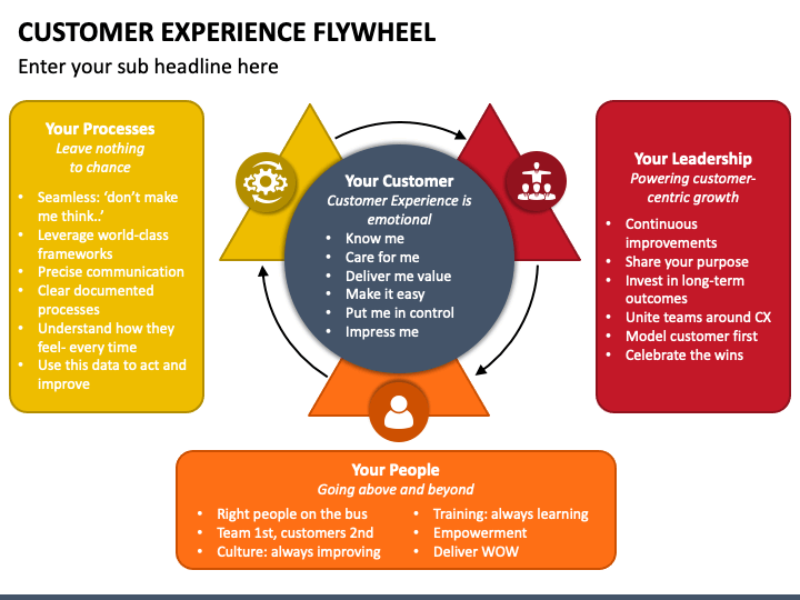
Contact center transformation turns support from a cost center into a CX engine.
The biggest gains come from aligning technology with real customer and agent needs.
Key points to remember:
- Focus on experience, not just tools.
- Modernize in phases.
- Measure what matters and iterate fast.
Start by assessing where friction exists today—and fix that first.
FAQ
What is contact center transformation in simple terms?
It is the process of modernizing how customer support works using cloud technology, AI, and integrated channels to improve experience and efficiency.
How long does contact center transformation take?
Most organizations see early results within a few months when they start with incremental changes instead of full replacements.
Is AI required for contact center transformation?
AI is not mandatory, but it significantly improves efficiency, scalability, and insight when applied correctly.
What is the difference between omnichannel and multichannel?
Multichannel offers multiple channels separately. Omnichannel connects them into one continuous experience.
Can SMBs afford contact center transformation?
Yes. Cloud-based platforms reduce upfront costs and allow SMBs to scale based on actual usage.
Read more:
Autonomous Customer Service Guide to Benefits Use Cases
Best Outsourced Customer Support Providers Compared 2026
More in Industry
View all →
Customer Experience Trends 2026: What Changed and What to Do
Customer experience in 2026 is being reshaped by three converging forces: persistent economic uncertainty, widespread AI adoption, and fundamentally different customer expectations. Today's customers are more price-conscious than previous years, less attached to brands they once trusted, and willing to switch providers the moment value becomes unclear. For businesses, this means customer experience is no longer a differentiator—it's a survival…

Customer Experience Analytics: Metrics, Data and Tools
Most companies do not have a customer data problem. They have a customer data connection problem: marketing measures ad clicks, support measures resolution time, product measures feature adoption, and nobody can answer whether the customer who abandoned checkout on Tuesday is the same one who called about pricing on Thursday. Customer experience analytics is the practice that closes that gap…
What Is Customer Experience Management? A Practical Guide
Customer experience management (CXM) is the practice of designing, measuring, and improving every interaction a customer has with your company — treated as one connected journey rather than as separate departmental touchpoints. It is what turns a collection of well-meaning teams into an experience a customer can recognise as coming from a single organisation. The distinction that matters is between…



 English
  Russian
  Chinese